Fortinet certification · Exam NSE7_FSN_AR-7.6

NSE7_FSN_AR-7.6 Mock Exam Page 3

Fortinet NSE 7 Secure Networking 7.6 Architect

Free NSE7_FSN_AR-7.6 mock exam questions 21–30, each with the answer and an explanation.

20 questions · 30 minutes · free, no sign-up

Free NSE7_FSN_AR-7.6 questions

21–30 of 50 free
Question 21 Choose 2
What are two reasons you might see iprope_in check () check failed, drop when using the debug How? (Choose two.)
Show answerHide answer

Correct answer: C, D The packet was dropped because the trusted host list is misconfiguredThe packet was dropped because the requested service is not enabled on FortiGate

Explanation

Explanation
The iprope_in_check() function is part of the FortiGate's local-in policy processing. When this check fails, it means a packet destined for the FortiGate itself (e.g., HTTPS, SSH, SNMP) has been rejected.

Correct Options

C. The packet was dropped because the trusted host list is misconfigured.
This is a common reason for the iprope_in_check() check failed, drop error. When a user attempts to access the FortiGate's management interface, the source IP is checked against the trusted hosts list configured for administrator accounts. If the source IP is not authorized to access that service, FortiGate drops the packet with this message .

D. The packet was dropped because the requested service is not enabled on FortiGate.
Even if the source IP is trusted, the requested service (e.g., HTTPS on port 443) must be explicitly enabled on the interface for management access. If the service is not enabled in the local-in policy (under config system interface or the administrative access settings), the check will fail and the packet will be dropped .

Incorrect Options

A. The packet was dropped because it is not allowed by any firewall policy.
This is a common cause for drops in general, but it is associated with the forwarding path, not the iprope_in_check() function. A "No matching policy" drop is typically logged as msg="No matching policy for packet" or similar, not iprope_in_check() check failed, drop.

B. The packet was dropped because there is no route to the source.
This is also incorrect for this specific error. The iprope_in_check() error does not indicate a routing issue. A packet dropped due to no route to the source would typically be a routing or forwarding failure, not a local-in policy enforcement failure.

Reference

Fortinet Document Library: "Troubleshooting Flow Trace (diagnose debug flow)"

Fortinet Knowledge Base: "Local-in policy and trusted hosts explained"

Exam discussion confirming the causes of the "iprope_in_check() check failed, drop" error
Question 22 Choose 2
Which two statements about an auxiliary session ate true? (Choose two.)
Show answerHide answer

Correct answer: B, C With the auxiliary session setting enabled. ECMP traffic is accelerated to the NP6 processor.With the auxiliary session setting enabled. Iwo sessions are created in case of routing change.

Explanation

Explanation:
These statements accurately describe the behavior of the auxiliary session feature in FortiOS, specifically its impact on ECMP traffic acceleration and session creation during routing changes .

✅ Correct Options

B. With the auxiliary session setting enabled, ECMP traffic is accelerated to the NP6 processor.
This is correct. The primary purpose of the auxiliary session feature is to maintain hardware acceleration for ECMP (Equal Cost Multi-Path) traffic. When auxiliary-session is enabled and the incoming or return interface changes, FortiGate creates an auxiliary session. This allows the traffic to continue being processed by the Network Processor (NP6) instead of being offloaded to the CPU . Without this feature, a routing change would "dirty" the session, preventing NPU offload and causing the CPU to handle the traffic, which increases resource usage .

C. With the auxiliary session setting enabled, two sessions are created in case of routing change.
This is also correct. When a routing change occurs (for example, in an ECMP or SD-WAN scenario where traffic could be distributed across multiple links), enabling auxiliary-session prompts FortiGate to proactively create a second "auxiliary" session (also known as a "reflect" session) for the alternative path . This ensures that if the path does change, the session is ready and traffic can be redirected without interruption .

❌ Incorrect Options

A. With the auxiliary session setting disabled, only auxiliary sessions are offloaded.
This is incorrect. When the auxiliary session feature is disabled, no auxiliary sessions are created . A routing or interface change will cause the session to be "dirtied," and it will then be processed by the CPU, not offloaded to the NPU .

D. With the auxiliary session setting disabled, for each traffic path, FortiGate uses the same auxiliary session.
This is incorrect. As stated above, when auxiliary-session is disabled, no auxiliary sessions are created at all . There is no "same auxiliary session" in use.

🔗 Reference

Fortinet Document Library: Controlling return path with auxiliary session

Exam discussion and Q&A for FCSS_NST_SE-7.6

Fortinet Document Library: Effect on NPU offloading sessions
Question 23 Choose 2
Which two protocol states indicate that traffic is bidirectional? (Choose two.)
Show answerHide answer

Correct answer: A, B proto_state=01 for a TCP session.proto_state=01 for a UDP session.

Explanation

Explanation:
The proto_state field in a FortiGate session table shows the traffic directionality for a given protocol. A bidirectional state indicates that traffic has been observed flowing in both directions .

Correct Options

A. proto_state=05 for a TCP session.
For TCP sessions, proto_state=05 explicitly indicates a fully established, bidirectional connection where the three-way handshake (SYN, SYN-ACK, ACK) has been completed .

B. proto_state=01 for a UDP session.
For UDP sessions, proto_state=01 means that a reply has been seen, confirming the traffic is bidirectional. UDP is connectionless, so a value of 00 would mean only one direction of traffic has been observed .

Incorrect Options

C. proto_state=01 for a TCP session.
This is incorrect for indicating bidirectional traffic. In FortiGate session tables, proto_state=01 for TCP indicates a unidirectional state (e.g., only a SYN sent, waiting for a reply), not a fully established session . It does not confirm bidirectional communication .

D. proto_state=00 for an ICMP session.
This is incorrect. FortiGate does not track ICMP traffic directionality in the proto_state field. The value for all ICMP sessions is always 00, regardless of whether replies have been seen, so proto_state=00 cannot be used to infer bidirectionality .

Reference
Exam Topics FCSS_NST_SE-7.6 discussion
Question 24 Choose 2


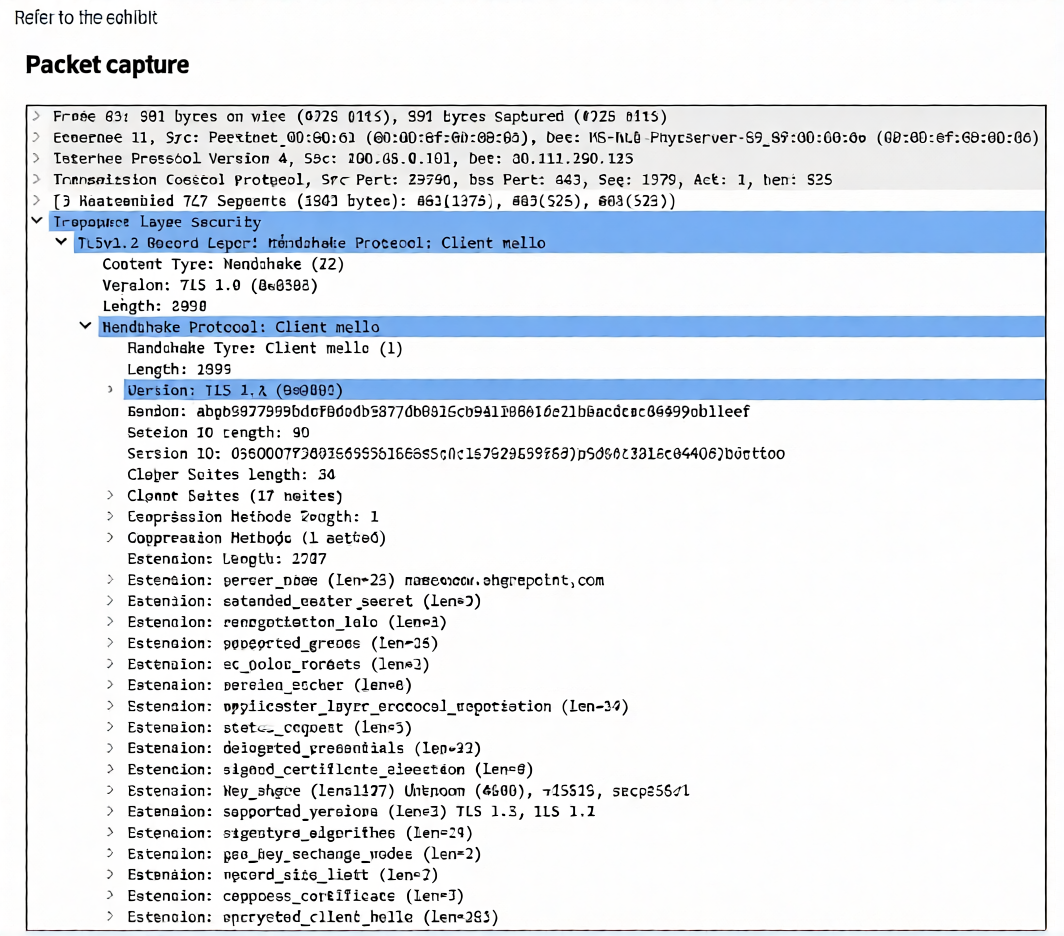
The packet capture output of a ClientHello message is shown.

You are updating a firewall policy that includes SSL certificate inspection. You are capturing packets from traffic passing through this firewall policy.

Which two statements about the packet capture are correct? (Choose two.)
Show answerHide answer

Correct answer: B, D You can effectively apply a web filtering profile to this traffic.The client supports only TLS versions 1.2 and 1.3.

Explanation

Explanation
The provided packet capture shows a TLS 1.3 Client Hello message. This is the first handshake message sent by the client to the server. Crucially, for a firewall performing SSL/TLS inspection (like FortiGate's certificate inspection), this is the point where the initial visibility into the connection is established. However, the actual content of the traffic is still encrypted. Security profiles that rely on inspecting the decrypted payload (like Antivirus) cannot be applied effectively at this stage, while profiles that inspect the initial handshake metadata (like Web Filtering) can be applied .

Correct Option: B

You can effectively apply a web filtering profile to this traffic.
This is correct. A Web Filtering profile can be applied based on the Server Name Indication (SNI) extension present in the Client Hello. In this capture, the SNI extension clearly shows the destination is www.sharepoint.com . The firewall can use this information to apply web filtering policies and categorize the traffic without needing to decrypt the entire payload. This allows for policy enforcement based on the intended destination domain.

Correct Option: D

The client supports only TLS versions 1.2 and 1.3.
This is correct. The packet capture contains a supported_versions extension within the Client Hello. The length of this extension is 5, which indicates it offers two versions. The listed versions are TLS 1.3 and TLS 1.2. The client explicitly states its support for these two protocol versions, confirming that it does not support older, less secure versions like TLS 1.1 or 1.0 .

Incorrect Option: A

You can effectively apply an antivirus security profile to this traffic.
This is incorrect. For an Antivirus profile to be effective, the firewall must perform full SSL/TLS decryption (deep inspection) to see the actual application payload (e.g., HTTP data or file transfers). With only certificate inspection, the firewall is looking at the encrypted handshake but does not decrypt the data. Therefore, it cannot inspect the content for viruses or malware patterns, making this statement false.

Incorrect Option: C

The subject alternative name (SAN) is necessary to apply security profiles.
This is incorrect. The SAN is a field used in the server's certificate, which is sent later in the handshake (in the Certificate message). In the Client Hello shown here, the SAN is not present and is not necessary for applying Web Filtering. The Web Filtering profile uses the SNI extension from the Client Hello to identify the destination, not the SAN. The SAN is used for validating a certificate, not for applying security policies.

Reference
Fortinet SSL/TLS Inspection Documentation
Question 25 Choose 1
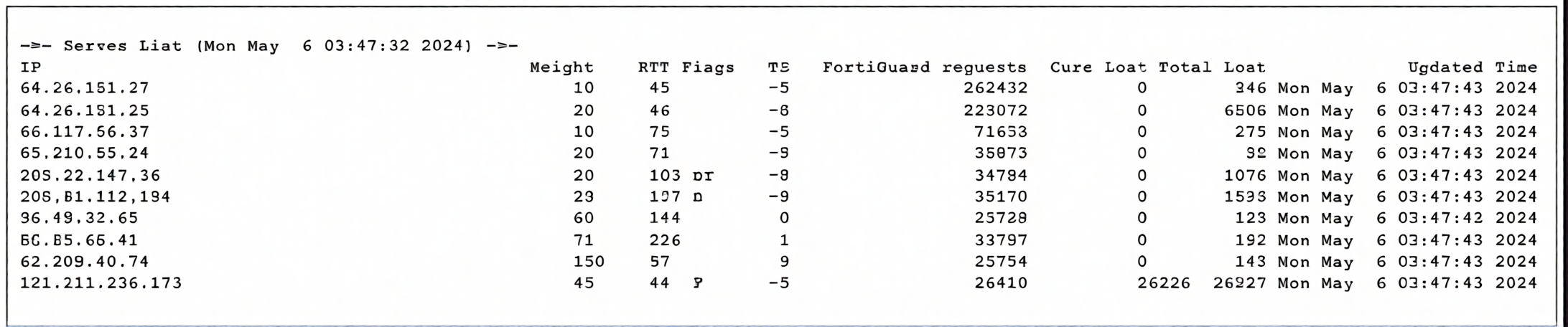
Refer to the exhibit, which shows the partial output of command diagnose debug rating.


In this exhibit, which FDS server will the FortiGate algorithm choose?
Show answerHide answer

Correct answer: D 64.26.151.37

Explanation

Explanation
The diagnose debug rating command displays the status of FortiGuard servers that the FortiGate uses for web filtering and antivirus rating queries. The FortiGate selects the "best" server using a proprietary algorithm that considers multiple factors. Key metrics include Round Trip Time (RT) , Weight, and Total Lost packets. The algorithm prioritizes servers with the lowest overall score, balancing low latency and high reliability (fewer lost packets) .

Correct Option: D (64.26.151.37)
This is the correct choice based on FortiGate's selection logic. This server has the lowest Round Trip Time (RT = 45 ms) among all listed servers. It also has a high Weight (10) and zero current losses, indicating a stable and responsive connection. The FortiGuard selection algorithm heavily favors the server with the lowest latency (RTT) as long as its loss rate remains within acceptable thresholds . Therefore, 64.26.151.37 is the optimal choice.

Incorrect Option: A (66.117.56.37)
While this server has a low RT of 75 ms and a Weight of 10, its latency is higher than that of 64.26.151.37 (45 ms) and 64.26.151.35 (46 ms). The FortiGate algorithm prioritizes the server with the lowest Round Trip Time to ensure the fastest response for rating queries, making this server less preferred despite being relatively fast .

Incorrect Option: B (208.91.112.194)
This server has a Weight of 20 and an RT of 107 ms. While its weight is higher than servers with Weight 10, the RT is significantly higher than the top-performing servers. The algorithm gives more importance to low latency for responsiveness, so this server would not be the primary choice unless all lower-latency servers were unavailable .

Incorrect Option: C (209.22.147.36)
Similar to option B, this server has a Weight of 20 and an RT of 103 ms. Although its "Total Lost" count (107) is lower than some others (e.g., 121.111.236.179 has 26227 losses), its latency is more than double that of the 64.26.151.37 server. The selection algorithm favors the lowest RT combination, making this a secondary or backup choice .

Reference

Fortinet FortiGate Administration Guide – FortiGuard Server Selection Algorithm (diagnose debug rating)

FortiGate Troubleshooting Guide – Understanding diagnose debug rating Output (RTT and Weight Metrics)
Question 26 Choose 2
You want to harden the SSL/SSH inspection profile for access to HTTPS web servers.

Which two configuration changes allow you to remove vulnerabilities? (Choose two answers.)
Show answerHide answer

Correct answer: A, B Set unsupported-ssl-version to block.Set Server certificate SNI check to Enable.

Explanation

Explanation:
To harden an SSL/SSH inspection profile and remove vulnerabilities for HTTPS web server access, you should implement the configuration changes described in options A and B. The reasoning is as follows:

Correct Option: A

Set unsupported-ssl-version to block.
This is a direct measure to eliminate weak cryptographic protocol support. By setting this parameter to block, the FortiGate will terminate any SSL/TLS session that attempts to use a protocol version considered obsolete or weak, such as SSL 3.0 or TLS 1.0 . Blocking these protocols prevents attackers from exploiting known vulnerabilities (e.g., POODLE) that rely on forcing connections to downgrade to these outdated versions.

Correct Option: B

Set Server certificate SNI check to Enable.
Enabling the Server Name Indication (SNI) check enhances the firewall's ability to verify the server's identity and enforce correct policies. When set to Enable, the FortiGate compares the SNI in the Client Hello with the Common Name (CN) or Subject Alternative Name (SAN) in the returned server certificate . If a mismatch is found, it uses the certificate's CN for URL filtering, ensuring that the traffic is correctly identified and policy is applied. This prevents attackers from using mismatched certificates to bypass web-filtering policies.

Incorrect Option: C

Set Untrusted SSL certificates to Ignore.
This is a dangerous action for hardening a profile. The "Ignore" option for untrusted certificates is typically used only for Full SSL Inspection in very specific troubleshooting scenarios, where the FortiGate re-signs the certificate to force trust . For a security-hardening objective, ignoring an untrusted certificate completely defeats the purpose of certificate validation, as it silently allows potentially malicious or misconfigured servers to establish connections without any warning or block.

Incorrect Option: D

Set min-allowed-ssl-version to ssl-3.0.
This configuration would have a counterproductive and insecure effect. The min-allowed-ssl-version parameter sets the lowest protocol version that the FortiGate will accept . Setting this to ssl-3.0 explicitly permits SSL 3.0 connections. Since SSL 3.0 is notoriously insecure and deprecated, allowing it introduces a significant vulnerability, the exact opposite of the hardening goal.
Question 27 Choose 2
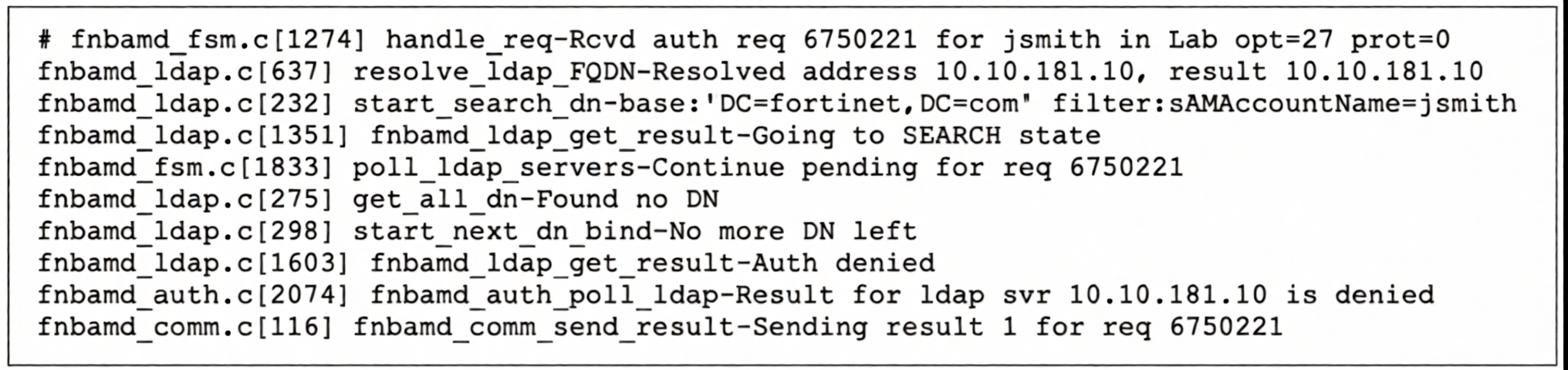
Refer to the exhibit, which shows a partial output of the real-time LDAP debug.


What two actions can the administrator take to resolve this issue? (Choose two.)
Show answerHide answer

Correct answer: B, D Ensure the user is providing the correct user credentials.Ensure the account is active.

Explanation

Explanation
The debug output shows a failed LDAP authentication attempt for user jsmith in the domain fortinet.com. The key error messages are "Found no DN" (Distinguished Name) and "Auth denied". These indicate that while the FortiGate could resolve the LDAP server's IP and contact it, it could not find the user's account in the directory. Based on the search filter sAMAccountName=jsmith, this error specifically occurs when the user account is not found or is inactive .

Correct Option: B

Ensure the user is providing the correct user credentials.
This is a relevant step because, while the immediate error is "Found no DN," providing incorrect credentials can sometimes cause a failed search or bind operation that manifests as a "no DN found" error. However, more importantly, if the credentials are correct, the authentication process moves to the bind stage. In this case, the "Auth denied" result after trying to bind suggests the password might be wrong, or the account is locked/inactive. Verifying credentials is a basic but necessary step in the troubleshooting process.

Correct Option: D

Ensure the account is active.
This is the most critical action based on the debug output. The sAMAccountName=jsmith search filter is correct, and the LDAP server responded but returned "Found no DN". In Active Directory, this typically occurs when:

The user account does not exist.

The user account is disabled.

The account is locked out.

The account is expired.

Since the output shows the search returned no DN, it strongly indicates the account may be inactive, disabled, or not present in the directory .

Incorrect Option: A

Ensure the user logs in using ' John Smith ' not ' jsmith ' .
This is incorrect. The debug output shows the search filter used is sAMAccountName=jsmith. In Active Directory, sAMAccountName is the pre-Windows 2000 logon name (typically a short username like jsmith), not the full display name (John Smith). If the administrator configured the LDAP server to use the sAMAccountName attribute for authentication, the user must log in with their short username. Using the full display name would not work.

Incorrect Option: C

Ensure the user is a member of at least one AD group to ensure step 4 of the LDAP authentication process is successful.
This is incorrect. The debug output fails at the "Found no DN" stage, which occurs during the user search phase (step 2 of the LDAP authentication process). Group membership is checked after a valid DN is found and the user's credentials are successfully bound (step 4). Since the FortiGate cannot even locate the user's DN, group membership verification has not yet been reached and is irrelevant to this specific error.

Reference

Fortinet FortiGate Administration Guide – LDAP Authentication Debugging and Troubleshooting

Fortinet Knowledge Base – Troubleshooting LDAP Authentication: "Found no DN" and "Auth denied" Errors

Microsoft Active Directory Documentation – sAMAccountName Attribute and User Account States
Question 28 Choose 1
Consider the scenario where the server name indication (SNI) does not match either the common name (CN) or any of the subject alternative names (SAN) in the server certificate.

Which action will FortiGate take when using the default settings for SSL certificate inspection?
Show answerHide answer

Correct answer: D FortiGate uses the CN information from the Subject field in the server certificate.

Explanation

Explanation
When FortiGate performs SSL certificate inspection, it receives the SNI from the client's TLS handshake and the CN/SAN from the server's certificate. The default behavior of the Server Certificate SNI Check setting determines how FortiGate handles a mismatch between these two identifiers.

The official Fortinet documentation states:

Enable (default): If it is mismatched, use the CN in the server certificate for URL filtering.

Therefore, in the described scenario, the FortiGate will disregard the mismatched SNI and proceed using the CN from the server certificate to perform its functions, such as URL filtering.

Correct Option: D

FortiGate uses the CN information from the Subject field in the server certificate.
This statement is correct. As per the default configuration (Enable), the "Server certificate SNI check" is active. When a mismatch between the SNI and the certificate's CN/SAN is detected, the FortiGate's configured action is to use the CN from the server certificate.

Incorrect Options

A. FortiGate uses the SNI from the user's web browser.
This is incorrect. While the SNI is the initial identifier, the default Enable setting is specifically designed to override it with the CN from the certificate when a mismatch occurs.

B. FortiGate closes the connection because this represents an invalid SSL/TLS configuration.
This is incorrect. Closing the connection is the behavior associated with the Strict setting, not the default Enable setting.

C. FortiGate uses the first entry listed in the SAN field in the server certificate.
This is incorrect. This action is not part of the default SSL certificate inspection behavior. The official configuration guide explicitly states that the fallback is to the CN, not to an entry in the SAN list.

Reference

Fortinet Administration Guide: Configuring an SSL/SSH inspection profile, Server certificate SNI check option.

FortiOS 7.2.4 Administration Guide: Certificate inspection.

Exam discussion identifying the correct option and its configuration parameter.
Question 29 Choose 1
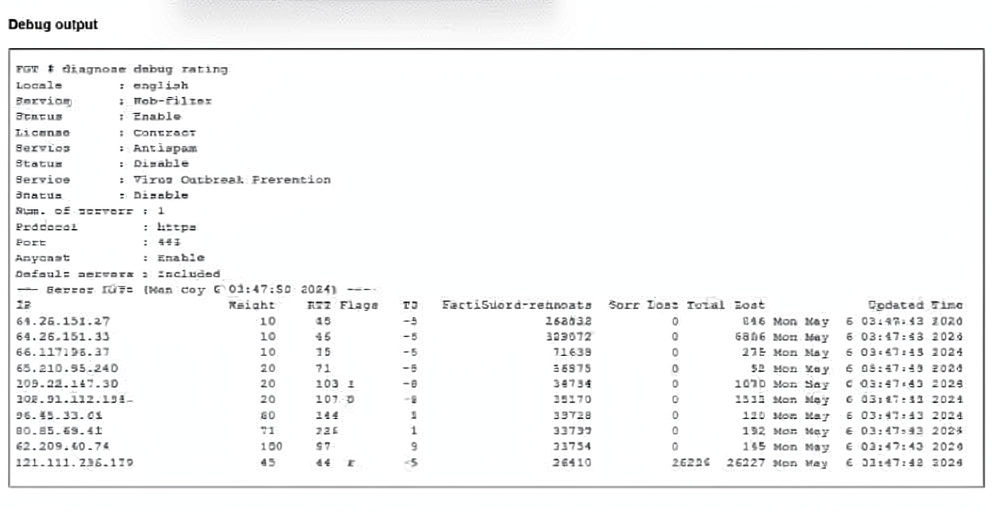
Refer to the exhibit.


The administrator did not override the FortiGuard FODN or IP address in the FortiGate configuration

Which IP address did FortiGate get when resolving the servicem,fortiguard.net name?
Show answerHide answer

Correct answer: A 208.91.112.194

Explanation

Explanation
The diagnose debug rating command displays a list of FortiGuard servers, with the selection algorithm's top choice presented at the top of the list. Since the administrator did not override the FortiGuard FQDN (it remains service.fortiguard.net) and the fortiguard-anycast setting is enabled by default, DNS resolution for this Anycast domain points to a single IP address—not a list.

Correct Option: A
208.91.112.194 is the correct answer because it is the first server listed in the diagnose debug rating output. With the default Anycast setting enabled, the service.fortiguard.net domain resolves to a specific Anycast IP address that is already included in the server list. In the exhibit, 208.91.112.194 is the top server, which indicates it was either the resolved address or selected as the active server.

Incorrect Options

B. 209.22.147.36 is incorrect because, although it appears in the server list, it is not at the top. Since the FortiGate sends rating requests to the top server during normal operation, this would not be the resolved IP address for the FQDN.

C. 64.26.151.37 is also incorrect. While it appears with a lower RTT value than 208.91.112.194, the RTT value does not determine DNS resolution. The standard selection algorithm selects the server with the smallest RTT for sorting, but the DNS resolve step happens before the list is generated for the algorithm.

D. 96.45.33.65 is incorrect and does not match the top server in the server list. This IP address does not appear as the first entry in the provided exhibit.

Reference

Fortinet Administration Guide: Diagnose debug rating command output and server sorting.

Exam discussion confirming the top server selection algorithm.

Fortinet Documentation: Anycast domain service.fortiguard.net resolves to a single anycast IP address.
Question 30 Choose 3
Which three common FortiGate-to-collector-agent connectivity issues can you identify using the FSSO realtime debug? (Choose three.)
Show answerHide answer

Correct answer: B, C, D The connection was refused. There may be a mismatch of the TCP port.FortiGate cannot reach the IP address of the collector agent.The pro-shared key does not match

Explanation

Explanation
The FSSO real-time debug (using diagnose debug application authd -1 and diagnose debug application fssod -1) helps identify a range of communication issues. The debug output will show specific error messages that correspond to particular problems. A connection refused error indicates a TCP port or connectivity issue, while a server authentication failed error points to a pre-shared key mismatch .

Correct Options

B. The connection was refused. There may be a mismatch of the TCP port.
The real-time debug will show an error like connection refused if the FortiGate attempts to connect to the collector agent but nothing is listening on the specified TCP port. The default port for FSSO communication is TCP 8000. If the collector agent is configured to use a different port, or if a firewall is blocking the port, the debug log will reveal this "refused" state .

C. FortiGate cannot reach the IP address of the collector agent.
If the FortiGate cannot establish a connection with the collector agent, a common reason is that the collector agent's IP address is unreachable. This is often due to routing issues or network segmentation. The fssod and authd debugs will show error messages related to a failed connection attempt, indicating that the FortiGate cannot reach the defined IP address .

D. The pre-shared key does not match.
Authentication between the FortiGate and the collector agent uses a pre-shared key (or password). If the key configured in the FortiGate's FSSO configuration does not match the key in the collector agent, the authentication will fail. The debug output will log an error such as server authentication failed or authentication failure, clearly indicating a mismatch of the pre-shared key .

Incorrect Options

A. The SSL certificate used for FSSO over SSL has expired.
While FSSO over SSL uses certificates, this is not a common issue identified by the standard real-time debug. The authentication failure error points to a pre-shared key mismatch, not a certificate validation issue .

E. The group filters do not match.
A mismatch of group filters is a configuration issue on the collector agent, not a connectivity issue. When group filters do not match, the FortiGate may not receive user logon information or may not apply the correct policies, but the connection itself would still be established. This problem is identified by a lack of user information in the debug output or diagnose firewall auth list, rather than a connection error .

Reference

Fortinet FSSO Study Guide – Troubleshooting Common Collector Agent Connection Issues

Fortinet Troubleshooting Guides – Diagnosing FSSO with Real-Time Debug Commands
Full mock exam

Sit the NSE7_FSN_AR-7.6 exam before exam day

Full-length mocks with the same number of questions and the same time limit as the real NSE7_FSN_AR-7.6 exam. Every attempt draws a new set of questions from the full bank, so you can keep going until you pass comfortably.

Get full NSE7_FSN_AR-7.6 mock exam
  • 40questions per mock
  • 60 mintime limit
  • 176questions in the bank
  • Newmock on every attempt