Fortinet certification · Exam NSE7_FSN_AR-7.6

NSE7_FSN_AR-7.6 Mock Exam

Fortinet NSE 7 Secure Networking 7.6 Architect

Find out if you're ready for NSE7_FSN_AR-7.6. Take the free timed mock exam and get your score in minutes, or study the free NSE7_FSN_AR-7.6 questions below with answers and explanations.

20 questions · 30 minutes · free, no sign-up

Free NSE7_FSN_AR-7.6 questions

1–10 of 50 free
Question 1 Choose 3
Which three factors about service-level agreement (SLA) targets and SD-WAN rules should you consider when configuring SD-WAN rules? (Choose three.)
Show answerHide answer

Correct answer: A, D, E Best performance SD-WAN rules cannot use SLA targets.SLA targets are used only by SD-WAN rules that are configured with a lowest cost (SLA) strategy.

Explanation

Explanation
Understanding the relationship between SLA targets and SD-WAN rule strategies is crucial for configuring effective traffic steering. The key is that SLA targets define the performance requirements that links must meet to be eligible for specific SD-WAN rules. However, how these targets are used differs depending on the strategy chosen for the SD-WAN rule.

Correct Options

A. Best performance SD-WAN rules cannot use SLA targets.
This is correct. The "Best Quality" strategy (referred to here as "Best performance") does not use SLA targets. Instead, it selects the best link by directly comparing measured metrics like latency, jitter, or packet loss to choose the optimal path. SLA targets are not part of this selection logic.

D. SLA targets are used only by SD-WAN rules that are configured with a lowest cost (SLA) strategy.
This is correct. In FortiOS, SLA targets are specifically implemented to enforce performance checks for rules using the Lowest Cost (SLA) strategy. When this strategy is used, only links that meet the defined SLA targets (e.g., latency < 100ms) are considered eligible, and the lowest-cost link among those is selected to forward traffic.

E. When configuring an SD-WAN rule, you can select only one SLA target from a performance SLA.
This is correct. While a Performance SLA can have multiple SLA targets defined with different thresholds, a single SD-WAN rule can only reference one SLA target from that Performance SLA. This allows you to create strict and lenient targets within the same health check and assign them to different rules for different applications.

Incorrect Options

B. Member metrics are measured when an SLA target references them.
This statement is incorrect. Member metrics are continuously measured by the Performance SLA (health check) as long as the SLA is configured and active, regardless of whether a rule uses or references them. The metrics are collected to have them available for any rule that might need them.

C. When configuring an SD-WAN rule, you can select multiple SLA targets from the same performance SLA.
This is incorrect. A single SD-WAN rule can only be configured with one SLA target. Selecting a specific SLA target from a Performance SLA determines the quality thresholds that must be met for links to be considered compliant. It is not possible to bind multiple targets from a single SLA to one rule.

Reference

Fortinet Administration Guide: SLA targets example

Fortinet Administration Guide: Lowest cost (SLA) strategy

Fortinet Administration Guide: Best quality strategy

Fortinet SD-WAN Study Guide for FortiOS 7.2: Performance SLA and SD-WAN Rules
Question 2 Choose 2
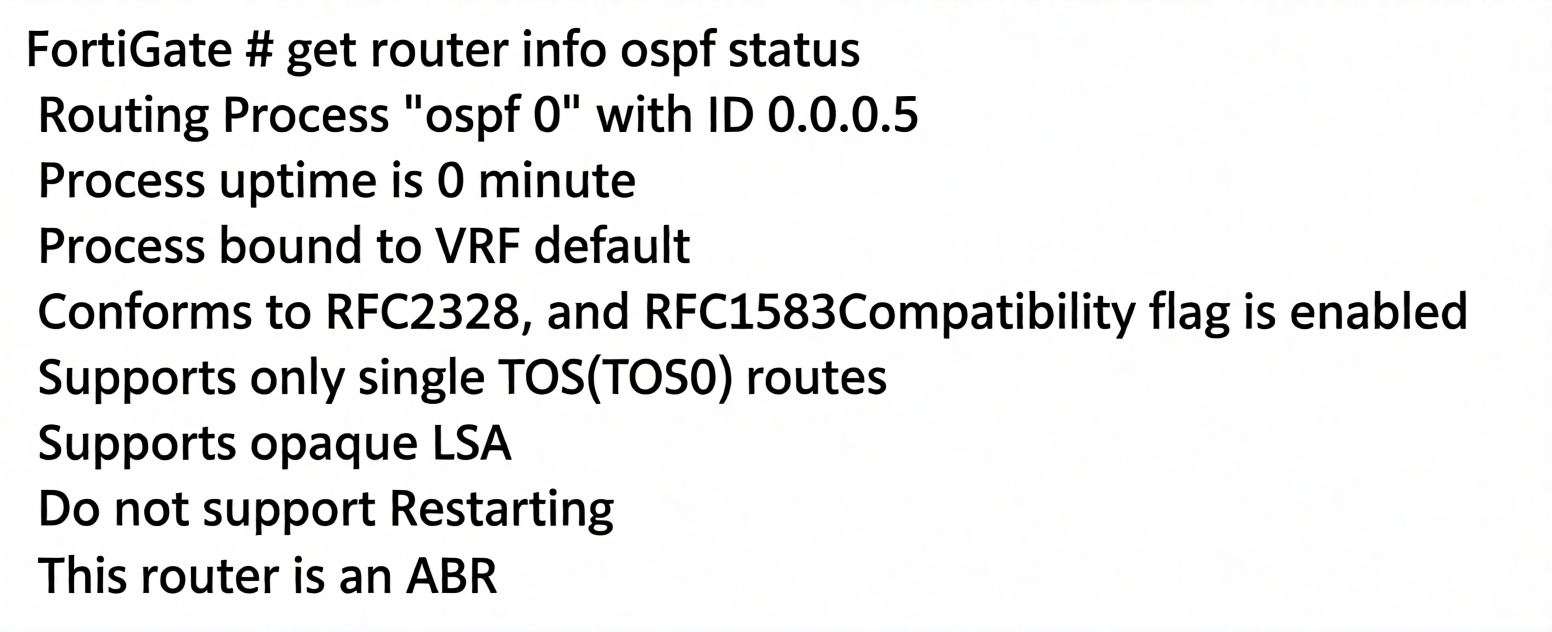
Refer to the exhibit.


The partial output of an OSPF command is shown.

While checking the OSPF status of FortiGate, you receive the output shown in the exhibit.

Based on the output, which two statements about FortiGate are correct? (Choose two.)
Show answerHide answer

Correct answer: A, D FortiGate is connected to multiple areas.FortiGate has OSPF ECMP enabled.

Explanation

Explanation
The get router info ospf status command displays the operational status of the OSPF routing process on the FortiGate. Key information includes the router ID, the Area Border Router (ABR) status, and compatibility flags. The output provides insights into the FortiGate's role within the OSPF network and its configuration settings, such as ECMP (Equal Cost Multi-Path) support.

Correct Option: A

FortiGate is connected to multiple areas.
This is correct. The output explicitly states "This router is an ABR" (Area Border Router). An ABR, by definition in OSPF (RFC 2328), is a router that has interfaces (or connections) in multiple OSPF areas. It is responsible for summarizing routing information between the backbone area (Area 0) and other non-backbone areas. This confirms that the FortiGate is connected to more than one OSPF area.

Correct Option: D

FortiGate has OSPF ECMP enabled.
This is correct. The output shows "Supports only single TOS (TOS0) routes". In OSPF, when a router supports multiple equal-cost paths to the same destination, it installs all of them in the routing table. The presence of multiple paths is directly indicated by the routing table, not the ospf status output directly. However, the absence of a flag limiting ECMP, combined with the router being an ABR, typically implies that ECMP is supported and enabled by default in FortiOS unless explicitly disabled. FortiOS supports OSPF ECMP by default, allowing traffic to be load-balanced across multiple equal-cost paths.

Incorrect Option: B

FortiGate is a backup designated router.
This is incorrect. The output provided does not contain any information about Designated Router (DR) or Backup Designated Router (BDR) status. Those details are found in the output of get router info ospf neighbor or interface-specific commands, not in the ospf status output. The status command only shows general process information such as router ID, ABR status, and RFC compatibility.

Incorrect Option: C

FortiGate injects external routing information.
This is incorrect. The output does not show any indication of external route injection (such as ASBR - Autonomous System Boundary Router status). The router is identified as an ABR, not an ASBR. An ABR connects areas within the same OSPF autonomous system, while an ASBR is responsible for injecting external routing information from other routing protocols (like BGP or static routes) into OSPF. The output lacks any ASBR designation or external LSA statistics.

Reference

Fortinet FortiGate Administration Guide – OSPF Configuration and Verification Commands (get router info ospf status)

RFC 2328 – OSPF Version 2 (Definitions of ABR, ASBR, and TOS Support)

FortiGate Troubleshooting Guide – OSPF ABR Behavior and ECMP Support in FortiOS
Question 3 Choose 2
As an IT manager, you want to delegate the installation and management of your SD-WAN deployment to a managed security service provider (MSSP).

Each site must maintain direct internet access and be secure. You expect significant traffic flow between the sites and want to delegate as much of the network administration and management as possible to the MSSP.

Which two MSSP deployment blueprints address your requirements? (Choose two.)
Show answerHide answer

Correct answer: A, C Use a shared hub on the MSSP premises with a dedicated VDOM for the customer, and install the spokes on the customer premises.Install a dedicated hub on the MSSP premises for the customer, and install the spokes on the customer premises.

Explanation

Explanation
This question is about selecting the most suitable SD-WAN deployment blueprint from an MSSP's architecture guide. The key requirements are that the customer sites maintain direct internet access (DIA) for security and that the MSSP handles as much of the management as possible. The two correct options are explicitly documented as primary blueprints in Fortinet's architecture guides for MSSPs.

Correct Options

A. Use a shared hub on the MSSP premises with a dedicated VDOM for the customer, and install the spokes on the customer premises.
This is the Multi-tenant Hub blueprint. It is a highly efficient model where the MSSP hosts the hub on its premises or in the cloud. A single physical FortiGate at the hub is logically partitioned using Virtual Domains (VDOMs), with one VDOM dedicated to your traffic. This design maximizes the MSSP's control while enabling Direct Internet Access (DIA) at each site and facilitating significant traffic flow between spokes through the hub.

C. Install a dedicated hub on the MSSP premises for the customer, and install the spokes on the customer premises.
This is the Dedicated Hub blueprint. In this model, the MSSP provides a completely separate FortiGate firewall that functions as your dedicated hub. This offers greater isolation and security for your traffic, which is beneficial for sensitive deployments. It still fully meets your requirements as the MSSP manages the entire overlay and your spokes, while the customer sites retain DIA and can exchange traffic efficiently.

Incorrect Options

B. Use a shared hub on the MSSP premises and a dedicated hub on the customer premises, and install the spokes on the customer premises.
This configuration is more complex and is typically used for hybrid or phased migration scenarios, not as a primary blueprint to address a requirement for "significant traffic flow" and maximum delegation to the MSSP. It involves shared control for the MSSP and on-premises management complexity for the customer.

D. Install the hub and spokes on the customer premises, and enable the MSSP to manage the SD-WAN deployment using FortiManager with a dedicated ADOM.
While an MSSP can manage an on-premise deployment using FortiManager and an ADOM, this option fails to delegate the installation of the hub to the MSSP. The hub is on the customer's premises, meaning the customer retains responsibility for the hardware and infrastructure. This does not meet the requirement to delegate "as much of the network administration and management as possible" to the MSSP.

Reference
Fortinet documentation covering MSSP deployment models: shared hub (multi-tenant) and dedicated hub.
Question 4 Choose 1
Refer to the exhibit.


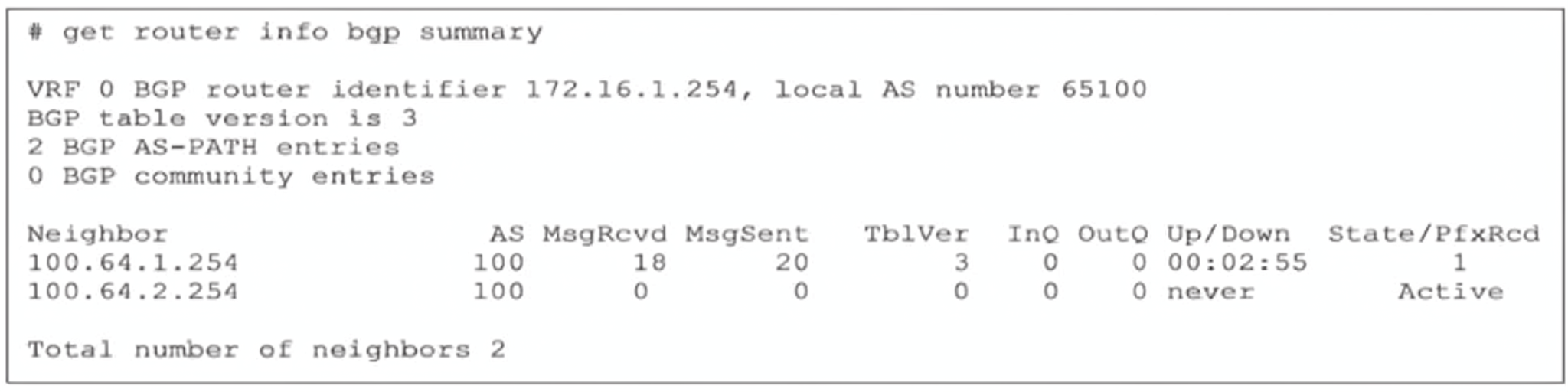
The output of the get router info bgp summary command is shown.

Which statement regarding adjacencies between the local router and its neighbors is correct?
Show answerHide answer

Correct answer: B The local router and neighbor 100.64.2.254 are unable to establish adjacency because the TCP session could not be established.

Explanation

Explanation
The get router info bgp summary command provides a snapshot of the BGP neighbor states. For neighbor 100.64.2.254, the state is shown as Active. In BGP, the Active state indicates that the local router has sent a TCP SYN to the neighbor but has not received a TCP SYN-ACK in response, meaning the TCP session cannot be established. This is a Layer 3/Layer 4 issue, often caused by reachability problems, ACLs, or the neighbor not listening on port 179.

Correct Option: B

The local router and neighbor 100.64.2.254 are unable to establish adjacency because the TCP session could not be established.

This is correct. The BGP state machine for neighbor 100.64.2.254 is stuck in the Active state. In this state, the local router is actively attempting to open a TCP connection with the neighbor, but the three-way handshake is not completing. This indicates that the neighbor is unreachable, the port is blocked, or the neighbor is not configured to peer with the local router's IP.

Incorrect Options

A. The local router and neighbor 100.64.2.254 are unable to establish adjacency until the adjacency with neighbor 100.64.1.254 ceases.
This is incorrect. BGP can establish multiple adjacencies simultaneously; there is no requirement for one BGP session to be terminated before another can be established. The two neighbors are independent.

C. The local router and neighbor 100.64.1.254 established adjacency because the priority of 100.64.1.254 is higher than that of 100.64.2.254.
This is incorrect. BGP uses IP addresses and router IDs for tie-breaking during path selection, but there is no "priority" value for establishing an adjacency. The session establishes simply because the TCP connection was successful.

D. The local router and neighbor 100.64.2.254 are unable to establish adjacency because AS 100 is already used by neighbor 100.64.1.254.
This is incorrect. It is perfectly valid for multiple BGP neighbors to use the same AS number. The local router can have multiple eBGP or iBGP neighbors with the same AS. This is not the cause of the Active state, which is a connectivity issue.

Reference

Fortinet FortiGate Administration Guide – BGP Neighbor States (Idle, Connect, Active, OpenSent, OpenConfirm, Established)

RFC 4271 – BGP-4 Finite State Machine (Active State Description)
Question 5 Choose 2
Refer to the exhibit.

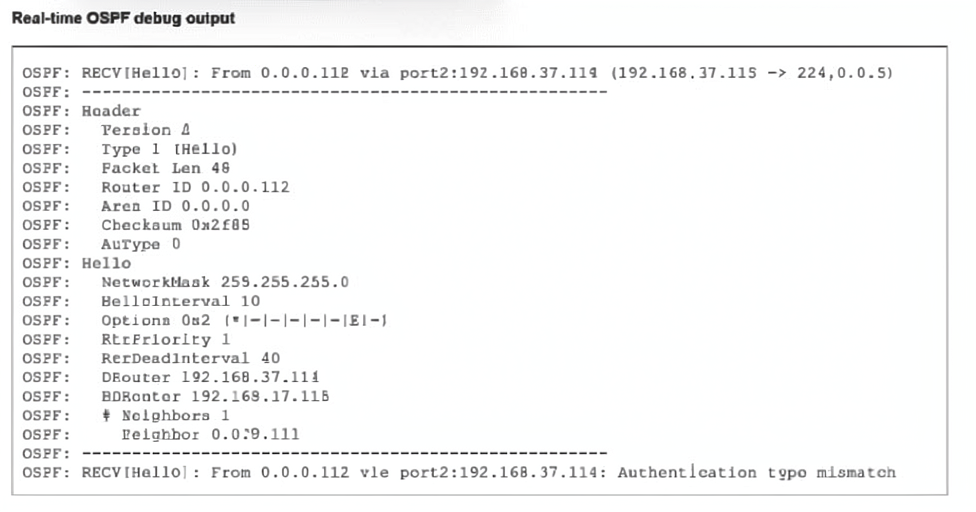
Partial output of a real-time OSPF debug is shown.


Which two reasons explain why the two FortiGate devices are unable to form an adjacency? (Choose two.)
Show answerHide answer

Correct answer: B, D There is an OSPF authentication configuration mismatch.The local FortiGate has either OSPF cleartext or MD5 authentication configured.

Explanation

Explanation
The debug output shows OSPF: RECV[Hello]: From 0.0.0.112 via port2:192.168.37.114: Authentication type mismatch. This indicates that the local FortiGate received a Hello packet from the neighbor, but the authentication type in the received packet does not match what the local interface is expecting. The AuType 0 in the received packet header confirms the neighbor is not using authentication.

Correct Options

B. There is an OSPF authentication configuration mismatch.
This is correct. The error message explicitly states "Authentication type mismatch". This means the OSPF authentication configuration on the local FortiGate interface does not match the configuration on the neighbor's interface. The mismatch could be that one side has authentication enabled and the other does not, or they are using different authentication methods (e.g., cleartext vs. MD5).

D. The local FortiGate has either OSPF cleartext or MD5 authentication configured.
This is correct. The debug output shows the received packet has AuType 0, which means no authentication is configured on the neighbor. Since the local FortiGate is reporting an authentication type mismatch, it must be configured to expect some form of authentication. The local FortiGate could have either cleartext authentication (AuType 1) or MD5 authentication (AuType 2) configured on the interface, which does not match the neighbor's AuType 0.

Incorrect Options

A. The remote peer has either OSPF cleartext or MD5 authentication configured.
This is incorrect. The debug output clearly shows the received packet has AuType 0, indicating the neighbor has no authentication configured. If the remote peer had cleartext or MD5 authentication configured, the AuType field would show 1 or 2 respectively, and the debug would not display an authentication type mismatch (it would be a different error, like password mismatch).

C. The local FortiGate does not have OSPF authentication configured.
This is incorrect. If the local FortiGate did not have authentication configured, it would be expecting AuType 0. The received packet also has AuType 0, which would match, and the adjacency would proceed. The fact that an authentication type mismatch error is generated proves the local FortiGate does have authentication configured, conflicting with the neighbor's AuType 0.

Reference

Fortinet FortiGate Administration Guide – OSPF Authentication Configuration and Troubleshooting

RFC 2328 – OSPF Version 2 (Authentication Types: 0 = Null, 1 = Simple Password, 2 = Cryptographic/MD5)

FortiGate Troubleshooting Guide – OSPF Neighbor Issues and Debug Output Interpretation
Question 6 Choose 2
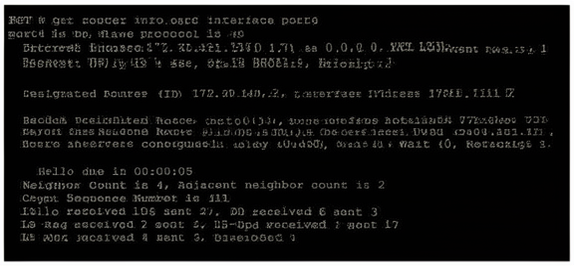
Refer to the exhibit, which shows the output of a debug command.


Which two statements about the output are true? (Choose two.)
Show answerHide answer

Correct answer: A, B The interlace is part of the OSPF backbone area.There are a total of five OSPF routers attached to the vorz4 network segment

Explanation

Explanation
The get router info ospf interface command provides detailed OSPF information for a specific interface. The output shows key parameters including the assigned area, network type, DR/BDR information, and neighbor statistics. Understanding these fields is essential for diagnosing OSPF adjacency issues and verifying network topology.

Correct Option: A

The interface is part of the OSPF backbone area.
This is correct. The output shows Area 0.0.0.0 in the line Internet Address 172.20.121.236/24, Area 0.0.0.0. In OSPF, Area 0.0.0.0 is defined as the backbone area. All OSPF areas must connect to the backbone area, and Area 0.0.0.0 serves as the central routing domain. This confirms that the interface port4 is part of the OSPF backbone.

Correct Option: B

There are a total of five OSPF routers attached to the port4 network segment.
This is correct. The output shows Neighbor Count is 4. This indicates that the local router (Router ID 0.0.0.4) has 4 OSPF neighbors on the port4 network segment. Therefore, the total number of OSPF routers attached to this segment is 4 (neighbors) + 1 (the local router itself) = 5 routers total. This is a common interpretation of OSPF neighbor counts.

Incorrect Option: C

One of the neighbors has a router ID of 0.0.0.4.
This is incorrect. The Router ID 0.0.0.4 shown in the output is the local router's Router ID, not a neighbor's Router ID. The output clearly states Process ID 0, VRF 0, Router ID 0.0.0.4. The DR and BDR listed have Router IDs 172.20.140.2 and 0.0.0.1 respectively, neither of which is 0.0.0.4.

Incorrect Option: D

In the network connected to port4, two OSPF routers are down.
This is incorrect. The output shows Neighbor Count is 4 and Adjacent neighbor count is 2. The fact that only 2 out of 4 neighbors are fully adjacent does not necessarily mean the other 2 routers are "down". OSPF neighbors can be in other states (e.g., 2-Way, ExStart, Exchange, Loading) without being fully adjacent, especially in broadcast networks where not all routers form full adjacencies with each other. They may still be operational.

Reference

Fortinet FortiGate Administration Guide – OSPF Commands (get router info ospf interface)

RFC 2328 – OSPF Version 2 (Backbone Area Definition, DR/BDR, and Neighbor States)

FortiGate Troubleshooting Guide – OSPF Neighbor Count and Adjacency Interpretation
Question 7 Choose 3
Which three conditions are required for two FortiGate devices to form an OSPF adjacency? (Choose three answers)
Show answerHide answer

Correct answer: C, D, E OSPF interface network types match.Authentication settings match.OSPF router IDs are unique.

Explanation

Explanation
OSPF (Open Shortest Path First) requires several parameters to match between two routers for a full adjacency to form. These parameters are verified during the exchange of Hello packets. If any of these core parameters do not match, the routers will not progress past the Two-Way state and will not become fully adjacent. The three essential conditions are matching network types, matching authentication settings, and unique router IDs.

Correct Options

C. OSPF interface network types match.
This is a fundamental requirement. OSPF has different network types, such as Broadcast, Point-to-Point, and NBMA. The network type determines how OSPF discovers neighbors and elects DR/BDR. If the network types on the connected interfaces do not match, the routers will not establish a full adjacency (they will get stuck in the Two-Way state).

D. Authentication settings match.
OSPF can use authentication (none, clear text, or MD5/SHA) to secure routing updates. For two routers to form an adjacency, the authentication settings on the connecting interfaces must be identical. A mismatch in the authentication type or password/key will cause the OSPF adjacency to fail, often shown by the "Authentication type mismatch" error in logs.

E. OSPF router IDs are unique.
Each router in an OSPF network must have a unique Router ID (RID). The Router ID is used to identify the router within the OSPF domain and is critical for DR/BDR election and link-state database representation. If two routers share the same Router ID, they will not be able to form an adjacency.

Incorrect Options

A. OSPF link costs match.
This is not a requirement for adjacency formation. OSPF cost is used for path calculation (metric) and does not affect the ability to form a neighbor relationship. Mismatched costs will simply cause the routers to calculate different path costs, but the adjacency will still form.

B. OSPF interface priority settings are unique.
This is incorrect. The priority is used for DR/BDR election, but it does not need to be unique. Multiple routers can share the same priority, and the adjacency will form. If priorities are identical, the Router ID is used as a tie-breaker.

Reference

RFC 2328 – OSPF Version 2 (Section 10.5: Receiving Hello Packets)

Fortinet FortiGate Administration Guide – OSPF Adjacency Requirements

FortiGate CLI Reference – config router ospf Configuration Parameters
Question 8 Choose 1
Which of the following regarding protocol states is true? (Choose one answer)
Show answerHide answer

Correct answer: B proto_state=01 indicates an established TCP session.

Explanation

Explanation
In a FortiGate session entry (diagnose sys session list), the proto_state field indicates the state of the session based on the protocol used . For TCP sessions, the value 01 corresponds to the ESTABLISHED state, which means the three-way handshake (SYN, SYN-ACK, ACK) has been completed, and a bidirectional connection is established .

Correct Option

B. proto_state=01 indicates an established TCP session.
This statement is correct. FortiGate tracks TCP session states using a specific numbering system. The value proto_state=01 specifically maps to the ESTABLISHED state, confirming the TCP session is fully connected and traffic can flow in both directions .

Incorrect Options

A. proto_state=00 indicates that UDP traffic flows in both directions.
This is incorrect. For UDP, proto_state=00 means that only one direction of UDP traffic has been seen, indicating a unidirectional flow . UDP traffic that has been seen in both directions is represented by proto_state=01 .

C. proto_state=10 indicates an established TCP session.
This is incorrect. proto_state=10 is not a standard value for a TCP session state in FortiOS . The proto_state for TCP is a two-digit value, but the commonly recognized state values are 00, 01, 02, 03, etc. .

D. proto_state=01 indicates one-way ICMP traffic.
This is incorrect. ICMP is a stateless protocol. For ICMP sessions, the proto_state is always 00, regardless of whether traffic is one-way or two-way .

Reference

Fortinet Support – Session Parameters (proto_state values for TCP, UDP, and ICMP)

FortiGate Troubleshooting Guide – Session Table Interpretation (TCP states and UDP states)
Question 9 Choose 1
Refer to the exhibits.


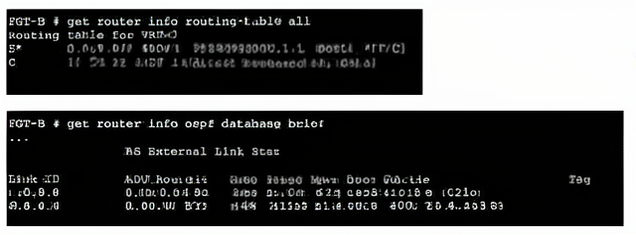
An administrator Is expecting to receive advertised route 8.8.8.8/32 from FGT-A. On FGT-B, they confirm that the route is being advertised and received, however, the route is not being injected into the routing table.

What is the most likely cause of this issue?
Show answerHide answer

Correct answer: B FGT-B is configured with a prefix list denying the 8.8.8.8/32 network to be injected into the routing table.

Explanation

Explanation
The get router info routing-table all output shows that no route for 8.8.8.8/32 exists in the routing table. However, the get router info ospf database brief output clearly shows the route is present in the OSPF database (Link ID 8.8.8.8 with ADV Router 0.0.0.112). This indicates the route is being received via OSPF but is being filtered out before installation into the routing table. The most likely mechanism for this is a prefix list configured under the OSPF process to deny the specific prefix from being added to the routing table.

Correct Option: B

FGT-B is configured with a prefix list denying the 8.8.8.8/32 network to be injected into the routing table.
This is the most likely cause. In OSPF, a prefix list can be applied to incoming routes to filter which routes are installed in the routing table. The OSPF database retains the route because it is still being advertised and received by the OSPF process, but the prefix list prevents it from being installed in the kernel routing table. This matches the symptoms exactly: the route is in the OSPF database but absent from the routing table.

Incorrect Option: A

A better route to the 8.8.8.8/32 network exists in the routing table.
This is incorrect. The routing table output shows no route for 8.8.8.8/32. If there were a better (more specific or lower administrative distance) route, it would be displayed in the routing table. The absence of any route for that destination rules out this possibility.

Incorrect Option: C

The administrator has misconfigured redistribution of routes on FGT-A.
This is incorrect. The OSPF database on FGT-B shows the route with ADV Router 0.0.0.112, indicating it is being advertised and received correctly. If redistribution were misconfigured on FGT-A, the route would not appear in the OSPF database at all.

Incorrect Option: D

FGT-B is configured with a distribution list denying the 8.8.8.8/32 network to be injected into the routing table.
While a distribution list could also filter routes, the question asks for the most likely cause. In FortiOS, prefix lists are the more commonly used and recommended method for filtering OSPF routes, especially when applied to the routing table injection process. Distribution lists are more commonly associated with route filtering in distance-vector protocols like RIP. Given that a prefix list is the standard tool for this task in OSPF, it is the most probable reason.

Reference

Fortinet FortiGate Administration Guide – OSPF Route Filtering with Prefix Lists

FortiGate Troubleshooting Guide – OSPF Database vs Routing Table Discrepancies

FortiOS CLI Reference – config router ospf (prefix-list and distribute-list configuration)
Question 10 Choose 2
In which two ways does FortiGate utilize the Internet Service Database (ISDB) within firewall policies and SD-WAN rules? (Choose two.)
Show answerHide answer

Correct answer: C, D FortiGate has a predefined list of IP addresses and ports for specific applications downloaded from FortiGuard.The ISDB can be used to block the IP addresses and ports of an application predefined by FortiGuard.

Explanation

Explanation
The Internet Service Database (ISDB) is a predefined, regularly updated collection of public IP addresses and service ports that FortiGate uses to identify traffic from specific Internet applications and services . It is a powerful tool that allows you to create security policies and SD-WAN rules based on the application itself, rather than having to manage individual IP addresses or ports.

Correct Options

C. FortiGate has a predefined list of IP addresses and ports for specific applications downloaded from FortiGuard.
This is a core function of the ISDB. The database is a comprehensive public IP address database that combines IP address ranges, IP owners, and service port numbers for various internet services . This data originates from the FortiGuard service system and is regularly updated, allowing you to use these entries as criteria in your policies just like any other address object .

D. The ISDB can be used to block the IP addresses and ports of an application predefined by FortiGuard.
This is a primary use case for the ISDB. Administrators can create firewall policies that block or allow traffic destined for specific internet services by selecting the appropriate ISDB object. For instance, you can create a policy to deny access to a specific service like Microsoft Update by using the corresponding ISDB entry in the destination field of the policy . This provides granular control over outbound traffic.

Incorrect Options

A. The ISDB limits access by URL and domain.
This is incorrect. The ISDB operates based on IP addresses, IP owners, and port numbers, not by URLs or domain names . URL and domain-based filtering are functions of FortiGuard Web Filtering and DNS filtering, which are separate security features.

B. The ISDB works in proxy mode only, allowing the analysis of packets at Layers 3 and 4 of the OSI model.
This is incorrect. The ISDB is used for policy matching based on Layer 3 (IP addresses) and Layer 4 (TCP/UDP ports) information, and it works in both flow-based and proxy-based inspection modes . It is a policy object that can be used in firewall policies, SD-WAN rules, and traffic shaping policies regardless of the inspection mode .

Reference

Fortinet ISDB Introduction: ISDB is a public IP/service database from FortiGuard .

Fortinet Administration Guide: Using ISDB objects in policies and SD-WAN rules .

Fortinet Support: Geographic-based ISDB for granular control in policies .
Full mock exam

Sit the NSE7_FSN_AR-7.6 exam before exam day

Full-length mocks with the same number of questions and the same time limit as the real NSE7_FSN_AR-7.6 exam. Every attempt draws a new set of questions from the full bank, so you can keep going until you pass comfortably.

Get full NSE7_FSN_AR-7.6 mock exam
  • 40questions per mock
  • 60 mintime limit
  • 176questions in the bank
  • Newmock on every attempt