Fortinet certification · Exam NSE7_FSN_AR-7.6

NSE7_FSN_AR-7.6 Mock Exam

Fortinet NSE 7 Secure Networking 7.6 Architect

Free NSE7_FSN_AR-7.6 questions on Central management, each with the answer and an explanation.

20 questions · 30 minutes · free, no sign-up

Central management questions

1–3 of 3 free
Question 1 Choose 1
Refer to the exhibit.
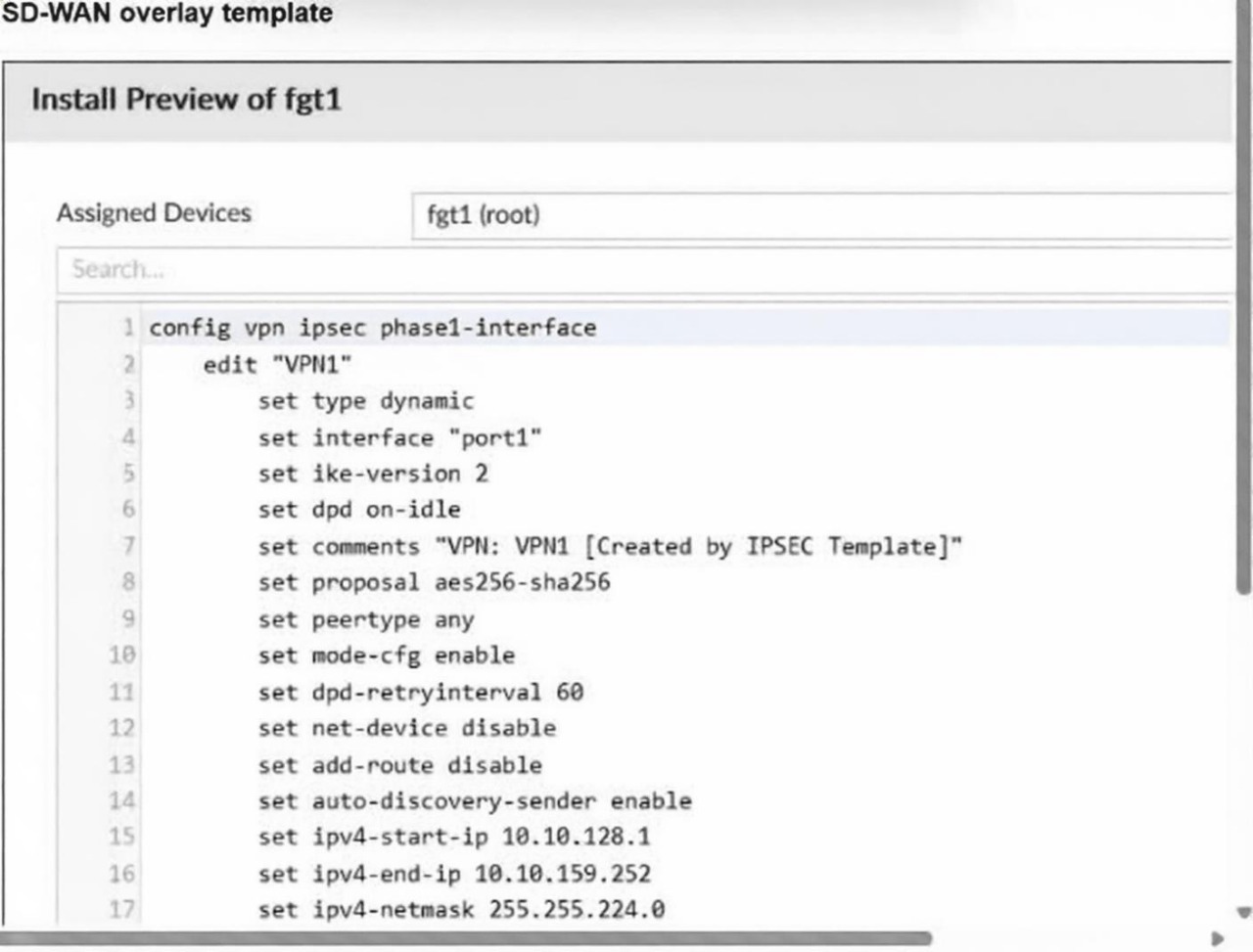


You used the SD-WAN overlay orchestrator to prepare an IPsec tunnel configuration for a hub-and-spoke SDWAN topology. The exhibit shows the FortiManager installation preview for one FortiGate device.

Based on the exhibit, which statement correctly describes the configuration applied to the FortiGate device?
Show answerHide answer

Correct answer: C It is a hub device. It can send ADVPN shortcut offer

Explanation

Explanation
The configuration preview shows an IPsec phase1-interface configured with type dynamic, auto-discovery-sender enable, and a pool of IP addresses (ipv4-start-ip to ipv4-end-ip) for client assignment. These settings are characteristic of a hub device in an SD-WAN overlay topology. The hub uses dynamic IPsec to accept connections from spokes and leverages ADVPN (Auto-Discovery VPN) to facilitate shortcut tunnels between spokes, with the hub acting as the sender of shortcut offers.

Correct Option: C

It is a hub device. It can send ADVPN shortcut offers.
This is correct. The configuration includes set auto-discovery-sender enable, which explicitly enables the device to act as an ADVPN shortcut sender. In an ADVPN topology, the hub is configured as the sender, meaning it can send shortcut offers to spokes when it detects that two spokes are communicating through the hub. Additionally, the type dynamic and mode-cfg enable (with a DHCP-like IP pool) are classic hub configurations that accept dynamic connections from multiple spokes.

Incorrect Option: A

It is a spoke device that establishes dynamic IPsec tunnels to the hub. The local subnet range is 10.10.128.0/23.
This is incorrect. Spoke devices typically use type static (not dynamic) to establish tunnels to the hub. Furthermore, the IP pool (10.10.128.1 to 10.10.159.252 with netmask 255.255.224.0/19) is used for assigning IPs to spokes, not defining a local subnet. The /23 subnet mentioned is incorrect; the netmask is /19. This configuration is not typical for a spoke.

Incorrect Option: B

It is a hub device. It will automatically discover the spoke devices and add them to the SD-WAN topology.
This is incorrect. While this is a hub device, hubs do not "automatically discover" spokes. Spokes initiate the connection to the hub using their pre-configured peer IPs. The hub accepts these incoming connections dynamically (due to type dynamic), but it does not actively discover or probe for spokes. The auto-discovery features (auto-discovery-sender) are for ADVPN shortcuts, not for discovering spokes themselves.

Incorrect Option: D

It is a spoke device that establishes dynamic IPsec tunnels to the hub. It can send ADVPN shortcut requests.
This is incorrect. As established, this is a hub, not a spoke. Additionally, in ADVPN, spokes are configured as auto-discovery-receiver and send shortcut requests (not offers), while the hub is the sender that offers shortcuts. The configuration shows auto-discovery-sender enable, which is the hub's role. A spoke would use auto-discovery-receiver enable.

Reference

Fortinet SD-WAN Administration Guide – ADVPN Configuration and Hub/Spoke Roles

FortiManager Administration Guide – SD-WAN Overlay Orchestrator Templates and Installation Preview

Fortinet NSE 7 SD-WAN Study Guide – IPsec Phase1 Parameters for Hub and Spoke (type dynamic vs static, auto-discovery-sender vs receiver)
Question 2 Choose 1
You must use FortiManager to standardize the deployment of the same FortiGate model across multiple branches with consistent interface roles and policy packages.

In this scenario, what is the recommended best practice for interface assignment?
Show answerHide answer

Correct answer: C Create normalized interface mappings per platform to automatically map device-level interfaces based on the FortiGate model and interface name.

Explanation

Explanation
When you need to standardize policy packages across multiple FortiGate devices of the same model, directly referencing physical interface names (like port1 or wan1) in policies is problematic. While the model is the same, the exact physical interface names or port assignments could vary per device.

The Normalized Interface feature in FortiManager solves this. It allows you to create a logical interface object (e.g., "WAN") in your policy package. This object is then linked to the actual physical interface on each device through "Per-Platform Mapping" rules. Because the policy package uses interface objects instead of directly referring to the interface, you can link the interface objects with the actual interfaces on any/all devices.

Correct Option: C

Create normalized interface mappings per platform to automatically map device-level interfaces based on the FortiGate model and interface name.
This is the standard FortiManager approach. You create the normalized interface with per-platform mappings. The mapping uses the device model to automatically recognize the correct interface name (e.g., mapping the logical "WAN" to wan1 on one model and to port2 on another). This creates a consistent policy package that is automatically valid for each branch FortiGate, eliminating the need for per-device manual adjustments.

Incorrect Options

A. Create interfaces using CLI scripts and use those interfaces in FortiGate policy packages.
While CLI scripting can be used for deployment, it is not the recommended best practice for this scenario. CLI scripts require you to know or handle the varying interface names for each device, making them more error-prone and less dynamic than normalized interfaces, which are built for this exact purpose.

B. Enable metadata variables to use dynamic configurations on the standard interfaces of FortiManager.
Metadata variables are useful for customizing values like IP addresses or branch_id in provisioning templates, not for abstracting physical interface names in a policy package. They do not address the core problem of mapping a logical policy to different physical ports on devices of the same model.

D. Use the Install On feature in the policy package to automatically assign the interfaces across branches.
The "Install On" feature is used to define installation targets for a policy package (i.e., which devices receive it). It does not handle interface assignment or abstraction. Normalized interfaces are the correct mechanism for solving the port-mapping challenge.

Reference

FortiManager Administration Guide: Creating Normalized Interfaces

FortiManager Administration Guide: Onboarding New Branch Devices
Question 3 Choose 2
You manage an SD-WAN topology and you will soon deploy 50 new branches.

Which two tasks can you do in advance to simplify this deployment? (Choose two.)
Show answerHide answer

Correct answer: C, D Define metadata variable values for each device.Create model devices.

Explanation

Explanation
Deploying 50 new branches requires a scalable, efficient approach. FortiManager provides the tools to prepare configurations in advance, minimizing manual work during the actual deployment. Two essential pre-deployment tasks are creating offline model devices to represent the new branch FortiGates and defining their unique metadata variables, which are used to customize the standard templates for each specific site .

Correct Options

C. Define metadata variable values for each device.
This is a critical step for successful automation. SD-WAN overlay templates use metadata variables (like branch_id or branch_hostname) to uniquely configure each device . Defining these values in advance—either manually or by importing a CSV file—ensures that when the model device comes online, its configuration is applied correctly and without errors .

D. Create model devices.
Creating model devices is the primary method for preparing for a large-scale deployment. A model device is an offline placeholder in FortiManager that represents a physical FortiGate that has not yet been connected . By creating these model devices in advance and assigning them to a device blueprint, you can pre-configure settings like device groups, policy packages, and provisioning templates . This simplifies the onboarding process significantly, as the devices will automatically pull their configurations when they connect .

Incorrect Options

A. Create a zero-touch provisioning (ZTP) template.
Zero-Touch Provisioning (ZTP) is a feature that uses the device blueprint itself to apply configurations automatically . The template is not created separately; instead, the blueprint you create for the model devices acts as the mechanism for ZTP. Therefore, creating a ZTP template is not a separate task from creating model devices and their blueprints.

B. Create a policy blueprint.
This is not a standard FortiManager term. While you can create policy packages and device blueprints, a "policy blueprint" does not exist as a distinct object in FortiManager's workflow for SD-WAN onboarding. The correct approach is to assign an existing policy package to the device blueprint .

Reference

FortiManager Administration Guide: Using device blueprints for model devices

FortiManager Administration Guide: Onboarding new branch devices

FortiManager New Features: Metadata Variables

FortiManager Administration Guide: SD-WAN Overlay Template and Branch ID assignment

That's the last free question in Central management

You've seen the free 30% (3 of 12 questions). Full access unlocks every question and full-length NSE7_FSN_AR-7.6 mock exams (40 questions, 60 minutes), a different mock on every attempt.

Unlock full mock exam
Full mock exam

Sit the NSE7_FSN_AR-7.6 exam before exam day

Full-length mocks with the same number of questions and the same time limit as the real NSE7_FSN_AR-7.6 exam. Every attempt draws a new set of questions from the full bank, so you can keep going until you pass comfortably.

Get full NSE7_FSN_AR-7.6 mock exam
  • 40questions per mock
  • 60 mintime limit
  • 176questions in the bank
  • Newmock on every attempt