Fortinet certification · Exam NSE7_FSN_AR-7.6

NSE7_FSN_AR-7.6 Mock Exam

Fortinet NSE 7 Secure Networking 7.6 Architect

Free NSE7_FSN_AR-7.6 questions on System configuration and SD-WAN setup, each with the answer and an explanation.

20 questions · 30 minutes · free, no sign-up

System configuration and SD-WAN setup questions

1–7 of 7 free
Question 1 Choose 2
Exhibit.


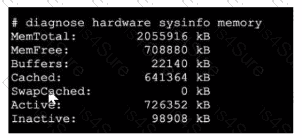
Refer to the exhibit, which shows a partial output of diagnose hardware aysinfo memory.

Which two statements about the output are true? (Choose two.)
Show answerHide answer

Correct answer: B, D The user space has 708880 kB of physical memory that is not used by the system.The value indicated next to the inactive heading represents the currently unused cache page.

Explanation

Explanation
The diagnose hardware sysinfo memory command displays the FortiGate's memory usage statistics, similar to the Linux /proc/meminfo output. Understanding these fields is crucial for troubleshooting memory-related performance issues. The output shows total physical memory (MemTotal), free memory (MemFree), and various caches (Buffers, Cached). The key distinction lies in understanding what "free" memory means versus memory that is actively cached or buffered .

Correct Option: B

The user space has 708880 kB of physical memory that is not used by the system.
This is correct. The MemFree value (708,880 kB) represents physical RAM that is completely unused and available for any process or the kernel to allocate. This memory is not being used by the system's kernel, drivers, or running applications. It is truly "free" and can be immediately allocated to user-space processes when needed. Low MemFree values may indicate memory pressure on the system.

Correct Option: D

The value indicated next to the inactive heading represents the currently unused cache page.
This is correct. The Inactive value (98,908 kB) represents cache memory pages (file cache) that have not been accessed recently. These pages are considered "cold" and are eligible to be reclaimed by the kernel if memory is needed elsewhere. While they still contain cached data, they are effectively unused from the application's perspective and can be dropped and reused without performance impact.

Incorrect Option: A

There are 98908 kB of memory that will never be used.
This is incorrect. The Inactive memory (98,908 kB) is not "never used" memory; it is cache that is currently holding data but is available for reclamation. The kernel will actively reuse these pages when memory is requested by applications. This memory is not permanently reserved and will be used again for caching when the system reads new files, making this statement fundamentally wrong.

Incorrect Option: C

The I/O cache, which has 641364 kB of memory allocated to it.
This is incorrect. The Cached value (641,364 kB) represents the page cache, which includes memory used for file system caching, not specifically I/O cache. The Buffers value (22,140 kB) is what represents I/O buffers (block device caching). The statement confuses these two distinct memory caches. Buffers are used for metadata and block I/O, while Cached is used for file content caching.

Reference

Fortinet FortiGate Administration Guide – Memory Management and Diagnostics (diagnose hardware sysinfo memory)

Linux /proc/meminfo Documentation – Understanding MemFree, Cached, Buffers, and Inactive Memory

FortiGate Troubleshooting Guide – Memory Usage and Performance Monitoring
Question 2 Choose 1
Refer to the exhibit.


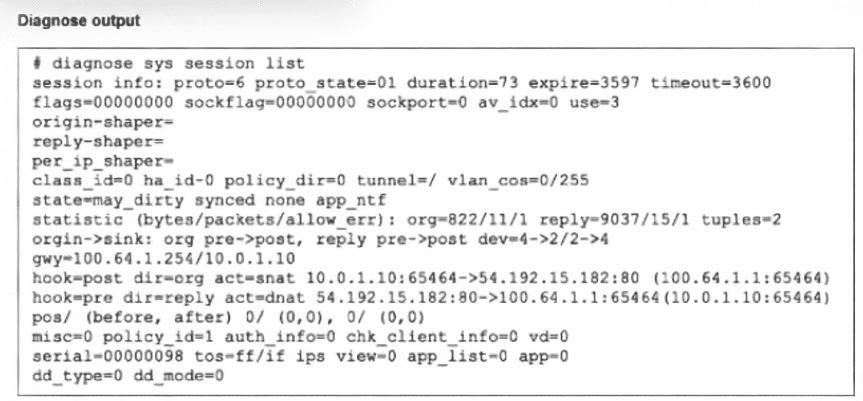
The output of diagnose sys session list command is shown.

If the HA ID for the primary device is 9, what happens if the primary fails and the secondary becomes the primary?
Show answerHide answer

Correct answer: C The session continues to permit traffic on the new primary device after failover. without requiring the client to restart the session with the server.

Explanation

Explanation
The session output shows ha_id=0 and state=may_dirty synced. In a FortiGate HA cluster, sessions are synchronized from the primary to the secondary devices. The ha_id field indicates which cluster unit originally created the session. When the primary fails and a secondary takes over, the behavior depends on the session's synchronization state and whether any "dirty" flags are set, which would require re-evaluation.

Correct Option: C

The session continues to permit traffic on the new primary device after failover, without requiring the client to restart the session with the server.
This is correct. The session output shows state=may_dirty synced, which indicates the session has been successfully synchronized to the secondary device. The synced flag confirms that the session table entry exists on the secondary. When the primary fails and the secondary becomes the new primary, this synchronized session is already present in the kernel session table. As a result, traffic for this session will continue to be permitted seamlessly, and the client does not need to re-establish the TCP connection with the server.

Incorrect Option: A

The session is synchronized with the secondary device, however, because application control is applied, the session is marked dirty and has to be reevaluated after failover.
This is incorrect. While the session is indeed synchronized (synced flag), the output does not show any application control (app-list or app-id) being applied to this session (app=0). The may_dirty state is a normal flag for sessions that may need re-evaluation, but it does not automatically force a full re-evaluation upon failover. This option incorrectly assumes application control is applied and that re-evaluation is mandatory.

Incorrect Option: B

The session will be removed from the session table of the secondary device because the TCP session is not yet fully established.
This is incorrect. The session shows proto_state=01, which corresponds to TCP TCP_SYN_SENT state, meaning the three-way handshake is in progress. However, FortiGate synchronizes sessions to the secondary from the very first packet (SYN). The secondary retains this session in its table even before the handshake completes. It is not removed simply because the TCP session is not yet fully established; synchronization happens proactively for all new sessions.

Incorrect Option: D

The session state is preserved but the kernel will re-evaluate the session because the routing information will be flushed.
This is incorrect. While session state is preserved, routing information is not "flushed" upon failover. The secondary device already has the routing table and session table synchronized. The kernel does not need to re-evaluate the session due to routing changes unless the outgoing interface or next-hop is no longer available. In this case, the session is synchronized and will continue to pass traffic without requiring kernel re-evaluation solely for routing purposes.

Reference

Fortinet FortiGate Administration Guide – High Availability (HA) Session Synchronization and Failover Behavior

Fortinet Troubleshooting Guide – diagnose sys session list Output Interpretation (ha_id, state, synced flags)

Fortinet NSE 7 Enterprise Firewall Study Guide – HA Session Failover and TCP State Handling
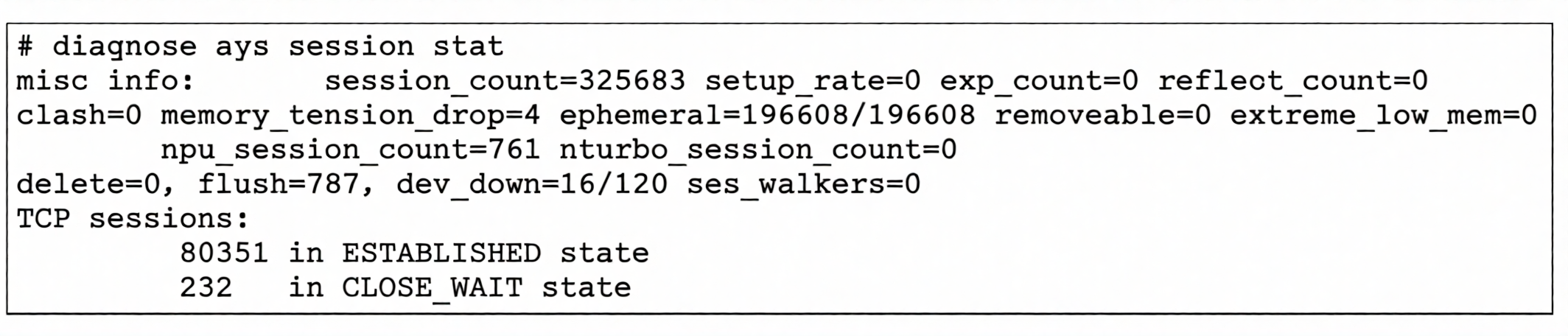
Question 3 Choose 2
Refer to the exhibit.

Partial output of diagnose sys session stat command is shown.


An administrator has noticed unusual behavior from FortiGate. It appears that sessions are randomly removed.

Which two reasons could explain this? (Choose two.)
Show answerHide answer

Correct answer: A, D FortiGate is deleting sessions because the kernel cannot allocate more memory pagesFortiGate is flushing sessions because of high memory usage.

Explanation

Explanation
The diagnose sys session stat command provides a summary of session table statistics, including session counts, deletion reasons, and memory-related counters. When sessions are randomly removed, it typically indicates resource constraints or system protection mechanisms are being triggered. The output shows several counters that can explain session flushes, particularly those related to memory pressure and allocation failures.

Correct Option: A

FortiGate is deleting sessions because the kernel cannot allocate more memory pages.
This is correct. The output shows memory_tension_drop=4, which indicates that sessions have been dropped due to memory tension (high memory pressure). Additionally, ephemeral=196608/196608 shows that the ephemeral port range is fully exhausted, meaning all available ports are in use. When the kernel cannot allocate new memory pages for new sessions or session extensions, it starts deleting existing sessions to free up resources, resulting in seemingly random session removals.

Correct Option: D

FortiGate is flushing sessions because of high memory usage.
This is correct. The output shows several indicators of high memory pressure: memory_tension_drop=4 (sessions dropped due to memory tension) and extreme_low_mem=0 (not currently triggered, but memory tension is active). When the FortiGate experiences high memory usage, it employs a session flushing mechanism to reclaim memory. This process removes sessions that are considered less critical, which can appear as random session removals to an administrator.

Incorrect Option: B

FortiGate is dropping all TCP sessions with incomplete three-way handshakes.
This is incorrect. The output does not show any counter or statistic related to dropping incomplete TCP handshakes. The session stat command would display a counter like tcp-halfopen or similar if such drops were occurring. Incomplete TCP sessions are typically aged out by the timeout mechanism (tcp-halfopen-timer) rather than being actively dropped due to the random removal behavior described. This option is not supported by the displayed output.

Incorrect Option: C

FortiGate is not accepting sessions because the device has been down 10 out of 120 seconds.
This is incorrect. The output shows dev_down=16/120, where the first number (16) represents the number of times an interface has gone down, and the second (120) is the total number of checks performed. This counter indicates network interface instability, not that the FortiGate itself has been "down" for 10 out of 120 seconds. Interface flaps can cause session removals for traffic using that interface, but this is not the primary reason for random session removal across all sessions.

Reference

Fortinet FortiGate Administration Guide – Session Management and diagnose sys session stat Output

Fortinet Troubleshooting Guide – Session Flushing Mechanisms and Memory Tension Drops

FortiGate Performance Tuning Guide – Ephemeral Port Exhaustion and Session Table Limits
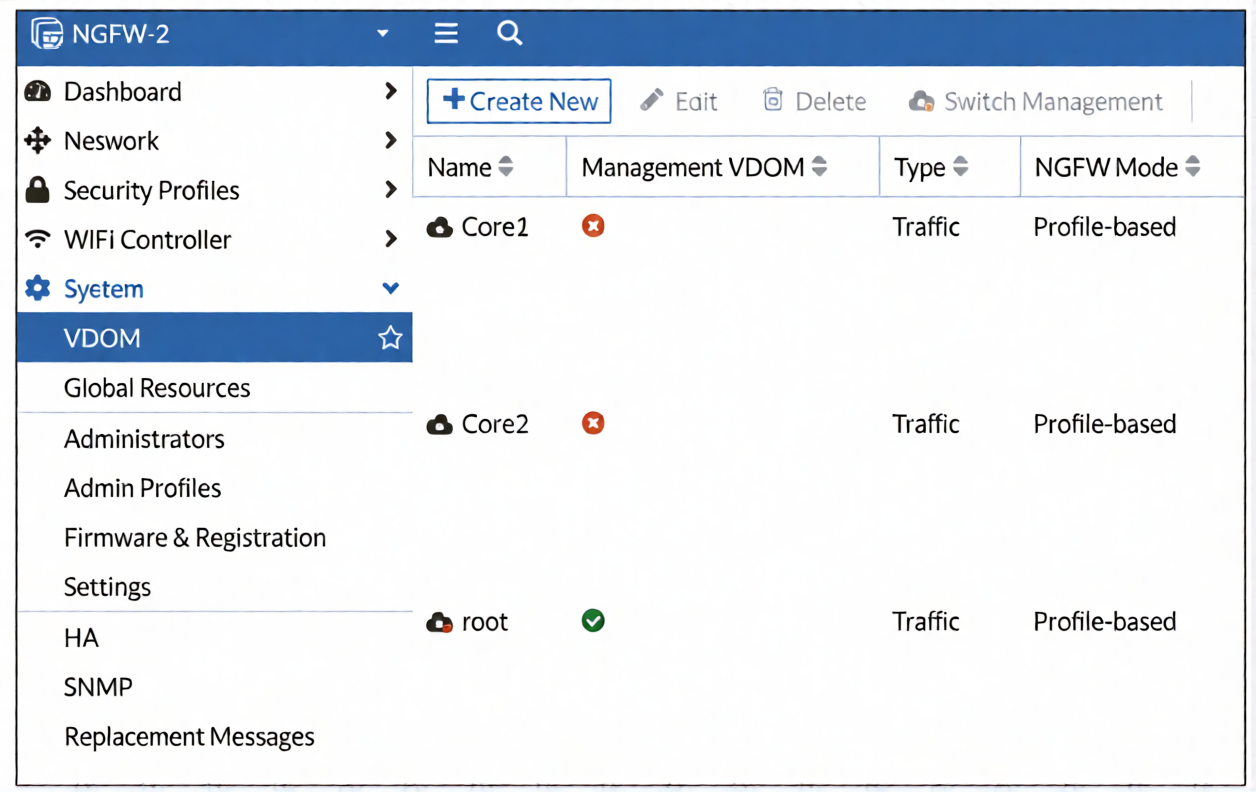
Question 4 Choose 2
Refer to the exhibit.


The VDOM configuration on a FortiGate device is shown. You discover that web filtering stopped working in Core1 and Core2 after a maintenance window.

What are two reasons why web filtering stopped working? (Choose two answers.)
Show answerHide answer

Correct answer: A, B The root VDOM does not have access to FortiManager in a closed network.The root VDOM does not have access to any valid public Fortinet Distribution Network (FDN) server.

Explanation

Explanation
In a multi-VDOM environment, the root VDOM is the default management VDOM . This management VDOM is responsible for all management-related traffic, including FortiGuard updates and queries, which are essential for Web Filtering to function . If the root VDOM loses its ability to communicate with the FortiGuard servers or an internal FortiManager acting as a FortiGuard Distribution Server (FDS), all dependent VDOMs like Core1 and Core2 will lose Web Filtering capabilities .

Correct Option: A

The root VDOM does not have access to FortiManager in a closed network.
This is a valid reason. In a closed network environment where there is no direct internet access, FortiGate units rely on a FortiManager to serve as a private FortiGuard Distribution Server (FDS) . If the management VDOM (root) cannot reach this internal FortiManager for FortiGuard ratings, Web Filtering will stop working for all VDOMs, as the root is responsible for this service .

Correct Option: B

The root VDOM does not have access to any valid public Fortinet Distribution Network (FDN) server.
This is correct. For Web Filtering to function, the management VDOM must have internet access to reach the public Fortinet Distribution Network (FDN) and query the FortiGuard servers for URL ratings and category information . The exhibit shows Core1 and Core2 as Traffic VDOMs, which rely on the root VDOM for these queries . Without root VDOM internet access, the queries fail and Web Filtering stops.

Incorrect Option: C

The Core1 and Core2 VDOMs must also be enabled as management VDOMs to receive FortiGuard updates.
This is incorrect. By default, the root VDOM is designated as the management VDOM, a role responsible for all FortiGuard communications for the entire FortiGate . Traffic VDOMs like Core1 and Core2 do not need to be management VDOMs to benefit from these services; they receive the data via the management VDOM .

Incorrect Option: D

The root VDOM does not use a VDOM link to connect with the Core1 and Core2 VDOMs.
This is incorrect. While VDOM links are used to connect VDOMs, they are not a requirement for Web Filtering to work. Traffic VDOMs can have independent physical interfaces with internet access and still function . A missing VDOM link doesn't inherently prevent the management VDOM from receiving FortiGuard updates; it only affects specific inter-VDOM communication paths .

Reference

Fortinet Administration Guide – Management VDOM and FortiGuard Communications

Fortinet Handbook – FortiGuard Services and VDOMs
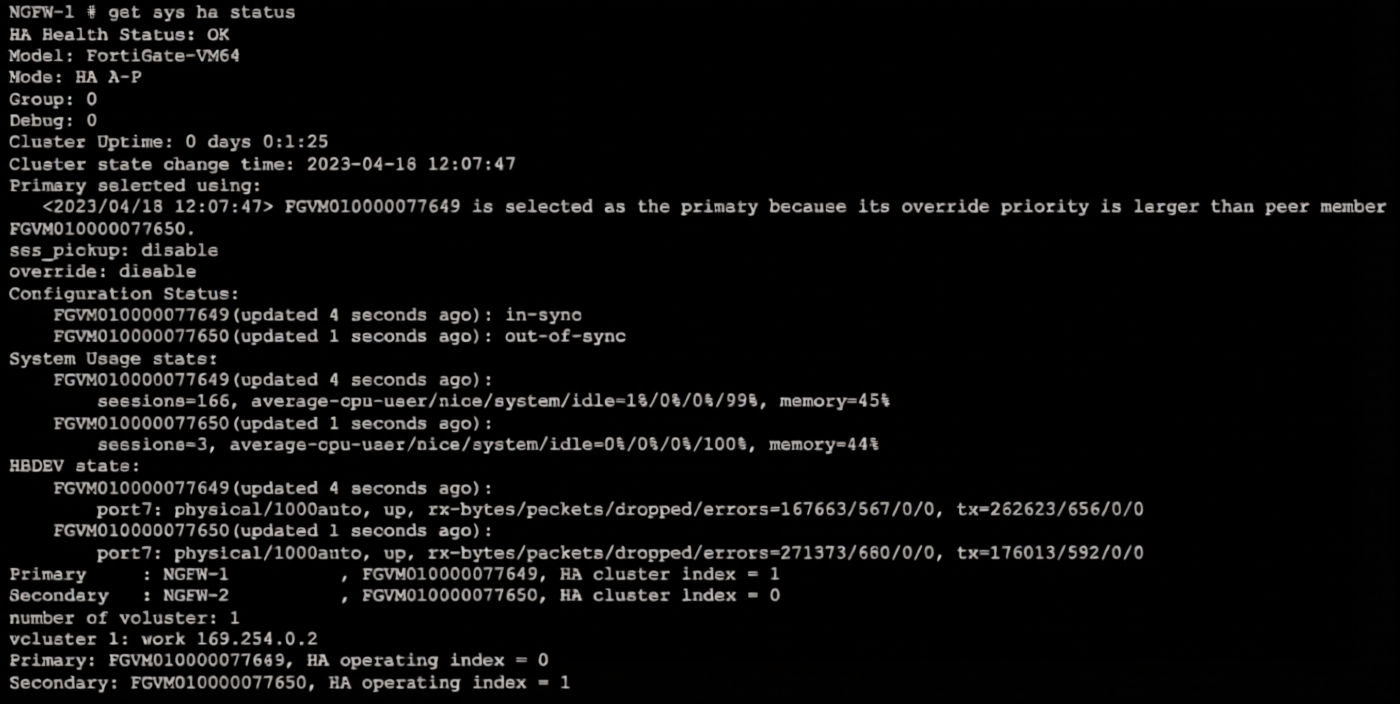
Question 5 Choose 2
Exhibit.


Refer to the exhibit, which shows the output of get system ha status.

NGFW-1 and NGFW-2 have been up for a week.

Which two statements about the output are true? (Choose two.)
Show answerHide answer

Correct answer: B, C If port 7 becomes disconnected on the secondary, both FortiGate devices will elect itself as primary.If FGVM...649 is rebooted. FGVM...650 will become the primary and retain that role, even after FGVM...649 rejoins the cluster.

Explanation

Explanation
The output shows an Active-Passive HA cluster with override: disable. This configuration is critical to understanding failover behavior. The displayed Configuration Status shows both units are synchronized, but the Primary selected using message indicates the primary was chosen based on a higher priority during initial negotiation . The absence of the override setting being enabled means the cluster will not automatically revert to a pre-defined primary after a failover event.

Correct Options

B. If port 7 becomes disconnected on the secondary, both FortiGate devices will elect itself as primary.
This is correct. The output shows port7 is the designated heartbeat interface (HBDDEV) for both units. This interface is critical for the cluster members to communicate and maintain the HA status. If the heartbeat link is lost on the secondary, the primary will lose contact with it. Since the secondary cannot confirm the primary is still active, it may assume the primary has failed and trigger a negotiation to become the primary itself, leading to a split-brain scenario where both devices attempt to act as the active unit .

C. If FGVM...649 is rebooted, FGVM...650 will become the primary and retain that role, even after FGVM...649 rejoins the cluster.
This is correct. The output shows override: disable. When override is disabled, the primary unit selection criteria prioritize uptime and do not allow preemption . If FGVM...649 (the current primary) reboots, FGVM...650 will take over as the new primary. When FGVM...649 rejoins the cluster, because override is disabled, it will not force a re-election and will simply rejoin as a secondary unit, allowing FGVM...650 to retain the primary role .

Incorrect Options

A. If a configuration change is made to the primary FortiGate at this time, the secondary will initiate a synchronization reset.
This is incorrect. The in-sync status indicates the configurations are currently matched. Typically, configuration changes made on the primary are automatically synchronized to the secondary without the secondary needing to initiate a reset. An out-of-sync status would require investigation, but a configuration change itself triggers the synchronization process, not a reset .

D. If no action is taken, the primary FortiGate will leave the cluster because of the current sync status.
This is incorrect. The Configuration Status shows both units are in-sync. An in-sync status is the normal and expected state for a healthy HA cluster. The primary will not leave the cluster due to an in-sync status. An out-of-sync condition would be a problem, but as the exhibit shows, both units are synchronized .

Reference

Fortinet Documentation – HA Primary Unit Selection Criteria

Fortinet Documentation – A-P Failover and Primary Unit Recovery

Fortinet Documentation – Heartbeat Interfaces and Split-Brain Scenario
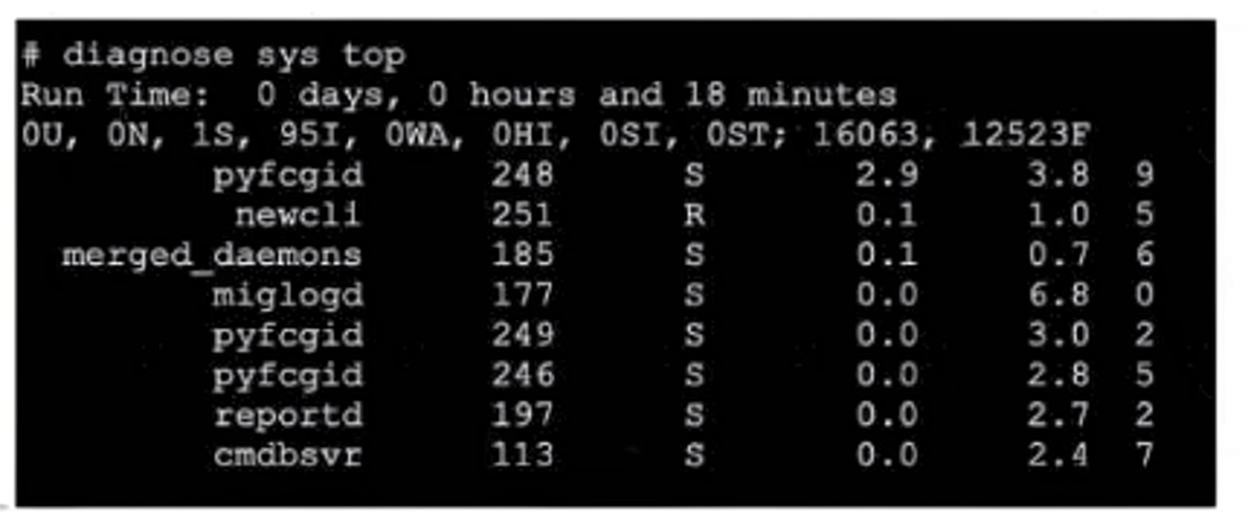
Question 6 Choose 3
Refer to the exhibit.


Which three pieces of information does the diagnose sys top command provide? (Choose three.)
Show answerHide answer

Correct answer: A, C, D The miglogd daemon is running on CPU core ID 0.The miglogd daemon would be on top of the list, if the administrator pressed m on the keyboard.The cmdbsvr process is occupying 2.4% of the total user memory space

Explanation

Explanation
The diagnose sys top command is a real-time process monitoring tool similar to the Linux top command. It provides a dynamic view of running processes, CPU usage, memory usage, and process states. The output shows a snapshot of the system's current state, allowing administrators to identify resource-intensive processes and troubleshoot performance issues.

Correct Option: A

The miglogd daemon is running on CPU core ID 0.
This is correct. The output shows miglogd 177 S 0.0 6.8 0. The last column (the number 0) represents the CPU core ID on which the process is currently running. This indicates that the miglogd daemon (responsible for logging) is executing on core 0. In multi-core FortiGate systems, this information is valuable for understanding CPU core distribution and load balancing.

Correct Option: C

The miglogd daemon would be on top of the list, if the administrator pressed m on the keyboard.
This is correct. In the diagnose sys top interactive mode, pressing the m key sorts the process list by memory usage in descending order. The output shows miglogd with the highest memory percentage (6.8%), significantly higher than the next process (pyfcgid at 3.8%). Therefore, if the administrator pressed m, miglogd would indeed move to the top of the list as the most memory-consuming process.

Correct Option: D

The cmdbsvr process is occupying 2.4% of the total user memory space.
This is correct. The output shows cmdbsvr 113 S 0.0 2.4 7. The fourth column (2.4) represents the percentage of total user memory the process is consuming. The cmdbsvr process manages the configuration database on the FortiGate. Understanding memory usage helps identify processes that may be consuming excessive resources, although 2.4% is within normal operational ranges.

Incorrect Option: B

The diagnose sys top command has been running for 18 minutes.
This is incorrect. The first line of the output shows "Run Time: 0 days, 0 hours and 18 minutes". This indicates the total system uptime since the last reboot, not the duration the diagnose sys top command has been running. The command itself typically runs in real-time and resets each time it's executed. This is a common misinterpretation that the display shows the command's run time rather than system uptime.

Incorrect Option: E

If the neweli daemon continues to be in the R state, it will need to be manually restarted.
This is incorrect. The R state in the output represents "Running" (or Runnable), which is a normal and expected process state for active processes. The newcli process (note: the exhibit shows newcli, not neweli) is a command-line interface process that should be in the R state when active. Processes can remain in the R state indefinitely without requiring manual intervention. It is the Z (Zombie) or D (Uninterruptible Sleep) states that may indicate problems requiring manual restarts.

Reference

Fortinet FortiGate Administration Guide – diagnose sys top Command and Process Monitoring

Linux top Command Documentation – Process States (R, S, D, Z) and Interactive Keys

FortiGate Troubleshooting Guide – CPU and Memory Monitoring Using diagnose sys top
Question 7 Choose 2
What are two functions of automation stitches? (Choose two.)
Show answerHide answer

Correct answer: B, D You can configure automation stitches to execute actions sequentially by taking parameters from previous actions as input for the current action.You can create automation stitches to run diagnostic commands and attach the results to an email message when CPU or memory usage exceeds specified thresholds.

Explanation

Explanation
Automation stitches in FortiOS are powerful tools that automate responses to security events by linking triggers with actions . They can be configured to execute actions in a specific sequence and can perform complex troubleshooting tasks, such as running diagnostic commands when system resources are under strain.

Correct Options

B. You can configure automation stitches to execute actions sequentially by taking parameters from previous actions as input for the current action.
This statement is correct. Automation stitches can be designed to run their defined actions in a specific order, where the completion of one action is required before the next begins . The set required enable CLI setting enforces this sequential execution, ensuring that one step completes before the next is triggered . While the primary function of this feature is to enforce a sequence, this is the mechanism that describes sequential action execution.

D. You can create automation stitches to run diagnostic commands and attach the results to an email message when CPU or memory usage exceeds specified thresholds.
This is a standard and well-documented use case for automation stitches . You can configure a stitch triggered by a High CPU or Conserve Mode event. This trigger activates a CLI Script action that runs diagnostic commands (diagnose debug, get system performance status), and then an Email action that sends the script's output (%%results%%) to an administrator, enabling rapid troubleshooting .

Incorrect Options

A. You can configure automation stitches on any FortiGate device in a Security Fabric environment.
This is incorrect. In a Security Fabric, automation stitches must be created on the root FortiGate . It is a key limitation that prevents distributed creation from any device in the fabric.

C. You can set an automation stitch configured to execute actions in parallel to insert a specific delay between actions.
This is incorrect. The ability to insert a delay (set delay) is available for actions, but when actions are executed in parallel, they are triggered simultaneously. The delay parameter is specifically designed for use with sequential action execution, where one action must finish before the next one begins .

Reference

Fortinet Documentation: Automation stitches creation and Security Fabric sync

Fortinet Documentation: Parallel and Sequential execution

Fortinet Documentation: CPU and Memory threshold examples

That's the last free question in System configuration and SD-WAN setup

You've seen the free 30% (7 of 25 questions). Full access unlocks every question and full-length NSE7_FSN_AR-7.6 mock exams (40 questions, 60 minutes), a different mock on every attempt.

Unlock full mock exam
Full mock exam

Sit the NSE7_FSN_AR-7.6 exam before exam day

Full-length mocks with the same number of questions and the same time limit as the real NSE7_FSN_AR-7.6 exam. Every attempt draws a new set of questions from the full bank, so you can keep going until you pass comfortably.

Get full NSE7_FSN_AR-7.6 mock exam
  • 40questions per mock
  • 60 mintime limit
  • 176questions in the bank
  • Newmock on every attempt