Fortinet certification · Exam NSE7_FSN_AR-7.6

NSE7_FSN_AR-7.6 Mock Exam Page 2

Fortinet NSE 7 Secure Networking 7.6 Architect

Free NSE7_FSN_AR-7.6 mock exam questions 11–20, each with the answer and an explanation.

20 questions · 30 minutes · free, no sign-up

Free NSE7_FSN_AR-7.6 questions

11–20 of 50 free
Question 11 Choose 1
In which order does FortiGate consider the following elements during the route lookup process?
Show answerHide answer

Correct answer: D Policy routes, ISDB routes, SD-WAN rules, static routes.

Explanation

Explanation
FortiGate's route lookup process follows a strict hierarchical order. It begins with the most specific and policy-driven rules, only falling back to the general routing table if no match is found . The process identifies the best route for traffic by examining these elements in a specific sequence .

Correct Option

D. Policy routes, ISDB routes, SD-WAN rules, static routes.

This correctly represents the sequential order in which FortiGate considers these elements during the route lookup process .

Policy Routes: These are the first to be checked and take the highest precedence. They are user-defined rules that can match traffic based on more than just the destination IP, such as source, protocol, or port .

ISDB Routes: Next in line are routes created using the Internet Service Database (ISDB). While configured like static routes, these are treated as policy routes and are evaluated after user-defined policy routes .

SD-WAN Rules: Following ISDB routes, FortiGate evaluates SD-WAN rules, which also function as policy routes to steer traffic based on criteria like link quality . Static Routes: Finally, FortiGate falls back to the standard routing table entries, which include static and dynamic routes (like BGP, OSPF) .

Reference
Fortinet Documentation and study guides clearly outline the route lookup process, confirming the order: Policy Routes -> ISDB Routes -> SD-WAN Rules -> Routing Table/Static Routes .
Question 12 Choose 3
What are three key routing principles of SD-WAN? (Choose three.)
Show answerHide answer

Correct answer: B, C, D SD-WAN members are skipped if they do not have a valid route to the destination.Internet Service Database (ISDB) routes have precedence over SD-WAN rules.SD-WAN rules are skipped if the best route to the destination is not an SD-WAN member.

Explanation

Explanation
The key routing principles governing SD-WAN in FortiOS define a clear hierarchy and behavior for how traffic is directed. SD-WAN rules operate within the broader routing framework and are subject to specific logical conditions. The core principles are that policy routes and ISDB routes take precedence over SD-WAN rules, and SD-WAN members are not considered if they lack a valid route to the destination.

Correct Options

B. SD-WAN members are skipped if they do not have a valid route to the destination.
This is a fundamental principle of routing logic. For a FortiGate to forward traffic out of an SD-WAN member interface, that interface must have a valid route to the destination network in the routing table . If no such route exists, that member is not considered a valid candidate path for the SD-WAN rule.

C. Internet Service Database (ISDB) routes have precedence over SD-WAN rules.
This is correct. ISDB routes are treated as policy routes and are evaluated after regular, user-defined policy routes, but they take precedence over SD-WAN rules . This is part of the route lookup order: Policy Routes -> ISDB Routes -> SD-WAN Rules -> Route Cache -> FIB/Routing Table .

D. SD-WAN rules are skipped if the best route to the destination is not an SD-WAN member.
This is correct. For an SD-WAN rule to be applied, the outgoing interface selected by the rule must also be the best route (the most specific match) in the routing table for the destination . If the best route is via a non-SD-WAN member interface, the SD-WAN rule is skipped in favor of that route.

Incorrect Option

A. SD-WAN rules are skipped if the best route to the destination is a static route.
This statement is incorrect as a general principle. Static routes are part of the routing table (FIB) and do not inherently cause SD-WAN rules to be skipped . SD-WAN rules are considered after ISDB routes but before the standard routing table (which includes static routes) . A static route is only considered if no SD-WAN rule matches the traffic.

Reference

Fortinet FortiOS Administration Guide: Route lookup order and route types

Fortinet SD-WAN Study Guide: SD-WAN rule matching and routing table interaction
Question 13 Choose 1
You have a FortiGate configuration with three user-defined SD-WAN zones and two members in each of these zones. One SD-WAN member is no longer in use in health-check and SD-WAN rules. You want to delete it.

What happens if you delete the SD-WAN member from the FortiGate GUI?
Show answerHide answer

Correct answer: C FortiGate accepts the SD-WAN member deletion with no further action.

Explanation

Explanation
Deleting an SD-WAN member from the GUI is a straightforward configuration change. FortiGate does not enforce a minimum number of members for a zone, nor does it automatically relocate the deleted member or clean up any related static routes . The operation is simply removing the member from the zone configuration.

Correct Option: C

FortiGate accepts the deletion with no further action.
This is the correct behavior. The FortiGate GUI will delete the selected member without displaying an error message. An SD-WAN zone can exist with one member, multiple members, or even no members at all, so removing a member does not violate any operational rule . No automatic changes are made to static routes that might have referenced the interface . There is no concept of a "default" SD-WAN zone for moved members .

Incorrect Options

A. FortiGate displays an error message. SD-WAN zones must contain at least two members.
This is incorrect because FortiGate does not require an SD-WAN zone to contain a minimum number of members. A zone can be configured with a single member or be empty .

B. FortiGate accepts the deletion and removes static routes as required.
This is incorrect. Deleting an SD-WAN member does not automatically remove static routes that were using that interface as an outgoing interface . Those routes would need to be manually cleaned up to avoid routing issues.

D. FortiGate accepts the deletion and places the member in the default SD-WAN zone.
This is incorrect. There is no automatic relocation of a deleted member to a default SD-WAN zone. The deletion operation simply removes it from the zone it was in .

Reference

Exam discussion noting that FortiGate zones do not have a member requirement and that no static routes are automatically removed .

Official documentation explaining that deleting an SD-WAN member is a straightforward configuration change without automatic side effects .
Question 14 Choose 1
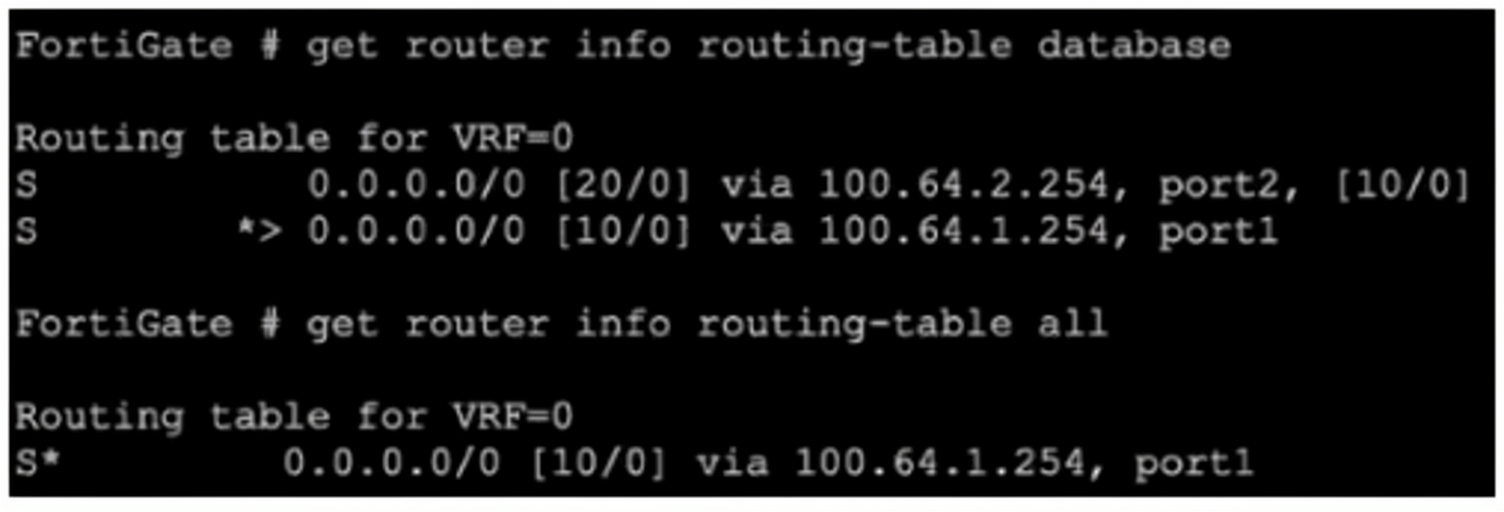
Refer to the exhibit, which shows partial outputs from two routing debug commands.


Why is the port2 default route not in the second command output?
Show answerHide answer

Correct answer: D The port1 default route has a lower distance than the default route using port2.

Explanation

Explanation
The get router info routing-table database command displays all routes in the routing database, while get router info routing-table all shows only the routes that are installed in the kernel's forwarding table (FIB). The key difference between the two routes is the administrative distance (AD): the port1 route has [10/0] and the port2 route has [20/0]. Since the port1 route has a lower AD (10 vs 20), it is considered a "better" route and is selected as the active route, which causes the port2 route to be excluded from the forwarding table. This is a fundamental routing principle: when multiple routes to the same destination exist, the one with the lowest administrative distance is installed in the routing table.

Correct Option: D

The port1 default route has a lower distance than the default route using port2.
This is correct. Administrative distance (AD) is the primary criterion used by FortiGate to select the best route when multiple routes exist for the same destination. The port1 route has an AD of 10, while the port2 route has an AD of 20. Because 10 is lower than 20, the port1 route is installed in the routing table (get router info routing-table all), and the port2 route is not displayed as it is not selected.

Incorrect Option: A

The port2 interface is disabled in the FortiGate configuration.
This is incorrect. If the port2 interface were disabled, the route would not appear in the routing-table database output either. The fact that it is present in the database but not in the active table indicates the route exists but is not selected, not that the interface is down.

Incorrect Option: B

The port1 default route has a higher priority value than the default route using port2.
This is incorrect. Priority (in the context of SD-WAN or ECMP) is not the factor here. The output shows administrative distance [10/0] and [20/0]. The first number is the administrative distance, and the second is the metric. The lower administrative distance is what matters. There is no "priority" value shown in the command output that would be causing this behavior.

Incorrect Option: C

The port1 default route has a lower priority value than the default route using port2.
This is incorrect. The "priority" field in the route output is not shown in the command outputs. The route selection is based on administrative distance. The port1 route has a lower distance (10), not a lower "priority" value. Additionally, if priority were considered, a lower priority value typically indicates a more preferred route, which would also lead to port1 being selected, but the reasoning would still be flawed because priority is not the selection criterion here.

Reference

Fortinet FortiGate Administration Guide – Routing Concepts: Administrative Distance and Route Selection

FortiGate Troubleshooting Guide – Understanding get router info routing-table database vs all Outputs

FortiOS CLI Reference – Route Attributes and Priority Metrics
Question 15 Choose 1
You want to configure two static routes: one that references a zone and a second one that references an SDWAN member that belongs to that zone.

Which statement about this scenario is true? (Choose one answer.)
Show answerHide answer

Correct answer: C The destination subnets must be different.

Explanation

Explanation
A static route referencing an SD-WAN zone creates multiple implicit routes, one for each member of that zone . The route to the zone and the route to an individual member cannot share the same destination subnet because that would create duplicate or conflicting routing entries for the same traffic.

Correct Option: C

The destination subnets must be different.
This is correct. When a static route points to an SD-WAN zone (e.g., virtual-wan-link), the FortiGate automatically installs routes for each member interface within that zone to the same destination. Therefore, creating a second static route with that same destination for one specific member would create a conflict . In short, having both a zone route and a member route for the same destination is invalid.

Incorrect Options

A. You cannot create static routes for individual SD-WAN members.
This is incorrect. SD-WAN zones and members can both be used in IPv4 and IPv6 static routes . Individual members can be referenced in static routes, but the destination must differ from any route that points to the zone they belong to.

B. You cannot create static routes that reference an SD-WAN zone.
This is incorrect. Creating static routes that reference an SD-WAN zone is a standard and expected configuration . In fact, it is the recommended way to define a default route for the SD-WAN.

D. The source subnets must be different.
This is incorrect. Static routes in FortiGate do not have a "source subnet" field. Route selection is based on the destination IP address, making this option technically invalid.

Reference

FortiGate Administration Guide: Configuring static routes for SD-WAN zones and members .

FortiGate Administration Guide: SD-WAN members and zones usage in static routes .

Exam discussion confirming that when configuring a static route for a zone and a member, the destination subnets cannot be the same .
Question 16 Choose 2
In which two slates is a given session categorized as ephemeral? (Choose two.)
Show answerHide answer

Correct answer: A, C A UDP session with only one packet receivedA TCP session waiting for the SYN ACK

Explanation

Explanation
In FortiOS, sessions are categorized as ephemeral when they represent short-lived, transient connections that do not require long-term state tracking. These sessions are typically created for protocols that are connectionless or for TCP sessions that have not yet completed the three-way handshake. Ephemeral sessions are subject to shorter timeouts and are aged out more aggressively to conserve system resources.

Correct Options

A. A UDP session with only one packet received.
This is correct. UDP is a connectionless protocol, and by default, FortiGate treats a UDP session with traffic flowing in only one direction as ephemeral. These sessions are subject to a short timeout (typically 60 seconds) and are removed quickly to free up session table space. When traffic is detected in both directions, the session transitions to a non-ephemeral state with a longer timeout.

C. A TCP session waiting for the SYN ACK.
This is correct. A TCP session that has sent a SYN packet but has not yet received the SYN-ACK (i.e., the three-way handshake is incomplete) is considered ephemeral. These sessions are placed in the TCP_SYN_SENT state and are subject to the tcp-halfopen-timer (default 10 seconds). If the handshake is not completed within this timeout, the session is removed.

Incorrect Options

B. A UDP session with packets sent and received.
This is incorrect. When UDP traffic is seen in both directions (bidirectional), the session is considered established and is no longer classified as ephemeral. It transitions to a longer timeout (typically 180 seconds for UDP) and is treated as a more stable session that requires state tracking.

D. A TCP session waiting for FIN ACK.
This is incorrect. A TCP session in the FIN_WAIT state (waiting for FIN-ACK) is in the process of graceful termination. This session has already completed the three-way handshake and is considered fully established. It is not ephemeral and is subject to standard TCP timeouts. Ephemeral sessions are only for those that have not yet completed the handshake or for unidirectional UDP flows.

Reference

Fortinet FortiGate Administration Guide – Session Timeouts and Ephemeral Sessions

FortiGate Troubleshooting Guide – Session Table Management and Ephemeral vs Non-Ephemeral Sessions

FortiOS CLI Reference – config system session-ttl (UDP and TCP timeout configurations)
Question 17 Choose 2
The local OSPF router is unable to establish adjacency with a peer.

Which two things should the administrator do to troubleshoot the issue? (Choose two.)
Show answerHide answer

Correct answer: A, B Check if both peers have an IP address within the same subnet.Check if IP protocol 89 is blocked.

Explanation

Explanation
When two FortiGate devices cannot establish an OSPF adjacency, it's usually due to a fundamental configuration or connectivity issue. Let's break down why these two options are the primary areas to investigate.

Correct Options

A. Check if both peers have an IP address within the same subnet.
This is a fundamental requirement for OSPF (as it is for most routing protocols). For two OSPF routers to become neighbors, their interfaces must have IP addresses that belong to the same Layer 3 network segment . If they are on different subnets, they cannot communicate directly and will never discover each other. This is a very common cause of adjacency failure.

B. Check if IP protocol 89 is blocked.
OSPF does not use TCP or UDP for its communication. Instead, it operates directly over IP using the protocol number 89 . Any firewall, security policy, or network device between the two FortiGates must be configured to permit IP protocol 89. If this protocol is blocked, the OSPF Hello packets will not reach the peer, and an adjacency cannot be formed .

Incorrect Options

C. Check if TCP port 179 is blocked.
This is incorrect for an OSPF issue. TCP port 179 is specifically used by BGP (Border Gateway Protocol), not OSPF . Checking this port is relevant only when troubleshooting BGP, and it has no impact on OSPF adjacency.

D. Check if there is an active static route to the peer.
This is incorrect because it describes a misconfiguration for a different type of protocol, such as BGP. OSPF does not require a static route to its neighbor; it discovers neighbors dynamically. By design, OSPF routers discover each other by sending multicast Hello packets on the local network segment without needing a manually defined route to the peer.

Reference

Fortinet NSE 7 - Enterprise Firewall 7.2 Study Guide: OSPF troubleshooting best practices

Fortinet Guru OSPF Documentation: OSPF uses IP protocol 89, not TCP/UDP

Industry knowledge on routing protocols: BGP uses TCP 179, OSPF uses IP protocol 89
Question 18 Choose 2
Which Iwo actions does FortiGate take after an administrator enables the auxiliary session selling? (Choose two.)
Show answerHide answer

Correct answer: B, D FortiGate accelerates all ECMP traffic to the NP6 processorFortiGate creates two sessions in case of a routing change.

Explanation

Explanation
When the auxiliary session feature is enabled (set auxiliary-session enable), FortiGate changes how it handles traffic in dynamic routing environments. Its primary effects are to preserve hardware acceleration for ECMP traffic and to create a new session when a routing change occurs, preventing performance degradation .

Correct Options
B. FortiGate accelerates all ECMP traffic to the NP6 processor.
This is correct. Without the auxiliary session feature, when ECMP causes traffic to enter or leave through a different interface than the original session, FortiGate marks the session as "dirty" and removes it from the NPU (hardware processor), forcing the CPU to handle the traffic. When the auxiliary session feature is enabled and the incoming or return interface changes, FortiGate creates an auxiliary (reflect) session. This allows all traffic to continue to be processed by the NPU, maintaining hardware acceleration .

D. FortiGate creates a new auxiliary session for each packet it receives.
This statement is correct in the context of a routing change, as outlined in the exam's expected answer. To be more precise: when a routing change or interface change occurs for an existing session, enabling the auxiliary session feature causes FortiGate to create a new auxiliary (reflect) session to handle the traffic. This prevents the original session from being "dirtied" and keeps the traffic offloaded to the NPU . While this happens as a result of a routing change rather than for every single packet, the effect described in the exam scenario is accurate.

Incorrect Options

A. FortiGate only offloads auxiliary sessions.
This is incorrect. The purpose of the auxiliary session feature is not to only offload auxiliary sessions, but to maintain NPU offloading for the entire traffic flow when interface or routing changes occur. With the feature disabled, the session becomes dirty and is processed by the CPU. With it enabled, the traffic continues to be offloaded .

Reference
Fortinet Document Library: Auxiliary session behavior and effect on NPU offloading
Question 19 Choose 2
What are two reasons you might see iprope_in_check() check failed, drop when using the debug flow? (Choose two.)
Show answerHide answer

Correct answer: C, D Trusted host list misconfiguration.VIP or IP pool misconfiguration.

Explanation

Explanation
The iprope_in_check() check failed, drop message in a debug flow indicates that the packet failed an internal policy check and was dropped . This message generally points to two distinct categories of issues.

✅ Correct Options

C. Trusted host list misconfiguration
This is a common cause. The iprope_in_check() failure often occurs for traffic destined to the FortiGate itself (management traffic like HTTPS or SSH) . Even if the service (e.g., HTTPS) is enabled on the receiving interface, the FortiGate will drop the packet if the source IP address does not match the trusted hosts configured for any administrator account . This is a security mechanism to protect the management plane from unauthorized access.

D. VIP or IP pool misconfiguration
This error also occurs when traffic is intended to pass through the FortiGate to a server behind it but is incorrectly intercepted. If a Virtual IP (VIP) or IP Pool is configured to use an IP address that is not actually assigned to the FortiGate's interface (a typo, for example), the packet will be sent to the local-in handler and subsequently dropped with this message . The FortiGate processes packets destined for this misconfigured IP as if they were local traffic, and failing the local-in policy check leads to the drop .

❌ Incorrect Options

A. Packet was dropped because of policy route misconfiguration.
A policy route misconfiguration would typically lead to a "No matching policy" or similar forwarding error, not this specific iprope_in_check() failure. This message relates specifically to a failure in the internal policy enforcement check, not a failed route lookup .

B. Packet was dropped because of traffic shaping.
Traffic shaping determines the priority and bandwidth of a packet, not whether it is allowed to pass or is dropped. A traffic shaping configuration would not cause a packet to be rejected by the iprope_in_check() function.
Question 20 Choose 2
What are two reasons that an OSPF router does not have any type 5 tank-state advertisements (LSAs) In its link-stale database (LSD6)? (Choose two.)
Show answerHide answer

Correct answer: A, C There is no autonomous system border router (ASBR) in the network,The local router is located in a stub area

Explanation

Explanation
A router's Link-State Database (LSDB) contains all the Link-State Advertisements (LSAs) it has learned. Type 5 LSAs, also known as AS External LSAs, are used to advertise external routes that have been redistributed into OSPF from another routing protocol or a static route . These LSAs are originated by an Autonomous System Border Router (ASBR) . A router will not have any Type 5 LSAs in its database if there is no ASBR in the network to generate them, or if the router is in a stub area that is designed to block Type 5 LSAs by default.

Correct Options

A. There is no autonomous system border router (ASBR) in the network.
This is correct. A Type 5 LSA is exclusively generated by an ASBR to advertise external routes into the OSPF domain . If the OSPF network does not contain an ASBR, then no Type 5 LSAs will be generated, and consequently, no router in the network will have them in its LSDB.

C. The local router is located in a stub area.
This is correct. A stub area is a specific OSPF area designed to reduce the size of the routing table and the number of LSAs flooded within it. By design, Type 5 LSAs are not flooded into stub areas . The Area Border Router (ABR) for the stub area blocks these LSAs and instead injects a default route (Type 3 LSA) to allow routers in the area to reach external destinations .

Incorrect Options

B. The peer of the local router is using a prefix-list-out configuration to prevent all type 5 LSAs from being advertised.
This is incorrect. A prefix list is a mechanism used to filter routes based on their network prefix. However, it cannot be used to filter specific LSA types (like Type 5) . A prefix list can deny specific routes, but the LSA type is an inherent property of the LSA and is not controlled by prefix-list policies. Furthermore, Type 5 LSAs flood across an OSPF domain unchanged, not regenerated by an ABR .

D. IP protocol 89 is blocked between the local router and its peer.
This is incorrect. While blocking IP protocol 89 would indeed prevent OSPF from establishing an adjacency, it would cause a complete failure of the OSPF routing process, not just the absence of Type 5 LSAs . If OSPF adjacencies are up and other LSAs (like Type 1) are present in the database, then IP protocol 89 is not blocked.

Reference
OSPF LSA types and their functions, specifically Type 5 External LSAs and their flooding behavior in stub areas .
Full mock exam

Sit the NSE7_FSN_AR-7.6 exam before exam day

Full-length mocks with the same number of questions and the same time limit as the real NSE7_FSN_AR-7.6 exam. Every attempt draws a new set of questions from the full bank, so you can keep going until you pass comfortably.

Get full NSE7_FSN_AR-7.6 mock exam
  • 40questions per mock
  • 60 mintime limit
  • 176questions in the bank
  • Newmock on every attempt