Fortinet certification · Exam NSE7_FSN_AR-7.6

NSE7_FSN_AR-7.6 Mock Exam

Fortinet NSE 7 Secure Networking 7.6 Architect

Free NSE7_FSN_AR-7.6 questions on Advanced IPsec, each with the answer and an explanation.

20 questions · 30 minutes · free, no sign-up

Advanced IPsec questions

1–8 of 8 free
Question 1 Choose 2
Refer to the exhibit.
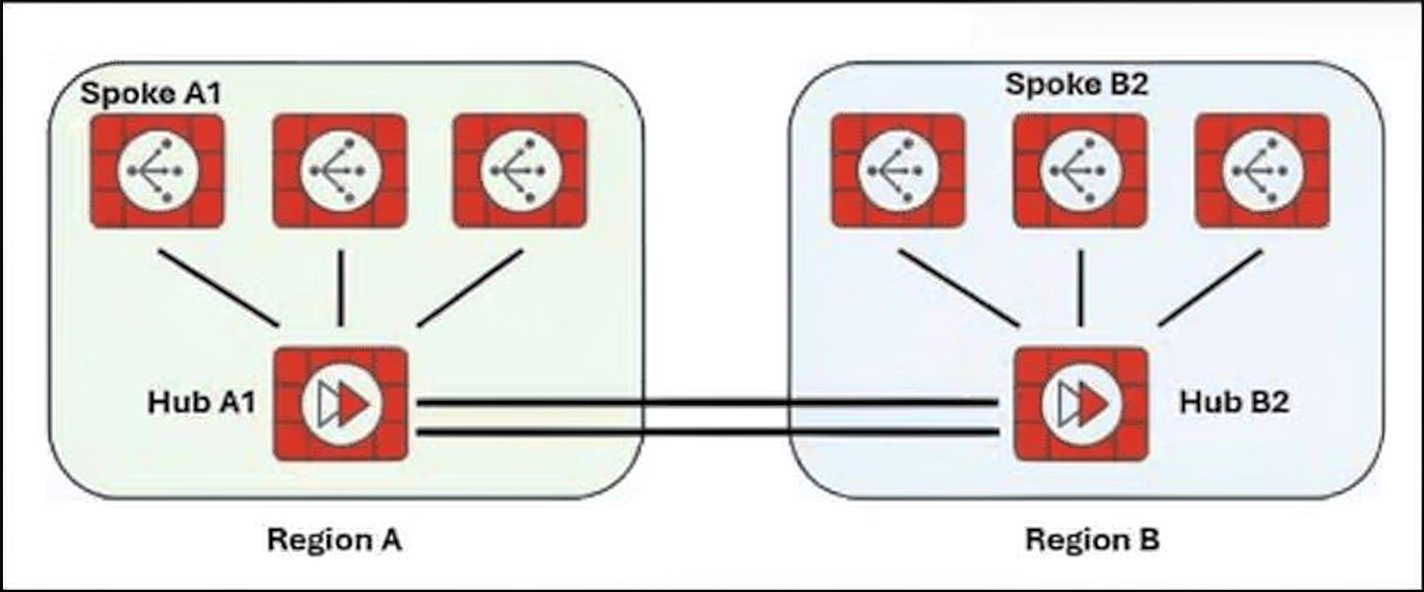


Two hub-and-spoke groups are connected through redundant site-to-site IPsec VPNs between Hub 1 and Hub 2.

Which two configuration settings are required for Spoke A1 to establish an auto-discovery VPN (ADVPN) shortcut with Spoke B2? (Choose two.)
Show answerHide answer

Correct answer: A, B On the spokes, auto-discovery-receiver must be enabled on the IPsec VPNs to the hubs.On the hubs, auto-discovery-forwarder must be enabled on the IPsec VPNs between the hubs.

Explanation

Explanation
In an Auto-Discovery VPN (ADVPN) topology with multiple hub-and-spoke groups, enabling direct "shortcut" tunnels between spokes in different regions requires a specific division of responsibilities .

Spokes must be configured to listen for and initiate shortcut offers.

Hubs must be configured to relay shortcut information to other hubs.

Correct Options

A. On the spokes, auto-discovery-receiver must be enabled on the IPsec VPNs to the hubs.
This is correct and is the standard configuration for any spoke that needs to participate in ADVPN shortcuts . Enabling this command on the spoke's phase1 interface tells the FortiGate to listen for and accept shortcut offers from the hub . It is the mandatory prerequisite for a spoke to receive the information needed to establish a direct tunnel with another spoke.

B. On the hubs, auto-discovery-forwarder must be enabled on the IPsec VPNs between the hubs.
This is also correct. For an ADVPN shortcut to be established across different hub groups, the inter-hub tunnels must forward shortcut information . The auto-discovery-forwarder command enables the hub-to-hub VPN to pass on the shortcut details (like public IP addresses) that the spokes need to connect directly . Without this setting, the hub would not relay the necessary information across regions, preventing the shortcut from being formed.

Incorrect Options

C. On the hubs, auto-discovery-sender must be enabled on the IPsec VPNs between the hubs.
This command is typically used on the hub's interface facing the spokes to initiate shortcut offers, not on the inter-hub links . auto-discovery-sender triggers the shortcut negotiation process when it sees spoke-to-spoke traffic transiting through it. The forwarder command is the one specifically designed for hub-to-hub connections to pass shortcut messages along .

D. On the spokes, auto-discovery-sender must be enabled on the IPsec VPNs to the hubs.
This is the opposite of the required spoke configuration. In ADVPN, the hub is the one with sender enabled, acting as the controller that offers shortcut opportunities. The spokes are configured as receivers to accept and act on those offers .

Reference

Fortinet Documentation: "Example ADVPN configuration"

FCSS_SDW_AR-7.6 Exam Discussion: Hub-and-spoke ADVPN shortcut requirements

Fortinet Cookbook: "Configuring the Spoke FortiGates"
Question 2 Choose 1
Exhibit.


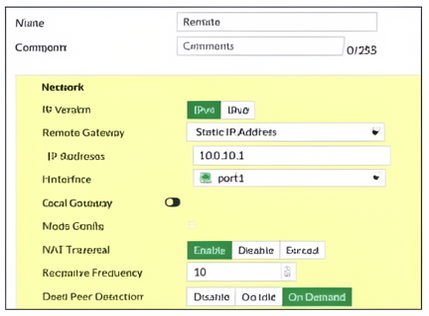
Refer to the exhibit, which contains a screenshot of some phase 1 settings.

The VPN is not up. To diagnose the issue, the administrator enters the following CLI commands on an SSH session on FortiGate:

However, the IKE real-time debug does not show any output. Why?
Show answerHide answer

Correct answer: A The administrator must also run the command diagnose debug enable.

Explanation

Explanation
The issue is not with the VPN configuration or the filter but rather with the basic command sequence required to capture debug output on a FortiGate. Real-time debug commands on FortiGate do not start producing output simply by being turned on; the process must be explicitly started. The sequence to enable any debug is to first set the debug level, then start the output capture.

Correct Option: A

The administrator must also run the command diagnose debug enable.
This statement is correct. The diagnose debug application ike -1 command sets the IKE debug level, but it does not activate the debug flow. To actually start capturing and displaying debug messages, the administrator must first run diagnose debug enable. This is a common and fundamental step that must be remembered before any debug session, and forgetting it is the primary reason for seeing no output despite the debug level being set.

Incorrect Options

B. The debug shows only error messages. If there is no output, then the phase 1 and phase 2 configurations match.
This is incorrect. The IKE debug level -1 shows all messages, including informational and verbose ones, not just errors. If there were no output, it would mean the debug was not properly enabled or the filter is blocking the traffic, not that the configurations match perfectly.

C. The log-filter setting is incorrect. The VPN traffic does not match this filter.
This is incorrect. The dst-addr4 10.0.10.1 filter is correct because it matches the remote gateway IP address configured in the phase 1 settings shown in the exhibit. If the filter was incorrect, it would filter out the IKE messages, but the administrator would still likely see some debug output if the debug was enabled, which it is not.

D. Replace diagnose debug application ike -1 with diagnose debug application ipsec -1.
This is incorrect. The ipsec debug application is used for kernel-level IPsec operations, such as encapsulation and decapsulation of the ESP packets. For IKE negotiation issues, the ike debug is the correct tool. Replacing it would not fix the lack of output because the debug is not enabled, and it would also be the wrong tool for diagnosing the IKE phase.

Reference

Fortinet FortiGate Administration Guide – Debugging Commands and Workflow

Fortinet Knowledge Base – Troubleshooting IPsec VPN with IKE Debug

FortiGate CLI Reference – diagnose debug Commands
Question 3 Choose 2
Refer to the exhibit.


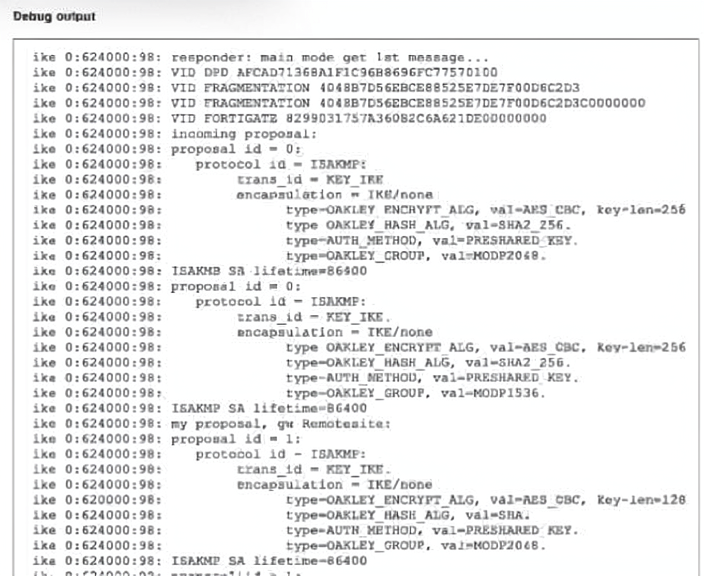
A partial output from an IKE real-time debug is shown

The administrator does not have access to (he remote gateway

Based on the debug output, which two conclusions can you draw? (Choose two.)
Show answerHide answer

Correct answer: A, B The remote peer is the initiating peer.This is a phase1 negotiation.

Explanation

Explanation
The debug output shows the local FortiGate acting as the responder in an IKE negotiation, as indicated by the responder: main mode get 1st message... line. The output contains ISAKMP SA lifetime=86400 and proposals for encryption, hashing, and Diffie-Hellman groups, which are characteristic of Phase 1 negotiations. The debug shows the local FortiGate's proposal being listed as my proposal, confirming it is responding to a remote peer's initiation attempt.

Correct Option: A

The remote peer is the initiating peer.
This is correct. The debug output shows responder: main mode get 1st message..., which confirms that the local FortiGate is acting as the responder in this IKE exchange. In any IKE negotiation, the device that sends the first message is the initiator, and the device that receives and responds to it is the responder. Therefore, the remote peer (the one sending the initial proposal) is the initiator.

Correct Option: B

This is a Phase 1 negotiation.

This is correct. The debug output shows several indicators of a Phase 1 (IKE SA) negotiation:

The exchange is in Main Mode, which is used for Phase 1.

It includes ISAKMP SA lifetime=86400, which defines the lifetime of the IKE Security Association.

The proposals include parameters like encryption algorithms (AES-CBC), hash algorithms (SHA2_256), and Diffie-Hellman groups (MODP2048), all of which are negotiated during Phase 1.

Incorrect Option: C

There is a Diffie-Hellman group mismatch.
This is incorrect. The debug output shows that the remote peer's proposal includes MODP2048 and MODP1536, and the local FortiGate's proposal includes MODP2048. Since MODP2048 appears in both proposals, there is a common Diffie-Hellman group that both peers support. A mismatch would occur if there were no common group between the two proposals, which is not the case here.

Incorrect Option: D

This is a Phase 2 negotiation.
This is incorrect. Phase 2 (Quick Mode) negotiations are used to establish IPsec SAs for actual data traffic. Phase 2 exchanges typically occur after Phase 1 is complete and involve different parameters such as proxy IDs (local/remote subnets) and IPsec transform sets (ESP encryption/hash). The debug output shows Main Mode and ISAKMP SA parameters, which are exclusively Phase 1 elements.

Reference

Fortinet FortiGate Administration Guide – IKE Debug Output Interpretation

RFC 2409 – The Internet Key Exchange (IKE) (Main Mode vs. Quick Mode)

FortiGate Troubleshooting Guide – IPsec VPN Phase 1 and Phase 2 Debugging
Question 4 Choose 1
Refer to the exhibit.


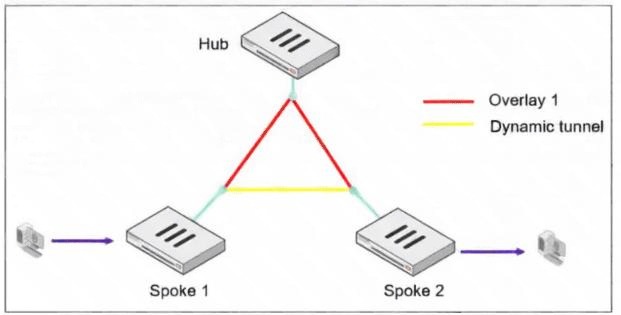
Based on the exhibit, what is the first message with which Spoke 1 replies to the hub, instructing it to bring up the dynamic tunnel when a client generates traffic destined for Spoke 2? (Choose one answer.)
Show answerHide answer

Correct answer: A Shortcut query

Explanation

Explanation
The ADVPN shortcut establishment process begins when a client generates traffic from Spoke 1 to Spoke 2. The traffic initially passes through the hub, which detects the inter-spoke communication and sends a Shortcut Offer to Spoke 1. This offer contains connection details to enable a direct tunnel. In the full messaging flow, Spoke 1's first reply to the hub after receiving this offer is the Shortcut Query. This query acknowledges the offer and requests further information needed to establish the direct dynamic tunnel with Spoke 2.

Correct Option

A. Shortcut query
This is correct based on the standard ADVPN message exchange sequence. After Spoke 1 receives a "shortcut offer" from the hub, it responds with a "shortcut query". This query contains Spoke 1's WAN IP address and other parameters for the dynamic tunnel negotiation. The hub then forwards this query to Spoke 2, which replies with a "shortcut reply" that is forwarded back to Spoke 1.

Incorrect Options

B. Shortcut reply
The "shortcut reply" message is sent by Spoke 2 back to the hub in response to the forwarded "shortcut query," not by Spoke 1 as the first reply.

C. Shortcut offer
The "shortcut offer" is the first message sent by the hub to Spoke 1, not the first message with which Spoke 1 replies to the hub.

D. Shortcut forward
This is not a standard ADVPN control message in the messaging flow. While the hub "forwards" the shortcut query to Spoke 2 and the shortcut reply back to Spoke 1, "shortcut forward" is not an actual ADVPN protocol message type.

Reference

Exam discussion confirming ADVPN shortcut messaging flow

Fortinet documentation showing the IKE debug output for SHORTCUT-QUERY messages

ADVPN sequence of messages: Offer → Query → Forward → Reply → Forward → Negotiation
Question 5 Choose 1
A FortiGate administrator is troubleshooting a VPN that is failing to establish.

As a first step, the administrator is attempting to sniff the traffic using the command:

# diagnose sniffer packet any ‘’udp port 500 or udp port 4500 or esp’’ 4

After several minutes there is still no output. What is the most Likely reason for this?
Show answerHide answer

Correct answer: A The VPN is configured to use IKE over TCP

Explanation

Explanation
The diagnose sniffer packet any 'udp port 500 or udp port 4500 or esp' 4 command is designed to capture the standard UDP-based IKE and ESP traffic. If the sniffer shows no output, the most likely reason is that the VPN is not using these standard protocols. For an IPsec VPN configured to use TCP transport (which is supported with IKEv2 ), all IKE and ESP packets are encapsulated within TCP headers on a configured port (the default is port 4500 or 443) . Therefore, the sniffer command filtering only on UDP ports 500, 4500, and protocol 50 (ESP) will see no relevant traffic. This is a known troubleshooting scenario where the traffic is present but is hidden by the TCP encapsulation .

Correct Option: A

The VPN is configured to use IKE over TCP.
This is the correct explanation. IPsec VPNs can be configured to operate over TCP to traverse firewalls that block UDP traffic . When transport {udp-fallback-tcp | tcp} is configured, the IKE and ESP packets are encapsulated within TCP . Consequently, a standard sniffer filter for UDP 500, UDP 4500, and ESP will not capture the VPN's negotiation or data packets.

Incorrect Options

B. esp is not a valid sniffer argument.
This is incorrect. In FortiOS, esp is a valid filter argument for the diagnose sniffer packet command, used to capture Encapsulating Security Payload packets that are not encapsulated in UDP (i.e., when NAT-T is not used) .

C. The ISP is blocking all VPN traffic.
This is incorrect. While an ISP blocking traffic is a possible cause for a failed VPN, it would not be the most likely reason for the sniffer showing no output. If traffic was reaching the FortiGate, the sniffer would likely display the blocked or dropped packets. The absence of output points to a more fundamental mismatch between the sniffer filter and the traffic pattern.

D. Mismatched IKE versions are detected on the VPN peers.
This is incorrect. A mismatch in IKE versions would prevent the VPN from establishing, and the IKE debug would likely show an error. However, the IKE negotiation packets would still be sent (either over UDP or TCP) and would be captured by a correctly configured sniffer. The issue is that the standard UDP sniffer is not looking at the correct port or protocol, not that no packets are being transmitted.
Question 6 Choose 2
A VPN tunnel is up. To monitor traffic flow, the administrator enters the following CLI commands on an SSH session on FortiGate:

# diagnose debug enablebr

# diagnose sniffer packet any ' udp and port 500 ' 4br

However, the sniffer does not show any output. Assuming default configuration values, what are two possible reasons there is no output? (Choose two answers)
Show answerHide answer

Correct answer: A, B The filter should be modified to also capture packets for TCP port 443 or UDP port 4500.NAT Traversal is enabled.

Explanation

Explanation
The diagnose sniffer packet command is used for capturing raw network traffic, not for debugging the VPN control plane. While the diagnose debug enable command is commonly used for application debugs, it is not required and does not interfere with the sniffer output. For an established VPN tunnel, IKE traffic may be using a different port than the standard UDP 500, and the ESP traffic itself is not encapsulated in UDP unless NAT-T is used.

Correct Options

A. The filter should be modified to also capture packets for TCP port 443 or UDP port 4500.
This is correct. While the default IPsec negotiation uses UDP port 500, an established VPN might have IKE traffic on UDP 4500 (NAT-Traversal) or might be configured to use TCP 443 or another TCP port. Additionally, the data traffic (ESP) is often encapsulated in UDP 4500 when NAT traversal is used. Therefore, the filter needs to be expanded to capture these ports.

B. NAT Traversal is enabled.
This is correct. When NAT Traversal is enabled and a VPN is established through a NAT device, the IKE and ESP traffic are encapsulated in UDP packets on port 4500. The IKE daemon maintains the connection and sends keepalives on this port. Therefore, a sniffer looking only at UDP port 500 will not see any traffic.

Incorrect Options

C. The sniffer must be restricted to the remote peer IP address.
This is incorrect. While it is a good troubleshooting practice to restrict the sniffer to the remote peer IP address, it is not a strict requirement. A sniffer without an IP filter would capture all UDP 500/4500 traffic and would still show output, even if it is not the desired traffic. The absence of output points to a protocol/port mismatch, not the lack of an IP filter.

D. The sniffer output will be ignored because running diagnose debug enable shows only application real-time debugs.
This is incorrect. The diagnose sniffer packet command is independent from application debugs. It functions as a packet capture tool and does not rely on diagnose debug enable to produce output. The debug enable command is used for application-level debugging (e.g., diagnose debug application ike), not for sniffing raw packets.

Reference

Fortinet FortiGate Administration Guide – VPN Traffic Sniffing and Troubleshooting

Fortinet Knowledge Base – IPsec VPN Packet Captures and Filters

FortiOS 7.2.4 and later – IKE and IPsec Debug Commands
Question 7 Choose 1
What is the correct order of the IKEv2 request-and-response protocol?
Show answerHide answer

Correct answer: C IKE SA INIT, IKE AUTH. Create Child SA OIKE AUTH.

Explanation

Explanation
The IKEv2 protocol establishes a security association (SA) through a series of request-and-response exchanges. The process is designed to be more efficient than IKEv1, combining several steps into two initial exchanges. The first Child SA is established during the IKE_AUTH exchange, making a separate CREATE_CHILD_SA exchange for the first Child SA unnecessary .

Correct Order

IKE_SA_INIT, IKE_AUTH, CREATE_CHILD_SA

This sequence is correct as defined by the IKEv2 standard .

IKE_SA_INIT Exchange: This is the first exchange. The peers negotiate cryptographic algorithms, exchange nonces, and perform a Diffie-Hellman exchange to establish a secure, but unauthenticated, IKE_SA .

IKE_AUTH Exchange: This is the second exchange. The peers authenticate each other, exchange identities, and prove knowledge of the secret corresponding to their identities. Critically, this exchange also establishes the first CHILD_SA for the IPsec tunnel .

CREATE_CHILD_SA Exchange: This is a subsequent exchange used to create additional Child SAs, rekey existing IKE or Child SAs, or modify an SA after the initial exchanges are completed .

Explanation of Incorrect Options

Create_Child_SA, IKEAUTH, IKESA INIT: This order is incorrect. IKE_SA_INIT must always be the first exchange to establish the secure channel.

IKE SA INIT, IKE AUTH, Create Child SA OIKE AUTH: This option contains a nonsensical term ("OIKE AUTH") and disrupts the established sequence.

IKE_AUTH_IKE_SA_INIT, Create_Child_SA: This option incorrectly reverses the order of the first two exchanges. IKE_AUTH cannot happen before IKE_SA_INIT.
Question 8 Choose 1
Which exchange lakes care of DoS protection in IKEv2?
Show answerHide answer

Correct answer: C IKE_Req_INIT

Explanation

Explanation
The primary mechanism in IKEv2 for mitigating DoS attacks is the stateless cookie challenge, which occurs during the IKE_SA_INIT exchange . When a responder (the VPN gateway) suspects it is under a DoS attack (e.g., a flood of half-open connection requests), it can reply to the initiator's initial request with a "cookie" in a notification payload . Critically, the responder creates no state (no memory or CPU-intensive computation) when it sends this cookie challenge, allowing it to protect its resources .

A legitimate initiator must then retry the IKE_SA_INIT request, including this received cookie . Only after the responder validates this cookie will it proceed with the more resource-intensive Diffie-Hellman key exchange, thus mitigating the risk of resource exhaustion from DoS attacks .

Correct Option

C. IKE_SA_INIT
This is correct. The IKEv2 standard explicitly uses the cookie mechanism in the IKE_SA_INIT exchange as a defense against Denial of Service attacks . It allows the responder to verify the initiator's return routability without committing its own state or performing heavy computations until the challenge is resolved .

Incorrect Options

A. Create_CHILD_SA
This exchange is used to create additional IPsec SAs or rekey existing ones . It does not feature mechanisms like the stateless cookie for DoS protection.

B. IKE_Auth
This exchange occurs after the IKE_SA_INIT is complete and the responder has already created state and performed cryptographic operations . While attacks at this stage (e.g., sending garbage data to exhaust CPU) are a concern, the DoS protection mechanisms are not primarily focused on this exchange .

D. IKE_SA_NIT
This is a typographical error for IKE_SA_INIT (the correct exchange) and is therefore incorrect.

That's the last free question in Advanced IPsec

You've seen the free 30% (8 of 28 questions). Full access unlocks every question and full-length NSE7_FSN_AR-7.6 mock exams (40 questions, 60 minutes), a different mock on every attempt.

Unlock full mock exam
Full mock exam

Sit the NSE7_FSN_AR-7.6 exam before exam day

Full-length mocks with the same number of questions and the same time limit as the real NSE7_FSN_AR-7.6 exam. Every attempt draws a new set of questions from the full bank, so you can keep going until you pass comfortably.

Get full NSE7_FSN_AR-7.6 mock exam
  • 40questions per mock
  • 60 mintime limit
  • 176questions in the bank
  • Newmock on every attempt