You create a Windows Autopilot deployment profile.
You need to configure the profile settings to meet the following requirements:
Automatically enroll new devices and provision system apps without requiring end-user authentication.
Include the hardware serial number in the computer name.
Which two settings should you configure? To answer, select the appropriate settings in the answer area.
NOTE: Each correct selection is worth one point.
You need to configure the profile settings to meet the following requirements:
Automatically enroll new devices and provision system apps without requiring end-user authentication.
Include the hardware serial number in the computer name.
Which two settings should you configure? To answer, select the appropriate settings in the answer area.
NOTE: Each correct selection is worth one point.
Show answerHide answer
Explanation
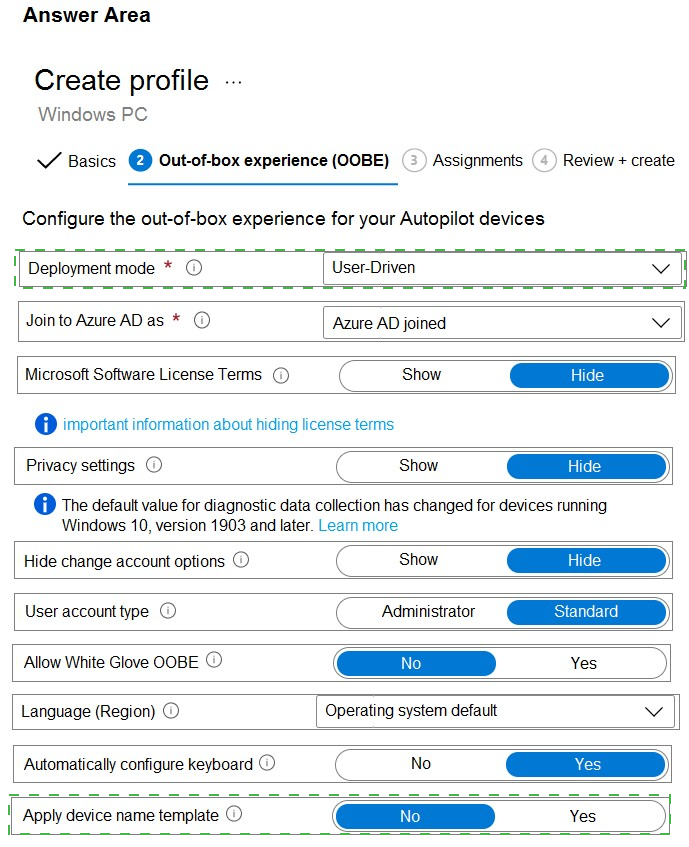
Explanation:
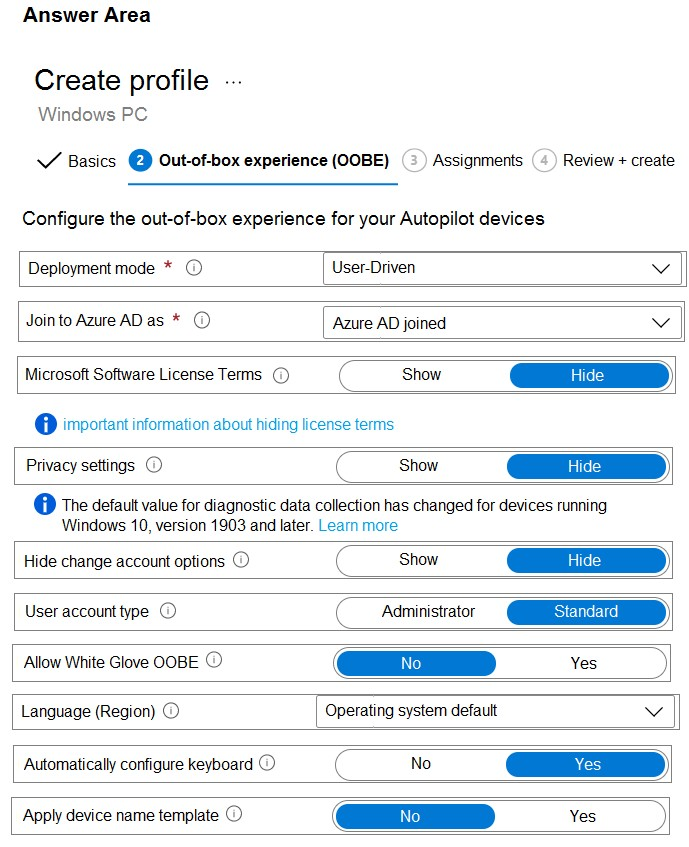
To automatically enroll devices and provision system apps without user authentication, you configure White Glove OOBE (pre-provisioning). To include the hardware serial number in the computer name, you configure Apply device name template and use the %SERIAL% variable in the template.
Correct Option:
Allow White Glove OOBE: Yes
White Glove (pre-provisioning) allows IT or a partner to pre-enroll the device, install system apps, and apply policies before the device reaches the end user. The user only needs to sign in when they receive the device, meeting the requirement of provisioning without end-user authentication during the initial setup.
Apply device name template: Yes
When set to Yes, you can specify a computer name template. To include the hardware serial number, use the variable %SERIAL% in the template (e.g., Contoso-%SERIAL%). This ensures the device name includes the unique serial number automatically.
Incorrect Option (other settings in the exhibit):
Deployment mode – User-Driven mode still requires user authentication; White Glove is the correct setting for no user authentication during provisioning.
Join to Azure AD as – Must be Azure AD joined for Autopilot, but this setting does not affect user authentication requirement or computer name.
Hide change account options – Controls whether users can change their account type during OOBE, unrelated to computer name or pre-provisioning.
User account type – Sets whether the user is Administrator or Standard after enrollment, not related to the requirements.
Language/Keyboard settings – Configure regional settings, not computer name or pre-provisioning.
Reference:
Microsoft Learn: Windows Autopilot White Glove – Pre-provisioning without user authentication. Device name template with %SERIAL% variable. No external links provided.