1. Prepare Infrastructure for Devices
Official Exam Weight: 25-30%
Subtopics: Choose appropriate device join type, join
devices to Microsoft Entra ID, register devices to Microsoft Entra ID,
plan and implement groups for devices in Microsoft Entra ID, configure
enrollment settings, configure automatic enrollment for Windows and bulk
enrollment for iOS/iPadOS and Android, configure enrollment profiles
for Android devices including fully managed dedicated corporate owned
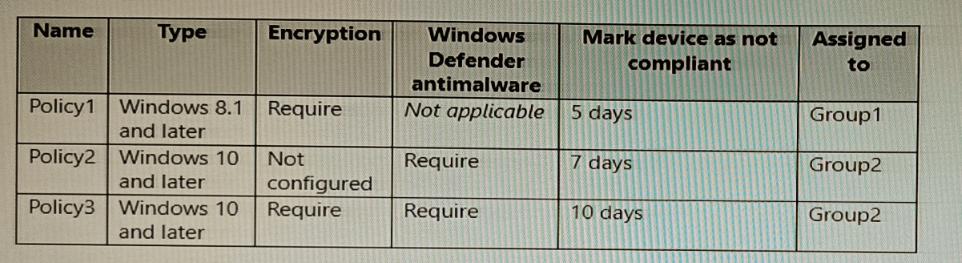
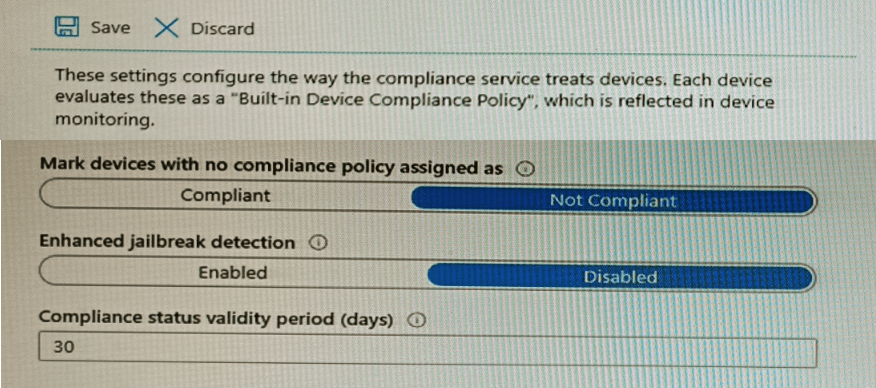
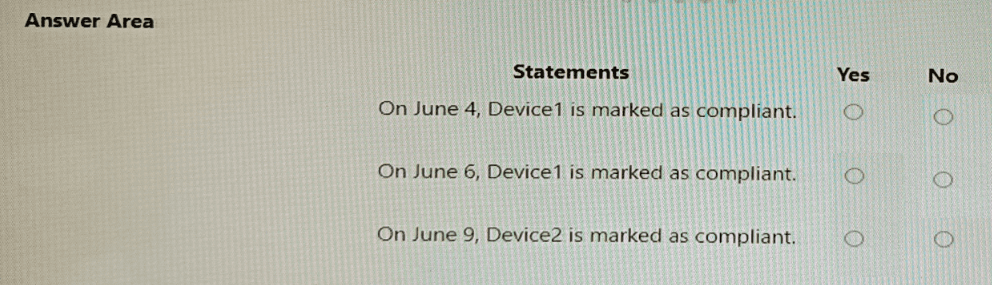
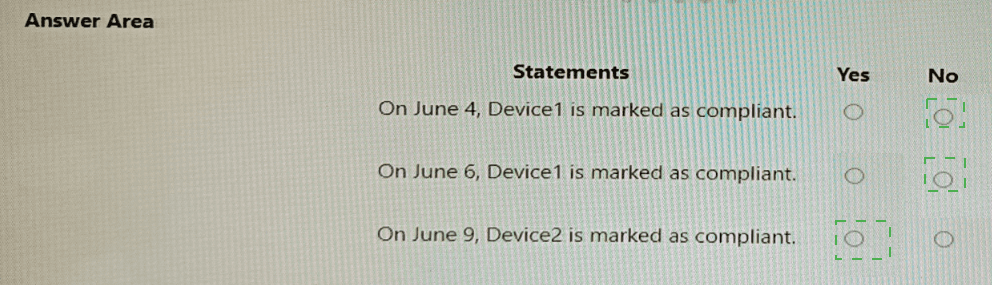
and work profile, manage roles in Intune, implement compliance policies
for all supported device platforms using Intune, implement Microsoft
Entra Conditional Access policies that require compliance status,
configure Windows Hello for Business, implement and manage Windows Local
Administrator Password Solution (Windows LAPS), manage membership of
local groups on Windows devices using Intune.
2. Manage and Maintain Devices
Official Exam Weight: 30-35%
Subtopics: Choose between Windows Autopilot and
provisioning packages, choose Windows Autopilot deployment mode, apply
device name template, implement Windows client deployment using Windows
Autopilot, create Enrollment Status Page (ESP), plan and implement
provisioning packages, plan and implement device upgrades for Windows
11, implement Windows 365 Cloud PC deployment, create device
configuration profiles for Windows devices including importing ADMX
files, create device configuration profiles for Android devices, create
device configuration profiles for iOS/iPadOS devices, create device
configuration profiles for macOS devices, create device configuration
profiles for Windows 11 Enterprise multi-session devices, target profile
using filters, configure Endpoint Privilege Management, manage
applications using Enterprise App Catalog, implement Microsoft Intune
Advanced Analytics, configure Microsoft Intune Remote Help, identify use
cases for Microsoft Cloud PKI, implement Microsoft Tunnel for Mobile
Application Management, sync restart retire or wipe devices, perform
bulk remote actions, update Microsoft Defender Antivirus security
intelligence, rotate BitLocker recovery keys, run device query using
KQL.
3. Manage Applications
Official Exam Weight: 15-20%
Subtopics: Prepare applications for deployment using
Intune, deploy apps using Intune, deploy Microsoft 365 Apps using
Intune, configure policies for Office apps, deploy Microsoft 365 Apps as
part of Windows Autopilot deployment using Office Deployment Tool (ODT)
or Office Customization Tool (OCT), manage Microsoft 365 Apps using
Microsoft 365 Apps admin center, deploy apps from platform-specific app
stores using Intune, plan and implement app protection policies,
implement Microsoft Entra Conditional Access policies for app protection
policies, plan and implement app configuration policies for managed
apps and managed devices.
4. Protect Devices
Official Exam Weight: 15-20%
Subtopics: Create antivirus policies, create disk
encryption policies, create firewall policies, configure Attack surface
reduction policies, plan and implement security baselines, integrate
Intune with Microsoft Defender for Endpoint, onboard devices into
Microsoft Defender for Endpoint, plan for device updates, create and
manage update rings using Intune, create and manage update policies
using Intune including iOS/iPadOS and macOS, manage Android updates
using configuration profiles or firmware-over-the-air (FOTA)
deployments, configure Windows client Delivery Optimization using
Intune, monitor updates.