Microsoft certification · Exam MB-800

MB-800 Mock Exam Page 2

Microsoft Dynamics 365 Business Central Functional Consultant

Free MB-800 mock exam questions 11–20, each with the answer and an explanation.

20 questions · 33 minutes · free, no sign-up

Free MB-800 questions

11–20 of 69 free
Question 11 Choose 1
A company uses the average costing method and inventory periods. Automatic Cost Posting is not enabled.
You close the inventory period for July 2020. You set the value of the Allow Posting From field in General Ledger Setup to August 1, 2020.
You receive and post a purchase invoice for freight charges on August 8, 2020 against a purchase invoice that was posted on July 15, 2020. You run the Adjust cost – Item entries batch job for August.
You need to identify the adjustment entry related to July after running the batch job.
Which date is automatically selected for the value entry by batch job?
Show answerHide answer

Correct answer: C August 1, 2020

Explanation

Explanation:
When an inventory period is closed, cost adjustments for that period are prevented. A freight charge posted in August against a July purchase is an additional direct cost that must be allocated to the original item cost. However, because the July period is closed, the system must post the adjustment to the earliest allowable date in the next open period.

Correct Option:

C. August 1, 2020

Explanation:
The Allow Posting From date in General Ledger Setup (Aug 1, 2020) defines the start of the next open period. The Adjust Cost – Item Entries batch job is aware of the closed July period and therefore backdates the resulting value entry to the last day of the previous closed period. Since July is closed and August is open, the adjustment is posted to the first day of the new open period, which is August 1, 2020.

Incorrect Options:

A. July 15, 2020:
This is the date of the original purchase, but the inventory period for July is closed. The system cannot post new entries to a closed period.

B. August 8, 2020:
This is the actual posting date of the freight charge invoice. However, cost adjustments that relate to items received in a closed period are automatically backdated to the boundary of the open period (August 1) to maintain period-based inventory valuation accuracy.

D. July 1, 2020:
This is the first day of the closed July period. No new postings are allowed on this date.

Reference:
Microsoft Learn documentation "Adjust Item Costs" and "Work with Inventory Periods." It states that when you run cost adjustment for a later period, and additional costs are assigned to items received in a closed period, the resulting value entry is dated the first day of the period for which you are adjusting costs (i.e., the start of the next open period, defined by "Allow Posting From").
Question 12 Choose 2
A company uses Dynamics 365 Business Central.
The company plans to use multiple unit prices for the same items from different vendors.
You need to configure the purchase price of the items.
In which two locations can you configure the purchase price? Each correct answer presents a complete solution.
NOTE: Each correct selection is worth one point.
Show answerHide answer

Correct answer: B, E Item cardVendor card

Explanation

Explanation:
Purchase prices define the cost at which an item is bought from a vendor. In Business Central, these prices can be configured in two primary, vendor-specific locations to support different prices from different vendors for the same item. Prices are typically set on a per-item, per-vendor basis.

Correct Options:

B. Item card:
On the Item Card, you can set a Last Direct Cost, which acts as a default purchase price. More importantly, you can access Purchase Prices from the Related menu to define specific vendor price agreements for that item. This is a standard location for configuring vendor-specific prices.

E. Vendor card:
On the Vendor Card, you can also access the Purchase Prices page via the Related menu to define price agreements for items you buy from this specific vendor. This is the vendor-centric view of the same price list setup as on the item card.

Incorrect Options:

A. Resource prices:
This setup is used to define billing rates for resources (people or machines) in service management or job costing, not for purchasing inventory items from vendors.

C. Customer card:
This is for setting sales prices (what you sell items for to customers), not purchase prices (what you buy items for from vendors).

D. Purchase order:
While you can enter and manually override a purchase price on a purchase order line, this is not a configuration location. Configuration implies setting up the default or agreed prices that automatically flow to documents, which is done on the Item Card or Vendor Card via the Purchase Prices setup.

Reference:
Microsoft Learn documentation on "Record Purchase Prices, Discounts, and Payment Agreements." The Purchase Price functionality is accessed from either the Item Card or the Vendor Card to create agreements that automatically populate purchase documents.
Question 13 Choose 1
A company uses Dynamics 365 Business Central.
The company performs an annual review of customer prices and determines that sales prices must rise by 10% for the coming year. You need to adjust the prices. What should you do?
Show answerHide answer

Correct answer: B Use the action Suggest Sales Price on Worksheet.

Explanation

Explanation:
A company-wide price increase of 10% for all customer prices is a bulk update scenario. The efficient method in Business Central is to use a batch process that automatically calculates new prices based on existing ones, rather than manually editing thousands of individual price records.

Correct Option:

B. Use the action Suggest Sales Price on Worksheet.

Explanation:
The Sales Price Worksheet is specifically designed for bulk creation and updates of sales prices. The Suggest Sales Price action can copy existing prices from items and then apply a universal adjustment factor (like 110% for a 10% increase) to propose new price lines, which can then be reviewed and implemented in batch.

Incorrect Options:

A. Manually add new lines to the Sales Lines Discount page:
This page is for setting discounts that apply to document lines, not for defining the base sales price per item per customer. It is not the correct tool for a universal price update.

C. Manually add a sales price to the Sales Prices page:
While this is where sales prices are stored, manually adding or editing prices here one-by-one is extremely inefficient for a company-wide 10% increase across potentially many items and customer price groups.

D. Manually add a sales price to the Sales Price Worksheet page:
You could manually enter lines here, but this is still a manual, line-by-line process. The key differentiator is using the Suggest Sales Price action on the worksheet to automate the proposal of new prices based on a percentage increase, which is the efficient solution.

Reference:
Microsoft Learn documentation "Update Multiple Item Prices." The Sales Price Worksheet with the Suggest Sales Price function is the recommended tool for performing mass updates to sales prices, as it allows for applying a multiplier or adding a fixed amount to existing prices.
Question 14 Choose 1
A company uses Dynamics 365 Business Central. The company has three sites.
The company needs to track inventory separately for each site.
You need to configure the system to meet this requirement.
What should you configure?
Show answerHide answer

Correct answer: C Location

Explanation

Explanation:
To track inventory separately by physical site, you must define each site as a distinct inventory storage location. This allows for separate stock levels, value, and transactions to be recorded for each place. The feature designed for this purpose is the primary inventory dimension for physical storage.

Correct Option:

C. Location

Explanation:
A Location in Business Central represents a physical site or warehouse where inventory is stored and tracked. By setting up three separate locations and assigning them to transactions, you achieve separate inventory tracking, valuation, and reporting for each site. This is the core configuration for multi-site inventory management.

Incorrect Options:

A. Warehouse:
A Warehouse is a sub-feature within a location that enables more complex handling processes (like bins, pick waves, shipments). It is not the primary entity for separating inventory by site; a single Location can contain multiple warehouses. The site itself must first be defined as a Location.

B. In-Transit location:
This is a special system-defined Location (code often 'TRANSIT') used to track items while they are being transferred between two regular locations. It is not used to define permanent, physical inventory sites for daily tracking.

D. Responsibility center:
This is an organizational unit (like a department or regional office) used to manage and report on business activities and costs. It does not track physical inventory stock; it is a management dimension, not an inventory location.

Reference:
Microsoft Learn documentation "Set Up Locations." Locations are defined as places "where you buy or sell items, and where you maintain inventory." They are the fundamental building block for inventory segregation by physical site.
Question 15 Choose 1
You need to transfer opening balances data into the system.
Solution: Transfer balances by using the Copy Company function.
Does the solution meet the goal?
Show answerHide answer

Correct answer: A Yes

Explanation

Explanation:
The Copy Company function is specifically designed for this purpose. It allows you to create a new company and copy all or selected data—including G/L accounts, customers, vendors, and their opening balances—from an existing company or template. This is the standard tool for initializing a new company with baseline financial data.

Correct Option:

A. Yes

Explanation:
The Copy Company function is the correct method to transfer opening balances data into a new system. It replicates the chart of accounts, master data, and importantly, the opening balance figures from the source company (or a company used as a data template) to the destination company, efficiently setting up the initial trial balance.

Incorrect Option:

B. No:
This would be incorrect because the proposed solution is valid. Alternative methods like manual data entry in journals or using RapidStart configuration packages exist, but the Copy Company function is a direct and supported method specifically for transferring company setup data, including opening balances, from one company to another within the same environment.

Reference:
Microsoft Learn documentation "Copy a Company." It states you can copy "master data, transactions, and all amounts" to a new company. For implementing opening balances, this includes copying G/L accounts with their net changes (which represent opening balances in a new company).
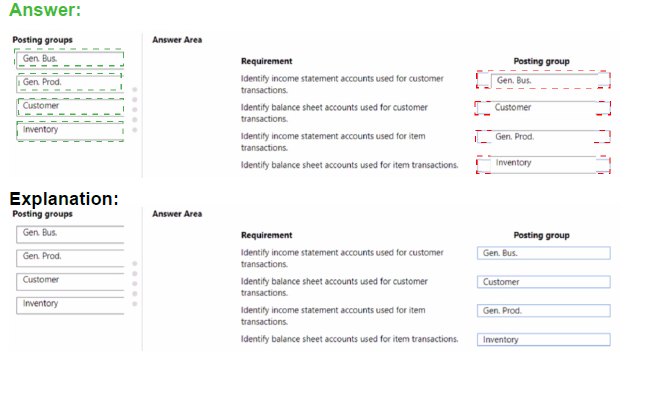
Question 16
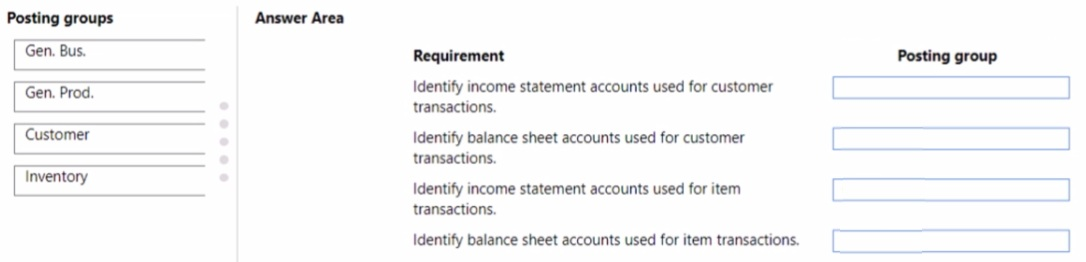
You are setting up new customers and items in Dynamics 365 Business Central.
You need to configure the system.
Which posting group should you use? To answer, drag the appropriate posting groups to the correct use cases. Each posting group may be used once, more than once, or not at all.
You may need to drag the split bar between panes or scroll to view content.
NOTE: Each correct selection is worth one point.

Show answerHide answer

Explanation


Explanation:
Posting groups link business entities (like customers and items) to the specific general ledger accounts where transactions are posted. Customer Posting Groups determine the accounts for receivables transactions, while General Posting Groups (combining Gen. Bus. and Gen. Prod.) determine the accounts for inventory and COGS transactions. Their account types (Income Statement vs. Balance Sheet) are predefined in the G/L Account setup.

Correct Option Mapping:

Requirement: Identify income statement accounts used for customer transactions.

Correct Posting Group: Customer

Explanation:
The Customer Posting Group defines the accounts for receivables. The Sales Account field within this setup points to an Income Statement account (e.g., a revenue account) where sales to this customer are posted.

Requirement: Identify balance sheet accounts used for customer transactions.

Correct Posting Group: Customer

Explanation:
The same Customer Posting Group also contains the Receivables Account field. This field must point to a Balance Sheet account (typically an asset account for Accounts Receivable) where the outstanding customer balance is tracked.

Requirement: Identify income statement accounts used for item transactions.

Correct Posting Group: Gen. Prod.

Explanation:
General Product Posting Groups (Gen. Prod.) are linked to items. Within the General Posting Setup (which combines a Gen. Bus. Posting Group and a Gen. Prod. Posting Group), key Income Statement accounts are defined, such as the Sales Account, COGS Account, and Inventory Adjmt. Account.

Incorrect Options:

Gen. Bus. (General Business Posting Group):
This is linked to customers/vendors and defines aspects like the G/L accounts for sales/purchase discounts and prepayments. While used in conjunction with Gen. Prod. in the General Posting Setup, the question about item transactions specifically points to the product side (Gen. Prod.).

Inventory:
There is no standalone "Inventory" posting group. Inventory-related G/L accounts (Inventory, COGS, etc.) are defined in the General Posting Setup, which uses the Gen. Prod. Posting Group.

Reference:
Microsoft Learn documentation "Setting Up Posting Groups." The Customer Posting Group manages customer-related G/L accounts, while the combination of General Business and General Product Posting Groups in the General Posting Setup manages the income statement accounts for item sales and costs.
Question 17 Choose 3
You are implementing Dynamics 365 Business Central.
You are unable to view some expected functionality in the system.
You need to demonstrate the use of different options for assigning profiles to users.
In which three places can you assign profiles to users? Each correct answer presents a complete solution.
NOTE: Each correct selection is worth one point.
Show answerHide answer

Correct answer: A, B, D Assign a User Group to the user. Assign the Profile to the User Group.Assign a Profile on the User Personalization page.Accept the default Profile.

Explanation

Explanation:
Profiles (formerly Roles) define the user's Role Center and UI layout. They can be assigned to users through several direct and indirect methods within Business Central's administration tools.

Correct Options:

A. Assign a User Group to the user. Assign the Profile to the User Group:
This is an indirect but efficient method. You can assign a Profile ID to a User Group on the User Groups page. Then, any user added to that group inherits the profile from the group, enabling mass profile assignment.

B. Assign a Profile on the User Personalization page:
You can assign or change a profile for a specific user by going to Users > select a user > User Personalization. This is a direct, per-user assignment method.

D. Accept the default Profile:
When a user first signs in and no other profile is assigned, Business Central assigns a Default Profile (configured in Profiles with the Default Role Center checkbox). This is an automatic assignment method.

Incorrect Options:

C. Assign the Profile on the User card:
While you assign Permission Sets on the User card, you cannot directly assign a Profile there. Profile assignment is done via the User Personalization page (Option B), User Groups (Option A), or by default.

E. Add the user to the Profile card:
This is backwards. You assign a profile to a user (or group), not add a user to a profile. The Profile card is for configuring the profile's properties (like Role Center), not for managing user membership.

Reference:
Microsoft Learn documentation "Managing Profiles and Role Centers." It details that profiles can be assigned: 1) Automatically as a default, 2) Manually per user via User Personalization, and 3) To all members of a User Group via the User Group card.
Question 18 Choose 2
You need to configure Dynamics 365 Business Central to allow for receipt of quantities of items greater than the quantity ordered.
What are two possible ways to achieve the goal? Each correct answer presents a complete solution.
NOTE: Each correct selection is worth one point.
Show answerHide answer

Correct answer: C, D Set up and select an over-receipt code in the item recordSet up and select an over-receipt code in the vendor record

Explanation

Explanation:
Over-receiving means accepting more goods than originally ordered on a purchase order. Business Central controls this tolerance through Over-Receipt Codes, which define the allowed percentage or quantity of excess. This control can be set at the item level for blanket rules or at the vendor level for specific supplier agreements.

Correct Options:

C. Set up and select an over-receipt code in the item record:
You can define an Over-Receipt Code on the Item Card (Purchasing FastTab). This applies a default over-receipt tolerance to all purchase orders for that specific item, regardless of the vendor.

D. Set up and select an over-receipt code in the vendor record:
You can define an Over-Receipt Code on the Vendor Card (Purchasing FastTab). This applies a default over-receipt tolerance to all purchase orders from that specific vendor, for any items.

Incorrect Options:

A. Configure a maximum order quantity for the item:
The Maximum Order Quantity on the item card is a planning parameter used by the MRP engine to suggest order quantities. It does not control or allow exceeding the ordered quantity during goods receipt posting; it's a planning limit, not a receiving tolerance.

B. Configure a maximum inventory level for the item:
The Maximum Inventory on the item card is another planning parameter used for replenishment calculations. It sets a target ceiling for total stock but does not enable or disable the ability to receive more than the purchase order quantity during posting.

Reference:
Microsoft Learn documentation "Enable Receipt of More Items than Ordered." It explicitly states that to allow over-receipt, you must set up over-receipt codes and assign them to items or vendors. These codes define the tolerance that is then applied on purchase order lines.
Question 19
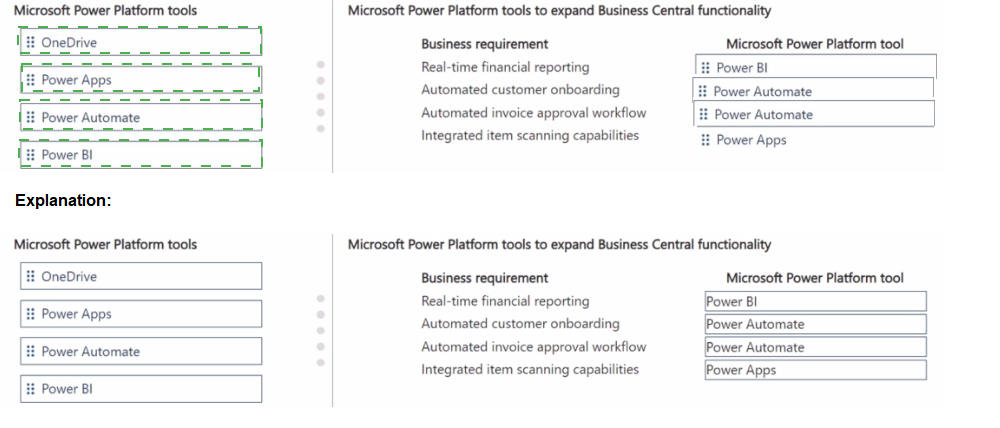
A company is implementing Business Central. The company is evaluating Microsoft Power Platform integration benefits. The company has the following business requirements:
• Provide financial reporting in real-time.
• Automate customer onboarding in Business Central.
• Create a workflow that automates invoice approvals.
• Integrate item scanning capabilities in the warehouse.
You need to evaluate the specified business requirements and align them with Microsoft solutions that can meet each need effectively.
Which Microsoft Power Platform tools should you recommend? To answer, move the appropriate business Microsoft Power Platform tools to the correct requirements. You may use each Microsoft Power Platform tool once, more than once, or not at all. You may need to move the split bar between panes or scroll to view content.
NOTE: Each correct selection is worth one point.
Show answerHide answer

Explanation


Explanation:
This question maps common business needs to the core Power Platform services that extend Business Central. Power BI is for analytics, Power Apps for custom applications, and Power Automate for workflow automation.

Correct Option Mapping:

Business requirement: Real-time financial reporting

Correct Tool: Power BI

Explanation:
Power BI is the analytics and visualization tool. It connects directly to Business Central data (via APIs or connector) to create live dashboards and interactive reports, providing real-time financial insights.

Business requirement: Automated customer onboarding

Correct Tool: Power Apps

Explanation:
Power Apps is used to build custom business applications without code. You can create an app for customer self-registration or for internal staff to input customer data, which then creates records in Business Central via the connector, automating the onboarding process.

Business requirement: Automated invoice approval workflow

Correct Tool: Power Automate

Explanation:
Power Automate is the workflow automation service. You can build a flow that triggers when an invoice is created, sends it for approval (e.g., via email or Teams), records the response, and updates the Business Central record, automating the entire approval chain.

Business requirement: Integrated item scanning capabilities

Correct Tool: Power Apps

Explanation:
Power Apps can be used to build a mobile warehouse scanning app. The app uses the device's camera as a barcode scanner, looks up or updates item information, and integrates directly with Business Central's APIs to register movements, providing integrated scanning capabilities.

Incorrect Options:

OneDrive:
This is a cloud storage service, not a primary application development or workflow automation tool. While it can store documents related to these processes, it does not directly "automate," "report," or "integrate scanning" with Business Central data in the way the Power Platform tools do.

Reference:
Microsoft's documentation on extending Business Central with the Power Platform. Power BI for reporting, Power Apps for custom apps and mobile solutions, and Power Automate for automated workflows are standard pairings.
Question 20 Choose 1
You are implementing Dynamics 365 Business Central.
You use infinite items such as water, electricity, and natural gas.
You need to set up the items.
Which item type should you use for infinite items?
Show answerHide answer

Correct answer: D Non-Inventory

Explanation

Explanation:
Infinite items like utilities (water, electricity) are not physical goods held in stock (Inventory), nor are they a person or machine's time (Resource), or a professional service (Service). They are purchased and consumed but not tracked as inventory. The correct type is for items used in transactions without tracking quantity on hand.

Correct Option:

D. Non-Inventory

Explanation:
The Non-Inventory item type is designed for goods or materials that a company buys or sells but does not track as inventory. These items have no quantity on hand, and their costs are expensed directly upon purchase. This perfectly suits infinite items like utilities, which are consumed as purchased and are not stored or tracked in stock.

Incorrect Options:

A. Resource:
This type represents work capacity (people or machines) used in jobs or service management. It tracks hours and costs for labor or equipment usage, not for consumable goods like water or electricity.

B. Inventory:
This type is for physical goods that are stocked, tracked for quantity and value, and use full inventory costing and valuation. Infinite items are not stored or physically counted.

C. Service:
This type is for intangible work performed, like consulting hours or maintenance work. While it is also not tracked in inventory, it is designed for labor-based services, not for consumable commodity goods purchased from a utility company.

Reference:
Microsoft Learn documentation on "Item Types." It specifies that Non-Inventory items are for "goods that you buy or sell but that you do not track inventory for," making them the appropriate choice for consumable commodities or infinite items.
Full mock exam

Sit the MB-800 exam before exam day

Full-length mocks with the same number of questions and the same time limit as the real MB-800 exam. Every attempt draws a new set of questions from the full bank, so you can keep going until you pass comfortably.

Get full MB-800 mock exam
  • 65questions per mock
  • 105 mintime limit
  • 234questions in the bank
  • Newmock on every attempt