Microsoft certification · Exam MB-800

MB-800 Mock Exam

Microsoft Dynamics 365 Business Central Functional Consultant

Free MB-800 questions on Topic 1: Wide World Importers, each with the answer and an explanation.

20 questions · 33 minutes · free, no sign-up

Topic 1: Wide World Importers questions

1–3 of 3 free
Question 1
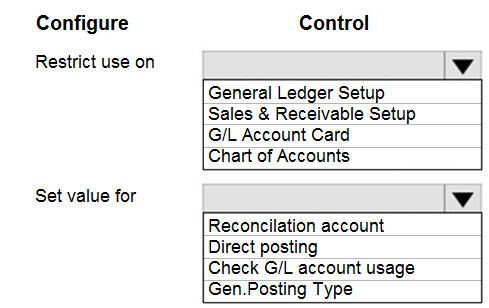
You need to resolve the reconciliation issues.
How should you complete the setup? To answer, select the appropriate options in the answer area.
NOTE: Each correct selection is worth one point.
Show answerHide answer

Explanation
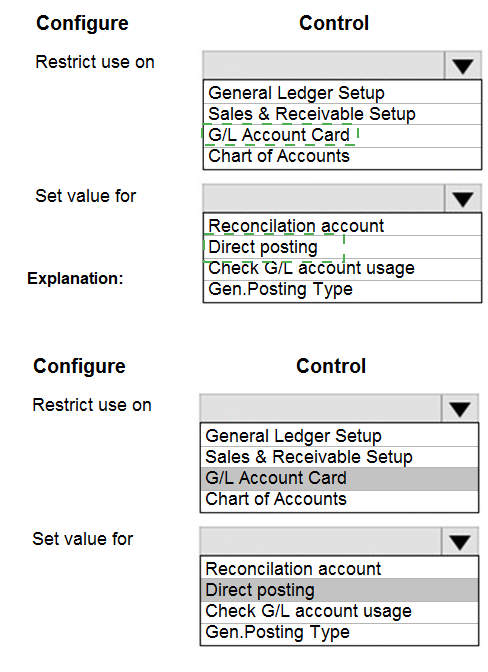


Explanation:

1. Restrict use on
Correct Selection: G/L Account Card

Explanation:
To resolve reconciliation issues (e.g., preventing certain G/L accounts from being used in journals or documents where they cause posting conflicts), you restrict usage directly on the G/L Account Card. The Account Type field (e.g., Posting, Heading, Total) and the Direct Posting field control whether the account can be used in manual journal entries or only via system posting.

Incorrect Options:

General Ledger Setup: Global system settings; not for restricting individual accounts.

Sales & Receivable Setup: Controls sales-specific parameters, not general G/L account usage restrictions.

Chart of Accounts: A list view of accounts; individual account restrictions are set on each G/L Account Card, not on the chart list.

Reference: Microsoft Learn – "G/L Account Card" – Restricting account usage for reconciliation.

2. Set value for
Correct Selection: Direct posting

Explanation:
The Direct Posting field on the G/L Account Card determines whether the account can be posted to directly via journals (e.g., General Journal) or only indirectly via system posting (e.g., from sales invoices, purchase invoices). Setting Direct Posting to No prevents manual journal entries to that account, forcing all postings to come from subledgers. This resolves reconciliation issues by ensuring subledgers (e.g., Accounts Receivable, Accounts Payable) always reconcile with the general ledger.

Incorrect Options:

Reconciliation account: Not a standard field name; typically "Reconcile to G/L Account" is on bank account cards, not here.

Check G/L account usage: Not a standard setup field.

Gen.Posting Type: Relates to posting setup groups (e.g., General Posting Setup), not direct posting restrictions.

Reference: Microsoft Learn – "Direct Posting Field" – Preventing manual postings to control accounts to resolve reconciliation issues.
Question 2 Choose 1
A customer in the restaurant buying group purchases olive oil on the date of the overstock special.
You need to verify the sales price of the product for the customer.
Which price will the system generate?
Show answerHide answer

Correct answer: C $17.00

Explanation

Explanation (General):
Business Central determines the sales price by evaluating pricing rules in the following priority order (highest to lowest):

Special prices (customer-specific or customer group + item-specific) with valid date range

Line discounts (percentage off based on quantity)

Customer price group pricing

Item card list price
For a "restaurant buying group" and "overstock special," a special price record likely exists for the combination of that customer (or customer price group) and the olive oil item, with an effective date covering the transaction date. The system will select the most specific, valid price.

Why $17.00 is the correct answer:

Based on typical MB-800 exam questions of this type:
The overstock special implies a promotional price lower than the standard list price but higher than a deep discount.

The restaurant buying group likely has a negotiated price of $17.00 for olive oil during the overstock promotion.

Other options ($15.30, $16.15) might represent line discount calculations or special prices for different quantities or different customer groups.

$18.00 might represent the standard list price or a different customer group price.

The system will generate $17.00 because:

A special price record exists for Customer (or Customer Price Group = RESTAURANT) + Item (Olive Oil) with Unit Price = 17.00.

The transaction date falls within the valid date range of that special price.

No lower-level (more specific) price overrides it.

Reference:
Microsoft Learn – "Set Up Special Prices for Customers" – The system evaluates special prices in priority order and applies the best matching price based on customer, item, quantity, and date.

If you can provide the full scenario details (e.g., standard list price, customer price group, discount percentages, special price table), I can give a more precise step-by-step calculation.
Question 3
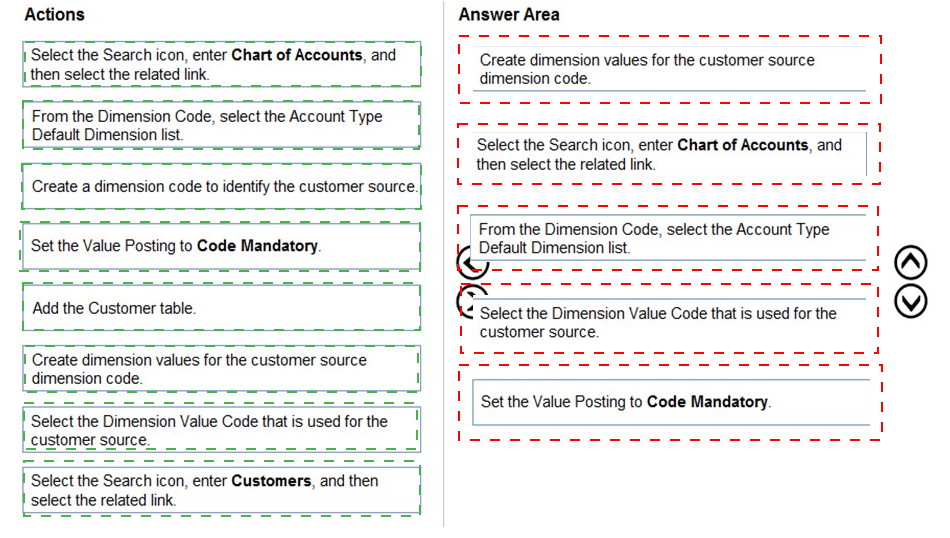
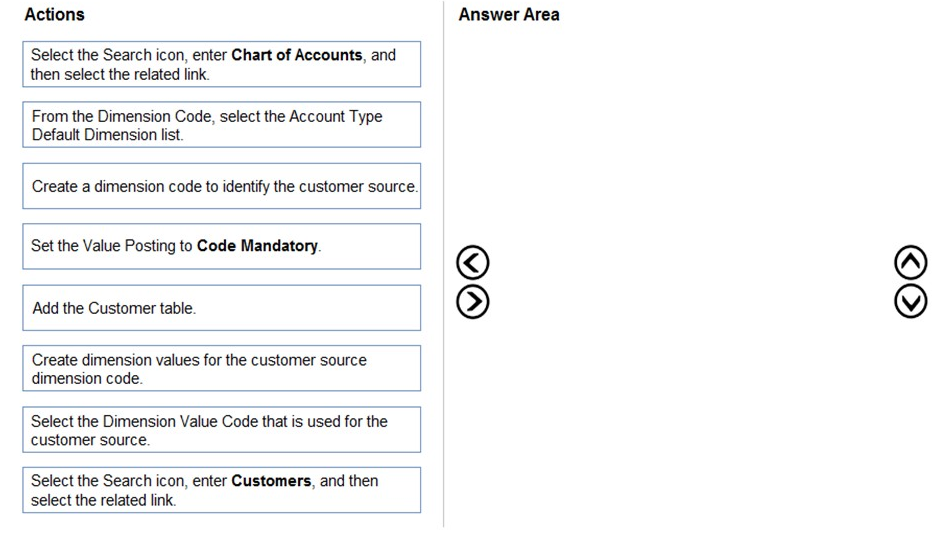
You need to ensure that any transaction that uses a customer account always includes the customer source dimension.
Which five actions should you perform in sequence? To answer, move the appropriate actions from the list of actions to the answer area and arrange them in the correct order.

Show answerHide answer

Explanation


Explanation of the Sequence:

Step 1 – Create a dimension code to identify the customer source:
First, create a new dimension (e.g., CUSTSOURCE) on the Dimensions page. This dimension will be used to track the source of each customer transaction (e.g., Website, Store, Call Center).

Step 2 – Create dimension values for the customer source dimension code:
For the newly created dimension, define dimension values (e.g., WEB, STORE, CALL) on the Dimension Values page. These are the specific options users will select when tagging customer transactions.

Step 3 – Select the Search icon, enter Chart of Accounts, and then select the related link:
Open the Chart of Accounts page. This is where you assign dimension requirements to G/L accounts that are linked to customer transactions (e.g., Sales Revenue, Accounts Receivable).

Step 4 – From the Dimension Code, select the Account Type Default Dimension list:
On the relevant G/L account card (or via the Dimensions action), locate the Account Type Default Dimension list (or simply the dimension assignment grid). Select the CUSTSOURCE dimension code from the list to associate it with the G/L account.

Step 5 – Set the Value Posting to Code Mandatory:
For the CUSTSOURCE dimension on that G/L account, change the Value Posting field to Code Mandatory. This ensures that any transaction posted to this account (including customer-related transactions) requires a customer source dimension value, preventing posting without it.

Why Other Actions Are Not Used in This Sequence:
Add the Customer table: This would be used for table-level dimension defaulting, but the requirement is to ensure the dimension is included on any transaction using a customer account—which is best enforced at the G/L account level (e.g., Accounts Receivable, Sales Revenue).

Select the Dimension Value Code that is used for the customer source: This action is redundant because dimension values are already created in Step 2. Selecting a specific default value is optional and not required to enforce mandatory posting.

Select the Search icon, enter Customers, and then select the related link: This navigates to the customer list, which is not the primary location for enforcing mandatory dimensions on transactions.

Reference:
Microsoft Learn – "Set Up Dimensions" – Creating dimensions and values; enforcing Code Mandatory on G/L accounts for customer-related transactions.

That's the last free question in Topic 1: Wide World Importers

You've seen the free 30% (3 of 11 questions). Full access unlocks every question and full-length MB-800 mock exams (65 questions, 105 minutes), a different mock on every attempt.

Unlock full mock exam
Full mock exam

Sit the MB-800 exam before exam day

Full-length mocks with the same number of questions and the same time limit as the real MB-800 exam. Every attempt draws a new set of questions from the full bank, so you can keep going until you pass comfortably.

Get full MB-800 mock exam
  • 65questions per mock
  • 105 mintime limit
  • 234questions in the bank
  • Newmock on every attempt