A company uses Dynamics 365 Business Central.
A vendor needs to use a default warehouse location and invoice a different vendor for a purchase order.
You need to configure the system to meet the requirements.
Which controls should you use? To answer, select the appropriate options in the answer area.
NOTE: Each correct selection is worth one point.
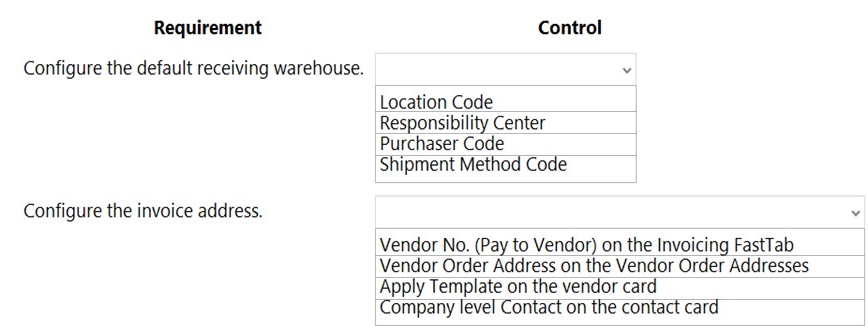
A vendor needs to use a default warehouse location and invoice a different vendor for a purchase order.
You need to configure the system to meet the requirements.
Which controls should you use? To answer, select the appropriate options in the answer area.
NOTE: Each correct selection is worth one point.
Show answerHide answer
Explanation
Explanation:
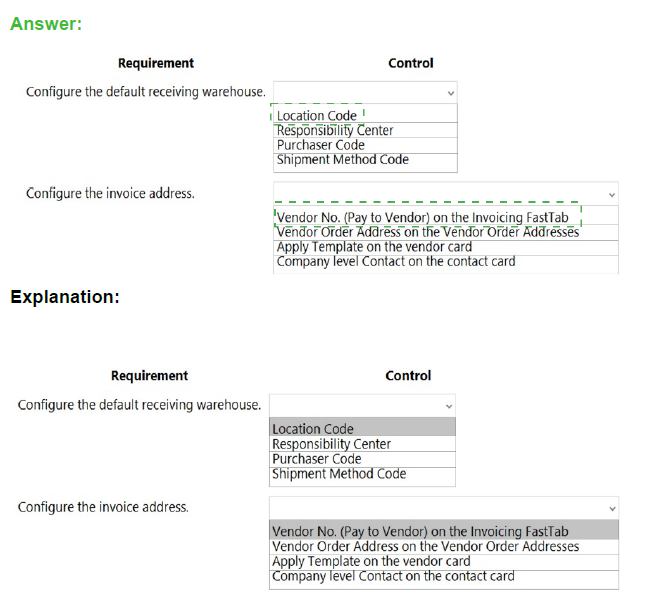
To set the default location where goods from a specific vendor are received, you must define this on the vendor's card. The Location Code field is used to specify the default warehouse for posting receipts from this vendor. The other listed controls are unrelated to warehouse determination for purchases.
Correct Option:
Location Code:
This field on the vendor card's Purchasing FastTab defines the default warehouse (location) where items received from this vendor will be posted. Setting it here ensures all purchase documents for this vendor default to this receiving location.
Incorrect Options:
Responsibility Center: Used to route documents to a specific department or office, not to define a physical receiving warehouse.
Purchaser Code: Identifies the responsible buyer/agent for the vendor relationship, not a storage location.
Shipment Method Code: Defines how goods are shipped (e.g., air freight), not where they are received.
Reference: Dynamics 365 Business Central help topic on setting up vendors.
Requirement: Configure the invoice address.
Explanation:
To have a purchase order invoice sent to and paid to a different vendor entity (e.g., a parent company or corporate billing center), you must specify the paying vendor on the purchase order. The Vendor No. (Pay to Vendor) field is used for this specific intercompany billing scenario.
Correct Option:
Vendor No. (Pay to Vendor) on the Invoicing FastTab:
On a purchase order, this field allows you to specify a different vendor number from the "Order Address" vendor to whom the invoice will be sent and payment made. This directly satisfies the requirement to "invoice a different vendor."
Incorrect Options:
Vendor Order Address on the Vendor Order Addresses:
This is used to define different shipping addresses (Order Addresses) for the same vendor, not to invoice a completely different vendor entity.
Apply Template on the vendor card:
This is for applying a setup template when creating a new vendor, not for configuring invoice routing on transactions.
Company level Contact on the contact card:
This links a contact to a company for relationship tracking in the Contact Management system, not for defining payment routing in Purchase Payables.
Reference:
Business Central documentation on creating purchase orders and the "Pay-to Vendor" field.