Salesforce certification · Exam Salesforce-MuleSoft-Developer

Salesforce-MuleSoft-Developer Mock Exam Page 7

Salesforce MuleSoft Developer - Mule-Dev-201

Free Salesforce-MuleSoft-Developer mock exam questions 61–67, each with the answer and an explanation.

20 questions · 33 minutes · free, no sign-up

Free Salesforce-MuleSoft-Developer questions

61–67 of 67 free
Question 61 Choose 1
Refer to the exhibit.
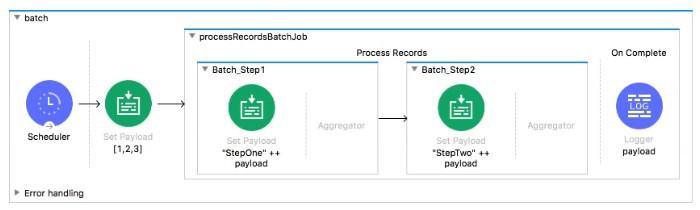


What is the output payload in the On Complete phase
Show answerHide answer

Correct answer: A summary statistics with NO record data

Explanation

Explanation:

Let's break down the Batch Job behavior:

Batch Job Phases:
Process Records: Processes individual records through Batch Steps (Batch_Step1, Batch_Step2)
On Complete: Runs once after all records have been processed, providing summary statistics about the batch execution (e.g., total records, successful records, failed records)

Key Behavior:
The On Complete phase does not receive the processed record data as payload.
Its payload contains batch job summary information (metadata about the batch execution), not the actual records.
Record data flows only within the Process Records phase through Batch Steps.

What Happens in This Flow:
Scheduler sets payload to [1, 2, 3]
Batch Job starts

Process Records phase:
Each record (1, 2, 3) goes through Batch_Step1 β†’ transforms to "StepOne" ++ payload
Then through Batch_Step2 β†’ transforms to "StepTwo" ++ "StepOne" ++ original

Output would be ["StepTwoStepOne1", "StepTwoStepOne2", "StepTwoStepOne3"]

On Complete phase:
Receives batch summary, NOT the processed records
Contains stats like total records processed, successful count, failed count

Key Concepts Tested:
Batch Job phases (Process Records vs. On Complete)
Data flow in Batch Jobs
Understanding that On Complete receives summary metadata, not record data

Reference:
MuleSoft Documentation: Batch Job On Complete phase provides statistics about batch execution, not the processed records.

Analysis of Other Options:

B. The records processed by the last batch step: Incorrect. This would be the output of the Process Records phase, not the On Complete phase.

C. The records processed by all batch steps: Incorrect. This is also Process Records phase data, not On Complete phase data.

D. The original payload: Incorrect. Neither phase receives the original payload; Process Records receives individual records, On Complete receives summary stats.
Question 62 Choose 1
Which of the below functionality is provided by zip operator in DataWeave?
Show answerHide answer

Correct answer: A Merges elements of two lists (arrays) into a single list

Explanation

Explanation:

The zip operator (or function: dw::Core::zip()) in DataWeave is a fundamental array operation:

1. Functionality: It takes two arrays as input and combines them element-by-element, based on their position (index), into a single new array.
2. Output Structure: The resulting array contains sub-arrays (or pairs), where the $i$-th sub-array contains the $i$-th element of the first input array and the $i$-th element of the second input array.
3. Example: If you zip the array ["a", "b"] with the array [1, 2], the result is [["a", 1], ["b", 2]].
4. Size: The resulting array's size is equal to the size of the smallest input array; any trailing elements in the longer array are ignored.

This perfectly matches the description in Option A.

❌ Incorrect Answers
B. Used for sending attachments: This functionality is handled by specialized connectors, such as the Email Connector, or by processing multipart/form-data MIME types, which is entirely separate from DataWeave's core transformation logic.

C. Minimize the size of long text using encoding: This describes compression (like GZIP) or encoding (like Base64). Mule applications use the Compression Module for creating compressed files (like .zip files), which is a component/module, not the DataWeave zip operator.

D. All of the above: Incorrect since options B and C are false.

πŸ“š References
DataWeave zip Function: The official MuleSoft documentation for the dw::Core module states that the zip function "Merges elements from two arrays into an array of arrays. The first sub-array in the output array contains the first indices of the input sub-arrays... and so on".
Question 63 Choose 1
A web client sends a request to http;//localhost:8081?dept=sales. What is the correct DataWeave expression to access the value of dept?
Show answerHide answer

Correct answer: A attributes.queryParams.dept

Explanation

Explanation:

In Mule 4, query parameters from an HTTP request are accessed through the message attributes in the queryParams map:

attributes contains all message metadata (headers, query params, URI params)

queryParams is a map within attributes containing all query parameters

dept is the specific query parameter name

So the correct DataWeave expression is: attributes.queryParams.dept

Key Concepts Tested:
Mule 4 message structure and attributes
Accessing HTTP query parameters
Difference between attributes, payload, and vars

Reference:
MuleSoft Documentation: Query parameters are accessed via attributes.queryParams.paramName.

Analysis of Other Options:

B. attributes.dept: Incorrect. Query parameters are not directly under attributes; they're in the queryParams map.

C. message.queryParams.dept: Incorrect. message scope doesn't exist in Mule 4 DataWeave expressions.

D. vars.dept: Incorrect. vars contains flow variables, not automatically populated query parameters. You would need to explicitly set a variable first using Set Variable.
Question 64 Choose 1
What HTTP method in a RESTful web service is typically used to completely replace an existing resource?
Show answerHide answer

Correct answer: C PUT

Explanation

Explanation:

βœ… Correct Option:

C. PUT
The PUT method is defined by the HTTP specification as idempotent and is used to replace the state of a resource at a known URI with the state defined in the request payload. If a resource exists at that URI, PUT completely overwrites it. If it does not exist, it is often created. This makes it the standard method for a complete update or replacement of an existing resource in RESTful design.

❌ Incorrect Options:

A. GET
The GET method is used solely for retrieving a representation of a resource. It is a safe, read-only operation that must not change the state of the resource on the server, making it unsuitable for any update or replace operation.

B. PATCH
The PATCH method is used for partial updates, not complete replacements. It applies a set of changes described in the request payload to the resource, modifying only the fields that are provided. It is not designed to replace the entire resource.

D. POST
The POST method is a general-purpose operation primarily used to create new resources within a collection. Its behavior is not standardized and is not idempotent. While it can sometimes be used for updates, it is not the standard or recommended method for a complete idempotent replacement of an existing resource.

πŸ“‹ Summary:
In RESTful API design, HTTP methods have specific semantic meanings. The requirement is to completely replace an existing resource. The PUT method is explicitly designed for this purpose, as it is idempotent and instructs the server to store the enclosed payload at the supplied URI, fully replacing any existing resource there.

πŸ”— Reference:
RFC 7231, Hypertext Transfer Protocol (HTTP/1.1): Semantics and Content, Section 4.3.4 (PUT)
Question 65 Choose 1
In the Database On Table Row operation, what does the Watermark column enable the On Table Row operation to do?
Show answerHide answer

Correct answer: A To avoid duplicate processing of records in a database.

Explanation

Explanation:

The Database On Table Row operation in MuleSoft is a polling mechanism that retrieves rows from a database table. To ensure that rows are processed only once, MuleSoft uses a Watermark column:

The Watermark column is a column whose values increase over time (commonly an auto-increment record_id or a timestamp).

Mule keeps track of the last retrieved watermark value in an ObjectStore.

On the next poll, Mule retrieves only rows with a watermark value greater than the last stored one.

This prevents duplicate processing of the same records.

❌ Why the Other Options Are Incorrect

B. To delete the most recent records retrieved from a database to enable database caching
Incorrect. The watermark does not delete records; it only tracks the last processed value.

C. To enable duplicate processing of records in a database
Opposite of the actual behavior. The watermark prevents duplicates.

D. To save the most recent records retrieved from a database to enable database caching
Misleading. The watermark saves the last processed value in an ObjectStore, but not for caching purposes.

πŸ“š References
MuleSoft Docs: Database Connector – On Table Row
Trailhead: Process Data Using Database Connector
Question 66 Choose 1
What execution model is used by For Each and Batch Job scopes?
Show answerHide answer

Correct answer: A For Each is single-threaded and Batch Job is multi-threaded

Explanation

Explanation:

In Mule 4, the For Each scope processes each element of a collection sequentially in a single thread, preserving the order of items and ensuring thread safety for operations within the loop. In contrast, the Batch Job scope is designed for processing large volumes of records asynchronously and in parallel using multiple threads, which improves performance for high-volume data processing tasks.

Key Concepts Tested:
Understanding of For Each scope execution (synchronous, single-threaded)
Understanding of Batch Job scope execution (asynchronous, multi-threaded)
Differences between iterative processing vs. batch processing in Mule
Threading behavior in Mule runtime

Reference:
MuleSoft Documentation: For Each Scope β€” processes items one by one in the same flow thread.
MuleSoft Documentation: Batch Job Processing β€” splits records into batches and processes them using multiple threads for parallel execution.

Analysis of Other Options:
Option B (Both are single-threaded): Incorrect. Batch Job is explicitly designed to be multi-threaded to handle large datasets efficiently.
Option C (Both are multi-threaded): Incorrect. For Each is explicitly single-threaded and processes items in sequence.
Option D (Batch Job is single-threaded and For Each is multi-threaded): Incorrect. This is the exact opposite of the correct behavior.
Question 67 Choose 1
How are multiple conditions used in a Choice router to route events?
Show answerHide answer

Correct answer: B To find the FIRST true condition, then distribute the event to the ONE matched route.

Explanation

βœ”οΈ Explanation:

The Choice Router in Mule works like an IF–ELSE IF–ELSE chain:

Mule evaluates each condition in order (top to bottom).

As soon as it finds the first condition that evaluates to true,
β†’ the event is routed to that ONE route only.
No other conditions are evaluated after the first match.
If none match, Mule uses the default route (if present).
❗ Important:
The event is not sent to multiple routes.
The event does not continue evaluating conditions after the first true one.

❌ Why the other options are wrong
A. To route the same event to EVERY true condition
Incorrect β€” Choice Router is not a Scatter-Gather. It picks only one route.
D. To route to the matched route and ALL following routes
Incorrect β€” it routes to one route only.
C. None of these
Incorrect β€” because option B is correct.

That's the last free question

You've seen the free 30% (67 of 234 questions). Full access unlocks every question and full-length Salesforce-MuleSoft-Developer mock exams (65 questions, 105 minutes), a different mock on every attempt.

Unlock full mock exam
Full mock exam

Sit the Salesforce-MuleSoft-Developer exam before exam day

Full-length mocks with the same number of questions and the same time limit as the real Salesforce-MuleSoft-Developer exam. Every attempt draws a new set of questions from the full bank, so you can keep going until you pass comfortably.

Get full Salesforce-MuleSoft-Developer mock exam
  • 65questions per mock
  • 105 mintime limit
  • 234questions in the bank
  • Newmock on every attempt