Salesforce certification · Exam Salesforce-MuleSoft-Developer

Salesforce-MuleSoft-Developer Mock Exam Page 5

Salesforce MuleSoft Developer - Mule-Dev-201

Free Salesforce-MuleSoft-Developer mock exam questions 41–50, each with the answer and an explanation.

20 questions · 33 minutes · free, no sign-up

Free Salesforce-MuleSoft-Developer questions

41–50 of 67 free
Question 41 Choose 1
Refer to the exhibit.
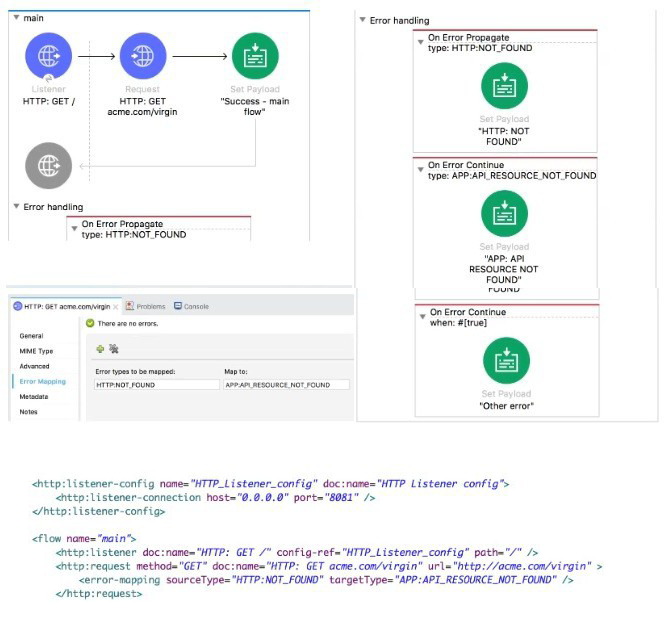


The main flow is configured with their error handlers. A web client submit a request to the HTTP Listener and the HTTP Request throws an HTTP:NOT_FOUND error.
What response message is returned?’’
What response message is returned?
Show answerHide answer

Correct answer: A APP: API RESOURCE NOT FOUND

Explanation

Explanation:

Let's trace through the error handling:

HTTP Request throws HTTP:NOT_FOUND error.

Error Mapping in the HTTP Request:
Has an error mapping: HTTP:NOT_FOUND → APP:API_RESOURCE_NOT_FOUND
This means the HTTP:NOT_FOUND error is re-mapped to APP:API_RESOURCE_NOT_FOUND before reaching the flow's error handler.

Flow Error Handler:
Has an On Error Propagate for HTTP:NOT_FOUND → but this won't trigger because error was already re-mapped
Has an On Error Propagate for APP:API_RESOURCE_NOT_FOUND → This WILL trigger
This error handler sets payload to "APP:API_RESOURCE_NOT_FOUND"

Key Point:
Error mappings in processors (like HTTP Request) happen before the flow's error handlers
The re-mapped error (APP:API_RESOURCE_NOT_FOUND) propagates up
The matching error handler for APP:API_RESOURCE_NOT_FOUND executes and sets the payload

Why not other options:

B. HTTP:NOT_FOUND: Would be if error mapping didn't exist or didn't work

C. other error: Would be if error didn't match any specific handlers and went to the On Error Continue with when: #[true], but APP:API_RESOURCE_NOT_FOUND has a specific handler

D. success: Clearly not, since an error occurred

Key Concepts Tested:
Error mapping in processors vs. flow error handlers
Order of error processing (mapping first, then error handlers)
Error propagation behavior

Reference:
MuleSoft Documentation: Error mappings in processors transform error types before they reach flow error handlers.
Question 42 Choose 1
Refer to the exhibits.


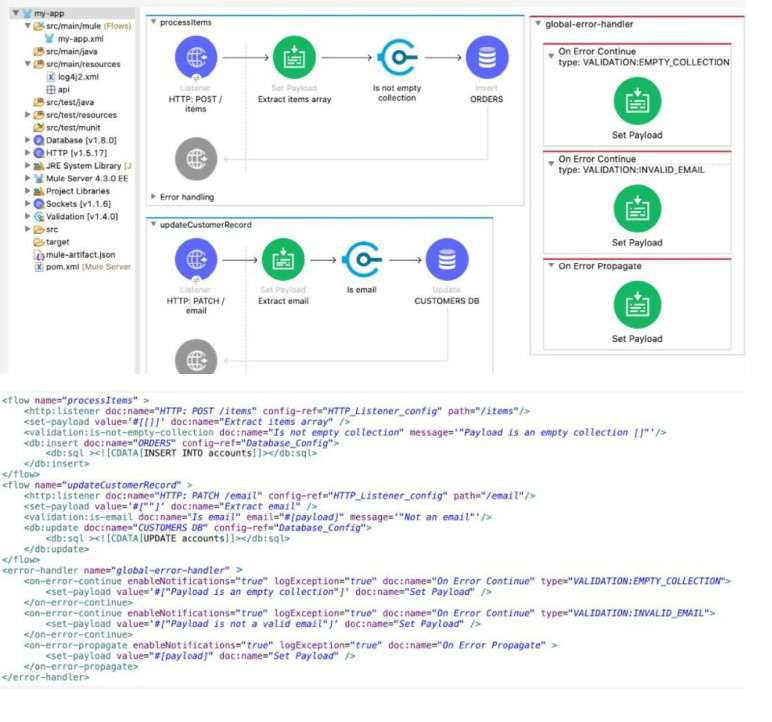
The my-app xml file contains an Error Handier scope named "global-error-handler"
The Error Handler scope needs to be set to be the default error handler for every flow in the Mule application
Where and how should the value "global-error-handler" be added in the Mule project so that the Error Handler scope is the default error handler of the Mule application?
Show answerHide answer

Correct answer: D In the my-app.xml file, as an attribute of a configuration element

Explanation

Explanation of Correct Answer

To set a named error handler (like global-error-handler) as the default exception strategy for all flows within a Mule application, you must configure the configuration element.

Configuration Element: The configuration element is a global element in a Mule configuration XML file (like my-app.xml).

Default Error Handler Attribute: You set the defaultExceptionHandler-ref attribute of the configuration element to the name of the desired error handler.

By placing this configuration in my-app.xml (the file where the flows and error handler are defined), any flow that does not have its own local defined will automatically use the global-error-handler when an error is thrown.

❌ Incorrect Answers

A. In the mule-artifact json file, as the value of a key-value pair: The mule-artifact.json file is used for configuration related to deployment and classloading (e.g., domain artifact configuration, required Mule versions). It is not used to define the application's default error handler.

B. In the Validation folder as the value of a global element in the error-handling yaml file: Mule configuration is typically defined in XML files, not YAML files specifically for error handling. Furthermore, the location "Validation folder" is not a standard configuration location for this purpose.

C. In the pom.xml file, as the value of a global element: The pom.xml file is for Maven build management (dependencies, packaging, plugins). It is not used for defining Mule application runtime configuration like the default error handler.

📚 References
Global Default Exception Strategy: The official MuleSoft documentation explains that the defaultExceptionHandler-ref attribute on the element is used to set a global default error handler for an entire Mule application.

Mule Project Structure: Documentation confirms the distinct roles of mule-artifact.json (deployment metadata) and pom.xml (Maven build configuration).
Question 43 Choose 1
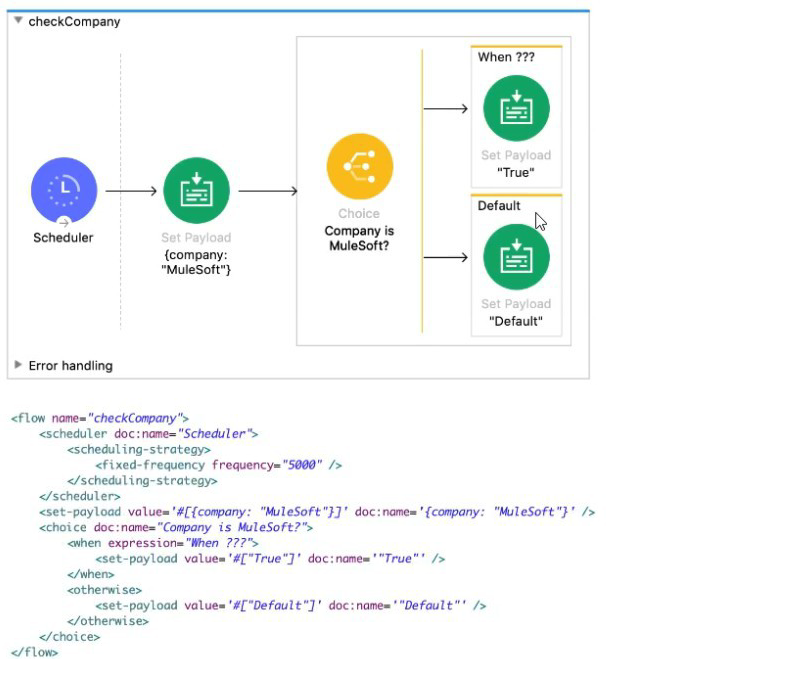
Refer to the exhibits.


The expression for the Choice router needs to be written.
What is a valid expression to route Mule events to the non-default flow?
Show answerHide answer

Correct answer: A #['MuleSoft' == paytoad.company]

Explanation

Explanation:

The Choice router's when expression must be a valid DataWeave expression that evaluates to a Boolean (true or false).

Accessing the Payload: The company name is stored as the key company within the current payload. To access it, the expression must use payload.company.

Comparison: The goal is to check if this value is equal to the string literal "MuleSoft". DataWeave uses the double equals sign (==) for equality comparison.

Full Expression: The entire valid DataWeave expression is:
#[’MuleSoft’==payload.company]

This expression correctly compares the string "MuleSoft" with the value of the company field in the current payload, which evaluates to true when the payload is {"company": "MuleSoft"}. (Note: Single quotes 'MuleSoft' and double quotes "MuleSoft" are typically interchangeable for string literals in DataWeave).

❌ Incorrect Answers

B. #[ company = "MuleSoft" ]: This uses the single equals sign (=), which is the DataWeave assignment operator (used to define variables or map fields), not the equality comparison operator. This expression would result in an error or unexpected behavior, as it does not evaluate to a boolean.

C. #[ if( company = "MuleSoft") ]: This incorrectly uses the DataWeave if-else construct when only a single boolean condition is required. Additionally, it uses the assignment operator (=) instead of the comparison operator (==), and it fails to specify the payload scope (payload.company).

D. #[ if( 'MuleSoff == payload.company) ]: This is incorrect. While the comparison logic (== payload.company) is correct, the if keyword is unnecessary and invalid for the when condition of a Choice router, which expects a direct boolean result. Furthermore, it contains a typographical error ('MuleSoff instead of 'MuleSoft').

📚 References
Choice Router: The MuleSoft documentation for the Choice Router requires that the when condition be a DataWeave expression that evaluates to a boolean value.

DataWeave Comparison Operators: DataWeave uses the double equals sign (==) for equality comparison, and the single equals sign (=) for assignment.
Question 44 Choose 1
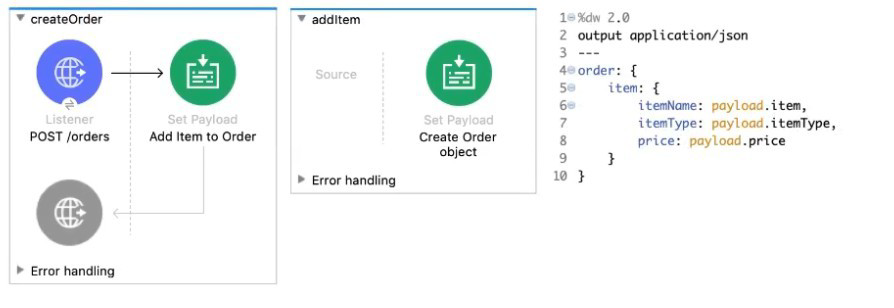
Refer to the exhibits.


The Set Payload transformer In the addltem subflow uses DataWeave to create an order object.
What is the correct DataWeave code for the Set Payload transformer in the createOrder flow to use the addltem subflow to add a router cable with the price of 100 to the order?
Show answerHide answer

Correct answer: B lookupf "addltem", { payload: { price: "100", item: "router", itemType: "cable" } } )

Explanation

Explanation:

Why it's correct:

lookup() is the only valid DataWeave function to invoke a subflow from within a DataWeave script.

"addItem" is the name of the subflow being called.

The second argument is the payload object passed to the subflow, matching the expected structure (item, itemType, price).
This syntax ensures the subflow executes and returns the transformed order object.

❌ Why the Other Options Are Incorrect:

A. addItem({ payload: { price: "100", item: "router", itemType: "cable" } })
Why it's wrong:
addItem() is not a valid DataWeave function.
DataWeave does not support direct invocation of subflows using function-style syntax like addItem(...).
Only lookup() can call a flow or subflow.

B. lookup("addItem", { payload: { price: "100", item: "router", itemType: "cable" } })
Why it's wrong:
This syntax adds an unnecessary payload wrapper around the actual data.
The addItem subflow expects the fields (item, itemType, price) directly in the payload — not nested inside another payload key.
This would result in payload.payload.item, which breaks the transformation logic.

C. addItem({ price: "100", item: "router", itemType: "cable" })
Why it's wrong:
Like option A, this uses invalid function-style syntax.
addItem is a subflow, not a callable function in DataWeave.
Only lookup() can invoke subflows.

📚 Reference:
MuleSoft Docs: DataWeave lookup function
Trailhead: MuleSoft Flow Design
Question 45 Choose 1
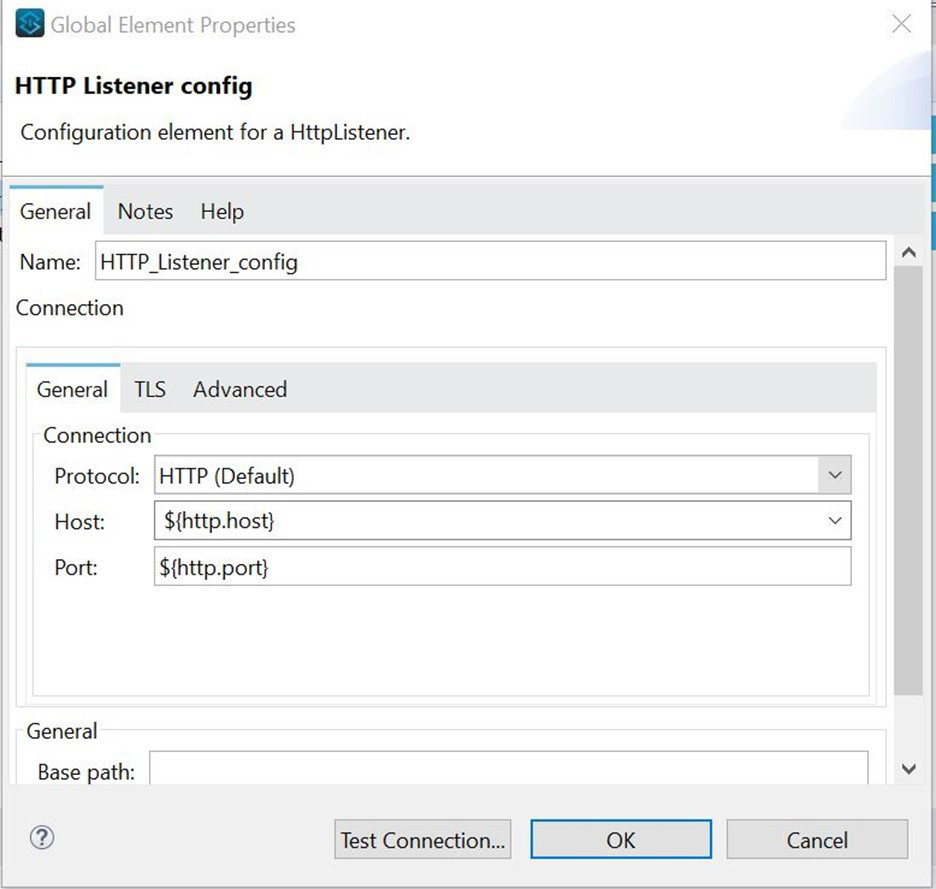
Refer to the below exhibit.


A Mule application configures a property placeholder file named config.yaml to set some property placeholders for an HTTP connector. What is the valid properties placeholder file to set these values?
Show answerHide answer

Correct answer: B 1. http:
2. basepath: "api"
3. host : "localhost"
4. port : "8081"

Explanation

Explanation

The HTTP Listener configuration uses property placeholders:
${http.host}
${http.port}

Because the placeholder file is config.yaml, it must follow YAML syntax, not .properties syntax.

A valid YAML structure for these keys must look like:
http:
host: "localhost"
port: "8081"

Option B is the only choice that uses correct YAML formatting.
Including basepath does not cause any issue — extra keys are allowed in a YAML config file.

Why the others are invalid

A uses = which is not valid YAML syntax.
C uses .properties format, not YAML.
D is written as JSON, not YAML.
Question 46 Choose 1
A Mule application contains a global error handler configured to catch any errors.
Where must the global error handler be specified so that the global error handler catches all errors from flows without their own error handlers?
Show answerHide answer

Correct answer: C A global element

Explanation

Explanation:

To make a named error handler (defined within an tag) the default exception strategy for all flows in a Mule application that do not have their own local error handler, you must use the Global Configuration Element:
Global Element: The configuration must be done within the tag, which is a global element typically found near the top of a Mule configuration XML file.
Attribute: You set the defaultExceptionHandler-ref attribute of the element to the name of the error handler you want to use as the default (e.g., defaultExceptionHandler-ref="my-global-error-handler").
This mechanism ensures that any flow or subflow that fails and lacks a local error handler will propagate its error to this globally defined handler.

❌ Incorrect Answers:

A. A configuration properties file: Configuration properties files (.yaml, .properties) are used to store runtime variables (host, port, credentials) and are read by the Mule runtime, but they are not used to define or reference the default error handler structure.
B. Nowhere, the global error handler is automatically used: This is incorrect. While errors propagate to the application's root, a defined, named handler must be explicitly set as the default using the defaultExceptionHandler-ref attribute on the element to be automatically used by unhandled flows.
D. The pom.xml file: The pom.xml file is strictly used for Maven build management, dependency management, and packaging the application. It contains no runtime configuration for Mule error handling.

📚 References:
Global Default Exception Strategy: The official MuleSoft documentation states that the defaultExceptionHandler-ref attribute on the element (a global element) is used to set a global default error handler for an entire Mule application.
Mule Project Structure: Documentation confirms the distinct roles of configuration properties files and the pom.xml file.
Question 47 Choose 1
What statement is a part of MuleSoft's description of an application network?
Show answerHide answer

Correct answer: B Creates reusable APIs and assets designed to be consumed by other business units

Explanation

Explanation:

MuleSoft's core philosophy centers on the concept of the Application Network. This network is fundamentally a way of connecting applications, data, and devices through reusable, discoverable APIs.

The goal of this architectural pattern is to shift away from brittle, point-to-point integrations and instead create a web of interchangeable services (APIs and assets) that can be easily consumed by any part of the organization. This reusability dramatically accelerates project delivery and fosters agility across the business.

Why the other options are incorrect:

A. Creates and manages high availability and fault tolerant services and infrastructure: While Mule applications are typically deployed with high availability and fault tolerance, this is a feature of the deployment environment (like CloudHub or Runtime Fabric), not the primary description of the application network architecture itself.

C. Creates and manages a collection of JMS messaging services and infrastructure: JMS messaging is one type of communication that can occur within an application network, but the description is too narrow. The network encompasses all protocols (HTTP, databases, SaaS, etc.) interconnected via APIs.

D. Leverages Central IT to deliver complete point-to-point solutions with master data management: MuleSoft's approach moves away from "point-to-point solutions," which are precisely what the application network is designed to replace. It favors reusable layers of APIs over custom one-off integrations.

📚 References:
Application Network Definition: The application network is described as a system where applications are connected via APIs that are exposed in a standardized, discoverable, and reusable manner, often categorized into layers (System, Process, Experience).

API-Led Connectivity: MuleSoft uses API-led connectivity to create the application network by creating reusable assets designed for consumption by other parts of the business.
Question 48 Choose 1
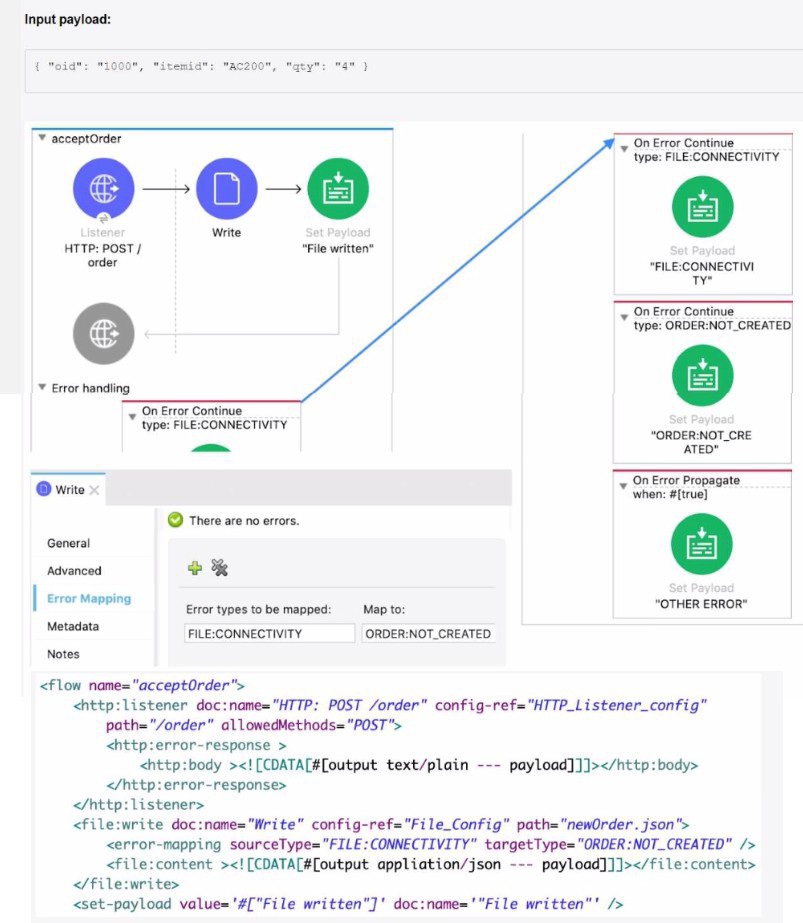
Refer to the exhibits. The Mule application does NOT define any global error handlers.
A web client sends a POST request to the Mule application with this input payload. The File Write operation throws a FILE: CONNECTIVITY error.
What response message is returned to the web client?

Show answerHide answer

Correct answer: D "ORDER: NOT CREATED"

Explanation

Explanation:

Error Triggered: The File Write operation throws a FILE:CONNECTIVITY error.

Immediate Error Handler: The Write component is configured with an Error Mapping strategy.
Error Mapping Execution: The Error Mapping within the Write component specifically maps the incoming FILE:CONNECTIVITY error to a new error type: ORDER:NOT_CREATED.
Error Propagation/Handling: Because the Write operation successfully mapped the error, the execution context (the error type) changes from FILE:CONNECTIVITY to ORDER:NOT_CREATED.
Scope/Flow Error Handler Activation: The execution then moves to the acceptOrder flow's Error handling section. It searches for a handler matching the new error type, ORDER:NOT_CREATED.
Handler Selected: The second On Error Continue block is triggered because its type is set to ORDER:NOT_CREATED.
Response Generation: The action inside this On Error Continue block is a Set Payload component, which sets the payload to "ORDER:NOT_CREATED".
Continue Behavior: Since this is an On Error Continue scope, it completes the flow execution successfully (as far as the web client is concerned). The final payload, "ORDER:NOT_CREATED", is returned to the web client.

❌ Incorrect Answers and Reasoning
A. "FILE: CONNECTIVITY": This would be the result if the second On Error Continue was not present, and the first one (for FILE:CONNECTIVITY) was executed, AND that first handler did not use On Error Continue but instead returned the payload. However, the FILE:CONNECTIVITY error is mapped away to ORDER:NOT_CREATED by the Write component before it reaches the top-level error handlers.

B. "OTHER ERROR": This is set in the On Error Propagate block. This block has the generic when: #[#true] condition, meaning it acts as the default catch-all. It would only be reached if the error type was not FILE:CONNECTIVITY or ORDER:NOT_CREATED. Since the error is explicitly handled by the second On Error Continue, the On Error Propagate is never executed.

C. "File written": This payload is set by a component after the Write operation in the main flow. Because the Write operation throws an error, the flow execution is immediately interrupted and moves to the Error Handling block, meaning the subsequent Set Payload "File written" component is skipped entirely.

📚 References
This scenario is based on three core concepts in Mule 4:

Component-Level Error Mapping:
MuleSoft Documentation on Handling Component-Level Errors [Search: MuleSoft documentation error mapping]

Flow-Level Error Handlers (On Error Continue vs. On Error Propagate):
MuleSoft Documentation on Error Handling in Mule 4 [Search: MuleSoft documentation On Error Continue vs On Error Propagate]

Error Scope Behavior (On Error Continue):
When an On Error Continue handler successfully processes an error, it returns a success message to the calling flow or client (the status code defaults to 200 OK), and its payload becomes the response body.
Question 49 Choose 1
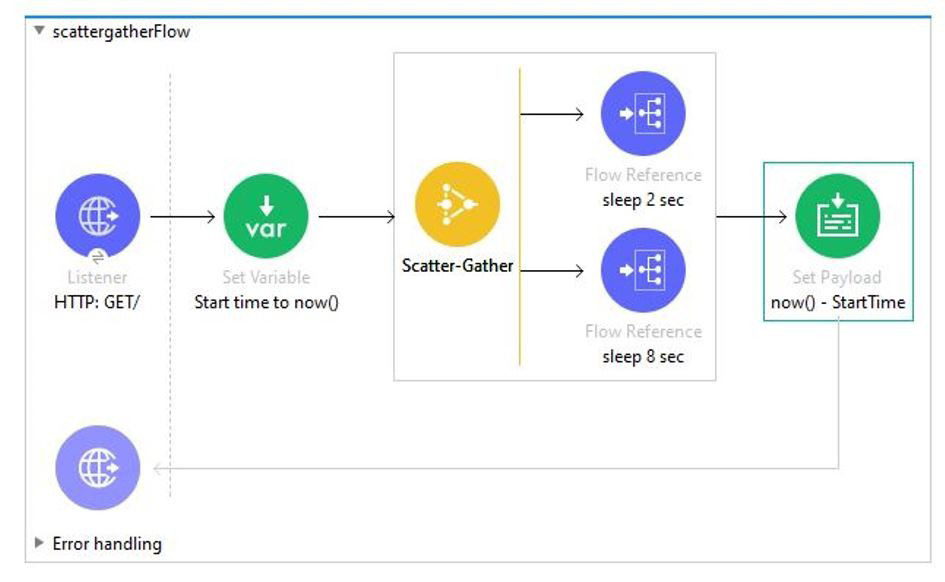
In the execution of scatter gather, the "sleep 2 sec" Flow Reference takes about 2 sec to complete, and the "sleep 8 sec" Flow Reference takes about 8 sec to complete.
About how many sec does it take from the Scatter-Gather is called until the "Set Payload" transformer is called?

Show answerHide answer

Correct answer: A 8

Explanation

Explanation:

The key to understanding this question is how the Scatter-Gather router works in Mule 4.

Scatter-Gather Behavior: The Scatter-Gather executes all of its routes concurrently. It does not execute them sequentially. It starts all routes at the same time and then waits for all of them to complete before aggregating the results and moving on to the next processor in the main flow.

Execution Timeline:
Time = 0 sec: The Scatter-Gather starts. It immediately launches both the "sleep 2 sec" and "sleep 8 sec" routes at the same time.

Time = 2 sec: The "sleep 2 sec" route finishes its execution. The Scatter-Gather has one result but continues to wait for the other route.

Time = 8 sec: The "sleep 8 sec" route finishes its execution. Now that all routes are complete, the Scatter-Gather aggregates the results (if any) and proceeds.

Total Time: Therefore, the total time from when the Scatter-Gather is called until it finishes and the subsequent Set Payload processor is called is determined by the longest-running route. In this case, that is 8 seconds.

Why the others are incorrect:
B. 0: This is incorrect because both routes perform a sleep operation, which takes real time. The Scatter-Gather does not bypass or ignore the processing time of its routes.

C. 2: This is the duration of the fastest route, but the Scatter-Gather must wait for the slowest one.

D. 10: This would be the result if the routes ran sequentially (2 + 8), but the Scatter-Gather's primary feature is parallel execution.

Reference:
MuleSoft Documentation - Scatter-Gather Router. The documentation states: "The Scatter-Gather component executes a set of routes in parallel, then aggregates the results into a single message." Its execution time is bound by the slowest parallel route. This concept falls under the Controlling Message Flow (19%) domain of the exam guide.
Question 50 Choose 1
A flow needs to combine and return data from two different data sources. It contains a Database SELECT operation followed by an HTTP Request operation.
What is the method to capture both payloads so the payload from the second request does not overwrite that from the first?
Show answerHide answer

Correct answer: D Save the payload from the Database SELECT operation to a variable

Explanation

Explanation:

In MuleSoft, each operation updates the payload with its result. That means:

The Database SELECT operation sets the payload to the query result.
The HTTP Request operation then overwrites the payload with its response.

If you need to combine data from both sources, you must preserve the first payload before it gets overwritten. The standard way to do this is to store the Database SELECT result in a variable (e.g., dbResult) using the Set Variable component. Later, you can reference this variable and merge it with the HTTP response payload.

❌ Why the Other Options Are Incorrect:
A. Cache scope ❌ Used for caching results to improve performance, not for preserving payloads between operations.

B. Message Enricher scope ❌ Message Enricher is used to enrich the message with additional data from a nested operation, but in this case, you want to explicitly capture both payloads. While Message Enricher could technically help, the exam expects the simpler and more direct solution: saving the first payload to a variable.

C. Nothing, previous payloads are combined ❌ Incorrect — Mule does not automatically combine payloads. Each operation replaces the payload with its own result.

🔗 Reference:
MuleSoft Docs – Variables
MuleSoft Docs – Message Structure
Full mock exam

Sit the Salesforce-MuleSoft-Developer exam before exam day

Full-length mocks with the same number of questions and the same time limit as the real Salesforce-MuleSoft-Developer exam. Every attempt draws a new set of questions from the full bank, so you can keep going until you pass comfortably.

Get full Salesforce-MuleSoft-Developer mock exam
  • 65questions per mock
  • 105 mintime limit
  • 234questions in the bank
  • Newmock on every attempt