Salesforce certification · Exam Salesforce-MuleSoft-Developer

Salesforce-MuleSoft-Developer Mock Exam Page 3

Salesforce MuleSoft Developer - Mule-Dev-201

Free Salesforce-MuleSoft-Developer mock exam questions 21–30, each with the answer and an explanation.

20 questions · 33 minutes · free, no sign-up

Free Salesforce-MuleSoft-Developer questions

21–30 of 67 free
Question 21 Choose 1
Refer to the exhibits.
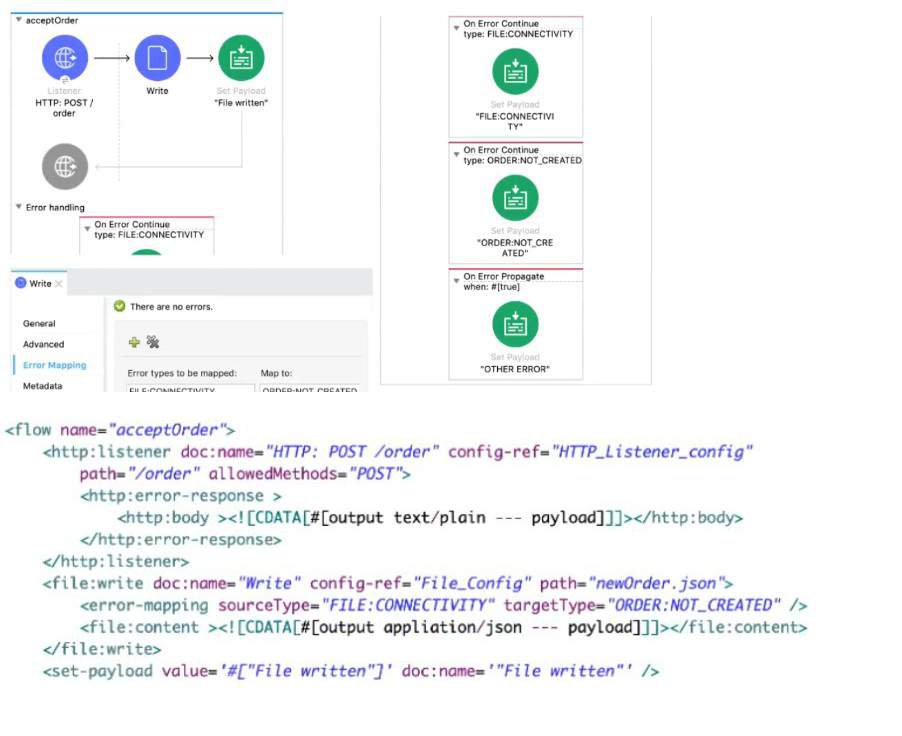


A web client sends a POST request with the payload {"oid": "1000", "itemid": "AC200", "qty": "4" } to the Mule application. The File Write operation throws a FILE:CONNECTIVITY error.

What response message is returned to the web client?
Show answerHide answer

Correct answer: A ‘’FILE:CONNECnvnY'

Explanation

Explanation:

✅ Correct Option

A. "FILE:CONNECTIVITY" 🟢
When the File Write operation fails with a FILE:CONNECTIVITY error, the flow’s error handling section is triggered. The error handler maps this specific error type to a custom response, which is "FILE:CONNECTIVITY". This is then returned to the client as plain text because the HTTP Listener has been set up to output the payload directly as the response body.

❌ Incorrect Options

B. "ORDER:NOT_CREATED" 🔴
Although there is an error mapping from FILE:CONNECTIVITY to ORDER:NOT_CREATED within the File Write component, the outer On Error Continue in the flow takes precedence. This handler directly sets the payload to "FILE:CONNECTIVITY", overriding the mapped type. So "ORDER:NOT_CREATED" is not returned to the client.

C. "OTHER ERROR" 🔴
This message would only appear if the flow entered the On Error Propagate branch. However, that branch only activates for errors that are not specifically handled by the earlier On Error Continue scopes. Since this case is already caught by FILE:CONNECTIVITY, "OTHER ERROR" never executes.

D. "File written" 🔴
This is the normal success message set in the flow when the file is written successfully. But because the File Write operation throws a FILE:CONNECTIVITY error, the success path never executes. Instead, the error handling path takes over, making this option invalid.

📘 Summary
In this scenario, a POST request with order details is received, but the File Write fails due to a connectivity issue. The application’s error handling logic has a specific On Error Continue for FILE:CONNECTIVITY, which sets the response payload to "FILE:CONNECTIVITY". This ensures the client gets an explicit error message rather than a generic or misleading response.

🔗 Reference
MuleSoft Error Handling (On Error Continue and On Error Propagate)
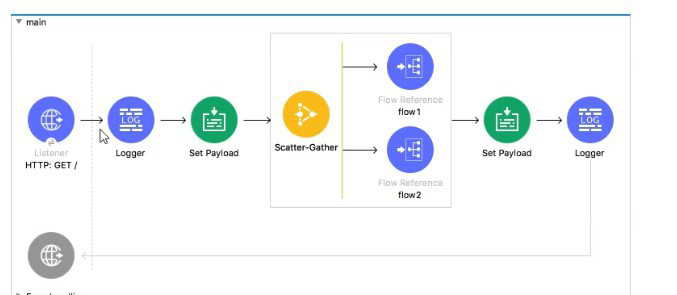
Question 22 Choose 1
Refer to the exhibit.


In the execution of the Scatter_Gather, the flow1 route completes after 10 seconds and the flow2 route completes after 20 seconds. How many seconds does it take for the Scatter_Gather to complete?
Show answerHide answer

Correct answer: C 20

Explanation

Explanation:

✅ Correct Option:

C. 20
The Scatter-Gather component executes all of its defined routes concurrently. Its completion time is determined by the longest-running route, as it must wait for all routes to finish before aggregating the results and proceeding. In this scenario, flow2 is the slowest route, taking 20 seconds to complete. Therefore, the total time for the Scatter-Gather to finish is 20 seconds, dictated by this slowest route.

❌ Incorrect Options:

A. 0
This is incorrect because Scatter-Gather is a blocking processor. It does not complete instantly; it actively processes the routes and waits for their results. A value of 0 would imply it finished immediately without executing any logic.

B. 10
This is incorrect because it represents the time of the fastest route (flow1). While flow1 finishes at the 10-second mark, the Scatter-Gather must continue to wait for the slower flow2 to complete its 20-second execution before it can finish.

D. 30
This is incorrect because the routes run in parallel, not sequentially. Their execution times are not added together. The total time is the maximum of the individual route times (20 seconds), not the sum of them (10 + 20 = 30).

📋 Summary:
The Scatter-Gather component processes its routes simultaneously. Its total execution time is governed by the duration of the slowest concurrent process. Since flow1 takes 10 seconds and flow2 takes 20 seconds, the component must wait the full 20 seconds for flow2 to finish before it can complete and move to the next processor in the main flow.

🔗 Reference:
MuleSoft Documentation: Scatter-Gather
Question 23 Choose 1
An API implementation has been deployed to CloudHub and now needs to be governed. IT will not allocate additional vCore for a new Mule application to act as an API proxy.
What is the next step to preseive the current vCore usage, but still allow the Mule application to be managed by API Manager?
Show answerHide answer

Correct answer: B Modify the API implementation to use auto-discovery to register with API Manager

Explanation

Explanation:

This scenario describes governing an existing CloudHub-deployed Mule application without deploying an additional proxy application (which would consume more vCores).

How Auto-Discovery Works:
You add the API Auto-Discovery configuration to your existing Mule application.
This involves adding an APIkit configuration element or HTTP Listener configuration with API Manager-related properties (API ID, environment ID, client ID/secret).
When the application redeploys (or starts), it automatically registers itself with API Manager.
API Manager can then apply policies, collect analytics, and enforce SLAs directly on the existing application—no proxy needed.

Why this preserves vCore usage:
No new Mule application is deployed
The existing application continues running on its already-allocated vCores
Only minimal configuration changes are required

Why the other options are incorrect:
A) Register the same API implementation in Runtime Manager – Runtime Manager is for deployment and monitoring, not API governance. Registering here doesn't connect to API Manager for policy enforcement.

C) Upload the JAR file to the API instance in API Manager – API Manager doesn't deploy JAR files directly. It manages APIs through proxies or auto-discovery.

D) Deploy behind a VPC – This adds infrastructure complexity but doesn't solve the governance problem. A VPC doesn't automatically connect to API Manager, and this approach might actually require more resources.

Key Concept: API Auto-Discovery allows direct governance of existing Mule applications without the overhead of a proxy layer. This is the standard MuleSoft approach for governing existing deployments when you want to avoid additional resource consumption.

Reference: MuleSoft's API Manager documentation on "Managing Existing APIs" specifically describes auto-discovery as the method for registering already-deployed Mule applications with API Manager.
Question 24 Choose 1
What happens to the attributes of a Mule event in a flow after an outbound HTTP Request is made?
Show answerHide answer

Correct answer: A Attributes are replaced with new attributes from the HTTP Request response (which might be null)

Explanation

Explanation:

✅ Correct Option
A. Attributes are replaced with new attributes from the HTTP Request response (which might be null) 🟢
When an outbound HTTP Request is made, MuleSoft updates the event’s attributes with details from the HTTP response. These include status code, headers, and other metadata. The previous attributes are completely replaced, not merged. If the HTTP response has no attributes, then the attributes may become null. This ensures that the flow always reflects the latest response context.

❌ Incorrect Options

B. New attributes may be added from the HTTP response headers, but no headers are ever removed 🔴
This is incorrect because MuleSoft does not append attributes. Instead, the original attributes are discarded and replaced. Response headers become the new attributes, meaning old headers are lost, not preserved.

C. Attributes do not change 🔴
This is false. The attributes definitely change because the Mule event is updated with HTTP response attributes. If they did not change, the flow would not be able to handle response metadata such as status codes.

D. Previous attributes are passed unchanged 🔴
This is also incorrect. After an HTTP Request, attributes are not carried forward. They are replaced with new attributes representing the HTTP response. Old attributes are discarded.

📘 Summary:
After an outbound HTTP Request, the Mule event’s attributes are replaced with new attributes from the HTTP response, such as headers and status code. Previous attributes are not preserved. This behavior ensures the flow always works with the most up-to-date response context from the external service.

🔗 Reference:
MuleSoft Documentation – Mule Event Attributes
Question 25 Choose 1
Refer to the exhibits.


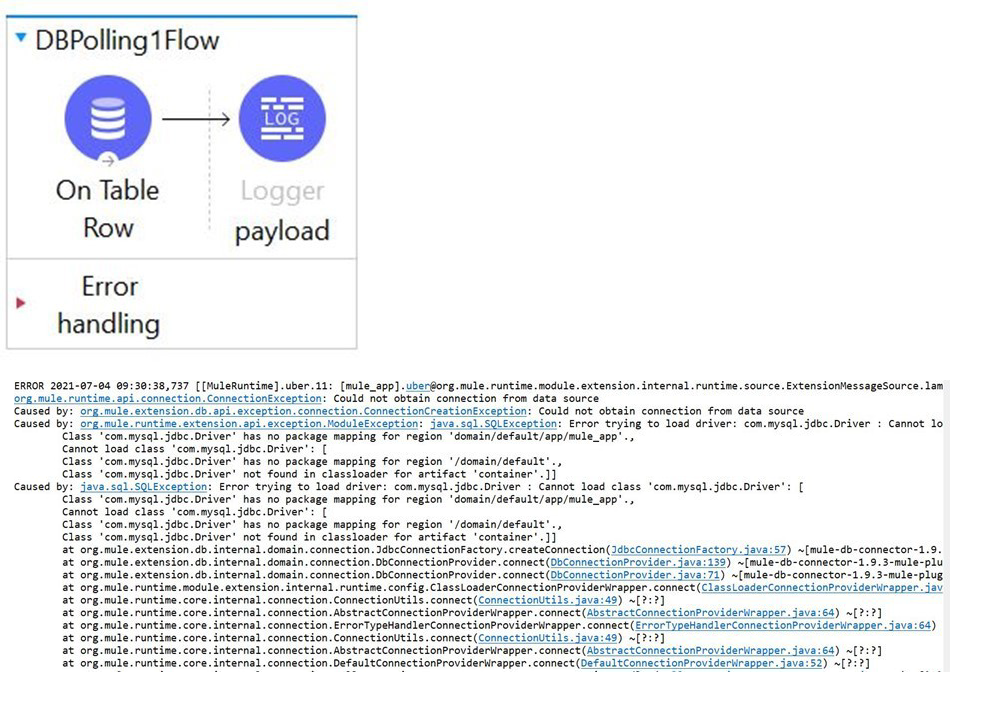
As a mulesoft developer, what you would change in Database connector configuration to resolve this error?
Show answerHide answer

Correct answer: D Configure the correct JDBC driver

Explanation

Explanation:

Correct Option: ✅ D. Configure the correct JDBC driver
The error log indicates a ClassNotFoundException for com.mysql.jdbc.Driver, suggesting the JDBC driver is missing or incorrectly configured. Resolving this requires adding the correct MySQL JDBC driver dependency (e.g., mysql-connector-java) to the Mule application’s pom.xml or ensuring it is included in the project’s classpath. This ensures the database connector can establish a connection to the MySQL database.

Incorrect Options:

❌ A. Configure the correct host URL
While an incorrect host URL can cause connection issues, the error specifically cites a ClassNotFoundException for the JDBC driver, not a connection failure due to host misconfiguration. The issue lies in the driver’s absence, not the host URL. Thus, adjusting the host URL will not resolve the missing driver error.

❌ B. Configure the correct database name
An incorrect database name would typically result in a connection or query error, not a ClassNotFoundException for the JDBC driver. The error indicates the driver class is missing from the classpath, not a database name mismatch. Therefore, configuring the database name is irrelevant to resolving this specific driver-related issue.

❌ C. Configure the correct table name
The table name is irrelevant to the ClassNotFoundException for com.mysql.jdbc.Driver. This error occurs due to the absence of the JDBC driver in the classpath, not a table configuration issue. Adjusting the table name would not address the underlying driver dependency problem causing the connection failure.

Summary:
The scenario involves a Mule application with a database polling flow encountering a ClassNotFoundException for com.mysql.jdbc.Driver, indicating the JDBC driver is missing. The flow attempts to connect to a database and log payload data but fails due to this configuration error. Resolving this requires adding the correct MySQL JDBC driver to the project, ensuring proper database connectivity.

References:
MuleSoft Documentation: Configuring Database Connectors
MuleSoft Documentation: Managing Dependencies
Question 26 Choose 1
Refer to the exhibit.


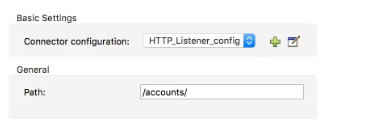
What is the correct syntax to add an employee ID as a URI parameter in an HTTP Listener path?
Show answerHide answer

Correct answer: C {employeelD}

Explanation

Explanation:

Correct Option:

✅ C. {employeeID}
In Mule 4's HTTP Listener, URI parameters are defined using a pair of curly braces {}. This syntax indicates that the path segment is a variable that will capture a value from the incoming request's URI. For example, if the path is /accounts/{employeeID}, and an incoming request is sent to /accounts/12345, the value 12345 will be captured and stored in a variable named employeeID. This variable can then be accessed later in the flow using the expression attributes.uriParams.employeeID.

Incorrect Options:

❌ A. (employeeID)
This syntax is not the correct way to define a URI parameter in Mule's HTTP Listener. Parentheses () are not used for this purpose in Mule 4. This syntax would likely be interpreted as a literal part of the path, not as a placeholder.

❌ B. ${employeeID}
This is the syntax for a placeholder property, which is used to externalize configuration values in a Mule application (e.g., in a config.yaml file). It is not used to define URI parameters within the HTTP Listener's path field.

❌ D. #[employeeID]
This is the syntax for a DataWeave expression. While you would use this syntax to access the URI parameter value later in your flow (e.g., #[attributes.uriParams.employeeID]), it is not the correct syntax for defining the parameter itself in the HTTP Listener's Path configuration field.

Summary:
To define a URI parameter in an HTTP Listener path in Mule 4, you must use curly braces {}. This syntax tells the listener to treat the enclosed name as a variable that will capture a value from the incoming request's URI. After the value is captured, it becomes available in the attributes.uriParams object, and you can access it within your Mule flow using a DataWeave expression like #[attributes.uriParams.employeeID].
Question 27 Choose 1
A Mule flow has three Set Variable transformers. What global data structure can be used to access the variables?
Show answerHide answer

Correct answer: D Mule event

Explanation

Explanation:

Correct Option: ✅ D. Mule Event
The Mule Event is the global data structure that encapsulates the entire context of a Mule flow, including the message and attributes. Set Variable transformers store variables within the Mule Event, making them accessible throughout the flow using vars.variableName. This structure ensures variables set by transformers are available for subsequent processing, providing a unified access point within the flow.

Incorrect Options:

❌ A. Mule event attributes
Mule event attributes are part of the Mule Event but specifically store metadata (e.g., headers, error information), not variables set by Set Variable transformers. Variables are stored in the Mule Event’s vars scope, not attributes, making this option incorrect for accessing variables set in the flow.

❌ B. Mule event message
The Mule event message contains the payload and properties, but variables set by Set Variable transformers are stored in the Mule Event’s vars scope, not the message. Accessing variables through the message is incorrect, as the message is designed for payload and property data, not variable storage.

❌ C. Mule application properties
Mule application properties are configuration settings defined outside the flow (e.g., in properties files), not variables set by transformers. They are accessed via app.properties, distinct from flow-specific variables. Thus, this option is incorrect for accessing variables within the Mule flow.

Summary:
The scenario involves a Mule flow with three Set Variable transformers, which set variables during execution. The Mule Event serves as the global data structure, containing the vars scope where these variables are stored. This allows access to variables (e.g., vars.variableName) throughout the flow, ensuring consistent data management and availability for subsequent processors.

References:
MuleSoft Documentation: Mule Event
MuleSoft Documentation: Variables in Mule
Question 28 Choose 1
What is the default port used by Mule application debugger configuration in Anypoint Studio?
Show answerHide answer

Correct answer: C 7777

Explanation

Explanation:

When debugging Mule applications in Anypoint Studio, the IDE launches the Mule runtime in debug mode and attaches a remote debugger. This requires a specific port to be opened so that the debugger can connect to the Mule runtime process. By default, Anypoint Studio uses port 7777 for this purpose.

Here’s how it works:

When you start a Mule application in debug mode, Anypoint Studio configures the Mule runtime to listen for debugger connections on port 7777.

The IDE then attaches to this port to allow developers to set breakpoints, inspect variables, and step through the flow execution.

This port is configurable, meaning you can change it if needed (for example, if 7777 is already in use by another process). However, unless explicitly modified, 7777 remains the default.

Now let’s analyze why the other options are incorrect:

A. 8082 – This is often used as the default HTTP listener port for Mule applications, not for debugging. It allows flows to accept incoming HTTP requests but has nothing to do with the debugger configuration.

B. 8080 – This is a common default port for web servers (like Tomcat or other HTTP services). Mule applications can use 8080 for HTTP listeners, but it is not the debugger port.

D. 6666 – This is not associated with MuleSoft debugging. It may be used by other applications, but MuleSoft does not assign 6666 as a default debugger port.

Thus, the correct answer is 7777, which is the default debugger port in Anypoint Studio. Developers should remember this for troubleshooting scenarios, especially when debugging fails due to port conflicts or firewall restrictions.

📚 References
MuleSoft Docs: Debug Mule Applications in Anypoint Studio
MuleSoft Help Center: Default Debugger Port Configuration
Question 29 Choose 1
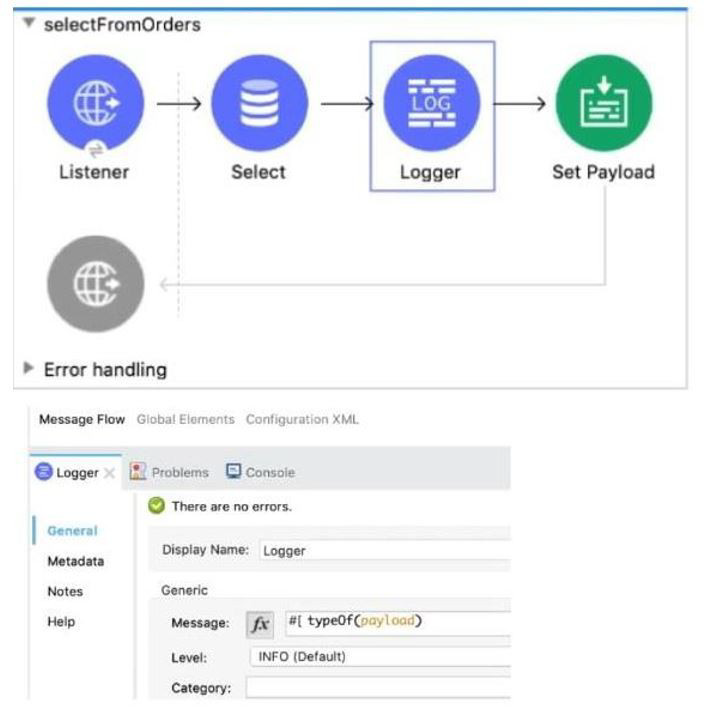
Refer to the exhibit. What is the output of logger component?

Show answerHide answer

Correct answer: C Array

Explanation

Explanation:

The flow processes data through three components before reaching the Logger:

Listener: This component receives the inbound request and starts the flow.
Select (Database Connector): This component executes a database query (implied by the name and icon). In Mule 4, when the Database Select operation executes a query, the output payload is, by default, a list of maps (or objects), where each map represents a row returned from the database. This data structure is represented in DataWeave as an Array (of Objects).
Logger: This component's configuration uses the DataWeave expression:
$$#[typeOf(payload)]
The typeOf() function inspects the data type of the current payload.
Since the payload entering the Logger is the default output of a Select database operation, which is an Array of records, the typeOf(payload) function will return the String value representing the array type (e.g., "Array" or a more specific array type string).
The question asks for the output of the logger component, which is the value of the message it logs. The value being logged is the string name of the payload's type, which is Array. Therefore, the conceptual output logged by the component is related to the Array data type. In the context of a multiple-choice exam asking about the result of typeOf(payload) after a database select, the expected answer is the type of the payload itself, which is an Array.

❌ Incorrect Answers:
A. String: A String is the literal output of the typeOf() function (e.g., the string "Array"), but the question implies what type the payload is. The payload itself is an Array.

B. Object: An Object (Map) represents a single record. Since the database select operation returns multiple rows, the overall payload is a collection of these objects, i.e., an Array.

D. Map: A Map is the Mule/DataWeave representation of a single key-value pair structure, which is what each item in the array is. The overall payload, however, is an Array of these Maps.

📚 References:
For detailed information on the default output structure of database operations, refer to the official MuleSoft documentation:
Database Connector Output: The documentation for the Select operation of the Mule 4 Database Connector states that the output message payload is typically a List> (a list of maps), which is represented as an Array in DataWeave.
DataWeave typeOf() Function: This function returns the type of the value it is called on. The value being inspected is the list of records (Array) returned by the database operation.
Question 30 Choose 1
How many Mule applications can run on a CloudHub worker?
Show answerHide answer

Correct answer: A At most one

Explanation

Explanation:

In MuleSoft’s CloudHub deployment model, a worker is the dedicated runtime instance that executes a Mule application. Each worker provides a certain amount of vCPU and memory resources, depending on the chosen worker size. Workers are isolated environments designed to run a single Mule application to ensure stability, scalability, and fault isolation.

By design, each CloudHub worker can run only one Mule application at a time. This is a strict limitation enforced by MuleSoft to guarantee that applications do not compete for resources within the same worker. If you want to deploy multiple Mule applications, you must provision additional workers. For example, if you need three applications running simultaneously, you must allocate at least three workers (one per application).

This architecture provides several benefits:

Isolation: Each application runs independently, reducing the risk of one application’s failure affecting another.
Scalability: Applications can be scaled horizontally by adding more workers.
Resource allocation: Each worker’s CPU and memory are dedicated to a single application, ensuring predictable performance.
Operational simplicity: Monitoring, logging, and managing applications is easier when each worker hosts only one application.

❌ Why the Other Options Are Incorrect

B. At least one – Misleading. While technically true, MuleSoft’s documentation specifies at most one application per worker, not “at least.”

C. Depends – Incorrect because it does not depend on configuration; the rule is strict: one worker → one application.

D. None of these – Incorrect because the correct answer is explicitly listed: at most one.

📚 References
MuleSoft Docs: CloudHub Workers
MuleSoft Docs: Deploying Applications to CloudHub
Trailhead: Deploy Mule Applications to CloudHub
Full mock exam

Sit the Salesforce-MuleSoft-Developer exam before exam day

Full-length mocks with the same number of questions and the same time limit as the real Salesforce-MuleSoft-Developer exam. Every attempt draws a new set of questions from the full bank, so you can keep going until you pass comfortably.

Get full Salesforce-MuleSoft-Developer mock exam
  • 65questions per mock
  • 105 mintime limit
  • 234questions in the bank
  • Newmock on every attempt