Salesforce certification · Exam Salesforce-MuleSoft-Developer

Salesforce-MuleSoft-Developer Mock Exam

Salesforce MuleSoft Developer - Mule-Dev-201

Find out if you're ready for Salesforce-MuleSoft-Developer. Take the free timed mock exam and get your score in minutes, or study the free Salesforce-MuleSoft-Developer questions below with answers and explanations.

20 questions · 33 minutes · free, no sign-up

Free Salesforce-MuleSoft-Developer questions

1–10 of 67 free
Question 1 Choose 1
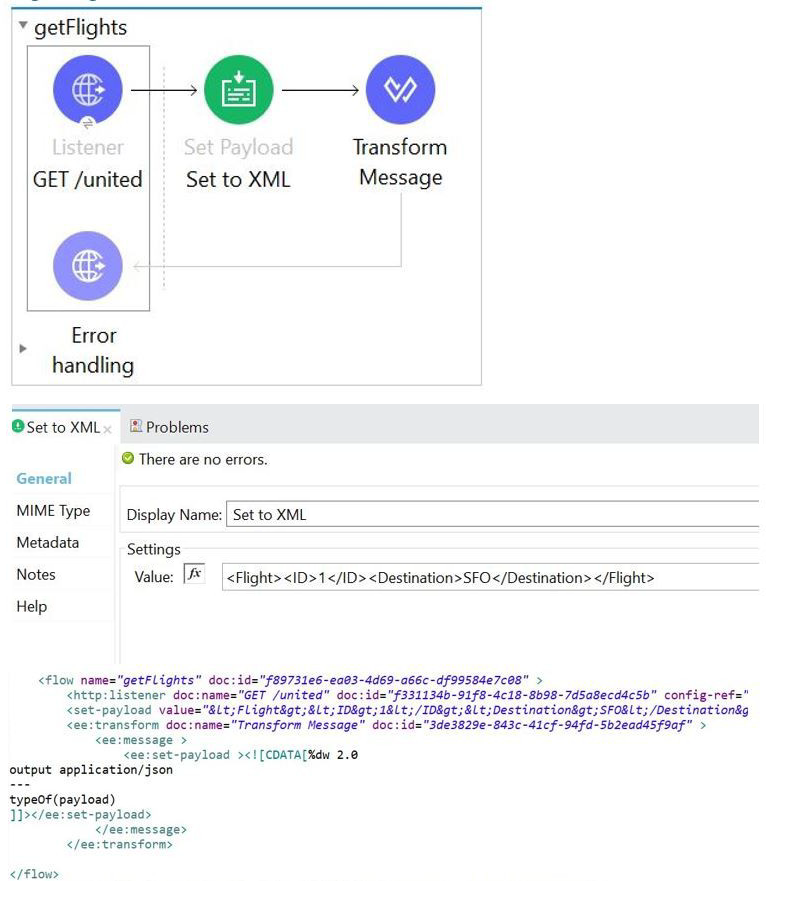
Refer to the exhibits. A web client submits a request to below flow. What is the output at the end of the flow?
Show answerHide answer

Correct answer: A String

Explanation

Explanation:

The flow consists of three main components: a Listener, a Set Payload component, and a Transform Message component.
Listener (GET /united): This component receives the inbound request, but its effect on the payload is minimal in this context. The payload starts empty (null) or based on the inbound request, but the next component immediately overwrites it.
Set Payload (Set to XML): This component sets the payload to a specific XML string value.
Value: 1SFO
MIME Type: Not explicitly shown, but typically a literal string or XML structure, resulting in a payload of type String (containing the XML content).
Transform Message: This component is the final operation that determines the output data type. The DataWeave script inside the Transform Message is the key:
$$
output application/json
---
typeOf(payload)
Output Directive: The output application/json directive indicates that the final output format of the Transform Message component will be JSON.
DataWeave Body: The body of the script is typeOf(payload). The typeOf() function in DataWeave returns a String representation of the data type of the payload it is inspecting. Since the payload entering the Transform Message is the XML String from the Set Payload component, typeOf(payload) will return the String value "java.lang.String".
Final Output: Although the output is formatted as JSON, the value being outputted is the String literal "java.lang.String". Since DataWeave's output directive converts the output value to the specified MIME type, a simple string output often results in a JSON string, which is still fundamentally a String representation when viewed in the context of the overall output data type. However, more fundamentally, the result of the DataWeave expression itself is a String (the string name of the type), and this is the direct output. Therefore, the output at the end of the flow is a String.
The most precise answer is String, as it's the result of the typeOf() function.

❌ Incorrect Answers

B. Object: The final output is the result of the typeOf() function, which is a String, not a complex Java object (Object).
C. Java: While the data type names in Mule are based on Java types (e.g., java.lang.String), the final output of the flow is the value returned by the DataWeave script, which is a String, not an arbitrary "Java" type.
D. XML: The payload enters the Transform Message as XML content (contained within a string), but the output is set to application/json, and the value generated by the script (typeOf(payload)) is a String literal, not XML.

📚 References
For detailed information on the components used: DataWeave typeOf() function: Refer to the MuleSoft documentation on DataWeave functions, which confirms that typeOf() returns a string with the name of the type.
Mule Flow Execution: Refer to the documentation on how the payload is passed between components and how the final component (Transform Message) dictates the final output structure and type.
Question 2 Choose 1
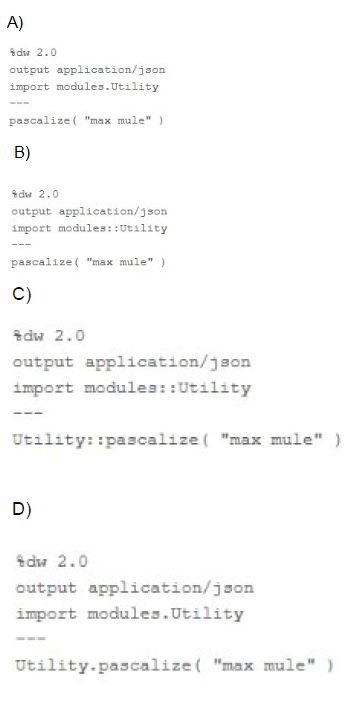
A Utility.dwl file is located in a Mule project at src/main/resources/modules. The Utility.dwl hie defines a function named pascalize that reformats strings to pascal case.
What is the correct DataWeave to call the pascalize function in a Transform Message component?

Show answerHide answer

Correct answer: C Option C

Explanation

Explanation:

Correct Option:

✅ C. Option C
Option C correctly shows the three key components required to call a custom DataWeave function from an external file:
➡️ 1. Importing the module: The import modules::Utility statement correctly imports the Utility.dwl module, specifying the path relative to the src/main/resources directory. The modules:: syntax is the standard way to import a module from the modules directory.
➡️ 2. Calling the function: The Utility::pascalize("max mule") syntax is the correct way to call the imported function. It uses a double colon (::) to reference the function pascalize within the imported Utility module.
➡️ 3. Output and headers: The output application/json and --- separator are standard for a DataWeave script, ensuring the correct output format.

Incorrect Options:

❌ A. Option A
This option incorrectly uses a single dot (.) to import the module (import modules.Utility) and call the function (Utility.pascalize). In DataWeave, the double colon (::) is used for namespacing and referencing modules and their functions. Using a dot is incorrect syntax for both.

❌ B. Option B
This option correctly imports the module (import modules::Utility) but incorrectly calls the function using pascalize("max mule"). When a function is part of an imported module, you must explicitly use the module name as a prefix followed by the double colon (Utility::pascalize). Calling the function without the module prefix would only work if the function were defined directly within the same script, which is not the case here.

❌ D. Option D
This option has two syntax errors. It incorrectly uses a single dot (.) for the import statement (import modules.Utility) and for the function call (Utility.pascalize). As explained above, DataWeave requires the double colon (::) for both importing and calling functions from a module.

Summary:
To call a function from an external DataWeave module, you must first import the module using the import statement with double colons (::) to denote its path (e.g., import modules::Utility). Then, when you call the function, you must qualify the function name with the module name and double colons (e.g., Utility::pascalize("max mule")). This syntax is essential for maintaining proper namespacing and correctly referencing functions within the DataWeave language.
Question 3 Choose 1
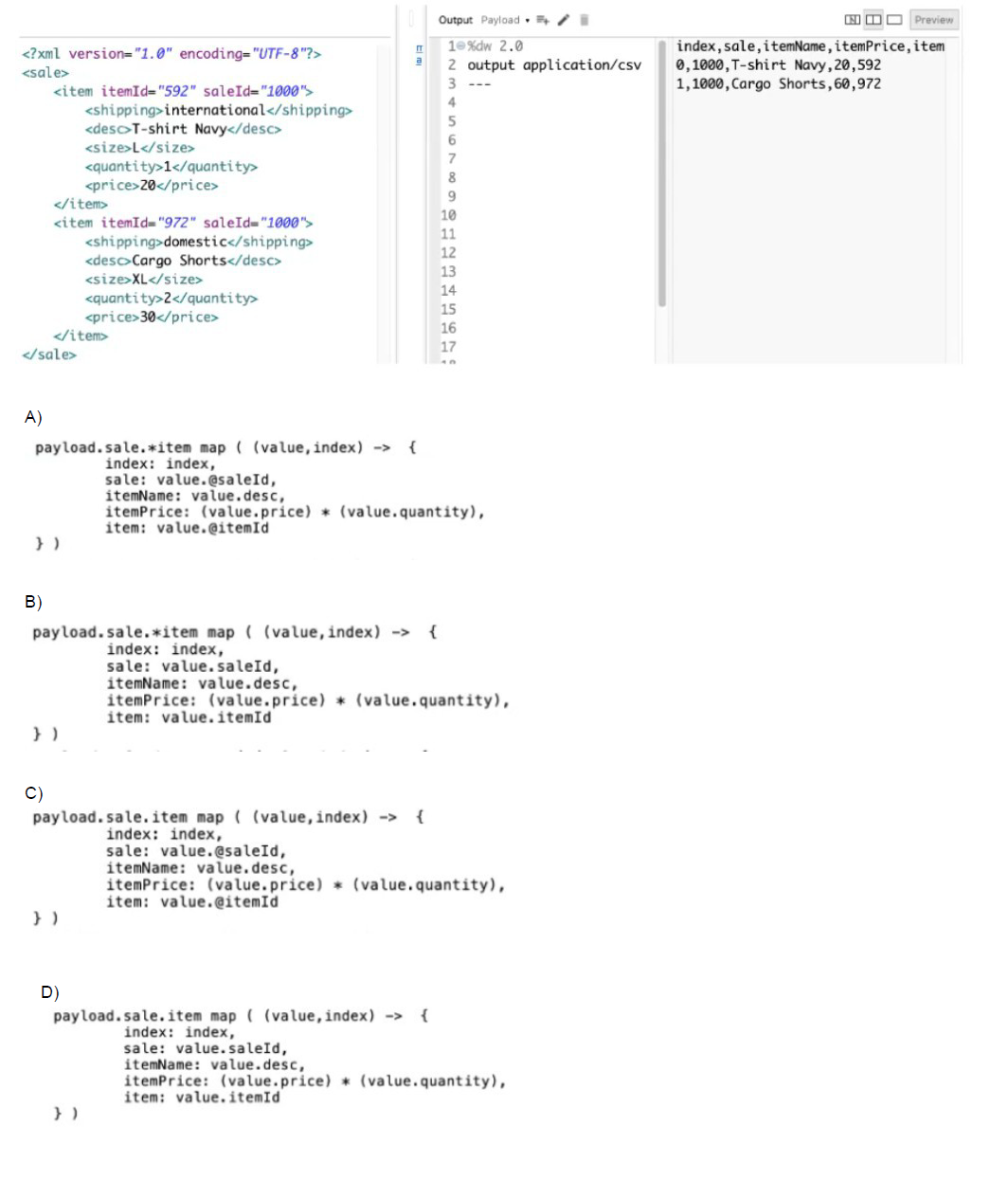
What DataWeave expression transforms the example XML input to the CSV output?

Show answerHide answer

Correct answer: D Option D

Explanation

Explanation:

Correct Option: ✅ D. Configure the correct JDBC driver
The error log indicates a ClassNotFoundException for com.mysql.jdbc.Driver, suggesting the JDBC driver is missing or incorrectly configured. Resolving this requires adding the correct MySQL JDBC driver dependency (e.g., mysql-connector-java) to the Mule application’s pom.xml or ensuring it is included in the project’s classpath. This ensures the database connector can establish a connection to the MySQL database.

Incorrect Options:

❌ A. Configure the correct host URL
While an incorrect host URL can cause connection issues, the error specifically cites a ClassNotFoundException for the JDBC driver, not a connection failure due to host misconfiguration. The issue lies in the driver’s absence, not the host URL. Thus, adjusting the host URL will not resolve the missing driver error.

❌ B. Configure the correct database name
An incorrect database name would typically result in a connection or query error, not a ClassNotFoundException for the JDBC driver. The error indicates the driver class is missing from the classpath, not a database name mismatch. Therefore, configuring the database name is irrelevant to resolving this specific driver-related issue.

❌ C. Configure the correct table name
The table name is irrelevant to the ClassNotFoundException for com.mysql.jdbc.Driver. This error occurs due to the absence of the JDBC driver in the classpath, not a table configuration issue. Adjusting the table name would not address the underlying driver dependency problem causing the connection failure.

Summary:
The scenario involves a Mule application with a database polling flow encountering a ClassNotFoundException for com.mysql.jdbc.Driver, indicating the JDBC driver is missing. The flow attempts to connect to a database and log payload data but fails due to this configuration error. Resolving this requires adding the correct MySQL JDBC driver to the project, ensuring proper database connectivity.

References:
MuleSoft Documentation: Configuring Database Connectors
MuleSoft Documentation: Managing Dependencies
Question 4 Choose 1
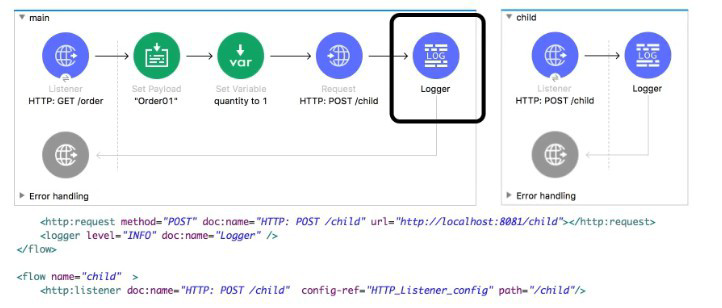
Refer to the exhibit. The main flow contains an HTTP Request in the middle of the flow. The HTTP Listeners and HTTP request use default configurations.

What values are accessible to the Logger at the end of the flow after a web client submit request to http://local:801/order?color=red?

Show answerHide answer

Correct answer: A payload

Explanation

Explanation:

✅ Correct Option:

A. payload
After the HTTP Request operation completes, the Mule event is replaced by the response from the called endpoint. The Logger at the end of the main flow will only have access to the payload from the HTTP response. The original variables (like quantity) and the original attributes (like the color query param) from the initial request are not part of this new event created by the HTTP response.

❌ Incorrect Options:

B. payload quantity var
This is incorrect. While the quantity variable was set in the main flow, the HTTP Request operation does not preserve the original variables in the outbound event. The event after the HTTP Request is a new event containing only the response payload and its associated attributes, not the original flow's variables.

C. payload color query param
This is incorrect. The color query parameter was part of the original request's attributes. The HTTP Request operation replaces the original attributes with the attributes of the HTTP response it received. The response from the /child endpoint does not contain the original query parameter, so it is inaccessible.

D. payload quantity var color query param
This is incorrect for the combined reasons above. The Logger's event is the result of the HTTP Request call. This new event contains only the response payload. It does not contain the original quantity variable or the original color query parameter from the initial request to the main flow.

📋 Summary:
An HTTP Request operation replaces the entire Mule event with the response from the called HTTP resource. The logger at the end of the flow only sees this new event. Therefore, it can only access the payload from the child flow's response. The original variable (quantity) and request attribute (the color query parameter) are lost from the event context at this point.

🔗 Reference:
MuleSoft Documentation: HTTP Request Operation
Question 5 Choose 1
Refer to the exhibit.


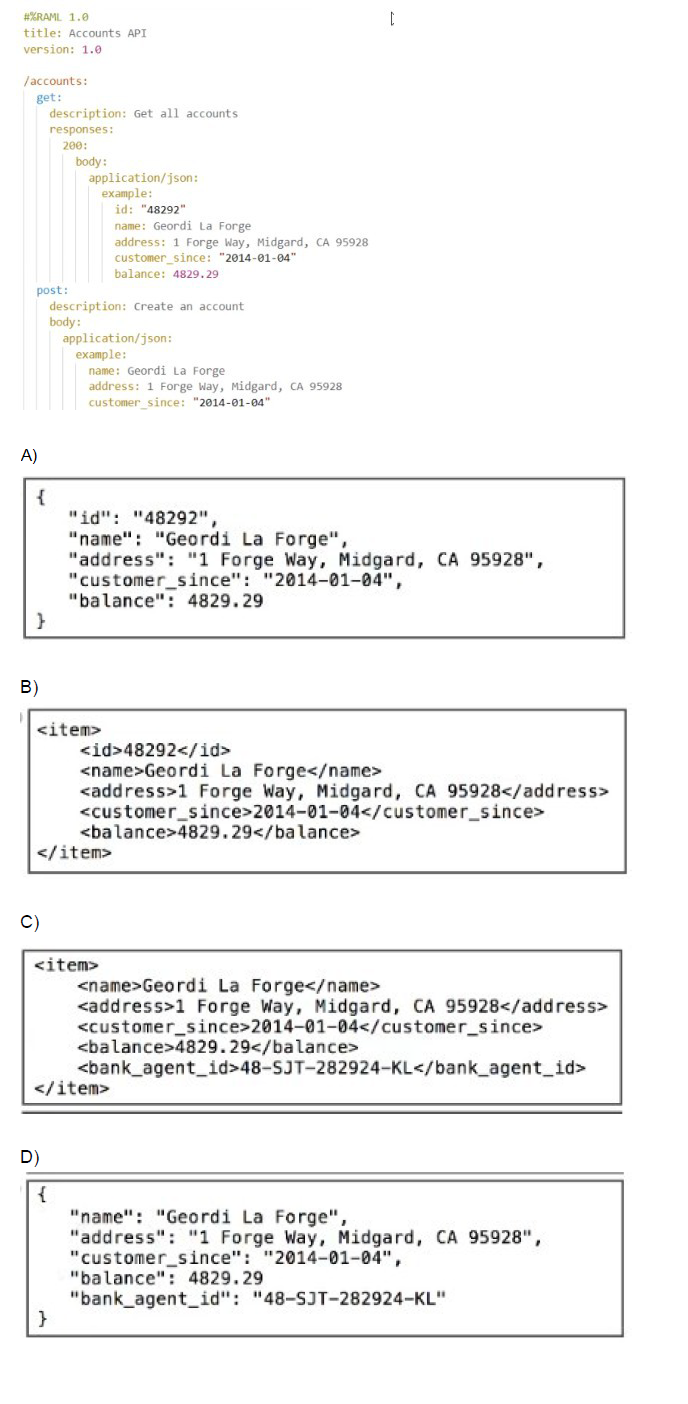
What data is expected by the POST /accounts endpoint?
Show answerHide answer

Correct answer: D Option D

Explanation

Explanation:

The RAML fragment shows the POST /accounts endpoint with the following definition:

post:
description: Create an account
body:
application/json:
example:
name: Geordi La Forge
address: 1 Forge Way, Midgard, CA 95928
customer_since: "2014-01-04"
balance: 4829.29

Because the POST has an example: block under application/json, MuleSoft’s API-led connectivity best practices and the RAML 1.0 specification state that this example is the exact structure and fields expected in the request body when no explicit type: or schema: is provided.

Looking at the four options:

Option D is the identical to the example shown in the RAML (same keys, same values, same JSON structure, plus the extra field bank_agent_id which is allowed because the example is not restrictive – it just illustrates the minimum required fields).

Why the other options are incorrect:

A → Wrong. Contains id: "48292" – an id is never accepted on POST for creation (it’s usually generated by the server).

B → Wrong. XML format – the endpoint only declares application/json.

C → Wrong. XML format + contains an extra inside the item tag – not matching the JSON contract.

References
RAML 1.0 Specification – Examples:
“When a body has an example but no type, the example serves as the de-facto expected payload.”
MuleSoft API Design Style Guide:
“The example in a POST body without a type definition is considered the contract for the request payload.”
Question 6 Choose 1
A Mule project contains a DataWeave module file WebStore dvA that defines a function named loginUser The module file is located in the projects src/main/resources/libs/dw folder
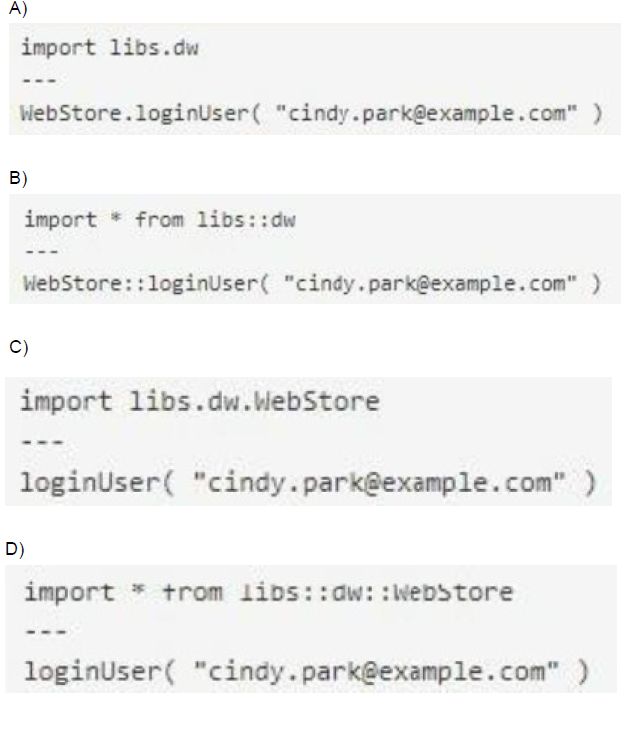
What is correct DataWeave code to import all of the WebStore.dwl file's functions and then call the loginUser function for the login "cindy.park@example.com"?

Show answerHide answer

Correct answer: D Option D

Explanation

Explanation:

Let's analyze the correct DataWeave import syntax:

Module Location: src/main/resources/libs/dw/WebStore.dwl

This creates a module namespace: libs::dw::WebStore

Import All Functions Syntax:
import * from libs::dw::WebStore
This imports all functions from the WebStore module located in the libs::dw namespace.

Function Call:
After import, call the function directly: loginUser("cindy.park@example.com")

Option D shows exactly this:
import * from libs::dw::WebStore
---
loginUser("cindy.park@example.com")

Key Concepts Tested:
DataWeave module import syntax
Namespace structure based on directory path
Wildcard imports vs. specific function imports
Correct separator (::) for namespace paths

Reference:
DataWeave Documentation: Modules are imported using import * from namespace::moduleName syntax.

Analysis of Other Options:
Option A: Uses libs.dw (dot notation) instead of libs::dw (double colon). Also imports entire dw namespace instead of specific WebStore module.

Option B: Uses import * from libs:dw (single colon) with incorrect separator and imports wrong namespace level.

Option C: Uses import libs.dw.WebStore which imports the module but doesn't use wildcard *, and the syntax is incorrect for wildcard imports.
Question 7 Choose 1
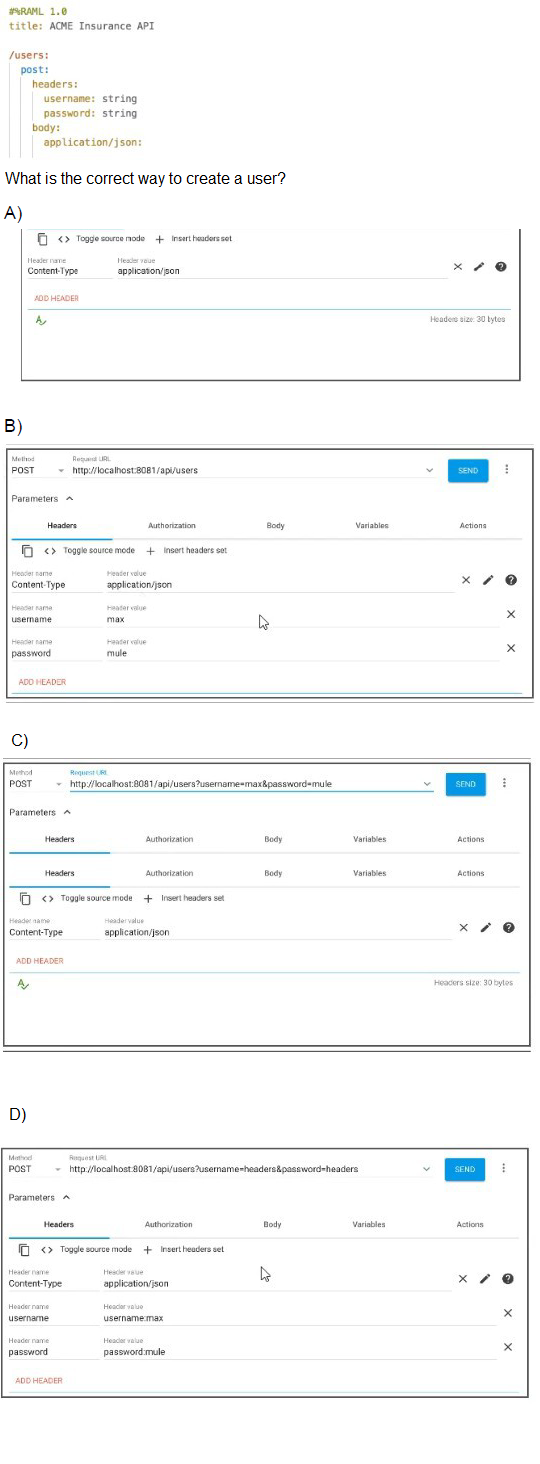
Refer to the exhibit.

Show answerHide answer

Correct answer: B Option B

Explanation

Explanation:

Looking at the RAML specification:

POST /users requires:

Headers: username (string) and password (string)
Body: application/json (content type specified)

Analysis of Options:

Option A: Only sets Content-Type: application/json header, missing the required username and password headers.

Option B: Correctly sets:
Content-Type: application/json (for the JSON body)
username header with a value
password header with a value
This matches the RAML requirements exactly

Option C: Attempts to pass credentials in the URL path (/api/users/username=max&password=mule), which is incorrect. Headers should be in the Headers section, not the URL. Also only sets Content-Type header.

Option D: Similar to C, tries to put credentials in URL (/api/users?username=headers&password=headers), not in headers as required. Although it does add username and password headers, the URL approach is wrong and redundant.

Key Concepts Tested:
Understanding RAML specification requirements
Difference between headers, query parameters, and path parameters
Proper way to pass authentication credentials in headers
REST API testing best practices

Reference:
REST API Design: Headers vs. query parameters usage
RAML Specification: Header requirements in method definitions

Note:
Option B correctly places username and password in the Headers section as required by the RAML spec, while also setting the proper Content-Type for the JSON body.
Question 8 Choose 1
Refer to the exhibits.


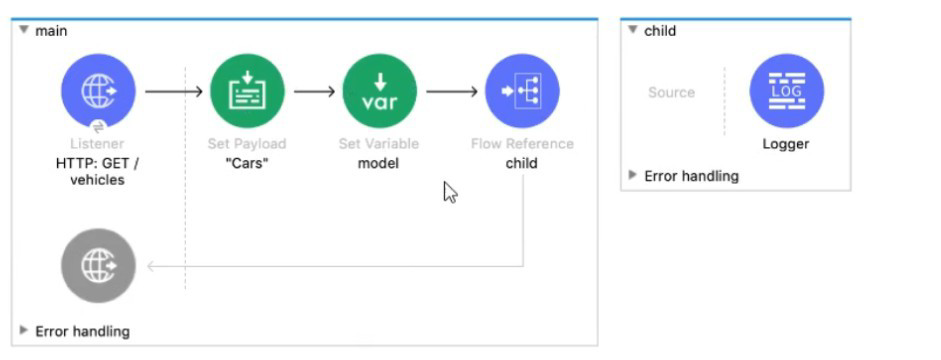
The main flow contains a Flow Reference to the child flow.
A web client sends a GET request to the main flow's HTTP Listener that includes a make query parameter.
What values are accessible in the child flow?
Show answerHide answer

Correct answer: D payload
make query param model var

Explanation

Explanation:

Flow Reference Behavior:
When a flow references another flow in Mule 4, it shares the entire Mule event
This includes: payload, variables, attributes (headers, query params, etc.)

What's Available in Main Flow:
Payload: Set to "Cars" by Set Payload "Cars"
Variable: model created by Set Variable model
Query Parameter: make from the HTTP request (?make=...) accessible via attributes.queryParams.make

What Child Flow Receives:
Payload: "Cars" (passed through)
Variable: model (available via vars.model)
Query Parameter: make (available via attributes.queryParams.make)
All other attributes (headers, etc.)

Key Concepts Tested:
Flow Reference event sharing in Mule 4
Scope of variables, payload, and attributes
Difference between flows and subflows (flows preserve their own error handling but share event data)

Reference:
MuleSoft Documentation: Flow Reference passes the current Mule event to the referenced flow.

Analysis of Other Options:

A. payload only: Incorrect. Child flow receives the entire event, including variables and attributes.
B. payload and make query param: Incorrect. Missing the model variable.
C. payload and model var: Incorrect. Missing the make query parameter which is part of the attributes.
Question 9 Choose 1
Refer to the exhibit.


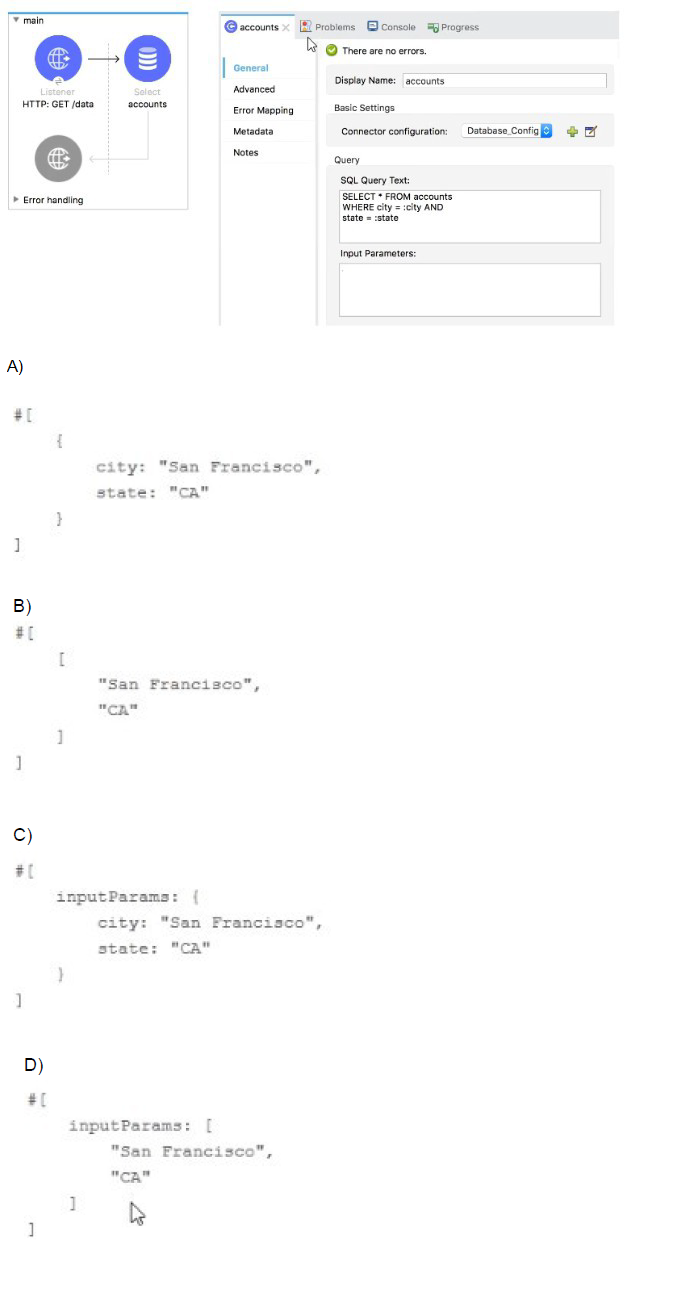
What expression correctly specifies input parameters to pass the city and state values to the SQL query?
Show answerHide answer

Correct answer: A Option A

Explanation

Explanation:

Option A correctly constructs a DataWeave expression that evaluates to a Map (JSON object) with keys that match the named parameters in the SQL query:
#[{city: "San Francisco", state: "CA"}]
Map Structure: The curly braces ({}) denote a Map/Object, which is the required structure for passing named parameters to the Database connector.
Key Matching: The keys city and state exactly match the parameters expected by the query (#:city and #:state).

❌ Incorrect Answers:

B. #[["San Francisco", "CA"]]: This is incorrect. This expression evaluates to an Array (List), not a Map. The Database connector would use the values by position for positional parameters (?), but it cannot correctly map them to the named parameters (#:city, #:state).
C. #[inputParams: { city: "San Francisco", state: "CA" }]: This is incorrect. It wraps the necessary Map inside another field called inputParams. The Database connector expects the root level of the DataWeave expression to be the parameter Map itself, not a Map nested inside an inputParams key.
D. #[inputParams: ["San Francisco", "CA"]]: This is incorrect. It combines an unnecessary outer wrapper (inputParams) with an Array structure ([]), which is not the required Map structure for named parameters.

📚 References:
Database Connector Input Parameters: The MuleSoft documentation for the Database connector confirms that when using named parameters (e.g., #:city), the Input Parameters field must contain a Map (or an Object in DataWeave) where the keys correspond to the parameter names in the SQL query.
Question 10 Choose 1
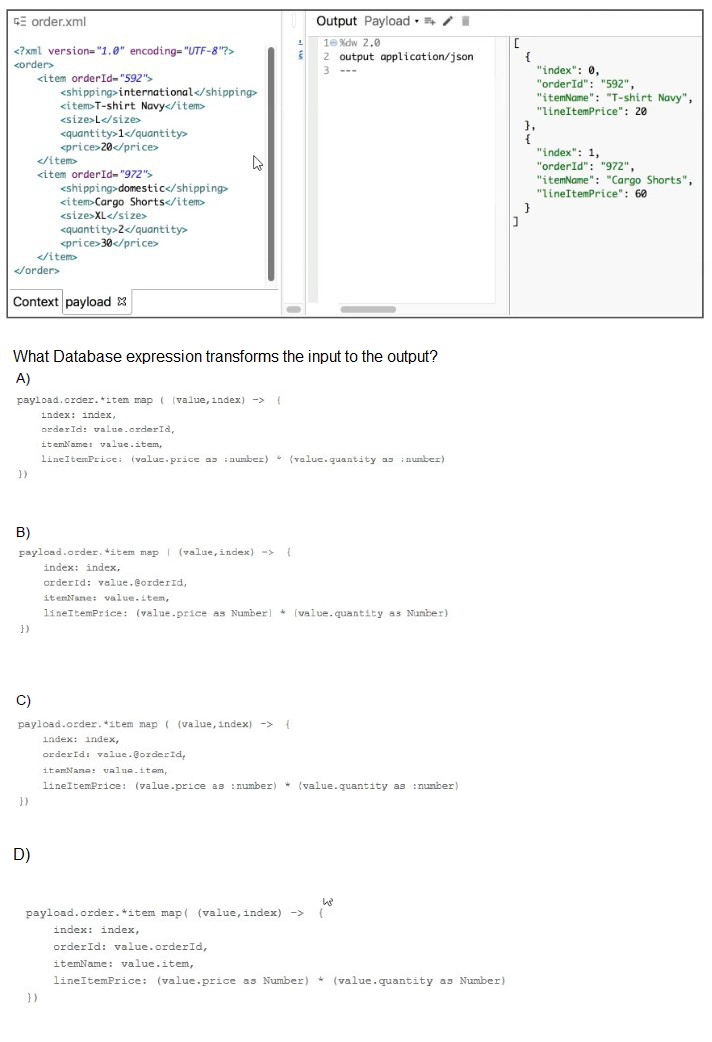
Refer to the exhibit.

Show answerHide answer

Correct answer: C Option C

Explanation

Explanation:
Iterating Over Items: The goal is to create one JSON object for every item element inside the order element in the XML. The correct path to access these repeated elements is payload.order.*item. The * is necessary to access the multiple item nodes in the XML structure.

Mapping Function: The map function correctly iterates over the list of items, assigning the current item's data to the variable value and its index to the variable index.

Output Structure: Inside the map, an object {...} is created for the JSON output.

Index: index (the second parameter in the map function) provides the zero-based index of the current item, fulfilling Index: index.

orderId: The orderId attribute of the node is accessed via value.orderId.

itemName: The content of the deeply nested item tag within item is accessed as value.item.

lineItemPrice: The calculation (value.price as :number) * (value.quantity as :number) correctly accesses the text content of the price and quantity children of the current item node, casts them to numbers for multiplication, and provides the required field.

❌ Incorrect Answers and Reasoning
A. Option A: This option uses payload.order.item instead of payload.order.*item. In DataWeave, accessing an XML node that is expected to be an array of multiple elements (like ) requires the wildcard * for iteration, especially when it's not the top-level element. While DataWeave is often flexible, payload.order.item might only return the first element or fail to iterate correctly.

B. Option B: This option has two key errors:
- It uses the wrong path: payload.order.*item is missing the s in *items. The XML shows the node name is item.
- It incorrectly casts to Number (uppercase). DataWeave 2.0 type coercion uses lowercase :number (or just number).

D. Option D: This option has the same incorrect casting as Option B, using Number instead of :number.

📚 References
DataWeave Documentation on XML Iteration: Using the selector .* is the standard way to select and iterate over repeated elements in an XML structure when they are not the root of the document.

DataWeave Documentation on Type Coercion: Explicit type casting for arithmetic operations requires the use of the :type notation (e.g., :number or as number). The uppercase Number is typically an incorrect syntax.
Full mock exam

Sit the Salesforce-MuleSoft-Developer exam before exam day

Full-length mocks with the same number of questions and the same time limit as the real Salesforce-MuleSoft-Developer exam. Every attempt draws a new set of questions from the full bank, so you can keep going until you pass comfortably.

Get full Salesforce-MuleSoft-Developer mock exam
  • 65questions per mock
  • 105 mintime limit
  • 234questions in the bank
  • Newmock on every attempt

Salesforce MuleSoft Developer Mastery Blueprint: 100% Exam Coverage with Proven Prep Tactics


Passing the Salesforce MuleSoft Certified Developer Mule-Dev-201 exam requires more than just technical knowledge; it demands a smart strategy. Think of your preparation in two phases: building your foundation and then pressure-testing your skills. This blueprint outlines how to effectively combine study with strategic practice to ensure you walk into the exam with confidence.

Phase 1: Solidify Your Core Knowledge


Before you even look at a practice question, you must build a strong foundation. Start by thoroughly reviewing the official exam guide from Salesforce. Use official MuleSoft documentation, Anypoint Platform tutorials, and developer blogs to deepen your understanding of key areas like API-led connectivity, DataWeave transformations, error handling, and deployment strategies.

Phase 2: The Power of Strategic Practice Testing


Reading is passive; applying knowledge under exam conditions is active. This is where high-quality Salesforce MuleSoft Developer practice test become non-negotiable. This is the single most effective tool for moving from "I think I know it" to "I can prove I know it."

The practice questions from SalesforceExams.com are specifically designed for this critical phase. They simulate the real exam environment, training you to manage time and pressure. When you take this test, you are not just memorizing answers; you are learning how to dissect complex questions, eliminate incorrect options, and apply logic to scenarios you have never seen before.

Maximizing Your Practice Exam Results


For every question you get wrong or even guess right on a SalesforceExams.com practice test, dig deeper. Why was your answer incorrect? What concept did the question target? Review explanations or go back to the official documentation and master that specific topic. This process of targeted revision turns your weaknesses into strengths and ensures 100% exam coverage.

Key Facts:

Exam Questions: 60
Type of Questions: MCQs
Exam Time: 120 minutes
Exam Price: $400
Passing Score: 70%

Key Topics:

1. Explaining application network basics
2. Designing and consuming APIs
3. Accessing and modifying Mule events
4. Structuring Mule Applications
5. Building API implementation interfaces
6. Routing events
7. Handling errors
8. Transforming data with DataWeave
9. Using Connectors
10. Processing records
11. Debugging and troubleshooting Mule applications
12. Reply to a Forum topic

Candidates should have hands-on experience working on basic Mule 4 projects under guidance and supervision. Salesforce MuleSoft Developer Exam is ideal for integration developers Who are looking to validate their skills in designing, building, testing, debugging, deploying, and managing basic APIs and integrations. Salesforce MuleSoft Developer practice exam questions build confidence, enhance problem-solving skills, and ensure that you are well-prepared to tackle real-world Salesforce scenarios.

Mastering the MuleSoft Developer Exam: Real Journeys, Real Results


The Wake-Up Call: When Experience Wasn’t Enough
Meet Alex, Senior Integration Developer

Alex had built dozens of APIs using MuleSoft’s Anypoint Platform. But when he took a practice test for the Salesforce MuleSoft Developer certification, he was shocked to score 58%. The exam demanded precision in areas he’d taken for granted:

Critical Gaps Uncovered:

1. DataWeave nuances: Transforming XML with nested namespaces
2. Error handling: When to use on-error-continue vs on-error-propagate
3. API design: Proper use of HTTP status codes in RESTful APIs
4. Performance tuning: Cache scopes and batch processing thresholds

"I realized I’d been relying on Stack Overflow too much," Alex admitted.

The Transformation: How Targeted Practice Changed Everything

Our MuleSoft Developer practice test became his technical mirror:

What Worked:

✔ Scenario-based questions that forced him to:

1. Debug malformed DataWeave scripts
2. Design proper RAML fragments for reusability
3. Calculate message processor threading configurations

✔ Detailed explanations that didn’t just state answers but explained:

1. Why 202 Accepted differs from 200 OK in async processes
2. How Mule event context affects variable scoping

The Breakthrough Moment:

After 3 weeks of drilling:
→ He could mentally visualize Mule message flows
→ Stopped second-guessing error handling strategies

The Certification Payoff

Today, Alex:
Leads his company’s MuleSoft Center of Excellence
Reduced integration bug reports by 40%
Onboards new developers using our tests as training

MuleSoft development requires both API knowledge and integration logic. The practice tests on Salesforceexams.com challenged me with real-world integration scenarios and dataweave transformations. If you are preparing for this exam, start here.
Brandon Foster, MuleSoft Developer | Austin, TX