Fortinet certification · Exam NSE6_FSM_AN-7.4

NSE6_FSM_AN-7.4 Mock Exam

Fortinet NSE 6 - FortiSIEM 7.4 Analyst

Find out if you're ready for NSE6_FSM_AN-7.4. Take the free timed mock exam and get your score in minutes, or study the free NSE6_FSM_AN-7.4 questions below with answers and explanations.

13 questions · 23 minutes · free, no sign-up

Free NSE6_FSM_AN-7.4 questions

1–10 of 13 free
Question 1 Choose 1
Refer to the exhibit.
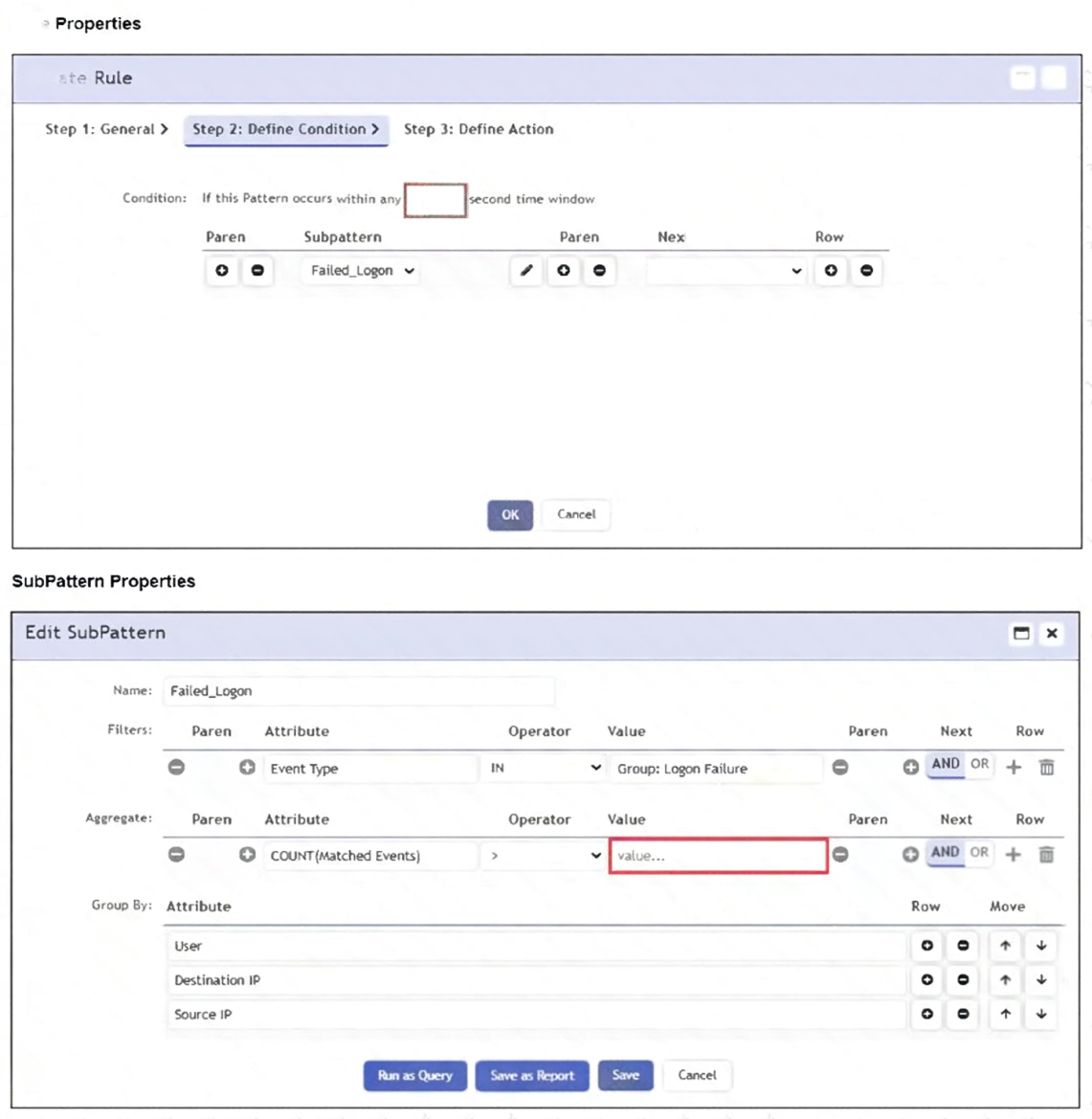


An analyst wants the rule shown in the exhibit to trigger when three failed login attempts occur within three minutes.

What should the values be for the condition time window and aggregate count?
Show answerHide answer

Correct answer: A Time window 180 seconds, aggregate count 3

Explanation

Explanation:
The rule is designed to detect a security incident pattern (multiple failed logons) within a specific timeframe. The condition in the exhibit states: "If this Pattern occurs within any second time window." To match the business requirement of exactly three attempts within three minutes, the system's threshold parameters must be configured to count the number of failed events and define the maximum elapsed time allowed for that count.

Correct Option: (A) Time window 180 seconds, aggregate count 3 The requirement specifies "three failed login attempts" → this translates directly to an aggregate count of 3 events.
The requirement specifies "within three minutes" → this translates to a time window of 180 seconds (since 3 minutes × 60 seconds = 180 seconds).
By setting the aggregate count to 3 and the sliding time window to 180 seconds, the rule triggers only when the third failure occurs within that exact 180-second boundary.

Incorrect Option: (B) Time window 180 seconds, aggregate count 2
Why it is wrong: While the time window (180 seconds) is correct, setting the aggregate count to "2" would cause the rule to trigger after only two failed attempts. This violates the explicit requirement for three attempts, resulting in a high rate of false positives (alerts firing prematurely).

Incorrect Option: (C) Time window 90 seconds, aggregate count 3
Why it is wrong: The aggregate count of "3" is correct, but the time window of 90 seconds (1.5 minutes) is too short. The requirement explicitly states a window of three minutes (180 seconds). This setting would cause the rule to miss legitimate attack patterns that occur over a longer 3-minute span.

Incorrect Option: (D) Time window 90 seconds, aggregate count 2
Why it is wrong: This option is doubly incorrect. The time window is too restrictive (90 seconds instead of 180), and the aggregate count is too low (2 instead of 3). This configuration would fire alerts for very rapid double-failures, completely disregarding the specified detection criteria.

Reference:
ITIL 4 Foundation, Chapter 5.1 (Value Streams and Processes) and ITIL 4 Practice Guide: Incident Management & Monitoring and Event Management. While ITIL does not specify SIEM syntax, it defines event correlation thresholds. The conversion of "3 minutes" to "180 seconds" is standard metric conversion, and "aggregate count" aligns with ITIL's guidance on defining event filters and thresholds to reduce alert fatigue (Event Management practice).
Question 2 Choose 1


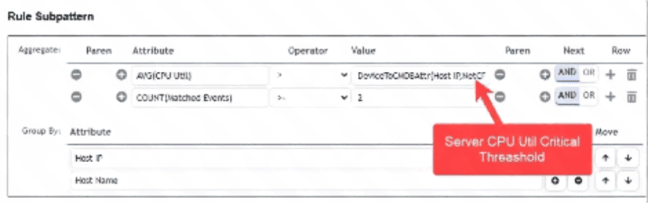
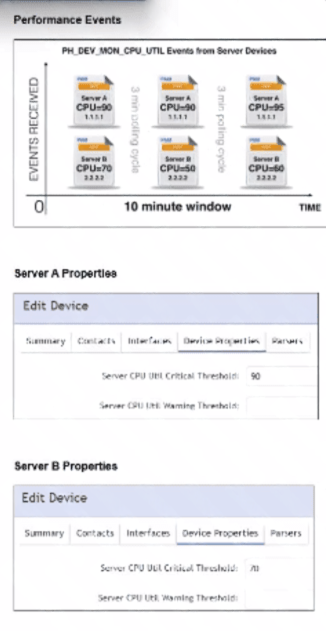
Three events are collected over 10 minutes from two servers: Server A and Server B.

Based on the settings for the rule subpattern and a 10-minute condition window, how many incidents will the servers generate?
Show answerHide answer

Correct answer: D Server A will generate one incident and Server B will not generate any incidents

Explanation

Explanation:
This question tests your understanding of FortiSIEM rule subpattern logic, specifically how threshold conditions, grouping, and the Host IP filter work together. The rule looks for CPU utilization events that cross the critical threshold (90%) while excluding specific IPs. The 10-minute window aggregates events per server to determine if an incident should be generated.

Correct Option:

D. Server A will generate one incident and Server B will not generate any incidents.

Server A (1.1.1.1):
Has 3 events (CPU=90, 90, 95), all exceeding the Critical Threshold of 90. The rule groups by Host IP and applies the Server CPU Util Critical threshold. Since none of Server A's IPs are excluded, it triggers one incident for the aggregate violation.

Server B (2.2.2.2):
Has 2 events (CPU=70, 90). While one event hits exactly 90, the rule's subpattern shows a Host IP Not exclusion that matches 2.2.2.2 (visible in the filter list). This exclusion prevents Server B from being evaluated, so it generates zero incidents.

Incorrect Option:

A. Server A will generate one incident and Server B will generate one incident.
This would be correct only if Server B were not excluded by the Host IP Not filter. However, the subpattern clearly shows 2.2.2.2 is explicitly excluded, so Server B cannot trigger an incident despite having a CPU=90 event.

B. Server A will not generate any incidents and server B will generate one incident.
This is incorrect because Server A clearly has multiple events exceeding the 90% threshold and is not excluded. Server B, on the other hand, is excluded, so it cannot generate an incident at all.

C. Server A will not generate any incidents and Server B will not generate any incidents.
This is incorrect because Server A has valid events (CPU=90, 90, 95) that meet the critical threshold and are not filtered out. The rule would definitely generate an incident for Server A.

Reference:
FortiSIEM 7.4.0 Administration Guide, Chapter 8: Rules → Subpatterns and Thresholds – "The 'Host IP Not' condition excludes specific IPs from rule evaluation. Group By attributes aggregate events per unique value before applying threshold checks." Additionally, the Device Properties tab shows Server A and Server B both have Critical Threshold = 90, confirming the evaluation baseline.
Question 3 Choose 1


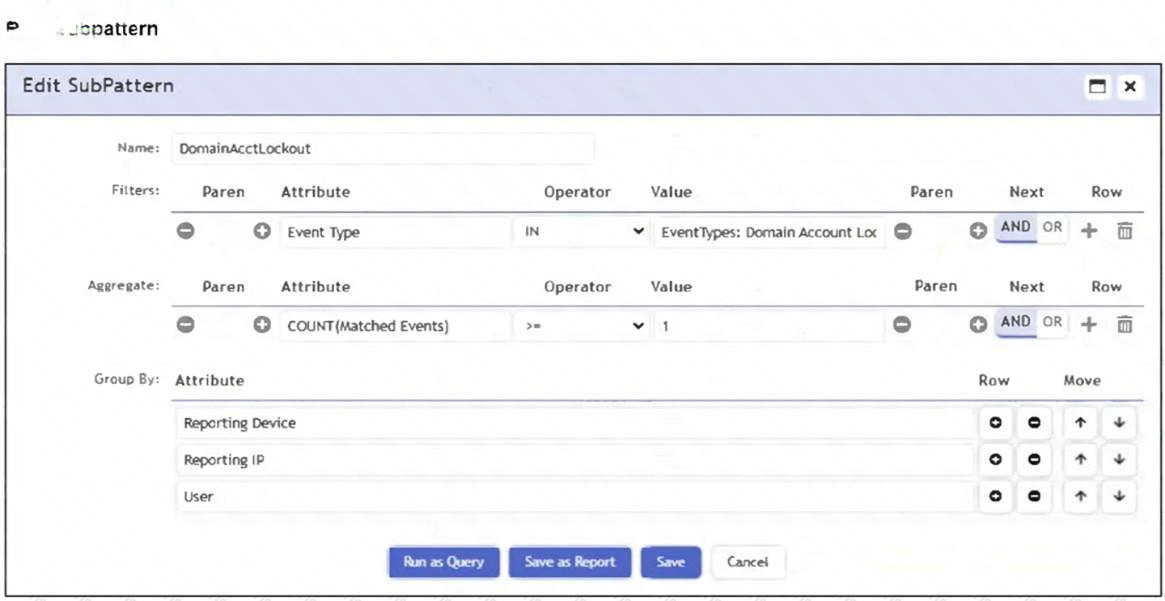
Which section contains the subpattern configuration that determines how many matching events are needed to trigger the rule?
Show answerHide answer

Correct answer: A Aggregate

Explanation

Explanation:
In FortiSIEM rule subpatterns, the Aggregate section is responsible for defining how multiple events are processed together before a rule triggers. It controls counting, thresholds, and time windows—essentially determining how many matching events are required to fire the rule, rather than just looking at individual events in isolation.

Correct Option:

A. Aggregate
The Aggregate section contains the COUNT function and threshold settings that specify the minimum number of matching events needed within a given time window to trigger the rule. Without aggregation, the rule would fire on every single matching event. The Group By clause works within the Aggregate to separate counts per unique attribute (e.g., per User or Reporting Device).

Incorrect Option:

B. Group By
Group By determines how events are categorized or bucketed (e.g., per User, per Reporting Device) for aggregation purposes. It does not set the actual numeric threshold or count requirement—it only defines the grouping keys for the aggregate counter.

C. Actions
Actions define what happens after the rule triggers—such as creating incidents, sending emails, or running scripts. They have no role in determining the number of events needed to trigger the rule in the first place.

D. Filters
Filters are used to narrow down which events are even considered for the rule (e.g., only Domain Account Lock events). They do not control event counting or thresholds; they simply act as a pre-qualification condition.

Reference:
FortiSIEM 7.4.0 Administration Guide, Chapter 8: Rules → Subpattern Configuration – "The Aggregate section allows you to set count, sum, or average thresholds over a specified time window. Group By is used within Aggregate to define how events are grouped for counting."
Question 4 Select all that apply
You want to create a rule with multiple subpatterns but trigger an incident only if three different subpatterns are matched over a 24-hour period.

Where must you define the time period that the rule uses to evaluate all the subpatterns? (Choose one answer)
Show answerHide answer

Correct answer: C Define the time window under the Define Condition tab of the rule.

Explanation

Explanation:
This question tests your understanding of how multi-subpattern rules work in FortiSIEM. When a rule contains multiple subpatterns that must all match to trigger an incident, you need a global time window that applies to the entire rule—not just individual subpatterns. This ensures all conditions are evaluated within the same overarching timeframe.

Correct Option:

C. Define the time window under the Define Condition tab of the rule.
The Define Condition tab is where you set the overall rule logic, including how subpatterns are combined (e.g., ALL, ANY, or sequence) and the global time window that applies to the entire rule evaluation. When you select "ALL" (or similar) to require multiple subpatterns, the time window defined here ensures that all matching events from all subpatterns fall within the same 24-hour period before triggering an incident.

Incorrect Option:

A. Define the time window in each individual subpattern.
Defining a time window per subpattern sets an individual time limit for each subpattern independently. This does not enforce a single, unified 24-hour window across all subpatterns. Events could match different subpatterns in completely separate time ranges, causing the rule to trigger incorrectly.

B. Define the time window under the General tab of the rule.
The General tab contains basic rule metadata—name, description, severity, and status (Enable/Disable). It does not contain any time-window configuration. Time settings are strictly found in the Define Condition tab.

D. Define the time window in the Define Action section of the rule.
The Define Action section specifies what happens after the rule triggers—such as incident creation, email notifications, or script execution. It has no role in determining when or if the rule conditions are met within a specific timeframe.

Reference:
FortiSIEM 7.4.0 Administration Guide, Chapter 8: Rules → Define Condition Tab – "When a rule has multiple subpatterns, the time window specified in the Define Condition tab applies globally to all subpatterns. This ensures that all matching events occur within the same evaluation period before the rule fires."
Question 5 Choose 2
In an automation policy, which two methods can you use to notify analysts when an incident is triggered? (Choose two.)
Show answerHide answer

Correct answer: A, B EmailFortiSIEM Case

Explanation

Explanation:
Automation policies in FortiSIEM are designed to execute predefined actions when specific incident triggers are met. These actions include notifying analysts to ensure rapid incident response. The system supports several notification methods, but only two of the listed options are natively available as action types within the automation policy configuration.

Correct Option:

A. Email
Email is a primary notification method configured within automation policies. It sends alerts directly to specified analysts' inboxes with incident details, ensuring they are promptly informed even when not actively viewing the console.

B. FortiSIEM Case
Creating a FortiSIEM Case is another native action. This method automatically generates a formal case record within the system, allowing for structured incident tracking, collaboration, and audit trails directly inside the FortiSIEM interface.

Incorrect Option:

C. Syslog
While FortiSIEM can forward events via Syslog for general logging or third-party integration, it is not a standard notification method for analysts within the automation policy action list. Syslog is typically used for system-to-system data export, not user-targeted alerts.

D. Pop-up window
FortiSIEM does not support a native "pop-up window" action in automation policies. Desktop notifications are not feasible in a server-based web application environment, and FortiSIEM relies on persistent notifications like Email or Cases instead.

Reference:
FortiSIEM 7.4.0 Administration Guide, Chapter 14: Automation → Automation Actions – "Automation actions include: Email, FortiSIEM Case, Script, and Syslog." (Note: Syslog is available as a forwarding action, but not for analyst notification).
Question 6 Choose 1
Refer to the exhibit.


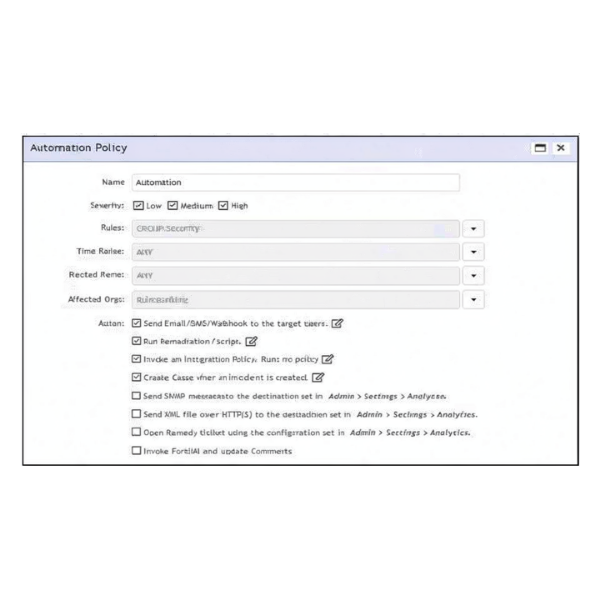
According to the automation policy configuration shown in the exhibit, what happens if an associated rule triggers?
Show answerHide answer

Correct answer: B FortiSIEM performs all selected actions.

Explanation

Explanation:
This question tests your understanding of how FortiSIEM automation policies execute actions when an associated rule triggers. The automation policy configuration allows multiple actions to be selected simultaneously. When a rule triggers, FortiSIEM processes all configured actions in parallel or sequentially, not just the first one or a single prioritized action.

Correct Option:

B. FortiSIEM performs all selected actions.
In the exhibit, multiple action checkboxes are visibly selected, including "Send Email/SMS/Webhook," "Run Remediation/Script," "Create Case," "Send SNMP message," and "Invoke FortiAI and update Comments." When an associated rule triggers, FortiSIEM executes all enabled actions as configured. There is no single-action precedence unless specifically designed; the policy executes every checked action.

Incorrect Option:

A. FortiSIEM runs the remediation script, because that takes precedence over all other options.
There is no inherent precedence or hierarchy among automation actions. Remediation scripts do not automatically override other actions. All selected actions are executed; none takes priority over others unless explicitly coded in the script or policy logic.

C. FortiSIEM fails to the integration policy, because no policy is defined.
The exhibit shows "Invoke an Integration Policy. Run: no policy" as an available action, but it is not selected (the checkbox is unchecked). Since it is not enabled, the automation policy ignores it entirely and proceeds with the other selected actions. No failure occurs.

D. FortiSIEM sends an email, because that is first on the list.
The order of actions in the list does not determine execution priority. FortiSIEM executes all selected actions regardless of their position in the UI. Being first does not make email the sole or primary action; all checked actions are performed.

Reference:
FortiSIEM 7.4.0 Administration Guide, Chapter 14: Automation → Automation Policies – "When an automation policy is triggered, FortiSIEM executes all actions that are enabled (selected) in the policy configuration. Actions are not prioritized; each configured action runs according to its own settings and schedule."
Question 7 Choose 1
Refer to the exhibit.


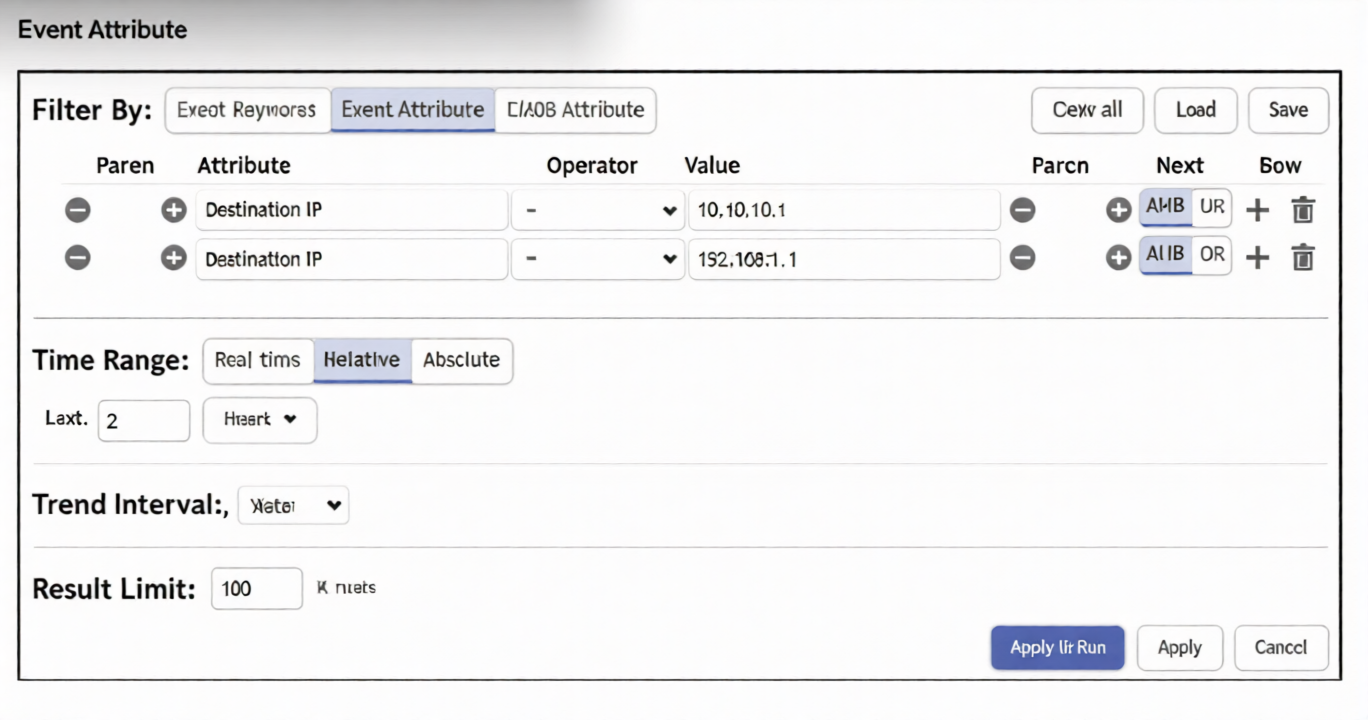
A FortiSIEM analyst is investigating an issue by examining events to two destination IP addresses. However, the analyst is not getting any results from the search.

Based on the selected filter shown in the exhibit, why is the search returning no results?
Show answerHide answer

Correct answer: B The wrong Boolean operator is selected in the Next column.

Explanation

Explanation:
This question tests your understanding of FortiSIEM's event search filter logic, specifically how the Parent, Next, and Operator columns work together to build Boolean expressions. The analyst is searching for events matching two destination IPs but getting zero results, indicating a logical flaw in how the conditions are combined.

Correct Option:

B. The wrong Boolean operator is selected in the Next column.
The Next column defines the Boolean relationship between rows of conditions (e.g., AND, OR). To match events to either of two destination IPs, the operator should be OR. If the Next column is set to AND, the search requires a single event to have both destination IPs simultaneously—which is impossible—resulting in zero results. This is the most common mistake when building multi-value filters.

Incorrect Option:

A. Parentheses are missing between the two items.
Parentheses control grouping and precedence but are not strictly required for a simple two-condition OR/AND filter. Missing parentheses would affect complex nested logic, but the fundamental issue here is the Boolean operator itself, not grouping.

C. The wrong option is selected in the Operator column.
The Operator column defines the comparison type (e.g., =, !=, CONTAINS) between the attribute and its value. Since both destination IP entries appear syntactically correct, the Operator is likely fine. The issue lies in how the two rows relate to each other, not in each individual comparison.

D. An invalid IP address is typed in the Value column.
The exhibit does not show any invalid IP format (e.g., missing octets or out-of-range values). If an IP were invalid, FortiSIEM would typically flag it or the search would return an error—not simply return zero results silently. The problem is logical, not syntactical.

Reference:
FortiSIEM 7.4.0 User Guide, Chapter 6: Event Search → Filter Conditions – "The Next column determines the Boolean relationship between multiple filter rows. Use AND to require all conditions, OR to match any condition. For multiple values of the same attribute, OR is typically required."
Question 8 Choose 1
Refer to the exhibit.


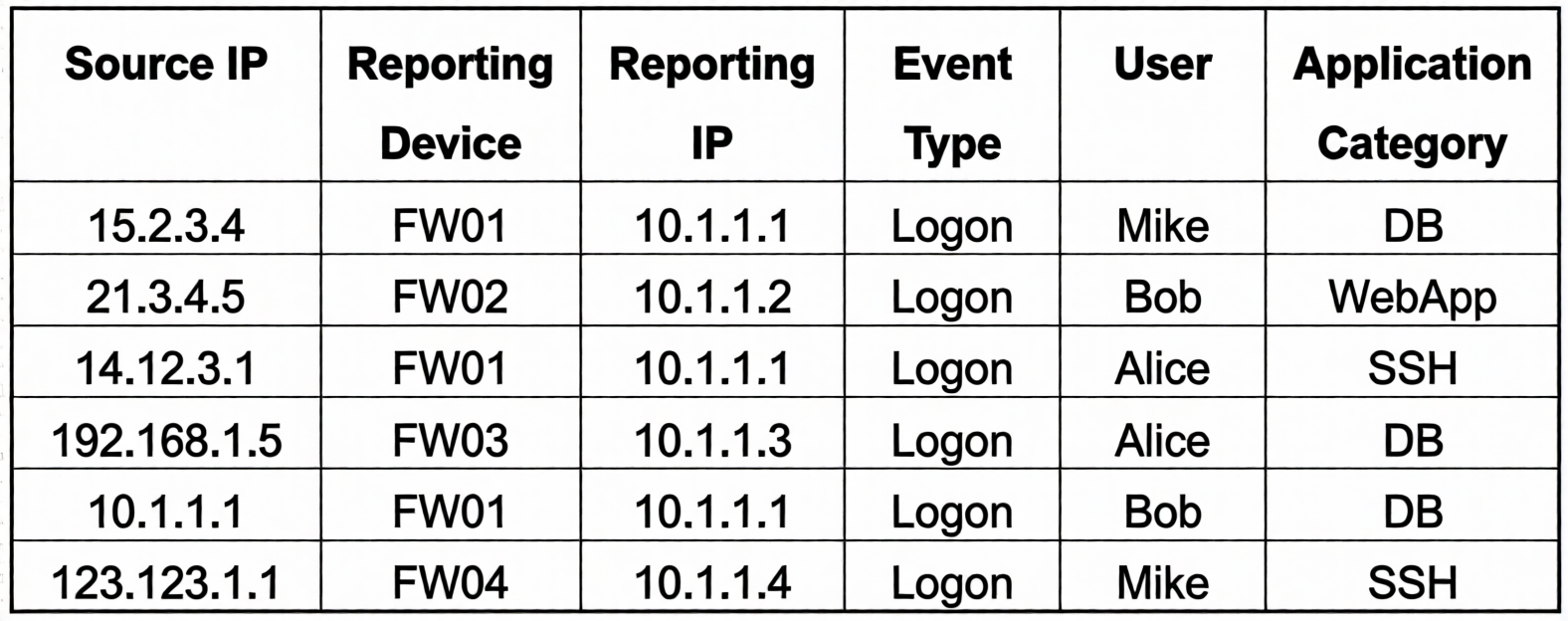
If you group the events by Reporting Device , Reporting IP , and Application Category , how many results will FortiSIEM display?
Show answerHide answer

Correct answer: B Five

Explanation

Explanation:
This question tests your understanding of how FortiSIEM's grouping (GROUP BY) functionality works. When you group by multiple attributes, FortiSIEM creates unique combinations of values from those specified columns. Each distinct combination counts as one result row, aggregating all events that share that exact combination of attribute values.

Correct Option:

B. Five
Grouping by Reporting Device, Reporting IP, and Application Category produces unique combinations:

Incorrect Option:

A. Four
This would undercount. It likely misses that FW01 with IP 10.1.1.1 has two different Application Categories (DB and SSH), which must be separate groups since Application Category is part of the GROUP BY.

C. One
This would only be true if you grouped by a single constant value or used no grouping at all. With three distinct attributes having multiple values, one group is impossible given the data variation.

D. Six
This is the total number of raw events before grouping. Grouping collapses events with identical combinations, so duplicate combinations (FW01, 10.1.1.1, DB) are merged into a single result row.

E. Two
This would undercount significantly. It might occur if you only grouped by Reporting Device or ignored Application Category entirely, but since all three are specified, there are clearly more than two distinct combinations.

Reference:
FortiSIEM 7.4.0 User Guide, Chapter 6: Event Search → Group By – "The Group By function aggregates events based on unique combinations of selected attributes. Each unique combination appears as one row in the results, with counts reflecting the number of events in that group."
Question 9 Choose 1
Refer to the exhibit.


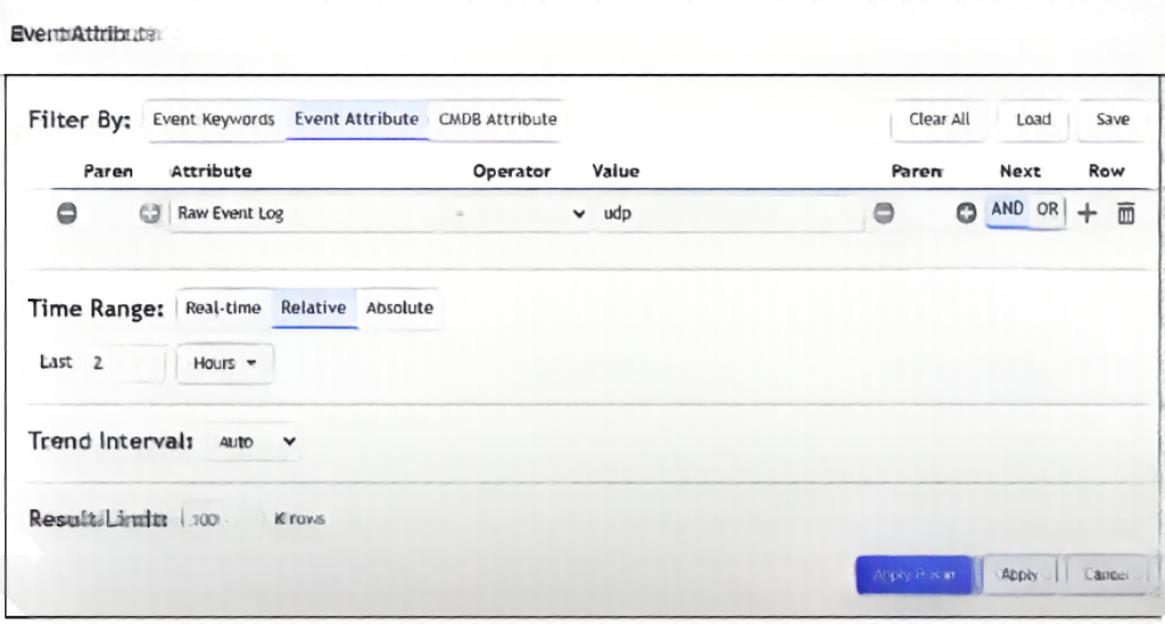
A FortiSIEM device is receiving syslog events from a FortiGate firewall. The FortiSIEM analyst is trying to search the raw event logs for the last two hours that contain the keyword " udp " . However, they are getting no results from the search, which they know should be available. Based on the filter shown in the exhibit, why are there no search results?
Show answerHide answer

Correct answer: D The analyst selected = in the Operator column. That is the wrong operator.

Explanation

Explanation:
This question tests your understanding of how the Operator column works in FortiSIEM's event search filters. The = operator performs an exact match on the entire field value, not a substring search. When searching for a keyword like "udp" within raw event logs, you need an operator that looks for the term anywhere inside the event message, not just as the complete field value.

Correct Option:

D. The analyst selected = in the Operator column. That is the wrong operator.
The = operator requires an exact, full-field match against the Event Message or Raw Log attribute. Since raw event logs contain much more than just the word "udp" (e.g., "src=10.0.0.1 sport=443 dst=192.168.1.1 dport=53 proto=udp"), an exact match fails. The correct operator should be CONTAINS or LIKE to search for "udp" as a substring anywhere within the raw log content.

Incorrect Option:

A. The analyst selected AND in the Next column. This is the wrong Boolean operator.
If only one filter row exists (keyword "udp"), the Next column is irrelevant because there are no additional conditions to combine. Even with multiple rows, AND would narrow results but wouldn't cause zero results if matches existed—it would just filter them further.

B. The Time Range value should be set to Real-Time.
The exhibit shows "Last 2 Hours" selected, which is a valid Relative time range. Real-Time is for live streaming events and would not affect historical search results. The time range is working correctly; the issue is with the filter logic, not the time window.

C. The keyword is case sensitive. Instead of typing udp in the Value field, the analyst should type UDP.
FortiSIEM event searches are generally case-insensitive by default for text-based searches, especially when using CONTAINS. The issue is not case but the operator itself. Even if case sensitivity were a factor, "udp" would still match "UDP" in a case-insensitive system.

Reference:
FortiSIEM 7.4.0 User Guide, Chapter 6: Event Search → Filter Operators – "Use the '=' operator for exact matches on the entire field value. Use 'CONTAINS' or 'LIKE' for substring searches within text fields such as Event Message or Raw Log. For keyword searches inside raw event payloads, CONTAINS is typically required."
Question 10 Choose 1
Refer to the exhibit.


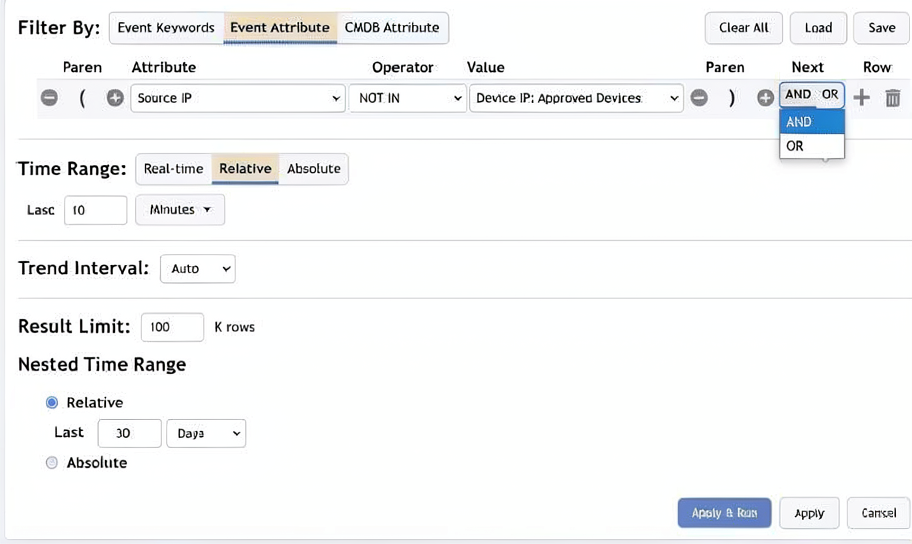
Which statement about the time range settings defined in the nested query is accurate? (Choose one answer)
Show answerHide answer

Correct answer: D FortiSIEM will search the last 10 minutes of events for a source IP address that is not in the Approved Devices report from the last 30 days.

Explanation

Explanation:
This question tests your understanding of nested time ranges in FortiSIEM event searches. The exhibit shows a primary time range of "Last 10 Minutes" and a nested time range of "Last 30 Days" applied to the CMDB attribute lookup. The nested query retrieves historical data from the CMDB (Approved Devices) over the longer period, while the main search focuses on recent events.

Correct Option:

D. FortiSIEM will search the last 10 minutes of events for a source IP address that is not in the Approved Devices report from the last 30 days.
The primary time range ("Last 10 Minutes") defines the window for the main event search—looking for recent events with source IPs. The nested time range ("Last 30 Days") applies specifically to the CMDB attribute subquery (Device IP: Approved Devices), meaning it looks back 30 days to determine which IPs are considered "approved." The filter then excludes any source IP found in that 30-day approved list from the last 10 minutes of events.

Incorrect Option:

A. FortiSIEM will list source IP addresses found in the last 10 minutes of events from each day in the Approved Devices report from the last 30 days.
This misinterprets the nested query. The nested time range does not create daily 10-minute slices; it simply defines the historical window for the CMDB lookup. The 10-minute window applies only to the main event search, not to each day of the 30-day period.

B. FortiSIEM will search in real time using 10-minute blocks for a source IP address that is not in the Approved Devices report from the last 30 days.
The primary time range is set to "Relative" (Last 10 Minutes), not "Real-time." Real-time searches continuously stream live events, whereas Relative searches a fixed historical window. The query performs a historical search of the last 10 minutes, not a real-time streaming search.

C. FortiSIEM will search the last 30 days of events for a source IP address that is not in the Approved Devices report.
This incorrectly applies the 30-day nested time range to the main event search. The primary time range is explicitly set to 10 minutes, not 30 days. The 30-day window applies only to the CMDB subquery (Approved Devices), not to the event data being searched.

Reference:
FortiSIEM 7.4.0 User Guide, Chapter 6: Event Search → Nested Time Ranges – "Nested time ranges allow you to define separate time windows for subqueries within a search. The primary time range applies to the main event search, while nested time ranges apply to referenced CMDB or report data, enabling comparisons across different time periods."
Full mock exam

Sit the NSE6_FSM_AN-7.4 exam before exam day

Full-length mocks with the same number of questions and the same time limit as the real NSE6_FSM_AN-7.4 exam. Every attempt draws a new set of questions from the full bank, so you can keep going until you pass comfortably.

Get full NSE6_FSM_AN-7.4 mock exam
  • 40questions per mock
  • 70 mintime limit
  • 49questions in the bank
  • Newmock on every attempt