Fortinet certification · Exam NSE6_FSM_AN-7.4

NSE6_FSM_AN-7.4 Mock Exam

Fortinet NSE 6 - FortiSIEM 7.4 Analyst

Free NSE6_FSM_AN-7.4 questions on Rules and subpatterns, each with the answer and an explanation.

13 questions · 23 minutes · free, no sign-up

Rules and subpatterns questions

1–4 of 4 free
Question 1 Choose 1
Refer to the exhibit.
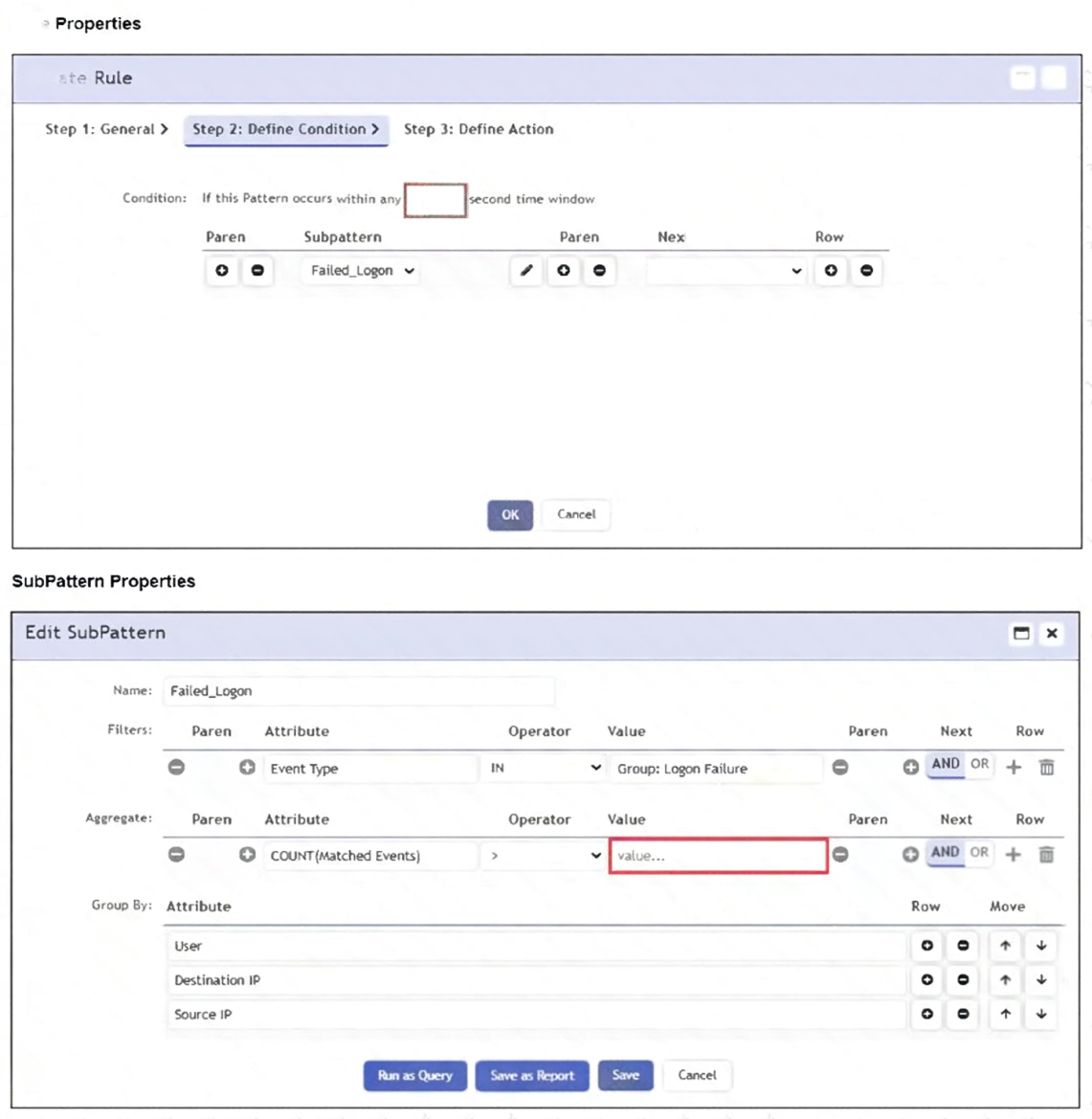


An analyst wants the rule shown in the exhibit to trigger when three failed login attempts occur within three minutes.

What should the values be for the condition time window and aggregate count?
Show answerHide answer

Correct answer: A Time window 180 seconds, aggregate count 3

Explanation

Explanation:
The rule is designed to detect a security incident pattern (multiple failed logons) within a specific timeframe. The condition in the exhibit states: "If this Pattern occurs within any second time window." To match the business requirement of exactly three attempts within three minutes, the system's threshold parameters must be configured to count the number of failed events and define the maximum elapsed time allowed for that count.

Correct Option: (A) Time window 180 seconds, aggregate count 3 The requirement specifies "three failed login attempts" → this translates directly to an aggregate count of 3 events.
The requirement specifies "within three minutes" → this translates to a time window of 180 seconds (since 3 minutes × 60 seconds = 180 seconds).
By setting the aggregate count to 3 and the sliding time window to 180 seconds, the rule triggers only when the third failure occurs within that exact 180-second boundary.

Incorrect Option: (B) Time window 180 seconds, aggregate count 2
Why it is wrong: While the time window (180 seconds) is correct, setting the aggregate count to "2" would cause the rule to trigger after only two failed attempts. This violates the explicit requirement for three attempts, resulting in a high rate of false positives (alerts firing prematurely).

Incorrect Option: (C) Time window 90 seconds, aggregate count 3
Why it is wrong: The aggregate count of "3" is correct, but the time window of 90 seconds (1.5 minutes) is too short. The requirement explicitly states a window of three minutes (180 seconds). This setting would cause the rule to miss legitimate attack patterns that occur over a longer 3-minute span.

Incorrect Option: (D) Time window 90 seconds, aggregate count 2
Why it is wrong: This option is doubly incorrect. The time window is too restrictive (90 seconds instead of 180), and the aggregate count is too low (2 instead of 3). This configuration would fire alerts for very rapid double-failures, completely disregarding the specified detection criteria.

Reference:
ITIL 4 Foundation, Chapter 5.1 (Value Streams and Processes) and ITIL 4 Practice Guide: Incident Management & Monitoring and Event Management. While ITIL does not specify SIEM syntax, it defines event correlation thresholds. The conversion of "3 minutes" to "180 seconds" is standard metric conversion, and "aggregate count" aligns with ITIL's guidance on defining event filters and thresholds to reduce alert fatigue (Event Management practice).
Question 2 Choose 1


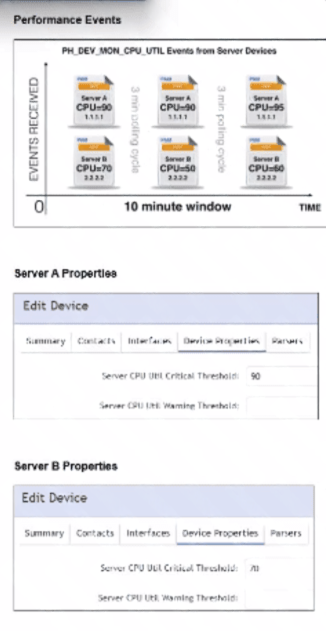
Three events are collected over 10 minutes from two servers: Server A and Server B.

Based on the settings for the rule subpattern and a 10-minute condition window, how many incidents will the servers generate?
Show answerHide answer

Correct answer: D Server A will generate one incident and Server B will not generate any incidents

Explanation

Explanation:
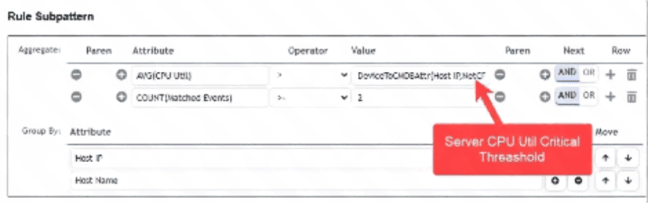
This question tests your understanding of FortiSIEM rule subpattern logic, specifically how threshold conditions, grouping, and the Host IP filter work together. The rule looks for CPU utilization events that cross the critical threshold (90%) while excluding specific IPs. The 10-minute window aggregates events per server to determine if an incident should be generated.

Correct Option:

D. Server A will generate one incident and Server B will not generate any incidents.

Server A (1.1.1.1):
Has 3 events (CPU=90, 90, 95), all exceeding the Critical Threshold of 90. The rule groups by Host IP and applies the Server CPU Util Critical threshold. Since none of Server A's IPs are excluded, it triggers one incident for the aggregate violation.

Server B (2.2.2.2):
Has 2 events (CPU=70, 90). While one event hits exactly 90, the rule's subpattern shows a Host IP Not exclusion that matches 2.2.2.2 (visible in the filter list). This exclusion prevents Server B from being evaluated, so it generates zero incidents.

Incorrect Option:

A. Server A will generate one incident and Server B will generate one incident.
This would be correct only if Server B were not excluded by the Host IP Not filter. However, the subpattern clearly shows 2.2.2.2 is explicitly excluded, so Server B cannot trigger an incident despite having a CPU=90 event.

B. Server A will not generate any incidents and server B will generate one incident.
This is incorrect because Server A clearly has multiple events exceeding the 90% threshold and is not excluded. Server B, on the other hand, is excluded, so it cannot generate an incident at all.

C. Server A will not generate any incidents and Server B will not generate any incidents.
This is incorrect because Server A has valid events (CPU=90, 90, 95) that meet the critical threshold and are not filtered out. The rule would definitely generate an incident for Server A.

Reference:
FortiSIEM 7.4.0 Administration Guide, Chapter 8: Rules → Subpatterns and Thresholds – "The 'Host IP Not' condition excludes specific IPs from rule evaluation. Group By attributes aggregate events per unique value before applying threshold checks." Additionally, the Device Properties tab shows Server A and Server B both have Critical Threshold = 90, confirming the evaluation baseline.
Question 3 Choose 1


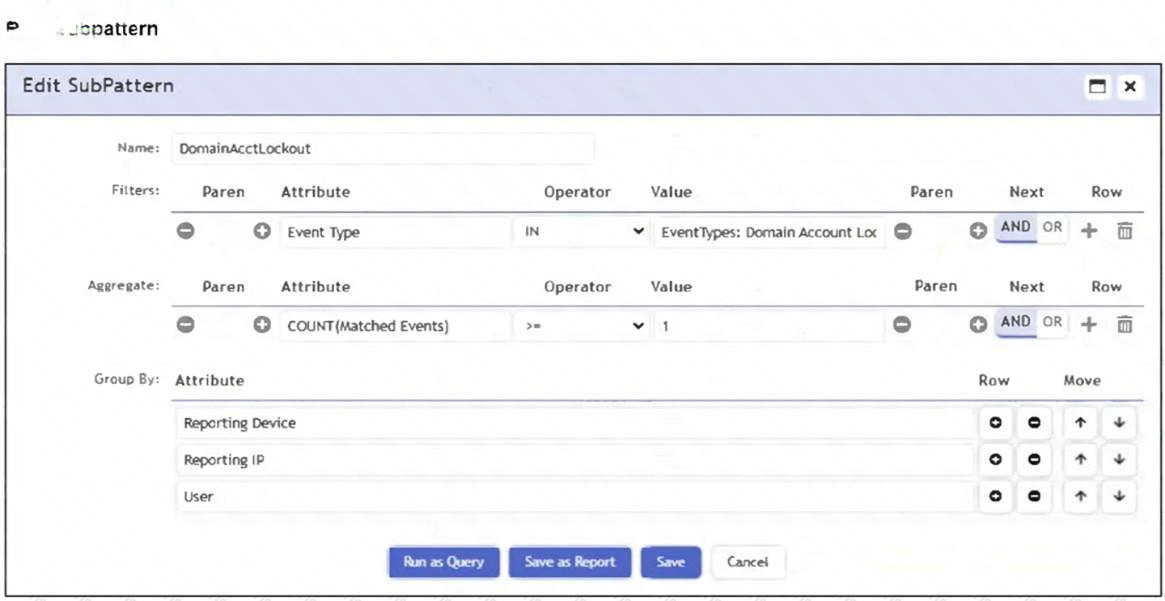
Which section contains the subpattern configuration that determines how many matching events are needed to trigger the rule?
Show answerHide answer

Correct answer: A Aggregate

Explanation

Explanation:
In FortiSIEM rule subpatterns, the Aggregate section is responsible for defining how multiple events are processed together before a rule triggers. It controls counting, thresholds, and time windows—essentially determining how many matching events are required to fire the rule, rather than just looking at individual events in isolation.

Correct Option:

A. Aggregate
The Aggregate section contains the COUNT function and threshold settings that specify the minimum number of matching events needed within a given time window to trigger the rule. Without aggregation, the rule would fire on every single matching event. The Group By clause works within the Aggregate to separate counts per unique attribute (e.g., per User or Reporting Device).

Incorrect Option:

B. Group By
Group By determines how events are categorized or bucketed (e.g., per User, per Reporting Device) for aggregation purposes. It does not set the actual numeric threshold or count requirement—it only defines the grouping keys for the aggregate counter.

C. Actions
Actions define what happens after the rule triggers—such as creating incidents, sending emails, or running scripts. They have no role in determining the number of events needed to trigger the rule in the first place.

D. Filters
Filters are used to narrow down which events are even considered for the rule (e.g., only Domain Account Lock events). They do not control event counting or thresholds; they simply act as a pre-qualification condition.

Reference:
FortiSIEM 7.4.0 Administration Guide, Chapter 8: Rules → Subpattern Configuration – "The Aggregate section allows you to set count, sum, or average thresholds over a specified time window. Group By is used within Aggregate to define how events are grouped for counting."
Question 4 Select all that apply
You want to create a rule with multiple subpatterns but trigger an incident only if three different subpatterns are matched over a 24-hour period.

Where must you define the time period that the rule uses to evaluate all the subpatterns? (Choose one answer)
Show answerHide answer

Correct answer: C Define the time window under the Define Condition tab of the rule.

Explanation

Explanation:
This question tests your understanding of how multi-subpattern rules work in FortiSIEM. When a rule contains multiple subpatterns that must all match to trigger an incident, you need a global time window that applies to the entire rule—not just individual subpatterns. This ensures all conditions are evaluated within the same overarching timeframe.

Correct Option:

C. Define the time window under the Define Condition tab of the rule.
The Define Condition tab is where you set the overall rule logic, including how subpatterns are combined (e.g., ALL, ANY, or sequence) and the global time window that applies to the entire rule evaluation. When you select "ALL" (or similar) to require multiple subpatterns, the time window defined here ensures that all matching events from all subpatterns fall within the same 24-hour period before triggering an incident.

Incorrect Option:

A. Define the time window in each individual subpattern.
Defining a time window per subpattern sets an individual time limit for each subpattern independently. This does not enforce a single, unified 24-hour window across all subpatterns. Events could match different subpatterns in completely separate time ranges, causing the rule to trigger incorrectly.

B. Define the time window under the General tab of the rule.
The General tab contains basic rule metadata—name, description, severity, and status (Enable/Disable). It does not contain any time-window configuration. Time settings are strictly found in the Define Condition tab.

D. Define the time window in the Define Action section of the rule.
The Define Action section specifies what happens after the rule triggers—such as incident creation, email notifications, or script execution. It has no role in determining when or if the rule conditions are met within a specific timeframe.

Reference:
FortiSIEM 7.4.0 Administration Guide, Chapter 8: Rules → Define Condition Tab – "When a rule has multiple subpatterns, the time window specified in the Define Condition tab applies globally to all subpatterns. This ensures that all matching events occur within the same evaluation period before the rule fires."

That's the last free question in Rules and subpatterns

You've seen the free 30% (4 of 16 questions). Full access unlocks every question and full-length NSE6_FSM_AN-7.4 mock exams (40 questions, 70 minutes), a different mock on every attempt.

Unlock full mock exam
Full mock exam

Sit the NSE6_FSM_AN-7.4 exam before exam day

Full-length mocks with the same number of questions and the same time limit as the real NSE6_FSM_AN-7.4 exam. Every attempt draws a new set of questions from the full bank, so you can keep going until you pass comfortably.

Get full NSE6_FSM_AN-7.4 mock exam
  • 40questions per mock
  • 70 mintime limit
  • 49questions in the bank
  • Newmock on every attempt