Fortinet certification · Exam NSE6_FSM_AN-7.4

NSE6_FSM_AN-7.4 Mock Exam

Fortinet NSE 6 - FortiSIEM 7.4 Analyst

Free NSE6_FSM_AN-7.4 questions on Analytics, each with the answer and an explanation.

13 questions · 23 minutes · free, no sign-up

Analytics questions

1–4 of 4 free
Question 1 Choose 1
Refer to the exhibit.
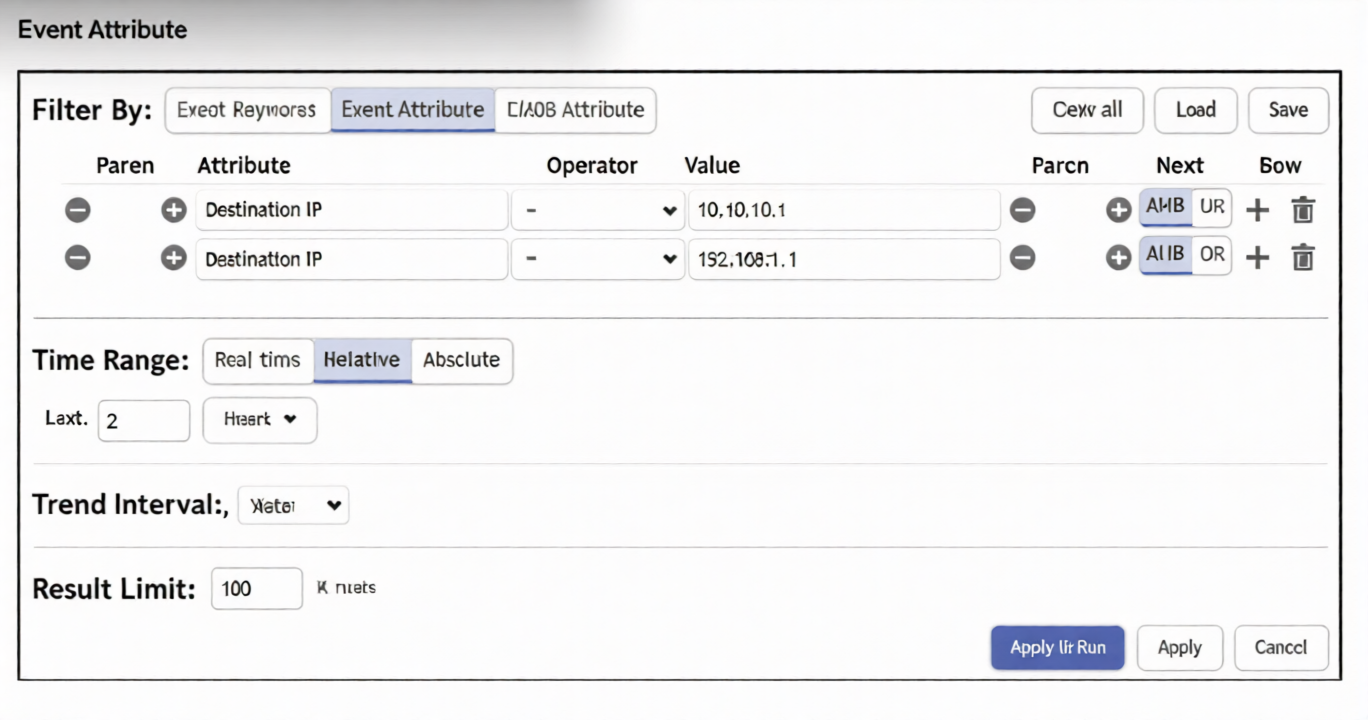


A FortiSIEM analyst is investigating an issue by examining events to two destination IP addresses. However, the analyst is not getting any results from the search.

Based on the selected filter shown in the exhibit, why is the search returning no results?
Show answerHide answer

Correct answer: B The wrong Boolean operator is selected in the Next column.

Explanation

Explanation:
This question tests your understanding of FortiSIEM's event search filter logic, specifically how the Parent, Next, and Operator columns work together to build Boolean expressions. The analyst is searching for events matching two destination IPs but getting zero results, indicating a logical flaw in how the conditions are combined.

Correct Option:

B. The wrong Boolean operator is selected in the Next column.
The Next column defines the Boolean relationship between rows of conditions (e.g., AND, OR). To match events to either of two destination IPs, the operator should be OR. If the Next column is set to AND, the search requires a single event to have both destination IPs simultaneously—which is impossible—resulting in zero results. This is the most common mistake when building multi-value filters.

Incorrect Option:

A. Parentheses are missing between the two items.
Parentheses control grouping and precedence but are not strictly required for a simple two-condition OR/AND filter. Missing parentheses would affect complex nested logic, but the fundamental issue here is the Boolean operator itself, not grouping.

C. The wrong option is selected in the Operator column.
The Operator column defines the comparison type (e.g., =, !=, CONTAINS) between the attribute and its value. Since both destination IP entries appear syntactically correct, the Operator is likely fine. The issue lies in how the two rows relate to each other, not in each individual comparison.

D. An invalid IP address is typed in the Value column.
The exhibit does not show any invalid IP format (e.g., missing octets or out-of-range values). If an IP were invalid, FortiSIEM would typically flag it or the search would return an error—not simply return zero results silently. The problem is logical, not syntactical.

Reference:
FortiSIEM 7.4.0 User Guide, Chapter 6: Event Search → Filter Conditions – "The Next column determines the Boolean relationship between multiple filter rows. Use AND to require all conditions, OR to match any condition. For multiple values of the same attribute, OR is typically required."
Question 2 Choose 1
Refer to the exhibit.


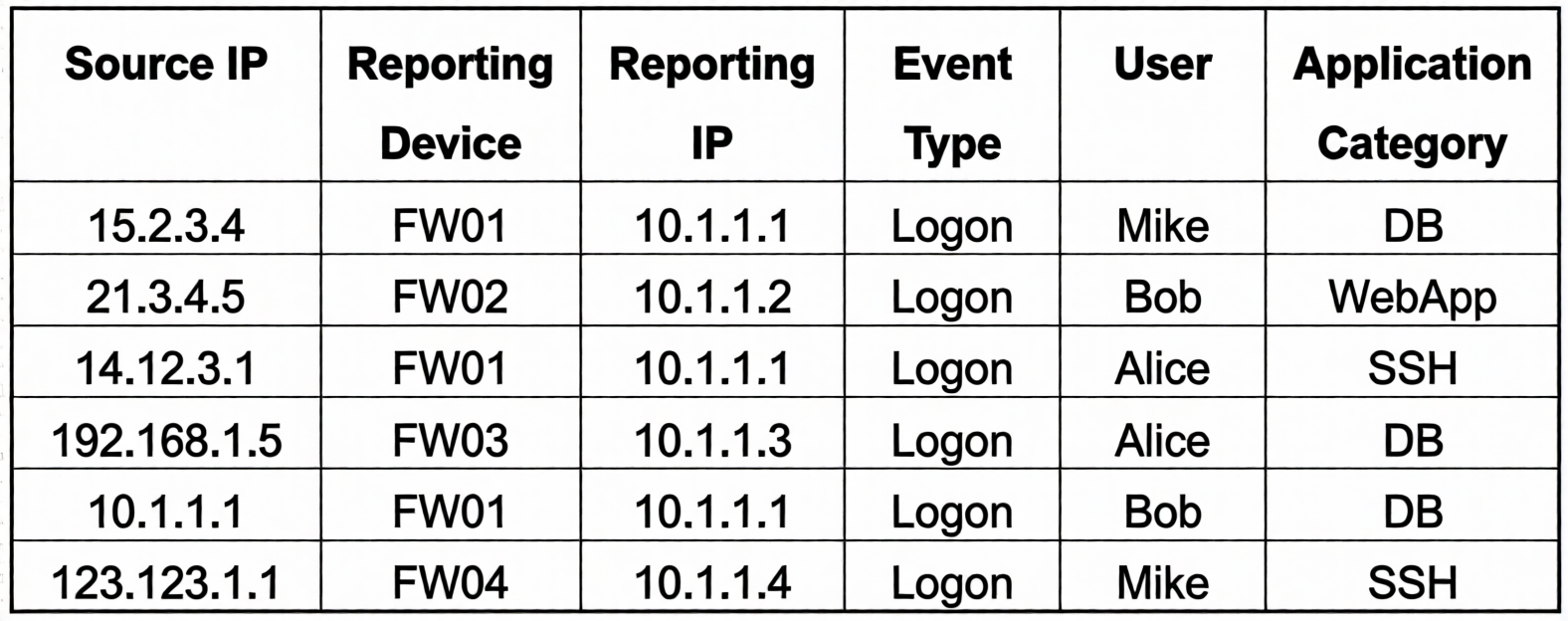
If you group the events by Reporting Device , Reporting IP , and Application Category , how many results will FortiSIEM display?
Show answerHide answer

Correct answer: B Five

Explanation

Explanation:
This question tests your understanding of how FortiSIEM's grouping (GROUP BY) functionality works. When you group by multiple attributes, FortiSIEM creates unique combinations of values from those specified columns. Each distinct combination counts as one result row, aggregating all events that share that exact combination of attribute values.

Correct Option:

B. Five
Grouping by Reporting Device, Reporting IP, and Application Category produces unique combinations:

Incorrect Option:

A. Four
This would undercount. It likely misses that FW01 with IP 10.1.1.1 has two different Application Categories (DB and SSH), which must be separate groups since Application Category is part of the GROUP BY.

C. One
This would only be true if you grouped by a single constant value or used no grouping at all. With three distinct attributes having multiple values, one group is impossible given the data variation.

D. Six
This is the total number of raw events before grouping. Grouping collapses events with identical combinations, so duplicate combinations (FW01, 10.1.1.1, DB) are merged into a single result row.

E. Two
This would undercount significantly. It might occur if you only grouped by Reporting Device or ignored Application Category entirely, but since all three are specified, there are clearly more than two distinct combinations.

Reference:
FortiSIEM 7.4.0 User Guide, Chapter 6: Event Search → Group By – "The Group By function aggregates events based on unique combinations of selected attributes. Each unique combination appears as one row in the results, with counts reflecting the number of events in that group."
Question 3 Choose 1
Refer to the exhibit.


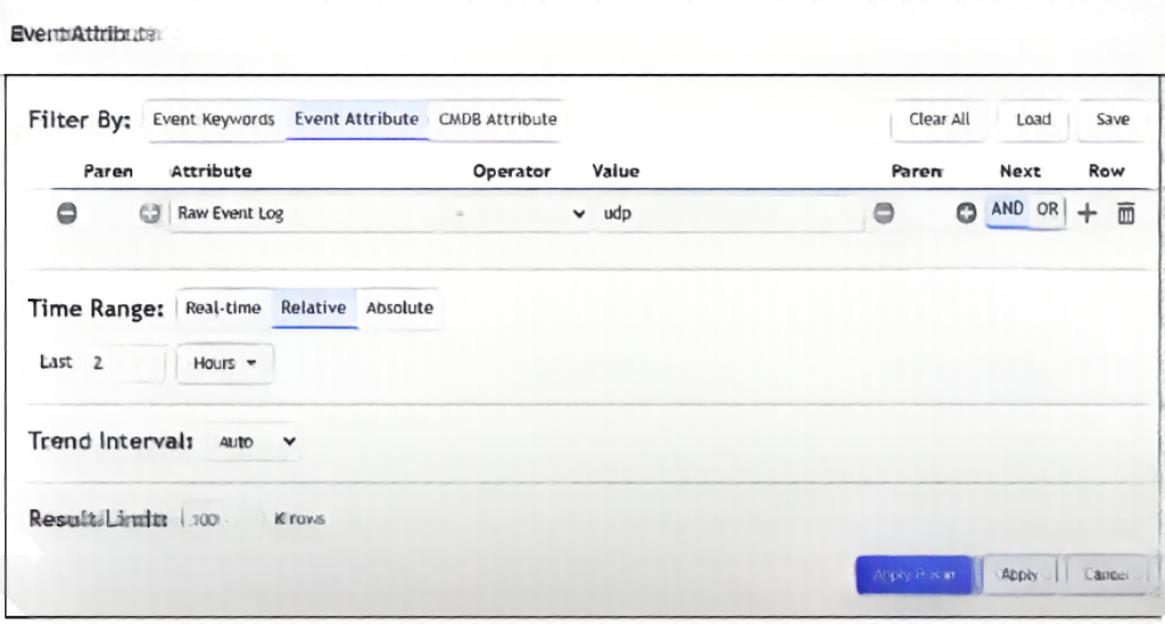
A FortiSIEM device is receiving syslog events from a FortiGate firewall. The FortiSIEM analyst is trying to search the raw event logs for the last two hours that contain the keyword " udp " . However, they are getting no results from the search, which they know should be available. Based on the filter shown in the exhibit, why are there no search results?
Show answerHide answer

Correct answer: D The analyst selected = in the Operator column. That is the wrong operator.

Explanation

Explanation:
This question tests your understanding of how the Operator column works in FortiSIEM's event search filters. The = operator performs an exact match on the entire field value, not a substring search. When searching for a keyword like "udp" within raw event logs, you need an operator that looks for the term anywhere inside the event message, not just as the complete field value.

Correct Option:

D. The analyst selected = in the Operator column. That is the wrong operator.
The = operator requires an exact, full-field match against the Event Message or Raw Log attribute. Since raw event logs contain much more than just the word "udp" (e.g., "src=10.0.0.1 sport=443 dst=192.168.1.1 dport=53 proto=udp"), an exact match fails. The correct operator should be CONTAINS or LIKE to search for "udp" as a substring anywhere within the raw log content.

Incorrect Option:

A. The analyst selected AND in the Next column. This is the wrong Boolean operator.
If only one filter row exists (keyword "udp"), the Next column is irrelevant because there are no additional conditions to combine. Even with multiple rows, AND would narrow results but wouldn't cause zero results if matches existed—it would just filter them further.

B. The Time Range value should be set to Real-Time.
The exhibit shows "Last 2 Hours" selected, which is a valid Relative time range. Real-Time is for live streaming events and would not affect historical search results. The time range is working correctly; the issue is with the filter logic, not the time window.

C. The keyword is case sensitive. Instead of typing udp in the Value field, the analyst should type UDP.
FortiSIEM event searches are generally case-insensitive by default for text-based searches, especially when using CONTAINS. The issue is not case but the operator itself. Even if case sensitivity were a factor, "udp" would still match "UDP" in a case-insensitive system.

Reference:
FortiSIEM 7.4.0 User Guide, Chapter 6: Event Search → Filter Operators – "Use the '=' operator for exact matches on the entire field value. Use 'CONTAINS' or 'LIKE' for substring searches within text fields such as Event Message or Raw Log. For keyword searches inside raw event payloads, CONTAINS is typically required."
Question 4 Choose 1
Refer to the exhibit.


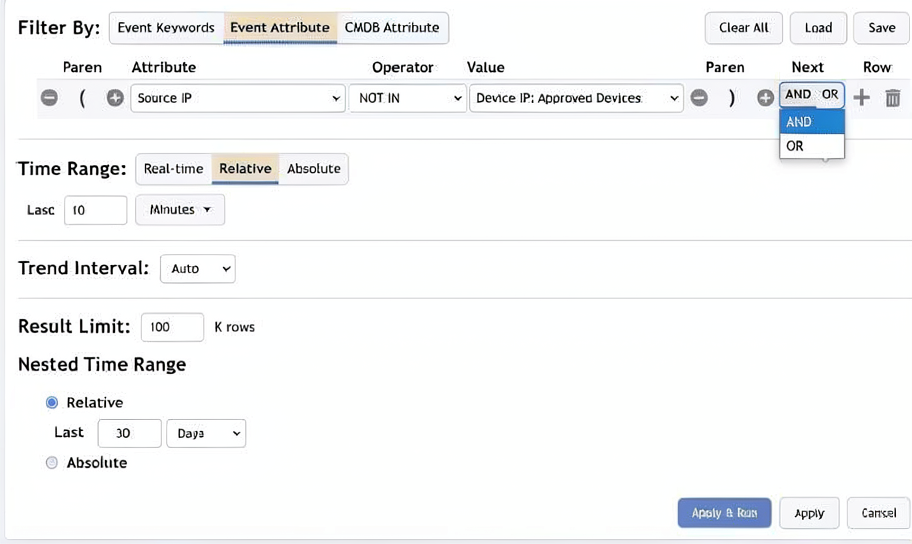
Which statement about the time range settings defined in the nested query is accurate? (Choose one answer)
Show answerHide answer

Correct answer: D FortiSIEM will search the last 10 minutes of events for a source IP address that is not in the Approved Devices report from the last 30 days.

Explanation

Explanation:
This question tests your understanding of nested time ranges in FortiSIEM event searches. The exhibit shows a primary time range of "Last 10 Minutes" and a nested time range of "Last 30 Days" applied to the CMDB attribute lookup. The nested query retrieves historical data from the CMDB (Approved Devices) over the longer period, while the main search focuses on recent events.

Correct Option:

D. FortiSIEM will search the last 10 minutes of events for a source IP address that is not in the Approved Devices report from the last 30 days.
The primary time range ("Last 10 Minutes") defines the window for the main event search—looking for recent events with source IPs. The nested time range ("Last 30 Days") applies specifically to the CMDB attribute subquery (Device IP: Approved Devices), meaning it looks back 30 days to determine which IPs are considered "approved." The filter then excludes any source IP found in that 30-day approved list from the last 10 minutes of events.

Incorrect Option:

A. FortiSIEM will list source IP addresses found in the last 10 minutes of events from each day in the Approved Devices report from the last 30 days.
This misinterprets the nested query. The nested time range does not create daily 10-minute slices; it simply defines the historical window for the CMDB lookup. The 10-minute window applies only to the main event search, not to each day of the 30-day period.

B. FortiSIEM will search in real time using 10-minute blocks for a source IP address that is not in the Approved Devices report from the last 30 days.
The primary time range is set to "Relative" (Last 10 Minutes), not "Real-time." Real-time searches continuously stream live events, whereas Relative searches a fixed historical window. The query performs a historical search of the last 10 minutes, not a real-time streaming search.

C. FortiSIEM will search the last 30 days of events for a source IP address that is not in the Approved Devices report.
This incorrectly applies the 30-day nested time range to the main event search. The primary time range is explicitly set to 10 minutes, not 30 days. The 30-day window applies only to the CMDB subquery (Approved Devices), not to the event data being searched.

Reference:
FortiSIEM 7.4.0 User Guide, Chapter 6: Event Search → Nested Time Ranges – "Nested time ranges allow you to define separate time windows for subqueries within a search. The primary time range applies to the main event search, while nested time ranges apply to referenced CMDB or report data, enabling comparisons across different time periods."

That's the last free question in Analytics

You've seen the free 30% (4 of 14 questions). Full access unlocks every question and full-length NSE6_FSM_AN-7.4 mock exams (40 questions, 70 minutes), a different mock on every attempt.

Unlock full mock exam
Full mock exam

Sit the NSE6_FSM_AN-7.4 exam before exam day

Full-length mocks with the same number of questions and the same time limit as the real NSE6_FSM_AN-7.4 exam. Every attempt draws a new set of questions from the full bank, so you can keep going until you pass comfortably.

Get full NSE6_FSM_AN-7.4 mock exam
  • 40questions per mock
  • 70 mintime limit
  • 49questions in the bank
  • Newmock on every attempt