Fortinet certification · Exam NSE6_FSM_AN-7.4

NSE6_FSM_AN-7.4 Mock Exam

Fortinet NSE 6 - FortiSIEM 7.4 Analyst

Free NSE6_FSM_AN-7.4 questions on Incidents, notifications, and remediation, each with the answer and an explanation.

13 questions · 23 minutes · free, no sign-up

Incidents, notifications, and remediation questions

1–2 of 2 free
Question 1 Choose 2
In an automation policy, which two methods can you use to notify analysts when an incident is triggered? (Choose two.)
Show answerHide answer

Correct answer: A, B EmailFortiSIEM Case

Explanation

Explanation:
Automation policies in FortiSIEM are designed to execute predefined actions when specific incident triggers are met. These actions include notifying analysts to ensure rapid incident response. The system supports several notification methods, but only two of the listed options are natively available as action types within the automation policy configuration.

Correct Option:

A. Email
Email is a primary notification method configured within automation policies. It sends alerts directly to specified analysts' inboxes with incident details, ensuring they are promptly informed even when not actively viewing the console.

B. FortiSIEM Case
Creating a FortiSIEM Case is another native action. This method automatically generates a formal case record within the system, allowing for structured incident tracking, collaboration, and audit trails directly inside the FortiSIEM interface.

Incorrect Option:

C. Syslog
While FortiSIEM can forward events via Syslog for general logging or third-party integration, it is not a standard notification method for analysts within the automation policy action list. Syslog is typically used for system-to-system data export, not user-targeted alerts.

D. Pop-up window
FortiSIEM does not support a native "pop-up window" action in automation policies. Desktop notifications are not feasible in a server-based web application environment, and FortiSIEM relies on persistent notifications like Email or Cases instead.

Reference:
FortiSIEM 7.4.0 Administration Guide, Chapter 14: Automation → Automation Actions – "Automation actions include: Email, FortiSIEM Case, Script, and Syslog." (Note: Syslog is available as a forwarding action, but not for analyst notification).
Question 2 Choose 1
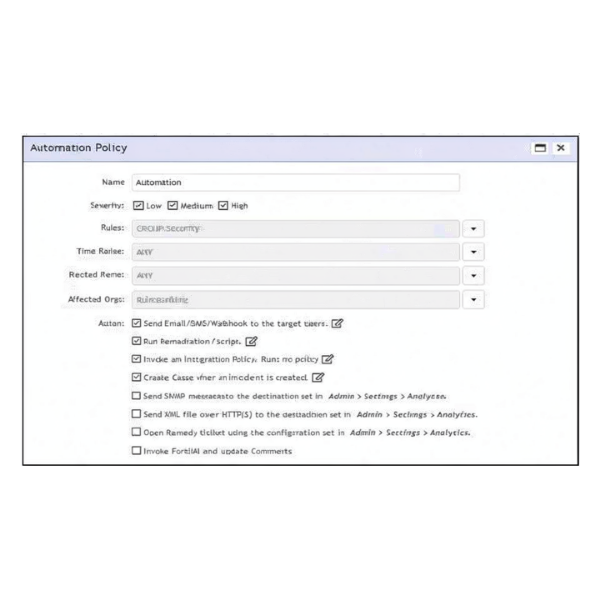
Refer to the exhibit.


According to the automation policy configuration shown in the exhibit, what happens if an associated rule triggers?
Show answerHide answer

Correct answer: B FortiSIEM performs all selected actions.

Explanation

Explanation:
This question tests your understanding of how FortiSIEM automation policies execute actions when an associated rule triggers. The automation policy configuration allows multiple actions to be selected simultaneously. When a rule triggers, FortiSIEM processes all configured actions in parallel or sequentially, not just the first one or a single prioritized action.

Correct Option:

B. FortiSIEM performs all selected actions.
In the exhibit, multiple action checkboxes are visibly selected, including "Send Email/SMS/Webhook," "Run Remediation/Script," "Create Case," "Send SNMP message," and "Invoke FortiAI and update Comments." When an associated rule triggers, FortiSIEM executes all enabled actions as configured. There is no single-action precedence unless specifically designed; the policy executes every checked action.

Incorrect Option:

A. FortiSIEM runs the remediation script, because that takes precedence over all other options.
There is no inherent precedence or hierarchy among automation actions. Remediation scripts do not automatically override other actions. All selected actions are executed; none takes priority over others unless explicitly coded in the script or policy logic.

C. FortiSIEM fails to the integration policy, because no policy is defined.
The exhibit shows "Invoke an Integration Policy. Run: no policy" as an available action, but it is not selected (the checkbox is unchecked). Since it is not enabled, the automation policy ignores it entirely and proceeds with the other selected actions. No failure occurs.

D. FortiSIEM sends an email, because that is first on the list.
The order of actions in the list does not determine execution priority. FortiSIEM executes all selected actions regardless of their position in the UI. Being first does not make email the sole or primary action; all checked actions are performed.

Reference:
FortiSIEM 7.4.0 Administration Guide, Chapter 14: Automation → Automation Policies – "When an automation policy is triggered, FortiSIEM executes all actions that are enabled (selected) in the policy configuration. Actions are not prioritized; each configured action runs according to its own settings and schedule."

That's the last free question in Incidents, notifications, and remediation

You've seen the free 30% (2 of 7 questions). Full access unlocks every question and full-length NSE6_FSM_AN-7.4 mock exams (40 questions, 70 minutes), a different mock on every attempt.

Unlock full mock exam
Full mock exam

Sit the NSE6_FSM_AN-7.4 exam before exam day

Full-length mocks with the same number of questions and the same time limit as the real NSE6_FSM_AN-7.4 exam. Every attempt draws a new set of questions from the full bank, so you can keep going until you pass comfortably.

Get full NSE6_FSM_AN-7.4 mock exam
  • 40questions per mock
  • 70 mintime limit
  • 49questions in the bank
  • Newmock on every attempt