Fortinet certification · Exam NSE6_FMG_AD-7.6

NSE6_FMG_AD-7.6 Mock Exam

Fortinet NSE 6 FortiManager 7.6 Administrator

Free NSE6_FMG_AD-7.6 questions on Troubleshooting, each with the answer and an explanation.

18 questions · 36 minutes · free, no sign-up

Troubleshooting questions

1–3 of 3 free
Question 1 Choose 1
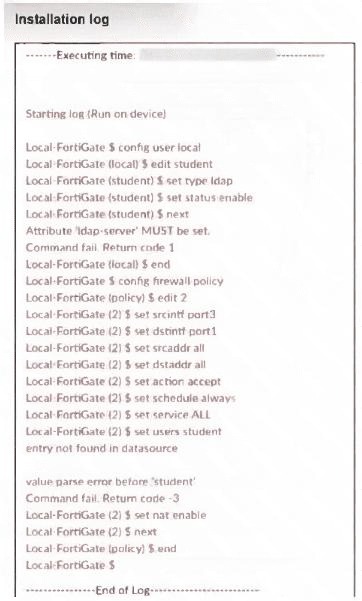
What can you conclude from the failed installation log shown in the exhibit?
Show answerHide answer

Correct answer: D Policy ID 2 is installed without the remote user student.

Explanation

✅ Explanation:

The installation log shows two distinct failures:

User configuration failure:
When trying to edit the local user student and set its type to ldap, FortiGate throws the error Attribute 'ldap-server' MUST be set. This indicates that the user student is not properly created on the FortiGate because the required LDAP server attribute was not provided. The user creation fails entirely.

Policy installation failure (partial):
When configuring firewall policy 2, the command set users student results in the error: entry not found in datasource followed by value parse error before 'student'. This happens because the user student does not exist in the FortiGate's local user database (since the creation attempt failed). As a result, the user reference cannot be applied to the policy.

❌ Why Other Options Are Incorrect

A. Policy ID 2 is installed in the disabled state.
This is incorrect. The policy installation log does not show any command to set the policy to disabled. The policy is installed as accept with all other parameters applied. The status of the policy (enable/disable) is not modified during the installation, so it retains its default or previously configured state.

B. Policy ID 2 will not be installed.
This is incorrect. As explained above, the installation continues after the user error and successfully applies the remaining policy configuration. The policy is installed (without the user), not completely skipped.

C. Policy ID 2 is installed without a source address.
This is incorrect. The log shows set sccaddr all (interpreted as set srcaddr all), which successfully sets the source address to all. The source address is applied without error. The error occurs only on the set users command.

📚 References

FortiManager 7.6 Administration Guide, Chapter "Installation" → Section "Installation Logs" – Explains that FortiManager installation logs show the execution of CLI commands on the FortiGate; when a command fails, FortiGate continues executing subsequent commands unless the failure is critical.
Question 2 Choose 1
An administrator suspects that the Collector Agent is not forwarding login events to FortiGate. What is the most effective troubleshooting step?
Show answerHide answer

Correct answer: D Check if TCP port 8000 is open between the collector agent and FortiGate.

Explanation

✅ Explanation:

The Collector Agent is a key component of Fortinet's Fortinet Single Sign-On (FSSO) solution, which forwards login events from a domain controller (via Active Directory) to FortiGate devices. The Collector Agent communicates with FortiGate over TCP port 8000 by default (configurable in the FSSO agent settings).

❌ Why Other Options Are Incorrect:

A. Verify if DC agent is enabled on the FortiGate.
This is incorrect. The DC Agent (Domain Controller Agent) is a software installed directly on the domain controller to monitor login events. It is not configured on FortiGate. FortiGate only receives FSSO events from the Collector Agent or DC Agent via TCP 8000/8009. The option describes a non-existent configuration on FortiGate.

B. Restart the domain controller to refresh authentication services.
This is incorrect. Restarting a domain controller is a disruptive, heavy-handed approach and is not a recommended first step. It would likely not resolve communication issues between Collector Agent and FortiGate. The issue is more likely network-related (connectivity or firewall) or an FSSO configuration mismatch.

C. Verify if FortiGate is set to use LDAP authentication instead of FSSO.
This is incorrect. LDAP authentication and FSSO are separate mechanisms. If FortiGate is configured to use LDAP instead of FSSO, then it would not expect FSSO login events from the Collector Agent. However, the question states that the Collector Agent is not forwarding login events—this points to a communication problem, not a protocol configuration mismatch. If FortiGate were using LDAP, the Collector Agent would be irrelevant, and the issue would not be "login events not forwarding."

📚 References:

Fortinet Single Sign-On (FSSO) Guide – Explains that the Collector Agent communicates with FortiGate over TCP port 8000 (or 8009) to send login event updates.

FortiOS 7.6 Administration Guide, Chapter "User & Authentication" → Section "FSSO" – Describes the communication ports between Collector Agent and FortiGate and common troubleshooting steps for connectivity issues.
Question 3 Choose 1
Refer to the exhibit

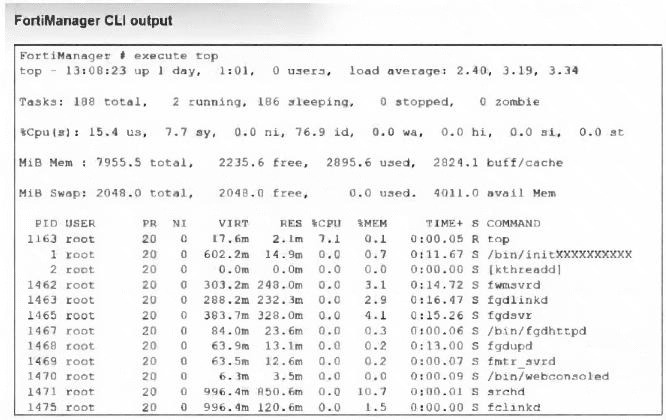
What percentage of the available RAM is being used by the process in charge of downloading the web and email filter databases from the public FortiGuard servers?
Show answerHide answer

Correct answer: C 4.1

Explanation

✅ Explanation:

In the FortiManager process list from the execute top output, the process responsible for downloading and managing FortiGuard web and email filter databases from public FortiGuard servers is fgdsvr (FortiGuard Daemon Server). This daemon handles the download and update of web filtering, email filtering, antivirus, IPS, and other FortiGuard databases.

In the output, the fgdsvr process shows:
RES (resident memory) = 328.0m
%MEM = 4.1

The question asks for the percentage of available RAM being used by the process in charge of downloading web and email filter databases. Since fgdsvr manages these updates, the correct value is 4.1%.

❌ Why Other Options Are Incorrect:

A. 1.5
– This corresponds to the fclinkd process (FortiClient Link Daemon), which is unrelated to FortiGuard database downloads.

B. 3.1
– This corresponds to the fwmsvrd process (FortiManager Server Daemon), which handles overall system management and is not responsible for web/email filter database updates.

D. 2.9
– This corresponds to the fgdlinkd process (FortiGuard Link Daemon), which manages communication with FortiGuard services but is not the primary process for downloading and storing the web/email filter databases.

📚 References:

FortiManager CLI Reference – execute top command – Explains the output fields and identifies fgdsvr as the FortiGuard daemon process responsible for managing security database updates.

FortiManager 7.6 Administration Guide, Chapter "System Settings" → Section "FortiGuard Updates" – Describes that fgdsvr is the process handling downloads of web, email, antivirus, and IPS databases from FortiGuard servers.

That's the last free question in Troubleshooting

You've seen the free 30% (3 of 11 questions). Full access unlocks every question and full-length NSE6_FMG_AD-7.6 mock exams (35 questions, 70 minutes), a different mock on every attempt.

Unlock full mock exam
Full mock exam

Sit the NSE6_FMG_AD-7.6 exam before exam day

Full-length mocks with the same number of questions and the same time limit as the real NSE6_FMG_AD-7.6 exam. Every attempt draws a new set of questions from the full bank, so you can keep going until you pass comfortably.

Get full NSE6_FMG_AD-7.6 mock exam
  • 35questions per mock
  • 70 mintime limit
  • 65questions in the bank
  • Newmock on every attempt