Fortinet certification · Exam NSE6_FMG_AD-7.6

NSE6_FMG_AD-7.6 Mock Exam

Fortinet NSE 6 FortiManager 7.6 Administrator

Free NSE6_FMG_AD-7.6 questions on Device manager, each with the answer and an explanation.

18 questions · 36 minutes · free, no sign-up

Device manager questions

1–3 of 3 free
Question 1 Choose 1
An administrator created a new ADOM named Training for FortiGate devices only. Then, the administrator added the root FortiGate device of a Security Fabric group to the Training ADOM. Which statement correctly describes the expected result for the downstream devices in the Security Fabric, given the actions taken by the administrator? Choose one answer
Show answerHide answer

Correct answer: D The downstream devices must be added using the Add Device wizard.

Explanation

βœ… Explanation

When an administrator creates a new ADOM (e.g., Training) and adds the root FortiGate of a Security Fabric group to that ADOM, the downstream devices (Security Fabric members) do not automatically move or become members of the new ADOM. Each FortiGate device must be explicitly added to FortiManager and assigned to an ADOM individually.

❌ Why Other Options Are Incorrect

A. The downstream devices are automatically authorized.
This is incorrect. Adding the root FortiGate to a new ADOM does not automatically authorize or import downstream devices. Each device must be manually authorized and added to FortiManager separately.

B. The downstream devices will appear in the Managed FortiGate section of the root ADOM.
This is incorrect. The root FortiGate itself is moved to the Training ADOM. Downstream devices are not automatically added to any ADOM. If they were later added without specifying an ADOM, they would default to the root ADOM (ADOM 0), but they do not appear simply because the root device was moved.

C. The downstream devices show as unauthorized in the root ADOM.
This is incorrect. Devices do not show as "unauthorized" in an ADOM just because the root FortiGate was moved. Unauthorized devices are those that have been discovered (e.g., via Security Fabric) but not yet approved/authorized in FortiManager. This status is separate from ADOM assignment and does not occur automatically.

πŸ“š References

FortiManager 7.6 Administration Guide, Chapter "ADOMs" β†’ Section "Adding Devices to ADOMs" – Explains that devices must be manually added to ADOMs using the Add Device wizard; moving or adding a root device does not automatically add downstream Security Fabric devices.
Question 2 Choose 1
What is the best explanation of how FortiManager helps with mass provisioning?
Show answerHide answer

Correct answer: C It uses templates to configure the same settings on many devices simultaneously.

Explanation

βœ… Explanation

FortiManager's primary strength in mass provisioning is its ability to apply consistent configurations across multiple devices efficiently using templates. Templates allow administrators to define system settings (DNS, SNMP, admin accounts, logging, etc.) and security profiles once and then assign them to dozens or hundreds of FortiGate devices simultaneously. This eliminates the need to manually configure each device individually, reducing human error, ensuring consistency, and saving significant time.

❌ Why Other Options Are Incorrect

A. It upgrades the OS of each FortiGate device.
This is incorrect. While FortiManager can upgrade firmware on managed devices (via firmware templates and the Device Manager), this is a subset of provisioning, not the primary definition of mass provisioning. Provisioning covers a wide range of configuration tasks, not just OS upgrades.

B. It provides local FortiGuard Distribution Server (FDS) services to the network.
This is incorrect. FDS services are used for distributing FortiGuard updates (antivirus, IPS, web filtering) to FortiGate devices. While this is a useful feature, it is not mass provisioningβ€”it's a service for security updates, not configuration deployment.

D. It sends email alerts when new devices connect.
This is incorrect. FortiManager does not automatically send email alerts when new devices connect as a standard provisioning feature. Device discovery and authorization are manual or automated via configuration, but email alerts are not a core mass provisioning capability.

πŸ“š References

FortiManager 7.6 Administration Guide, Chapter "Provisioning Templates" – Explains that templates allow administrators to standardize and deploy configurations to multiple devices at scale, which is the essence of mass provisioning.

FortiManager 7.6 Administration Guide, Chapter "System Templates" – Describes how system templates are used to apply consistent device-level settings across many FortiGates.
Question 3 Choose 1
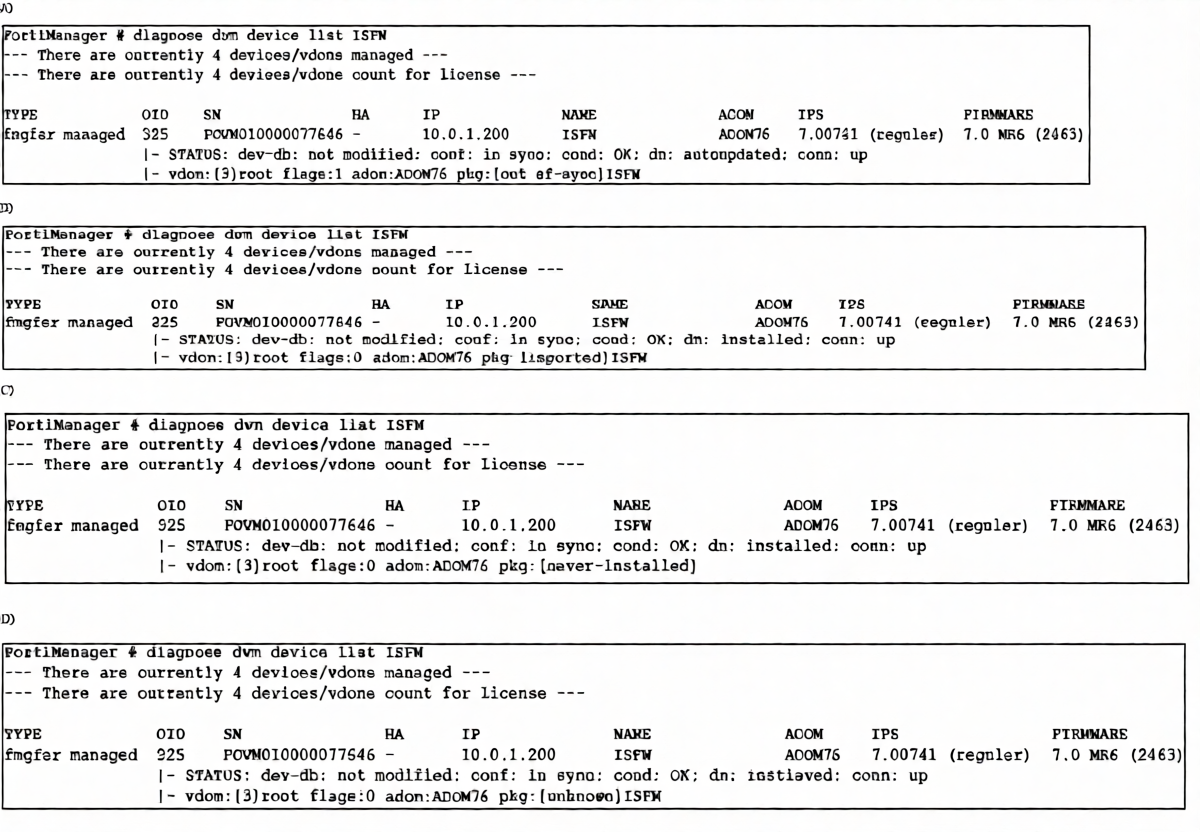
Which output is displayed right after moving the ISFW device from one ADOM to another?

Show answerHide answer

Correct answer: C Option C

Explanation

βœ… Explanation

When a FortiGate device is moved from one ADOM to another in FortiManager, the device's policy package status in the new ADOM is initially set to [never-installed]. This is because the device has not yet had any policy package installed from the new ADOM's database. The policy package associated with the device in the new ADOM does not exist yet, and FortiManager marks it as never-installed until the administrator imports or assigns a policy package and performs an installation.

❌ Why Other Options Are Incorrect

Option A
– Shows pkg:[out of sync]ISFW. This indicates that a policy package exists but is out of sync with the device, which is not the state immediately after a move.

Option B
– Shows pkg:[installed]ISFW. This indicates that a policy package has already been installed on the device in the new ADOM, which is not the case immediately after the move.

Option D
– Shows pkg:[unknown]ISFW. This status is not a valid FortiManager policy package state and does not occur after an ADOM move.

πŸ“š References

FortiManager 7.6 Administration Guide, Chapter "ADOMs" β†’ Section "Moving Devices Between ADOMs" – Explains that after moving a device, the policy package status in the new ADOM is set to never-installed because no policy package from the new ADOM has been installed on the device yet.

FortiManager CLI Reference – diagnose dvm device list – Describes the output fields, including pkg statuses such as never-installed, installed, out of sync, and unknown.

That's the last free question in Device manager

You've seen the free 30% (3 of 10 questions). Full access unlocks every question and full-length NSE6_FMG_AD-7.6 mock exams (35 questions, 70 minutes), a different mock on every attempt.

Unlock full mock exam
Full mock exam

Sit the NSE6_FMG_AD-7.6 exam before exam day

Full-length mocks with the same number of questions and the same time limit as the real NSE6_FMG_AD-7.6 exam. Every attempt draws a new set of questions from the full bank, so you can keep going until you pass comfortably.

Get full NSE6_FMG_AD-7.6 mock exam
  • 35questions per mock
  • 70 mintime limit
  • 65questions in the bank
  • Newmock on every attempt