Fortinet certification · Exam NSE6_FMG_AD-7.6

NSE6_FMG_AD-7.6 Mock Exam

Fortinet NSE 6 FortiManager 7.6 Administrator

Free NSE6_FMG_AD-7.6 questions on Advanced configuration, each with the answer and an explanation.

18 questions · 36 minutes · free, no sign-up

Advanced configuration questions

1–3 of 3 free
Question 1 Choose 1
While attempting to push a NetFlow configuration script through the FortiManager policy package: an administrator encounters an error stating that an object is unrecognized in line 4.

What must the administrator do to successfully apply the NetFlow configuration script and avoid the object unrecognized error?
Show answerHide answer

Correct answer: D Create a normalized interface on the policy layer before running the script.

Explanation

Explanation:

The error message shows [line 4] > config sys interface [parameter(s) invalid. detail: object unrecognized]. This indicates that the script is trying to configure a system interface within the VDOM AGEUSR, but FortiManager does not recognize the interface object being referenced.

❌ Why Other Options Are Incorrect:

A. Make sure the user running the script has full access to the VDOM—AGEUSR.
This is incorrect. The error is object unrecognized, not a permission error. The user already has access to the VDOM (as shown by edit AGEUSR being accepted). Full access would not resolve an unrecognized object issue.

B. Run the script on the device database.
This is incorrect. While running the script directly on the device database might bypass the normalization requirement, the question specifically asks how to apply the script through the FortiManager policy package. Running on the device database would not address the root cause—it would simply avoid the normalized interface requirement, which is not the intended solution for policy-package-based script execution.

C. Use metadata variables if they use VDOMs in the script.
This is incorrect. Metadata variables are used for categorizing devices and policies, not for resolving interface objects in scripts. Using metadata variables would not fix an unrecognized interface object error.

📚 References:

FortiManager 7.6 Administration Guide, Chapter "Policy and Objects" → Section "Interface Normalization" – Explains that normalized interfaces are required when running scripts or configuring policies at the ADOM/policy layer, as FortiManager must map device-specific physical interfaces to ADOM-level objects.
Question 2 Choose 1
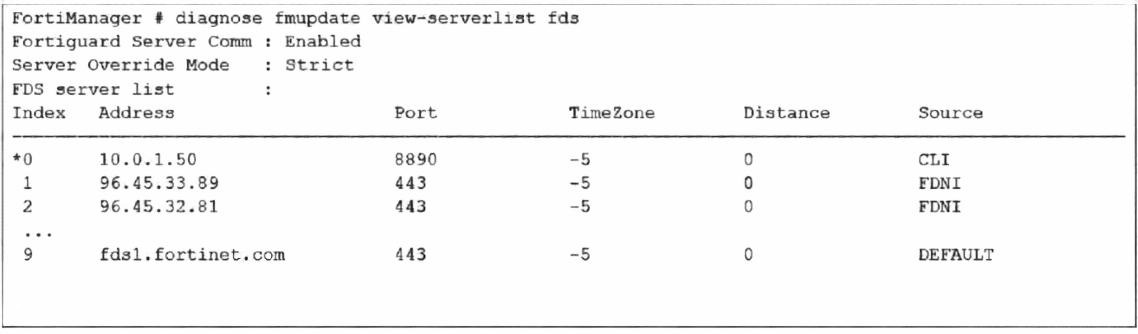
Refer to the exhibit.

How does FortiManager get antivirus and IPS updates? Choose one answer
Show answerHide answer

Correct answer: B It gets updates from the server with IP address 10.0.1.50.

Explanation

✅ Explanation

The exhibit shows the output of the diagnose fmpupdate view-serverlist fds command, which displays the FortiGuard Distribution Server (FDS) list that FortiManager uses to download antivirus and IPS updates.

❌ Why Other Options Are Incorrect

A. It uses all URLs in the list that contain the fds host name.
This is incorrect. The list contains IP addresses and hostnames, but in Strict mode, FortiManager does not use all URLs. It prioritizes the configured list and only uses the active/selected server (Index 0).

C. It connects to all servers marked as FortiGuard Distribution Network through Internet FDNI sources.
This is incorrect. The FDNI source entries (Indices 1 and 2) are public FortiGuard servers, but with Strict mode enabled, FortiManager will not connect to these unless the primary server fails. It does not connect to all servers simultaneously.

D. It connects to the public FortiGuard servers listed in the configuration.
This is incorrect. The DEFAULT entries (e.g., fds1.fortinet.com) are the public FortiGuard servers. However, because the administrator has overridden the server list with a private FDS (10.0.1.50) and enabled Strict mode, FortiManager will not use the public servers unless the private one becomes unreachable.

📚 References

FortiManager 7.6 Administration Guide, Chapter "System Settings" → Section "FortiGuard Distribution Server (FDS)" – Explains that FortiManager can be configured to use a private FDS for updates, and the diagnose fmpupdate view-serverlist fds command displays the configured servers and the active selection.
Question 3 Choose 1
Which is recommended when you are managing a high volume of logs in your network?
Show answerHide answer

Correct answer: B Add and manage FortiAnalyzer from FortiManager.

Explanation

✅ Explanation

When managing a high volume of logs in a network, the recommended best practice is to use a dedicated FortiAnalyzer for log collection, storage, and analytics, while integrating it with FortiManager for centralized management.

❌ Why Other Options Are Incorrect

A. Store logs on FortiManager and use FortiView.
This is incorrect. FortiManager is not designed for high-volume log storage. Its disk space and database are optimized for configuration management, not log retention. Storing large volumes of logs on FortiManager can degrade performance and fill up storage quickly.

C. Enable advanced ADOM mode on FortiManager.
This is incorrect. Advanced ADOM mode allows for more granular ADOM-level firmware management and object sharing, but it does not enhance log storage or processing capabilities. It is unrelated to log volume management.

D. Forward logs from FortiAnalyzer to FortiManager daily.
This is incorrect. Forwarding logs from FortiAnalyzer to FortiManager would defeat the purpose of using FortiAnalyzer for dedicated storage. It would also consume FortiManager's limited storage and processing capacity, recreating the very problem it aims to solve. The recommended flow is for FortiGate to send logs directly to FortiAnalyzer, while FortiManager handles management functions.

📚 References:

FortiManager 7.6 Administration Guide, Chapter "FortiAnalyzer Integration" – Explains that FortiAnalyzer can be added as a managed device within FortiManager, allowing administrators to centrally manage both platforms and offload log storage to FortiAnalyzer.

That's the last free question in Advanced configuration

You've seen the free 30% (3 of 12 questions). Full access unlocks every question and full-length NSE6_FMG_AD-7.6 mock exams (35 questions, 70 minutes), a different mock on every attempt.

Unlock full mock exam
Full mock exam

Sit the NSE6_FMG_AD-7.6 exam before exam day

Full-length mocks with the same number of questions and the same time limit as the real NSE6_FMG_AD-7.6 exam. Every attempt draws a new set of questions from the full bank, so you can keep going until you pass comfortably.

Get full NSE6_FMG_AD-7.6 mock exam
  • 35questions per mock
  • 70 mintime limit
  • 65questions in the bank
  • Newmock on every attempt