Fortinet certification · Exam NSE6_FMG_AD-7.6

NSE6_FMG_AD-7.6 Mock Exam

Fortinet NSE 6 FortiManager 7.6 Administrator

Free NSE6_FMG_AD-7.6 questions on Administration, each with the answer and an explanation.

18 questions · 36 minutes · free, no sign-up

Administration questions

1–4 of 4 free
Question 1 Choose 1
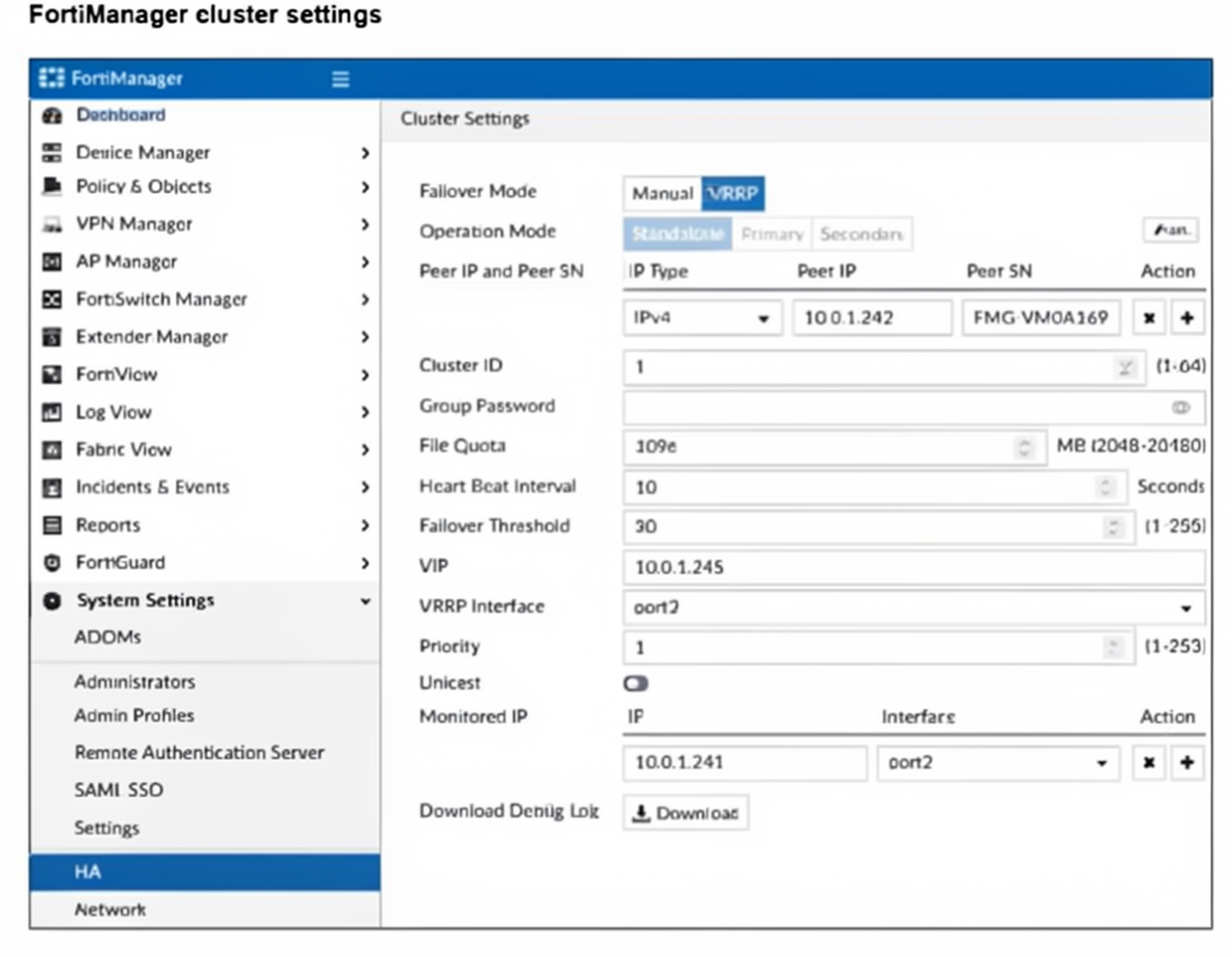
Refer to the exhibit.

If the monitored interface for the primary FortiManager device fails, what must you do to maintain high availability (HA)?
Show answerHide answer

Correct answer: A The FortiManager HA failover is transparent to administrators and does not require any additional action.

Explanation

✅ Explanation:

The exhibit shows FortiManager HA configured in VRRP mode with a VIP (10.0.1.245) and monitored interfaces. In this setup, the primary and secondary FortiManager devices share a virtual IP address. If the monitored interface on the primary device fails, VRRP detects the failure and automatically triggers a failover to the secondary device. The secondary assumes the VIP and takes over the primary role, providing seamless continuity. This failover is transparent to administrators—they continue to access FortiManager using the same VIP, and the HA cluster handles the switch without requiring manual intervention. No manual promotion, rebooting, or reconfiguration is needed.


❌ Why Other Options Are Incorrect

B. Manually promote one of the working secondary devices to the primary role and reboot the original primary device to remove the peer IP address of the failed device.
This is incorrect because VRRP-based HA in FortiManager performs automatic failover when the monitored interface fails. Manual intervention, such as promoting a secondary or rebooting the primary, is not required.

  • C. Reconfigure the primary device to remove the peer IP address of the failed device from its configuration.
    This is incorrect. Reconfiguring the primary or removing peer IP addresses is not a required step for failover. VRRP handles the failover automatically, and peer IPs are only used for cluster member identification, not for failover triggering.

    D. Check the integrity database of the primary device to force a secondary device to become the new primary with all active interfaces.
    This is incorrect. Database integrity checks are used to verify FortiManager’s configuration consistency, not to trigger HA failover. The failover is handled by VRRP, not by database integrity commands.

    📚 References

    FortiManager 7.6 Administration Guide, Chapter "High Availability (HA)" → Section "VRRP HA Mode" – Explains that when VRRP is configured, the failover between primary and secondary FortiManager devices is automatic and transparent when a monitored interface fails.
  • Question 2 Choose 2
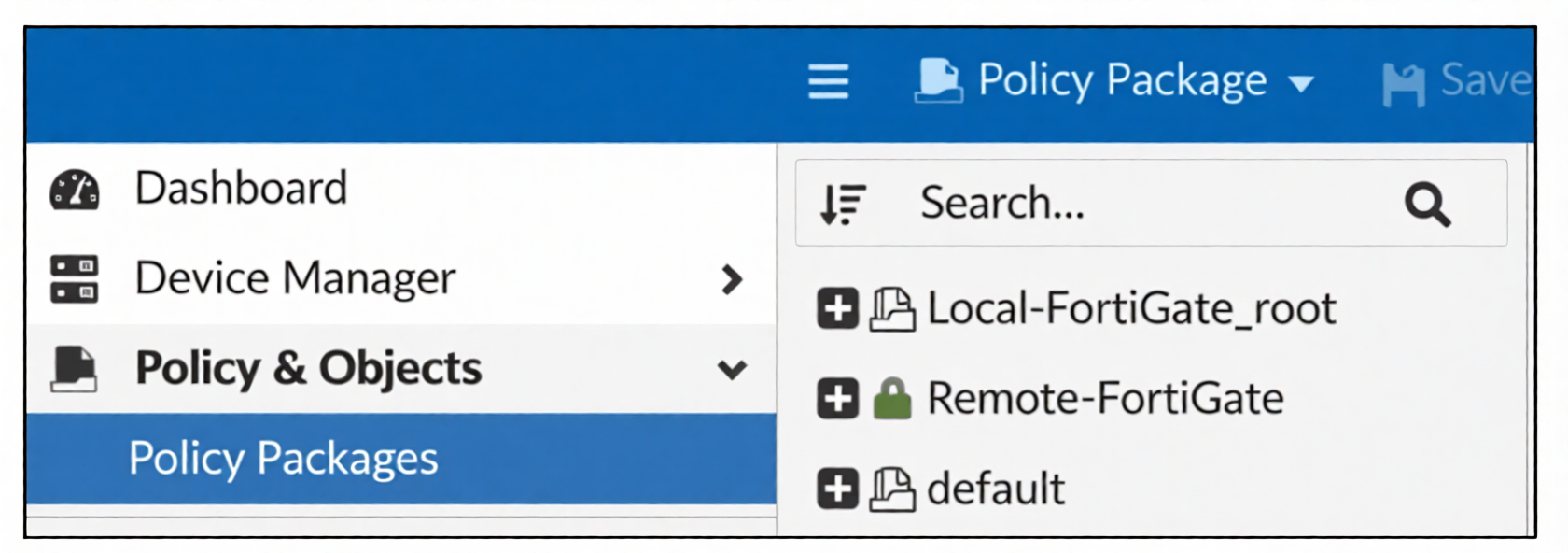
    Refer to the exhibit.

    Which two statements about the configuration shown in the exhibit are true? Choose two answers.
    Show answerHide answer

    Correct answer: A, D An administrator can lock the Local-FortiGate_root policy package.The FortiManager is in workflow mode.

    Explanation

    ✅ Explanation

    The exhibit shows a FortiManager policy package interface with an "Unlock" button displayed (indicated by the lock icon and the word "Unlock" in the screenshot). This indicates that the policy package Local-FortiGate_root is currently locked by an administrator. Therefore:

    A. An administrator can lock the Local-FortiGate_root policy package.
    This is correct. The presence of the "Unlock" button means the package is locked, which implies that administrators have the ability to lock it. Locking is a feature of workspace mode or workflow mode, allowing administrators to prevent conflicting changes.

    The exhibit also shows a "Save" and "Preview" button, which are characteristic of workflow mode (change management with approval workflow). In workflow mode, changes are saved as drafts and require approval before installation. The "Preview" button allows reviewing changes before submitting for approval. Therefore:

    D. The FortiManager is in workflow mode.
    This is correct. The Save and Preview buttons are typical of workflow mode, where changes are staged, reviewed, and approved before installation.

    ❌ Why Other Options Are Incorrect

    B. The administrator created a snapshot of the Remote-FortiGate policy package.
    This is incorrect. The exhibit does not show any snapshot creation for Remote-FortiGate. The lock icon is only displayed next to Local-FortiGate_root, indicating it is locked, not that a snapshot was created.

    C. The FortiManager ADOM workspace mode is set to normal.
    This is incorrect. In normal workspace mode, the interface typically shows Lock/Unlock buttons but does not display Save and Preview buttons. The presence of Save and Preview indicates workflow mode, not normal workspace mode.

    📚 References

    FortiManager 7.6 Administration Guide, Chapter "Policy and Objects" → Section "Workspace Mode" – Explains that in normal workspace mode, administrators lock policy packages to edit them, and the interface shows Lock/Unlock buttons.

    Question 3 Choose 1
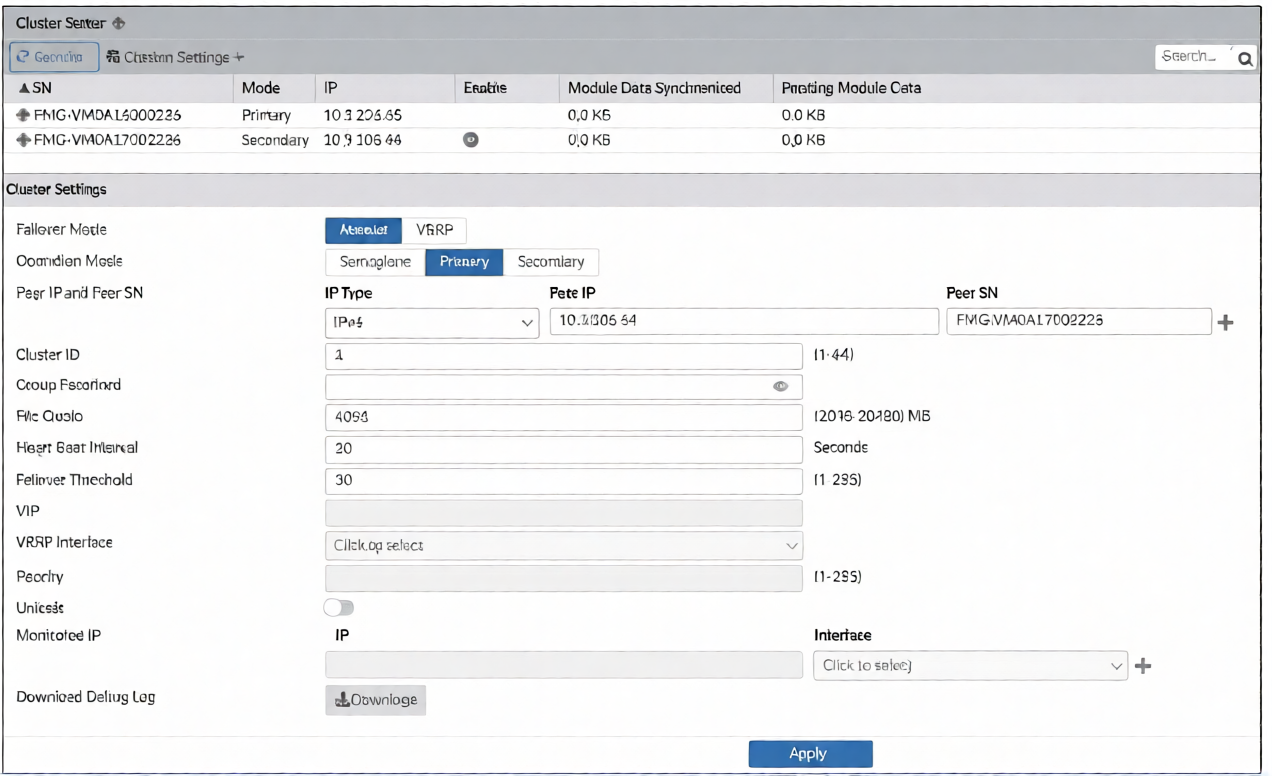
    Refer to the exhibit.

    Which statement about the environment shown in the exhibit is true? Choose one answer
    Show answerHide answer

    Correct answer: D FortiAnalyzer features are not enabled on this FortiManager device.

    Explanation

    ✅ Explanation

    The exhibit shows the output of the diagnose system ha status command on a FortiManager HA cluster. The line FortiAnalyzer ... disabled clearly indicates that FortiAnalyzer features are not enabled on this FortiManager device. FortiManager can operate in two modes:

    FortiManager-only mode – Management and provisioning only.

    FortiManager with FortiAnalyzer features enabled – Combines management with log collection and analytics.

    Since the output explicitly states disabled, the FortiAnalyzer features are turned off on this device, meaning it does not collect or analyze logs from FortiGate devices.

    ❌ Why Other Options Are Incorrect

    A. You must restart the secondary device if you promote it to primary.
    This is incorrect. In FortiManager HA, promoting a secondary to primary does not require a restart. The secondary takes over the primary role automatically (or manually) without rebooting.

    B. No FortiGuard packages have been synchronized between the cluster members.
    This is incorrect. The FortiGuard packages line shows synchronized, indicating that FortiGuard updates (antivirus, IPS, web filtering databases) are in sync between cluster members.

    C. A failover will take place after five minutes without receiving heartbeat packets.
    This is incorrect. The Heartbeat lost (threshold): 5 means the HA cluster will declare a peer as failed after 5 missed heartbeat intervals, not after 5 minutes. The actual failover time depends on the heartbeat interval setting (e.g., if interval is 1 second, failover occurs after 5 seconds, not 5 minutes).


    📚 References

    FortiManager 7.6 Administration Guide, Chapter "High Availability (HA)" → Section "HA Status Commands" – Explains that the diagnose system ha status command output shows HA status, including FortiAnalyzer feature status, FortiGuard sync status, and heartbeat settings.

    Question 4 Choose 1
    An administrator wants to configure and manage multiple objects in the FortiManager database and give access to other users who work in the same database.
    To stay in control of the changes made to firewall policies by other team members, the administrator needs a setup where all modifications go through a central check before they can be installed.
    How can the administrator create this setup?
    Show answerHide answer

    Correct answer: D Enable workflow mode and the ADOM lock feature.

    That's the last free question in Administration

    You've seen the free 30% (4 of 15 questions). Full access unlocks every question and full-length NSE6_FMG_AD-7.6 mock exams (35 questions, 70 minutes), a different mock on every attempt.

    Unlock full mock exam
    Full mock exam

    Sit the NSE6_FMG_AD-7.6 exam before exam day

    Full-length mocks with the same number of questions and the same time limit as the real NSE6_FMG_AD-7.6 exam. Every attempt draws a new set of questions from the full bank, so you can keep going until you pass comfortably.

    Get full NSE6_FMG_AD-7.6 mock exam
    • 35questions per mock
    • 70 mintime limit
    • 65questions in the bank
    • Newmock on every attempt