Microsoft certification · Exam MB-330

MB-330 Mock Exam

Microsoft Dynamics 365 for Finance and Operations - Supply Chain Management

Free MB-330 questions on Topic 2: Organics Company Case Study, each with the answer and an explanation.

20 questions · 33 minutes · free, no sign-up

Topic 2: Organics Company Case Study questions

1–3 of 3 free
Question 1
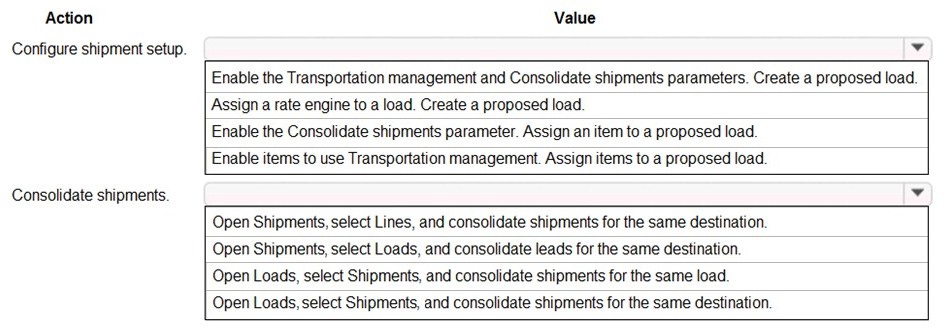
You need to consolidate orders and prepare to rate shop shipments.

How should you complete the setup? To answer, select the appropriate options in the answer area.

NOTE: Each correct selection is worth one point.
Show answerHide answer

Explanation


Explanation:
To consolidate orders and rate shop shipments, you must first enable the system's core transportation features to allow automatic consolidation. Then, you use the load planning workbench to manually or automatically group shipments with the same destination into a single load for optimized rating and shipping.

Correct Option:
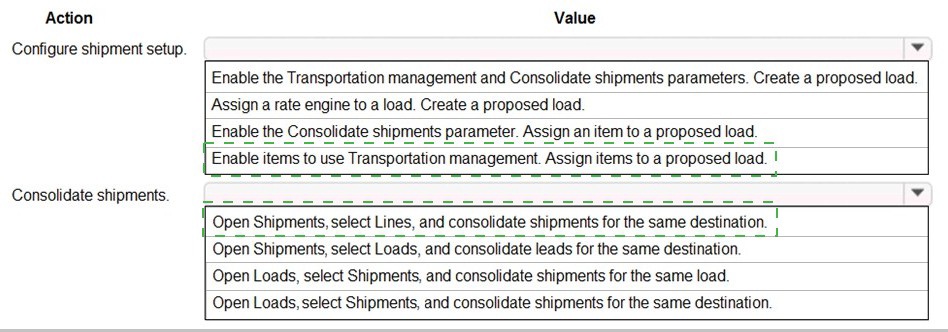
Configure shipment setup → Enable Transportation management and Consolidate shipments parameters. Create a proposed load: This is the foundational system configuration.

Enable Transportation management:
Activates the entire TMS module.

Enable Consolidate shipments:
Allows the system to automatically group shipments into loads based on rules.

Create a proposed load:
This is the operational result of the configuration; the system generates a preliminary load plan for consolidated shipments, which is then ready for rate shopping. Consolidate shipments → Open Loads, select Shipments, and consolidate shipments for the same destination: This describes the correct user action in the Load planning workbench.

You open the Loads workspace.

You work with the Shipments assigned to those loads.

The logical consolidation rule is for shipments going to the same destination, which minimizes freight cost.

Incorrect Option:

Other setup values:
Options mentioning only one parameter (like just "Consolidate shipments") or unrelated steps like "Assign an item to a proposed load" are incomplete or incorrect. The full setup requires both key parameters to be enabled to automate consolidation and planning.

Other consolidation actions:
Options like "Open Shipments, select Lines..." or "Open Shipments, select Loads..." do not follow the standard TMS workflow. Consolidation is performed from the Load planning perspective (Open Loads), not from the Shipments form. "Consolidate shipments for the same load" is illogical, as consolidation happens before a final load is built.

Reference:
Microsoft Learn: "Configure transportation management" and "Consolidate shipments into loads." The documentation specifies enabling both Transportation management and Consolidate shipments parameters in Transportation management parameters. The Load planning workbench is then used to build and consolidate loads by destination for optimal carrier selection and rating.
Question 2
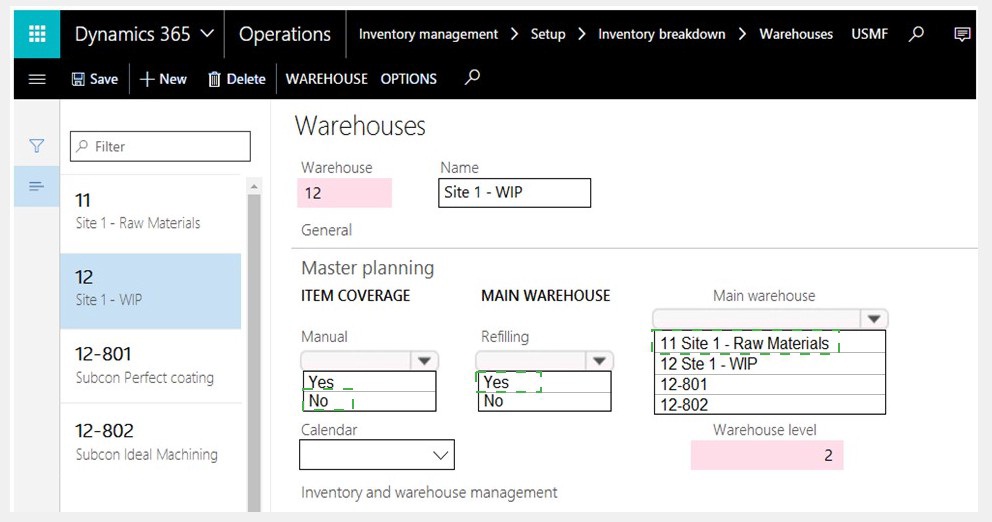
You need to configure automatic warehouse inventory replenishment for items.

How should you complete the setup? To answer, select the appropriate options in the answer area.

NOTE: Each correct selection is worth one point.

Show answerHide answer

Explanation


Explanation:
To configure min/max replenishment, you must define the warehouse hierarchy for replenishment flow. The Main Warehouse is the central supply source, Warehouse Level positions the warehouse in that hierarchy, and Refilling = Yes enables automatic transfer orders from the main warehouse when inventory falls below the minimum threshold.

Correct Option:

Main Warehouse:
12 Site 1 - WIP: The Main Warehouse is the source warehouse that will replenish its dependent warehouses. In a min/max setup, the WIP warehouse is a typical central storage point that supplies production floor locations (like 12-801, 12-802). Setting it as the main warehouse establishes the replenishment source.

Warehouse Level:
2: This defines the warehouse's position in the replenishment hierarchy. Level 1 is typically the highest or primary warehouse. Level 2 warehouses are replenished by a Level 1 warehouse. Setting it to 2 correctly indicates it is a dependent warehouse that receives stock from a higher-level source (even if not explicitly shown here as Level 1).

Refilling:
Yes: This parameter must be set to Yes to enable the automatic creation of transfer orders for replenishment based on the minimum quantity defined in the item's warehouse-specific coverage settings. "No" would disable the automatic replenishment feature.

Incorrect Option:

Main Warehouse:
Other values (11, 12-801, 12-802): Warehouse 11 is for Raw Materials, which is a different storage type and not the logical immediate source for WIP locations. Warehouses 12-801 and 12-802 are subcontractor/service locations, not central inventory hubs. They would be replenished by the main WIP warehouse, not act as the source themselves.

Warehouse Level:
Not 2: For a WIP warehouse that supplies production bays, Level 1 would imply it is the top of the hierarchy with no replenishment source, which is atypical. Level 2 correctly positions it as an intermediate hub.

Refilling:
No: This would disable the very automatic replenishment process you are trying to configure, defeating the purpose.

Reference:
Microsoft Learn: "Set up warehouse replenishment" for min/max. The setup requires defining a warehouse hierarchy with main/sub warehouses and setting Refilling = Yes on the receiving warehouse. The system then automatically generates transfer orders from the main warehouse when the inventory level in the dependent warehouse falls below its defined minimum.
Question 3 Choose 2
Employee 1 needs to set up the new items for the product line.

Which two actions should Employee1 perform? Each correct answer presents part of the solution.

NOTE Each correct selection is worth one point.
Show answerHide answer

Correct answer: C, E Create new finished goods with predefined variants and release to the legal entity.Create new raw materials with variants and release to the legal entity

Explanation

Explanation:
For a new product line like pottery or perfume, both the final sellable items (finished goods) and their component materials (raw materials) often have variations. Setting up both with their respective variant structures is essential for accurate production planning (BOMs) and inventory management before manufacturing and sales can begin.

Correct Option:

C. Create new finished goods with predefined variants:
Finished goods (e.g., a ceramic mug) are the end products sold to customers. They often have variants based on dimensions like Size and Color. Creating them as product masters with predefined variants ensures all sellable combinations are systematically set up.

E. Create new raw materials with variants:
Raw materials (e.g., clay, glaze) may also have variants, such as Color or Grade. Creating these with variants is crucial for accurate Bills of Materials (BOMs) and production orders, ensuring the correct material variant (e.g., Blue Glaze) is specified for each finished good variant (e.g., Blue Mug).

Incorrect Option:

A. Create new finished goods and release... / B. Create new raw materials and release...:
These options are too vague and incomplete. They do not specify the use of variants, which is a core requirement for a configurable product line. Creating simple "non-variant" products would not support the necessary product structure.

D. Create new finished goods... Raw material products are not required:
This is incorrect. Any manufactured item requires a Bill of Materials (BOM) listing its components. Therefore, raw material products are absolutely required in the system to define the product's cost and production process.

Reference:
Microsoft Learn: "Product information overview" and "Product masters and product variants." The setup process for a manufactured product line involves creating both finished goods and raw materials in the system. When these products have different characteristics, they should be set up using the product master and variant framework to manage the distinct types efficiently.

That's the last free question in Topic 2: Organics Company Case Study

You've seen the free 30% (3 of 13 questions). Full access unlocks every question and full-length MB-330 mock exams (65 questions, 105 minutes), a different mock on every attempt.

Unlock full mock exam
Full mock exam

Sit the MB-330 exam before exam day

Full-length mocks with the same number of questions and the same time limit as the real MB-330 exam. Every attempt draws a new set of questions from the full bank, so you can keep going until you pass comfortably.

Get full MB-330 mock exam
  • 65questions per mock
  • 105 mintime limit
  • 403questions in the bank
  • Newmock on every attempt