The Cost entity contains the fields TotalPremium and Tax. The application needs to calculate the total cost as a sum of those two fields dynamically and wants to create a reusable solution. Which configuration is appropriate and efficient to achieve this task?
Show answerHide answer
Correct answer: AAdd a getter in CostEnhancement: property get TotalCost_Ext() : BigDecimal { return this.TotalPremium + this.Tax }
Explanation
Answer Option (Which option is correct) A. Add a getter in CostEnhancement: property get TotalCost_Ext() : BigDecimal { return this.TotalPremium + this.Tax } Explanation:
A getter derives a value when it is read and can be reused from multiple callers. This is appropriate for a total calculated from existing amounts or a primary email chosen by a fallback rule. A setter assigns state, and a persisted duplicate of a derived value creates synchronization work.
Why the other options are incorrect:
B. Create an entity enhancement and add: property set TotalCost_Ext(totalCost : BigDecimal){ totalCost = this.TotalPremium + this.Tax }: A setter accepts an assigned value. This requirement reads a calculated total. A getter returns the sum without assignment.
C. Create an entity extension and add a new field to store the total cost: A stored total duplicates premium and tax information. It must be updated whenever either component changes. The requested dynamic getter avoids that duplicated state.
D. Calculate the total cost in the value property in the PCF file: A PCF expression computes the value in one interface location. Other callers cannot reuse that expression directly. The enhancement getter provides a shared property.
A query is known to return 500,000 rows. Which two are recommended to process all 500,000 rows efficiently? (Select two)
Show answerHide answer
Correct answer: B, CUse setPageSize().Use a batch process for large result sets.
Explanation
Answer Option (Which option is correct) B. Use setPageSize().
Answer Option (Which option is correct) C. Use a batch process for large result sets. Explanation:
Process large query results in controlled pages or chunks rather than materializing the entire result at once. A configured page size and a suitable batch-processing design limit the working set. Sorting by entity name does not itself control memory use.
Verification note: The key selects batch processing while Q143 selects chunking for the same large-result scenario. More than two choices may be defensible.
Why the other options are incorrect:
A. Use Google Iterables: Google Iterables supplies general collection utilities. That label does not set the database result page size. The source selects paging and batch context.
D. Chunk the results into page sets: Chunking is relevant to bounded processing. Q143 selects it for the same row count. Its exclusion here is not confidently justified.
E. Sort the result by entity name: Sorting changes result order. It does not limit the number of loaded rows. A memory-bounded processing strategy is still needed.
The business wants to create a new popup in BillingCenter that displays a single customer invoicing inquiry. The popup will have the inquiry date, inquiry contact, and the description of the inquiry. Which configurations follow best practices to make this page editable? (Choose Two)
Show answerHide answer
Correct answer: B, ESet the Page's startInEditMode property to true if it should initially be editable.Ensure that Input widgets are used for fields requiring data entry, and that their editable property is set to true.
Explanation
Answer Option (Which option is correct) B. Set the Page's startInEditMode property to true if it should initially be editable.
Answer Option (Which option is correct) E. Ensure that Input widgets are used for fields requiring data entry, and that their editable property is set to true. Explanation:
An editable popup must enter an appropriate edit mode and use editable input widgets for fields that accept data. A separate Boolean variable does not automatically change the page edit mode. ListView edit settings do not control the fields in a single-record detail view.
Verification note: The exact option selection could not be independently verified from accessible official documentation. Relevant official topic links are provided, but some exact configuration or training rules require the product Configuration Guide or Cloud Standards behind sign-in. The source key is retained.
Why the other options are incorrect:
A. Add a Boolean variable named editable_Ext to the Variables tab and set its initial value to true: Adding a Boolean variable does not automatically enter edit mode. Nothing connects that variable to the popup state. The page needs the appropriate edit setting.
C. Set the Detail View panel's readOnly property to false: The option names a panel property not verified for the target PCF type. The source uses page edit mode and editable input widgets. Confirm the component API before selecting it.
D. Be sure that the ListView container widget has its editable property set to true: The popup shows one inquiry rather than a ListView. Changing list editability targets the wrong component. The inquiry inputs must accept editing.
F. Add an InputSet widget within the detail view and set its canEdit property to true: An InputSet is a layout container. The stated canEdit property is not established by the source. Use documented edit settings for the page and inputs.
A user needs to select a single item from a non-editable list and modify its properties. Which UI pattern is best practice to facilitate editing just the selected item?
Show answerHide answer
Correct answer: AOpening a Popup containing an editable detail view for the selected item.
Explanation
Answer Option (Which option is correct) A. Opening a Popup containing an editable detail view for the selected item. Explanation:
A Popup containing an editable DetailView lets the user inspect and update one selected record. The source list can remain non-editable and continue showing a short summary. Making the entire list editable changes more of the interface than the requested single-record edit.
Verification note: The exact option selection could not be independently verified from accessible official documentation. Relevant official topic links are provided, but some exact configuration or training rules require the product Configuration Guide or Cloud Standards behind sign-in. The source key is retained.
Why the other options are incorrect:
B. Using an inline Screen within the list view row: A screen within a list row adds a different interface structure. The user needs a focused single-record editor. A popup can show that selected record directly.
C. Configuring an InputSet within the list row: An InputSet groups fields but does not provide its own editing location. It does not alone open the chosen record. The interaction needs a popup detail view.
D. Making the entire list view editable: Making the whole list editable affects every row. The request concerns one selected item. That broader edit mode is unnecessary.
E. Navigating to a separate page for editing: A separate page can implement editing. It changes the navigation flow more than the selected popup. The source treats the popup as the focused pattern.
A business analyst provided a requirement to create a list of Payment Types accepted by vendors. The list will include the values Cash, Credit Card, Debit Card, Check, and EFT. It will be linked to Company Vendors. Following best practices for creating a new typelist, how can this requirement be configured in the data model?
Show answerHide answer
Correct answer: CPaymentType_Ext.tti in the Extensions -> Typelist folder and add typecodes for the five payment types to the typelist
Explanation
Answer Option (Which option is correct) C. PaymentType_Ext.tti in the Extensions -> Typelist folder and add typecodes for the five payment types to the typelist Explanation:
A new standalone custom typelist is defined in a suffixed .tti file in the extension typelist area. Reference that typelist from the entity through a typekey. A .ttx file extends an existing typelist, and a foreign key points to an entity rather than to a typelist.
Verification note: The exact option selection could not be independently verified from accessible official documentation. Relevant official topic links are provided, but some exact configuration or training rules require the product Configuration Guide or Cloud Standards behind sign-in. The source key is retained.
Why the other options are incorrect:
A. PaymentType_Ext.ttx in the Extensions -> Typelist folder and add typecodes with the _Ext suffix to the typelist for the five payment types: A ttx file extends a typelist. The requirement creates a new standalone list. The new definition belongs in tti metadata.
B. PaymentType.tix in the Metadata -> Typelist folder and add typecodes with the _Ext suffix to the typelist for the five payment types: A tix file is not the custom definition file selected here. The Metadata folder also targets delivered configuration. The source uses the Extensions typelist area.
D. PaymentType.tti in the Metadata -> Typelist folder and add typecodes to the typelist for the five payment types: This creates a nonsuffixed list in the delivered metadata area. The requested list is a customer customization. A custom tti name keeps that distinction explicit.
Automated inspections help enforce quality by identifying anomalous code and adherence to defined metrics. Which types of issues or rules are typically enforced by Guidewire Studio Inspections? Select Two
Show answerHide answer
Correct answer: B, EEnforcement of naming standards for method and variable declarations across the entire Gosu configuration.Identification of potential programming bugs, such as empty if or else statements or unused loop variables.
Explanation
Answer Option (Which option is correct) B. Enforcement of naming standards for method and variable declarations across the entire Gosu configuration.
Answer Option (Which option is correct) E. Identification of potential programming bugs, such as empty if or else statements or unused loop variables. Explanation:
Studio inspections perform static analysis of Gosu code to identify potential bugs and enforce coding standards. Background editor inspections are distinct from runtime profiling and database consistency checks. Naming problems, empty branches, and unused variables are examples of static-analysis concerns.
Why the other options are incorrect:
A. Detection of unaccounted-for time (Own Time) during server round trips, indicating inefficient processing loops: Own Time is a runtime profiling measurement. Static inspection analyzes code without running that request. These are separate tools.
C. Measurement of the Cyclomatic Complexity metric to ensure methods do not exceed 40 statements: Cyclomatic complexity counts decision-path structure. A fixed statement count is a different metric. The option conflates those measures.
D. Verification of data integrity to ensure that required columns on subtypes are correctly populated (a platform-level Database Consistency Check): Required database values concern persisted data integrity. DBCCs inspect that data. Editor inspection does not replace the database check.
F. Detection of memory leaks caused by large, long-running bundles that were not paged correctly during batch modification: A runtime bundle memory leak requires runtime evidence. Static warnings can identify patterns but not establish this measured leak. The option describes a broader runtime diagnostic claim.
When viewing application logs in Datadog for troubleshooting, which methods can be used to find specific information within the logs, according to the training? Select Two
Show answerHide answer
Correct answer: D, FUsing the sidebar facets to filter resultsUsing the search bar for full-text searches.
Explanation
Answer Option (Which option is correct) D. Using the sidebar facets to filter results
Answer Option (Which option is correct) F. Using the search bar for full-text searches. Explanation:
Use facets to narrow the log result set and the search bar to search log content. Monitors and dashboards can support observability, but they are not the direct log-search controls selected in this question. TeamCity build history is a separate source of build information.
Why the other options are incorrect:
A. By querying the Lifecycle Manager API: Lifecycle Manager API manages configuration resources. It is not a Datadog log-search interface. Use the Log Explorer controls.
B. Using the Monitors section to set up alerts: A monitor evaluates conditions and triggers alerts. It is not the direct full-text search control. The task is finding existing log entries.
C. By examining the build history in TeamCity: TeamCity history describes builds. The question concerns application logs in Datadog. Those are different data sources.
E. Creating custom dashboards with relevant widgets: A dashboard can display related information. It is not the two direct search methods requested. Facets and search queries operate on the log results.
An insurer specializing in high-risk policies requires a new Account to provide at least three references. A Reference entity is created. What is the best practice for adding and displaying References on the Contact Summary page in TrainingApp?
Show answerHide answer
Correct answer: CCreate a Reference list view and add it to the Contact Summary page
Explanation
Answer Option (Which option is correct) C. Create a Reference list view and add it to the Contact Summary page Explanation:
References are multiple related records, so a ListView represents them as repeated rows. A fixed group of three fields constrains the layout to that number instead of representing the related collection. A single-record popup or an InputSet does not by itself display the collection as a list.
Verification note: The exact option selection could not be independently verified from accessible official documentation. Relevant official topic links are provided, but some exact configuration or training rules require the product Configuration Guide or Cloud Standards behind sign-in. The source key is retained.
Why the other options are incorrect:
A. Create a Reference detail view with fields for three References and add it to the Contact Summary page: Three fixed reference fields impose a fixed record count. The requirement says at least three. A related-record list can represent additional references.
B. Create a Contacts pop up and add a button that opens it to the Contact Summary page: A contact popup does not itself list the account references. It supplies a separate editing interaction. The summary still needs a repeated-record component.
D. Create an input set that displays References and add it to the Contact Summary page: An InputSet groups scalar input widgets. It does not directly express the Reference collection. A ListView represents the multiple related records.
Which of the following represents logging best practices? Select Two
Show answerHide answer
Correct answer: A, DMask personally identifiable information (PII) before including it in a log message.Log all information that is necessary to diagnose the transaction.
Explanation
Answer Option (Which option is correct) A. Mask personally identifiable information (PII) before including it in a log message.
Answer Option (Which option is correct) D. Log all information that is necessary to diagnose the transaction. Explanation:
Log significant events and the context needed to investigate a transaction while protecting sensitive information. Mask personal information when it must appear. Logging credentials or unmasked financial data, or logging everything indiscriminately, creates problems beyond the requested diagnostic purpose.
Why the other options are incorrect:
B. Set the logging level to "info" in the production environment: A global info setting is a configuration choice. It does not determine whether individual data is safe to log. The question selects content and privacy practices.
C. Set the logging level to "debug" in the production environment when diagnosing a production issue: Temporary debug logging may assist diagnosis. It still needs appropriate scope and data protection. The PDF does not establish it as the selected blanket practice.
E. Log every transaction to ensure a complete audit trail: Logging every transaction can produce unnecessary volume. It can also capture unjustified sensitive content. Log the events and context required by the actual audit purpose.
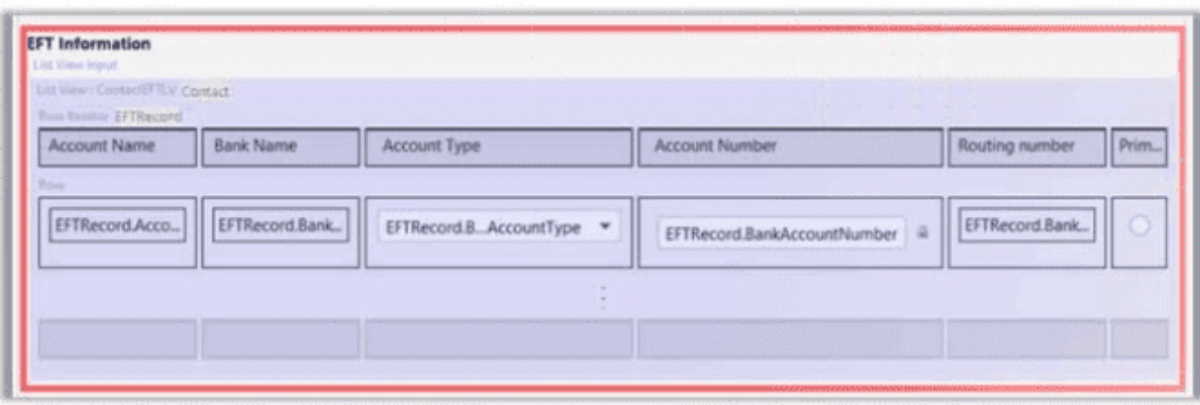
ContactManager provides an inline reference to an editable list view on the Contact Basics screen that supports adding and editing of banking information for contacts. The screenshot below shows this list view in Studio. There is an error within the red outline. Which configuration changes are necessary to resolve the error? (Select two)
Visual content transcription: The red outline encloses the EFT Information editable banking ListView in Studio. Account-name, bank-name, account-type, account-number and routing-number columns are visible.
Show answerHide answer
Correct answer: A, BAdd a toolbar widget to the list view inputAdd and configure Iterator buttons
Explanation
Answer Option (Which option is correct) A. Add a toolbar widget to the list view input
Answer Option (Which option is correct) B. Add and configure Iterator buttons Explanation:
An editable list that supports adding and removing records needs the corresponding toolbar and configured iterator buttons. The buttons invoke operations on the associated iterator. Changing permissions or replacing the entire list container does not supply the missing toolbar controls.
Verification note: The exact option selection could not be independently verified from accessible official documentation. Relevant official topic links are provided, but some exact configuration or training rules require the product Configuration Guide or Cloud Standards behind sign-in. The source key is retained.
Why the other options are incorrect:
C. Replace the list view input with a panel ref: Replacing the input with a panel reference changes the container approach. The stem says it is an editable inline list. The source-selected repair supplies the missing controls.
D. Replace the list view PCF with an inline list view: Replacing the PCF list discards reuse. It does not explain the error within the existing list. A toolbar and iterator controls address that interaction.
E. Add edit permissions to the row iterator: Permissions control whether editing is allowed. They do not add missing toolbar widgets. The source error is a structural interaction issue.
Sit the InsuranceSuite-Developer exam before exam day
Full-length mocks with the same number of questions and the same time limit as the real InsuranceSuite-Developer exam. Every attempt draws a new set of questions from the full bank, so you can keep going until you pass comfortably.