Refer to the exhibits.
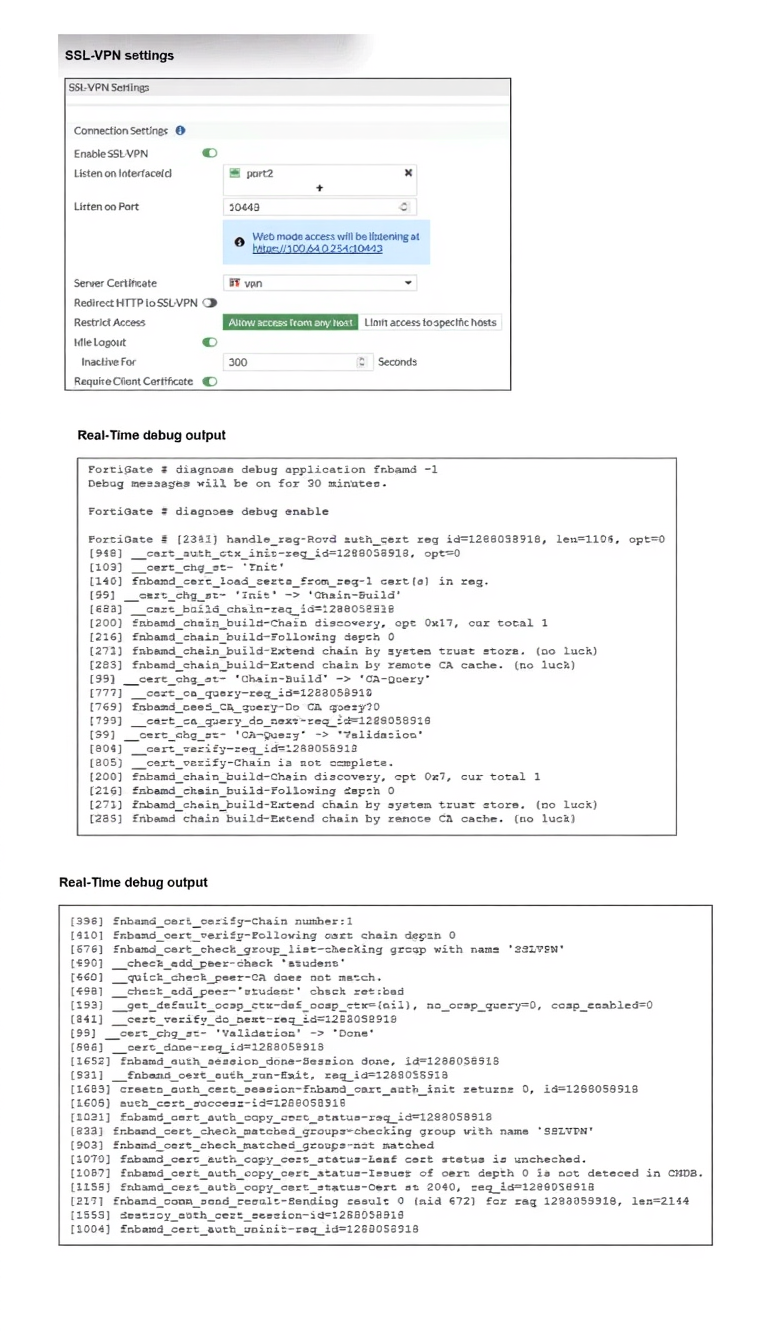
Which include debug output and SSL VPN configuration details. An SSL VPN has been configured on FortiGate. To enhance security, the administrator enabled Required Client Certificate in the SSL VPN settings. However, when a user attempts to connect, authentication fails. Which configuration change is needed to fix the issue and allow the user to connect?
Which include debug output and SSL VPN configuration details. An SSL VPN has been configured on FortiGate. To enhance security, the administrator enabled Required Client Certificate in the SSL VPN settings. However, when a user attempts to connect, authentication fails. Which configuration change is needed to fix the issue and allow the user to connect?
Show answerHide answer
Correct answer: D Import the CA that signed the user certificate to FortiGate.
Explanation
Explanation:This question tests the ability to diagnose SSL-VPN client certificate authentication failures using real-time debug output. The key line in the debug log reads: "Issuer of cert depth 0 is not detected in CMDB" — meaning FortiGate cannot find the Certificate Authority (CA) that signed the user's certificate in its local certificate store, causing the authentication chain to fail and the user to be denied access.
✔️ Correct Option:
D. Import the CA that signed the user certificate to FortiGate.
The debug log explicitly states the issuer of the client certificate is not detected in CMDB (FortiGate's certificate database). FortiGate must have the signing CA imported to validate the user certificate chain. Without it, client certificate authentication cannot succeed regardless of SSL-VPN settings.
❌ Incorrect Options:
A. Enable Redirect HTTP to SSL-VPN on the SSL VPN configuration page.
This option simply redirects HTTP traffic to the SSL-VPN portal URL. It has no impact on certificate validation or authentication. The debug output shows a certificate chain verification failure — not a connectivity or redirect issue.
B. Import the CA that signed the SSL VPN Server Certificate to FortiGate.
The server certificate is already configured and functional (shown in SSL-VPN settings as "vpn"). The debug failure is specifically about the client/user certificate's issuer not being found, not the server certificate's CA chain.
C. Set the user certificate as the Server Certificate on the SSL VPN configuration page.
The Server Certificate field is for the FortiGate's own identity certificate presented to VPN clients — not for user authentication. Using a user certificate as a server certificate is architecturally incorrect and would not resolve the CA trust issue.
🔧 Reference:
⇒ Fortinet SSL VPN with Certificate Authentication – FortiGate Administration Guide
→ Confirms that FortiGate requires the CA certificate that signed the client certificate to be imported into its certificate store for successful certificate-based authentication.
⇒ Fortinet SSL VPN Troubleshooting Guide
→ Documents the fnbamd debug process and explains that "Issuer not detected in CMDB" directly indicates a missing CA certificate for client certificate validation.