Fortinet certification · Exam FCSS_LED_AR-7.6

FCSS_LED_AR-7.6 Mock Exam

Fortinet NSE 6 - LAN Edge 7.6 Architect

Free FCSS_LED_AR-7.6 questions on FortiLink and FortiGate Integration, each with the answer and an explanation.

12 questions · 23 minutes · free, no sign-up

FortiLink and FortiGate Integration questions

1–3 of 3 free
Question 1 Choose 1
In addition to requiring a FortiAnalyzer device to configure the Security Fabric, which license must be added to FortiAnalyzer to use Indicators of Compromise (IOC) rules?
Show answerHide answer

Correct answer: B IOC Subscription license

Explanation

Explanation:

This question tests the licensing requirements for advanced Security Fabric features on FortiAnalyzer. While a FortiAnalyzer device is required to integrate with the Security Fabric for centralized logging and analytics, using Indicators of Compromise (IOC) rules to detect compromised devices needs an additional specific license beyond the base setup.

✔️ Correct Option:

B. IOC Subscription license
This option is correct because Indicators of Compromise (IOC) functionality on FortiAnalyzer is not included in the base license. The IOC Subscription license enables FortiGuard IOC intelligence updates, allowing FortiAnalyzer to download and apply IOC rules for detecting suspicious IPs, domains, URLs, and malware indicators across the Security Fabric.

❌ Incorrect options:

A. IoT Security Add-on license
This does not satisfy the requirement because the IoT Security Add-on license is designed specifically for discovering, profiling, and securing IoT and OT devices in the network. It provides visibility into IoT asset inventory and risk assessment but has no relation to enabling IOC rules or FortiGuard threat intelligence for compromise detection.

B. IOC detection is included on FAZ-Basic license
This fails as the base FortiAnalyzer license only supports basic logging, reporting, and limited Security Fabric integration. Advanced features like real-time IOC rule processing and automatic FortiGuard IOC package downloads require a separate paid subscription and are not available with the standard FAZ-Basic license.

C. Threat Detection Service license
This is unsuitable because FortiAnalyzer does not offer a generic “Threat Detection Service” license for IOC functionality. Threat-related features on FortiAnalyzer are tied specifically to the IOC Subscription license, which handles Indicators of Compromise intelligence rather than a broad threat detection bundle.

🔧 Reference:
→ Viewing Indicators of Compromise | FortiAnalyzer 7.6
Explains that the IOC service requires a valid subscription license for full FortiGuard updates and rule functionality.

→ How IOC works | FortiAnalyzer 7.4
Describes the licensing requirement for using IOC rules with Security Fabric integration.
Question 2 Choose 1
Which FortiGuard licenses are required for FortiLink device detection to enable device identification and vulnerability detection?
Show answerHide answer

Correct answer: B FortiGuard Threat Intelligence and FortiGuard loT Detection

Explanation

Explanation

✅ B. FortiGuard Threat Intelligence and FortiGuard IoT Detection
This is the correct answer because FortiLink device detection relies on passive fingerprinting and threat context rather than endpoint agents or active scanning. FortiGuard IoT Detection is responsible for identifying connected devices by type, vendor, operating system, and behavior, including unmanaged and IoT devices connected through FortiSwitch. FortiGuard Threat Intelligence complements this by enriching the detected devices with known threat and vulnerability context. Without these two licenses together, FortiGate cannot fully identify devices or assess their risk level through FortiLink.

❌ A. FortiGuard Vulnerability Management and FortiGuard Endpoint Protection
This option is incorrect because Vulnerability Management focuses on infrastructure and asset scanning, not passive device detection through FortiLink. Endpoint Protection applies only to endpoints managed by FortiClient and does not identify unmanaged or IoT devices, which are the primary targets of FortiLink device detection.

❌ C. FortiGuard Threat Intelligence and FortiGuard Endpoint Protection
Although Threat Intelligence is required, Endpoint Protection does not contribute to device fingerprinting or vulnerability detection for devices connected via FortiLink. Without FortiGuard IoT Detection, FortiGate cannot identify device types or behaviors, making this license combination insufficient.

❌ D. FortiGuard Attack Surface Security and FortiGuard IoT Detection
While IoT Detection is relevant, Attack Surface Security is designed to monitor internet-facing assets and external exposure. It does not integrate with internal FortiLink device discovery or contribute to device identification within the LAN.

Official Fortinet References

FortiGuard IoT Detection Overview:
https://www.fortinet.com/products/fortiguard/fortiguard-iot-security

FortiGate 7.6 Administration Guide – Device Detection:
https://docs.fortinet.com/document/fortigate/7.6.0/administration-guide/648508/device-detection
Question 3 Choose 1
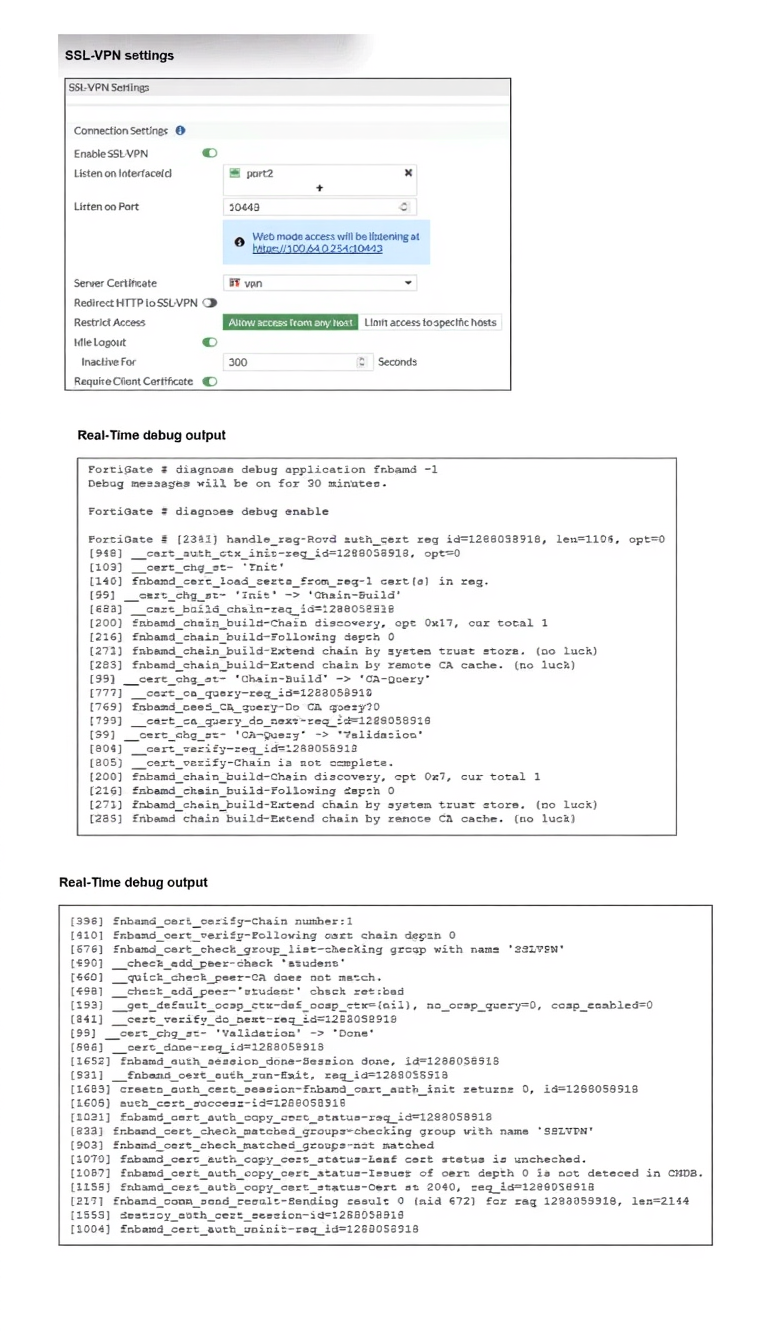
Refer to the exhibits.


Which include debug output and SSL VPN configuration details. An SSL VPN has been configured on FortiGate. To enhance security, the administrator enabled Required Client Certificate in the SSL VPN settings. However, when a user attempts to connect, authentication fails. Which configuration change is needed to fix the issue and allow the user to connect?
Show answerHide answer

Correct answer: D Import the CA that signed the user certificate to FortiGate.

Explanation

Explanation:

This question tests the ability to diagnose SSL-VPN client certificate authentication failures using real-time debug output. The key line in the debug log reads: "Issuer of cert depth 0 is not detected in CMDB" — meaning FortiGate cannot find the Certificate Authority (CA) that signed the user's certificate in its local certificate store, causing the authentication chain to fail and the user to be denied access.

✔️ Correct Option:

D. Import the CA that signed the user certificate to FortiGate.
The debug log explicitly states the issuer of the client certificate is not detected in CMDB (FortiGate's certificate database). FortiGate must have the signing CA imported to validate the user certificate chain. Without it, client certificate authentication cannot succeed regardless of SSL-VPN settings.

❌ Incorrect Options:

A. Enable Redirect HTTP to SSL-VPN on the SSL VPN configuration page.
This option simply redirects HTTP traffic to the SSL-VPN portal URL. It has no impact on certificate validation or authentication. The debug output shows a certificate chain verification failure — not a connectivity or redirect issue.

B. Import the CA that signed the SSL VPN Server Certificate to FortiGate.
The server certificate is already configured and functional (shown in SSL-VPN settings as "vpn"). The debug failure is specifically about the client/user certificate's issuer not being found, not the server certificate's CA chain.

C. Set the user certificate as the Server Certificate on the SSL VPN configuration page.
The Server Certificate field is for the FortiGate's own identity certificate presented to VPN clients — not for user authentication. Using a user certificate as a server certificate is architecturally incorrect and would not resolve the CA trust issue.

🔧 Reference:
⇒ Fortinet SSL VPN with Certificate Authentication – FortiGate Administration Guide
→ Confirms that FortiGate requires the CA certificate that signed the client certificate to be imported into its certificate store for successful certificate-based authentication.

⇒ Fortinet SSL VPN Troubleshooting Guide
→ Documents the fnbamd debug process and explains that "Issuer not detected in CMDB" directly indicates a missing CA certificate for client certificate validation.

That's the last free question in FortiLink and FortiGate Integration

You've seen the free 30% (3 of 13 questions). Full access unlocks every question and full-length FCSS_LED_AR-7.6 mock exams (40 questions, 75 minutes), a different mock on every attempt.

Unlock full mock exam
Full mock exam

Sit the FCSS_LED_AR-7.6 exam before exam day

Full-length mocks with the same number of questions and the same time limit as the real FCSS_LED_AR-7.6 exam. Every attempt draws a new set of questions from the full bank, so you can keep going until you pass comfortably.

Get full FCSS_LED_AR-7.6 mock exam
  • 40questions per mock
  • 75 mintime limit
  • 45questions in the bank
  • Newmock on every attempt