Fortinet certification · Exam FCSS_LED_AR-7.6

FCSS_LED_AR-7.6 Mock Exam

Fortinet NSE 6 - LAN Edge 7.6 Architect

Find out if you're ready for FCSS_LED_AR-7.6. Take the free timed mock exam and get your score in minutes, or study the free FCSS_LED_AR-7.6 questions below with answers and explanations.

12 questions · 23 minutes · free, no sign-up

Free FCSS_LED_AR-7.6 questions

1–10 of 12 free
Question 1 Choose 1
Refer to the exhibits.
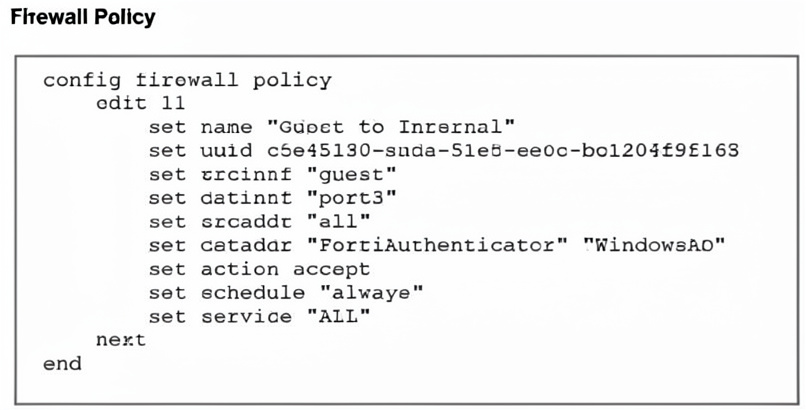
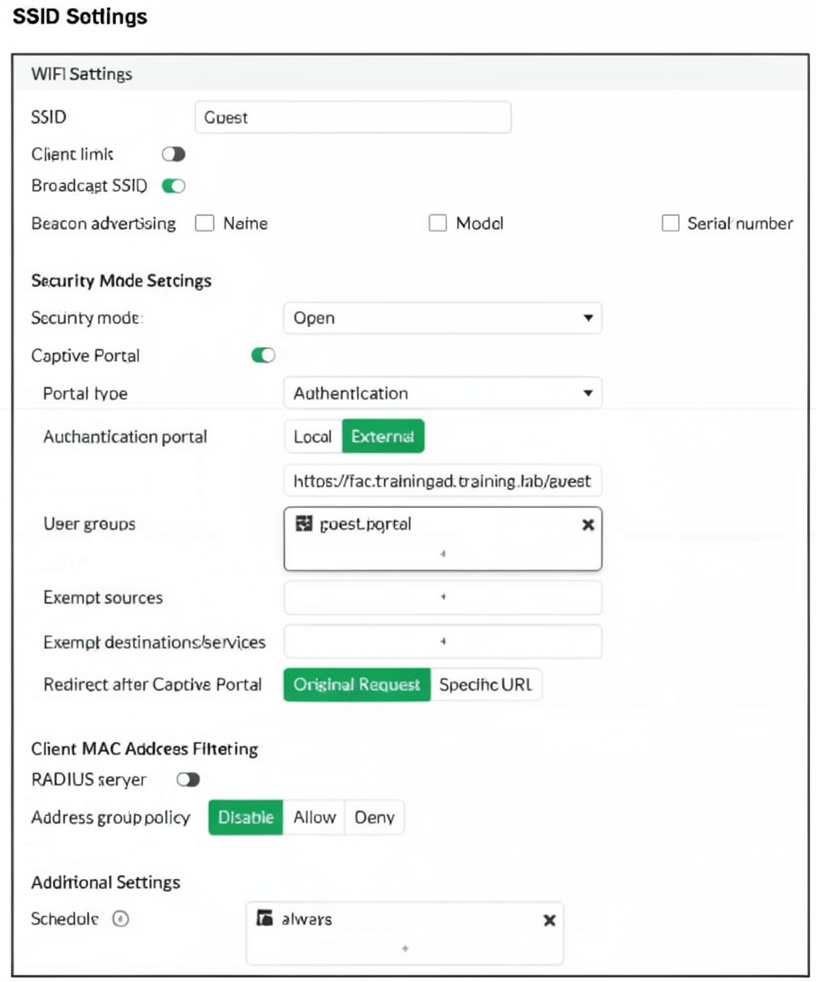


Examine the firewall policy configuration and SSID settings. Users trying to connect to the new Guest wireless network should be redirected to an external captive portal, however, these wireless users are not able to see the captive portal login page. The external captive portal URL has been verified as correct, yet the issue persists. Which configuration change should fix the problem?
Show answerHide answer

Correct answer: C A firewall policy with the ID 11 is missing to enable the captive-portal-exempt option.

Explanation

Explanation:
The SSID uses an external captive portal with authentication, and the firewall policy allows traffic from guest to port3. However, users cannot see the login page. This typically occurs because the firewall policy lacks the captive-portal-exempt option. When this option is disabled (default), FortiGate blocks portal traffic until authentication completes, creating a deadlock.

Correct Option:

C. A firewall policy with the ID 11 is missing to enable the captive-portal-exempt option.
The captive-portal-exempt enable command in firewall policy allows captive portal traffic (HTTP/HTTPS to the external portal URL) to bypass authentication checks.
Without this, FortiGate drops the initial portal page request because the user is not yet authenticated.
Adding this option to policy ID 11 resolves the deadlock and displays the login page.

Incorrect Option:

A. Add FortiAuthenticator and WindowsAD as exempt sources.
Exempt sources are for bypassing captive portal entirely, not for fixing portal page delivery.
Adding them would allow users to skip authentication, defeating the portal purpose.

B. Security mode should be set to WPA2 Enterprise to authenticate through RADIUS.
WPA2 Enterprise is for Wi-Fi authentication, not for external captive portal operation.
The SSID uses Open security mode with captive portal, which is correct for guest access scenarios.

D. Include the user group guest.portal in the firewall policy.
The SSID configuration already references guest.portal as the user group for authentication.
Adding it to the firewall policy is redundant; the issue is portal traffic being blocked pre-authentication, not missing user group reference.

Reference:
Fortinet Documentation: Firewall Policy captive-portal-exempt — Required when using external captive portal on FortiGate. Without this option, HTTP/HTTPS requests to the portal URL are blocked by the same policy until authentication succeeds.
Question 2 Choose 2
Refer to the exhibits.


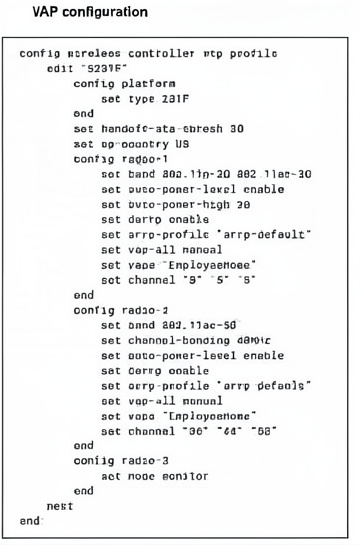
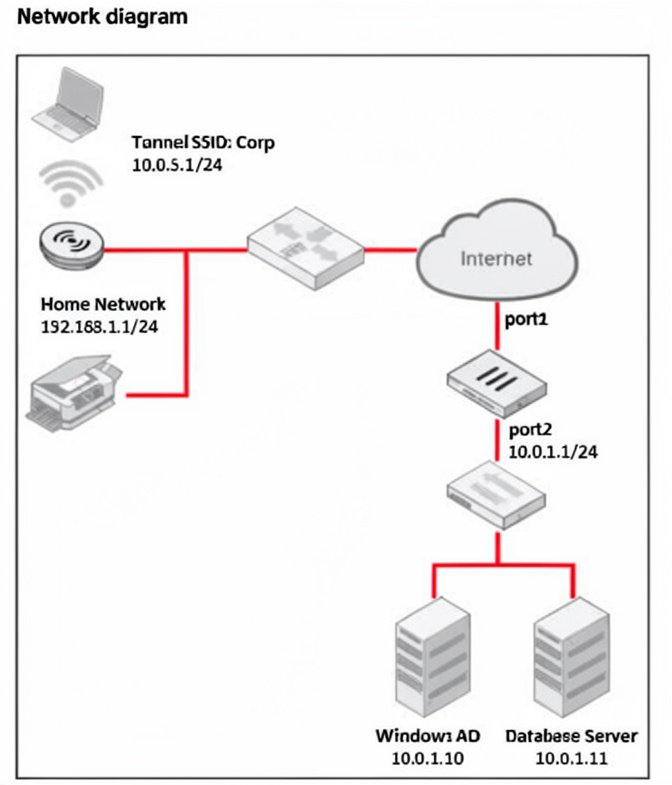
The exhibits show the WTP profile and VAP CLI configurations on FortiGate managing a remote AP. The AP is designed to grant a remote employee access to company network resources, including the database and AD servers. The employee can reach company resources but is unable to access a local printer at home. What two solutions are required to fix this issue? (Choose two answers)
Show answerHide answer

Correct answer: A, D Configure the S231F WTP profile to add a split tunneling ACL with a destination subnet of 192.168.1.1 /24, using the command set dest-ip 192.168.1.1/24. Configure the S231F WTP profile to enable split tunneling to the AP subnet using the command set split-tunneling-acl-local-ap-subnet enable.

Explanation

Explanation:
The remote AP connects an employee to corporate resources (database, AD) but blocks access to a local home printer (192.168.1.1/24). This happens because all traffic is tunneled back to FortiGate by default. To allow local printer access, split tunneling must forward local subnet traffic directly out the AP's home LAN while corporate traffic goes through the tunnel.

Correct Option:

A. Configure the S231F WTP profile to add a split tunneling ACL with a destination subnet of 192.168.1.1/24, using the command set dest-ip 192.168.1.1/24.
Split tunneling ACL defines which destination subnets bypass the tunnel and go directly out the AP's local interface.
Adding 192.168.1.1/24 allows the employee to reach the home printer without sending traffic through FortiGate.

D. Configure the S231F WTP profile to enable split tunneling to the AP subnet using the command set split-tunneling-acl-local-ap-subnet enable.
This automatically adds the AP's local subnet (where the printer resides) to the split tunneling ACL.
Combined with option A, it ensures local traffic stays local. This command simplifies configuration when the home subnet is dynamic or not predefined.

Incorrect Option:

B. Configure the EmployeeHome VAP profile for local bridging using the command set local-bridging enable.
Local bridging bridges wireless clients directly to the AP's Ethernet port, completely bypassing the tunnel to FortiGate.
This would grant local printer access but would also block access to corporate database and AD servers, breaking the primary requirement.

C. Configure the EmployeeHome VAP profile to disable host isolation using the command set intra-vap-privacy disable.
Intra-VAP privacy blocks communication between clients connected to the same VAP.
Disabling it allows client-to-client communication but does not affect access to the printer if the printer is on a different subnet or connected via AP's LAN port. This is not the correct solution.

Reference:
Fortinet Documentation: FortiGate Remote AP Split Tunneling — Use split-tunneling-acl-local-ap-subnet enable and custom ACL entries to allow local subnet traffic while maintaining corporate tunnel for other destinations.
Question 3 Choose 1
Refer to the exhibits.


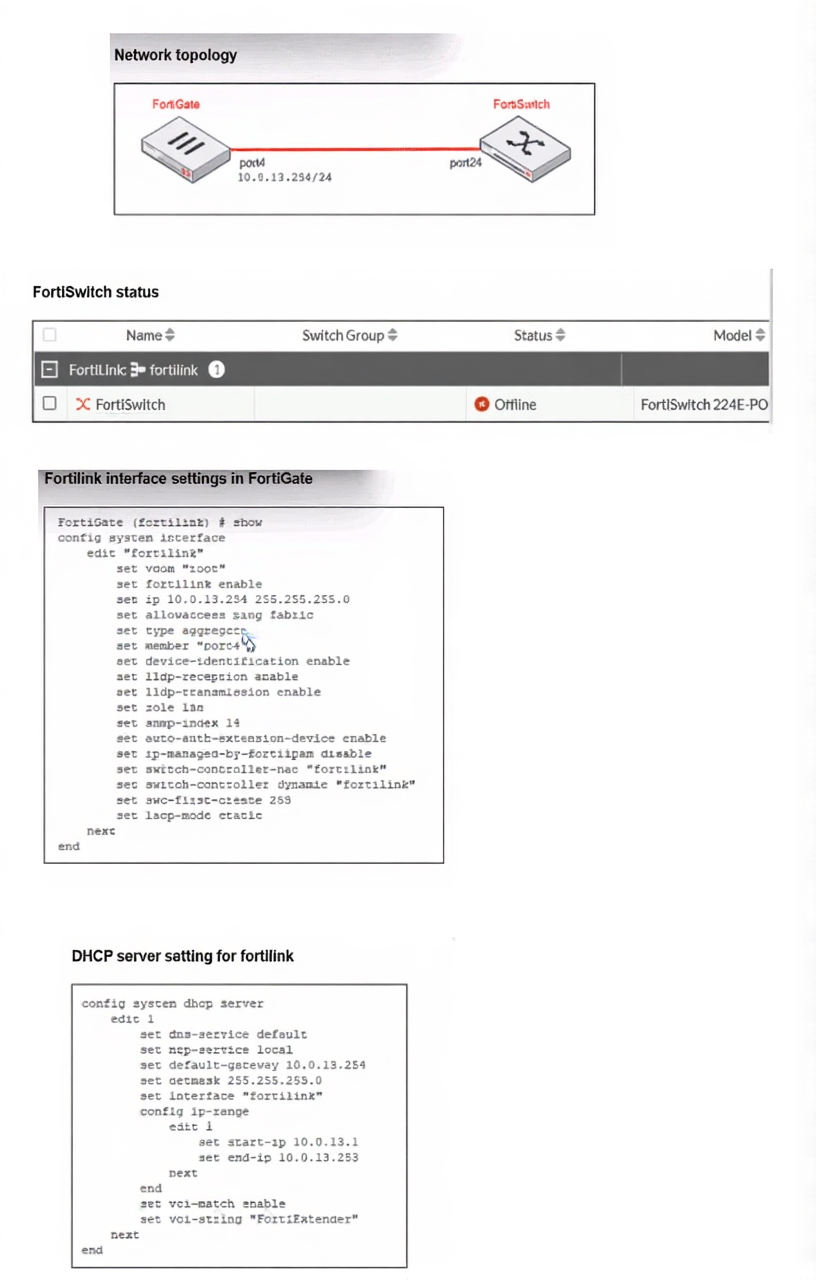
You are adding a new FortiSwitch to FortiGate for management. All necessary settings have been configured on FortiGate, but FortiSwitch remains offline. The cabling has been verified and is correctly connected.
Which misconfiguration might be preventing FortiGate from detecting FortiSwitch?
Show answerHide answer

Correct answer: D The DHCP server setting vci-string is misconfigured.

Explanation

Explanation:

This question tests knowledge of FortiLink auto-discovery requirements for FortiSwitches. When a FortiSwitch connects to a FortiGate, it sends a DHCP request containing a specific Vendor Class Identifier (VCI) string. The DHCP server on the FortiLink interface must match this string to assign an IP address and complete the discovery process.

✔️ Correct Option:

✔️ Option D: The DHCP server setting vci-string is misconfigured.
The exhibit shows the DHCP server configuration uses set vci-string "FortiEthernet". However, FortiSwitches send the VCI string FortiSwitch (or FortiSwitch ) in their DHCP requests. The mismatch prevents the DHCP server from responding, so the FortiSwitch never receives an IP address and remains offline .

❌ Incorrect options:

❌ Option A: The Fortilink interface setting ip-managed-by-fortiipam must be enabled.
This setting (ip-managed-by-fortilink in the exhibit) is used when IP addresses are managed by an external IPAM solution. It is not required for basic FortiLink discovery and DHCP assignment .

❌ Option B: The Fortilink interface has the wrong interface member.
The exhibit shows set member "port4", which is a valid physical port. If the cabling is verified correct, the member configuration is appropriate for a FortiLink aggregate interface .

❌ Option C: The Fortilink interface setting cype must be physical.
The interface type shown is type aggregate, which is correct for FortiLink when using link aggregation. FortiLink supports both physical and aggregate interface types. Changing to physical would not resolve the discovery issue .

🔧 Reference:
→ Fortinet Document Library: VCI pattern matching for DHCP assignment: Official documentation explaining that vci-match enable restricts DHCP service to only clients with matching VCI strings, and vci-string defines which strings are allowed.
Question 4 Choose 1
When the MAC address of a device is placed in quarantine on FortiSwitch, what happens to its egress traffic?
Show answerHide answer

Correct answer: A Traffic is sent to an access VLAN.

Explanation

Explanation:

This question tests understanding of FortiSwitch quarantine behavior in NAC deployments. When a device is quarantined based on its MAC address, FortiSwitch redirects its traffic to a specific VLAN to limit network access until the device meets security compliance requirements.

🟢 Correct Option:

A. Traffic is sent to an access VLAN
Quarantined devices are placed in a restricted access VLAN, often called a quarantine VLAN. All egress traffic from the device is redirected to this VLAN, preventing full network access while allowing remediation or onboarding procedures.

🔴 Incorrect options:

B. Traffic is assigned to the native VLAN
The native VLAN is used for untagged traffic but does not control quarantine behavior. Placing quarantined devices in the native VLAN would bypass policy enforcement.

C. Traffic is sent as untagged traffic
Traffic tagging does not determine quarantine; FortiSwitch uses VLAN assignment to isolate devices. Untagged traffic alone does not enforce restricted access.

D. Traffic is sent to an allowed VLAN
“Allowed VLAN” implies full network access. Quarantined devices are explicitly isolated, so traffic is not forwarded to standard allowed VLANs.

🔧 Reference:
→ Fortinet FortiSwitch NAC Quarantine Behavior
Confirms that quarantined MAC addresses are redirected to a designated access VLAN to restrict network access until compliance is met.
Question 5 Choose 3
Refer to the exhibits.


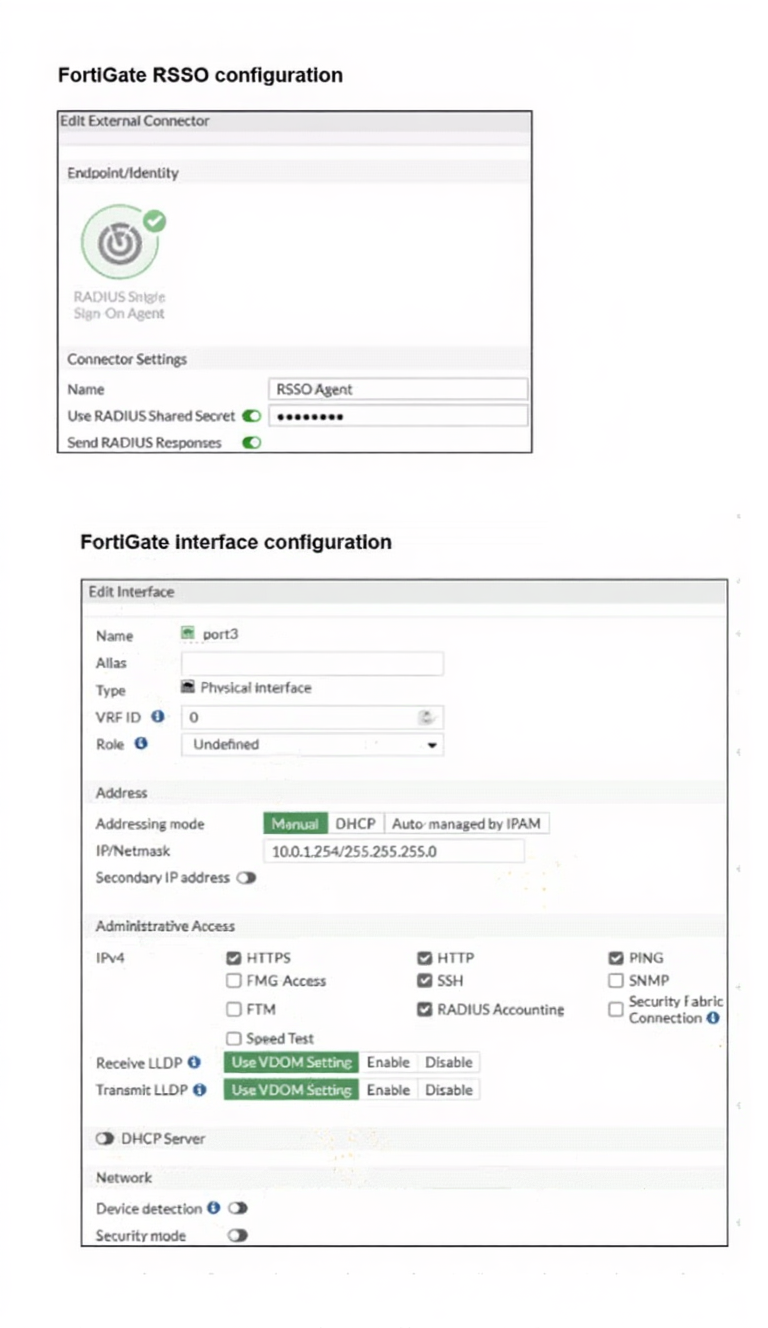
Examine the FortiGate RSSO configuration shown in the exhibit. FortiGate is set up to use RSSO for user authentication. It is currently receiving RADIUS accounting messages through port3. The incoming RADIUS accounting messages contain the username in the User- Name attribute and group membership in the Class attribute. You must ensure that the users are authenticated through these RADIUS accounting messages and accurately mapped to their respective RSSO user groups. Which three critical configurations must you implement on the FortiGate device? (Choose three.)
Show answerHide answer

Correct answer: A, D, E The RADIUS Attribute Value setting configured for an RSSO user group should match the class RADIUS attribute value in the RADIUS accounting message. The sso-attribute CLI setting in the RSSO agent configuration should be set to Class. The rsso-endpoint-attribute CLI setting in the RSSO agent configuration should be set to User-Name.

Explanation

Explanation:

This scenario involves configuring FortiGate as a RADIUS Single Sign-On (RSSO) collector. When FortiGate receives RADIUS accounting messages, it must be told exactly which attributes contain the user's identity and their group membership to create a valid login session.

✅ Correct Options:

A. The RADIUS Attribute Value setting configured for an RSSO user group should match the class RADIUS attribute value in the RADIUS accounting message.
For RSSO to function, the "User Group" defined on the FortiGate must have a specific "RADIUS Attribute Value" string. When the RADIUS packet arrives, FortiGate compares the value found in the designated group attribute against this string; if they match, the user is placed into that local RSSO group.

D. The sso-attribute CLI setting in the RSSO agent configuration should be set to Class.
By default, FortiGate may look for group information in different attributes. Since the prompt specifies that group membership is sent in the Class attribute, you must explicitly configure the sso-attribute to "Class" in the CLI so the RSSO agent knows where to extract group data.

E. The rsso-endpoint-attribute CLI setting in the RSSO agent configuration should be set to User-Name.
The rsso-endpoint-attribute defines which attribute in the RADIUS packet represents the user's unique identifier (the endpoint). Since the prompt states the username is in the User-Name attribute, this setting must be explicitly mapped to ensure the session is tied to the correct person.

❌ Incorrect options:

B. RSSO user groups should be assigned to all firewall policies.
While RSSO groups must be used in relevant policies to enforce access control, they do not need to be assigned to "all" firewall policies. This is a design choice, not a technical requirement for the authentication and mapping process to function.

C. Device detection and Security Fabric Connection should be enabled on port3.
The exhibit shows that RADIUS Accounting is already enabled on port3, which allows the interface to listen for the packets. Device detection and Security Fabric Connection are used for asset identification and fabric telemetry, respectively, and are not required for processing RSSO accounting messages.

🔧 Reference:
→ FortiGate RSSO Configuration Guide
This documentation confirms that sso-attribute and rsso-endpoint-attribute are the primary CLI settings used to map RADIUS accounting fields to FSSO/RSSO sessions.
Question 6 Choose 2
A conference center wireless network provides guest access through a captive portal, allowing unregistered users to self-register and connect to the network. The IT team has been tasked with updating the existing configuration to enforce captive portal authentication over a secure HTTPS connection. Which two steps should the administrator take to implement this change? (Choose two.)
Show answerHide answer

Correct answer: A, D Enable HTTP redirect in the user authentication settings.Update the captive portal URL to use HTTPS on FortiGate and FortiAuthenticator.

Explanation

Explanation:

This question addresses the security requirements for guest access via a captive portal. By transitioning from HTTP to HTTPS, the administrator ensures that the exchange of user credentials and self-registration data is encrypted, protecting the network from credential sniffing.

✔️ Correct Options:

✅ A. Enable HTTP redirect in the user authentication settings.
Enabling HTTP redirect is a critical step that allows the FortiGate to catch unencrypted web requests from guests and automatically redirect them to the secure portal. This ensures that users do not encounter "page not found" errors when trying to access the login page.

✅ D. Update the captive portal URL to use HTTPS on FortiGate and FortiAuthenticator.
To enforce encryption, the Captive Portal URL must be explicitly configured with the https:// prefix. This change must be consistent across the FortiGate enforcement point and the FortiAuthenticator portal host to maintain a valid and secure redirection flow.

❌ Incorrect options:

❌ B. Create a new SSID with the HTTPS captive portal URL.
Creating a new SSID is an unnecessary administrative overhead. Captive portal settings are attributes of the existing SSID’s security profile or the interface it is mapped to; therefore, the current SSID can simply be modified to support the HTTPS URL without creating a new network.

❌ C. Disable HTTP administrative access on the guest SSID to enforce HTTPS connection.
Administrative access settings (HTTP, HTTPS, SSH) control how an administrator manages the FortiGate device through that specific interface. These settings are entirely separate from the guest traffic plane and have no impact on the captive portal's authentication protocol for end-users.

🔧 Reference:
→ Captive Portal Authentication
This official Fortinet documentation confirms that securing a captive portal involves configuring the redirect logic and updating the portal URL to use the HTTPS protocol.
Question 7 Choose 2
You are setting up a captive portal to provide Wi-Fi access for visitors. To simplify the process, your team wants visitors to authenticate using their existing social media accounts instead of creating new accounts or entering credentials manually. Which two actions are required to enable this functionality? (Choose two.)
Show answerHide answer

Correct answer: A, E Set up a remote open authorization (OAuth) server for each selected social media platform.Configure the social login profiles for the supported platforms.

Explanation

Explanation:

This question tests Fortinet captive portal configuration for visitor Wi-Fi using social media authentication. It evaluates understanding of OAuth integration with FortiAuthenticator to enable seamless login via existing social accounts, avoiding manual credential creation.

✅ Correct Option:

Option A. Set up a remote open authorization (OAuth) server for each selected social media platform.
Setting up remote OAuth servers for platforms like LinkedIn/Facebook provides Client ID/Secret credentials. FortiAuthenticator uses these to redirect users for social authentication during captive portal login, completing the OAuth flow successfully.

Option E. Configure the social login profiles for the supported platforms.
Configuring social login profiles on FortiAuthenticator enables specific platforms, sets login button visibility on the splash page, defines user group assignment, and controls session timeouts for authenticated social media visitors.

❌ Incorrect options:

Option B. Configure only the email login option because a social media login cannot be used with captive portals.
Email login is a separate authentication method. Social media login via OAuth is fully supported on FortiAuthenticator captive portals and appears alongside other login options on the visitor splash page.

Option C. Enable Account Login as the authentication type and configure a remote LDAP server.
Remote LDAP servers handle enterprise directory authentication, not social media platforms which use OAuth 2.0 protocols. LDAP is incompatible with public social login providers like Twitter or LinkedIn.

Option D. Set up the FortiAuthenticator internal database as the primary source for user credentials.
FortiAuthenticator's internal database stores locally created users or imports social login attributes post-authentication, but OAuth providers remain the primary credential validation source during the login process.

🔧 Reference:
→ Create the Smart Connect profile
Confirms OAuth server setup and social login profile configuration steps for captive portals.
Question 8 Choose 1
Why is it critical to maintain NTP synchronization between FortiGate and FortiSwitch when FortiLink is configured?
Show answerHide answer

Correct answer: C To ensure accurate time for logs, authentication, and event correlation

Explanation

Explanation:

This question explores the foundational requirement of time synchronization in a managed network fabric. When a FortiGate manages a FortiSwitch via FortiLink, they operate as a single logical entity; therefore, any discrepancy in their internal clocks can lead to significant failures in security auditing, secure communication, and automated network response.

✅ Correct Option:

C. To ensure accurate time for logs, authentication, and event correlation
In a FortiLink environment, the FortiGate acts as the central management point. If the FortiSwitch and FortiGate are not synchronized via NTP, logs generated by the switch will have different timestamps than those on the FortiGate, making it impossible to accurately reconstruct a sequence of network events. Furthermore, security protocols like 802.1X authentication and certificate validation rely heavily on precise timing to determine if credentials or sessions are still valid for the security fabric.

❌ Incorrect options:

A. To facilitate synchronization of firmware updates across devices
Firmware synchronization is a functional process handled by the FortiLink protocol's image management system. While the FortiGate pushes the firmware to the switch, this is a version-control and file-transfer task. The success of the update depends on connectivity and compatibility rather than the real-time clock alignment between the two devices.

B. To allow FortiSwitch to communicate with other FortiSwitch devices in the network
Inter-switch communication, such as forming trunks or participating in Spanning Tree Protocol (STP), is a Layer 2 or Layer 3 networking function. These protocols rely on frame headers, MAC addresses, and priority values to establish paths. NTP is a management-plane service and does not dictate the basic data-plane connectivity between switches.

D. To allow FortiSwitch to function in standalone mode if FortiGate becomes unavailable
If a FortiSwitch loses its connection to the FortiGate, its ability to function independently is determined by its saved local configuration and boot settings. NTP synchronization with a missing FortiGate would not assist the switch in standalone operations; in fact, a standalone switch would likely need its own independent NTP source to maintain accurate logs.

🔧 Reference:
→ Configuring NTP for FortiLink
This official documentation confirms that NTP is essential for maintaining the integrity of the security fabric, ensuring that all managed switches report time-accurate data back to the FortiGate.
Question 9 Choose 1
In addition to requiring a FortiAnalyzer device to configure the Security Fabric, which license must be added to FortiAnalyzer to use Indicators of Compromise (IOC) rules?
Show answerHide answer

Correct answer: B IOC Subscription license

Explanation

Explanation:

This question tests the licensing requirements for advanced Security Fabric features on FortiAnalyzer. While a FortiAnalyzer device is required to integrate with the Security Fabric for centralized logging and analytics, using Indicators of Compromise (IOC) rules to detect compromised devices needs an additional specific license beyond the base setup.

✔️ Correct Option:

B. IOC Subscription license
This option is correct because Indicators of Compromise (IOC) functionality on FortiAnalyzer is not included in the base license. The IOC Subscription license enables FortiGuard IOC intelligence updates, allowing FortiAnalyzer to download and apply IOC rules for detecting suspicious IPs, domains, URLs, and malware indicators across the Security Fabric.

❌ Incorrect options:

A. IoT Security Add-on license
This does not satisfy the requirement because the IoT Security Add-on license is designed specifically for discovering, profiling, and securing IoT and OT devices in the network. It provides visibility into IoT asset inventory and risk assessment but has no relation to enabling IOC rules or FortiGuard threat intelligence for compromise detection.

B. IOC detection is included on FAZ-Basic license
This fails as the base FortiAnalyzer license only supports basic logging, reporting, and limited Security Fabric integration. Advanced features like real-time IOC rule processing and automatic FortiGuard IOC package downloads require a separate paid subscription and are not available with the standard FAZ-Basic license.

C. Threat Detection Service license
This is unsuitable because FortiAnalyzer does not offer a generic “Threat Detection Service” license for IOC functionality. Threat-related features on FortiAnalyzer are tied specifically to the IOC Subscription license, which handles Indicators of Compromise intelligence rather than a broad threat detection bundle.

🔧 Reference:
→ Viewing Indicators of Compromise | FortiAnalyzer 7.6
Explains that the IOC service requires a valid subscription license for full FortiGuard updates and rule functionality.

→ How IOC works | FortiAnalyzer 7.4
Describes the licensing requirement for using IOC rules with Security Fabric integration.
Question 10 Choose 1
Which FortiGuard licenses are required for FortiLink device detection to enable device identification and vulnerability detection?
Show answerHide answer

Correct answer: B FortiGuard Threat Intelligence and FortiGuard loT Detection

Explanation

Explanation

✅ B. FortiGuard Threat Intelligence and FortiGuard IoT Detection
This is the correct answer because FortiLink device detection relies on passive fingerprinting and threat context rather than endpoint agents or active scanning. FortiGuard IoT Detection is responsible for identifying connected devices by type, vendor, operating system, and behavior, including unmanaged and IoT devices connected through FortiSwitch. FortiGuard Threat Intelligence complements this by enriching the detected devices with known threat and vulnerability context. Without these two licenses together, FortiGate cannot fully identify devices or assess their risk level through FortiLink.

❌ A. FortiGuard Vulnerability Management and FortiGuard Endpoint Protection
This option is incorrect because Vulnerability Management focuses on infrastructure and asset scanning, not passive device detection through FortiLink. Endpoint Protection applies only to endpoints managed by FortiClient and does not identify unmanaged or IoT devices, which are the primary targets of FortiLink device detection.

❌ C. FortiGuard Threat Intelligence and FortiGuard Endpoint Protection
Although Threat Intelligence is required, Endpoint Protection does not contribute to device fingerprinting or vulnerability detection for devices connected via FortiLink. Without FortiGuard IoT Detection, FortiGate cannot identify device types or behaviors, making this license combination insufficient.

❌ D. FortiGuard Attack Surface Security and FortiGuard IoT Detection
While IoT Detection is relevant, Attack Surface Security is designed to monitor internet-facing assets and external exposure. It does not integrate with internal FortiLink device discovery or contribute to device identification within the LAN.

Official Fortinet References

FortiGuard IoT Detection Overview:
https://www.fortinet.com/products/fortiguard/fortiguard-iot-security

FortiGate 7.6 Administration Guide – Device Detection:
https://docs.fortinet.com/document/fortigate/7.6.0/administration-guide/648508/device-detection
Full mock exam

Sit the FCSS_LED_AR-7.6 exam before exam day

Full-length mocks with the same number of questions and the same time limit as the real FCSS_LED_AR-7.6 exam. Every attempt draws a new set of questions from the full bank, so you can keep going until you pass comfortably.

Get full FCSS_LED_AR-7.6 mock exam
  • 40questions per mock
  • 75 mintime limit
  • 45questions in the bank
  • Newmock on every attempt

Pass on the First Try: Targeted Prep for FCSS_LED_AR-7.6 Fortinet NSE 6 LAN Edge 7.6 Architect Exam


Securing your Fortinet NSE 6 LAN Edge 7.6 Architect certification is a strategic step toward advancing in network security. This credential validates your applied skills in designing and managing modern, secure, and identity-driven wired and wireless networks.

Exam Overview & Key Details


Before you begin your studies, understanding the exam structure is crucial for effective preparation.

Exam Code & Name: FCSS_LED_AR-7.6 (Fortinet NSE 6 LAN Edge 7.6 Architect)
Format & Questions: The test consists of 35-45 multiple-choice questions, many based on real-world scenarios you must analyze
Time Limit: You will have 75 minutes to complete the exam
Prerequisite Experience: Fortinet recommends at least 3 years of networking experience, including 1 year each in network security and identity/access management

Core Exam Topics You Must Master


Authentication: Configuring advanced identity management with RADIUS, LDAP, certificates, and Single Sign-On (SSO)

Central Management: Automating and managing FortiSwitch, FortiAP, and FortiExtender devices using FortiManager and Zero-Touch Provisioning (ZTP)

Zero-Trust LAN Access: Implementing machine authentication, NAC policies, guest portals, and dynamic VLANs to enforce least-privilege access

Monitoring & Troubleshooting: Using FortiAIOps, dashboards, and diagnostic tools to monitor health and resolve communication issues within the security fabric

Your Path to Success: How to Prepare


Passing this exam requires more than just theoretical knowledge; it demands strategic, hands-on preparation.

Build a Lab: There is no substitute for practical experience. Set up a lab environment to practice configurations for authentication servers, FortiLink setups, and VLAN policies

Simulate the Real Test: Practice under timed conditions to improve your speed and accuracy. Prepforti offers scenario-based Fortinet FCSS_LED_AR-7.6 exam questions similar to the actual exam is highly beneficial.

Target Your Weaknesses: A focused approach is key. The expert-crafted Fortinet NSE 6 LAN Edge 7.6 Architect practice test from prepforti.com are designed to mirror the real exams difficulty and format. They help you identify knowledge gaps, master complex scenarios, and build the confidence needed to pass on your first attempt.

Trusted, Tested, and Recommended


"As an architect, the depth in the SD-Branch Zero Trust scenarios was exactly what I needed. The exam insight on FortiSwitch and FortiAP integration under a single-pane-of-glass management was a major theme. These practice questions did not just prepare me for the test; they validated our current multi-site deployment strategy."
- Marcus John

“Prepforti FCSS_LED_AR-7.6 practice tests were perfect for LAN edge design topics. The mix of architecture and troubleshooting questions, plus clear explanations, helped me lock down the concepts quickly. I walked into the exam confident and passed on my first attempt.”
- Matthew Parker

LAN Edge architecture requires precision with FortiSwitch and FortiLink. Prepforti practice tests challenged me on VLAN segmentation, NAC integration, and switching topologies. The FCSS_LED_AR-7.6 exam questions were spot-on and helped me architect with confidence.
David Peterson, Network Architect | Chicago, IL