Fortinet certification · Exam FCSS_LED_AR-7.6

FCSS_LED_AR-7.6 Mock Exam

Fortinet NSE 6 - LAN Edge 7.6 Architect

Free FCSS_LED_AR-7.6 questions on High Availability and Redundancy, each with the answer and an explanation.

12 questions · 23 minutes · free, no sign-up

High Availability and Redundancy questions

1–2 of 2 free
Question 1 Choose 1
Refer to the exhibits.
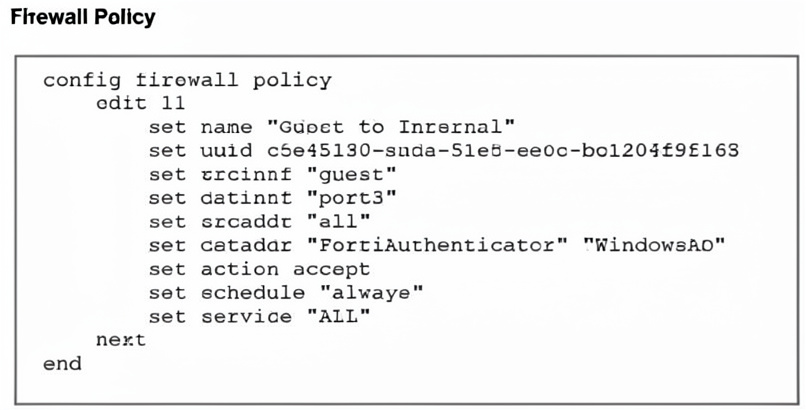
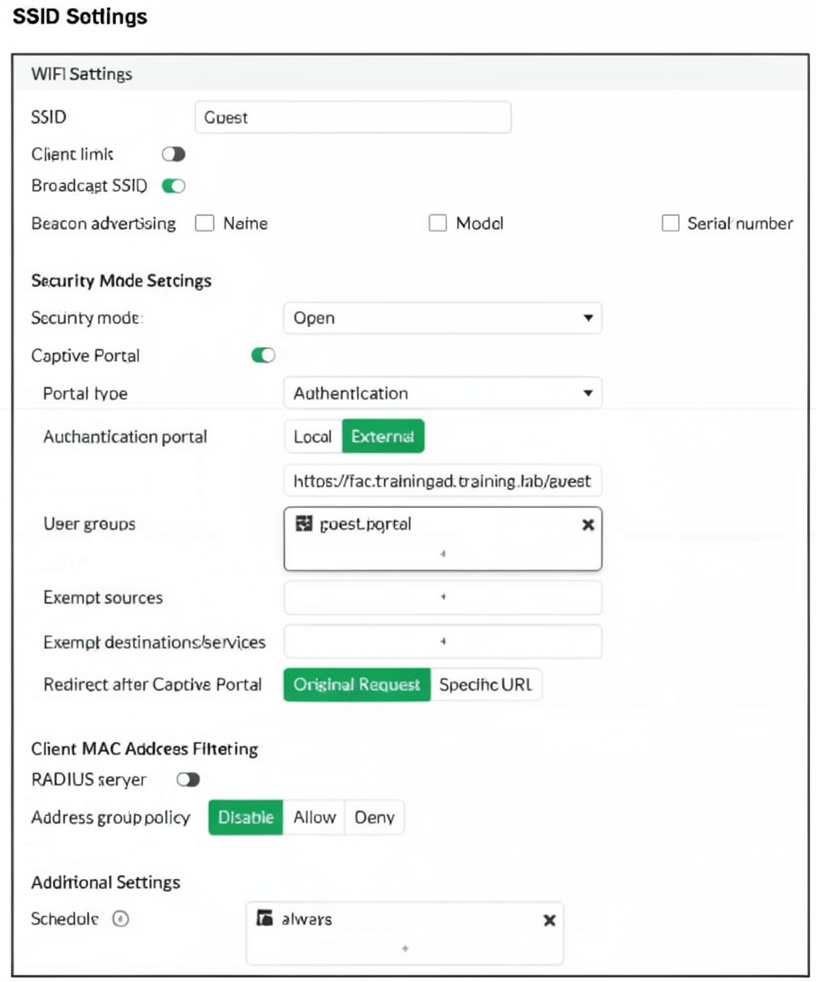


Examine the firewall policy configuration and SSID settings. Users trying to connect to the new Guest wireless network should be redirected to an external captive portal, however, these wireless users are not able to see the captive portal login page. The external captive portal URL has been verified as correct, yet the issue persists. Which configuration change should fix the problem?
Show answerHide answer

Correct answer: C A firewall policy with the ID 11 is missing to enable the captive-portal-exempt option.

Explanation

Explanation:
The SSID uses an external captive portal with authentication, and the firewall policy allows traffic from guest to port3. However, users cannot see the login page. This typically occurs because the firewall policy lacks the captive-portal-exempt option. When this option is disabled (default), FortiGate blocks portal traffic until authentication completes, creating a deadlock.

Correct Option:

C. A firewall policy with the ID 11 is missing to enable the captive-portal-exempt option.
The captive-portal-exempt enable command in firewall policy allows captive portal traffic (HTTP/HTTPS to the external portal URL) to bypass authentication checks.
Without this, FortiGate drops the initial portal page request because the user is not yet authenticated.
Adding this option to policy ID 11 resolves the deadlock and displays the login page.

Incorrect Option:

A. Add FortiAuthenticator and WindowsAD as exempt sources.
Exempt sources are for bypassing captive portal entirely, not for fixing portal page delivery.
Adding them would allow users to skip authentication, defeating the portal purpose.

B. Security mode should be set to WPA2 Enterprise to authenticate through RADIUS.
WPA2 Enterprise is for Wi-Fi authentication, not for external captive portal operation.
The SSID uses Open security mode with captive portal, which is correct for guest access scenarios.

D. Include the user group guest.portal in the firewall policy.
The SSID configuration already references guest.portal as the user group for authentication.
Adding it to the firewall policy is redundant; the issue is portal traffic being blocked pre-authentication, not missing user group reference.

Reference:
Fortinet Documentation: Firewall Policy captive-portal-exempt — Required when using external captive portal on FortiGate. Without this option, HTTP/HTTPS requests to the portal URL are blocked by the same policy until authentication succeeds.
Question 2 Choose 2
Refer to the exhibits.


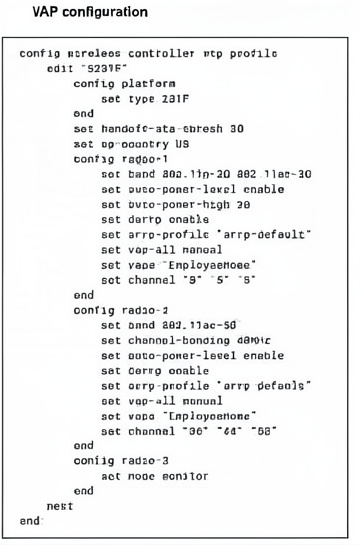
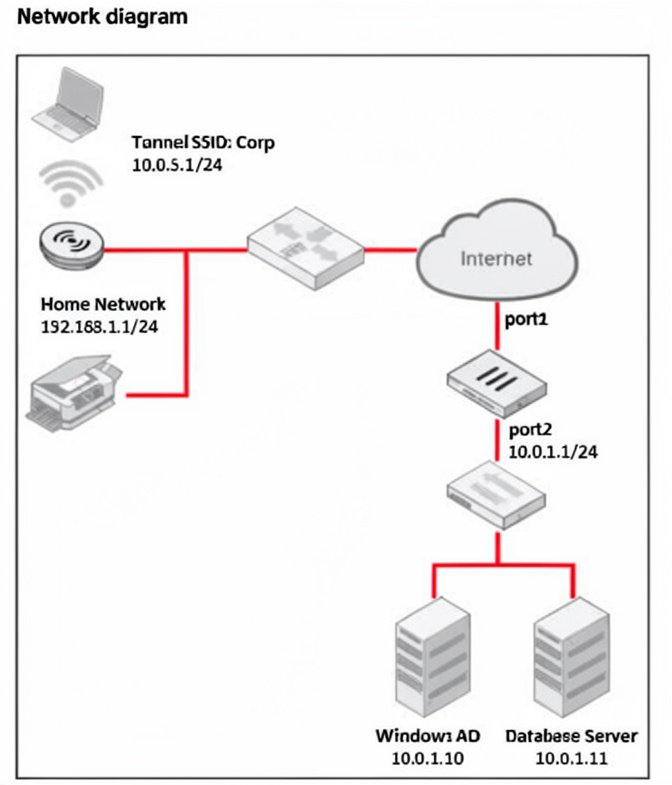
The exhibits show the WTP profile and VAP CLI configurations on FortiGate managing a remote AP. The AP is designed to grant a remote employee access to company network resources, including the database and AD servers. The employee can reach company resources but is unable to access a local printer at home. What two solutions are required to fix this issue? (Choose two answers)
Show answerHide answer

Correct answer: A, D Configure the S231F WTP profile to add a split tunneling ACL with a destination subnet of 192.168.1.1 /24, using the command set dest-ip 192.168.1.1/24. Configure the S231F WTP profile to enable split tunneling to the AP subnet using the command set split-tunneling-acl-local-ap-subnet enable.

Explanation

Explanation:
The remote AP connects an employee to corporate resources (database, AD) but blocks access to a local home printer (192.168.1.1/24). This happens because all traffic is tunneled back to FortiGate by default. To allow local printer access, split tunneling must forward local subnet traffic directly out the AP's home LAN while corporate traffic goes through the tunnel.

Correct Option:

A. Configure the S231F WTP profile to add a split tunneling ACL with a destination subnet of 192.168.1.1/24, using the command set dest-ip 192.168.1.1/24.
Split tunneling ACL defines which destination subnets bypass the tunnel and go directly out the AP's local interface.
Adding 192.168.1.1/24 allows the employee to reach the home printer without sending traffic through FortiGate.

D. Configure the S231F WTP profile to enable split tunneling to the AP subnet using the command set split-tunneling-acl-local-ap-subnet enable.
This automatically adds the AP's local subnet (where the printer resides) to the split tunneling ACL.
Combined with option A, it ensures local traffic stays local. This command simplifies configuration when the home subnet is dynamic or not predefined.

Incorrect Option:

B. Configure the EmployeeHome VAP profile for local bridging using the command set local-bridging enable.
Local bridging bridges wireless clients directly to the AP's Ethernet port, completely bypassing the tunnel to FortiGate.
This would grant local printer access but would also block access to corporate database and AD servers, breaking the primary requirement.

C. Configure the EmployeeHome VAP profile to disable host isolation using the command set intra-vap-privacy disable.
Intra-VAP privacy blocks communication between clients connected to the same VAP.
Disabling it allows client-to-client communication but does not affect access to the printer if the printer is on a different subnet or connected via AP's LAN port. This is not the correct solution.

Reference:
Fortinet Documentation: FortiGate Remote AP Split Tunneling — Use split-tunneling-acl-local-ap-subnet enable and custom ACL entries to allow local subnet traffic while maintaining corporate tunnel for other destinations.

That's the last free question in High Availability and Redundancy

You've seen the free 30% (2 of 8 questions). Full access unlocks every question and full-length FCSS_LED_AR-7.6 mock exams (40 questions, 75 minutes), a different mock on every attempt.

Unlock full mock exam
Full mock exam

Sit the FCSS_LED_AR-7.6 exam before exam day

Full-length mocks with the same number of questions and the same time limit as the real FCSS_LED_AR-7.6 exam. Every attempt draws a new set of questions from the full bank, so you can keep going until you pass comfortably.

Get full FCSS_LED_AR-7.6 mock exam
  • 40questions per mock
  • 75 mintime limit
  • 45questions in the bank
  • Newmock on every attempt