Microsoft certification · Exam DP-300

DP-300 Mock Exam

Administering Relational Databases on Microsoft Azure

Free DP-300 questions on Topic 6: Misc. Questions, each with the answer and an explanation.

20 questions · 33 minutes · free, no sign-up

Topic 6: Misc. Questions questions

1–10 of 85 free
Question 1 Choose 1
You have an Azure SQL database named sqldb1.

You need to minimize the possibility of Query Store transitioning to a read-only state.

What should you do?
Show answerHide answer

Correct answer: B Decrease by half the value of Data Flush Interval

Explanation

Explanation:
Query Store can transition to a read-only state primarily when it runs out of allocated storage space (MAX_STORAGE_SIZE_MB) and the cleanup policies cannot free enough space. The Data Flush Interval determines how frequently captured runtime statistics are flushed from memory to disk. A shorter interval flushes data more frequently, preventing large in-memory accumulation that could exceed storage limits during a single flush and helping the cleanup mechanism stay ahead of space usage.

Correct Option:

B. Decrease by half the value of Data Flush Interval
Decreasing the Data Flush Interval (e.g., from the default 15 minutes to 7.5 minutes) means data is persisted to disk more frequently. This reduces the risk of a large, single flush overwhelming the allocated storage quota, giving the cleanup policy (based on SIZE_BASED_CLEANUP_MODE and STALE_QUERY_THRESHOLD_DAYS) more regular opportunities to purge old data and maintain free space, thus minimizing the chance of Query Store becoming read-only.

Incorrect Options:

A. Double the value of Data Flush Interval
Increasing the flush interval means data stays in memory longer before being written to disk. This can lead to larger, less frequent flushes, which increase the risk of suddenly exceeding the storage limit when the flush occurs, making a read-only state more likely.

C. Double the value of Statistics Collection Interval
The Statistics Collection Interval defines how often runtime stats are aggregated (default 60 minutes). Increasing this interval collects data less frequently, which reduces the volume of data entering Query Store. While this could help with space, it also reduces the granularity of performance diagnostics. More importantly, it does not address the core flushing mechanism that directly causes read-only states due to large single writes.

D. Decrease by half the value of Statistics Collection Interval
Decreasing this interval (e.g., to 30 minutes) increases the frequency of data collection, creating more granular but also more data to store. This would increase the data volume and storage pressure, making a read-only state more likely, not less.

Reference:
Microsoft Docs - Best practices with Query Store - Avoid read-only state
Question 2 Choose 2
A data engineer creates a table to store employee information for a new application. All
employee names are in the US English alphabet. All addresses are locations in the United
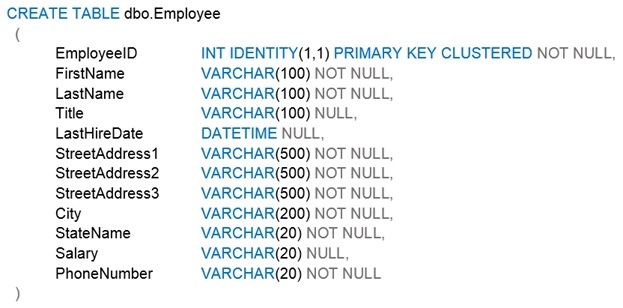
States. The data engineer uses the following statement to create the table
You need to recommend changes to the data types to reduce storage and improve
performance.
Which two actions should you recommend? Each correct answer presents part of the
solution.
NOTE: Each correct selection is worth one point.
Show answerHide answer

Correct answer: A, E Change Salary to the money data type. Change LastHireDate to the date data t

Explanation

Explanation:
The goal is to change data types to reduce storage and improve performance. This involves selecting the most appropriate and efficient data type for each column's actual data domain. Storage savings lead to better cache utilization and reduced I/O, which directly improves performance.
Correct Options:

A. Change Salary to the money data type.
The Salary column is currently VARCHAR(20), which stores character data. A money or decimal data type is appropriate for currency values. Storing numeric data in a numeric type (like money, which uses 8 bytes) is far more efficient for storage and calculations than storing it as a string. It also ensures data integrity and enables proper numeric operations and indexing.

E. Change LastHireDate to the date data type.
The LastHireDate column is currently DATETIME. If only the date component is needed (without time), changing it to the date data type reduces storage from 8 bytes (for DATETIME) to 3 bytes. This is a significant storage reduction, especially over millions of rows, and improves performance by allowing more rows per data page.

Incorrect Options:

B. Change PhoneNumber to the float data type.
FLOAT is an approximate numeric data type for scientific calculations. It is entirely inappropriate for a phone number, which is a discrete identifier, not a continuous number for calculations. Storing it as FLOAT can lead to loss of precision (e.g., leading zeros lost) and is a poor design practice. A string type (VARCHAR) or a specialized type is better for phone numbers.

C. Change LastHireDate to the datetime2(7) data type.
DATETIME2(7) provides higher precision but uses more storage (8 bytes for 7 fractional seconds precision) than DATETIME. If time precision is not required, this change would increase storage, which is the opposite of the goal. It improves accuracy but not storage efficiency.

D. Change PhoneNumber to the bigint data type.
While BIGINT (8 bytes) could store a numeric phone number and might be slightly more storage-efficient than VARCHAR(20) for purely numeric US numbers, it has significant drawbacks. It cannot store formatting (dashes, parentheses), international prefixes with a plus sign (+), or extensions. More critically, BIGINT cannot store a leading zero in a phone number (e.g., an area code like '012'), causing data loss. VARCHAR is more flexible and safer for phone numbers.

Reference:
Microsoft Docs - Data types (Transact-SQL)
Question 3 Choose 2
You have SQL Server on an Azure virtual machine that contains a database named DB1.
DB1 contains a table
named CustomerPII.
You need to record whenever users query the CustomerPII table.
Which two options should you enable? Each correct answer presents part of the solution.
NOTE: Each correct selection is worth one point.
Show answerHide answer

Correct answer: A, C server audit specification database audit specification

Explanation

Explanation:
To record (audit) queries on a specific table (CustomerPII), you must enable SQL Server Audit, which is the overarching feature, and then define what to audit at the appropriate scope. SQL Server Audit operates hierarchically: you first create a Server Audit object (the destination), then a Server Audit Specification for server-level actions, and/or a Database Audit Specification for database-level actions. Auditing data access (like a SELECT on a table) is configured at the database level.

Correct Options:

A. Server audit specification
A Server Audit Specification defines the server-level audit actions to capture and must be attached to a Server Audit object. While auditing SELECT on a table is a database-level action, you still need to have the parent Server Audit feature enabled. The listed option "server audit specification" implicitly represents enabling the Server Audit component itself, which is the foundational container that must exist before any database audit specification can be created and where the audit trail is directed (to a file, Windows Security log, etc.).

C. Database audit specification
A Database Audit Specification is required to capture database-scoped actions, such as SELECT, INSERT, UPDATE, or DELETE on a specific table (CustomerPII). You create this specification within the DB1 database, define the audit action (e.g., SELECT on schema::dbo for object::CustomerPII), and associate it with the existing Server Audit.

Incorrect Options:

B. SQL Server audit
"SQL Server audit" is the overall feature name, not a specific component you "enable" in a list. The implementation requires creating the specific objects: a Server Audit and then a Database Audit Specification. In the context of this multiple-choice question, the correct granular steps are enabling the server-level container (A) and the database-level action spec (C).

D. A server principal
A server principal is a login (e.g., SQL or Windows login). This is unrelated to enabling auditing. While audit specifications can be filtered to specific principals, creating a principal is not a step to enable the recording of queries.

Reference:
Microsoft Docs - SQL Server Audit (Database Engine)
Question 4
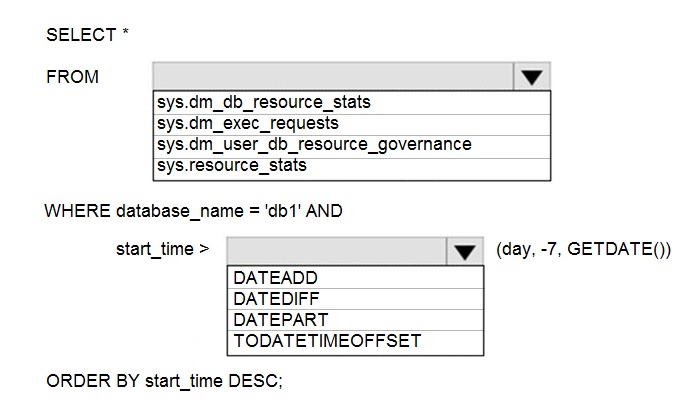
You have an Azure SQL database named db1.
You need to retrieve the resource usage of db1 from the last week.
How should you complete the statement? To answer, select the appropriate options in the
answer area.
NOTE: Each correct selection is worth one p
Show answerHide answer

Explanation


Explanation:
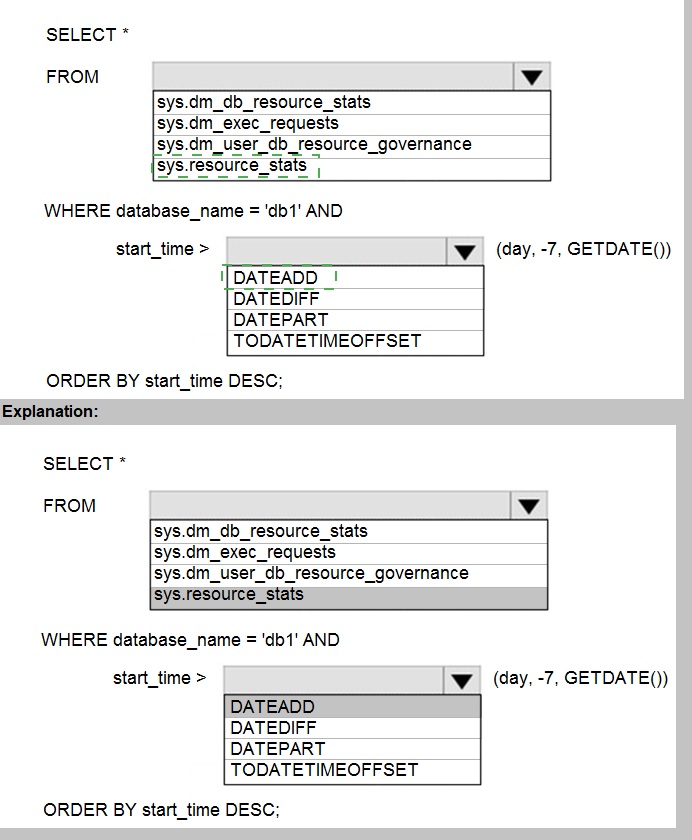
To retrieve resource usage history for an Azure SQL Database, you must use the correct system view and filter for the last week. For historical usage over a week, the primary view is sys.resource_stats, which retains data for approximately 14 days and provides aggregated resource consumption (CPU, DTU, storage, etc.) in 5-minute intervals. The filter should compare the start_time column to a date seven days ago.

Correct Selections:
FROM: sys.resource_stats

The sys.resource_stats view contains historical resource usage data for the database, aggregated in 5-minute intervals and retained for about 14 days. It is the correct view for analyzing performance trends over the past week. The other DMVs are either for real-time monitoring (sys.dm_db_resource_stats, sys.dm_exec_requests) or internal governance settings (sys.dm_user_db_resource_governance).

WHERE: start_time >
The filter must be applied to the start_time column, which represents the beginning of each 5-minute aggregation interval in the sys.resource_stats view.

DATEADD(day, -7, GETDATE())
This function calculates the date and time exactly seven days ago from the current moment (GETDATE()). Using DATEADD to subtract 7 days is the correct way to filter for all records where the start_time is within the last week.

Incorrect Options:

FROM:
sys.dm_db_resource_stats: This DMV returns resource consumption for the last hour only, in 15-second intervals. It is for real-time diagnostics, not for retrieving a week's worth of history.

sys.dm_exec_requests: This DMV shows currently executing requests. It does not store historical resource usage data.

sys.dm_user_db_resource_governance: This DMV displays the current resource governance settings (like CPU caps) for the database, not historical usage metrics.

DATEADD/DATEDIFF/DATEPART/TODATETIMEOFFSET:
DATEDIFF: Returns the count of time units between two dates (e.g., DATEDIFF(day, start_time, GETDATE()) <= 7). While it could be used, the syntax in the query (start_time > ...) is structured for DATEADD.

DATEPART: Extracts a specific part (like day, hour) from a date. It is not used for calculating relative dates for filtering.

TODATETIMEOFFSET: Adds a time zone offset to a datetime value. It is irrelevant to calculating a date seven days ago.

Reference:
Microsoft Docs - sys.resource_stats (Azure SQL Database)
Question 5 Choose 1
You have 50 Azure SQL databases.
You need to notify the database owner when the database settings, such as the database
size and pricing tier, are modified in Azure.
What should you do?
Show answerHide answer

Correct answer: D Create an alert rule that uses an Activity Log signal type

Explanation

Explanation:
The requirement is to detect and notify when database settings (size, pricing tier) are changed. These changes are administrative operations performed on the Azure SQL Database resource (e.g., via the Azure portal, ARM templates, or PowerShell). Administrative operations are recorded in the Azure Activity Log (specifically the "Administrative" category), not in database performance metrics.

Correct Option:

D. Create an alert rule that uses an Activity Log signal type.
Azure Monitor allows you to create alert rules based on Activity Log events. You can filter on the resource type (Microsoft.Sql/servers/databases), operation name (e.g., Microsoft.Sql/servers/databases/write for scaling), and status (Succeeded). When a matching event occurs (like a pricing tier change), the alert triggers and can send a notification via email, SMS, or webhook to the database owner.

Incorrect Options:

A. Create a diagnostic setting for the activity log that has the Security log enabled.
Diagnostic settings route logs to destinations like Log Analytics or Storage. Enabling the Security log sends Azure SQL Database SQL Security Audit Logs, which track database-level events (like queries and logins), not Azure resource management operations (like scaling). Furthermore, simply sending logs to a destination does not create a notification; an alert rule is required for that.

B. For the database, create a diagnostic setting that has the InstanceAndAppAdvanced metric enabled.
Diagnostic settings for metrics send performance data (like CPU, DTU) to a destination. The InstanceAndAppAdvanced metric set includes database-level performance counters, not logs of configuration changes. This would not capture administrative operations like changing the pricing tier.

C. Create an alert rule that uses a Metric signal type.
Metric alerts monitor performance metrics (e.g., CPU percentage, storage size) and trigger when a metric value crosses a threshold. They cannot detect a one-time administrative event like a configuration change. You cannot set a metric alert for "pricing tier was modified."

Reference:
Microsoft Docs - Create activity log alerts for Azure service notifications
Question 6
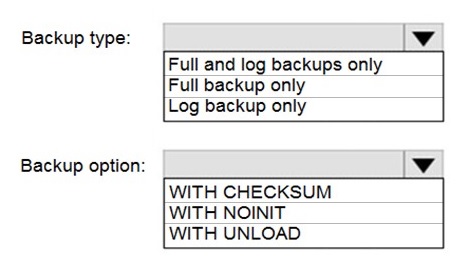
You have an on-premises Microsoft SQL Server 2016 server named Server1 that contains
a database named DB1.
You need to perform an online migration of DB1 to an Azure SQL Database managed
instance by using Azure Database Migration Service.
How should you configure the backup of DB1? To answer, select the appropriate options in
the answer area.
NOTE: Each correct selection is worth one point.
Show answerHide answer

Explanation


Explanation:
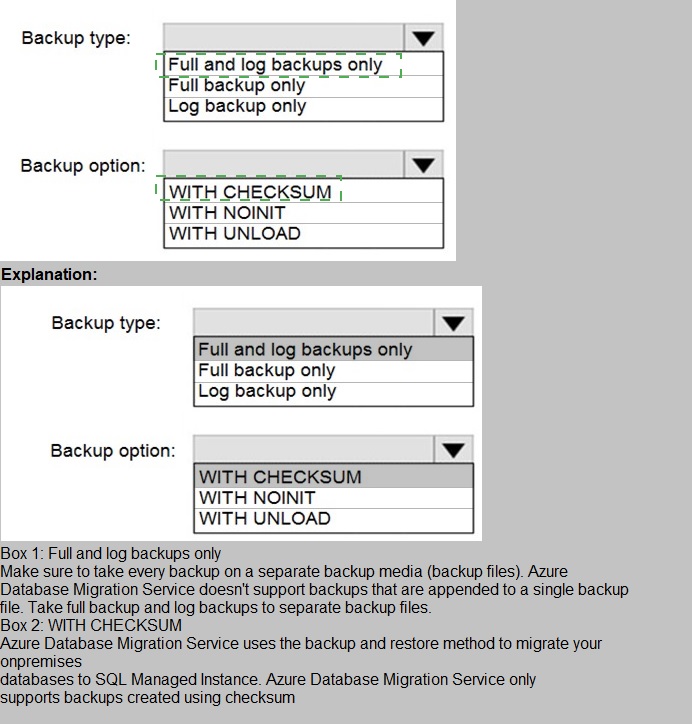
To perform an online migration to Azure SQL Managed Instance using Azure Database Migration Service (DMS), you must configure the on-premises SQL Server to provide a continuous backup chain that DMS can restore. DMS for online migration uses the log backup chain to continuously restore transactions to the target, minimizing downtime.

Correct Selections:

Backup type: Full and log backups only
The migration process requires a full database backup to seed the target Managed Instance. After the full backup is taken and restored, transaction log backups must be taken regularly (e.g., every few minutes) and restored to the target to keep it synchronized. This creates the continuous log chain needed for an online migration.

Backup option: WITH CHECKSUM
Using WITH CHECKSUM is a critical best practice and often a requirement for DMS. It enables SQL Server to verify the integrity of each backup page, ensuring no corrupted data is migrated. This increases reliability and helps DMS handle backup files correctly. The other options (WITH NOINIT, WITH UNLOAD) are not relevant to migration integrity.

Incorrect Options:

Backup type: Full backup only
A single full backup only provides a point-in-time copy. Without subsequent log backups, DMS cannot synchronize ongoing changes, making this an offline migration with significant downtime.

Backup type: Log backup only
A log backup chain cannot be restored without a preceding full backup as a starting point. DMS requires a full backup as the baseline.

Backup option: WITH NOINIT
WITH NOINIT means "append to the existing backup set." This is about managing backup media, not data integrity. It is irrelevant to migration and is not a requirement.

Backup option: WITH UNLOAD
WITH UNLOAD is a legacy tape-specific option to rewind and unload a tape after the backup. It is irrelevant for disk backups used in Azure migrations.

Reference:
Microsoft Docs - Migrate SQL Server to Azure SQL Managed Instance online using DMS - Prerequisites
Question 7
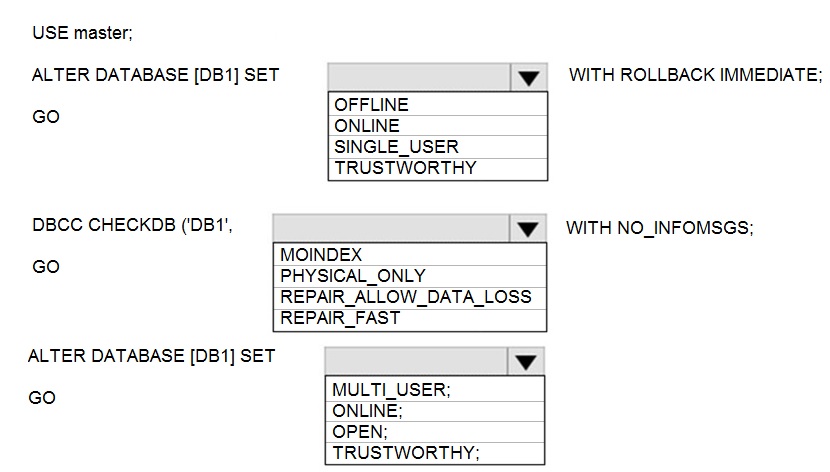
You have SQL Server on an Azure virtual machine that contains a database named DB1.
The database reports a CHECKSUM error.
You need to recover the database.
How should you complete the statements? To answer, select the appropriate options in the
answer area.
NOTE: Each correct selection is worth one point.
Show answerHide answer

Explanation


Explanation:
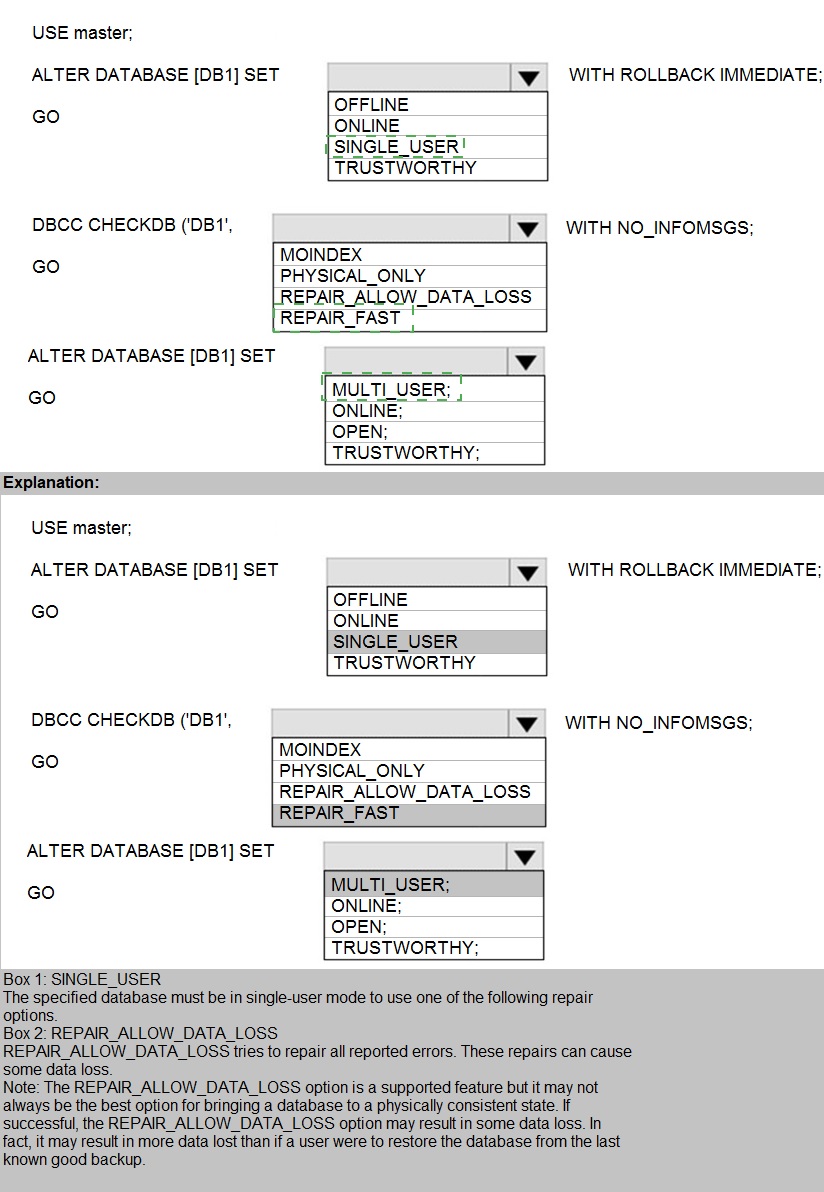
This scenario involves recovering a database after a CHECKSUM error, which indicates physical corruption (e.g., damaged disk page). The standard recovery process is to repair the corruption, which may result in data loss, and then bring the database back online. The steps involve setting the database to single-user mode, running DBCC CHECKDB with a repair option, and then returning it to multi-user mode.

Correct Selections:
ALTER DATABASE [DB1] SET SINGLE_USER WITH ROLLBACK IMMEDIATE;

This command sets the database to single-user mode and immediately rolls back any active transactions. This is necessary to gain exclusive access to the database to run the repair operation. No other connections can interfere.

DBCC CHECKDB ('DB1', REPAIR_ALLOW_DATA_LOSS)

DBCC CHECKDB is the command to check and repair database integrity. The REPAIR_ALLOW_DATA_LOSS option is the only repair option that can fix severe errors like CHECKSUM failures. It may delete corrupted data and rebuild indexes, which can lead to data loss but is the only way to make the database structurally consistent again.

ALTER DATABASE [DB1] SET MULTI_USER;
After the repair is complete, you must return the database to multi-user mode to allow normal application connections. This is the final step to make the database fully operational again.

Incorrect Options:

ALTER DATABASE Options (OFFLINE, ONLINE, TRUSTWORTHY):

OFFLINE/ONLINE: Taking the database offline is not the correct first step for a repair; you need exclusive access via SINGLE_USER.

TRUSTWORTHY: This is a security property unrelated to corruption repair.

DBCC CHECKDB Options:
PHYSICAL_ONLY: This only checks for physical consistency and does not perform any repair. It's used for checking, not fixing.

REPAIR_FAST: This is a deprecated option that performs minor, non-invasive repairs. It cannot fix CHECKSUM errors.

WITH NO_INFOMSGS: This is a valid clause to suppress informational messages, but the core action is the REPAIR_ALLOW_DATA_LOSS argument.

Final ALTER DATABASE Options (ONLINE, OPEN, TRUSTWORTHY):
ONLINE/OPEN: The database is already online and open after repair; the needed action is to restore concurrent access via MULTI_USER.

TRUSTWORTHY: Again, irrelevant to the recovery process.

Reference:
Microsoft Docs - DBCC CHECKDB (Transact-SQL) - REPAIR_ALLOW_DATA_LOSS
Question 8
You have SQL Server on an Azure virtual machine.
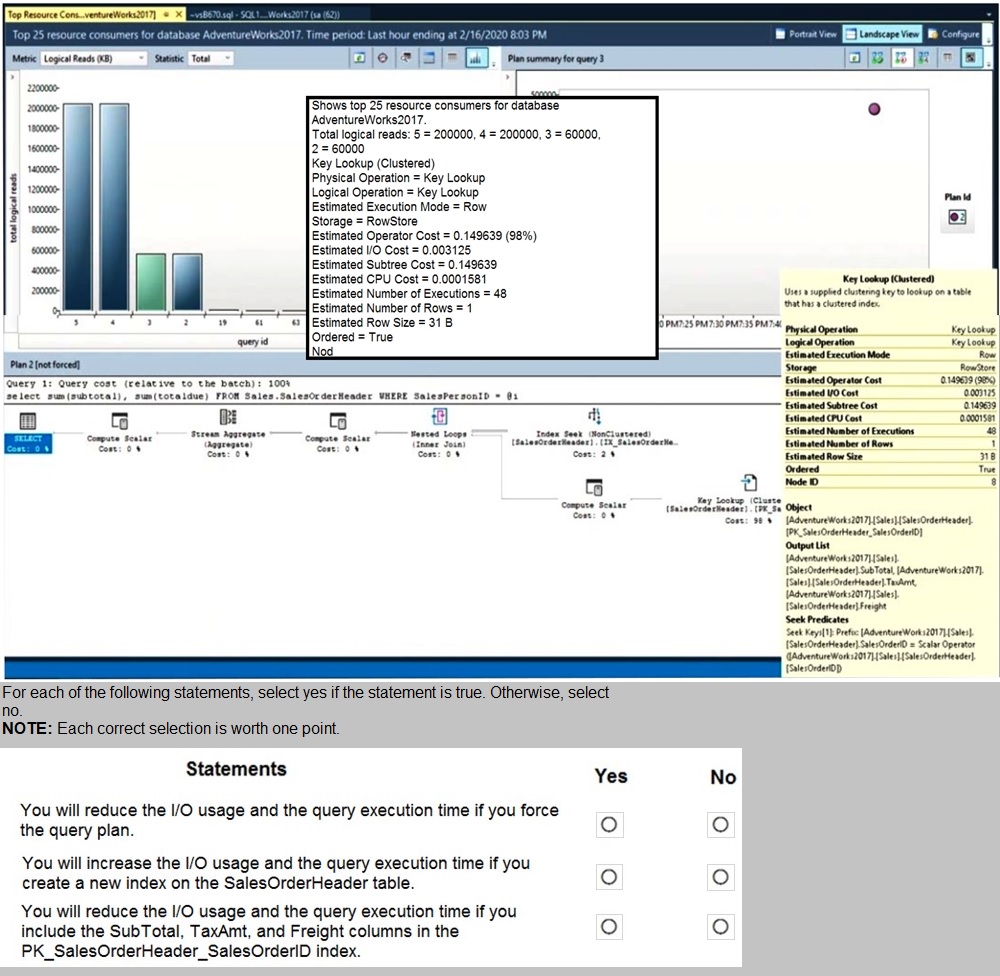
You review the query plan shown in the following exhibit
Show answerHide answer

Explanation


Explanation:
This scenario addresses query performance tuning by analyzing execution plans. When a query plan shows a Key Lookup (Clustered) alongside an Index Seek (Non-Clustered), it signifies that the non-clustered index is "non-covering" for that specific query. The database engine must perform extra I/O operations to fetch missing columns from the data pages, which increases both disk I/O and total execution time. Eliminating these lookups is a primary goal in optimizing high-traffic queries.

Correct Option:

Modify the non-clustered index to include the missing columns:
The most effective way to reduce I/O and execution time is to create a covering index. By adding the columns requested in the SELECT list to the INCLUDE clause of the existing non-clustered index, the engine can satisfy the query entirely from the index leaf nodes, eliminating the need for expensive Key Lookups.

Incorrect Option:

Force the query plan using Query Store:
While forcing a plan is useful if a "good" plan has regressed to a "bad" one, it does not fix an inherently inefficient plan containing a Key Lookup. Forcing a plan with a Key Lookup will not reduce the I/O overhead already present in that plan.

Rebuild the clustered index:
Rebuilding an index can resolve fragmentation, but it does not change the logical structure of how data is accessed. It will not eliminate a Key Lookup because the root cause—missing columns in the non-clustered index—remains unaddressed.

Reference:
Microsoft Learn: Index Architecture and Design Guide - Included Columns
Question 9 Choose 1
You have a Microsoft SQL Server 2019 instance in an on-premises datacenter. The
instance contains a 4-TB database named DB1.
You plan to migrate DB1 to an Azure SQL Database managed instance.
What should you use to minimize downtime and data loss during the migration?
D18912E1457D5D1DDCBD40AB3BF70D5D
Show answerHide answer

Correct answer: D Database Migration Assistant

Explanation

Explanation:
The requirement is to migrate a 4-TB on-premises SQL Server database to Azure SQL Managed Instance while minimizing downtime and data loss. This scenario calls for an online migration where the source database remains operational during initial data transfer, and only a brief cutover is needed. The correct tool for this is one designed specifically for this Azure migration scenario.

Correct Option:

D. Database Migration Assistant (DMA) in conjunction with Azure Database Migration Service (DMS)
Database Migration Assistant (DMA) is the correct high-level answer for a comprehensive migration strategy. DMA is used to assess the on-premises database for compatibility issues and generate migration projects. For the actual online data movement, DMA integrates with or hands off to the Azure Database Migration Service (DMS), which performs the online migration by continuously syncing transaction log backups from the source to the target Managed Instance, thereby minimizing downtime and eliminating data loss.

Incorrect Options:

A. Distributed availability groups
Distributed availability groups are an advanced high-availability/disaster recovery feature between two separate SQL Server availability groups (typically on-premises or across regions). They are not a migration tool to Azure SQL Managed Instance and involve significant complexity and licensing costs. They are not the standard or recommended method for migration.

B. Database mirroring
Database mirroring is a deprecated high-availability feature in SQL Server. It is not supported for Azure SQL Managed Instance as a target and is not a viable migration method. It has been replaced by Always On availability groups.

C. Log shipping
Log shipping can be used as a manual migration method by restoring a full backup and subsequent log backups to the Managed Instance. However, it requires manual cutover coordination, which increases the risk of data loss and extends downtime compared to an automated service like DMS. It does not "minimize downtime" as effectively as a dedicated online migration service.

Reference:
Question 10
You have SQL Server on an Azure virtual machine named SQL1.
SQL1 has an agent job to back up all databases.
You add a user named dbadmin1 as a SQL Server Agent operator.
You need to ensure that dbadmin1 receives an email alert if a job fails.
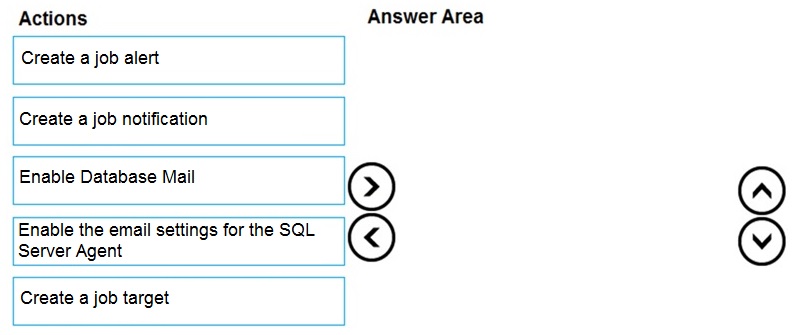
Which three actions should you perform in sequence? To answer, move the appropriate
actions from the list of actions to the answer area and arrange them in the correct order
Show answerHide answer

Explanation


Explanation:
To configure SQL Server Agent to send email alerts on job failure, you must first set up the email infrastructure (Database Mail), then configure SQL Server Agent to use that mail profile, and finally define the alert or notification that triggers the email.

Correct Sequence:

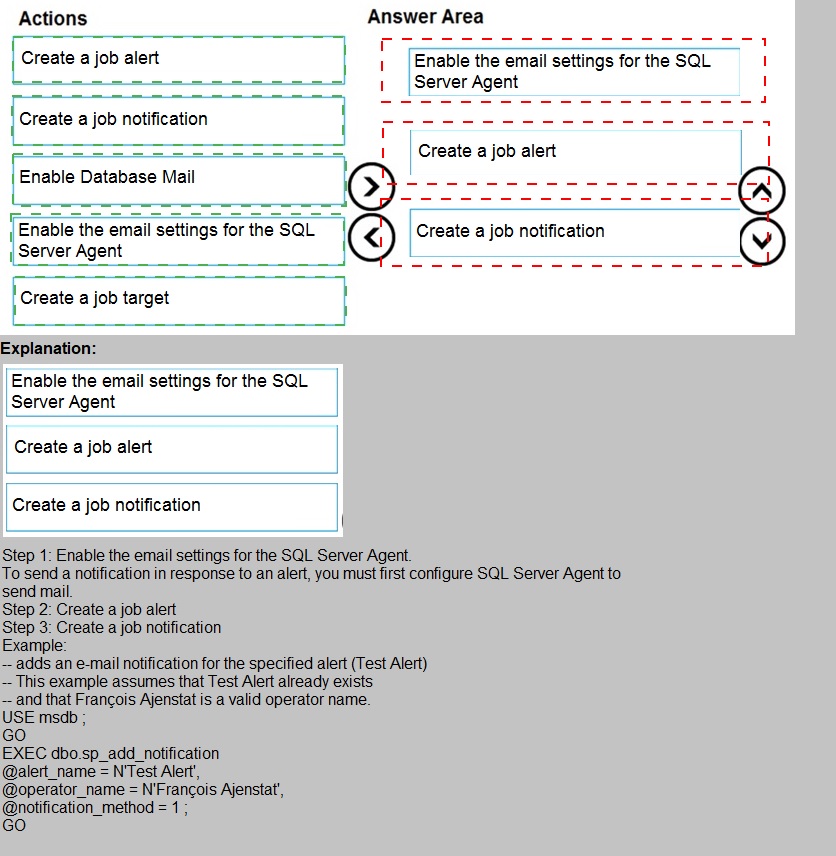
Enable Database Mail.
This is the foundational step. Database Mail is the SQL Server component that sends email. You must enable and configure it by setting up a mail profile and an SMTP account. Without this, no emails can be sent from SQL Server.

Enable the email settings for the SQL Server Agent.
After Database Mail is configured, you must link it to SQL Server Agent. In SQL Server Agent Properties, you select the Database Mail profile you created. This tells the Agent which mail system to use for sending notifications.

Create a job notification.
Finally, you configure the specific alerting rule. For a specific job, you edit the job's properties, go to the "Notifications" page, and create a notification for the dbadmin1 operator to be sent "When the job fails" via Email. This directly ties the job failure event to an email being sent to the designated operator.

Incorrect/Unused Actions:

Create a job alert.
A SQL Server Agent Alert responds to specific error numbers, severity levels, or performance conditions. While alerts can also send notifications, the requirement is specifically for a job failure. The correct method for a job failure is to set a job notification, not a system-wide alert.

Create a job target.
Job targets are used in multiserver administration to define which servers a job runs on. This is unrelated to configuring email notifications.

Reference:
Microsoft Docs - Configure SQL Server Agent Mail to Use Database Mail
Full mock exam

Sit the DP-300 exam before exam day

Full-length mocks with the same number of questions and the same time limit as the real DP-300 exam. Every attempt draws a new set of questions from the full bank, so you can keep going until you pass comfortably.

Get full DP-300 mock exam
  • 65questions per mock
  • 105 mintime limit
  • 334questions in the bank
  • Newmock on every attempt