You are planning disaster recovery for the failover group of an Azure SQL Database managed instance. Your company’s SLA requires that the database in the failover group become available as quickly as possible if a major outage occurs. You set the Read/Write failover policy to Automatic. What are two results of the configuration? Each correct answer presents a complete solution. NOTE: Each correct selection is worth one point.
Show answerHide answer
Correct answer: A, EIn the event of a datacenter or Azure regional outage, the databases will fail over
automatically.
In the event of an outage, the minimum delay for the databases to fail over in the
primary instance will be one hour.
Explanation
Explanation:
For an Azure SQL Database Managed Instance failover group with the Read/Write failover policy set to Automatic, failover is managed at the instance level (all databases together) and is triggered by Azure's health detection of a major outage. The configuration includes a built-in grace period to avoid unnecessary failovers for transient issues.
Correct Options:
A. In the event of a datacenter or Azure regional outage, the databases will fail over automatically.
This is the primary purpose of setting the failover policy to Automatic. Azure monitors the health of the primary Managed Instance. If a severe, persistent outage (like a datacenter or regional failure) is detected, Azure automatically initiates a failover of the entire instance (all databases in the failover group) to the secondary region after the grace period expires.
E. In the event of an outage, the minimum delay for the databases to fail over in the primary instance will be one hour.
The Automatic failover policy for Managed Instance failover groups has a fixed grace period of 1 hour. This means that even if an outage is detected, the automatic failover will not occur until at least one hour has passed. This prevents unnecessary failovers for short-lived transient issues.
Incorrect Options:
B. In the event of an outage, the databases in the primary instance will fail over immediately.
This is false because of the 1-hour grace period. Failover is not immediate; it is delayed by at least one hour to allow transient issues to resolve.
C. In the event of an outage, you can selectively fail over individual databases.
Failover groups for Managed Instance operate at the instance level. All databases within the instance fail over together as a single unit. You cannot selectively fail over individual databases.
D. In the event of an outage, you can set a different grace period to fail over each database.
The grace period is fixed at 1 hour for Managed Instance failover groups with Automatic policy and cannot be configured. Furthermore, failover is instance-wide, not per-database.
You are building a database backup solution for a SQL Server database hosted on an
Azure virtual machine.
In the event of an Azure regional outage, you need to be able to restore the database
backups. The solution must minimize costs.
Which type of storage accounts should you use for the backups?
>Explanation:
The requirement is to be able to restore database backups in the event of an Azure regional outage while minimizing costs. This means backups must be stored with geo-redundancy so a copy exists in a paired region if the primary region fails. Among geo-redundant options, Read-Access Geo-Redundant Storage (RA-GRS) provides the necessary regional resiliency at a lower cost than GRS because it offers read-only access to the secondary region.
Correct Option:
B. Read-access geo-redundant storage (RA-GRS)
RA-GRS replicates data to a secondary region and allows read access to the replicated data in that secondary region. This means if the primary region is down, you can still read and restore the backup files from the secondary region's endpoint. It is less expensive than Geo-Redundant Storage (GRS)? Actually, GRS does not allow read access to the secondary; you would need to wait for a Microsoft-initiated failover. RA-GRS provides immediate read access for disaster recovery at a slightly higher cost than GRS, but it's the most cost-effective choice for ensuring restorability without manual failover.
Incorrect Options:
A. Locally-redundant storage (LRS):
LRS only replicates within a single datacenter. It provides no protection against a regional outage, so backups would be unavailable.
C. Zone-redundant storage (ZRS):
ZRS replicates across availability zones within a single region. It protects against zone-level failures but not against a regional outage.
D. Geo-redundant storage (GRS):
GRS replicates to a secondary region, but the data in the secondary region is not readable unless Microsoft triggers a storage account failover (which is not customer-initiated for standard GRS). This means you cannot directly restore from the secondary region during an outage without a failover event, making it less suitable for immediate recovery.
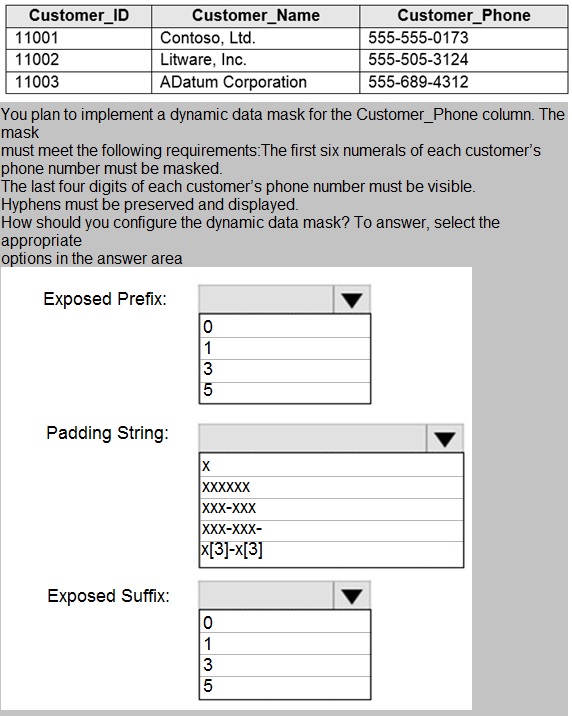
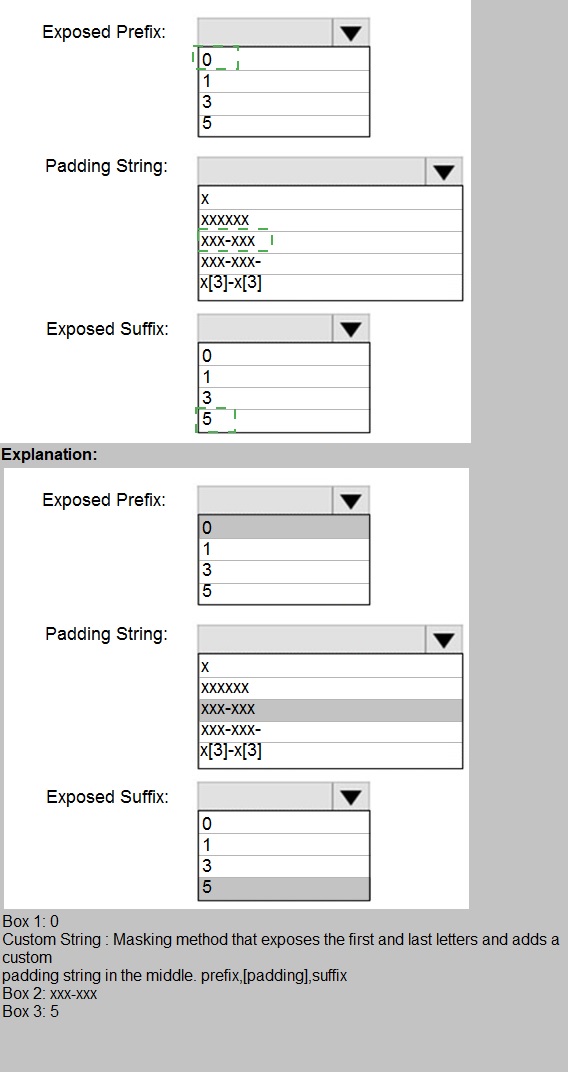
You have an Azure SQL database that contains a table named Customer. Customer has the columns shown in the following table.
Show answerHide answer
Explanation
Question 24
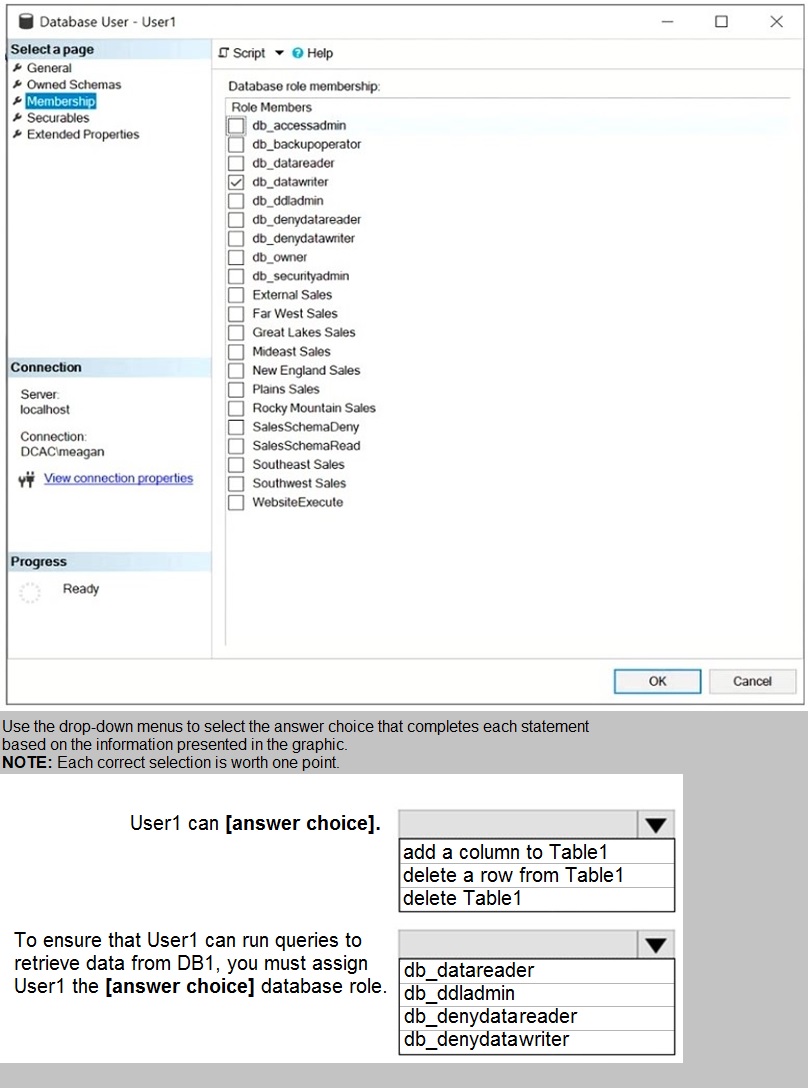
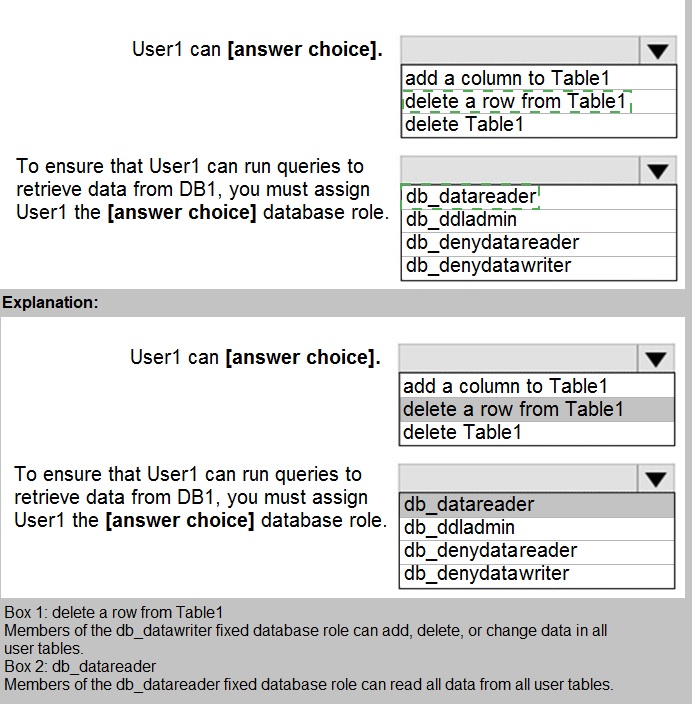
You have a Microsoft SQL Server database named DB1 that contains a table named Table1. The database role membership for a user named User1 is shown in the following exhibit
Show answerHide answer
Explanation
Question 25
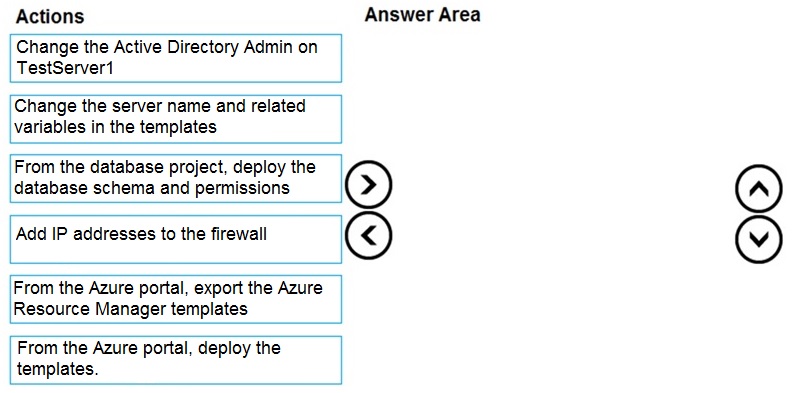
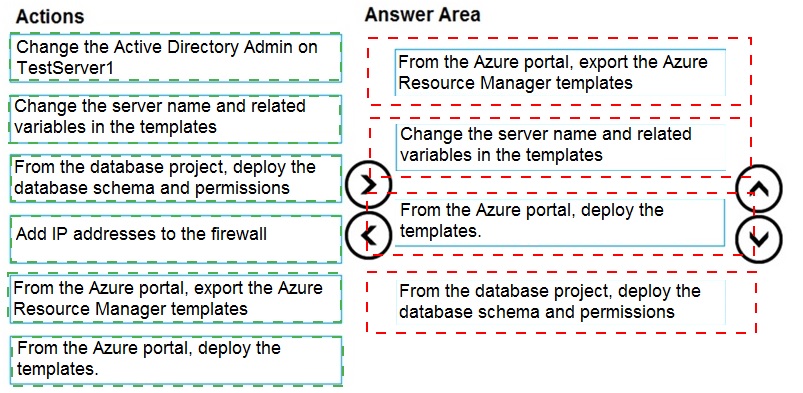
You have a resource group named App1Dev that contains an Azure SQL Database server named DevServer1. DevServer1 contains an Azure SQL database named DB1. The schema and permissions for DB1 are saved in a Microsoft SQL Server Data Tools (SSDT) database project You need to populate a new resource group named App1Test with the DB1 database and an Azure SQL Server named TestServer1. The resources in App1Test must have the same configurations as the resources in App1Dev. Which four actions should you perform in sequence? To answer, move the appropriate actions from the list of actions to the answer area and arrange them in the correct order.
Show answerHide answer
Explanation
Question 26Choose 1
Note: This question is part of a series of questions that present the same scenario. Each question in the series contains a unique solution that might meet the stated goals. Some question sets might have more than one correct solution, while others might not have a correct solution. After you answer a question in this section, you will NOT be able to return to it. As a result, these questions will not appear in the review screen. You have an Azure SQL database named Sales. You need to implement disaster recovery for Sales to meet the following requirements: During normal operations, provide at least two readable copies of Sales. Ensure that Sales remains available if a datacenter fails. Solution: You deploy an Azure SQL database that uses the General Purpose service tier and failover groups. Does this meet the goal?
Show answerHide answer
Correct answer: BNo
Explanation
Explanation: Instead deploy an Azure SQL database that uses the Business Critical service tier and Availability Zones. Note: Premium and Business Critical service tiers leverage the Premium availability model, which integrates compute resources (sqlservr.exe process) and storage (locally attached SSD) on a single node. High availability is achieved by replicating both compute and storage to additional nodes creating a three to four-node cluster. By default, the cluster of nodes for the premium availability model is created in the same datacenter. With the introduction of Azure Availability Zones, SQL Database can place different replicas of the Business Critical database to different availability zones in the same region. To eliminate a single point of failure, the control ring is also duplicated across multiple zones as three gateway rings (GW). Reference: https://docs.microsoft.com/en-us/azure/azure-sql/database/high-availability-sla
Question 27Choose 1
You have an Azure SQL Database server named sqlsrv1 that hosts 10 Azure SQL databases. The databases perform slower than expected. You need to identify whether the performance issue relates to the use of tempdb on sqlsrv1. What should you do?
The diagnostics log outputs tempDB contention details. You can use the information as the
starting point for troubleshooting.
You can use the Intelligent Insights performance diagnostics log of Azure SQL Database to
troubleshoot performance issues.
Note: This question is part of a series of questions that present the same scenario. Each question in the series contains a unique solution that might meet the stated goals. Some question sets might have more than one correct solution, while others might not have a correct solution. After you answer a question in this section, you will NOT be able to return to it. As a result, these questions will not appear in the review screen. You have two Azure SQL Database servers named Server1 and Server2. Each server contains an Azure SQL database named Database1. You need to restore Database1 from Server1 to Server2. The solution must replace the existing Database1 on Server2. Solution: From the Azure portal, you delete Database1 from Server2, and then you create a new database on Server2 by using the backup of Database1 from Server1. Does this meet the goal?
Show answerHide answer
Correct answer: BNo
Explanation
Explanation:
Instead restore Database1 from Server1 to the Server2 by using the RESTORE Transact-
SQL command and the REPLACE option.
Note: REPLACE should be used rarely and only after careful consideration. Restore
normally prevents accidentally overwriting a database with a different database. If the
database specified in a RESTORE statement already exists on the current server and the
specified database family GUID differs from the database family GUID recorded in the
backup set, the database is not restored. This is an important safeguard.
You have an Azure SQL database. Users report that the executions of a stored procedure are slower than usual. You suspect that a regressed query is causing the performance issue. You need to view the query execution plan to verify whether a regressed query is causing the issue. The solution must minimize effort. What should you use?
Show answerHide answer
Correct answer: CQuery Store in Microsoft SQL Server Management Studio (SSMS)
Explanation
Explanation: Use the Query Store Page in SQL Server Management Studio. Query performance regressions caused by execution plan changes can be non-trivial and time consuming to resolve. Since the Query Store retains multiple execution plans per query, it can enforce policies to direct the Query Processor to use a specific execution plan for a query. This is referred to as plan forcing. Plan forcing in Query Store is provided by using a mechanism similar to the USE PLAN query hint, but it does not require any change in user applications. Plan forcing can resolve a query performance regression caused by a plan change in a very short period of time. Reference: https://docs.microsoft.com/en-us/sql/relational-databases/performance/monitoringperformance- by-using-the-query-store
Question 30
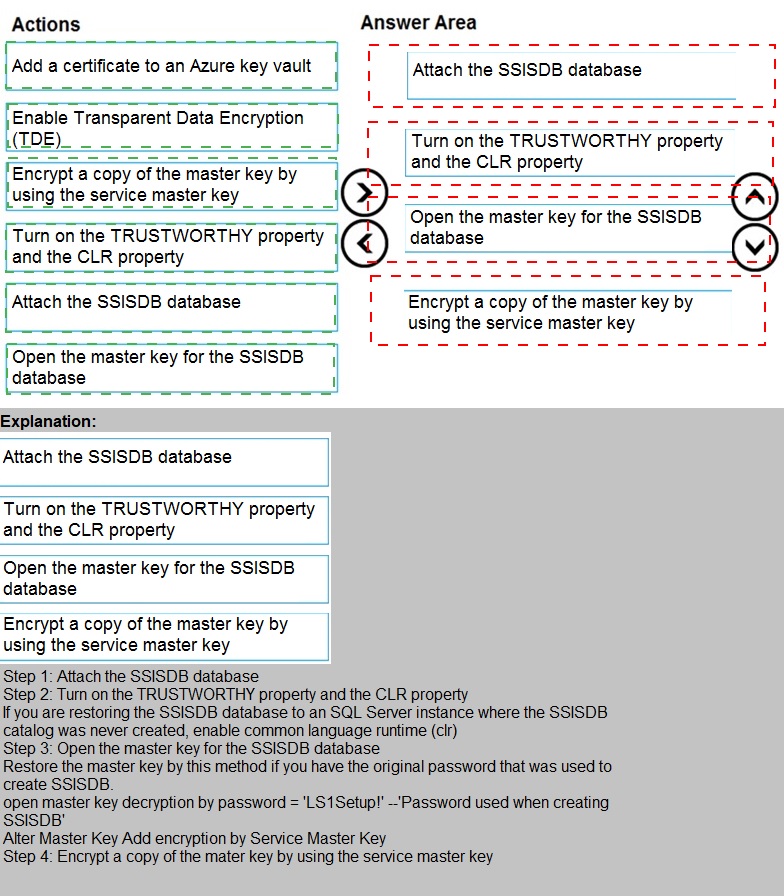
You have SQL Server 2019 on an Azure virtual machine that contains an SSISDB database. A recent failure causes the master database to be lost. You discover that all Microsoft SQL Server integration Services (SSIS) packages fail to run on the virtual machine. Which four actions should you perform in sequence to resolve the issue? To answer, move the appropriate actions from the list of actions to the answer area and arrange them in the correct.
Show answerHide answer
Explanation
Full mock exam
Sit the DP-300 exam before exam day
Full-length mocks with the same number of questions and the same time limit as the real DP-300 exam. Every attempt draws a new set of questions from the full bank, so you can keep going until you pass comfortably.