Microsoft certification · Exam DP-300

DP-300 Mock Exam Page 2

Administering Relational Databases on Microsoft Azure

Free DP-300 mock exam questions 11–20, each with the answer and an explanation.

20 questions · 33 minutes · free, no sign-up

Free DP-300 questions

11–20 of 97 free
Question 11
You have an on-premises Microsoft SQL Server 2016 server named Server1 that contains
a database named DB1.
You need to perform an online migration of DB1 to an Azure SQL Database managed
instance by using Azure Database Migration Service.
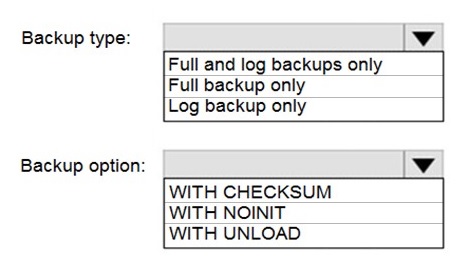
How should you configure the backup of DB1? To answer, select the appropriate options in
the answer area.
NOTE: Each correct selection is worth one point.
Show answerHide answer

Explanation


Explanation:
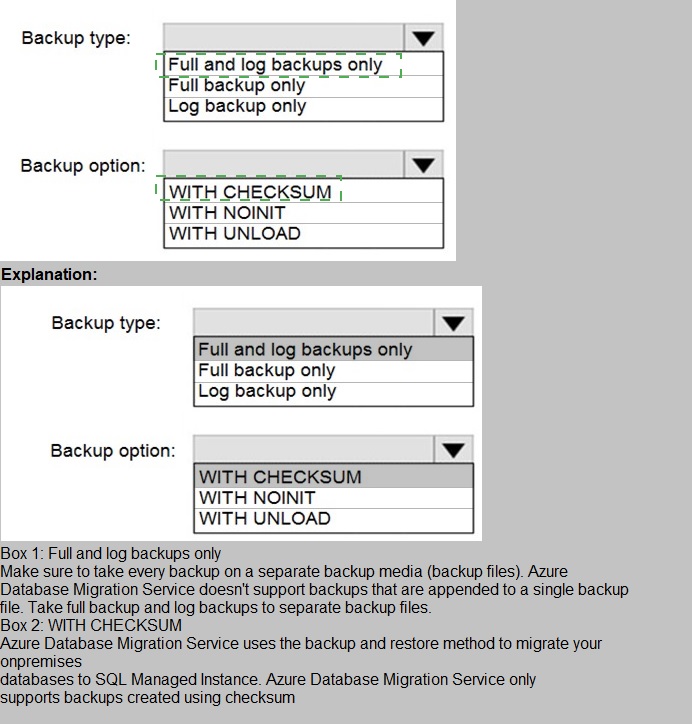
To perform an online migration to Azure SQL Managed Instance using Azure Database Migration Service (DMS), you must configure the on-premises SQL Server to provide a continuous backup chain that DMS can restore. DMS for online migration uses the log backup chain to continuously restore transactions to the target, minimizing downtime.

Correct Selections:

Backup type: Full and log backups only
The migration process requires a full database backup to seed the target Managed Instance. After the full backup is taken and restored, transaction log backups must be taken regularly (e.g., every few minutes) and restored to the target to keep it synchronized. This creates the continuous log chain needed for an online migration.

Backup option: WITH CHECKSUM
Using WITH CHECKSUM is a critical best practice and often a requirement for DMS. It enables SQL Server to verify the integrity of each backup page, ensuring no corrupted data is migrated. This increases reliability and helps DMS handle backup files correctly. The other options (WITH NOINIT, WITH UNLOAD) are not relevant to migration integrity.

Incorrect Options:

Backup type: Full backup only
A single full backup only provides a point-in-time copy. Without subsequent log backups, DMS cannot synchronize ongoing changes, making this an offline migration with significant downtime.

Backup type: Log backup only
A log backup chain cannot be restored without a preceding full backup as a starting point. DMS requires a full backup as the baseline.

Backup option: WITH NOINIT
WITH NOINIT means "append to the existing backup set." This is about managing backup media, not data integrity. It is irrelevant to migration and is not a requirement.

Backup option: WITH UNLOAD
WITH UNLOAD is a legacy tape-specific option to rewind and unload a tape after the backup. It is irrelevant for disk backups used in Azure migrations.

Reference:
Microsoft Docs - Migrate SQL Server to Azure SQL Managed Instance online using DMS - Prerequisites
Question 12
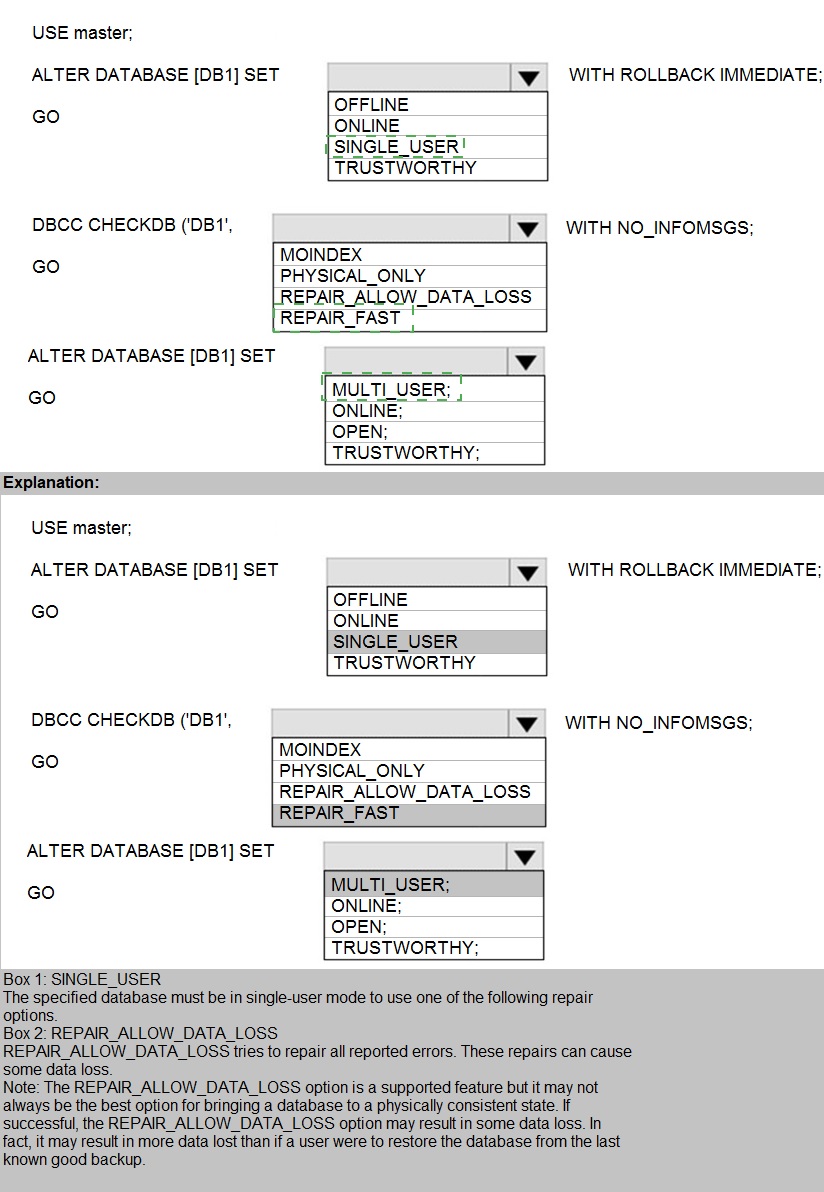
You have SQL Server on an Azure virtual machine that contains a database named DB1.
The database reports a CHECKSUM error.
You need to recover the database.
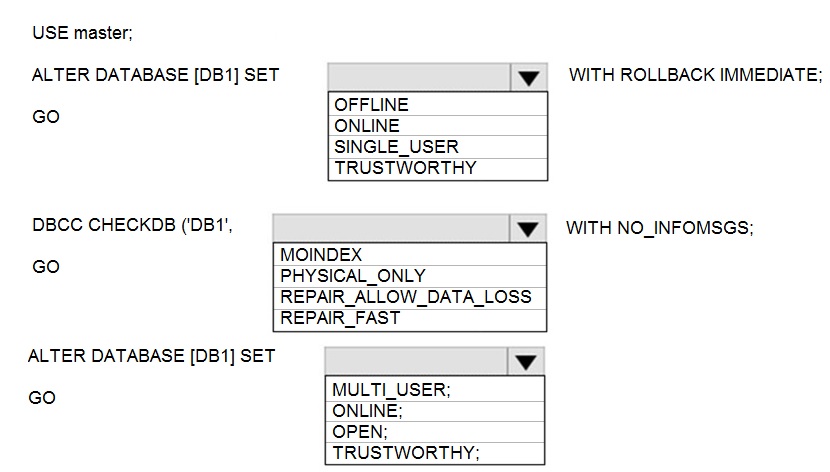
How should you complete the statements? To answer, select the appropriate options in the
answer area.
NOTE: Each correct selection is worth one point.
Show answerHide answer

Explanation


Explanation:
This scenario involves recovering a database after a CHECKSUM error, which indicates physical corruption (e.g., damaged disk page). The standard recovery process is to repair the corruption, which may result in data loss, and then bring the database back online. The steps involve setting the database to single-user mode, running DBCC CHECKDB with a repair option, and then returning it to multi-user mode.

Correct Selections:
ALTER DATABASE [DB1] SET SINGLE_USER WITH ROLLBACK IMMEDIATE;

This command sets the database to single-user mode and immediately rolls back any active transactions. This is necessary to gain exclusive access to the database to run the repair operation. No other connections can interfere.

DBCC CHECKDB ('DB1', REPAIR_ALLOW_DATA_LOSS)

DBCC CHECKDB is the command to check and repair database integrity. The REPAIR_ALLOW_DATA_LOSS option is the only repair option that can fix severe errors like CHECKSUM failures. It may delete corrupted data and rebuild indexes, which can lead to data loss but is the only way to make the database structurally consistent again.

ALTER DATABASE [DB1] SET MULTI_USER;
After the repair is complete, you must return the database to multi-user mode to allow normal application connections. This is the final step to make the database fully operational again.

Incorrect Options:

ALTER DATABASE Options (OFFLINE, ONLINE, TRUSTWORTHY):

OFFLINE/ONLINE: Taking the database offline is not the correct first step for a repair; you need exclusive access via SINGLE_USER.

TRUSTWORTHY: This is a security property unrelated to corruption repair.

DBCC CHECKDB Options:
PHYSICAL_ONLY: This only checks for physical consistency and does not perform any repair. It's used for checking, not fixing.

REPAIR_FAST: This is a deprecated option that performs minor, non-invasive repairs. It cannot fix CHECKSUM errors.

WITH NO_INFOMSGS: This is a valid clause to suppress informational messages, but the core action is the REPAIR_ALLOW_DATA_LOSS argument.

Final ALTER DATABASE Options (ONLINE, OPEN, TRUSTWORTHY):
ONLINE/OPEN: The database is already online and open after repair; the needed action is to restore concurrent access via MULTI_USER.

TRUSTWORTHY: Again, irrelevant to the recovery process.

Reference:
Microsoft Docs - DBCC CHECKDB (Transact-SQL) - REPAIR_ALLOW_DATA_LOSS
Question 13
You have SQL Server on an Azure virtual machine.
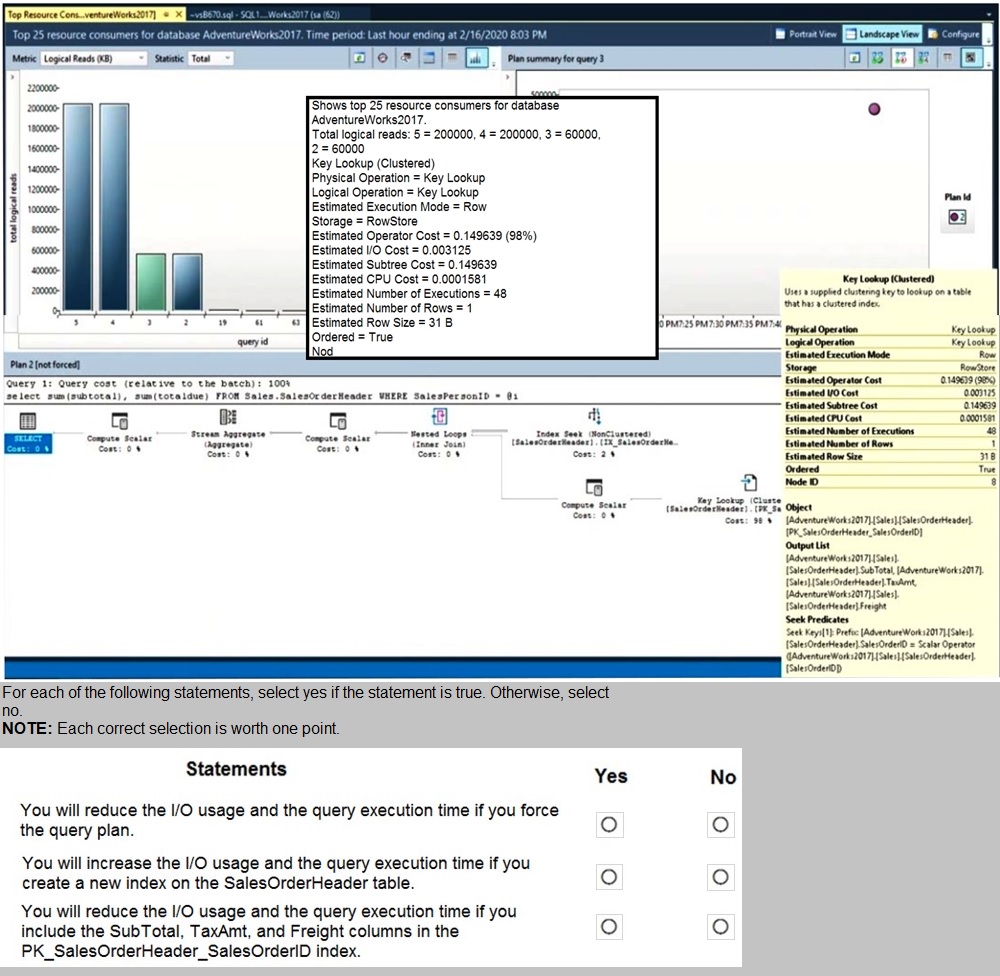
You review the query plan shown in the following exhibit
Show answerHide answer

Explanation


Explanation:
This scenario addresses query performance tuning by analyzing execution plans. When a query plan shows a Key Lookup (Clustered) alongside an Index Seek (Non-Clustered), it signifies that the non-clustered index is "non-covering" for that specific query. The database engine must perform extra I/O operations to fetch missing columns from the data pages, which increases both disk I/O and total execution time. Eliminating these lookups is a primary goal in optimizing high-traffic queries.

Correct Option:

Modify the non-clustered index to include the missing columns:
The most effective way to reduce I/O and execution time is to create a covering index. By adding the columns requested in the SELECT list to the INCLUDE clause of the existing non-clustered index, the engine can satisfy the query entirely from the index leaf nodes, eliminating the need for expensive Key Lookups.

Incorrect Option:

Force the query plan using Query Store:
While forcing a plan is useful if a "good" plan has regressed to a "bad" one, it does not fix an inherently inefficient plan containing a Key Lookup. Forcing a plan with a Key Lookup will not reduce the I/O overhead already present in that plan.

Rebuild the clustered index:
Rebuilding an index can resolve fragmentation, but it does not change the logical structure of how data is accessed. It will not eliminate a Key Lookup because the root cause—missing columns in the non-clustered index—remains unaddressed.

Reference:
Microsoft Learn: Index Architecture and Design Guide - Included Columns
Question 14 Choose 1
You have a Microsoft SQL Server 2019 instance in an on-premises datacenter. The
instance contains a 4-TB database named DB1.
You plan to migrate DB1 to an Azure SQL Database managed instance.
What should you use to minimize downtime and data loss during the migration?
D18912E1457D5D1DDCBD40AB3BF70D5D
Show answerHide answer

Correct answer: D Database Migration Assistant

Explanation

Explanation:
The requirement is to migrate a 4-TB on-premises SQL Server database to Azure SQL Managed Instance while minimizing downtime and data loss. This scenario calls for an online migration where the source database remains operational during initial data transfer, and only a brief cutover is needed. The correct tool for this is one designed specifically for this Azure migration scenario.

Correct Option:

D. Database Migration Assistant (DMA) in conjunction with Azure Database Migration Service (DMS)
Database Migration Assistant (DMA) is the correct high-level answer for a comprehensive migration strategy. DMA is used to assess the on-premises database for compatibility issues and generate migration projects. For the actual online data movement, DMA integrates with or hands off to the Azure Database Migration Service (DMS), which performs the online migration by continuously syncing transaction log backups from the source to the target Managed Instance, thereby minimizing downtime and eliminating data loss.

Incorrect Options:

A. Distributed availability groups
Distributed availability groups are an advanced high-availability/disaster recovery feature between two separate SQL Server availability groups (typically on-premises or across regions). They are not a migration tool to Azure SQL Managed Instance and involve significant complexity and licensing costs. They are not the standard or recommended method for migration.

B. Database mirroring
Database mirroring is a deprecated high-availability feature in SQL Server. It is not supported for Azure SQL Managed Instance as a target and is not a viable migration method. It has been replaced by Always On availability groups.

C. Log shipping
Log shipping can be used as a manual migration method by restoring a full backup and subsequent log backups to the Managed Instance. However, it requires manual cutover coordination, which increases the risk of data loss and extends downtime compared to an automated service like DMS. It does not "minimize downtime" as effectively as a dedicated online migration service.

Reference:
Question 15
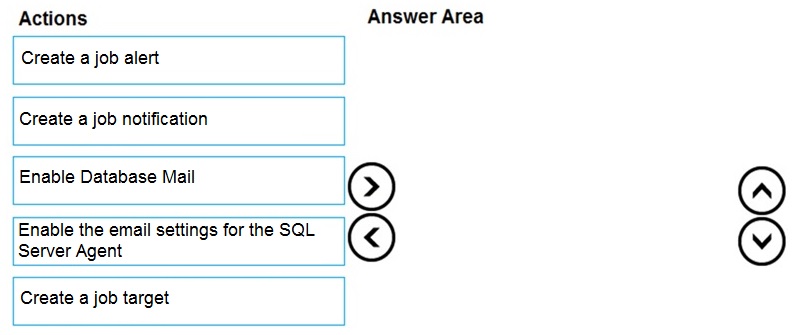
You have SQL Server on an Azure virtual machine named SQL1.
SQL1 has an agent job to back up all databases.
You add a user named dbadmin1 as a SQL Server Agent operator.
You need to ensure that dbadmin1 receives an email alert if a job fails.
Which three actions should you perform in sequence? To answer, move the appropriate
actions from the list of actions to the answer area and arrange them in the correct order
Show answerHide answer

Explanation


Explanation:
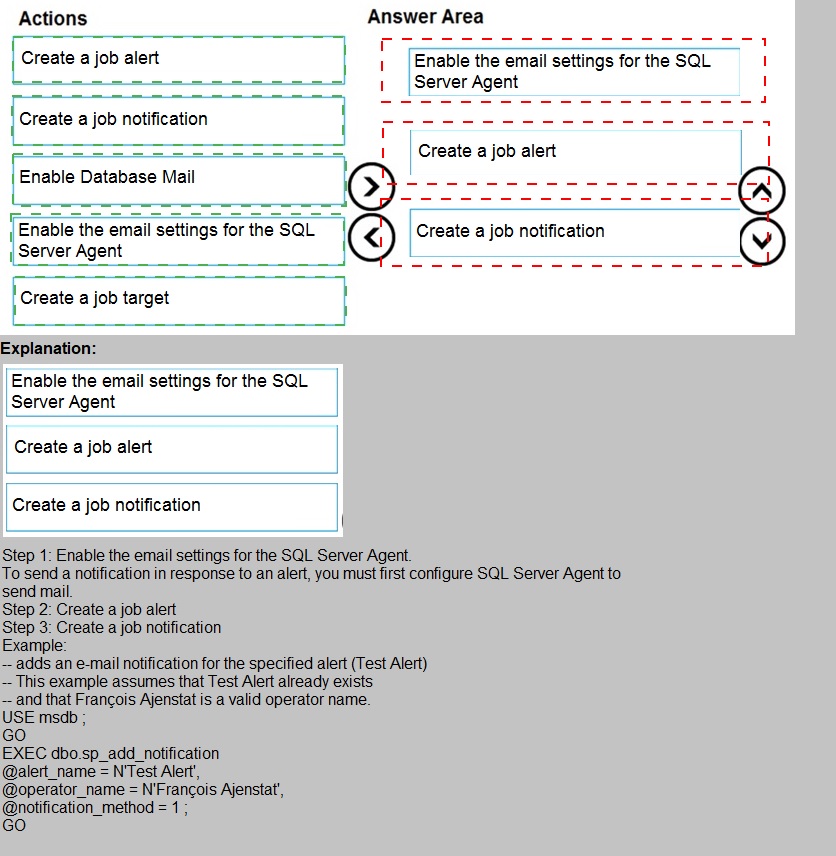
To configure SQL Server Agent to send email alerts on job failure, you must first set up the email infrastructure (Database Mail), then configure SQL Server Agent to use that mail profile, and finally define the alert or notification that triggers the email.

Correct Sequence:

Enable Database Mail.
This is the foundational step. Database Mail is the SQL Server component that sends email. You must enable and configure it by setting up a mail profile and an SMTP account. Without this, no emails can be sent from SQL Server.

Enable the email settings for the SQL Server Agent.
After Database Mail is configured, you must link it to SQL Server Agent. In SQL Server Agent Properties, you select the Database Mail profile you created. This tells the Agent which mail system to use for sending notifications.

Create a job notification.
Finally, you configure the specific alerting rule. For a specific job, you edit the job's properties, go to the "Notifications" page, and create a notification for the dbadmin1 operator to be sent "When the job fails" via Email. This directly ties the job failure event to an email being sent to the designated operator.

Incorrect/Unused Actions:

Create a job alert.
A SQL Server Agent Alert responds to specific error numbers, severity levels, or performance conditions. While alerts can also send notifications, the requirement is specifically for a job failure. The correct method for a job failure is to set a job notification, not a system-wide alert.

Create a job target.
Job targets are used in multiserver administration to define which servers a job runs on. This is unrelated to configuring email notifications.

Reference:
Microsoft Docs - Configure SQL Server Agent Mail to Use Database Mail
Question 16 Choose 1
Note: This question is part of a series of questions that present the same scenario.
Each question in the series contains a unique solution that might meet the stated
goals. Some question sets might have more than one correct solution, while others
might not have a correct solution.
After you answer a question in this section, you will NOT be able to return to it. As a
result, these questions will not appear in the review screen.
You have an Azure SQL database named Sales.
You need to implement disaster recovery for Sales to meet the following requirements:
During normal operations, provide at least two readable copies of Sales.
Ensure that Sales remains available if a datacenter fails.
Solution: You deploy an Azure SQL database that uses the General Purpose service tier
and geo-replication.
Does this meet the goal?
Show answerHide answer

Correct answer: B No

Explanation

Explanation:
The General Purpose service tier in Azure SQL Database uses a premium remote storage architecture with one readable primary compute replica. It does not provide multiple readable copies of the database during normal operations. The requirement for "at least two readable copies of Sales" during normal operations implies the need for multiple read-scale replicas, which is a feature of the Business Critical/Premium tier (which provides three readable replicas) or Hyperscale (which provides up to four readable secondary replicas).

While geo-replication does create a readable secondary in another region for disaster recovery, the primary database in the General Purpose tier itself still has only one readable copy (the primary) in the primary region. The secondary is not used during "normal operations" unless manually redirected for read-only workloads. The solution does not meet the requirement for multiple readable copies during normal operations in the primary region.

Correct Option:
B. No

Reference:
Microsoft Docs - High availability for Azure SQL Database
Question 17 Choose 1
Note: This question is part of a series of questions that present the same scenario.
Each question in the series contains a unique solution that might meet the stated
goals. Some question sets might have more than one correct solution, while others
might not have a correct solution.
After you answer a question in this section, you will NOT be able to return to it. As a
result, these questions will not appear in the review screen.
You have two Azure SQL Database servers named Server1 and Server2. Each server
contains an Azure SQL database named Database1.
You need to restore Database1 from Server1 to Server2. The solution must replace the
existing Database1 on Server2.
Solution: You restore Database1 from Server1 to the Server2 by using the RESTORE
Transact-SQL command and the REPLACE option.
Does this meet the goal?
Show answerHide answer

Correct answer: A Yes

Explanation

Explanation:
The goal is to restore a database from one server to another and replace the existing database with the same name on the target server. The RESTORE Transact-SQL command can be used to restore a .bacpac, .dacpac, or a backup file (.bak) from one Azure SQL server to another. When using the RESTORE command from a backup file stored in Azure Blob Storage, the REPLACE option is required if a database with the same name already exists on the target server. This option instructs SQL Server to overwrite the existing database, which meets the requirement to "replace the existing Database1 on Server2."

However, it’s important to note that in Azure SQL Database, cross-server restore from backup files requires the backup to be stored in Azure Blob Storage, and appropriate authentication (SAS or managed identity) must be configured. Assuming these prerequisites are satisfied, the RESTORE ... WITH REPLACE solution is valid.

Correct Option:

A. Yes

Reference:
Microsoft Docs - RESTORE (Transact-SQL) - REPLACE Option
Question 18 Choose 1
You have an Azure SQL Database managed instance named SQLMI1. A Microsoft SQL Server Agent job runs on SQLMI1.
You need to ensure that an automatic email notification is sent once the job completes What should you include in the solution?
Show answerHide answer

Correct answer: C From SQL Server Management Studio (SSMS), create a Database Mail profile

Explanation

Explanation:
SQL Server Agent on Azure SQL Managed Instance functions similarly to on-premises SQL Server but runs in a managed PaaS environment. To send email notifications for job completions, you must configure Database Mail within the Managed Instance, as this is the integrated email system for SQL Server. Creating a Database Mail profile and account (using an SMTP server) is a prerequisite before you can set up SQL Server Agent to use email notifications.

Correct Option:

C. From SQL Server Management Studio (SSMS), create a Database Mail profile.
This is the essential first step. You must create and test a Database Mail profile and account within SQLMI1 using T-SQL or SSMS. Once configured, you can then set this profile in SQL Server Agent properties and create job notifications (e.g., "When the job completes") to send emails to designated operators.

Incorrect Options:

A. From SQL Server Configuration Manager (SSMS), enable SQL Server Agent
SQL Server Configuration Manager is a Windows tool for on-premises SQL Server and is not accessible for Azure SQL Managed Instance, which is a fully managed PaaS service. Furthermore, SQL Server Agent is already enabled by default on Managed Instance; it doesn't need to be enabled via this method.

B. From SQL Server Management Studio (SSMS), run sp_set_sqlagent_properties
While sp_set_sqlagent_properties is a valid stored procedure to configure SQL Server Agent settings (like the mail profile), you must first have Database Mail configured. This procedure is a subsequent step, not the primary action to include. The core requirement is to set up the mail infrastructure first.

D. From the Azure portal, create an Azure Monitor action group that has an Email/SMS/Push/Voice action
Azure Monitor action groups are for Azure platform-level alerts (e.g., metric alerts, activity log alerts). They cannot be triggered directly by SQL Server Agent job completions, which are internal SQL Server events. SQL Agent notifications require Database Mail integration.

Question 19
You have an Azure SQL Database managed instance named sqldbmi1 that contains a
database name Sales
You need to initiate a backup of Sales.
How should you complete the Transact-SQL statement? To answer, select the appropriate
options in the answer area.
NOTE: Each correct selection is worth one point
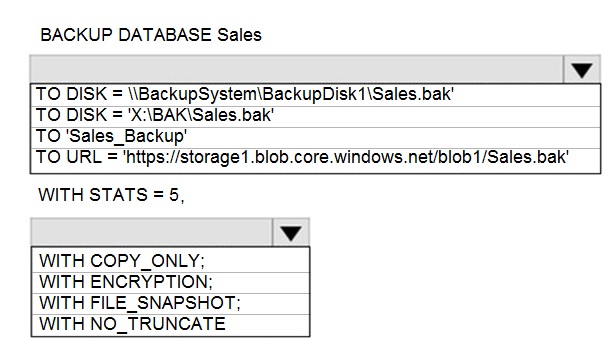
Show answerHide answer

Explanation


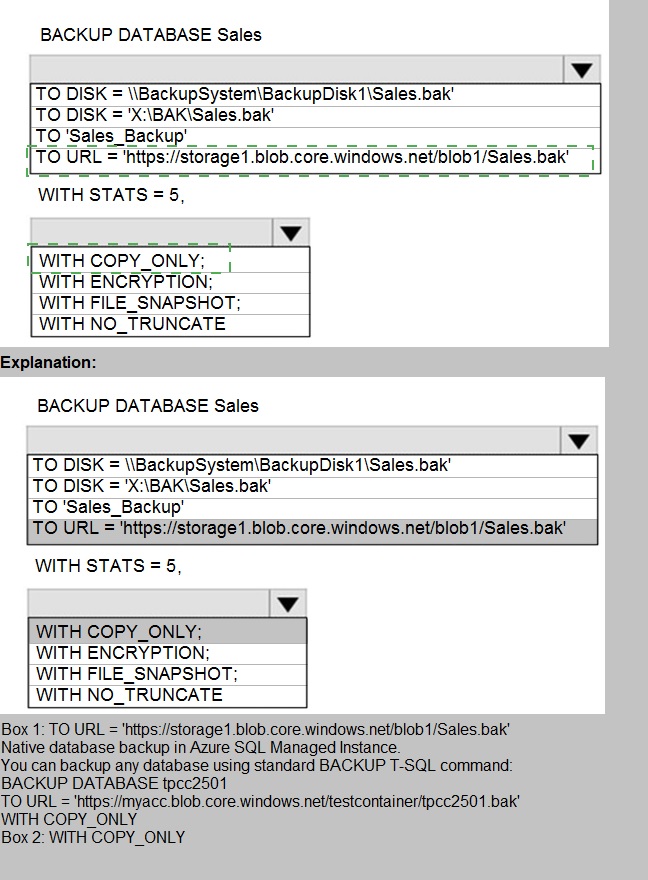
Explanation:
For an Azure SQL Database Managed Instance, the BACKUP DATABASE command is supported, but it must write to Azure Blob Storage (URL). Managed Instance does not support backing up to local disk (DISK =) or a local tape/device (TO 'device_name'). The backup URL must point to an Azure Storage blob container with appropriate SAS tokens or managed identity access configured.

Correct Selections:

TO URL = 'https://storage1.blob.core.windows.net/blob1/Sales.bak'
This is the only supported backup destination for Azure SQL Managed Instance. The backup file must be stored in an Azure Blob Storage container. The URL format must specify the full path to the .bak file within the container.

WITH COPY_ONLY;
A COPY_ONLY backup does not break the log backup chain and is ideal for taking ad-hoc backups for migration, testing, or other purposes without affecting regular backup schedules. Since this is a one-time "initiate a backup" request (not part of a scheduled sequence), COPY_ONLY is a safe and recommended option.

Incorrect Options:

Backup Destination (TO DISK, TO 'Sales_Backup'):
TO DISK = ...: Managed Instance cannot access on-premises or local network file shares (\\BackupSystem\...) or local drives (X:\BAK\...). Backups must go to Azure Blob Storage.

TO 'Sales_Backup': This syntax refers to a logical backup device predefined on the SQL Server instance. Managed Instance does not support creating or using logical backup devices for BACKUP commands.

WITH Options:
WITH ENCRYPTION: While Managed Instance can create encrypted backups, encryption requires specifying an encryption algorithm and encryptor (certificate or asymmetric key) in the WITH clause. Using ENCRYPTION alone without these specifics is invalid.

WITH FILE_SNAPSHOT: This option is used for Azure SQL Database (single database) automated backups when performing geo-replication/restore operations, not for Managed Instance BACKUP DATABASE commands.

WITH NO_TRUNCATE: This is used with BACKUP LOG to back up the tail of the log without truncating it, typically during a disaster recovery scenario. It is not applicable to a full database backup command.

Reference:Microsoft Docs - Backup to URL for SQL Server Managed Instance
Question 20 Choose 1
You have an Azure SQL database.
You discover that the plan cache is full of compiled plans that were used only once.
You run the select * from sys.database_scoped_configurations Transact-SQL command
and receive the results shown in the following table
You need relieve the memory pressure.
What should you configure?
Show answerHide answer

Correct answer: C OPTIMIZE_FOR_AD_HOC_WORKLOADS

Explanation

Explanation:
When the plan cache is filled with compiled plans used only once (a common symptom of ad-hoc workloads), it causes memory pressure because these single-use plans consume cache space without providing reuse benefits. The specific database-scoped configuration designed to mitigate this is OPTIMIZE_FOR_AD_HOC_WORKLOADS.

Correct Option:

C. OPTIMIZE_FOR_AD_HOC_WORKLOADS
Enabling this setting (value = 1) changes the caching behavior for single-use ad-hoc queries. Instead of storing the full compiled plan, SQL Server stores a smaller plan stub in the cache on the first compilation. Only if the same query is compiled again will the full plan be cached. This significantly reduces the memory footprint of the plan cache for ad-hoc workloads, directly relieving memory pressure.

Incorrect Options:

A. LEGACY_CARDINALITY_ESTIMATION
This setting controls whether the database uses the older SQL Server 2012 cardinality estimator (value = 1) or the newer, default estimator (value = 0). It affects query optimization and performance but does not address the caching behavior of single-use plans.

B. QUERY_OPTIMIZER_HOTFIXES
This setting determines whether the latest query optimizer hotfixes (trace flag 4199 behavior) are enabled at the database level. It influences plan generation but does not impact how or when plans are cached for ad-hoc queries.

D. ACCELERATED_PLAN_FORCING
This setting improves the performance of automatic plan forcing (Query Store forced plans) by caching a helper structure. It is related to Query Store plan forcing efficiency, not to reducing plan cache bloat from single-use ad-hoc queries.

Reference:
Microsoft Docs - optimize for ad hoc workloads Server Configuration Option
Full mock exam

Sit the DP-300 exam before exam day

Full-length mocks with the same number of questions and the same time limit as the real DP-300 exam. Every attempt draws a new set of questions from the full bank, so you can keep going until you pass comfortably.

Get full DP-300 mock exam
  • 65questions per mock
  • 105 mintime limit
  • 334questions in the bank
  • Newmock on every attempt