A company is designing a model-driven app for customer service representatives.
The app must:
Organize navigation into logical groupings based on business processes.
Ensure only required data is included in the app navigation.
You need to configure navigation and table availability.
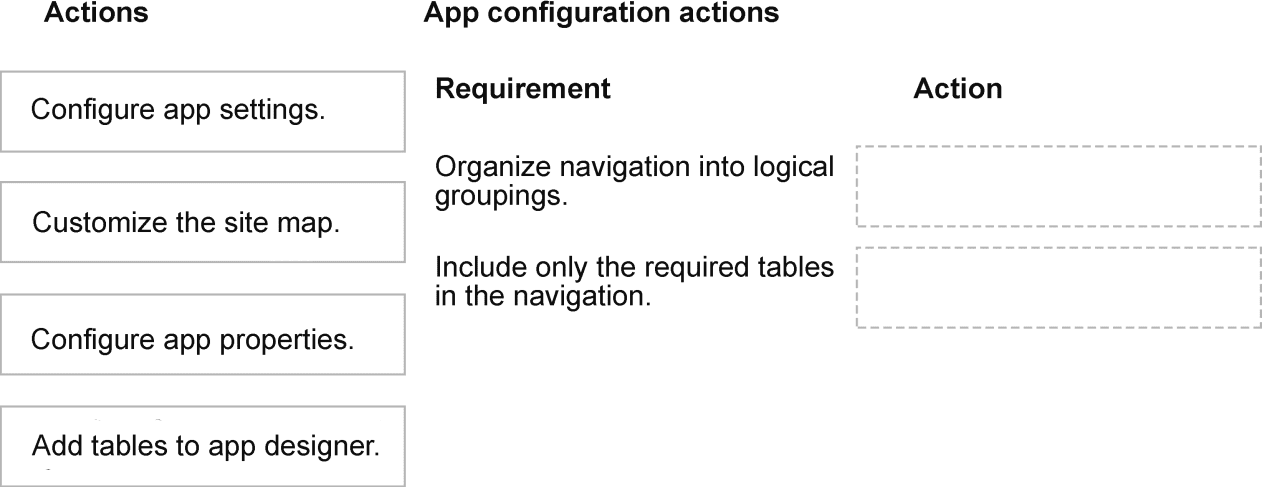
Which actions should you perform? To answer, move the appropriate actions to the correct requirements. You may use each action once, more than once, or not at all. You may need to move the split bar between panes or scroll to view content. NOTE: Each correct selection is worth one point.
Show answerHide answer
Explanation
Explanation:Model-driven apps use a navigation structure to help users access business data efficiently. The navigation structure consists of areas, groups, and subareas (pages). Groups organize related tables and components into logical sections based on business processes. The app designer also allows administrators to control which Dataverse tables are included in the application. By configuring navigation groups and selecting only the necessary tables, administrators can create a focused customer service experience without exposing unnecessary navigation entries.
Correct Option:
Requirement 1: Organize navigation into logical groupings based on business processes.
Action: Create groups in the app navigation.
Groups in a model-driven app organize related tables, custom pages, and other components into meaningful sections. For example, a customer service app can have groups such as Customer Management, Case Management, and Knowledge Management. Administrators can create groups using the model-driven app designer and place relevant pages under each group. This creates an organized navigation experience that aligns with business processes and helps customer service representatives locate the appropriate functionality quickly.
Requirement 2: Ensure only required data is included in the app navigation.
Action: Add only the required Dataverse tables to the app.
The model-driven app designer allows administrators to select which Dataverse tables are included in the application. By adding only the tables required by customer service representatives, administrators can control which table pages are available through the app navigation. Unnecessary tables can be excluded from the app. This creates a focused application experience and prevents users from seeing irrelevant navigation entries. Table inclusion in the app is separate from Dataverse security permissions.
Incorrect Options:
- Creating additional areas: Areas divide an application into separate work areas. They are useful for major functional divisions, not simply grouping related pages within a business process.
- Adding every available table: This introduces unnecessary navigation entries and does not satisfy the requirement to include only relevant data.
Reference:
Microsoft explains that model-driven app navigation consists of areas, groups, and pages. Groups organize related pages, while the app designer allows makers to add or remove tables and other components. These capabilities support business-oriented navigation and controlled app composition.