A company uses Power Apps to create maintenance requests. The maintenance manager emails the manager of the department specified in each request.
The maintenance manager wants to automate the email process whenever a new maintenance request is created.
You need to build a Power Automate flow to automate the email process.
Which three components should you add to the flow in sequence?
Exhibit:
Show answerHide answer
Explanation
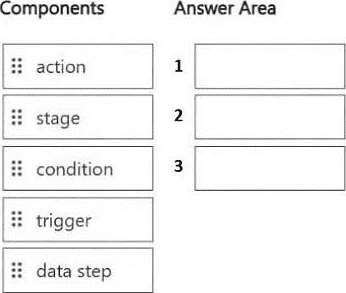
Explanation:The company wants to automate email notifications whenever a new maintenance request is created in Power Apps. The flow must detect the creation of a maintenance request, retrieve the information needed to identify the manager of the department specified in that request, and send an email to the appropriate manager. Power Automate supports this process through a Dataverse trigger, a data retrieval step, and an email action. A condition or stage is unnecessary when the flow follows this straightforward sequence.
Correct Option:
1. Trigger — First component
The trigger starts the Power Automate cloud flow when a specific event occurs. In this scenario, configure the Microsoft Dataverse trigger When a row is added, modified or deleted and set the change type to Added.
2. Data step — Second component
The data step retrieves the information required to identify the appropriate department manager. The maintenance request contains a department reference, so the flow must use that information to retrieve the related department record and its manager's email address.
3. Action — Third component
The action performs the required operation after retrieving the department manager's details. Configure the Office 365 Outlook action Send an email (V2).
Incorrect Components:
Stage — Incorrect
Stages are not standard components used to construct the described Power Automate cloud flow sequence. They are associated with business process flows, which guide users through predefined stages of a business process. The requirement is to automate an email notification when a maintenance request is created. A stage does not detect record creation, retrieve department information, or send email notifications. Therefore, it is unnecessary for this automation scenario.
Condition — Incorrect
A condition evaluates whether specified criteria are true or false and directs the flow through different branches. It is useful when an email should be sent only for requests meeting particular requirements, such as a specific priority or maintenance category. However, the scenario requires an email whenever a new maintenance request is created. No additional decision-making logic is specified, so a condition is unnecessary.
Reference:
Microsoft Learn documentation explains that Dataverse triggers can start flows when records are created, while the Get a row by ID action retrieves related record information. Power Automate also supports Office 365 Outlook's Send an email (V2) action for automated notifications.