You plan to implement Microsoft Dataverse.
You must track changes for two columns in the Account table. You must maintain a historical log of changes for the two columns and track only what is necessary.
You configure the appropriate organization settings.
You need to configure the system to track changes for the two columns.
Which two actions should you perform?
Show answerHide answer
Correct answer: C Enable auditing for the Account table and enable auditing for the two specified columns.
Explanation
Explanation:Microsoft Dataverse provides auditing to maintain a historical record of changes made to table records and individual columns. The company needs to track changes to only two specific columns in the Account table while minimizing unnecessary audit data. To achieve this, auditing must first be enabled at the environment level and then configured for the Account table and the two required columns. This approach records relevant changes, including previous and new values, without unnecessarily auditing every column.
Correct Option:
C. Enable auditing for the Account table and enable auditing for the two specified columns — Correct
Dataverse auditing supports tracking changes at multiple levels, including the environment, table, and individual column levels.
The required configuration is:
- Environment level: Enable auditing in the environment settings.
- Account table: Enable auditing for the Account table.
- Two specified columns: Enable auditing only for the two columns that require historical tracking.
This configuration ensures that Dataverse records changes to the selected columns, including information about who made the changes and when they occurred.
It also minimizes unnecessary audit records by avoiding auditing unrelated columns.
Incorrect Options:
A. Enable change tracking for the Account table and both specified columns — Incorrect
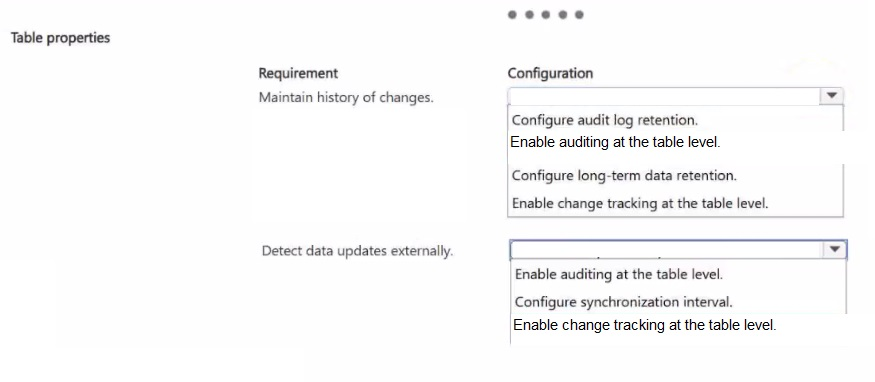
Dataverse change tracking and auditing serve different purposes. Change tracking identifies data changes so external systems can synchronize updated records with Dataverse. It does not maintain a detailed historical audit log containing previous and new column values, the user responsible, and the time of the change. Since the company requires historical information about modifications to two specific columns, auditing is the appropriate feature rather than change tracking.
B. Enable change tracking for the Account table and auditing for the two specified columns — Incorrect
Although auditing selected columns is relevant, enabling change tracking is not the correct table-level prerequisite for maintaining an audit history. Dataverse requires auditing to be enabled for the table before auditing can be configured for individual columns. Therefore, the Account table's auditing setting must also be enabled. Change tracking serves a different purpose and does not replace table-level auditing.
D. Enable auditing only at the environment level — Incorrect
Enabling auditing at the environment level establishes the organization-wide prerequisite for auditing, but it does not automatically configure every table and column for historical tracking. The Account table must also have auditing enabled, followed by enabling auditing on the two specified columns. Without these additional configurations, the company cannot ensure that changes to the required columns are recorded in the audit history.
Reference:
Microsoft Learn confirms that Dataverse auditing can be configured at three levels: environment, table, and column. To capture changes, auditing must be enabled at all applicable levels. Column-level configuration allows administrators to track only the required fields and minimize unnecessary audit log storage.