Contoso Ltd. is configuring a Maintenance Request Approval workflow in Power Automate.
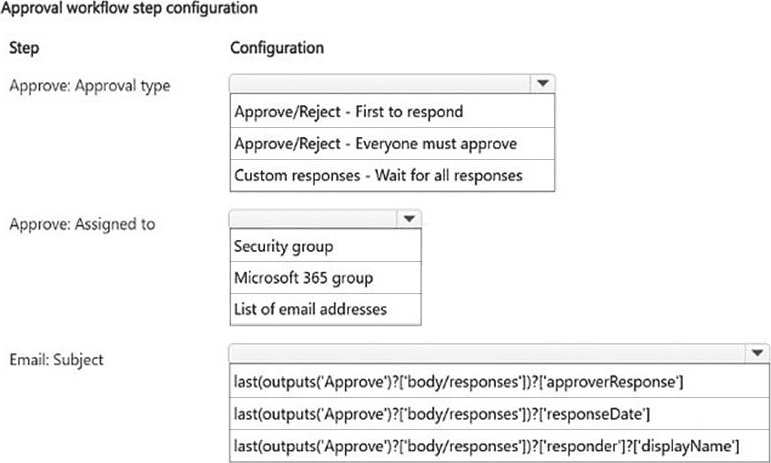
The workflow must request approval from all managers. Approval must not be granted if any manager rejects the request. The result must be sent to the initial reviewer by email, with the subject indicating Approve or Reject.
A developer names the Start and wait for an approval step `Approve` and the Send an email notification (V3) step `Email`.
How should the developer configure the Power Automate cloud flow steps?
Exhibit:
Show answerHide answer
Explanation
Explanation:The scenario requires an approval process where all managers must respond, and a single rejection blocks approval. In Power Automate, the Start and wait for an approval action offers the Approve/Reject – Everyone must approve type, which enforces this logic: the flow waits for every approver, but short-circuits on the first rejection . The subsequent email must dynamically reflect the overall outcome. The developer must use the approval action's Outcome dynamic content to build a subject line that conditionally displays "Approve" or "Reject," likely via an expression or condition branch.
Correct Option:
The approval step named Approve must be configured with Approval type set to Approve/Reject – Everyone must approve. This type ensures all assigned managers receive the request and the flow waits until every manager responds, unless any single manager rejects—then the flow immediately proceeds with a rejected outcome . For the Email step, the developer should reference the Outcome dynamic content from the Approve step. To satisfy the subject requirement, use an expression such as concat('Maintenance Request: ', outputs('Approve')?['body/outcome']) or add a Condition that branches on Outcome equals "Approve" to send distinct subject lines.
Incorrect Option:
Approve/Reject – First to respond:
This type completes as soon as any one manager responds, which violates the requirement that all managers must provide input and that no single approval should bypass others .
Custom Responses – Wait for one response:
This type expects a single response from the group, not individual responses from every manager, failing the "all managers" requirement.
Hardcoding the email subject (e.g., always "Approve" or always "Reject"):
This ignores the dynamic Outcome of the approval and fails the requirement that the subject must indicate the actual result.
Using a separate approval action per manager in parallel branches:
While technically possible, this does not use the native "everyone must approve" semantics and requires complex condition aggregation, making it more error-prone and not the intended configuration for a single Start and wait for an approval step.
Reference:
Microsoft Learn: Approvals in Power Automate – "Approve/Reject – Everyone must approve" requires a response from each approver and completes when all respond or a single rejection occurs . The Outcome field becomes dynamic content for downstream steps .