Microsoft certification · Exam AB-410

AB-410 Mock Exam

Building Intelligent Applications

Free AB-410 questions on Contoso Ltd., each with the answer and an explanation.

20 questions · 40 minutes · free, no sign-up

Contoso Ltd. questions

1–2 of 2 free
Question 1

Contoso Ltd. is configuring a Maintenance Request Approval workflow in Power Automate.

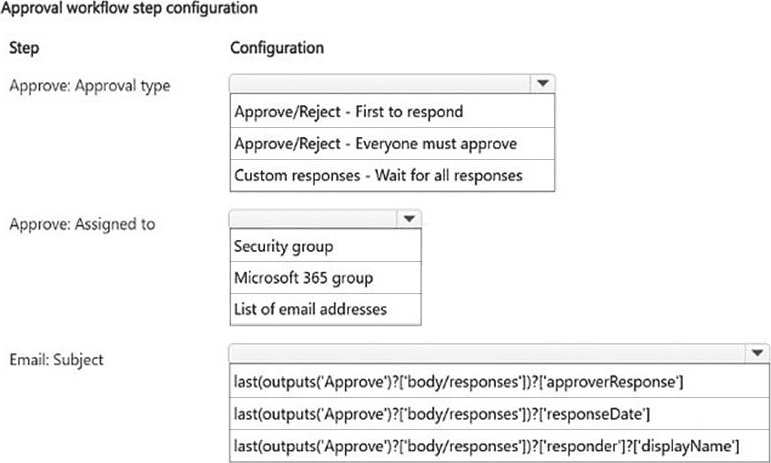
The workflow must request approval from all managers. Approval must not be granted if any manager rejects the request. The result must be sent to the initial reviewer by email, with the subject indicating Approve or Reject.

A developer names the Start and wait for an approval step `Approve` and the Send an email notification (V3) step `Email`.

How should the developer configure the Power Automate cloud flow steps?

Exhibit:
Show answerHide answer

Explanation

Explanation:
The scenario requires an approval process where all managers must respond, and a single rejection blocks approval. In Power Automate, the Start and wait for an approval action offers the Approve/Reject – Everyone must approve type, which enforces this logic: the flow waits for every approver, but short-circuits on the first rejection . The subsequent email must dynamically reflect the overall outcome. The developer must use the approval action's Outcome dynamic content to build a subject line that conditionally displays "Approve" or "Reject," likely via an expression or condition branch.

Correct Option:
The approval step named Approve must be configured with Approval type set to Approve/Reject – Everyone must approve. This type ensures all assigned managers receive the request and the flow waits until every manager responds, unless any single manager rejects—then the flow immediately proceeds with a rejected outcome . For the Email step, the developer should reference the Outcome dynamic content from the Approve step. To satisfy the subject requirement, use an expression such as concat('Maintenance Request: ', outputs('Approve')?['body/outcome']) or add a Condition that branches on Outcome equals "Approve" to send distinct subject lines.

Incorrect Option:

Approve/Reject – First to respond:
This type completes as soon as any one manager responds, which violates the requirement that all managers must provide input and that no single approval should bypass others .

Custom Responses – Wait for one response:
This type expects a single response from the group, not individual responses from every manager, failing the "all managers" requirement.

Hardcoding the email subject (e.g., always "Approve" or always "Reject"):
This ignores the dynamic Outcome of the approval and fails the requirement that the subject must indicate the actual result.

Using a separate approval action per manager in parallel branches:
While technically possible, this does not use the native "everyone must approve" semantics and requires complex condition aggregation, making it more error-prone and not the intended configuration for a single Start and wait for an approval step.

Reference:
Microsoft Learn: Approvals in Power Automate – "Approve/Reject – Everyone must approve" requires a response from each approver and completes when all respond or a single rejection occurs . The Outcome field becomes dynamic content for downstream steps .
Question 2 Choose 1

Contoso Ltd. has a Production environment and a Microsoft Entra security group named Contoso Ltd. QA, which is configured to assign Power Apps licenses. A Dataverse group team named Testers is associated with this security group and has the Quality Assurance security role.

A new QA tester joins Contoso Ltd. The Identity and Access Management (IDAM) department adds the tester to the Contoso Ltd. QA security group. However, the tester is not listed as a member of the Testers team.

You need to ensure the new QA tester can access the app to perform testing.

What should you do?

Show answerHide answer

Correct answer: B Assign the new tester a Power Apps license.

Explanation

Explanation:
The new tester is missing from the Testers team because Microsoft Entra ID group team membership is synchronized just-in-time, not pre-provisioned. According to Microsoft documentation, members of Microsoft Entra groups that are part of a Group Team are not pre-provisioned into the environment . Instead, the group member is added into the Microsoft Entra ID group team at run-time when they access Dataverse interactively or through a non-interactive process . Therefore, the tester likely does not appear in the team list yet simply because they have not yet accessed the environment. The correct resolution is to have the tester access the app or environment, which triggers the just-in-time synchronization and adds them to the Testers team automatically.

Correct Option:
The correct approach is to ensure the new tester accesses the Production environment or the Operations app. When a Microsoft Entra ID group member accesses Dataverse, the platform automatically adds them to the associated group team at run-time . Because the Testers team is already configured for the Contoso Ltd. QA security group and already has the Quality Assurance security role assigned, the tester will inherit the necessary permissions once the just-in-time membership is triggered. No manual team membership addition or license assignment is required—the tester simply needs to sign in and attempt to access the app or environment.

Incorrect Option:

A (Add the new tester to the Production environment):
The user is already a member of the security group tied to the environment's group team. Manually adding them to the environment does not resolve the team synchronization issue and is not the documented mechanism for group team membership.

B (Assign the new tester a Power Apps license):
The security group is already configured to assign Power Apps licenses. The tester's license status is not the reason they are absent from the Testers team; the absence is expected until just-in-time provisioning occurs .

C (Send the new tester a web link to the Operations app):
While directing the user to the app may trigger access, simply sending a link without ensuring the user actually signs in and accesses the environment does not guarantee the synchronization. The core requirement is that the user accesses Dataverse, not merely receives a URL.

D (Assign the new tester the Quality Assurance security role):
The Testers team already has this role assigned. Security roles assigned to group teams are inherited by members automatically once membership is established. Directly assigning the role to the user is unnecessary and bypasses the intended group-based security model .

Reference:
Microsoft Learn: "Members of Microsoft Entra groups that are part of a Group Team created for the Microsoft Entra group won't be pre-provisioned." Group team members are added just-in-time when the user accesses Dataverse .

That's the last free question in Contoso Ltd.

You've seen the free 30% (2 of 8 questions). Full access unlocks every question and full-length AB-410 mock exams (60 questions, 120 minutes), a different mock on every attempt.

Unlock full mock exam
Full mock exam

Sit the AB-410 exam before exam day

Full-length mocks with the same number of questions and the same time limit as the real AB-410 exam. Every attempt draws a new set of questions from the full bank, so you can keep going until you pass comfortably.

Get full AB-410 mock exam
  • 60questions per mock
  • 120 mintime limit
  • 154questions in the bank
  • Newmock on every attempt