VMware certification · Exam 3V0-23.25

3V0-23.25 Mock Exam Page 2

Advanced VMware Cloud Foundation 9.0 Storage

Free 3V0-23.25 mock exam questions 11–20, each with the answer and an explanation.

20 questions · 45 minutes · free, no sign-up

Free 3V0-23.25 questions

11–20 of 21 free
Question 11 Choose 2
An administrator has successfully deployed a vSAN Stretched Cluster and needs to ensure that any Virtual Machines (VMs) that are created are placed in the appropriate site.
Which two steps are required to complete the task? (Choose two.)
Show answerHide answer

Correct answer: A, C Put the VMs in the correct DRS Group.Create VM/Host groups for the two sites.

Explanation

Explanation:

This question tests the administrator's understanding of how to enforce site affinity in a vSAN Stretched Cluster environment. To ensure VMs are placed and remain on the correct site, administrators must use DRS VM/Host Groups combined with VM-Host Affinity Rules — a standard vSphere mechanism for controlling workload placement across stretched cluster sites.

✅ Correct Options:

C. Create VM/Host groups for the two sites.
Before any affinity rules can be applied, the administrator must first create separate VM Groups and Host Groups for each site (Site A and Site B). These groups logically define which hosts belong to which site and which VMs should be associated with them. This is the foundational step for enforcing site-aware placement in a stretched cluster.

A. Put the VMs in the correct DRS Group.
Once VM/Host groups are created, the administrator must assign each VM to the appropriate VM DRS group corresponding to its intended site. This, combined with a VM-Host Affinity Rule, ensures DRS enforces placement and keeps VMs running on hosts within their designated site during normal operations and after failover recovery.

❌ Incorrect Options:

B. Create a VM/Host group across the two sites.
VM/Host groups should be created per site, not across both sites. Creating a single group spanning both sites defeats the purpose of site isolation and affinity enforcement. Stretched cluster best practices require distinct, separate groups for each site to ensure correct placement and DRS rule targeting.

D. Put the VMs in the correct VM Folder.
VM Folders are purely an organizational and inventory management tool within vCenter. They have no influence over DRS placement decisions, host affinity, or site preference in a stretched cluster. Placing VMs in folders does not control or enforce which physical site the VM runs on.

E. Create a storage policy for each site.
While storage policies are important for defining vSAN data placement and protection (such as site affinity in storage), they do not control compute placement of VMs across sites. A storage policy alone cannot ensure a VM runs on hosts at a specific site — that requires DRS groups and affinity rules.

🔧 Reference:
⇒ VMware vSAN Stretched Cluster Guide – Administering VMware vSAN → Confirms that VM/Host Groups and DRS Affinity Rules are required to enforce site-specific VM placement in stretched clusters.
⇒ VMware vSphere DRS – vSphere Resource Management → Validates the process of creating VM Groups, Host Groups, and affinity rules to control workload placement across defined host groups.
Question 12 Choose 4
An administrator has been tasked with making changes to a VMware Cloud Foundation (VCF) Workload Domain cluster that is configured with NFS for both Principal storage and Supplemental storage. The cluster has the following configuration:

• There are 3 x ESX host servers.
• There are 3 x NFS Datastores allocated to host Virtual Machines workloads.
• There is a single NFS Datastore allocated for hosting ISO files.

The administrator has the following concerns with the existing configuration:

• Every time a new Virtual Machine is deployed to the Workload Domain, the administrator must choose which datastore should be used.

• When reviewing the Datastores in VCF Operations:

One of the datastores has no Virtual Machines running in it.

The other two datastores have an imbalance of Virtual Machines and this is causing resource contention. The administrator has the following requirements: • Virtual Machines must be placed automatically on the most appropriate datastore based on utilization. • Migration recommendations on Virtual Machine placement should be made when one datastore reaches 50% utilization. • Virtual Machines must only be migrated to another datastore after being approved by an administrator. What four actions must the administrator take to meet all of the requirements? (Choose four.)
Show answerHide answer

Correct answer: A, C, E, F Configure the Datastore Cluster to set the Storage DRS storage space threshold to 50%.Create a new Datastore Cluster using all three NFS Datastores allocated to host Virtual Machines workloads.Ensure all three NFS Datastores are available to each ESX host server.Configure the Datastore Cluster to use Manual Storage DRS.

Explanation

Explanation:

This question tests the administrator's ability to correct resource imbalances and automate placement within a VCF Workload Domain using Storage DRS (SDRS). It requires grouping identical workload datastores, ensuring proper host presentation, setting explicit capacity utilization triggers, and selecting the appropriate automation level based on administrative approval policies.

✅ Correct Option:

A. Configure the Datastore Cluster to set the Storage DRS storage space threshold to 50%.
The requirements state that migration recommendations must be generated when a datastore hits 50% utilization. Configuring the Storage DRS space utilization threshold specifically to 50% ensures that the SDRS engine evaluates the cluster and alerts the administrator as soon as any single datastore reaches this exact capacity.

C. Create a new Datastore Cluster using all three NFS Datastores allocated to host Virtual Machines workloads.
To solve the issue of manual datastore selection and resource imbalance, the three active VM workload datastores must be aggregated into a single logical Datastore Cluster. The ISO datastore must be excluded from this cluster because it serves a different functional purpose and should not hold running VM workloads.

E. Ensure all three NFS Datastores are available to each ESX host server.
For a Datastore Cluster to function reliably and allow safe VM migrations or automated placements, uniform storage connectivity is required. Every ESXi host within the VCF Workload Domain cluster must have simultaneous access to all three participating NFS datastores to prevent dead-ends or access loss during placement.

F. Configure the Datastore Cluster to use Manual Storage DRS.
The prompt explicitly dictates that Virtual Machines must only be migrated to another datastore after being approved by an administrator. Choosing Manual mode ensures that Storage DRS runs its algorithms and populates clear placement and migration recommendations but waits for explicit administrative sign-off before executing them.

❌ Incorrect options:

B. Configure the Datastore Cluster to set the Storage DRS storage space utilization difference to 50%.
Setting the space utilization difference to 50% would mean SDRS only reacts if the capacity gap between the most filled and least filled datastore exceeds 50%. This does not satisfy the requirement to trigger migration recommendations the moment an individual datastore reaches 50% total utilization.

D. Configure the Datastore Cluster to use Fully Automated Storage DRS.
Fully Automated SDRS allows vSphere to automatically execute initial placements and migrate running virtual machines between datastores without any human intervention. This directly violates the strict corporate constraint stating that no VM migrations can happen without manual approval from an administrator.

G. Create a new Datastore Cluster using all four available Datastores.
Including the dedicated ISO datastore inside the VM Datastore Cluster is an architectural error. The ISO repository holds static media files and is not configured for highly active, low-latency VM disk workloads; mixing it into the cluster would cause SDRS to mistakenly place active virtual machines on it.

🔧 Reference:
⇒ VMware vSphere Storage Guide
→ Confirms how to configure Datastore Clusters, set Storage DRS capacity thresholds, and implement Manual vs. Automated migration recommendations based on business rules.
Question 13 Choose 2
An administrator is tasked with setting up immutable snapshots for recovery in case of a cyber-attack.
Which two limitations apply when configuring immutable snapshots? (Choose two.)
Show answerHide answer

Correct answer: A, C The Virtual Machine cannot be part of multiple protection groups.Virtual machine hardware cannot be changed on VM having immutable snapshots.

Explanation

Explanation:

This question tests knowledge of vSAN Data Protection immutable snapshots. Immutable snapshots are designed to protect recovery points from modification or deletion, helping organizations recover from ransomware and cyber-attacks. Because the snapshots must remain unchanged, VMware enforces specific restrictions on protected VMs and protection groups to preserve the integrity of the recovery data.

🟢 Correct Option:

A. The Virtual Machine cannot be part of multiple protection groups.
A VM configured with immutable snapshot protection can belong to only one protection group. Allowing membership in multiple protection groups could create conflicting retention policies, schedules, and immutability settings. Restricting a VM to a single protection group ensures consistent management of protected recovery points and maintains predictable recovery operations.

🟢 Correct Option:

C. Virtual machine hardware cannot be changed on VM having immutable snapshots.
When immutable snapshots exist, VM hardware reconfiguration operations are restricted. Changes such as adding or removing virtual devices could affect the consistency of protected recovery points. VMware therefore prevents hardware modifications while immutable snapshots are present, ensuring that recovery data remains valid and protected against accidental or malicious changes.

🔴 Incorrect Options:

B. The protection group cannot have more than 7 snapshot schedules.
There is no VMware limitation restricting immutable protection groups to a maximum of seven snapshot schedules. Snapshot scheduling limits are determined by overall product capabilities and configuration guidelines rather than by immutability requirements.

D. Virtual Machine hardware must be at least version 10.
Immutable snapshot functionality is not tied to VM hardware version 10. The feature is managed through vSAN Data Protection and protection-group policies, making the virtual hardware version requirement stated in this option incorrect.

E. The protection group cannot be both replicated and immutable.
Replication and immutability address different protection objectives. VMware does not require these capabilities to be mutually exclusive, and a protection group can support replication-related features while maintaining immutable recovery points.

🔧 Reference:
⇒ vSAN Data Protection Administration Guide
Describes immutable snapshots, protection groups, and operational restrictions for protected virtual machines.

⇒ vSAN Data Protection - Immutable Protection Group Restrictions
Confirms restrictions associated with immutable protection groups and protected VM configurations.
Question 14 Choose 1
The security team has notified the VMware Cloud Foundation (VCF) Storage Administrator of a new security vulnerability that must be patched immediately. The vSAN Cluster uses vSphere Lifecycle Manager images.
After updating the image with the patch, what method should the administrator use to apply this patch with the least amount of disruption to the cluster?
Show answerHide answer

Correct answer: B Enable the Quick Boot setting in the host remediation settings for the images.

Explanation

Explanation:

This question tests the administrator's knowledge of optimizing the host remediation lifecycle within a vSAN cluster managed by vSphere Lifecycle Manager (vLCM) images. It evaluates methods to minimize host reboot times and operational disruptions during critical security patching cycles.

✅ Correct Option:

B. Enable the Quick Boot setting in the host remediation settings for the images.
Quick Boot allows supported ESXi hosts to restart the hypervisor software without going through the physical hardware and BIOS/UEFI self-test (POST) sequence. Enabling this setting under vLCM image remediation drastically shortens host downtime, ensuring the vSAN cluster is patched quickly with the absolute least amount of disruption.

❌ Incorrect options:

A. Enable the suspend to memory feature in the host remediation settings for the baselines.
The cluster in this scenario is explicitly configured to use vSphere Lifecycle Manager images, rendering any remediation settings or adjustments tied to legacy VUM baselines completely irrelevant. Furthermore, suspend-to-memory features do not bypass the hardware boot cycle for full hypervisor-level security patches.

C. Disable the Quick Boot feature in the host remediation settings for the images.
Disabling Quick Boot forces every ESXi host in the vSAN cluster to undergo a complete cold reboot, including physical hardware initializations and memory checks. This significantly extends the remediation window for each host, increasing the overall time the cluster operates in a degraded or maintenance state.

D. Disable HA admission control in the host remediation settings for the baselines.
Modifying vSphere High Availability (HA) admission control configuration is a cluster-level resilience setting rather than a host boot optimization tool. Additionally, adjusting baseline-specific options will have zero functional effect on a cluster whose lifecycle is governed entirely by a unified vLCM image.

🔧 Reference:
⇒ VMware vSphere Lifecycle Manager Guide
→ Validates that Quick Boot is an image-based remediation setting designed to reduce ESXi upgrade downtime by skipping hardware re-initialization.
Question 15 Choose 3
An administrator is tasked with configuring the vSAN File Service to deliver NFS file shares for an Edge environment.
Which three are required to deliver the service? (Choose three.)
Show answerHide answer

Correct answer: A, B, E Create a dedicated port group for vSAN File Services in the DVS.If using an NSX-based network, ensure that MAC Learning is enabled.Hosts connected to a DVS version 6.6.0 or later.

Explanation

Explanation:

This question tests the administrator's knowledge of the prerequisite network and infrastructure requirements for enabling vSAN File Services in an Edge environment. vSAN File Service requires specific DVS configurations, NSX compatibility settings, and minimum versioning to deploy and serve NFS file shares correctly across the environment.

✅ Correct Options:

A. Create a dedicated port group for vSAN File Services in the DVS.
vSAN File Services requires a dedicated DVS port group to handle file service agent (FSA) traffic separately from other vSAN or management traffic. This dedicated port group provides the network path for NFS share access and is a mandatory configuration step before enabling the vSAN File Service on the cluster.

B. If using an NSX-based network, ensure that MAC Learning is enabled.
When vSAN File Services is deployed on an NSX-backed network, MAC Learning must be enabled on the DVS port group. File Service Agents use virtual IPs with unique MACs that NSX must learn dynamically. Without MAC Learning enabled, network traffic to file shares will be dropped or misdirected, causing NFS accessibility failures.

E. Hosts connected to a DVS version 6.6.0 or later.
vSAN File Services has a minimum DVS version requirement of 6.6.0. This version introduced the necessary port group capabilities and network features that File Service Agents depend on for proper operation. Hosts connected to older DVS versions are not supported and will prevent successful File Services enablement and deployment.

❌ Incorrect Options:

C. MAC Learning and Forged Transmits are disabled.
This is the opposite of the actual requirement. For vSAN File Services, Forged Transmits must be enabled on the port group to allow File Service Agents to send traffic using virtual IP addresses. Disabling both MAC Learning and Forged Transmits would break NFS file share connectivity entirely.

D. Jumbo frames are enabled on the network and the DVS port group.
Jumbo frames (MTU 9000) are a performance optimization, not a mandatory requirement for vSAN File Services. The service can be deployed and function correctly on standard MTU 1500 networks. While recommended in high-throughput environments, it is not listed as a prerequisite for enabling File Services in VMware's official documentation.

F. vSAN Witness functionality is enabled on each VMkernel.
vSAN Witness functionality on VMkernel adapters is specific to Stretched Cluster and Two-Node configurations for quorum purposes. It has no relevance to vSAN File Services deployment or NFS share delivery. Enabling witness functionality on each VMkernel is neither required nor related to File Services configuration.

🔧 Reference:
⇒ VMware vSAN File Services Configuration Guide → Confirms prerequisites including dedicated DVS port group, MAC Learning for NSX environments, and minimum DVS version 6.6.0 for vSAN File Services deployment.
⇒ VMware vSAN File Services and NSX Networking Requirements → Validates MAC Learning and Forged Transmits enablement requirements when deploying vSAN File Services on NSX-based network infrastructure.
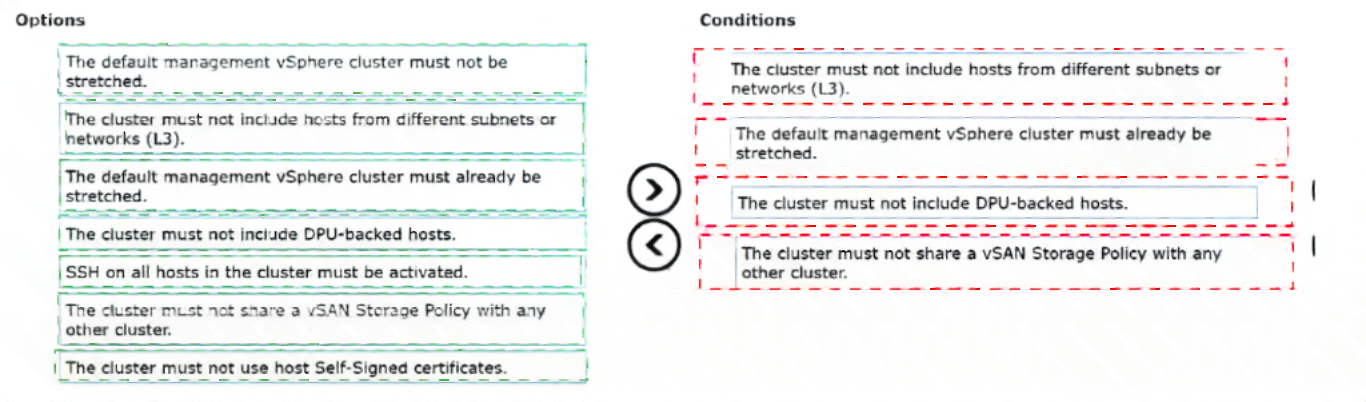
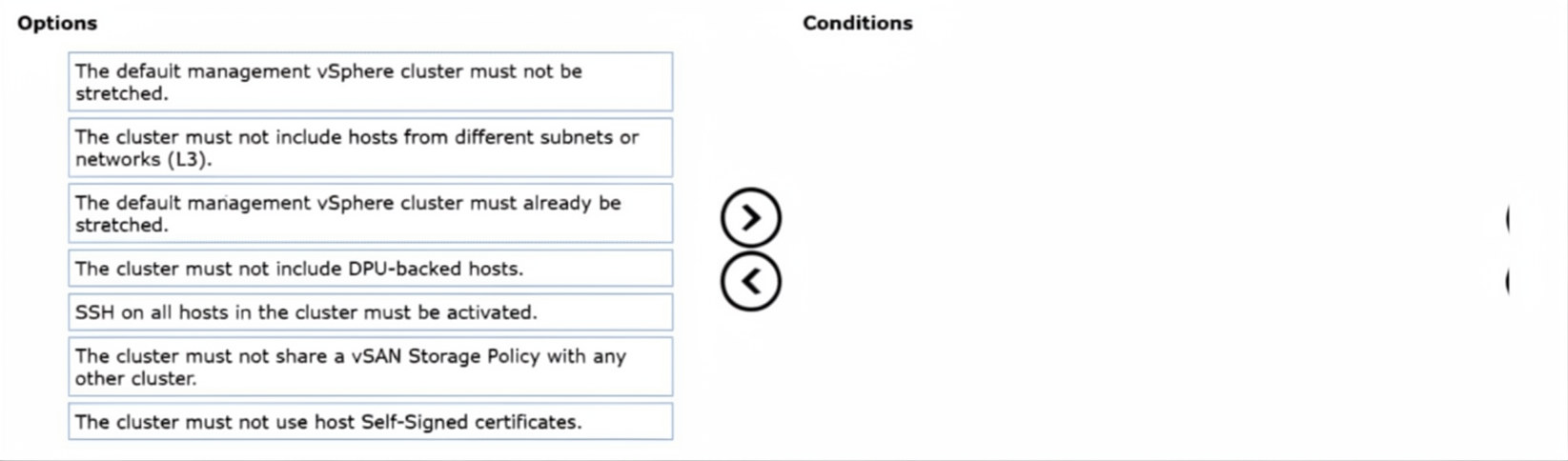
Question 16
An administrator is tasked with stretching a vSAN cluster in a VMware Cloud Foundation (VCF) Workload Domain across two availability zones within a region. Both availability zones contain an equal number of hosts.
What four Conditions must also be met in order to stretch the cluster?
Drag and drop the four correct options from the Options list on the left and place them into the Conditions on the right in any order. (Choose four.)
Show answerHide answer

Explanation


Explanation:

This question tests the prerequisites for stretching a vSAN cluster across two availability zones in a VCF Workload Domain. Equal host distribution per site is already given; these four additional conditions must be satisfied.

✅ Correct Options:

The cluster must not include hosts from different subnets or networks (L3).
Stretched vSAN clusters in VCF require consistent L2/L3 networking design between sites. Hosts from different subnets can break vSAN stretched cluster communication and fault domain configuration.

The default management vSphere cluster must already be stretched.
For VI Workload Domains, the management domain cluster must be stretched first. This ensures NSX control plane and management components remain available during site events.

The cluster must not include DPU-backed hosts.
DPU-backed hosts are not supported in stretched vSAN clusters in VCF due to compatibility and networking constraints with the stretched topology.

The cluster must not share a vSAN Storage Policy with any other cluster.
Each stretched cluster must use its own dedicated vSAN storage policy. Sharing policies with other clusters is not allowed during stretch operations.

❌ Incorrect options:

The default management vSphere cluster must not be stretched.
This is the opposite of the requirement. The management cluster must be stretched before stretching a workload domain cluster.

SSH on all hosts in the cluster must be activated.
SSH enablement is not a prerequisite for stretching a vSAN cluster.

The cluster must not use host Self-Signed certificates.
Certificate type (self-signed vs. CA-signed) is not a blocking condition for vSAN cluster stretching.

🔧 Reference:
→ Stretching vSAN Clusters in VMware Cloud Foundation
Lists exact prerequisites and limitations for stretching workload domain clusters.
Question 17 Choose 2
The Windows team is planning to deploy a Windows Server Failover Cluster. This requires a disk shared between all members of the cluster.
Which two options are available to fulfill this requirement on a vSAN ESA cluster? (Choose two.)
Show answerHide answer

Correct answer: A, E vSAN iSCSI targetParavirtual SCSI controller with physical bus sharing

Explanation

Explanation:

This question tests knowledge of how to provide shared storage for a Windows Server Failover Cluster (WSFC) on a vSAN ESA cluster. WSFC requires a disk that can be accessed simultaneously by all cluster nodes with SCSI-3 Persistent Reservations for arbitration . On vSAN, this requirement can be met through two distinct methods: exposing storage via the vSAN iSCSI target service, or configuring native vSAN virtual disks with the correct controller settings .

✔️ Option A (vSAN iSCSI target):
The vSAN iSCSI target service enables both virtual and physical workloads to access vSAN datastores as block storage. Official VMware documentation explicitly confirms that vSAN iSCSI targets support Windows Server Failover Clustering (WSFC) . This method allows WSFC nodes to discover and connect to shared LUNs using standard iSCSI initiators, with each LUN protected by vSAN storage policies.

✔️ Option E (Paravirtual SCSI controller with physical bus sharing):
For native vSAN shared disks, VMware documentation specifies that shared disks must be accessed through a SCSI controller with SCSI Bus Sharing set to Physical . The recommended controller type for shared disks in WSFC configurations is the VMware Paravirtualized (PVSCSI) controller . This configuration enables SCSI-3 Persistent Reservations, which WSFC requires to arbitrate access to clustered disk resources .

❌ Option B (LSI SCSI controller per disk):
While LSI Logic SAS controllers are supported for boot disks in WSFC configurations, they are not the recommended controller type for shared disks. Furthermore, using a separate controller per disk does not fulfill the requirement for a disk shared between all cluster members—the same disk must be attached to all nodes via a controller with physical bus sharing.

❌ Option C (Raw Device Mapping):
Raw Device Mapping (RDM) is not a typical native vSAN configuration. For vSAN environments, shared VMDKs (Clustered VMDKs) are the native method, not RDMs . Additionally, the vSAN iSCSI target service explicitly does not support migrations using RDM .

❌ Option D (NFS v4.1):
NFS datastores are not supported for WSFC configurations. Multiple official sources list NFS datastores as an unsupported scenario for WSFC on vSphere . WSFC requires block-level storage with SCSI-3 Persistent Reservations, which NFS as a file-level protocol cannot provide.

🔧 Reference:
→ Broadcom KB 326884: Best practices for using vSAN iSCSI targets – Confirms vSAN iSCSI target supports Windows Server Failover Cluster (WSFC).
→ Broadcom TechDocs: Shared Storage Clusters on vSAN – Documents requirement for SCSI controller with Physical bus sharing for WSFC.
Question 18 Choose 1
An administrator is tasked with enabling vSAN Data Protection.
Which action is required to enable vSAN Data Protection?
Show answerHide answer

Correct answer: B Deploy VMware Live Recovery (VLR)

Explanation

Explanation:

This question tests the prerequisite for enabling vSAN Data Protection in VMware Cloud Foundation 9.0, which provides snapshot-based local protection and optional replication.

✅ Correct Option:

B. Deploy VMware Live Recovery (VLR)
vSAN Data Protection is powered by and integrated with the VMware Live Recovery appliance. Deploying the VLR OVA is the required action to activate the service, after which administrators can create protection groups for immutable snapshots and replication directly from the vSphere Client.

❌ Incorrect options:

A. Enable vSAN advanced options
Advanced options are not required to enable vSAN Data Protection. This feature operates through the dedicated Live Recovery service.

C. Deploy Data Services Manager
Data Services Manager is used for database-as-a-service capabilities and is unrelated to vSAN Data Protection.

D. Deploy vSphere Replication
vSphere Replication is a separate legacy replication tool. vSAN Data Protection uses its own integrated replication engine through VMware Live Recovery.

🔧 Reference:
→ Using vSAN Data Protection
Requires deployment of the VMware Live Recovery / Snapshot Service appliance.

→ vSAN Data Protection in VMware Cloud Foundation
Confirms deployment of the VMware Live Recovery appliance to enable the service.
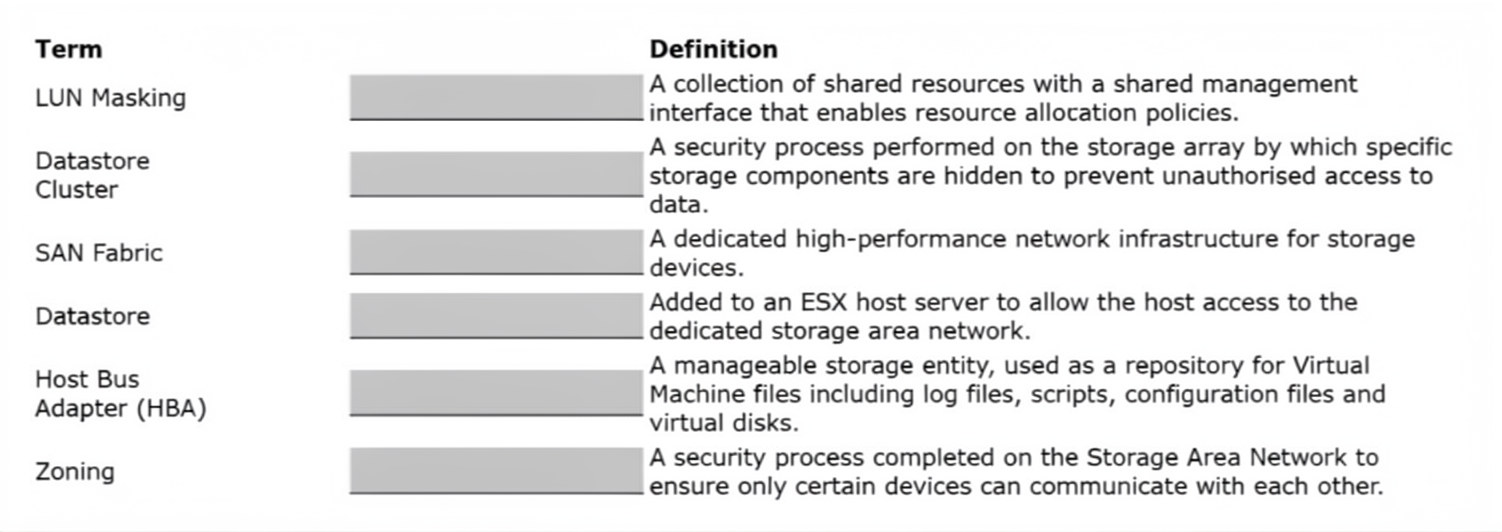
Question 19
An administrator is responsible for a VMware Cloud Foundation (VCF) Private Cloud and has been tasked with identifying and explaining the different Fibre Channel (FC) Storage Area Network (SAN) components within a VCF Workload Domain cluster.
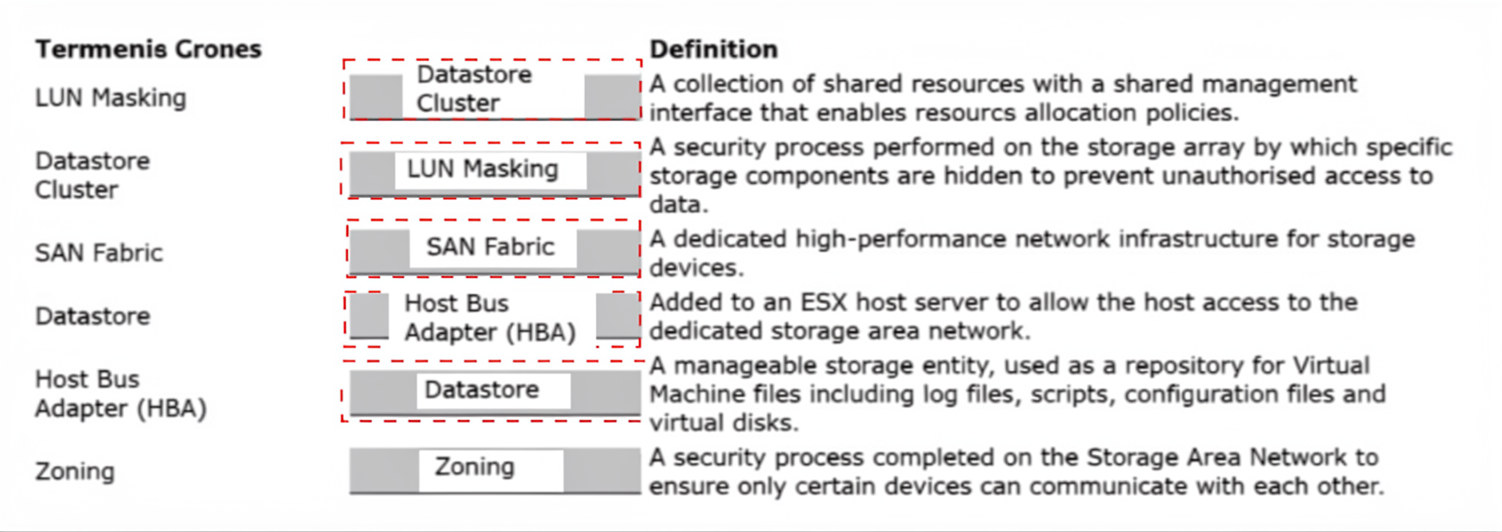
Drag and drop the correct Term onto its matching Definition.
Show answerHide answer

Explanation


Explanation:

This question tests an administrator's understanding of foundational storage technologies, specifically relating to Fibre Channel (FC) Storage Area Networks (SAN) and VMware vSphere constructs. Accurately mapping these storage terms is necessary for configuring, managing, and securing non-vSAN external block storage within a VCF Workload Domain.

✅ Correct Option:

Datastore Cluster
A collection of shared resources with a shared management interface that enables resource allocation policies. This fits perfectly because a Datastore Cluster aggregates multiple physical datastores into a single logical unit, enabling automated storage management features like Storage DRS for balance and capacity allocation.

LUN Masking
A security process performed on the storage array by which specific storage components are hidden to prevent unauthorized access to data. This is the exact definition as LUN masking is an array-level permission mechanism ensuring that only designated ESXi host initiators can see and access specific Logical Unit Numbers (LUNs).

SAN Fabric
A dedicated high-performance network infrastructure for storage devices. This matches the definition as the SAN fabric comprises the physical hardware components—such as Fibre Channel switches, routers, and data links—that route storage traffic network-wide between server hosts and target storage arrays.

Host Bus Adapter (HBA)
Added to an ESXi host server to allow the host access to the dedicated storage area network. This is completely accurate because an HBA is the specialized physical interface card installed within the server hardware that connects the ESXi host operating system directly to the Fibre Channel network.

Datastore
A manageable storage entity, used as a repository for Virtual Machine files including log files, scripts, configuration files, and virtual disks. This fits because a VMware datastore is the logical storage container (formatted with VMFS) that abstracts underlying physical storage to safely house active VM components.

Zoning
A security process completed on the Storage Area Network to ensure only certain devices can communicate with each other. This is correct because FC zoning is managed at the fabric switch level, segmenting the network into isolated zones to control device visibility and interaction between hosts and storage arrays.

❌ Incorrect options:

Misplaced Definitions / Incorrect Pairings
Mapping any term to a different slot fails because each operational layer is distinct. Mixing switch-level fabric security (Zoning) with array-level target security (LUN Masking), or confusing physical server hardware (HBA) with software storage repositories (Datastore), introduces architectural errors that violate core vSphere storage administration rules.

🔧 Reference:
⇒ VMware vSphere Storage Guide
→ Validates standard definitions and configuration rules for Fibre Channel SAN components, Host Bus Adapters, LUN management, and Datastore structures within vSphere environments.
Question 20 Choose 1
An administrator is deploying a vSphere Supervisor Cluster on a VMware Cloud Foundation (VCF) Workload Domain that uses NFS storage. As part of the configuration, the administrator must define separate storage policies for container images, ephemeral volumes, and persistent volumes within the vSphere Namespace.
The solution must align with vSphere Storage Policy Based Management (SPBM) and Broadcom TechDocs recommendations for supported Supervisor configurations.
Which configuration meets these requirements?
Show answerHide answer

Correct answer: C Create three distinct SPBM storage policies mapped to shared NFS datastore(s). Assign the policies to the corresponding storage options for container images, ephemeral volumes, and persistent volumes.

Explanation

Explanation:

This question tests your understanding of vSphere Storage Policy Based Management (SPBM) configuration for vSphere Supervisor Clusters with Tanzu. The administrator must create separate storage policies for container images, ephemeral volumes, and persistent volumes, and assign them to the corresponding storage options when enabling Workload Management on a VCF Workload Domain using NFS storage.

✔️ Option C (Correct):
Creating three distinct SPBM storage policies mapped to shared NFS datastore(s) is correct because vSphere with Tanzu requires separate storage policies for control plane VMs, pod ephemeral disks, and container image cache when configuring the Supervisor Cluster. Each policy represents datastore(s) and manages storage placement for specific workload types. Container images, ephemeral volumes, and persistent volumes each have different storage requirements and lifecycle characteristics. Assigning distinct policies to the corresponding storage options ensures proper placement and management of each workload type according to Broadcom TechDocs recommendations for supported Supervisor configurations.

❌ Option A (Incorrect):
Creating three SPBM storage policies that all reference the same shared NFS datastore is incorrect because while logically isolating volume types within a single datastore is possible, the option's phrasing suggests the policies don't provide actual separation. The key requirement is to create distinct policies that map to datastores and assign them to corresponding storage options. Simply referencing the same datastore in three policies doesn't align with best practices for different storage classes. The policies should represent different storage capabilities or classes (Bronze, Silver, Gold) rather than just three labels for the same datastore.

❌ Option B (Incorrect):
Using datastore clusters to automatically balance storage consumption and relying on vSphere DRS is incorrect because vSphere with Tanzu and Supervisor Clusters require explicit SPBM storage policies, not DRS-based automatic placement. DRS doesn't manage Kubernetes storage objects like ephemeral disks, container images, or persistent volumes. SPBM is the required framework for integrating with shared datastores (VMFS, NFS, vSAN, vVols) and managing placement of control plane VMs, pod ephemeral disks, container images, and persistent volumes. Automatic DRS placement doesn't provide the policy-driven storage management required for Supervisor Cluster configurations.

❌ Option D (Incorrect):
Defining one default storage policy and allowing the Supervisor control plane to automatically create subpolicies is incorrect because vSphere with Tanzu requires administrators to create storage policies before enabling the Supervisor Cluster. The control plane doesn't automatically create subpolicies for container and persistent workloads during namespace provisioning. Each storage type (control plane VMs, ephemeral disks, container image cache, persistent volumes) needs explicit policy assignment. The vSphere administrator must define storage policies describing different storage requirements and classes of services, then assign them to vSphere Namespaces.

🔧 Reference:
→ vSphere with Tanzu Storage
Confirms that storage policies represent datastores and manage placement of control plane VMs, pod ephemeral disks, container images, and persistent volumes

→ Change Storage Settings on Supervisor Cluster
Confirms administrators configure SPBM storage policies when enabling Supervisor Cluster for control plane, ephemeral disks, and container image cache
Full mock exam

Sit the 3V0-23.25 exam before exam day

Full-length mocks with the same number of questions and the same time limit as the real 3V0-23.25 exam. Every attempt draws a new set of questions from the full bank, so you can keep going until you pass comfortably.

Get full 3V0-23.25 mock exam
  • 60questions per mock
  • 135 mintime limit
  • 76questions in the bank
  • Newmock on every attempt