VMware certification · Exam 3V0-23.25

3V0-23.25 Mock Exam

Advanced VMware Cloud Foundation 9.0 Storage

Find out if you're ready for 3V0-23.25. Take the free timed mock exam and get your score in minutes, or study the free 3V0-23.25 questions below with answers and explanations.

20 questions · 45 minutes · free, no sign-up

Free 3V0-23.25 questions

1–10 of 21 free
Question 1 Choose 1
An administrator has been tasked with deploying a new VMware Cloud Foundation (VCF) environment that includes a Management Domain and two workload domains. Compliance regulations require that production and non-production workloads reside in separate failure domains, with the production workload environment using low-latency block storage and the non-production environment relying on high-capacity file-based storage.
Which combination of supported non-vSAN storage solutions should the administrator recommend to meet these requirements?
Show answerHide answer

Correct answer: D Management domain on VMFS over Fibre Channel, production workload domain on VMFS over NVMe/FC, and non-production workload domain on NFS v4.1

Explanation

Explanation:

The question evaluates supported non-vSAN principal storage options in VMware Cloud Foundation 9.0. It focuses on separating production and non-production workloads into different failure domains while meeting specific performance needs: low-latency block storage for production and high-capacity file storage for non-production.

✅ Correct Option:

D. Management domain on VMFS over Fibre Channel, production workload domain on VMFS over NVMe/FC, and non-production workload domain on NFS v4.1
This option meets all requirements. VMFS over Fibre Channel is supported as principal storage for the Management Domain in greenfield deployments. VMFS on NVMe/FC delivers the low-latency block storage needed for production workloads. NFS v4.1 provides high-capacity file-based storage for non-production, ensuring separate failure domains.

❌ Incorrect options:

A. Management domain on vVols over NFS, production workload domain on VMFS over iSCSI, and nonproduction workload domain on SMB
vVols is not recommended as principal storage for the Management Domain. SMB is not supported as principal storage in VCF. iSCSI has restrictions for greenfield principal deployments in this context.

B. Management domain on local VMFS datastores, production workload domain on iSCSI, and nonproduction workload domain on NFS v3
Local VMFS datastores are not supported as principal storage for the Management Domain, which requires shared storage. iSCSI is not available as principal storage for greenfield Management Domain deployments.

C. Management domain on vSAN ESA, production workload domain on vSAN HCI Mesh, and nonproduction workload domain on vSAN File Services
This solution is fully vSAN-based, which does not satisfy the non-vSAN requirement. It fails to provide separate external block and file storage for distinct failure domains.

🔧 Reference:
→ VMware Cloud Foundation 9: Now Ready For All Storage
Confirms expanded non-vSAN support including FC VMFS for Management Domain.

→ Storage Models - VCF 9.0 Documentation
Details principal storage options like Fibre Channel, NVMe/FC, and NFS protocols.
Question 2 Choose 4
An administrator is tasked with deploying a VMware Cloud Foundation (VCF) Workload Domain that meets the following requirements:

• vSAN ESA as principal storage
• RAID-6 with FTT=2
• Support for Storage Traffic Separation

The administrator is provided the following hardware to perform the task:

• Four ESX hosts, each host contains:

24 CPU cores
96 GB memory
Two 25GbE network NICs
12 NVMe devices 4 TB each, connected to a single SATA/SAS/NVMe Tri-mode controller What four changes must the administrator make to the hardware before deploying the new Workload Domain?
(Choose four.)
Show answerHide answer

Correct answer: B, D, E, G Increase the ESX host count to a minimum of six.Increase the Tri-mode controller quantity on each host to two, with six NVMe devices connected to each.Increase the network NICs on each host to minimum of four 25 GbE network NICs.Increase the memory on each host to a minimum 128 GB.

Explanation

Explanation:

This question tests knowledge of vSAN ESA ReadyNode and VMware Cloud Foundation hardware requirements. The workload domain must support vSAN ESA, RAID-6 (FTT=2), and Storage Traffic Separation (STS). The provided hardware does not meet several minimum requirements, so the administrator must modify the configuration before deployment can proceed successfully.

🟢 Correct Option:

B. Increase the ESX host count to a minimum of six.
vSAN ESA RAID-6 with FTT=2 requires sufficient hosts to tolerate multiple failures while maintaining data availability and compliance with the selected storage policy. A four-host cluster is insufficient for this design requirement. Expanding the cluster to at least six hosts provides the capacity and fault-domain support needed for ESA RAID-6 configurations in a VCF workload domain.

🟢 Correct Option:

D. Increase the Tri-mode controller quantity on each host to two, with six NVMe devices connected to each.
vSAN ESA supports NVMe devices behind certified controllers, but large numbers of drives attached to a single controller can create bottlenecks. Distributing the twelve NVMe devices across two controllers improves performance, resiliency, and compliance with validated ESA hardware designs. This configuration aligns with supported ReadyNode guidance for enterprise ESA deployments.

🟢 Correct Option:

E. Increase the network NICs on each host to minimum of four 25 GbE network NICs.
Storage Traffic Separation requires dedicated network paths for different traffic types, including vSAN and vMotion. With only two NICs, there is insufficient network redundancy and traffic segregation capability. Increasing to four 25 GbE adapters enables the administrator to implement separated traffic flows while maintaining high availability and performance for the ESA workload domain.

🟢 Correct Option:

G. Increase the memory on each host to a minimum 128 GB.
The supplied hosts contain only 96 GB of memory, which falls below the minimum memory requirement for ESA-based workload domain deployments. Increasing memory to at least 128 GB ensures compliance with VCF and ESA hardware requirements while providing sufficient resources for storage services and workload operations.

🔴 Incorrect Options:

A. Increase the ESX host count to a minimum of seven.
While seven hosts would support the workload, it is not the minimum change required. The requirement is to meet supported deployment standards, and six hosts are sufficient for the specified ESA RAID-6 and FTT=2 configuration.

C. Increase the CPU quantity on each host to a minimum 32.
The provided 24-core processors do not violate ESA deployment requirements. vSAN ESA does not mandate a minimum of 32 CPU cores per host for the described configuration, making this upgrade unnecessary.

F. Replace the network NICs on each host to a minimum of two 100 GbE network NICs.
vSAN ESA benefits from high-speed networking, but 100 GbE adapters are not required for Storage Traffic Separation. Supported designs can meet the requirements using additional 25 GbE adapters, making this replacement unnecessary.

H. Replace the Tri-mode controller on each host with a dedicated NVMe controller.
vSAN ESA supports certified Tri-mode controllers when used in validated hardware configurations. The issue is the controller layout and drive distribution rather than the controller technology itself. Replacing the controller is not required.

🔧 Reference:
⇒ VMware Cloud Foundation 9 Storage and vSAN ESA Requirements
Confirms hardware, networking, and storage requirements for VCF workload domains using vSAN ESA.

⇒ vSAN ESA Planning and Deployment Guide
Provides guidance on ESA cluster sizing, RAID-6 requirements, controller design, and Storage Traffic Separation prerequisites.
Question 3 Choose 1
A storage architect is designing a vSAN solution that enforces quotas and Access Based Enumeration (ABE) on all file shares.
What should the architect highlight as a design decision implication?
Show answerHide answer

Correct answer: A When creating the share, enable quotas and ABE under SMB settings.

Explanation

Explanation:

This question tests knowledge of vSAN File Services quota and Access Based Enumeration (ABE) configuration. The architect needs to understand where and how these features are applied. The search results from official VMware/Broadcom documentation confirm that both quotas and ABE are configured on a per-share basis during share creation, specifically within SMB share settings .

✔️ Option A (When creating the share, enable quotas and ABE under SMB settings):
The official vSAN File Services documentation confirms that both quotas and Access Based Enumeration are configured on a per-file share basis . When creating an SMB share, administrators can set share warning thresholds and share hard quotas under "Storage space quotas" . The ABE option, which hides files and folders users lack permission to access, appears exclusively under SMB protocol settings .

❌ Option B (Quotas supported only on NFS; ABE supported only on SMB):
This is incorrect. Official Broadcom documentation confirms that storage space quotas (both warning threshold and hard quota) are available for both NFS and SMB shares when creating a file share . ABE is indeed only available for SMB shares , but the statement about quotas is false.

❌ Option C (Deploy separate file services servers for quotas and ABEs):
This is incorrect. vSAN File Services does not require separate servers for quotas versus ABE functionality. The file service architecture places file service VMs (FSVMs) on each host, and each FSVM contains a file server that provides both NFS and SMB services . Quotas and ABE are feature settings, not infrastructure components requiring dedicated servers.

❌ Option D (Quotas and ABEs must be configured at cluster level, not per-share):
This is incorrect. Official Broadcom documentation explicitly states that quotas can be enabled on a "per-file share basis" . The vSAN API documentation for VsanFileShareConfig shows quota is a property of individual file share configurations . ABE is also selected individually for each SMB share during creation, not at the cluster level .

🔧 Reference:
→ Broadcom TechDocs: Create a vSAN File Share – Confirms storage space quotas (warning threshold and hard quota) and Access Based Enumeration for SMB shares are configured per-share during creation.
→ Broadcom VMware Docs: vSAN File Services – Confirms quotas on a per-file share basis and ABE as a security mechanism for SMB shares.
Question 4
An administrator is responsible for managing a VMware Cloud Foundation (VCF) Private Cloud. The following information has been provided about the environment:

• There are 3 customer datacenters, Site A, Site B and Site C.
• The datacenter at Site A runs all Production Services.
• The datacenter at Site B has reached capacity and there is no space for additional physical hardware.
• The datacenter at Site C has been commissioned to replace Site B, because there is more rack space and power capacity to cater for future demand. The administrator has been tasked with identifying the networking requirements for a new VMware vSAN Stretched Cluster with the following requirements:

• The solution will deploy a total of 10 new ESX host servers to create a VMware vSAN Stretched Cluster.
• The solution must deploy appropriate networking to ensure minimal disruption from issues with Spanning Tree Protocol (STP).

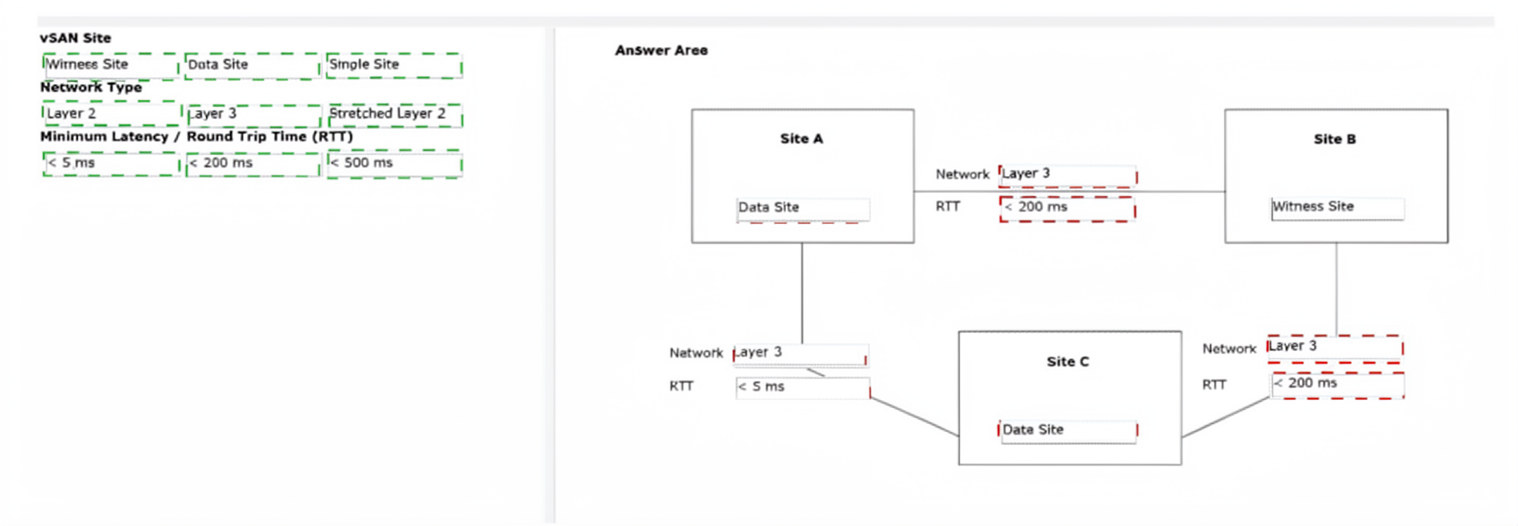
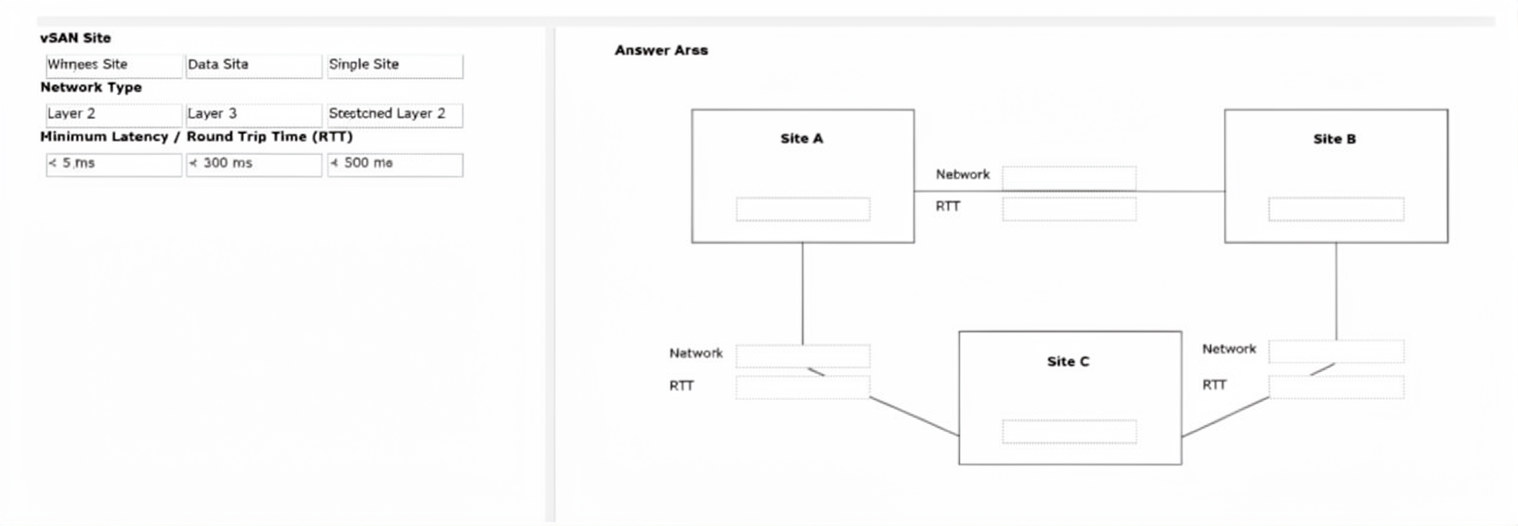
Drag and drop the correct vSAN Site Type, Networking Type and Round Trip Latency (RTT) within the boxes provided to complete the high-level diagram.
Show answerHide answer

Explanation


Explanation:

The question requires configuring a vSAN Stretched Cluster across three sites using 10 new ESXi hosts while minimizing STP issues. Site A hosts production workloads and Site C provides capacity, making them the two data sites. Site B, at capacity with no room for hosts, is ideal for the Witness.

✅ Correct Options:

Site A → Data Site (with hosts), Network Type: Layer 3, RTT: < 5 ms (to Site C)
Site A and Site C serve as the two data sites hosting the ESXi hosts. Layer 3 networking between them with < 5 ms RTT supports synchronous replication for the stretched cluster.

Site B → Witness Site, Network Type: Layer 3, RTT: < 200 ms (to both Site A and Site C)
Site B hosts only the Witness appliance (lightweight). Layer 3 with < 200 ms RTT to each data site meets witness communication requirements.

Site C → Data Site (with hosts), Network Type: Layer 3, RTT: < 5 ms (to Site A), < 200 ms (to Site B)
Site C acts as the second data site with multiple hosts for capacity and future growth. Layer 3 networking avoids STP issues.

❌ Incorrect options:

(These would violate stretched cluster rules or site roles.)
Placing Witness at Site A or C, using Layer 2 between data sites, or exceeding latency limits (e.g., >5 ms between data sites) would fail deployment or performance requirements.

🔧 Reference:
→ vSAN Stretched Cluster Design Considerations
Details data site RTT < 5 ms and witness RTT < 200 ms.

→ vSAN Stretched Cluster Networking
Recommends Layer 3 to minimize STP impact.
Question 5 Choose 1
An administrator is planning the deployment of a new VMware Cloud Foundation (VCF) Workload Domain. The storage design decisions for the solution are:

• NFS
• NVMe over RDMA
• No local storage is available to the hosts

What is the storage solution build order for the Workload Domain?
Show answerHide answer

Correct answer: D NFS as principal storage, then add NVMe over RDMA as supplemental storage.

Explanation

Explanation:

The question tests the supported storage build order for a new VCF Workload Domain when no local storage is available on the hosts. Principal storage is configured during domain creation, while supplemental storage is added afterward.

✅ Correct Option:

D. NFS as principal storage, then add NVMe over RDMA as supplemental storage.
With no local storage available, vSAN (OSA or ESA) cannot be used. NFS v3 is fully supported as principal storage for greenfield Workload Domain deployments in VCF 9.0. NVMe over RDMA (NVMe-oF) can then be added as supplemental storage after the domain is created.

❌ Incorrect options:

A. vSAN OSA as principal storage, then add NFS and NVMe over RDMA as supplemental storage.
vSAN OSA requires local storage devices on the hosts, which are not available.

B. vSAN ESA as principal storage, then add NFS and NVMe over RDMA as supplemental storage.
vSAN ESA also requires local NVMe devices and cannot be used as principal storage without local storage.

C. NVMe over RDMA as principal storage, then add NFS as supplemental storage.
NVMe over RDMA is not supported as principal storage in standard greenfield VCF Workload Domain deployments. It is only available as supplemental storage (or via import workflows).

🔧 Reference:
→ Storage Models - VCF 9.0
Details supported principal storage options including NFS v3.

→ VMware Cloud Foundation 9: Now Ready For All Storage
Confirms NVMe over Fabrics (including RDMA) as supplemental in greenfield scenarios.
Question 6 Choose 1
A storage administrator is being presented with the following VMware Cloud Foundation (VCF) architectural details:

• The applications data will require 2.5 PB of capacity.
• The production applications will be hosting archival solutions and gateways.
• There will be some applications deployed for the purpose of testing and development.

What is the optimal principal storage that the administrator can recommend?
Show answerHide answer

Correct answer: A vSAN ESA Storage Clusters

Explanation

Explanation:

This question tests the administrator's ability to identify the correct storage design approach within a VMware Cloud Foundation (VCF) environment based on scale and operational profiles. It requires mapping high-capacity requirements (2.5 PB) alongside diverse mixed workloads (production archives, gateways, and dev/test setups) to the optimal architectural deployment unit.

✅ Correct Option:

A. vSAN ESA Storage Clusters
This option is correct because managing a massive 2.5 PB footprint alongside varied operational profiles requires scaling out via vSAN Express Storage Architecture (ESA) across multiple distinct clusters. Utilizing multiple vSAN ESA Storage Clusters allows the administrator to segregate production archives and dev/test environments into separate failure domains while scaling capacity and performance cleanly.

❌ Incorrect options:

B. vSAN ESA
While vSAN ESA is the correct underlying architecture for modern high-performance, high-capacity NVMe deployments, selecting it as a standalone, singular item does not represent the complete structural design choice. Deploying a single monolithic cluster for a 2.5 PB pool that combines production archives, gateways, and dev/test apps violates workload isolation best practices.

C. vSAN OSA - All Flash
The legacy Original Storage Architecture (OSA) utilizes a two-tier disk group framework (caching and capacity) that introduces higher configuration complexity and lower performance efficiency compared to ESA. At a scale of 2.5 PB, staying on OSA All-Flash increases hardware overhead, cost, and management complexity unnecessarily.

D. vSAN OSA - Hybrid
vSAN OSA Hybrid architecture relies on magnetic spinning disks for capacity and flash devices for caching. Recommending a hybrid framework for a massive 2.5 PB VCF modern deployment is highly suboptimal, as it fails to deliver the throughput, latency profiles, and predictable performance required by production application gateways and modern enterprise workloads.

🔧 Reference:
⇒ VMware Cloud Foundation Planning and Deployment Guide
→ Outlines scale-out cluster guidelines and architecture recommendations for accommodating petabyte-scale application data requirements using vSAN ESA.
Question 7 Choose 1
An administrator is monitoring a vSAN ESA backed workload domain that is dedicated for running AI inferencing. When the administrator navigates to the Storage Performance dashboard in VMware Cloud Foundation Operations, the performance dashboard shows:

• High backend write latency ( > 8 ms)
• Low read latency ( < 1 ms)
• Normal network throughput
• Disk Group Health = Green

Based on the readings above, what would be the explanation?
Show answerHide answer

Correct answer: A This is caused due to transient commit-queue delays, since the workload is exhibiting random-writes saturating ESA’s write buffer.

Explanation

Explanation:

This question tests understanding of vSAN Express Storage Architecture (ESA) performance characteristics and how storage metrics should be interpreted. The key indicators are high backend write latency, low read latency, normal network throughput, and healthy disk groups, which point toward a write-intensive workload rather than a network or hardware problem.

🟢 Correct Option:

A. This is caused due to transient commit-queue delays, since the workload is exhibiting random-writes saturating ESA’s write buffer.
The metrics indicate that reads are being served efficiently while writes are experiencing delays. Since network throughput is normal and storage health remains green, the issue is unlikely to be hardware or network related. AI inferencing workloads can generate bursts of metadata and random write operations that temporarily increase backend write latency. Such conditions can create commit-queue delays as ESA processes and persists incoming writes, resulting in elevated write latency without affecting read performance.

🔴 Incorrect Options:

B. A wrongly sized read cache tier is throttling the write buffer, thus forcing the reads to trespass to the capacity tier.
vSAN ESA does not use the traditional cache-and-capacity architecture found in vSAN Original Storage Architecture (OSA). The observed low read latency also contradicts the claim that reads are being forced into a slower storage tier. The performance data does not indicate a read-path bottleneck.

C. The workload’s small-block writes are compressed inline, lowering backend throughput and increasing cache misses.
ESA performs efficient data services such as compression, but compression alone does not typically create the observed pattern of high write latency with consistently low read latency. Furthermore, cache misses are not reflected in the provided metrics and would likely impact read performance as well.

D. A vSAN network congestion event on the vSAN TCP port 2233 is throttling mirror acknowledgements.
The dashboard explicitly reports normal network throughput, which makes network congestion an unlikely cause. If mirror acknowledgements were being delayed by network issues, additional network-related symptoms would be expected, including elevated communication latency and broader storage performance degradation.

🔧 Reference:
⇒ vSAN ESA Performance and Architecture Overview
Explains ESA architecture, write handling, and performance behavior under write-intensive workloads.

⇒ Monitoring vSAN Performance Metrics
Describes interpretation of latency, throughput, and health metrics when analyzing vSAN performance issues.
Question 8 Choose 1
An administrator notices alerts triggering IOPS and Disk Throughput storage performance problems in the Fibre Channel datastore in a VMware Cloud Foundation (VCF) Workload Domain.
What can the administrator review to identify which Virtual Machines (VMs) may be experiencing storage IOPS and disk throughput performance issues?
Show answerHide answer

Correct answer: C Live! vSphere Heavy Hitter VM dashboard.

Explanation

Explanation:

The question tests knowledge of monitoring tools in VMware Cloud Foundation to identify individual VMs causing high IOPS and disk throughput issues on a Fibre Channel datastore.

✅ Correct Option:

C. Live! vSphere Heavy Hitter VM dashboard.
This dashboard is designed to highlight VMs with the highest storage resource consumption. It provides real-time visibility into IOPS, throughput, and latency at the VM level, allowing administrators to quickly pinpoint which VMs are contributing to performance alerts on traditional datastores like Fibre Channel VMFS.

❌ Incorrect options:

A. vSAN Health dashboard.
This dashboard is specific to vSAN clusters and focuses on vSAN health, capacity, and object compliance. It does not monitor performance of external Fibre Channel datastores or individual VM IOPS.

B. vSphere Storage Inventory dashboard.
This provides an overview of storage inventory, capacity, and general health but does not offer detailed per-VM IOPS or throughput analysis for identifying heavy hitters.

D. Storage Operations page.
The Storage Operations page gives high-level cluster and datastore performance KPIs (IOPS, throughput, latency) but lacks granular VM-level breakdown to identify specific problematic virtual machines.

🔧 Reference:
→ VCF Operations - Storage Performance Monitoring
Confirms use of Heavy Hitter dashboards for VM-level storage performance analysis.
Question 9 Choose 1
An administrator reports that after rebooting one host in a vSAN cluster configured with Data-at-Rest Encryption using an external Key Management Server (KMS), the host shows all vSAN disk groups as unmounted. The KMS is online and reachable from all hosts.

In vCenter, the host displays the following event:

“Failed to retrieve encryption key from KMS.”

Key ID:

All other hosts in the cluster remain healthy and show “Encryption: Enabled.”
Why did the encryption key retrieval fail for this host?
Show answerHide answer

Correct answer: A The host’s trust relationship or certificate with the KMS is invalid or missing.

Explanation

Explanation:

This question tests the administrator's understanding of how vSAN Data-at-Rest Encryption authenticates with an external KMS. The scenario isolates the issue to a single host after a reboot, while the KMS is reachable and all other hosts are healthy — pointing directly to a host-level trust or certificate problem, not a cluster-wide or KMS-side failure.

✅ Correct Option:

A. The host's trust relationship or certificate with the KMS is invalid or missing.
In vSAN encryption with an external KMS, each ESXi host must maintain its own trusted certificate relationship with the KMS to independently retrieve encryption keys. After a reboot, if the host's KMS certificate is expired, missing, or revoked, the host cannot authenticate and key retrieval fails. Since only this host is affected and the KMS is online, the trust/certificate relationship is the definitive root cause.

❌ Incorrect Options:

B. The cluster requires a Deep Rekey operation to restore access to the encrypted disks.
A Deep Rekey operation re-encrypts data with a new Key Encryption Key (KEK) and is used proactively for key rotation — not for troubleshooting key retrieval failures on a single host. It would not resolve a certificate or trust issue and is irrelevant when only one host fails while others remain healthy.

C. The vCenter Server has not been restarted to refresh the encryption key cache.
vCenter Server does not cache or distribute encryption keys to ESXi hosts in external KMS configurations. Each host communicates directly and independently with the KMS. Restarting vCenter would have no impact on a host's ability to retrieve its encryption key from the KMS server.

D. The TPM on the host failed to unlock the data encryption keys.
TPM (Trusted Platform Module) is used in vSphere Native Key Provider scenarios to protect encryption keys locally. In an external KMS configuration, the host does not rely on TPM to unlock data encryption keys. TPM failure is irrelevant to external KMS-based key retrieval workflows in vSAN.

🔧 Reference:
⇒ VMware vSAN Data-at-Rest Encryption – KMS and Host Trust → Confirms each ESXi host must establish and maintain its own trusted certificate with the external KMS to retrieve encryption keys independently after reboot.
⇒ VMware vSphere Security Guide – Encrypting vSAN with External KMS → Validates that key retrieval failures on individual hosts are caused by missing or invalid KMS trust relationships, not cluster-wide or vCenter-level issues.
Question 10
A VMware Cloud Foundation (VCF) Management Domain is requested to be deployed with the following information:

. 6 blade style hosts with no local storage beyond the operating system.
. 4 25 Gb networking cards installed in each host.
. A 30 TB external array configured to support NVMe/TCP only.
. 2 dVS switches, one configured for storage isolation and one for all other traffic.
. Aria Operations is not currently deployed in the environment.

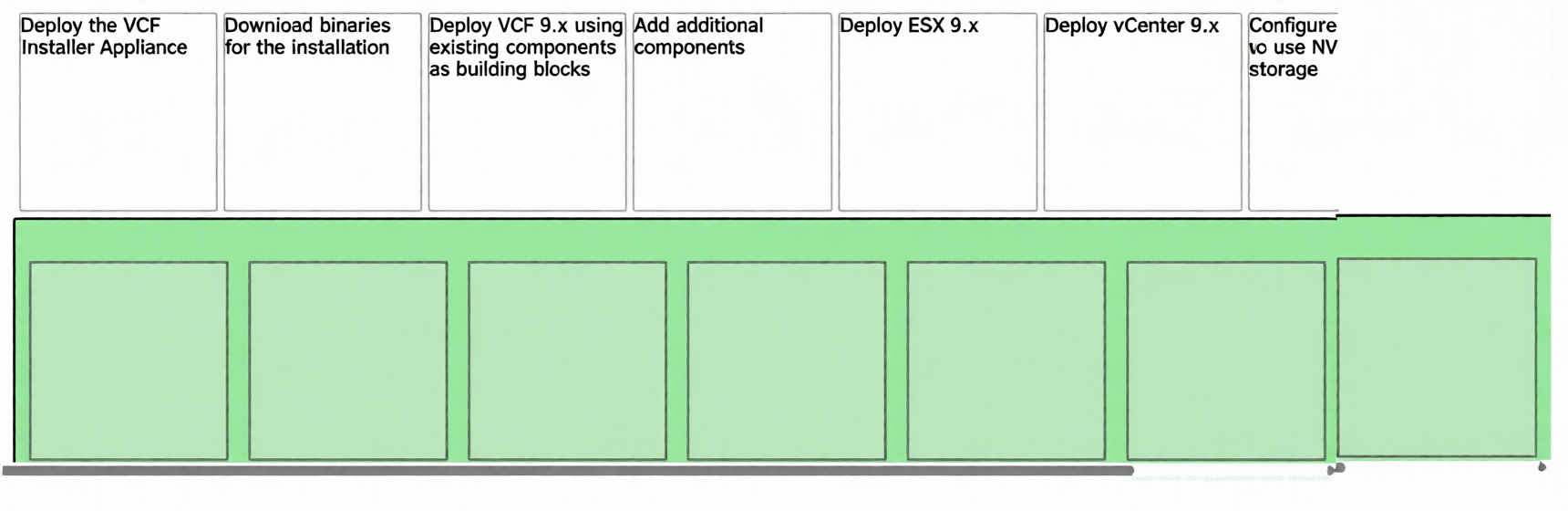
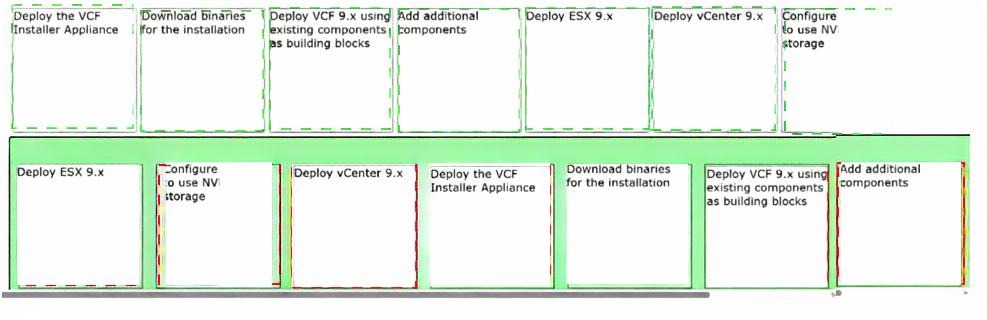
Place the general steps in sequence for converging VCF on to this configuration.
Show answerHide answer

Explanation


Explanation:

This question tests knowledge of the VCF 9.0 "converge" workflow for greenfield deployments where NVMe/TCP principal storage is required. Since NVMe/TCP is not available in automated greenfield workflows, the correct sequence follows VMware's documented process: first build the vSphere foundation manually, then use VCF Installer to convert it into a VCF management domain .

✔️ Step 1 (Deploy ESX 9.x):
For NVMe/TCP principal storage, the process begins by manually installing ESXi 9.x on all 6 blade hosts. This establishes the hypervisor layer before any storage or management components can be configured .

✔️ Step 2 (Configure to use NV storage):
NVMe/TCP storage must be configured at the ESXi host level before vCenter deployment. This involves configuring NVMe/TCP adapters, discovering NVMe namespaces, and presenting the 30 TB external array to all hosts .

✔️ Step 3 (Deploy vCenter 9.x):
After ESXi hosts have access to the NVMe/TCP storage, deploy the vCenter Server 9 appliance on one of the hosts. The vCenter must be placed on a datastore residing on the pre-configured NVMe/TCP storage .

✔️ Step 4 (Deploy the VCF Installer Appliance):
With vCenter managing the ESXi cluster and NVMe/TCP datastores, download and deploy the VCF Installer appliance. VCF Installer 9.0 replaces the older Cloud Builder appliance used in previous versions .

✔️ Step 5 (Download binaries for the installation):
Before initiating the converge workflow, use VCF Installer to download all necessary installation binaries for VCF components, including SDDC Manager and NSX .

✔️ Step 6 (Deploy VCF 9.x using existing components as building blocks):
Execute the "Converge" workflow within VCF Installer, pointing it to the existing vCenter. This converts the vSphere environment into a VCF management domain and uses the pre-configured NVMe/TCP datastore as principal storage .

✔️ Step 7 (Add additional components):
After successful converge, add additional components such as NSX networking, configure the second distributed vSwitch for storage isolation, and optionally deploy Aria Operations if required .

❌ Common Sequencing Errors to Avoid:

Deploy VCF Installer first:
Deploying the VCF Installer appliance before ESXi hosts and storage configuration is incorrect because the installer's converge workflow requires an existing vSphere environment with configured storage to operate on .

Missing NVMe/TCP configuration order:
Configuring NVMe/TCP storage after vCenter deployment is invalid because vCenter deployment requires an accessible datastore. The storage must be presented to ESXi hosts before vCenter installation .

Placing VCF deployment before component downloads:
Attempting to deploy VCF 9.x before downloading binaries would fail because the installation artifacts are not yet available locally. Download must precede deployment .

🔧 Reference:
→ Broadcom Support KB 416270: Supporting all Principal Storage Options in VMware Cloud Foundation 9 – Confirms the complete converge workflow for NVMe/TCP principal storage including manual ESXi deployment, storage configuration, vCenter deployment, then VCF Installer converge.

→ Broadcom TechDocs: VCF Installer – Details the VCF Installer appliance deployment and converge workflow for converting existing vSphere environments.
Full mock exam

Sit the 3V0-23.25 exam before exam day

Full-length mocks with the same number of questions and the same time limit as the real 3V0-23.25 exam. Every attempt draws a new set of questions from the full bank, so you can keep going until you pass comfortably.

Get full 3V0-23.25 mock exam
  • 60questions per mock
  • 135 mintime limit
  • 76questions in the bank
  • Newmock on every attempt