A VMware Cloud Foundation (VCF) Management Domain is requested to be deployed with the following
information:
. 6 blade style hosts with no local storage beyond the operating system.
. 4 25 Gb networking cards installed in each host.
. A 30 TB external array configured to support NVMe/TCP only.
. 2 dVS switches, one configured for storage isolation and one for all other traffic.
. Aria Operations is not currently deployed in the environment.
Place the general steps in sequence for converging VCF on to this configuration.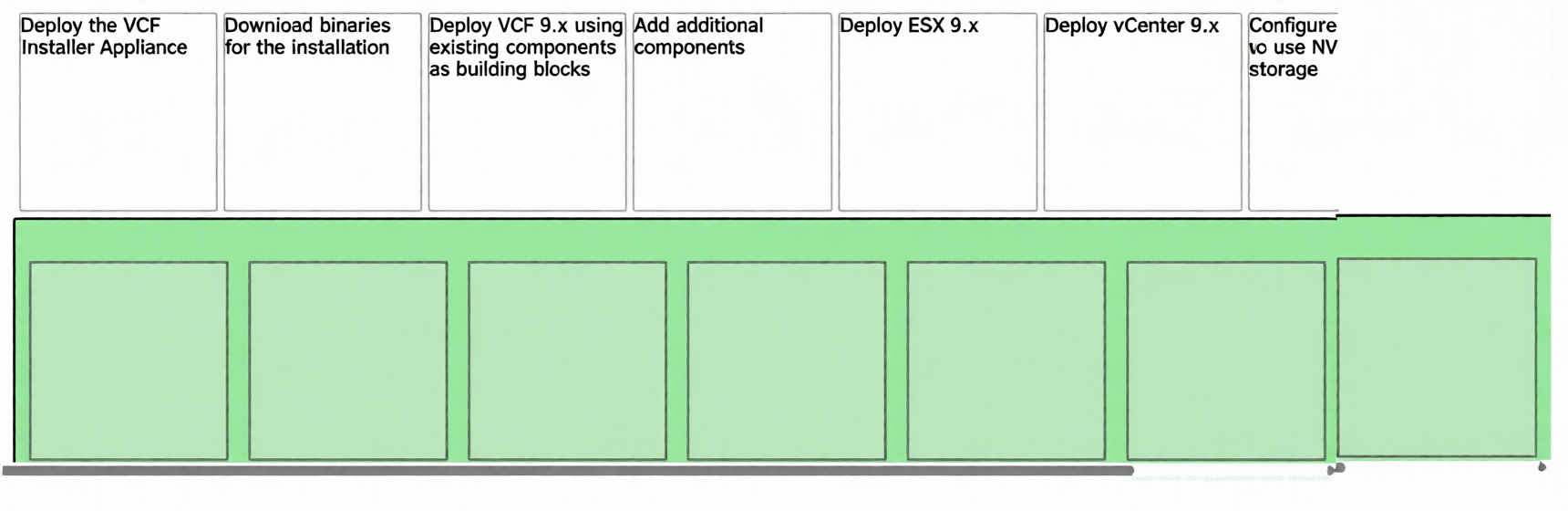
. 6 blade style hosts with no local storage beyond the operating system.
. 4 25 Gb networking cards installed in each host.
. A 30 TB external array configured to support NVMe/TCP only.
. 2 dVS switches, one configured for storage isolation and one for all other traffic.
. Aria Operations is not currently deployed in the environment.
Place the general steps in sequence for converging VCF on to this configuration.
Show answerHide answer
Explanation
Explanation:
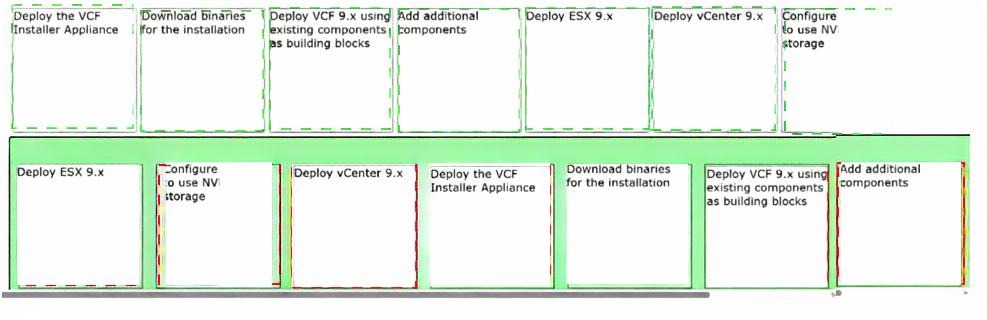
This question tests knowledge of the VCF 9.0 "converge" workflow for greenfield deployments where NVMe/TCP principal storage is required. Since NVMe/TCP is not available in automated greenfield workflows, the correct sequence follows VMware's documented process: first build the vSphere foundation manually, then use VCF Installer to convert it into a VCF management domain .
✔️ Step 1 (Deploy ESX 9.x):
For NVMe/TCP principal storage, the process begins by manually installing ESXi 9.x on all 6 blade hosts. This establishes the hypervisor layer before any storage or management components can be configured .
✔️ Step 2 (Configure to use NV storage):
NVMe/TCP storage must be configured at the ESXi host level before vCenter deployment. This involves configuring NVMe/TCP adapters, discovering NVMe namespaces, and presenting the 30 TB external array to all hosts .
✔️ Step 3 (Deploy vCenter 9.x):
After ESXi hosts have access to the NVMe/TCP storage, deploy the vCenter Server 9 appliance on one of the hosts. The vCenter must be placed on a datastore residing on the pre-configured NVMe/TCP storage .
✔️ Step 4 (Deploy the VCF Installer Appliance):
With vCenter managing the ESXi cluster and NVMe/TCP datastores, download and deploy the VCF Installer appliance. VCF Installer 9.0 replaces the older Cloud Builder appliance used in previous versions .
✔️ Step 5 (Download binaries for the installation):
Before initiating the converge workflow, use VCF Installer to download all necessary installation binaries for VCF components, including SDDC Manager and NSX .
✔️ Step 6 (Deploy VCF 9.x using existing components as building blocks):
Execute the "Converge" workflow within VCF Installer, pointing it to the existing vCenter. This converts the vSphere environment into a VCF management domain and uses the pre-configured NVMe/TCP datastore as principal storage .
✔️ Step 7 (Add additional components):
After successful converge, add additional components such as NSX networking, configure the second distributed vSwitch for storage isolation, and optionally deploy Aria Operations if required .
❌ Common Sequencing Errors to Avoid:
Deploy VCF Installer first:
Deploying the VCF Installer appliance before ESXi hosts and storage configuration is incorrect because the installer's converge workflow requires an existing vSphere environment with configured storage to operate on .
Missing NVMe/TCP configuration order:
Configuring NVMe/TCP storage after vCenter deployment is invalid because vCenter deployment requires an accessible datastore. The storage must be presented to ESXi hosts before vCenter installation .
Placing VCF deployment before component downloads:
Attempting to deploy VCF 9.x before downloading binaries would fail because the installation artifacts are not yet available locally. Download must precede deployment .
🔧 Reference:
→ Broadcom Support KB 416270: Supporting all Principal Storage Options in VMware Cloud Foundation 9 – Confirms the complete converge workflow for NVMe/TCP principal storage including manual ESXi deployment, storage configuration, vCenter deployment, then VCF Installer converge.
→ Broadcom TechDocs: VCF Installer – Details the VCF Installer appliance deployment and converge workflow for converting existing vSphere environments.