VMware certification · Exam 3V0-23.25

3V0-23.25 Mock Exam

Advanced VMware Cloud Foundation 9.0 Storage

Free 3V0-23.25 questions on Plan and Design the VMware Solution, each with the answer and an explanation.

20 questions · 45 minutes · free, no sign-up

Plan and Design the VMware Solution questions

1–6 of 6 free
Question 1 Choose 1
An administrator has been tasked with deploying a new VMware Cloud Foundation (VCF) environment that includes a Management Domain and two workload domains. Compliance regulations require that production and non-production workloads reside in separate failure domains, with the production workload environment using low-latency block storage and the non-production environment relying on high-capacity file-based storage.
Which combination of supported non-vSAN storage solutions should the administrator recommend to meet these requirements?
Show answerHide answer

Correct answer: D Management domain on VMFS over Fibre Channel, production workload domain on VMFS over NVMe/FC, and non-production workload domain on NFS v4.1

Explanation

Explanation:

The question evaluates supported non-vSAN principal storage options in VMware Cloud Foundation 9.0. It focuses on separating production and non-production workloads into different failure domains while meeting specific performance needs: low-latency block storage for production and high-capacity file storage for non-production.

✅ Correct Option:

D. Management domain on VMFS over Fibre Channel, production workload domain on VMFS over NVMe/FC, and non-production workload domain on NFS v4.1
This option meets all requirements. VMFS over Fibre Channel is supported as principal storage for the Management Domain in greenfield deployments. VMFS on NVMe/FC delivers the low-latency block storage needed for production workloads. NFS v4.1 provides high-capacity file-based storage for non-production, ensuring separate failure domains.

❌ Incorrect options:

A. Management domain on vVols over NFS, production workload domain on VMFS over iSCSI, and nonproduction workload domain on SMB
vVols is not recommended as principal storage for the Management Domain. SMB is not supported as principal storage in VCF. iSCSI has restrictions for greenfield principal deployments in this context.

B. Management domain on local VMFS datastores, production workload domain on iSCSI, and nonproduction workload domain on NFS v3
Local VMFS datastores are not supported as principal storage for the Management Domain, which requires shared storage. iSCSI is not available as principal storage for greenfield Management Domain deployments.

C. Management domain on vSAN ESA, production workload domain on vSAN HCI Mesh, and nonproduction workload domain on vSAN File Services
This solution is fully vSAN-based, which does not satisfy the non-vSAN requirement. It fails to provide separate external block and file storage for distinct failure domains.

🔧 Reference:
→ VMware Cloud Foundation 9: Now Ready For All Storage
Confirms expanded non-vSAN support including FC VMFS for Management Domain.

→ Storage Models - VCF 9.0 Documentation
Details principal storage options like Fibre Channel, NVMe/FC, and NFS protocols.
Question 2 Choose 4
An administrator is tasked with deploying a VMware Cloud Foundation (VCF) Workload Domain that meets the following requirements:

• vSAN ESA as principal storage
• RAID-6 with FTT=2
• Support for Storage Traffic Separation

The administrator is provided the following hardware to perform the task:

• Four ESX hosts, each host contains:

24 CPU cores
96 GB memory
Two 25GbE network NICs
12 NVMe devices 4 TB each, connected to a single SATA/SAS/NVMe Tri-mode controller What four changes must the administrator make to the hardware before deploying the new Workload Domain?
(Choose four.)
Show answerHide answer

Correct answer: B, D, E, G Increase the ESX host count to a minimum of six.Increase the Tri-mode controller quantity on each host to two, with six NVMe devices connected to each.Increase the network NICs on each host to minimum of four 25 GbE network NICs.Increase the memory on each host to a minimum 128 GB.

Explanation

Explanation:

This question tests knowledge of vSAN ESA ReadyNode and VMware Cloud Foundation hardware requirements. The workload domain must support vSAN ESA, RAID-6 (FTT=2), and Storage Traffic Separation (STS). The provided hardware does not meet several minimum requirements, so the administrator must modify the configuration before deployment can proceed successfully.

🟢 Correct Option:

B. Increase the ESX host count to a minimum of six.
vSAN ESA RAID-6 with FTT=2 requires sufficient hosts to tolerate multiple failures while maintaining data availability and compliance with the selected storage policy. A four-host cluster is insufficient for this design requirement. Expanding the cluster to at least six hosts provides the capacity and fault-domain support needed for ESA RAID-6 configurations in a VCF workload domain.

🟢 Correct Option:

D. Increase the Tri-mode controller quantity on each host to two, with six NVMe devices connected to each.
vSAN ESA supports NVMe devices behind certified controllers, but large numbers of drives attached to a single controller can create bottlenecks. Distributing the twelve NVMe devices across two controllers improves performance, resiliency, and compliance with validated ESA hardware designs. This configuration aligns with supported ReadyNode guidance for enterprise ESA deployments.

🟢 Correct Option:

E. Increase the network NICs on each host to minimum of four 25 GbE network NICs.
Storage Traffic Separation requires dedicated network paths for different traffic types, including vSAN and vMotion. With only two NICs, there is insufficient network redundancy and traffic segregation capability. Increasing to four 25 GbE adapters enables the administrator to implement separated traffic flows while maintaining high availability and performance for the ESA workload domain.

🟢 Correct Option:

G. Increase the memory on each host to a minimum 128 GB.
The supplied hosts contain only 96 GB of memory, which falls below the minimum memory requirement for ESA-based workload domain deployments. Increasing memory to at least 128 GB ensures compliance with VCF and ESA hardware requirements while providing sufficient resources for storage services and workload operations.

🔴 Incorrect Options:

A. Increase the ESX host count to a minimum of seven.
While seven hosts would support the workload, it is not the minimum change required. The requirement is to meet supported deployment standards, and six hosts are sufficient for the specified ESA RAID-6 and FTT=2 configuration.

C. Increase the CPU quantity on each host to a minimum 32.
The provided 24-core processors do not violate ESA deployment requirements. vSAN ESA does not mandate a minimum of 32 CPU cores per host for the described configuration, making this upgrade unnecessary.

F. Replace the network NICs on each host to a minimum of two 100 GbE network NICs.
vSAN ESA benefits from high-speed networking, but 100 GbE adapters are not required for Storage Traffic Separation. Supported designs can meet the requirements using additional 25 GbE adapters, making this replacement unnecessary.

H. Replace the Tri-mode controller on each host with a dedicated NVMe controller.
vSAN ESA supports certified Tri-mode controllers when used in validated hardware configurations. The issue is the controller layout and drive distribution rather than the controller technology itself. Replacing the controller is not required.

🔧 Reference:
⇒ VMware Cloud Foundation 9 Storage and vSAN ESA Requirements
Confirms hardware, networking, and storage requirements for VCF workload domains using vSAN ESA.

⇒ vSAN ESA Planning and Deployment Guide
Provides guidance on ESA cluster sizing, RAID-6 requirements, controller design, and Storage Traffic Separation prerequisites.
Question 3 Choose 1
A storage architect is designing a vSAN solution that enforces quotas and Access Based Enumeration (ABE) on all file shares.
What should the architect highlight as a design decision implication?
Show answerHide answer

Correct answer: A When creating the share, enable quotas and ABE under SMB settings.

Explanation

Explanation:

This question tests knowledge of vSAN File Services quota and Access Based Enumeration (ABE) configuration. The architect needs to understand where and how these features are applied. The search results from official VMware/Broadcom documentation confirm that both quotas and ABE are configured on a per-share basis during share creation, specifically within SMB share settings .

✔️ Option A (When creating the share, enable quotas and ABE under SMB settings):
The official vSAN File Services documentation confirms that both quotas and Access Based Enumeration are configured on a per-file share basis . When creating an SMB share, administrators can set share warning thresholds and share hard quotas under "Storage space quotas" . The ABE option, which hides files and folders users lack permission to access, appears exclusively under SMB protocol settings .

❌ Option B (Quotas supported only on NFS; ABE supported only on SMB):
This is incorrect. Official Broadcom documentation confirms that storage space quotas (both warning threshold and hard quota) are available for both NFS and SMB shares when creating a file share . ABE is indeed only available for SMB shares , but the statement about quotas is false.

❌ Option C (Deploy separate file services servers for quotas and ABEs):
This is incorrect. vSAN File Services does not require separate servers for quotas versus ABE functionality. The file service architecture places file service VMs (FSVMs) on each host, and each FSVM contains a file server that provides both NFS and SMB services . Quotas and ABE are feature settings, not infrastructure components requiring dedicated servers.

❌ Option D (Quotas and ABEs must be configured at cluster level, not per-share):
This is incorrect. Official Broadcom documentation explicitly states that quotas can be enabled on a "per-file share basis" . The vSAN API documentation for VsanFileShareConfig shows quota is a property of individual file share configurations . ABE is also selected individually for each SMB share during creation, not at the cluster level .

🔧 Reference:
→ Broadcom TechDocs: Create a vSAN File Share – Confirms storage space quotas (warning threshold and hard quota) and Access Based Enumeration for SMB shares are configured per-share during creation.
→ Broadcom VMware Docs: vSAN File Services – Confirms quotas on a per-file share basis and ABE as a security mechanism for SMB shares.
Question 4
An administrator is responsible for managing a VMware Cloud Foundation (VCF) Private Cloud. The following information has been provided about the environment:

• There are 3 customer datacenters, Site A, Site B and Site C.
• The datacenter at Site A runs all Production Services.
• The datacenter at Site B has reached capacity and there is no space for additional physical hardware.
• The datacenter at Site C has been commissioned to replace Site B, because there is more rack space and power capacity to cater for future demand. The administrator has been tasked with identifying the networking requirements for a new VMware vSAN Stretched Cluster with the following requirements:

• The solution will deploy a total of 10 new ESX host servers to create a VMware vSAN Stretched Cluster.
• The solution must deploy appropriate networking to ensure minimal disruption from issues with Spanning Tree Protocol (STP).

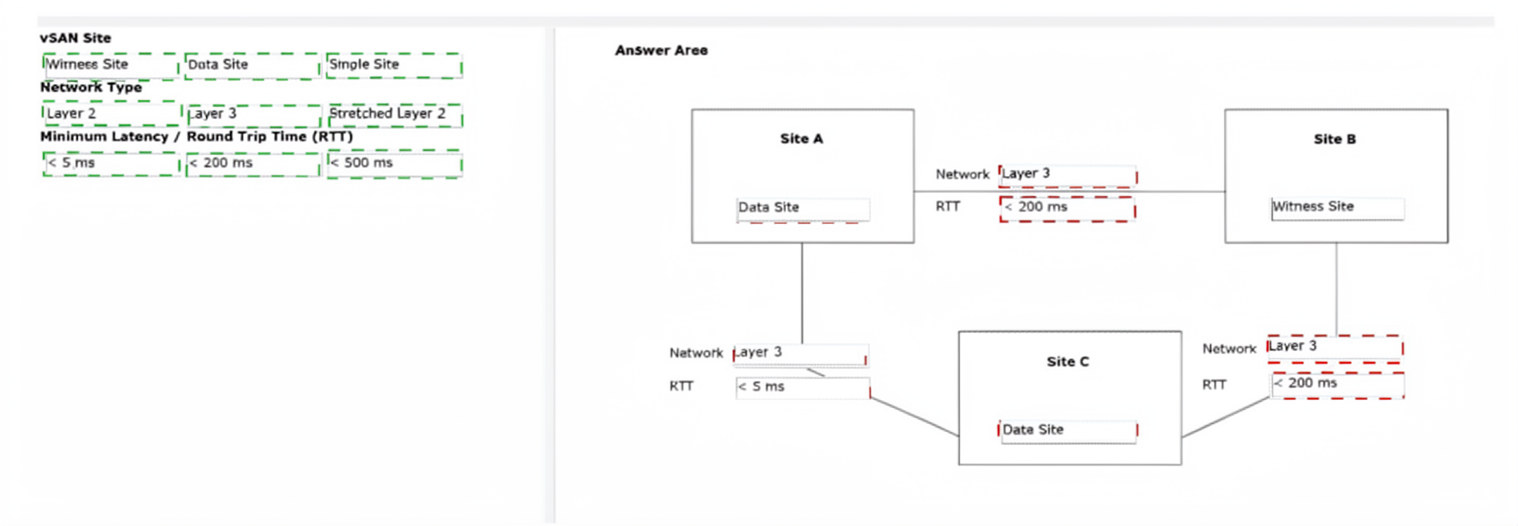
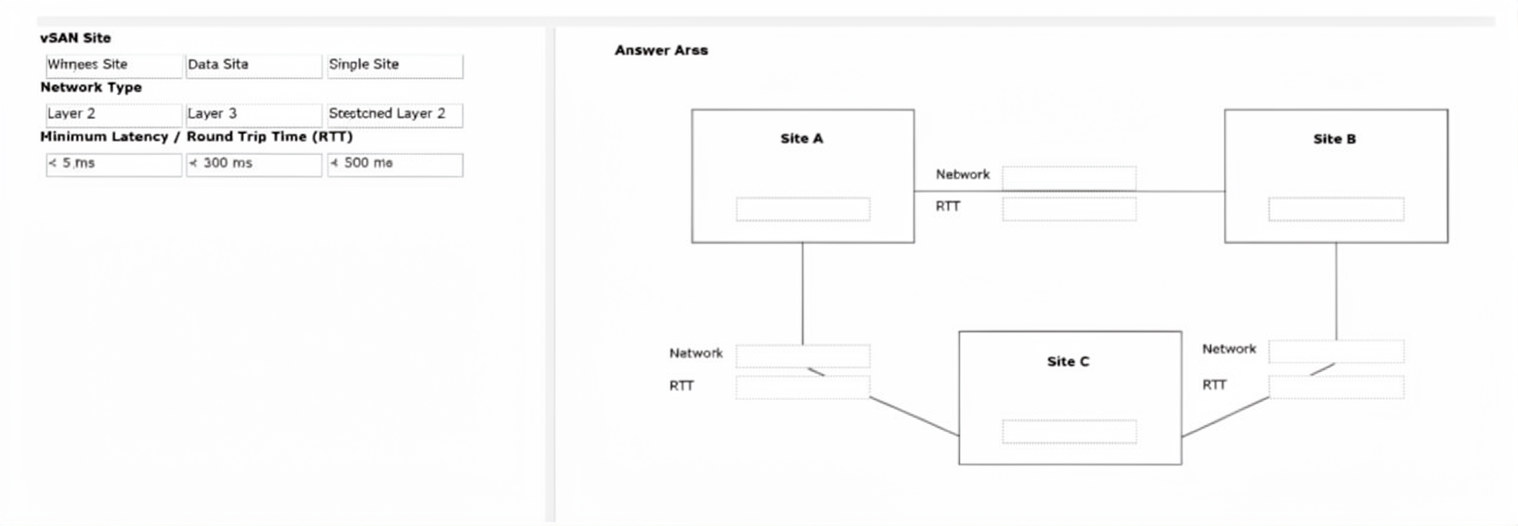
Drag and drop the correct vSAN Site Type, Networking Type and Round Trip Latency (RTT) within the boxes provided to complete the high-level diagram.
Show answerHide answer

Explanation


Explanation:

The question requires configuring a vSAN Stretched Cluster across three sites using 10 new ESXi hosts while minimizing STP issues. Site A hosts production workloads and Site C provides capacity, making them the two data sites. Site B, at capacity with no room for hosts, is ideal for the Witness.

✅ Correct Options:

Site A → Data Site (with hosts), Network Type: Layer 3, RTT: < 5 ms (to Site C)
Site A and Site C serve as the two data sites hosting the ESXi hosts. Layer 3 networking between them with < 5 ms RTT supports synchronous replication for the stretched cluster.

Site B → Witness Site, Network Type: Layer 3, RTT: < 200 ms (to both Site A and Site C)
Site B hosts only the Witness appliance (lightweight). Layer 3 with < 200 ms RTT to each data site meets witness communication requirements.

Site C → Data Site (with hosts), Network Type: Layer 3, RTT: < 5 ms (to Site A), < 200 ms (to Site B)
Site C acts as the second data site with multiple hosts for capacity and future growth. Layer 3 networking avoids STP issues.

❌ Incorrect options:

(These would violate stretched cluster rules or site roles.)
Placing Witness at Site A or C, using Layer 2 between data sites, or exceeding latency limits (e.g., >5 ms between data sites) would fail deployment or performance requirements.

🔧 Reference:
→ vSAN Stretched Cluster Design Considerations
Details data site RTT < 5 ms and witness RTT < 200 ms.

→ vSAN Stretched Cluster Networking
Recommends Layer 3 to minimize STP impact.
Question 5 Choose 1
An administrator is planning the deployment of a new VMware Cloud Foundation (VCF) Workload Domain. The storage design decisions for the solution are:

• NFS
• NVMe over RDMA
• No local storage is available to the hosts

What is the storage solution build order for the Workload Domain?
Show answerHide answer

Correct answer: D NFS as principal storage, then add NVMe over RDMA as supplemental storage.

Explanation

Explanation:

The question tests the supported storage build order for a new VCF Workload Domain when no local storage is available on the hosts. Principal storage is configured during domain creation, while supplemental storage is added afterward.

✅ Correct Option:

D. NFS as principal storage, then add NVMe over RDMA as supplemental storage.
With no local storage available, vSAN (OSA or ESA) cannot be used. NFS v3 is fully supported as principal storage for greenfield Workload Domain deployments in VCF 9.0. NVMe over RDMA (NVMe-oF) can then be added as supplemental storage after the domain is created.

❌ Incorrect options:

A. vSAN OSA as principal storage, then add NFS and NVMe over RDMA as supplemental storage.
vSAN OSA requires local storage devices on the hosts, which are not available.

B. vSAN ESA as principal storage, then add NFS and NVMe over RDMA as supplemental storage.
vSAN ESA also requires local NVMe devices and cannot be used as principal storage without local storage.

C. NVMe over RDMA as principal storage, then add NFS as supplemental storage.
NVMe over RDMA is not supported as principal storage in standard greenfield VCF Workload Domain deployments. It is only available as supplemental storage (or via import workflows).

🔧 Reference:
→ Storage Models - VCF 9.0
Details supported principal storage options including NFS v3.

→ VMware Cloud Foundation 9: Now Ready For All Storage
Confirms NVMe over Fabrics (including RDMA) as supplemental in greenfield scenarios.
Question 6 Choose 1
A storage administrator is being presented with the following VMware Cloud Foundation (VCF) architectural details:

• The applications data will require 2.5 PB of capacity.
• The production applications will be hosting archival solutions and gateways.
• There will be some applications deployed for the purpose of testing and development.

What is the optimal principal storage that the administrator can recommend?
Show answerHide answer

Correct answer: A vSAN ESA Storage Clusters

Explanation

Explanation:

This question tests the administrator's ability to identify the correct storage design approach within a VMware Cloud Foundation (VCF) environment based on scale and operational profiles. It requires mapping high-capacity requirements (2.5 PB) alongside diverse mixed workloads (production archives, gateways, and dev/test setups) to the optimal architectural deployment unit.

✅ Correct Option:

A. vSAN ESA Storage Clusters
This option is correct because managing a massive 2.5 PB footprint alongside varied operational profiles requires scaling out via vSAN Express Storage Architecture (ESA) across multiple distinct clusters. Utilizing multiple vSAN ESA Storage Clusters allows the administrator to segregate production archives and dev/test environments into separate failure domains while scaling capacity and performance cleanly.

❌ Incorrect options:

B. vSAN ESA
While vSAN ESA is the correct underlying architecture for modern high-performance, high-capacity NVMe deployments, selecting it as a standalone, singular item does not represent the complete structural design choice. Deploying a single monolithic cluster for a 2.5 PB pool that combines production archives, gateways, and dev/test apps violates workload isolation best practices.

C. vSAN OSA - All Flash
The legacy Original Storage Architecture (OSA) utilizes a two-tier disk group framework (caching and capacity) that introduces higher configuration complexity and lower performance efficiency compared to ESA. At a scale of 2.5 PB, staying on OSA All-Flash increases hardware overhead, cost, and management complexity unnecessarily.

D. vSAN OSA - Hybrid
vSAN OSA Hybrid architecture relies on magnetic spinning disks for capacity and flash devices for caching. Recommending a hybrid framework for a massive 2.5 PB VCF modern deployment is highly suboptimal, as it fails to deliver the throughput, latency profiles, and predictable performance required by production application gateways and modern enterprise workloads.

🔧 Reference:
⇒ VMware Cloud Foundation Planning and Deployment Guide
→ Outlines scale-out cluster guidelines and architecture recommendations for accommodating petabyte-scale application data requirements using vSAN ESA.

That's the last free question in Plan and Design the VMware Solution

You've seen the free 30% (6 of 20 questions). Full access unlocks every question and full-length 3V0-23.25 mock exams (60 questions, 135 minutes), a different mock on every attempt.

Unlock full mock exam
Full mock exam

Sit the 3V0-23.25 exam before exam day

Full-length mocks with the same number of questions and the same time limit as the real 3V0-23.25 exam. Every attempt draws a new set of questions from the full bank, so you can keep going until you pass comfortably.

Get full 3V0-23.25 mock exam
  • 60questions per mock
  • 135 mintime limit
  • 76questions in the bank
  • Newmock on every attempt