An administrator creates a custom alert in VCF Operations with CPU utilization greater than 99 percent and a
recommendation to reboot the guest operating system. The alert triggers correctly, but the guest operating
system is not restarted automatically. Why is the guest operating system not restarted automatically, as
requested by the recommendation in the alert definition?
Show answerHide answer
Correct answer: CVM Tools must be installed
Explanation
✅ Explanation:
The "Reboot Guest OS" action in VCF Operations has a specific prerequisite: it requires VMware Tools to be installed and running on the target virtual machine .
According to the official documentation, when you configure this action (whether run manually or triggered by an alert), the system first checks that VMware Tools is present on the VM . If VMware Tools is not installed or is installed but not running, the action does not execute, and the job is reported as failed in "Recent Tasks" .
While the alert triggers correctly and VCF Operations attempts to run the recommended action, the action itself fails silently or logs a failure because the prerequisite is not met.
❌ Why the other options are incorrect
A. The Power Off Allowed flag must be set to true - This is not a standard prerequisite for the "Reboot Guest OS" action. The reboot action performs a graceful operating system restart via VMware Tools, not a hard power cycle. There is no "Power Off Allowed" flag required for this specific action.
B. The payload template must be configured - Payload templates are used for custom actions or integrations with external systems (like automation orchestrators). The built-in "Reboot Guest OS" action does not require a payload template to be configured .
D. VM Compatibility must be upgraded - VM hardware compatibility level does not affect the ability of VCF Operations to issue a guest OS reboot command. As long as VMware Tools is installed and the VM is powered on, the action works across supported hardware versions.
📚 Reference
Broadcom TechDocs - Reboot Guest OS Action "The Reboot Guest OS for VM action checks that VMware Tools, which is required, is installed on the target virtual machines, then reboots the guest operating system... If VMware Tools is not installed or installed but not running, the action does not run"
VCF Operations for Logs is using self-signed certificates in a lab. An administrator wants the VCF
Operations for Logs agent communication to remain encrypted. What modification should be made to agent.
ini so the agent accepts the self-signed certificate?
Show answerHide answer
Correct answer: DAdd ssl_accept_any=1 to the agent.ini
Explanation
✅ Explanation:
When VCF Operations for Logs uses a self-signed certificate (as is common in lab environments), the agent will reject the connection by default because it does not trust the certificate authority that signed it.
To force the agent to accept any certificate—including a self-signed one—you must modify the agent configuration file and add the parameter ssl_accept_any=1 (or ssl_accept_any=yes). This setting bypasses certificate validation entirely for the SSL handshake, allowing the encrypted connection to be established even though the certificate is not from a trusted CA.
The official documentation explicitly states: "When the value is set to yes or 1, the agent accepts any certificate from the server and establishes a secure connection for sending data. The default value is no. Because the server presents a self-signed certificate by default, you must set the value of ssl_accept_any to 1".
This parameter is added under the [server] section of the configuration file, which is typically located at /var/lib/loginsight-agent/liagent.ini on Linux systems.
❌ Why Other Options Are Incorrect
A. Copy the self-signed certificate to the cert sub-directory
This is not sufficient. While copying the certificate to the agent's trusted store can work for CA-signed certificates (using ssl_ca_path), it does not automatically make the agent trust a self-signed certificate. The agent will still reject it unless the ssl_accept_any flag is explicitly enabled or the exact certificate is properly imported into the trust store with the correct configuration.
B. Add port=9000 to the agent.ini
Port 9000 is used for cfapi communication without SSL encryption. The requirement states the administrator wants the communication to remain encrypted. Changing the port to 9000 would deactivate SSL entirely, violating the encryption requirement.
C. Add ssl_accept_any_trusted=yes to the agent.ini
This parameter serves a different purpose. It controls whether the agent accepts a new CA-signed certificate when it already has a different trusted CA certificate stored locally. It does not force acceptance of self-signed certificates. For self-signed certificates, ssl_accept_any=yes is required, not ssl_accept_any_trusted.
E. Add proto=syslog to the agent.ini
This changes the protocol from the default cfapi to syslog, but does nothing to resolve certificate trust issues. The agent would still reject the self-signed certificate regardless of the protocol used. Additionally, the syslog protocol is less efficient for structured log data than cfapi.
📚 Reference:
ssl_accept_any=1Forces agent to accept any certificate (including self-signed). Required for lab environments with self-signed certs
ssl_accept_any_trusted=yesAllows accepting a new CA-signed certificate when a different trusted CA cert is already stored
An administrator has been tasked with assigning a policy to a group of VMs. The group should update
automatically when the application owner adds or deletes VMs. The VMs do not use the same naming convention and are deployed on different subnets. What three actions must the administrator take? (Choose
three.)
Show answerHide answer
Correct answer: B, D, ESelect tag as the criteria for group membership
Add the same tag to the selected virtual machines
Create a custom group
Explanation
Explanation:
To automatically assign policies to a dynamic set of virtual machines that lack a common naming convention or network subnet, the administrator must leverage a metadata-driven dynamic grouping strategy within VCF Operations:
Create a custom group (Result E): A custom group acts as the logical container used to assign policies across infrastructure objects. Instead of a static list, this group must be configured with dynamic membership rules.
Select tag as the criteria for group membership (Result B): Since naming patterns and subnets vary, standard string matching cannot be used. Selecting a vSphere tag or a VCF Operations custom tag as the dynamic criteria ensures that the group automatically adds or deletes member VMs based on whether they possess that specific metadata attribute.
Add the same tag to the selected virtual machines (Result D): The application owner applies this specific tag to any newly deployed VM or removes it when decommissioning a VM. The VCF Operations inventory collection engine detects this change during its next collection cycle and automatically updates the custom group’s membership, ensuring continuous, automated policy alignment.
Why Other Options Are Incorrect
A and F are incorrect: Altering production network subnets or manually re-arranging VMs into dedicated inventory folders introduces unnecessary infrastructure overhead and does not guarantee automated, dynamic policy inheritance within VCF Operations.
C is incorrect: Adding each VM manually as an object makes the group membership static. It would fail to update automatically when the application owner adds or deletes virtual machines.
References
VMware Cloud Foundation 9.0 Policy Management Guide: Creating Custom Object Groups -> Configuring Dynamic Membership Rules with Tags.
VMware Aria Operations User Guide: Using Custom Groups to Automate Policy Assignment Across Variable Workloads.
An administrator is tasked with collecting metrics from multiple VCF Private Clouds. The environment
contains two VCF Fleets, each Fleet has two VCF instances, each VCF instance has one Management Domain
and two Workload Domains, there must be no single point of failure, and each domain requires dedicated
collectors. What is the minimum number of collectors the administrator must install?
Show answerHide answer
Correct answer: D12
Explanation
✅ Explanation:
The administrator must deploy collector groups with high availability to meet the "no single point of failure" requirement. VCF Operations documentation states that "you can group two or more cloud proxies to form a collector group" and that this "ensures that there is no single point of failure in your cloud environment" .
Environment breakdown:
2 VCF Fleets × 2 VCF instances per Fleet = 4 VCF instances
Each instance: 1 Management Domain + 2 Workload Domains = 3 domains
Total domains = 4 × 3 = 12 domains
Because "each domain requires dedicated collectors," each domain must have its own collector group . With HA requiring a minimum of 2 cloud proxies per collector group , the calculation is:
12 domains × 2 collectors = 12 collectors
A single collector group cannot serve multiple domains when the "dedicated collectors per domain" requirement applies .
❌ Why Other Options Are Incorrect
A. 6 – This assumes each collector group can monitor multiple domains while still providing HA (3 domains per group), which violates the "dedicated collectors per domain" requirement.
B. 4 – This incorrectly assumes collectors can be shared across all domains and ignores the HA requirement entirely.
C. 10 – This is an odd number that cannot provide proper HA (HA requires pairs). Additionally, it undercounts the required collector groups for 12 domains.
📚 References
Broadcom TechDocs: Collecting Data with Cloud Proxy in VCF Operations – "Cloud proxies provide high availability...you can group two or more cloud proxies to form a collector group"
Broadcom TechDocs: Adding a Collector Group – Details HA activation requiring virtual IP configuration
A VCF Operations Developer has been tasked with importing metrics and dashboards for a custom
application in the enterprise environment. The developer has asked the VCF administrator for a Management
Pack Builder environment. What step should be taken to prepare the environment?
Show answerHide answer
Correct answer: BDownload and deploy the Management Pack Builder Appliance OVA
Explanation
✅ Explanation:
Management Pack Builder is a separate virtual appliance that must be deployed before a developer can create custom management packs for importing metrics and dashboards from third-party or custom applications. The administrator must download the Management Pack Builder OVA from the Broadcom Support Portal and deploy it to the vCenter environment where VCF Operations runs .
After deployment, the developer can access Management Pack Builder from the VCF Operations interface under Development Center in the left menu . The tool provides a no-code wizard for defining data sources, API requests, objects, relationships, and events to build custom management packs .
❌ Why Other Options Are Incorrect
A. Enable the "Management Pack Builder" feature flag in global settings – This is incorrect. Management Pack Builder is not a feature flag that can be toggled on. It is a separate appliance that must be deployed and is then automatically available in the VCF Operations interface .
C. Give the developer the ContentAdmin role for the VCF Operations instance – While role assignment may be necessary for accessing the tool after deployment, it does not prepare the environment. The appliance must be deployed before any developer can use Management Pack Builder, regardless of their assigned role .
D. Install the Management Pack Builder from the VCF Operations Marketplace – This is incorrect. The Marketplace is used to download and install pre-built management packs created by VMware or third parties . Management Pack Builder is a tool for creating custom management packs, not a pack that is installed from the Marketplace. The official documentation explicitly distinguishes between "Create Management Pack" (using Management Pack Builder) and downloading existing packs from the Marketplace .
📚 References
Broadcom TechDocs: Deploy the VCF Operations fleet management Appliance
Broadcom TechDocs: Management Pack Builder – "Aucune installation distincte n'est requise... pré-intégré à la plate-forme"
An administrator is tasked with using Configuration Drift in VCF Operations. Source Control and GitHub
integration are properly configured. One of the templates is OUT_OF_SYNC . What are three potential
causes? (Choose three.)
Show answerHide answer
Correct answer: B, C, FThe template was edited directly in the source control repo
A template was deleted from the source control repo
The source control configuration was deleted
Explanation
Explanation:
The Configuration Drift engine in VCF Operations establishes a synchronized pipeline between your infrastructure templates and a Git-based source of truth (such as GitHub). An OUT_OF_SYNC status signals a structural divergence between the template metadata tracked in VCF Operations and the files in the repository:
Edited Directly in Source Control (Result B): If a user modifies a configuration template file natively within the GitHub repository, its cryptographic hash changes. During the next automated pull or comparison cycle, VCF Operations detects that the repository file no longer matches its local baseline copy, marking it OUT_OF_SYNC.
Deleted from the Source Control Repo (Result C): If a template file is deleted or renamed on the GitHub side, VCF Operations' reference link breaks. The system still holds the template entry locally but flags it as out of sync because the remote target file is missing.
Source Control Configuration Was Deleted (Result F): Deleting the overarching integration or source control configuration profile within VCF Operations severs the background webhook and API synchronization paths. This breaks the state management heartbeat, immediately triggering synchronization drift warnings across the affected templates.
Why Other Options Are Incorrect
A is incorrect: If the configuration was not deleted, the synchronization mechanism remains functional, eliminating this as a failure state.
D and E are incorrect: Removing a template from an active policy or removing a vCenter instance from a drift job impacts rule enforcement and object targeting scope. It does not alter the underlying integrity or state of the template-to-repository relationship itself.
References
VMware Cloud Foundation 9.0 Configuration and Compliance Guide: Managing Configuration Drift -> Git Integration and Troubleshooting Synchronization Statuses.
VMware Aria Operations User Guide: Compliance Management -> Understanding Out of Sync States in Git-backed Templates.
An administrator has been tasked with configuring VCF Operations to set the pricing for Virtual Machines
deployed by customers using VCF Automation. The administrator edits the Default Policy and enables the
pricing engine. Which three additional steps must the administrator perform to complete this task? (Choose
three.)
Show answerHide answer
Correct answer: A, B, EConfigure the Provider Pricing settings.
Add Recurring Charges for each VM tag.
Set the CPU Rate to vCPU Count Based.
Explanation
Explanation:
To successfully integrate and track accurate pricing for virtual machines provisioned via VCF Automation within VCF Operations, the following specific pricing engine configurations must be executed after enabling the engine within the Default Policy:
Configure the Provider Pricing settings (Result A): VCF Operations relies on structural cost drivers configured within the Provider Pricing settings panel. This sets up the absolute base calculations, storage policies, and overhead margins applied before costs flow to customer-facing business units.
Add Recurring Charges for each VM tag (Result B): Customers in multi-tenant or automated portal environments use descriptive application tags or deployment variables. Adding recurring flat rates or tier adjustments bound directly to vSphere/NSX tags allows the pricing engine to recognize and automatically add special programmatic fees (such as OS licensing costs or priority support levels) into the rolling VM price total.
Set the CPU Rate to vCPU Count Based (Result E): VCF Automation blueprints generally assign flat infrastructure profiles based on resource count slots (e.g., small, medium, large). Switching the default billing parameter from consumption (demand-based utilization) to vCPU Count Based ensures that customers are billed precisely according to the allocated provisioned size defined by their automation catalog item.
Why Other Options Are Incorrect
C is incorrect: "VC Pricing" settings do not map to the native VCF multi-tenant provider cost allocation structure within the integrated Operations framework.
D and F are incorrect: Creating manual cost slabs or forcing users to manually tag every single VM based on size introduces substantial administrative overhead and bypasses the built-in, automated catalog scaling capabilities provided natively by the VCF cross-platform pricing framework.
References
VMware Cloud Foundation 9.0 Cloud Cost and Capacity Optimization Guide: Configuring Chargeback and Tenant Pricing -> VCF Automation Integration.
VMware Aria Operations User Guide: Managing Cost Drivers -> Setting Up Provider Pricing, Tag-Based Fees, and Allocation Base Rates.
Company management has declared that all VCF workload domains require a 20% space buffer and
workloads should be placed into as few clusters as possible. What configuration actions does the VCF
administrator take on each workload domain and VCF Operations Workload Placement to satisfy the
requirement? (Choose two.)
Show answerHide answer
Correct answer: E, FSet the Operational Intent Cluster Headroom to 20%
Set the Operational Intent Workload Optimization to Consolidate
Explanation
Explanation:
To meet the company's dual requirements of maintaining a 20% resource safety margin while maximizing infrastructure density, the administrator must configure the Workload Optimization policy engine within VCF Operations:
Set the Operational Intent Cluster Headroom to 20% (Result E): Under the Operational Intent settings for VCF clusters, the Headroom parameter defines the dedicated capacity buffer left untouched by automated placement algorithms. Configuring this explicitly to 20% ensures that the capacity engine always reserves a 20% buffer for sudden workload growth, meeting the safety requirement.
Set the Operational Intent Workload Optimization to Consolidate (Result F): The Workload Optimization engine offers two primary placement behaviors: Balance (which spreads VMs evenly across available clusters) and Consolidate. Setting the intent to Consolidate tells the platform's cross-cluster placement algorithm to pack as many virtual machines as safely possible into the fewest number of active host clusters, maximizing compute and storage density.
Why Other Options Are Incorrect
A and D are incorrect: "Optimization:Condense" and "Space_buffer:20" are arbitrary text strings. Business Intent placement tags are used to restrict workloads to specific hardware for licensing or compliance boundaries, not to alter capacity reservation formulas.
B is incorrect: Setting optimization intent to Balance will actively spread workloads across as many clusters as possible to flatten utilization curves, directly violating the management directive.
C is incorrect:Modifying the alert Criticality Threshold merely changes when warning colors appear on dashboard charts. It does not control or restrict the automated engine from placing active workloads onto clusters.
References
VMware Cloud Foundation 9.0 Performance and Capacity Optimization Guide: Configuring Workload Placement and Operational Intent Policies.
VMware Aria Operations User Guide: Optimizing Workload Placement -> Understanding Consolidate vs. Balance Modes and Cluster Headroom Reserves.
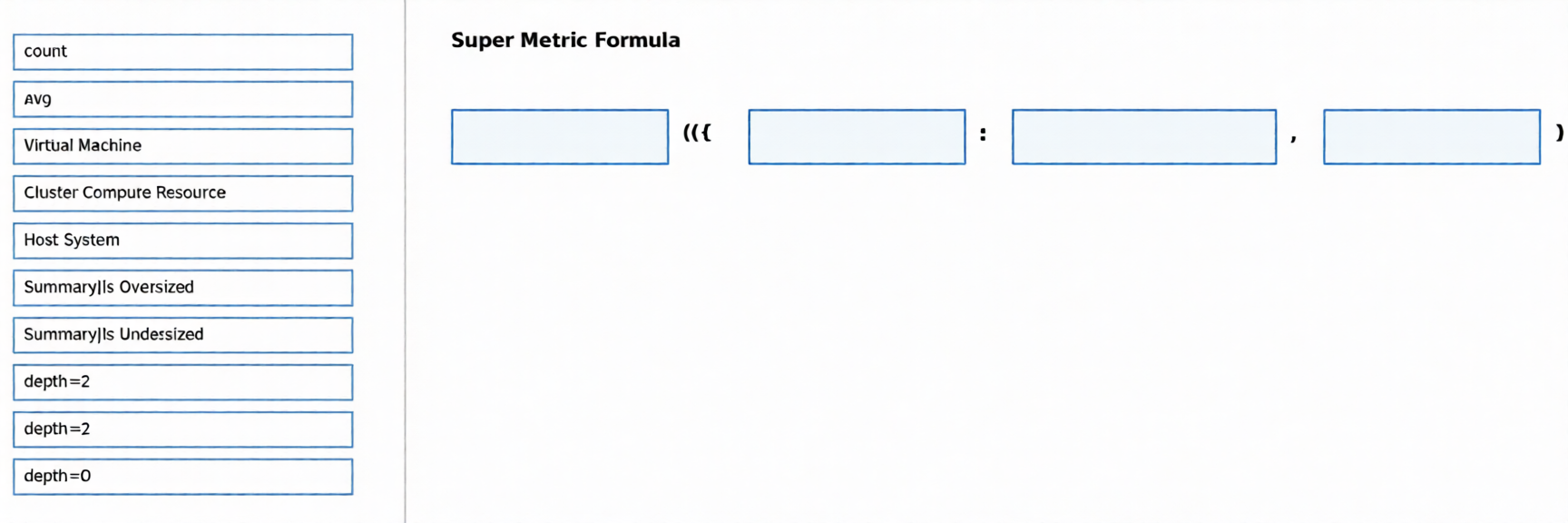
An administrator has been tasked with creating a new report in VCF Operations that details the total number
of oversized virtual machines within a VMware Cloud Foundation workload domain cluster.
The following information has been provided:
Each VCF workload domain cluster has a separate VCF Operations policy assigned.
Only the metrics required for each object should be collected.
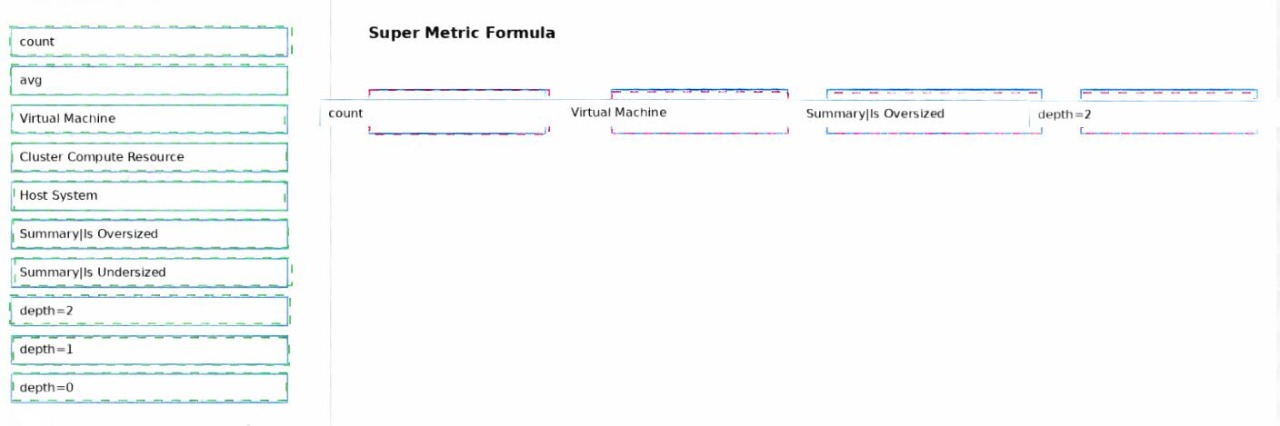
Drag and Drop the four components to complete the Super Metric formula required for the report. (Choose
four.)
Show answerHide answer
Explanation
Explanation:
To generate an aggregate metric at the Cluster level that counts specific descendant attributes, VCF Operations uses an explicit mathematical syntax:
count function: Establishes the mathematical operation to calculate the absolute number of objects that meet the matching criteria inside the container array.
Virtual Machine : Summary|Is Oversized selection: Restricts the count engine strictly to the target child resource type (Virtual Machine) and checks against the specific boolean or numeric indicator metric path (Summary|Is Oversized) that flags over-provisioned sizing behavior.
depth=2 constraint: In a VCF workload domain hierarchy, a Cluster Compute Resource sits above the resource pools and parent configurations. Defining a depth of 2 ensures the query travels down through the resource pool abstraction layers to successfully evaluate individual parent-child leaf objects (the VMs) underneath that cluster branch.
Why Other Options Are Incorrect
avg misplacement: Using avg would compute the average value of a metric rather than totaling the actual quantity of anomalous virtual machines.
depth=0 or depth=1 misplacement: Setting depth to 0 looks only at the cluster itself, while 1 stops at immediate child objects (like resource pools), failing to see or count the underlying virtual machines.
Summary|Is Undersized misplacement: This checks for resource starvation issues, directly violating the administrative task to isolate oversized systems.
References
VMware Cloud Foundation 9.0 Performance and Capacity Optimization Guide: Creating Advanced Performance Reports -> Utilizing Super Metrics.
VMware Aria Operations User Guide: Building Super Metric Formulas -> Syntax Rules for Count Functions, Object Types, and Resource Depth Scopes.
That's the last free question
You've seen the free 30% (19 of 60 questions). Full access unlocks every question and full-length 3V0-22.25 mock exams (60 questions, 135 minutes), a different mock on every attempt.
Full-length mocks with the same number of questions and the same time limit as the real 3V0-22.25 exam. Every attempt draws a new set of questions from the full bank, so you can keep going until you pass comfortably.