VMware certification · Exam 3V0-22.25

3V0-22.25 Mock Exam

Advanced VMware Cloud Foundation 9.0 Operations

Free 3V0-22.25 questions on Monitor Applications with VCF Operations, each with the answer and an explanation.

19 questions · 43 minutes · free, no sign-up

Monitor Applications with VCF Operations questions

1–2 of 2 free
Question 1
Match each VCF Operations monitoring feature with its capability by dragging and dropping the correct item from the Feature list on the left and placing it onto the Capability list on the right.

Show answerHide answer

Explanation



Explanation:

1. Application Discovery → Identifies services running on VMs and builds relationships between services from different VMs.

Why: "Application Discovery" in VCF Operations is specifically responsible for understanding inter-VM and inter-service dependencies. It maps out which services (e.g., a web server VM talking to a database VM) are connected, creating an application topology.

2. Product-Managed Telegraf → Monitors supported operating systems on physical servers and VMs.

Why: "Product-Managed Telegraf" refers to the Telegraf agent that is automatically deployed, configured, and updated by VCF Operations / Aria Operations. It is designed to monitor OS-level metrics (CPU, memory, disk, network) on supported guest OSes (Windows, Linux) running on both VMs and physical servers.

3. Open Source Telegraf → Monitors supported and unsupported application services as well as operating systems.

Why: The open-source version of Telegraf gives the administrator full flexibility. While product-managed Telegraf covers standard OS metrics, the open-source Telegraf agent can be manually configured with custom plugins to monitor third-party or unsupported applications (e.g., a specific legacy app, custom middleware) that the product-managed agent does not natively support.

4. Service Discovery → Identifies predefined and custom applications running on VMs when services are connected to each other.

Why: "Service Discovery" focuses on identifying application components (predefined like Apache, MySQL, or custom) running within a VM. Once Service Discovery identifies these services and sees they are connected (e.g., ports open between VMs), it can also assist in understanding the application stack. Note that Service Discovery is often related to Application Discovery, but the given capability explicitly mentions "identifies...applications running on VMs when services are connected," which matches Service Discovery's role in detecting the application components themselves.

Reference:

Application Discovery: Mapping relationships between services across different VMs (application dependency mapping).

Product-Managed Telegraf: Automated OS and hardware monitoring for supported operating systems.
Question 2
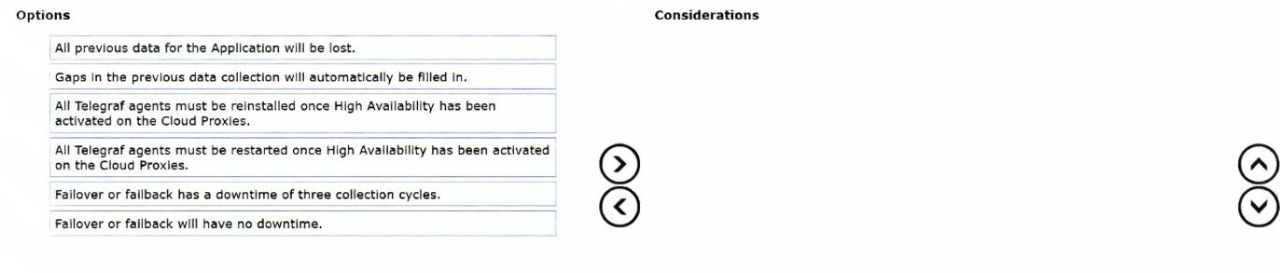
An administrator has set up managed Telegraf agents through the VMware Cloud Foundation Private Cloud to monitor applications. Data has been collecting properly for the last three months, but gaps in the collection have been noticed during Collector Group maintenance. The application teams have asked to reduce these gaps going forward, so the administrator has decided to activate Application Groups High Availability on the Collector Groups. Drag and drop the three correct items the administrator must consider from the Options list on the left and place them into the Considerations list on the right in any order. (Choose three.)

Show answerHide answer

Explanation


Explanation:

When activating High Availability (HA) for application monitoring utilizing managed Telegraf agents via Cloud Proxies in VCF Operations, the underlying architecture undergoes a major structural change. Here is why these considerations are critical:

All previous data for the Application will be lost:Enabling High Availability on an existing Collector Group resetting the application monitoring framework can cause existing historical metric assignments to become disconnected or erased for those specific agent configurations. This means that a backup or data export should be considered if the past 3 months of data are crucial.

All Telegraf agents must be reinstalled once High Availability has been activated on the Cloud Proxies: When HA is turned on, the configuration maps to an entire Collector Group (consisting of multiple Cloud Proxies working in an active-passive or balanced setup) rather than an individual Cloud Proxy endpoint. Because the endpoint certificate and configuration mapping change, any existing Telegraf agents must be cleanly reinstalled so they register against the HA-enabled group entity. Simply restarting the agents will fail to establish the correct multi-proxy failover endpoints.

Failover or failback has a downtime of three collection cycles: High Availability for application monitoring is not completely instantaneous. When a primary Cloud Proxy goes down, the system takes up to three collection cycles to definitively detect the heartbeat loss, declare a failure, and fully redirect the Telegraf agent metrics incoming pipeline to the secondary node.

Why the other options are incorrect:

Gaps in previous data collection will automatically be filled in: Historical collection gaps caused by previous single-point maintenance cannot retroactively be repaired or populated.

All Telegraf agents must be restarted...: As noted above, a simple service restart is insufficient because the agent needs the brand-new deployment configuration package linked to the HA group.

Failover or failback will have no downtime: This is false due to the built-in 3-cycle detection mechanism required to prevent flip-flopping or split-brain behaviors.

References

VMware Aria Operations / VCF Operations Documentation:Configuring Application Monitoring -> High Availability for Application Monitoring Cloud Proxies.

VMware KB / Architecture Guide: Explains the requirement of re-registering/re-deploying Telegraf agents when changing the deployment state of the target Cloud Proxies to an HA Collector Group configuration.

That's the last free question in Monitor Applications with VCF Operations

You've seen the free 30% (2 of 7 questions). Full access unlocks every question and full-length 3V0-22.25 mock exams (60 questions, 135 minutes), a different mock on every attempt.

Unlock full mock exam
Full mock exam

Sit the 3V0-22.25 exam before exam day

Full-length mocks with the same number of questions and the same time limit as the real 3V0-22.25 exam. Every attempt draws a new set of questions from the full bank, so you can keep going until you pass comfortably.

Get full 3V0-22.25 mock exam
  • 60questions per mock
  • 135 mintime limit
  • 60questions in the bank
  • Newmock on every attempt