VMware certification · Exam 3V0-22.25

3V0-22.25 Mock Exam

Advanced VMware Cloud Foundation 9.0 Operations

Find out if you're ready for 3V0-22.25. Take the free timed mock exam and get your score in minutes, or study the free 3V0-22.25 questions below with answers and explanations.

19 questions · 43 minutes · free, no sign-up

Free 3V0-22.25 questions

1–10 of 19 free
Question 1 Choose 4
Which four steps should the administrator perform within VCF Operations to determine whether there is sufficient capacity within the cluster to complete all planned migration phases? (Choose four.)
Show answerHide answer

Correct answer: C, E, F, G Add virtual machine workloads to each What-If Analysis scenario for the corresponding migration phaseRun all What-If Analysis scenarios together to evaluate the combined impact on the target clusterCreate a separate What-If Analysis scenario for each migration phaseConfigure an Application Profile in each scenario to represent the VM t-shirt sizing

Explanation

Explanations:

Here is the breakdown of the correct steps and why the others are incorrect for determining cluster capacity using VCF Operations (formerly vRealize Operations):

F. Create a separate What-If Analysis scenario for each migration phase.
Migration projects are typically complex and divided into logical phases or "waves" based on dependencies and priority. Creating separate scenarios for each phase allows the administrator to model the incremental impact of each stage on the target cluster's resources (CPU, RAM, Storage). This avoids the "big bang" approach, which can hide intermediate resource constraints .

C. Add virtual machine workloads to each What-If Analysis scenario for the corresponding migration phase.
A scenario is only useful if it contains specific workloads. VCF Operations allows you to define the workload by either manually configuring T-shirt sizes (vCPU, Memory) or importing existing VMs from the source vCenter environment. Adding the specific VMs for Phase 1 to Scenario 1, and Phase 2 to Scenario 2, ensures the capacity calculation reflects the actual resource consumption of the migration .

G. Configure an Application Profile in each scenario to represent the VM t-shirt sizing.
An "Application Profile" is the container within the scenario that holds the specification of the workload (vCPU, Memory, Disk). By configuring this profile (either by manual entry or by importing from an existing VM), you define the "size" or T-shirt size of the workloads moving in that phase .

E. Run all What-If Analysis scenarios together to evaluate the combined impact on the target cluster.
After creating individual scenarios for Phase 1, Phase 2, and Phase 3, the administrator should select them in the What-If Analysis interface and run them cumulatively. The official VCF 9.0 documentation explicitly states: "You can select more than one compatible scenario and run them together...to see the capacity after..." . This provides the total combined stress on the target cluster.

❌ Why the other options are wrong

A. Create a single What-If Analysis scenario...
Why it is wrong: A single scenario models a single event. While you could lump all VMs into one scenario, it prevents you from modeling the intermediate state of the cluster (e.g., after Phase 1 but before Phase 2) to ensure you don't run out of capacity halfway through the migration window .

B. Persist each scenario configuration without performing analysis.
Why it is wrong: Saving without analyzing performs no calculation. The goal is to determine "sufficient capacity," which requires running the analysis to view the "Remaining Time" and "Capacity Remaining" metrics .

D. Import Application Profiles from the source vCenter environment.
Why it is wrong: This is a distractor. You do not import a generic "Application Profile" from vCenter. In the UI, you Import VMs to use as templates to build the Application Profile, or you configure the profile manually. You import VMs, not profiles .

H. Use migration execution planning workflows.
Why it is wrong: "Migration execution planning workflows" (likely referring to HCX migration waves or planning) are used to execute the migration, not to perform capacity analysis calculations. The question specifically asks what to do within VCF Operations to determine capacity .

📚 Reference

Combined Scenarios: VCF Operations specifically allows the selection of multiple saved scenarios (e.g., Phase 1 and Phase 2) to be run together to evaluate cumulative impact .

Workload Definition: Capacity planning requires defining the workload via Application Profiles built from Configuring specs or Importing from existing VM

Question 2 Choose 1
An administrator is assigned the task of configuring a custom dashboard within VMware Cloud Foundation Operations to monitor CPU, memory, and disk usage metrics across all VMs in a specific workload domain, with the ability to extract detailed usage data in CSV format. Which view type should the administrator use?
Show answerHide answer

Correct answer: A List View

Explanation

Explanation:

The List View is the appropriate choice in VCF (VMware Cloud Foundation) Operations when you need to monitor and export specific metric data across multiple objects. Here is how it fulfills each requirement:

Requirement: Monitor CPU, Memory, and Disk usage metrics across all VMs in a specific workload domain.

The List View is specifically designed to display tabular data about specific objects in the monitored environment . You can configure it to show exactly the metrics you need (CPU, Memory, Disk) for all Virtual Machines (VMs) that belong to a specific group or workload domain . Unlike visual-heavy views, the List View focuses on raw data in rows and columns, which is ideal for checking performance metrics across many VMs.

Requirement: Extract detailed usage data in CSV format.

The official documentation for VCF 9.0 and VMware Aria Operations explicitly states that you can export the view as a CSV file for any view type . However, in the context of this requirement (listing 50+ VMs with specific metrics), the List View is the standard operational practice. The export option in the toolbar works seamlessly with List Views to generate the required CSV report .

Why the other options are incorrect

B. Scoreboard View:
This view type is generally used for high-level, at-a-glance status summaries (often represented by gauges or health icons). It does not provide the detailed metric table view required for export or detailed analysis of individual VMs.

C. Object Relationship View:
This view is used to visualize the relationships and dependencies between objects (e.g., which VMs are on which hosts). It is a topological or graphical view, not a data-grid view, and it does not support the CSV export requirement in the same tabular context as the List View .

D. Trend View:
While Trend Views are excellent for displaying historical data and forecasting future usage, they are primarily used for line charts and time-series analysis . You generally cannot export a list of specific VMs and their current/individual metric values directly from a standard Trend View configuration in the same way you can from a List View . The requirement explicitly asks for monitoring "across all VMs" (implying a current snapshot or recent data points in a list), not necessarily a long-term trend line.

Reference:

List View Export: The toolbar for the View widget includes an "Export as CSV" option applicable to all views, but the List View is the standard tool for exporting lists of object properties .

Configuration: List Views can be configured to target specific object types (like VMs in a workload domain) and display specific metrics (CPU, Memory, Disk) .
Question 3 Choose 4
An administrator is responsible for a VCF Private Cloud that is isolated from the Internet. Which four steps must an administrator complete to remain fully licensed whilst operating in a Disconnected Reporting Mode before the Next Usage Report is due? (Choose four.)
Show answerHide answer

Correct answer: D, E, F, G Generate a Usage file from within VCF Operations Download the license key from the Broadcom Support Portal Import the license file into VCF Operations Download the license file from the VCF Business Services Console

Explanation

Explanations:

D. Generate a Usage file from within VCF Operations.
The first step in the disconnected reporting cycle is to generate a usage file from your VCF Operations instance. This file contains the consumption data for your subscribed products. You navigate to Administration > Licensing > Registration and click Generate Usage File.

G. Download the license file from the VCF Business Services Console.
After uploading the usage file to the Broadcom VCF Business Services Console (VCF BSC), the system processes the data and generates a new license file. You must download this .lic file from the VCF BSC portal to your local machine to import it into your isolated environment.

E. Upload the file to the VCF Business Services Console.
Once you have generated the usage file (Step D), you must transfer it (via secure methods like USB or SCP) to a machine with internet access. You then log in to the VCF Business Services Console, locate your VCF Operations registration, and click Upload Usage File to submit the usage data.

F. Import the license file into VCF Operations.
Explanation: After you download the new license file from the VCF BSC (Step G), you transfer it back to the isolated environment. In the VCF Operations UI, you navigate to Administration > Licensing > Registration and click Import License File to apply the updated licenses to your environment.

❌ Why the other options are incorrect

A. Add the license key into VCF Operations while connected to the Internet.
Why it is wrong: This describes "Connected Mode." The scenario explicitly states the environment is isolated from the Internet (Disconnected Mode), meaning you cannot connect directly to Broadcom to add keys automatically.

B. Enable SSH on all ESX hosts.
Why it is wrong: Enabling SSH is a troubleshooting or manual configuration tool. It is not part of the official VMware licensing workflow for VCF 9.x. License management is performed entirely through the VCF Operations UI and the VCF Business Services Console.

C. Download the license key from the Broadcom Support Portal.
Why it is wrong: VCF 9.0 does not use traditional license keys. It uses a "keyless entitlement" model where licensing is managed via files exchanged between VCF Operations and the VCF Business Services Console. You do not manually download a product key from the support portal to type in.

📚 Reference:

Disconnected Mode Workflow: The official documentation outlines the 4-step cycle for disconnected environments: Generate Usage File (VCF Ops) -> Upload Usage File (VCF BSC) -> Download License File (VCF BSC) -> Import License File (VCF Ops).

Frequency: This process must be completed at least once every 180 days to remain compliant. If the usage report is not submitted, licenses are treated as expired, and hosts are disconnected from vCenter.
Question 4
Match each VCF Operations monitoring feature with its capability by dragging and dropping the correct item from the Feature list on the left and placing it onto the Capability list on the right.

Show answerHide answer

Explanation


Explanation:

1. Application Discovery → Identifies services running on VMs and builds relationships between services from different VMs.

Why: "Application Discovery" in VCF Operations is specifically responsible for understanding inter-VM and inter-service dependencies. It maps out which services (e.g., a web server VM talking to a database VM) are connected, creating an application topology.

2. Product-Managed Telegraf → Monitors supported operating systems on physical servers and VMs.

Why: "Product-Managed Telegraf" refers to the Telegraf agent that is automatically deployed, configured, and updated by VCF Operations / Aria Operations. It is designed to monitor OS-level metrics (CPU, memory, disk, network) on supported guest OSes (Windows, Linux) running on both VMs and physical servers.

3. Open Source Telegraf → Monitors supported and unsupported application services as well as operating systems.

Why: The open-source version of Telegraf gives the administrator full flexibility. While product-managed Telegraf covers standard OS metrics, the open-source Telegraf agent can be manually configured with custom plugins to monitor third-party or unsupported applications (e.g., a specific legacy app, custom middleware) that the product-managed agent does not natively support.

4. Service Discovery → Identifies predefined and custom applications running on VMs when services are connected to each other.

Why: "Service Discovery" focuses on identifying application components (predefined like Apache, MySQL, or custom) running within a VM. Once Service Discovery identifies these services and sees they are connected (e.g., ports open between VMs), it can also assist in understanding the application stack. Note that Service Discovery is often related to Application Discovery, but the given capability explicitly mentions "identifies...applications running on VMs when services are connected," which matches Service Discovery's role in detecting the application components themselves.

Reference:

Application Discovery: Mapping relationships between services across different VMs (application dependency mapping).

Product-Managed Telegraf: Automated OS and hardware monitoring for supported operating systems.
Question 5
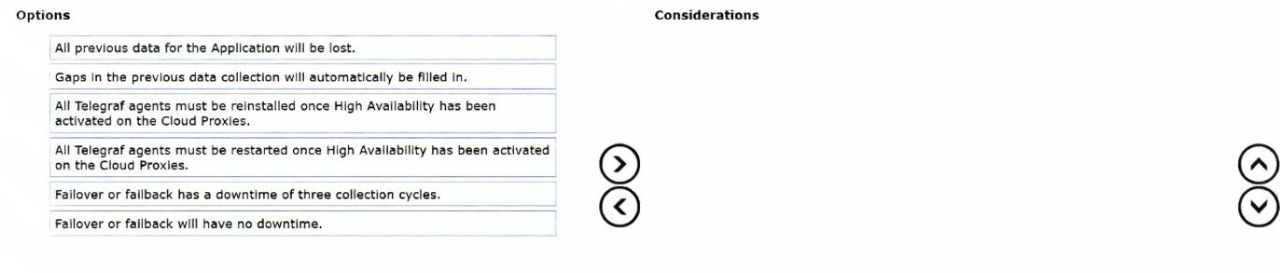
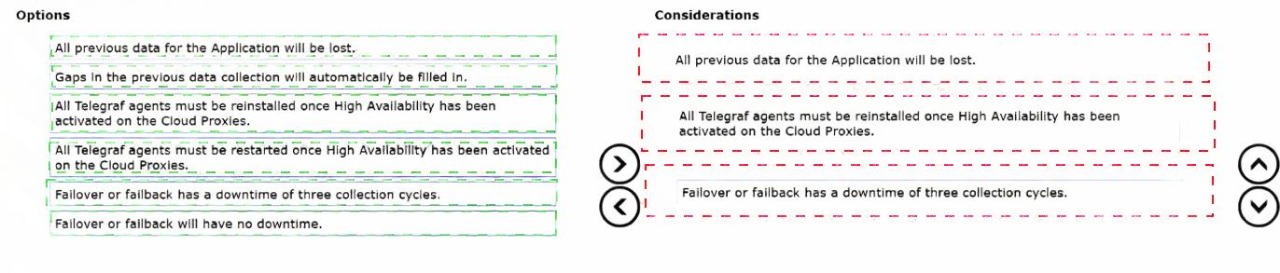
An administrator has set up managed Telegraf agents through the VMware Cloud Foundation Private Cloud to monitor applications. Data has been collecting properly for the last three months, but gaps in the collection have been noticed during Collector Group maintenance. The application teams have asked to reduce these gaps going forward, so the administrator has decided to activate Application Groups High Availability on the Collector Groups. Drag and drop the three correct items the administrator must consider from the Options list on the left and place them into the Considerations list on the right in any order. (Choose three.)

Show answerHide answer

Explanation


Explanation:

When activating High Availability (HA) for application monitoring utilizing managed Telegraf agents via Cloud Proxies in VCF Operations, the underlying architecture undergoes a major structural change. Here is why these considerations are critical:

All previous data for the Application will be lost:Enabling High Availability on an existing Collector Group resetting the application monitoring framework can cause existing historical metric assignments to become disconnected or erased for those specific agent configurations. This means that a backup or data export should be considered if the past 3 months of data are crucial.

All Telegraf agents must be reinstalled once High Availability has been activated on the Cloud Proxies: When HA is turned on, the configuration maps to an entire Collector Group (consisting of multiple Cloud Proxies working in an active-passive or balanced setup) rather than an individual Cloud Proxy endpoint. Because the endpoint certificate and configuration mapping change, any existing Telegraf agents must be cleanly reinstalled so they register against the HA-enabled group entity. Simply restarting the agents will fail to establish the correct multi-proxy failover endpoints.

Failover or failback has a downtime of three collection cycles: High Availability for application monitoring is not completely instantaneous. When a primary Cloud Proxy goes down, the system takes up to three collection cycles to definitively detect the heartbeat loss, declare a failure, and fully redirect the Telegraf agent metrics incoming pipeline to the secondary node.

Why the other options are incorrect:

Gaps in previous data collection will automatically be filled in: Historical collection gaps caused by previous single-point maintenance cannot retroactively be repaired or populated.

All Telegraf agents must be restarted...: As noted above, a simple service restart is insufficient because the agent needs the brand-new deployment configuration package linked to the HA group.

Failover or failback will have no downtime: This is false due to the built-in 3-cycle detection mechanism required to prevent flip-flopping or split-brain behaviors.

References

VMware Aria Operations / VCF Operations Documentation:Configuring Application Monitoring -> High Availability for Application Monitoring Cloud Proxies.

VMware KB / Architecture Guide: Explains the requirement of re-registering/re-deploying Telegraf agents when changing the deployment state of the target Cloud Proxies to an HA Collector Group configuration.
Question 6 Choose 1
An administrator has been tasked with configuring a VCF Operations policy to enable a more conservative capacity modelling. When setting the Risk Level Configuration, what is the time remaining metric based on?
Show answerHide answer

Correct answer: D Upper Bounds Projection of Capacity Utilization

Explanation

Explanation:

When you configure a Conservative risk level in VCF Operations (formerly VMware Aria Operations), the capacity engine calculates the "Time Remaining" metric—the number of days until projected utilization crosses the usable capacity threshold—using the upper bound projection of capacity utilization .

The capacity engine analyzes historical utilization data and projects a future workload range that includes both an upper bound projection and a lower bound projection . The upper bound represents the high-end estimate based on historical utilization peaks. For Conservative risk levels (designed for production and mission-critical workloads), the engine explicitly uses this upper bound projection to provide a cautious forecast that helps prevent unexpected capacity exhaustion . As documented, "The engine considers the upper bound projection for a conservative risk level" .

Conversely, for Aggressive risk levels (used for non-critical workloads), the engine uses the mean (average) of the upper and lower bound projections .

Why Other Options Are Incorrect

A (Actual Projection of Available Capacity Mean) & B (Actual Projection of Capacity Utilization Mean)
– The mean projection is specifically used for Aggressive risk levels, not Conservative . Selecting the mean would underestimate future demand and risk capacity shortages.

C (Lower Bounds Projection of Capacity Utilization)
– This represents the most optimistic forecast, ignoring historical utilization peaks. Using it would dangerously underestimate future resource consumption, contradicting the purpose of a conservative policy .

Reference:

Broadcom TechDocs: How Does VCF Operations Calculate and Forecast Capacity (VCF 9.0) ; Capacity Details
Question 7 Choose 2
A VM named acme001 is listed in the Rightsize oversized list with a default recommendation of a 2 vCPU reduction and also in the undersized list with a default recommendation of a 2 GB memory increase. The administrator schedules the oversized vCPU reduction, then excludes the VM from the undersized list, then schedules scale-up for the remaining undersized VMs. What are the two results for acme001? (Choose two.)
Show answerHide answer

Correct answer: D, E The acme001 VM is reduced by 2 vCPU The acme001 VM memory is not changed

Explanation

Explanation:

The administrator executes optimization steps in a specific sequential order, yielding these exact results:

vCPU Reduction (Result D):The administrator explicitly schedules the oversized vCPU reduction while acme001 is actively on that list. VCF Operations registers this action item. Once the scheduled maintenance window occurs, the engine passes the API call to vCenter Server to decrease the allocation by 2 vCPUs.

Memory Remains Unchanged (Result E):
The administrator manually adds acme001 to the exclusion list for the undersized category before running or scheduling mass modifications. When the bulk scale-up action is subsequently initiated for the "remaining undersized VMs," the engine evaluates exclusions, skips acme001, and applies no memory modifications to it.

Why Other Options Are Incorrect

A and B are incorrect: The 2 GB memory increase is blocked entirely because the VM was successfully removed from the targeting scope via the exclusion action prior to the bulk scale-up scheduling.

C is incorrect:The vCPU configuration is altered because the reduction job was queued and committed before any changes were made to the VM's exclusion statuses.

References

VMware Cloud Foundation 9.0 Workload Optimization Guide: Managing Right-Sizing Recommendations -> Excluding Infrastructure Objects from Active Resource Actions.

VMware Aria Operations User Guide: Optimizing Capacity and Performance -> Automating and Scheduling Resize Actions.
Question 8 Choose 1
An administrator has deployed a VMware vSphere Foundation instance into production. The following month the administrator leaves the company without providing the local administrator password for VCF Operations to the new administrator. However, the new administrator has all VVF root passwords and AD administrator access. What action must the new administrator take to reset the VCF Operations Administrator Password?
Show answerHide answer

Correct answer: C Log into the VCF Operations master node command-line console as root. Execute the vcopsSetAdminPassword.py --reset CLI command

Explanation

✅ Explanation:

When the local admin password for VCF Operations (formerly VMware Aria Operations) is lost, the only supported method to reset it is by using a specific command-line script directly on the master node . Since the previous administrator did not provide this password, and the new administrator has root access to the VCF environment, this procedure is possible.

❌ Why Other Options Are Incorrect

A. Log into VCF Operations administration interface as root, in Administrator Settings, select Change Administrator Password:
Incorrect. The VCF Operations administration interface (/admin) uses the admin account for login, not the root account. Therefore, you cannot log in using root credentials through the web UI. The root account is strictly for command-line (SSH/console) access .

B. In VCF Operations Fleet Management > Passwords, select the VCF Operations admin account and select Update Password:
Incorrect. The Fleet Management feature is the recommended method for rotating an existing password or remediating an expired one , but it requires knowledge of the current password to authenticate and update it . It cannot be used when the password is completely lost or unknown. A note in the documentation clarifies that for a forgotten password, you must follow the CLI reset procedure .

D. In the VCF Operations administration interface using an AD administrator account, in Administrator Settings, select Change Administrator Password:
Incorrect. While you can log in with an Active Directory account if AD authentication is configured, the Change Administrator Password setting in the UI is only applicable to the local admin account. However, this requires you to already be logged into the interface. Since the admin password is lost and the AD account is likely for VM or vCenter access (not pre-configured as a VCF Operations local admin with password change privileges), this method is not viable for resetting a forgotten local password.

📚 References

Broadcom TechDocs: Reset the VCF Operations Administrator Password from CLI

Broadcom KB Article 437119: Password Change Not Syncing for Admin Account on VCF Operations/Aria Operations
Question 9 Choose 1
An administrator successfully integrated VCF Operations Fleet Management with a Microsoft Certificate Authority and deployed certificates to vCenter, NSX, VCF Operations, and ESX hosts. VCF Operations now reports that all certificates are nearing expiration even though auto-renewal rotated certificates a week ago and the template allows certificates to last one year. What is the reason certificate warnings are still being generated?
Show answerHide answer

Correct answer: C The Microsoft CA Root or Intermediate certificates are nearing expiration

Explanation

✅ Explanation:

The scenario describes that VCF Operations Fleet Management was successfully integrated with a Microsoft Certificate Authority, and auto-renewal rotated certificates a week ago. Yet, VCF Operations continues to report that certificates are nearing expiration, despite the template allowing certificates to last one year.

❌ Why Other Options Are Incorrect

A. SDDC Manager has lost contact with the Microsoft CA
– If contact had been lost, the initial integration and certificate deployment a week ago would have failed. Furthermore, the VCF Operations diagnostics would likely show a degraded or unhealthy integration status, not valid certificates that are simply flagged as nearing expiration.

B. The certificate alert in VCF Operations has not been properly cleared
– Certificate alerts are not manual "clear" items in VCF Operations. They are generated based on continuous health checks. If the underlying certificate chain issue persists, the alert will re-trigger automatically regardless of any manual dismissal attempts.

D. The administrator must manually click “Renew Certificate” on desired items
– This is incorrect because the scenario explicitly states that auto-renewal rotated certificates a week ago. The purpose of auto-renewal in Fleet Management is precisely to avoid manual renewal. If auto-renewal succeeded for the leaf certificates, the problem is not that auto-renewal failed—it is that the parent CA certificate chain is the root cause.

📚 References

Broadcom KB 439032Lists "Microsoft CA Root certificate validity has expired" as a cause for Fleet Management certificate errors

Broadcom KB 416354Explains that expired CA certificates in trust stores cause persistent alarms even after leaf certificates are renewed
Question 10 Choose 2
An administrator has been tasked with setting up Log Assist in VCF Operations to generate a log bundle on demand, link the bundle to a support case, and attach diagnostic findings to the support case. What are the two minimum requirements to configure Log Assist? (Choose two.)
Show answerHide answer

Correct answer: C, E Within Administration > Cloud Proxies, enable Log Assist within the Unified Cloud Proxy Register licenses with the VCF Business Services console in Connected mode

Explanation

Explanation:

C. Within Administration > Cloud Proxies, enable Log Assist within the Unified Cloud Proxy.
One of the two minimum requirements is to have a unified cloud proxy deployed and to explicitly activate Log Assist on it. This is a mandatory setup step. Standard data collection adapters do not work for Log Assist; it requires a dedicated Log Assist adapter running in standalone mode on the cloud proxy . This activation is performed under Administration → Cloud Proxies by selecting the cloud proxy, clicking the ellipsis, and choosing Activate Log Assist .

E. Register licenses with the VCF Business Services console in Connected mode.
The other minimum requirement is that your VCF Operations instance must be registered with the VCF Business Services console in Connected mode . The official setup guide explicitly states: "Before you start using Log Assist, make sure your environment is in Connected Mode" . This requires an internet connection and uses an activation code for automated license management and usage reporting, which Log Assist relies on to link bundles to support cases .

❌ Why Other Options Are Incorrect

A. Register licenses with the VCF Business Services console in Disconnected mode.
This is explicitly incorrect for Log Assist. The configuration guide states you must be in Connected Mode . Disconnected mode is for air-gapped environments and does not support the automated file transfers required for Log Assist to communicate with the Broadcom Support Portal .

B. Register licenses with Broadcom Support Portal.
While you do need Broadcom Support Portal credentials to generate an activation code , the specific minimum requirement for Log Assist is to register your VCF Operations instance with the VCF Business Services console in Connected mode. Registering licenses directly with the Support Portal is not a standalone setup step for Log Assist .

D. Within Administration > Integrations, enable Activate Log Collection within the VMware vCenter adapter.
This is incorrect. Log Assist is configured and activated on the unified cloud proxy, not within the vCenter adapter integration . The vCenter and other inventory objects are assigned to the Log Assist-enabled cloud proxy, but the activation occurs at the cloud proxy level, not the vCenter adapter level .

📚Reference:

Minimum Requirements: Register VCF Operations in Connected Mode and activate Log Assist on a unified cloud proxy

Configuration Path: License Management > Registration (set to Connected) → Administration > Cloud Proxies (Activate Log Assist) → Infrastructure Operations > Configurations > Log Assist (assign objects)
Full mock exam

Sit the 3V0-22.25 exam before exam day

Full-length mocks with the same number of questions and the same time limit as the real 3V0-22.25 exam. Every attempt draws a new set of questions from the full bank, so you can keep going until you pass comfortably.

Get full 3V0-22.25 mock exam
  • 60questions per mock
  • 135 mintime limit
  • 60questions in the bank
  • Newmock on every attempt