CompTIA certification · Exam XK0-006

XK0-006 Mock Exam Page 5

CompTIA Linux+ V8

Free XK0-006 mock exam questions 41–45, each with the answer and an explanation.

20 questions · 21 minutes · free, no sign-up

Free XK0-006 questions

41–45 of 45 free
Question 41 Choose 1
An administrator set up a new user account called "test". However, the user is unable to change their password. Given the following output:
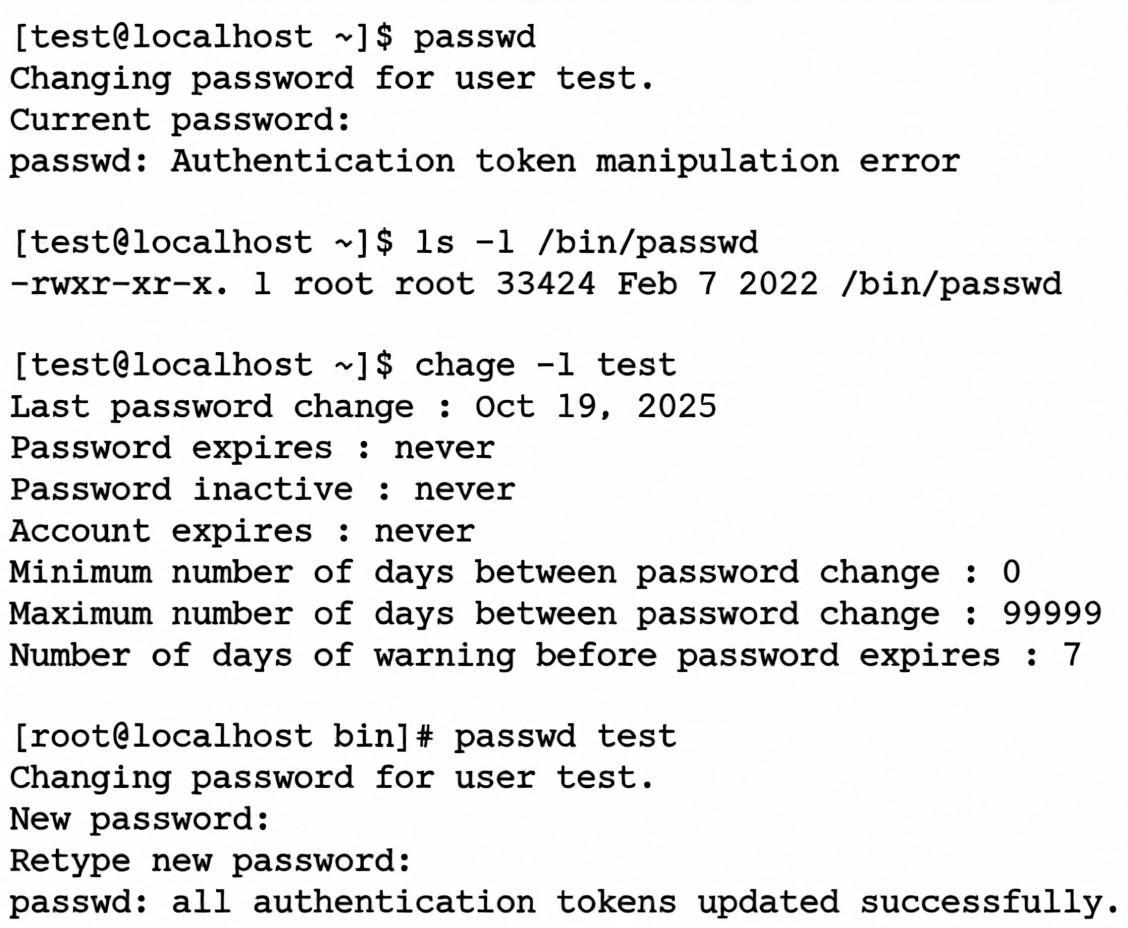


Which of the following is the most likely cause of this issue?
Show answerHide answer

Correct answer: A The SUID bit is missing on the /bin/passwd file.

Explanation

Explanation:

The error message:
passwd: Authentication token manipulation error
usually indicates that the passwd binary cannot update the shadow password file because it lacks the necessary privileges.

Normally, /bin/passwd should be owned by root and have the SUID bit set (-rwsr-xr-x), allowing regular users to run it with root privileges for password changes.

In the output provided, /bin/passwd is shown as:
-rwxr-xr-x. 1 root root ...
→ Notice the missing s in the permissions. This confirms the SUID bit is not set, preventing the user test from changing their password.

Why the Other Options Are Wrong
The password provided by the user "test" does not meet complexity requirements: The error would be different (e.g., "BAD PASSWORD").

The user "test" already changed the password today: The chage output shows minimum days between changes = 0, so this is not a restriction.

The password has been disabled for user "test": The account is active, and root was able to change the password successfully.

Reference:
Linux man page: man passwd → Requires SUID to update /etc/shadow.
CompTIA Linux+ XK0-006 Exam Objectives: User and Group Management (Domain: Security).
Question 42 Choose 1
An administrator added a new disk to expand the current storage. Which of the following commands should the administrator run first to add the new disk to the LVM?
Show answerHide answer

Correct answer: C pvcreate

Explanation

Explanation:

When adding a new disk to expand LVM storage, the very first step is to initialize the disk as a Physical Volume (PV) using the pvcreate command. This prepares the disk for use in LVM by writing LVM metadata to it.

The LVM Storage Workflow:
When adding new storage to LVM, you must follow this specific order:
Step 1: pvcreate → Step 2: vgextend → Step 3: lvextend
(Initialize disk) (Add PV to VG) (Extend logical volume)

Why pvcreate must come first:
- pvcreate initializes the new disk with LVM metadata
- Writes LVM headers to the disk
- Divides the disk into physical extents
- Makes the disk recognizable as an LVM physical volume
Only after pvcreate can the disk be added to a volume group with vgextend
Finally, you can extend logical volumes with lvextend to use the new space

Example workflow:
# 1. Identify the new disk
lsblk
# Output shows /dev/sdb is the new unpartitioned disk

# 2. Initialize as physical volume (FIRST STEP)
sudo pvcreate /dev/sdb

# 3. Verify it's created
sudo pvs
# or
sudo pvdisplay

# 4. Add to existing volume group
sudo vgextend my_volume_group /dev/sdb

# 5. Extend logical volume
sudo lvextend -L +10G /dev/my_volume_group/my_logical_volume

# 6. Resize filesystem (if needed)
sudo resize2fs /dev/my_volume_group/my_logical_volume
# or for XFS:
sudo xfs_growfs /mount/point

Why other options are incorrect:
❌ vgextend: This command adds a physical volume to a volume group. Cannot be used first because it requires an existing PV. Would fail with error: "Device /dev/sdb not found (or ignored by filtering)". Only valid AFTER pvcreate.

❌ lvextend: This command expands a logical volume. Requires free space in the volume group. Cannot be used first because the disk isn't even in LVM yet. Would fail: "Insufficient free space" (the new disk isn't available to LV).

❌ pvresize: This command resizes an existing physical volume. Used when you've expanded the underlying disk (virtual disk resize). Not for adding new disks. Would fail on a new disk: "Device /dev/sdb not found in LVM".

Complete LVM Disk Addition Process:
# Step 0: Verify new disk is detected
fdisk -l /dev/sdb
# or
lsblk

# Step 1: Create partition (optional but recommended)
fdisk /dev/sdb
# Create a single partition /dev/sdb1 with type 8e (Linux LVM)

# Step 2: Initialize as physical volume
pvcreate /dev/sdb1

# Step 3: Add to volume group
vgextend my_vg /dev/sdb1

# Step 4: Extend logical volume
lvextend -L +20G /dev/my_vg/my_lv

# Step 5: Resize filesystem
resize2fs /dev/my_vg/my_lv

LVM Command Summary:
Command Purpose When Used
pvcreate Initialize disk for LVM First step with new disk
pvdisplay Show PV details Verification
vgextend Add PV to volume group After pvcreate
lvextend Grow logical volume After adding space to VG
pvresize Resize existing PV After underlying disk grew

Reference:
LVM = Logical Volume Manager
PV = Physical Volume (disk or partition)
VG = Volume Group (pool of storage)
LV = Logical Volume (virtual partition)
The order is critical: PV → VG → LV
Skipping pvcreate is like trying to pour water into a bottle that doesn't exist yet
Question 43 Choose 1
A systems administrator is writing a script to analyze the number of files in the directory /opt/application /home/. Which of the following commands should the administrator use in conjunction with ls -l | to count the files?
Show answerHide answer

Correct answer: D wc -l

Explanation

Explanation

The administrator wants to count the number of files listed by:

ls -l

To count lines of output (each file typically appears on one line), the correct command is:

ls -l | wc -l

What wc -l does:

wc = word count utility
-l = counts lines

Each line corresponds to one listed entry, giving the total file count.

❌ Why the Other Options Are Incorrect

❌ less
Pager used to scroll output.
Does not count anything.

❌ tail -f
Continuously monitors file updates.
Used for logs, not counting lines.

❌ tr -c
Translates or deletes characters.
Not used for counting entries.

🧠 Linux+ Exam Tip

Common pipeline pattern:

Goal Command
Count files/output lines wc -l ✅
Filter text grep
Sort output sort
Remove duplicates uniq

⚠️ Exam note:
ls -l includes a “total” line, so precise counting often uses:

ls -1 | wc -l

But for this question, wc -l is the intended answer.
Question 44 Choose 1
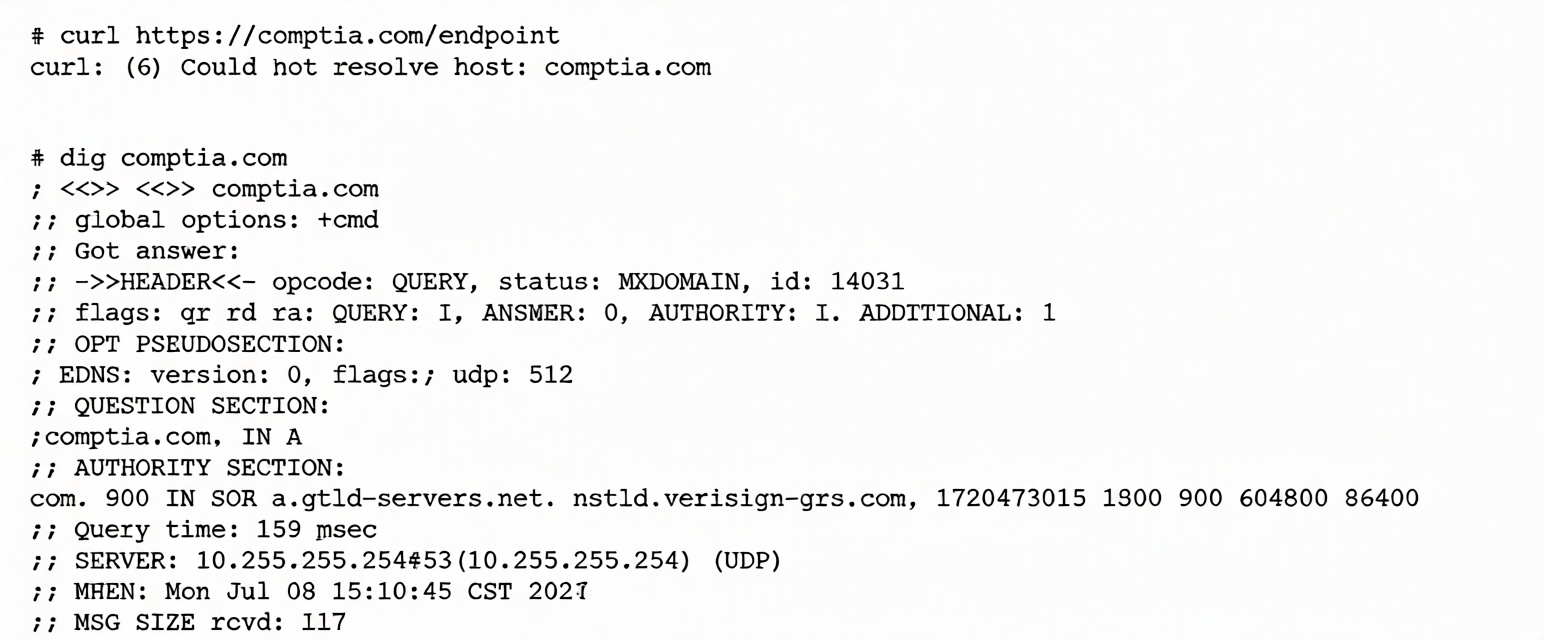
An administrator is investigating the reason a Linux workstation is not resolving the website http://www.comptia. org. The administrator executes some commands and receives the following output:


Which of the following is the most likely cause?
Show answerHide answer

Correct answer: A The static entry needs to be removed from /etc/hosts.

Explanation

Explanation:

The key error shown is:

curl: (6) Could not resolve host: comptia.com

This indicates a DNS resolution failure, not a web server or firewall problem.

Evidence from dig Output

status: NXDOMAIN
SERVER: 10.255.255.254#53

Important Observations:
The workstation is querying a DNS server at 10.255.255.254.
That DNS server is returning NXDOMAIN (domain does not exist).
comptia.com is a valid domain, so the response is incorrect.
This means the configured DNS server is incorrect or malfunctioning.

The root cause is a bad nameserver configuration, not a connectivity issue.

Updating /etc/resolv.conf to use a valid DNS server resolves the issue, for example:

nameserver 8.8.8.8

Why the Other Options Are Incorrect

Static entry in /etc/hosts
If /etc/hosts were the issue, dig would not query an external DNS server.
The output clearly shows that DNS queries are being sent to 10.255.255.254.

Remote website does not support IPv6
DNS resolution is failing before any connection attempt occurs.
IPv6 support is unrelated to this error.

Firewall needs outbound HTTP/HTTPS
Firewall problems would cause connection timeouts or connection refused errors.
Here, DNS resolution fails before any HTTP or HTTPS connection is attempted.

Linux+ Exam Tip

Troubleshooting Flow
Could not resolve host → DNS problem
Connection refused → Service not running or firewall blocking
Timeout → Routing or network connectivity issue

Check DNS configuration with:
cat /etc/resolv.conf

Keyword Trigger
NXDOMAIN response from an incorrect DNS server indicates a bad nameserver configuration.
Question 45 Choose 1
A Linux user needs to authenticate to a Windows Active Directory domain. Which of the following configuration files contains the domain configuration details?
Show answerHide answer

Correct answer: A sssd.conf

Explanation

Explanation:
When a Linux user authenticates to an Active Directory domain using modern methods (such as SSSD - System Security Services Daemon), the domain configuration details are stored in sssd.conf. This file contains AD server addresses, domain names, and authentication parameters.

Correct Option:

A. sssd.conf
The /etc/sssd/sssd.conf file configures SSSD, which caches AD credentials and handles Kerberos/LDAP authentication. It includes domain sections specifying AD domain controllers, LDAP search bases, and authentication providers. SSSD is the recommended method for integrating Linux with Active Directory for centralized authentication.

Incorrect Options:

B. krb5.conf –
This file configures Kerberos realms and KDC servers. While Kerberos is used by AD, krb5.conf alone does not contain complete domain configuration details (e.g., LDAP, password policies). It is a component but not the primary domain configuration file for Linux AD authentication.

C. pam.conf –
The Pluggable Authentication Modules configuration file defines authentication rules (which modules to call). It does not contain domain configuration details (server IPs, domain names). It references SSSD but does not store the configuration itself.

D. smb.conf –
This file configures Samba (file sharing and legacy domain membership). For modern Linux AD authentication using SSSD, smb.conf is not the primary domain configuration file.

Reference:
Red Hat Enterprise Linux Documentation – "Configuring SSSD for Active Directory"
man sssd.conf – SSSD configuration file reference

That's the last free question

You've seen the free 30% (45 of 150 questions). Full access unlocks every question and full-length XK0-006 mock exams (87 questions, 90 minutes), a different mock on every attempt.

Unlock full mock exam
Full mock exam

Sit the XK0-006 exam before exam day

Full-length mocks with the same number of questions and the same time limit as the real XK0-006 exam. Every attempt draws a new set of questions from the full bank, so you can keep going until you pass comfortably.

Get full XK0-006 mock exam
  • 87questions per mock
  • 90 mintime limit
  • 150questions in the bank
  • Newmock on every attempt