CompTIA certification · Exam XK0-006

XK0-006 Mock Exam

CompTIA Linux+ V8

Free XK0-006 questions on Security, each with the answer and an explanation.

20 questions · 21 minutes · free, no sign-up

Security questions

1–10 of 10 free
Question 1 Choose 1
The development team asks a Linux administrator to help diagnose a connectivity issue that is occurring with a newly developed software. The Linux administrator reviews the following output:

$ wget -vvv https://api.newapp.comptia.org/v2/health

Resolving proxy.comptia.org (proxy.comptia.org)... connected.

ERROR: The certificate of ' api.newapp.comptia.org ' is not trusted.

ERROR: The certificate of ' api.newapp.comptia.org ' does not have a known issuer.

Which of the following actions is the best way to resolve the issue?
Show answerHide answer

Correct answer: A Verify the remote certificate is trustworthy, and add it to the local trusted certificates repository.

Explanation

Explanation:
The wget error messages indicate that the certificate presented by api.newapp.comptia.org is not trusted because its issuer is not recognized by the local system. The best solution is to verify that the remote certificate is valid (signed by a legitimate CA) and then add that CA certificate to the local trusted certificate store.

Correct Option:

A. Verify the remote certificate is trustworthy, and add it to the local trusted certificates repository.
The error "not trusted" and "does not have a known issuer" means the local system lacks the root or intermediate CA certificate that signed the remote server's certificate. After verifying the certificate's chain (confirming it is not malicious), the administrator should add the appropriate CA certificate to the system's trust store (e.g., /etc/pki/ca-trust/source/anchors/ on RHEL, or /usr/local/share/ca-certificates/ on Debian) and update the trust store. This resolves the error permanently without bypassing security.

Incorrect Options:

B. Replace the remote certificate with a new self-signed CA and application certificate –
Replacing the remote certificate would affect all users, not just this server. A self-signed certificate would still be untrusted by default unless its CA is added locally. This is not the best solution.

C. Replace the expired CA certificate to permanently resolve the problem –
The error does not mention certificate expiration; it mentions issuer trust. The certificate may not be expired at all. This assumes an expiration issue that is not indicated.

D. Add option --no-check-certificate to wget command to permanently resolve the problem –
Using --no-check-certificate disables certificate validation entirely, exposing the system to man‑in‑the‑middle attacks. It is a temporary workaround, not a permanent resolution, and does not fix the root cause.

Reference:
man wget – --no-check-certificate option (insecure, not recommended for permanent use)
Red Hat / Debian documentation – Adding custom CA certificates to system trust store
IETF RFC 5280 – Certificate path validation (trust anchors)
Question 2 Choose 1
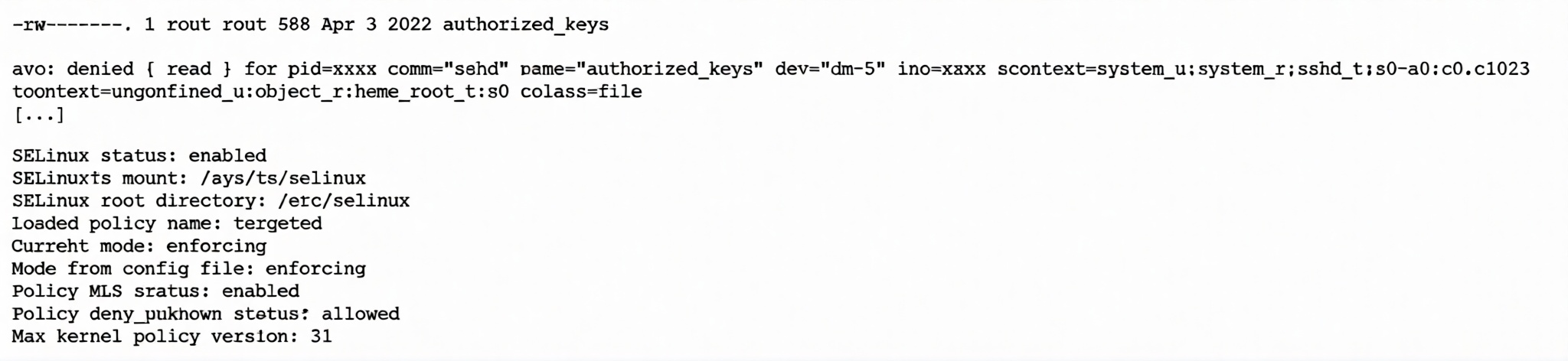
A Linux administrator just finished setting up passwordless SSH authentication between two nodes. However, upon test validation, the remote host prompts for a password. Given the following logs:


Which of the following is the most likely cause of the issue?
Show answerHide answer

Correct answer: D The authorized_keys file does not have the correct security context to match SELinux policy.

Explanation

Explanation:

Why this is the most likely cause
The log shows an SELinux AVC denial:

- comm="sshd" and scontext=system_u:system_r:sshd_t:... → the sshd process is trying to read the key file.
- name="authorized_keys" → the file sshd is trying to read.
- tcontext=unconfined_u:object_r:home_root_t:s0 → the target file is labeled home_root_t, which is not the expected SELinux type for SSH authorized keys.

The system is in enforcing mode, so SELinux will block the read.
So even if the file permissions are correct, sshd can’t read it because SELinux denies access based on the file label/type → SSH key auth fails and it falls back to password prompting.

Why the other options are not best

- Incorrectly targeting the unconfined_u context: unconfined_u here is the SELinux user part of the label; the critical mismatch is the type (home_root_t), not “targeting unconfined_u.”
- Forgot to restart sshd: sshd does not require a restart to read authorized_keys—it reads it on login attempts.
- Incorrect root permissions: The file shows -rw------- owned by root:root, which is typically acceptable; the denial is explicitly from SELinux, not UNIX permissions.

Typical fix (what an admin would do)

Restore the proper SELinux context, e.g.:
restorecon -Rv /root/.ssh

(or wherever the authorized_keys file lives), ensuring it gets the expected SSH-related SELinux type (commonly ssh_home_t on SELinux systems).
Question 3 Choose 1
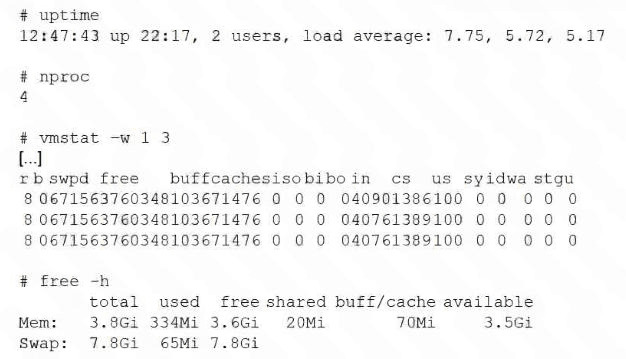
A Linux administrator receives reports that an application hosted in a system is not completing tasks in the allocated time. The administrator connects to the system and obtains the following details:


Which of the following actions can the administrator take to help speed up the jobs?
Show answerHide answer

Correct answer: B Increase the amount of CPU resources available to the system.

Explanation

Explanation:

The system is experiencing a CPU bottleneck, which is preventing the application from completing tasks on time. We can determine this by looking at three key metrics in the output:

Load Average vs. Core Count:
The uptime command shows a 1-minute load average of 7.75. However, the nproc command shows the system only has 4 CPU cores. In Linux, a load average significantly higher than the number of cores (7.75 > 4) indicates that processes are queuing and waiting for CPU time.

Process Queue (vmstat):
Looking at the vmstat -w 1 3 output, the 'r' column (runnable processes) shows a value of 8. This means there are 8 processes either running or waiting for a CPU cycle. With only 4 cores, at least 4 processes are constantly stalled in the queue.

CPU Utilization (vmstat):
The us (user) column is at 100, and id (idle) is at 0. This confirms the CPUs are fully saturated by user-space applications with zero idle time available.

Increasing CPU resources (adding more vCPUs or upgrading the processor) is the only way to resolve a queue of 8 processes competing for 4 cores.

Explanation of Incorrect Answers

Increase the amount of free memory available to the system:
The free -h output shows that the system has 3.5Gi available out of 3.8Gi total. The system is barely using RAM (only 334Mi used). Adding more memory will not help because the current memory is not being fully utilized.

Increase the amount of swap space available to the system:
The free -h output shows that swap usage is negligible (65Mi used out of 7.8Gi). Furthermore, the vmstat output shows 0 in the si (swap in) and so (swap out) columns, proving there is no memory pressure or swapping activity causing the slowdown.

Increase the amount of disks available to the system:
In the vmstat output, the bi (blocks in) and bo (blocks out) columns are 0, and the wa (I/O wait) column is also 0. This indicates that the system is not waiting on disk operations; the bottleneck is purely CPU-related.

Reference
CompTIA Exam Objective: Domain 5.0 (Troubleshooting) – Subsection 5.2: "Troubleshoot system-related issues" (focusing on CPU, memory, and I/O performance monitoring).
Reference: The Linux Command Line (William Shotts), Chapter 10: Processes; and Official CompTIA Linux+ Study Guide, Chapter on Performance Monitoring and Tuning.
Question 4 Choose 1
Which of the following utilities supports the automation of security compliance and vulnerability management?
Show answerHide answer

Correct answer: D OpenSCAP

Explanation

Explanation:

OpenSCAP (Open Security Content Automation Protocol) is a framework designed specifically for:

✅ Security compliance automation
✅ Vulnerability assessment
✅ Configuration auditing
✅ Policy enforcement
✅ Automated security scanning against standards

It uses standardized security content such as:

SCAP
CVE (Common Vulnerabilities and Exposures)
OVAL definitions
CIS benchmarks
DISA STIG profiles

Example Usage:
oscap xccdf eval --profile stig /usr/share/xml/scap/...xml
This command scans a system and automatically reports compliance status.

Why the Other Options Are Incorrect

❌ SELinux
Mandatory Access Control (MAC) system.
Enforces runtime security policies.
Does not perform compliance scanning or vulnerability management.

❌ Nmap
Network scanner.
Used for port scanning and service discovery.
Not a compliance automation tool.

❌ AIDE
Advanced Intrusion Detection Environment.
File integrity checker that detects file changes.
Does not manage vulnerabilities or compliance policies.

Linux+ XK0-006 Exam Tip

Memorize this mapping:

Tool → Purpose
SELinux → Access control enforcement
Nmap → Network scanning
AIDE → File integrity monitoring
OpenSCAP → Compliance and vulnerability automation

Exam Keyword Trigger:
If you see automation, compliance, and vulnerability management together, think OpenSCAP immediately.
Question 5 Choose 1
Which of the following passwords is the most complex?
Show answerHide answer

Correct answer: C H3s@1dSh3t0|d

Explanation

Explanation:

Password complexity is determined by the variety of character types and the length of the string. In professional certifications like CompTIA Linux+, a "complex" password is traditionally defined as one that combines all four major character categories: uppercase letters, lowercase letters, numbers, and special characters (symbols).

H3s@1dSh3t0|d (Choice C):
This is the most complex because it uses:
Uppercase letters: H, S
Lowercase letters: s, d, h, t, d
Numbers: 3, 1, 0
Special characters: @, | (pipe)
Length: 13 characters

he$@ID$heTold (Choice B):
While it has symbols and letters, it lacks any numbers.

H3sa1dt01d (Choice A):
Uses uppercase, lowercase, and numbers, but lacks any special characters (symbols).

HeSaidShetold (Choice D):
A simple combination of uppercase and lowercase letters, lacking both numbers and special characters.

Key Complexity Rules:
According to standard exam objectives, a strong password should follow the "8 and 4" rule: a minimum of 8 characters and at least one from each of the 4 categories (Upper, Lower, Number, Symbol). Choice C is the only one that meets all four criteria while also maintaining a robust length.
Question 6 Choose 1
Which of the following is a reason multiple password changes on the same day are not allowed?
Show answerHide answer

Correct answer: C To stop users from circulating through the password history to return to the originally used password

Explanation

Explanation:

In Linux and other enterprise systems, administrators often configure a password history policy (e.g., remember=5) to prevent users from reusing their favorite passwords. However, without a minimum password age (often set to 1 day or 24 hours), a user could bypass this restriction by changing their password multiple times in a single session—cycling through dummy passwords until the system's history limit is reached—and then resetting it back to the original password. Restricting multiple changes on the same day forces the user to keep each new password for a significant period, making this "cycling" tactic impractical.

Why other options are incorrect

❌ To avoid brute-forced password attacks by making them too long to perform:
Brute-force protection is typically handled by enforcing password complexity, minimum length, and account lockout thresholds after failed attempts, not by limiting the frequency of successful password changes.

❌ To increase password complexity and the system's security:
While complexity (uppercase, digits, symbols) increases security, the specific rule against multiple daily changes is a temporal restriction aimed at enforcing the history policy, not the inherent complexity of the characters used.

❌ To enforce using multifactor authentication with stronger encryption algorithms instead of passwords:
Password age policies are a legacy security measure for password-based authentication. They do not force a transition to MFA or change the underlying encryption algorithms (like SHA-512) used to store hashes in /etc/shadow.
Question 7 Choose 1
A Linux administrator is testing a web application on a laboratory service and needs to temporarily allow DNS and HTTP/HTTPS traffic from the internal network. Which of the following commands will accomplish this task?
Show answerHide answer

Correct answer: C firewall-cmd --add-service={dns, http, https} --zone=internal

Explanation

Explanation:

The administrator wants to temporarily allow DNS, HTTP, and HTTPS traffic using firewalld.

The correct command uses firewall-cmd, which is the proper management tool for firewalld rules:
firewall-cmd --add-service={dns,http,https} --zone=internal

Why this works
--add-service allows predefined services.
{dns,http,https} adds multiple services at once.
--zone=internal applies rules only to the internal network zone.
Without --permanent, the change is temporary (lost after reboot), matching the requirement.

❌ Why the Other Options Are Incorrect

❌ firewalld -- add-service=...
firewalld is a daemon/service, not the configuration command.
Invalid syntax.

❌ iptables -- enable-service=...
iptables does not use service names or zones.
firewalld abstracts iptables rules.
Invalid command.

❌ systemctl mask firewalld ...
mask disables a service entirely.
Would block firewall operation, not allow traffic.

🧠 Linux+ XK0-006 Exam Tip
Key firewalld commands:
Task Command
Temporary allow service firewall-cmd --add-service= ✅
Permanent rule add --permanent
Reload rules firewall-cmd --reload
List rules firewall-cmd --list-all

💡 Exam keyword trigger:
If question says temporary firewall change, do NOT include --permanent.
Question 8 Choose 1
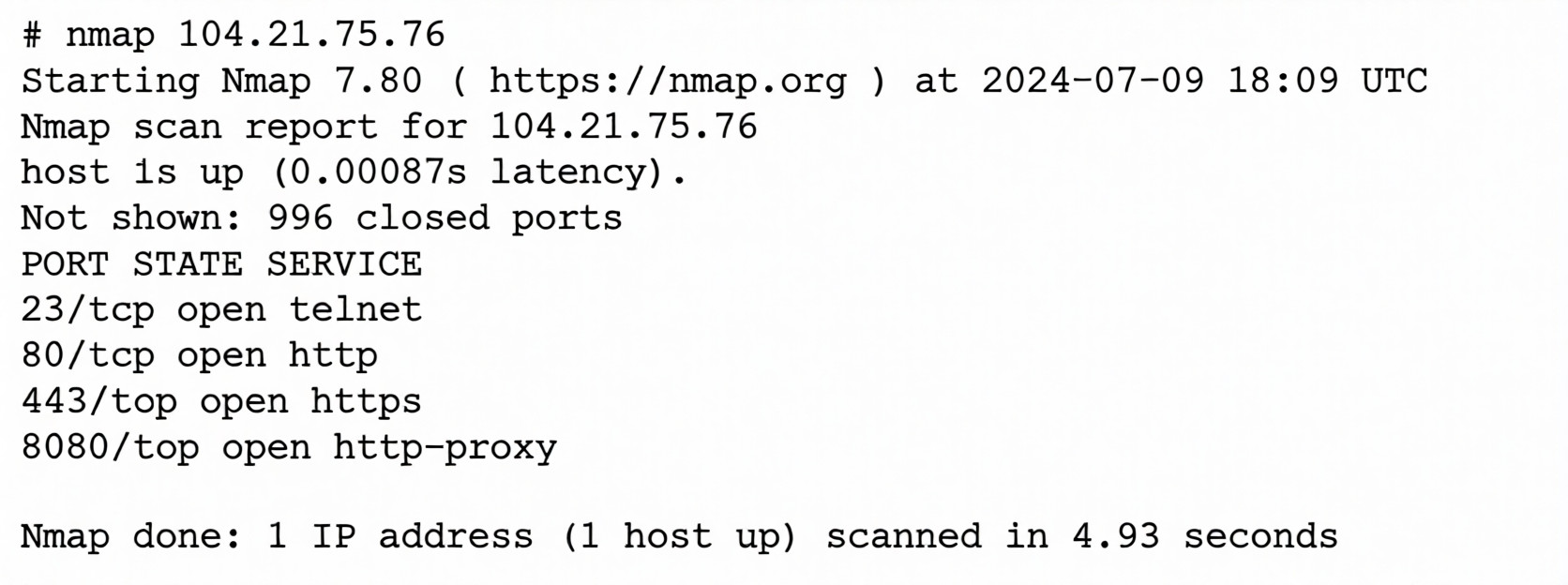
While hardening a system, an administrator runs a port scan with Nmap, which returned the following output:


Which of the following is the best way to address this security issue?
Show answerHide answer

Correct answer: D Disabling and removing the Telnet service on the server

Explanation

Explanation:

The Nmap scan reveals that port 23 (telnet) is open on the server. Telnet is an outdated, insecure protocol that transmits all data, including login credentials, in cleartext (unencrypted). This presents a significant security vulnerability.

Analysis of the Nmap output:
PORT STATE SERVICE
23/tcp open telnet # ⚠️ INSECURE - transmits in cleartext
80/tcp open http # Web server (can be secure with HTTPS)
443/tcp open https # Secure web server (encrypted)
8080/tcp open http-proxy # Alternative web port

Why Telnet is a security risk:
No encryption: All data (including usernames and passwords) sent in plaintext
Can be intercepted: Anyone on the network can sniff credentials
No integrity checking: Data can be modified in transit
Outdated protocol: Modern alternatives provide encryption
Common attack vector: Frequently targeted by attackers

The best remediation:
Disabling and removing the Telnet service addresses the root cause by eliminating the vulnerable service entirely. This is a complete and permanent solution.

Why other options are incorrect:
❌ Configuring a firewall to block traffic on port 23 on the server
This is a workaround, not a fix
The Telnet service would still be running and could be:
* Re-enabled by accident
* Accessed if firewall rules change or fail
* Accessed from localhost (bypassing firewall)
Leaves unnecessary software installed (increases attack surface)
Better to remove the service entirely (defense in depth)

❌ Changing the system administrator's password to prevent unauthorized access
Does NOT address the vulnerability
Passwords sent via Telnet are still exposed in cleartext
Attackers can sniff the new password just as easily
Focuses on credential strength, not the insecure protocol

❌ Closing port 80 on the network switch to block traffic
Wrong port: Port 80 (HTTP) is not the security issue
Port 80 is legitimate web traffic
Blocking at the switch is network-level, not system hardening
Doesn't address the Telnet vulnerability at all
Would break legitimate web services

Secure Alternatives to Telnet:
Protocol Port Encryption Use Case
SSH 22 ✅ Yes Secure remote shell access
SCP/SFTP 22 ✅ Yes Secure file transfer
HTTPS 443 ✅ Yes Secure web access

To properly secure the system:
# 1. Stop the Telnet service immediately
sudo systemctl stop telnet.socket
sudo systemctl stop telnet.service

# 2. Disable Telnet from starting on boot
sudo systemctl disable telnet.socket
sudo systemctl disable telnet.service

# 3. Remove Telnet packages entirely
# On RHEL/CentOS/Fedora:
sudo dnf remove telnet-server telnet

# On Debian/Ubuntu:
sudo apt remove telnetd telnet

# 4. Ensure SSH is installed and properly configured
sudo systemctl enable --now sshd

# 5. Verify the port is closed
nmap localhost
# or
ss -lnt | grep :23

Security Best Practices:
Principle of Least Functionality: Remove or disable unnecessary services
Defense in Depth: Multiple layers of security (remove service + firewall)
Encrypt Everything: Use encrypted protocols (SSH instead of Telnet)
Regular Audits: Periodic port scans to detect open ports
Service Management: Only run services that are required

Reference:
Telnet (RFC 854) - No encryption, credentials in plaintext
NIST Guidelines: Remove or disable unnecessary network services
CIS Benchmarks: Recommend disabling Telnet and using SSH instead
PCI DSS Requirement 2.2.2: Disable all insecure services and protocols
Question 9 Choose 1
A Linux administrator needs to analyze a compromised disk for traces of malware. To complete the analysis, the administrator wants to make an exact, block-level copy of the disk. Which of the following commands accomplishes this task?
Show answerHide answer

Correct answer: D dd if=/dev/sdc of=/tmp/image bs=8192

Explanation

Explanation:

The dd (Data Duplicator) command is the standard utility for performing block-level or bit-by-bit copies of storage devices. Unlike file-based tools, dd reads the raw data directly from the device file (e.g., /dev/sdc), capturing everything including the master boot record (MBR), partition tables, and even deleted file remnants that might still exist in unallocated space. This makes it the tool of choice for forensic analysis and malware investigations.

if=/dev/sdc: Specifies the input file, which in this case is the raw block device being analyzed.
of=/tmp/image: Specifies the output file, where the bit-for-bit image will be stored.
bs=8192: Sets the block size to 8192 bytes (8 KB) for the read/write operations, which helps speed up the imaging process compared to the default 512-byte block size.

Why other options are incorrect
cp -rp /dev/sdc/ /tmp/image*: The cp command is file-based. It only copies active files and directories and cannot capture the underlying disk structure or deleted data required for forensics.

cpio -i /dev/sdc -ov /tmp/image: cpio is an archiving tool. While it can handle device files, it is primarily used for moving sets of files into and out of archive files, not for creating a raw bitstream image of a physical disk.

tar cvzf /tmp/image /dev/sdc: tar creates an archive of the filesystem contents. It does not perform a block-level copy of the raw disk device.
Question 10 Choose 1
Which of the following is the main reason for setting up password expiry policies?
Show answerHide answer

Correct answer: B To mitigate the use of exposed passwords

Explanation

Explanation:

Password expiry policies (also called password aging) require users to change their passwords periodically (e.g., every 90 days). The primary security rationale behind enforcing regular password changes is:
To limit the window of opportunity for an attacker who has already obtained (or is in the process of obtaining) a valid password.
If a password is compromised (e.g., via phishing, keylogger, shoulder surfing, credential stuffing from a previous breach, or database leak), forcing periodic changes means the stolen credential will eventually become invalid — even if the attacker hasn't used it yet.
This is the main historical and still widely cited reason in security standards and CompTIA Linux+ objectives.

Why not the other options?

Option: To avoid using the same passwords repeatedly
This is addressed by password history / password reuse prevention rules (e.g., "cannot reuse last 10 passwords"), not by expiry/aging.

Option: To mitigate the use of exposed passwords
Correct — the core purpose of forced periodic changes is to invalidate credentials that may have already been compromised but not yet abused.

Option: To force usage of passwordless authentication
Password expiry has nothing to do with pushing passwordless methods (FIDO2, WebAuthn, passkeys, biometrics, etc.).

Option: To increase password strength and complexity
Strength/complexity is enforced by separate rules (minimum length, character classes, forbidden patterns) via tools like pwquality or cracklib — not by expiry.

CompTIA Linux+ Context (XK0-006):
Objective ~4.1 / 4.2: Configure and secure user accounts, apply security best practices, manage password policies.
Common exam emphasis: Understand the difference between:
* Password complexity/strength rules
* Password history/reuse prevention
* Password aging/expiry (focus: limiting exposure time of compromised credentials)
* Account lockout policies

Modern security guidance (NIST SP 800-63B since 2017, Microsoft, many CIS Benchmarks) actually discourages forced regular password changes for most users unless there's evidence of compromise, because it often leads to weaker passwords (incremental changes like Password1 → Password2). However, CompTIA Linux+ still tests the traditional rationale — mitigating exposed/compromised passwords — as the main reason organizations implement expiry policies.

Final answer: To mitigate the use of exposed passwords

That's the last free question in Security

You've seen the free 30% (10 of 35 questions). Full access unlocks every question and full-length XK0-006 mock exams (87 questions, 90 minutes), a different mock on every attempt.

Unlock full mock exam
Full mock exam

Sit the XK0-006 exam before exam day

Full-length mocks with the same number of questions and the same time limit as the real XK0-006 exam. Every attempt draws a new set of questions from the full bank, so you can keep going until you pass comfortably.

Get full XK0-006 mock exam
  • 87questions per mock
  • 90 mintime limit
  • 150questions in the bank
  • Newmock on every attempt