CompTIA certification · Exam XK0-006

XK0-006 Mock Exam

CompTIA Linux+ V8

Find out if you're ready for XK0-006. Take the free timed mock exam and get your score in minutes, or study the free XK0-006 questions below with answers and explanations.

20 questions · 21 minutes · free, no sign-up

Free XK0-006 questions

1–10 of 45 free
Question 1 Choose 1
A systems administrator is having issues with a third-party API endpoint. The administrator receives the following output:
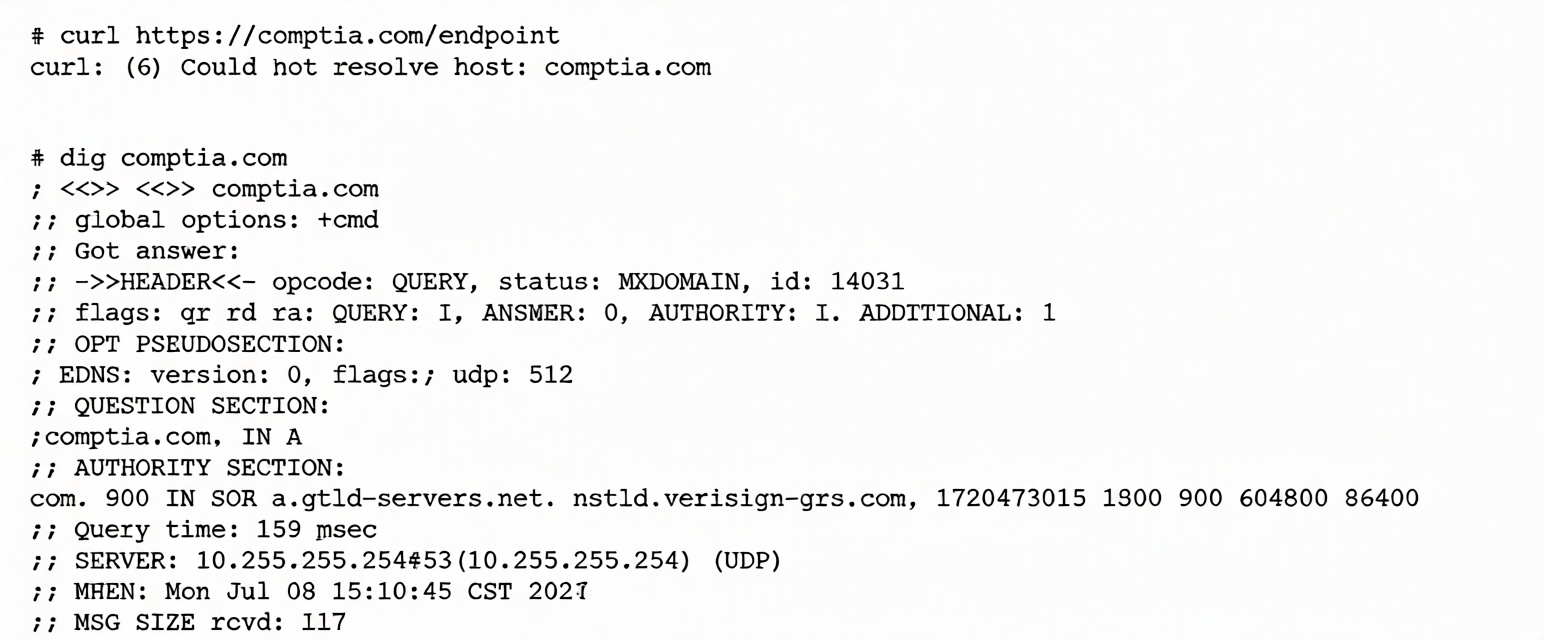


Which of the following actions should the administrator take to resolve the issue?
Show answerHide answer

Correct answer: C Review and fix the DNS client configuration file.

Explanation

Explanation:

The provided command outputs indicate a failure in the Domain Name System (DNS) resolution process, which prevents the system from finding the IP address of the third-party API.

curl Analysis:
The output
curl: (6) Could not resolve host: comptia.com
shows that the application cannot proceed because it doesn't know where to send the data.

dig Analysis:
Status: NXDOMAIN — "Non-Existent Domain." The DNS server explicitly states it cannot find a record for the requested name.
ANSWER: 0 → No valid IP address was returned for the query.
Server Information: The system is querying an internal IP address, 10.255.255.254. This local nameserver is failing to provide public internet records.

The Action:
The DNS client configuration file in Linux is typically /etc/resolv.conf.
Reviewing and fixing this file — by adding a valid nameserver such as 8.8.8.8 — will allow the system to correctly resolve the API endpoint.

Explanation of Incorrect Answers

Open a secure port in the server's firewall:
Firewall issues usually result in "Connection Timed Out" or "Connection Refused" errors.
Because the error here is "Could not resolve host," the system hasn't even reached the stage where a firewall would block a port. It cannot connect without an IP address.

Request a new API endpoint from a third party:
The dig output shows the system is querying comptia.com, which is a valid domain.
The endpoint itself is likely fine. The problem lies with the local server's inability to resolve the domain.

Enable internet connectivity on the host:
The system is successfully communicating with its local DNS server at 10.255.255.254 (as evidenced by the dig response).
While general internet access might be required for the API call, the specific error here is DNS resolution, which must be fixed in /etc/resolv.conf first.

Reference:
CompTIA Exam Objective: Domain 5.0 (Troubleshooting) – Subsection 5.3: Analyze and troubleshoot network-related issues (DNS and Name Resolution).
Reference: Linux Man Pages (man resolv.conf, man dig); Official CompTIA Linux+ Study Guide, Chapter on Network Troubleshooting.
Question 2 Choose 1
A Linux administrator updates the DNS record for the company using:
cat /etc/bind/db.abc.com
The revised partial zone file is as follows:
ns1 IN A 192.168.40.251
ns2 IN A 192.168.40.252
www IN A 192.168.30.30

When the administrator attempts to resolve www.abc.com to its IP address, the domain name still points to its
old IP mapping:
nslookup www.abc.com
Server: 192.168.40.251
Address: 192.168.40.251#53
Non-authoritative answer:
Name: www.abc.com
Address: 199.168.20.81
Which of the following should the administrator execute to retrieve the updated IP mapping?
Show answerHide answer

Correct answer: D resolvectl flush-caches

Explanation

Explanation:

The administrator updated the authoritative zone file for abc.com on the BIND server (at 192.168.40.251, which is also the DNS server used in the nslookup output). However, when querying www.abc.com, the response still shows the old IP (199.168.20.81) as a non-authoritative answer.
This indicates the issue is not with the authoritative server (BIND would serve the updated record immediately after reload/restart or rndc reload), but with caching on the client machine where the query is run.
The client is using a local caching resolver (likely systemd-resolved, common on modern Linux distros like Ubuntu 18.04+, Debian 10+, Fedora, etc.), which caches DNS responses to improve performance. The old record is stuck in this local DNS cache.

systemd-resolve query www.abc.com: Incorrect.
This performs a DNS lookup using systemd-resolved (similar to dig or nslookup), but it does not flush or clear the cache. It would still return the cached (old) answer.

systemd-resolve status: Incorrect.
This shows the current configuration of systemd-resolved (per-interface DNS servers, search domains, etc.), but does not affect or flush the cache.

service nslcd reload: Incorrect.
nslcd is the daemon for NSS LDAP (Name Service Switch LDAP), used for authenticating users/groups via LDAP/AD — not for DNS resolution or caching. Reloading it has no effect on DNS.

resolvectl flush-caches: Correct.
resolvectl is the modern client tool for interacting with systemd-resolved (introduced around systemd v239+; the preferred command on current systems).
flush-caches clears the DNS cache maintained by systemd-resolved.
After running this (usually with sudo), subsequent queries (e.g., nslookup, dig, or browser) will go to the authoritative server again and retrieve the updated IP (192.168.30.30).

Note on older systems:
In systemd versions before ~239 (e.g., older Ubuntu 16.04/18.04 setups), the equivalent was systemd-resolve --flush-caches. On modern distributions (2020+), resolvectl flush-caches is the standard and correct command.
Question 3 Choose 1
System users are being randomly disconnected from a server. The systems administrator inspects the following output:

# ping 192.168.1.1

--- 192.168.1.1 ping statistics ---

100 packets transmitted, 4 received, 96% packet loss

# ip -s link show

RX: errors 400000

TX: errors 150000

# ip route

default via 192.168.1.1 dev enp0s25 proto dhcp src 192.168.1.102 metric 600

Which of the following should the administrator do to fix the issue?
Show answerHide answer

Correct answer: B Replace the NIC

Explanation

Explanation:
The output shows 96% packet loss and significant error counters (RX: errors 400000, TX: errors 150000) on the network interface. High error counts at the interface level indicate hardware problems (failing NIC, bad cable, faulty switch port). The gateway and route are correctly configured, so the NIC itself is the likely culprit.

Correct Option:

B. Replace the NIC
The ip -s link show output displays thousands of receive (RX) and transmit (TX) errors. Such high error rates at the physical interface level typically indicate defective hardware (NIC), damaged cable, or a faulty switch port. After ruling out cable/port issues, replacing the NIC is the appropriate resolution. The severe packet loss (96%) and error counts are consistent with hardware failure.

Incorrect Options:

A. Assign a proper gateway –
The ip route output shows a default gateway (192.168.1.1) is already assigned. Ping reaches the gateway (4 responses out of 100), so gateway assignment is correct. The issue is not routing.

C. Increase the ping's TTL –
Time To Live (TTL) affects routing loops and hop limits, not link-level errors or packet loss. The ping reaches the gateway (responses received), so TTL is sufficient. Increasing TTL will not fix RX/TX errors.

D. Increase the MTU size –
MTU mismatches can cause fragmentation or packet loss, but they do not produce the massive interface error counters shown (errors 400000). MTU issues typically show as "frag needed" or ICMP errors, not raw RX/TX error increments.

Reference:
man ip – link show error counters explanation
Linux networking troubleshooting – High RX/TX errors indicate hardware issues
IEEE 802.3 – Ethernet error conditions (CRC errors, frame alignment errors)
Question 4 Choose 1
A Linux server is experiencing slowness. A systems administrator obtains the following output:

top - load average: 2.43, 1.80, 2.32

Tasks: ... 154 zombie

%Cpu(s): 6.2 us, 5.1 sy, 0.0 ni, 79.2 id, 9.1 wa, ...

$ iostat -m 2

%user %nice %system %iowait %steal %idle

4.30 2.02 0.29 70.38 4.00 19.01

Which of the following explains the issue?
Show answerHide answer

Correct answer: C The storage I/O latency is high.

Explanation

Explanation:
The top output shows a high load average (2.43) and 154 zombie processes. The iostat -m output shows %iowait = 70.38%, indicating that the CPU is spending the majority of its time waiting for I/O operations (disk reads/writes) to complete. High I/O wait explains both the system slowness and high load average.

Correct Option:

C. The storage I/O latency is high.
%iowait (from iostat) represents the percentage of time the CPU was idle while waiting for pending disk I/O to complete. A value of 70.38% means the system is severely bottlenecked by storage performance. High I/O wait leads to high load averages and slow responsiveness because processes are blocked waiting for disk operations (e.g., reads, writes, swapping).

Incorrect Options:

A. The system ran out of swap space –
The output shows no swap-related metrics. Running out of swap typically causes OOM kills, not high I/O wait. Even if swapping, %iowait might increase, but the primary indicator is swap usage, which is not shown here.

B. The CPU is overutilized –
CPU user + system = 6.2 + 5.1 = 11.3% in the first output, and 4.30 + 2.02 + 0.29 = 6.61% in iostat. CPU idle is 79.2% and 19.01%. CPU is not overutilized; it is waiting for I/O.

D. The system needs to be patched –
No kernel version, security patch, or update information is provided. There is no evidence that patching would resolve high I/O wait, which is typically a storage performance or application pattern issue.

Reference:
man iostat – %iowait interpretation
man top – Load average and zombie processes
Linux performance tuning – High I/O wait troubleshooting
Question 5 Choose 1
An administrator receives the following output while attempting to unmount a filesystem: umount /data1: target is busy.
Which of the following commands should the administrator run next to determine why the filesystem is busy?
Show answerHide answer

Correct answer: D lsof | grep /data1

Explanation

Explanation:

The "target is busy" error occurs because the kernel cannot unmount a filesystem if any files are currently open or if a process has its current working directory set within that mount point.

lsof (List Open Files): This utility provides a comprehensive list of all files currently opened by the system.

The Pipe and Grep: By piping the output to grep /data1, the administrator filters the thousands of open files down to only those specifically located on the /data1 partition.

Identification: The output will reveal the Process ID (PID) and the user responsible for the lock, allowing the administrator to either ask the user to exit the directory or terminate the process to free the filesystem.

Explanation of Incorrect Answers
ps -f /data1: The ps (process status) command is used to view running processes. While it can show process details, it does not natively accept a directory path as a filter to show which processes are using that specific directory.

du -sh /data1: The du (disk usage) command calculates the space used by files and directories. While it provides information about storage consumption, it does not provide any information regarding active file handles or process locks.

top -d /data1: The top command provides a dynamic, real-time view of running processes and system resource usage. The -d flag is used to specify the delay between screen updates (in seconds), not to filter by directory.

Reference:
CompTIA Exam Objective: Domain 5.0 (Troubleshooting) – Subsection 5.2: "Troubleshoot system-related issues" (specifically focusing on storage and unmounting issues).
Reference: Linux Man Pages (man lsof); Official CompTIA Linux+ Study Guide, Chapter on Performance Monitoring and Process Management.
Question 6 Choose 1
An administrator attempts to install updates on a Linux system but receives error messages regarding a specific repository. Which of the following commands should the administrator use to verify that the repository is installed and enabled?
Show answerHide answer

Correct answer: D yum repolist all

Explanation

Explanation:

The yum repolist command is used to display information about configured repositories. Adding the all flag ensures that the command shows every repository defined in the /etc/yum.repos.d/ directory, along with their current status (enabled or disabled). This allows an administrator to quickly identify if a repository causing errors is actually active or if it needs to be toggled on.

❌ Why other options are incorrect
yum repo-pkgs:
This command is used to list or work with packages contained within a specific repository. It is used after you know which repository you want to target, not for verifying the overall status of the repositories themselves.
yum list installed repos:
This is syntactically incorrect. While yum list installed shows installed software packages, it does not provide a list of configured repository sources.
yum reposync available:
reposync is a specific utility used to synchronize (mirror) a remote repository to a local directory. It is not the standard tool for verifying basic repository status on a live system.
Question 7 Choose 1
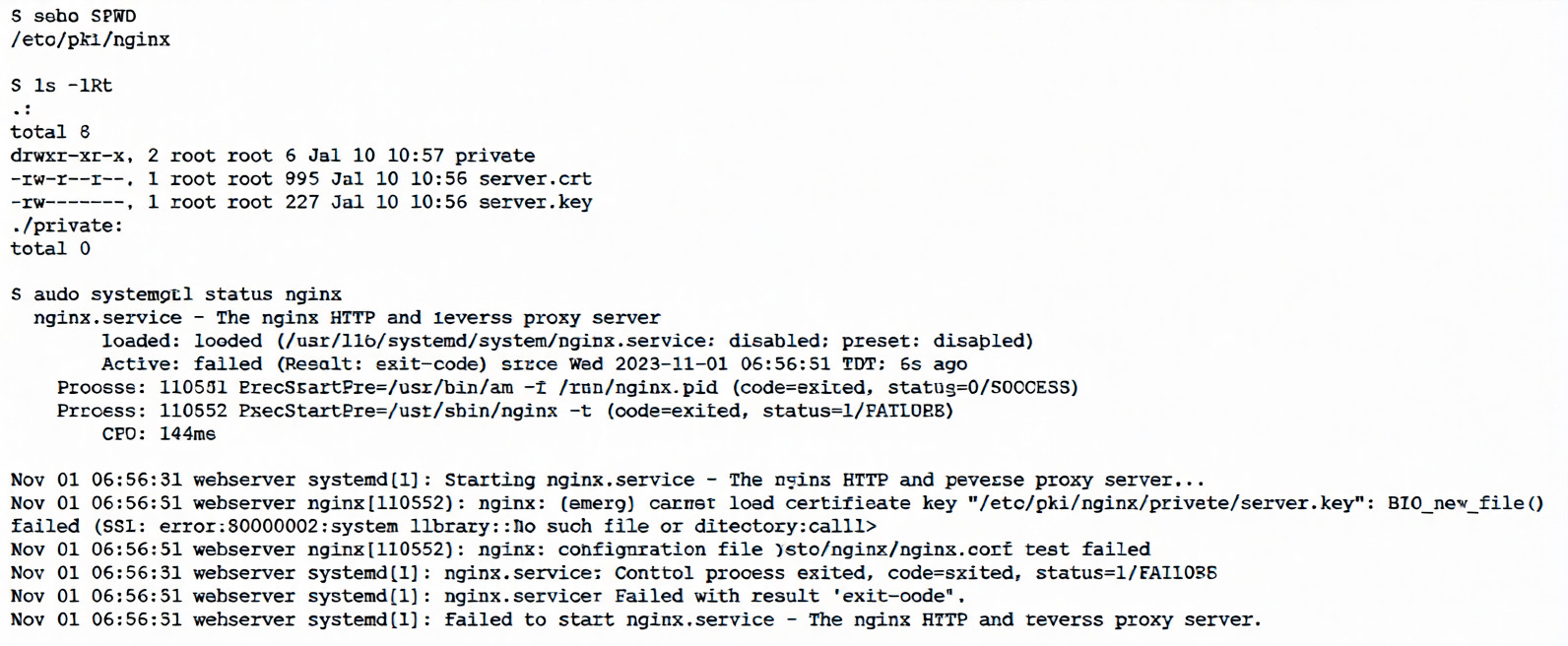
An administrator receives reports that a web service is not responding. The administrator reviews the following outputs:


Which of the following is the reason the web service is not responding?
Show answerHide answer

Correct answer: C The private key is not in the correct location and needs to be moved to the correct directory.

Explanation

Explanation:

The key error in the logs is:
textnginx: [emerg] cannot load certificate key "/etc/pki/nginx/private/server.key": BIO_new_file() failed (SSL: error:80000002:system library::No such file or directory:calling:fopen('/etc/pki/nginx/private/server.key','r') error:10000080:BIO routines::no such file)
Even though ls -lRt clearly shows the file exists:
text-rw------- 1 root root 227 Jul 10 10:56 server.key
Nginx is reporting it as "No such file or directory" when trying to open it via OpenSSL's BIO_new_file().
This is a classic symptom of permission denied being translated into a misleading "No such file or directory" error by OpenSSL/Nginx.

The file has permissions -rw------- (0600) → readable/writable only by root.
Nginx usually runs as user nginx (or www-data on Debian/Ubuntu), not as root.
Therefore, the nginx process cannot read the private key file → OpenSSL fails to open it → reports "no such file" (a known quirk in older OpenSSL error handling; newer versions often say "Permission denied" more clearly, but the behavior matches many documented cases).

Why the other options are incorrect
The private key needs to be renamed from server.crt to server.key → No, the file is already named server.key, and the config is pointing to it correctly (the error is about reading it, not the name).
The private key does not match the public key, and both keys should be replaced → No, the error occurs before any matching/validation; Nginx can't even load the key file to begin with.
The private key is not in the correct location and needs to be moved → No, ls confirms it's exactly where the config expects: /etc/pki/nginx/private/server.key.

Correct fix (what the admin should do)
Change the permissions so the nginx user can read the key (common secure practice):
sudo chmod 640 /etc/pki/nginx/private/server.key
sudo chown root:nginx /etc/pki/nginx/private/server.key    # or root:www-data depending on distro
640 = owner (root) rw, group r, others none
Group = nginx (or the group nginx runs under)

Then test and restart:
sudo nginx -t
sudo systemctl restart nginx
This resolves the startup failure and allows the web service (Nginx) to respond again.
This is a very common real-world and exam-style troubleshooting scenario for Nginx + SSL in CompTIA Linux+ (XK0-006), especially under security/hardening and service management objectives.
Question 8 Choose 1
Users report that a Linux system is unresponsive and simple commands take too long to complete. The Linux administrator logs in to the system and sees the following: Output 1:
10:06:29 up 235 day, 19:23, 2 users, load average: 8.71, 8.24, 7.71


Which of the following is the system experiencing?
Show answerHide answer

Correct answer: C High CPU load

Explanation

Explanation:

The system's unresponsiveness is directly correlated to the extremely high load averages and CPU utilization percentages shown in the outputs.

Load Average Analysis:
Output 1 shows a load average of 8.71, 8.24, 7.71. In a system with 4 CPUs (as indicated in Output 2), a load average above 4.00 means the CPU is fully saturated and processes are actively queuing for execution time. A load of 8.71 means the system is over-capacity by more than 100%.

CPU Utilization Details:
Output 2 shows the CPU breakdown:

%usr (User): 65.88 – More than half of the processing power is being consumed by user-level applications.
%sys (System): 20.54 – A significant portion is consumed by the kernel.
%idle: 0 – The CPU has zero downtime; it is working at 100% capacity.

Result:
When the %idle reaches 0 and the load average exceeds the core count, simple commands become sluggish because they must wait in a long queue for CPU cycles.

Explanation of Incorrect Answers
High latency:
While the user experience feels latent, "latency" in a Linux exam context usually refers specifically to network delay (ICMP/ping times) or disk response times. The primary issue here is local processing resource exhaustion.

High uptime:
Output 1 shows the system has been up for 235 days. While this is a long time, high uptime does not inherently cause a system to be unresponsive unless it has led to an unpatched memory leak or log file bloat, which is not evidenced here.

High I/O wait times:
Output 2 shows an %iowait of 5.65. While there is some disk/network waiting occurring, it is relatively low compared to the 65.88% user load. If I/O wait were the primary cause of unresponsiveness, that number would typically be much higher (e.g., >30%) while the CPU remained mostly idle.

Reference
CompTIA Exam Objective: Domain 5.0 (Troubleshooting) – Subsection 5.1: "Analyze and troubleshoot system-related issues" (specifically focusing on Performance and Process Monitoring).
Reference: Linux Man Pages (man uptime, man sar); Official CompTIA Linux+ Study Guide, Chapter on Performance Monitoring.
Question 9 Choose 1
The development team asks a Linux administrator to help diagnose a connectivity issue that is occurring with a newly developed software. The Linux administrator reviews the following output:

$ wget -vvv https://api.newapp.comptia.org/v2/health

Resolving proxy.comptia.org (proxy.comptia.org)... connected.

ERROR: The certificate of ' api.newapp.comptia.org ' is not trusted.

ERROR: The certificate of ' api.newapp.comptia.org ' does not have a known issuer.

Which of the following actions is the best way to resolve the issue?
Show answerHide answer

Correct answer: A Verify the remote certificate is trustworthy, and add it to the local trusted certificates repository.

Explanation

Explanation:
The wget error messages indicate that the certificate presented by api.newapp.comptia.org is not trusted because its issuer is not recognized by the local system. The best solution is to verify that the remote certificate is valid (signed by a legitimate CA) and then add that CA certificate to the local trusted certificate store.

Correct Option:

A. Verify the remote certificate is trustworthy, and add it to the local trusted certificates repository.
The error "not trusted" and "does not have a known issuer" means the local system lacks the root or intermediate CA certificate that signed the remote server's certificate. After verifying the certificate's chain (confirming it is not malicious), the administrator should add the appropriate CA certificate to the system's trust store (e.g., /etc/pki/ca-trust/source/anchors/ on RHEL, or /usr/local/share/ca-certificates/ on Debian) and update the trust store. This resolves the error permanently without bypassing security.

Incorrect Options:

B. Replace the remote certificate with a new self-signed CA and application certificate –
Replacing the remote certificate would affect all users, not just this server. A self-signed certificate would still be untrusted by default unless its CA is added locally. This is not the best solution.

C. Replace the expired CA certificate to permanently resolve the problem –
The error does not mention certificate expiration; it mentions issuer trust. The certificate may not be expired at all. This assumes an expiration issue that is not indicated.

D. Add option --no-check-certificate to wget command to permanently resolve the problem –
Using --no-check-certificate disables certificate validation entirely, exposing the system to man‑in‑the‑middle attacks. It is a temporary workaround, not a permanent resolution, and does not fix the root cause.

Reference:
man wget – --no-check-certificate option (insecure, not recommended for permanent use)
Red Hat / Debian documentation – Adding custom CA certificates to system trust store
IETF RFC 5280 – Certificate path validation (trust anchors)
Question 10 Choose 1
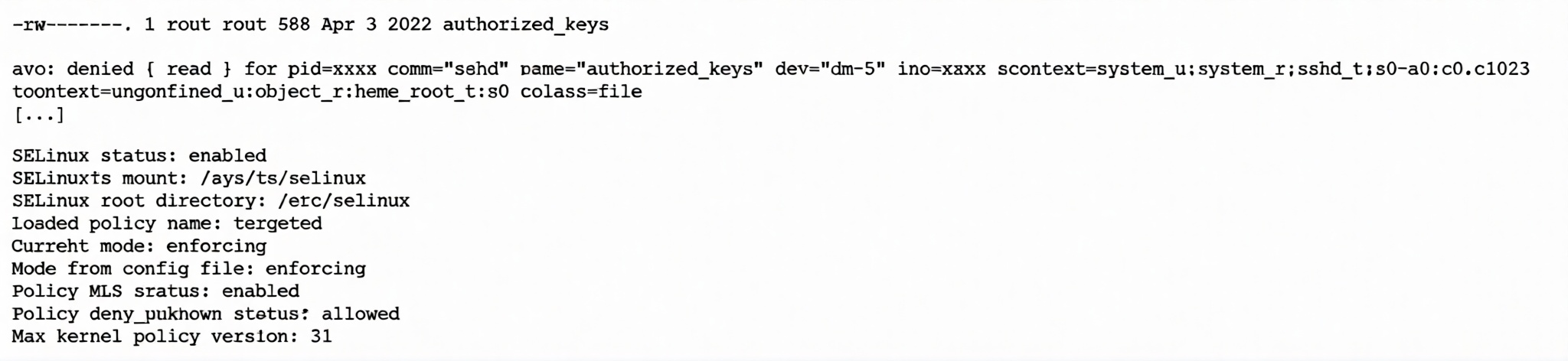
A Linux administrator just finished setting up passwordless SSH authentication between two nodes. However, upon test validation, the remote host prompts for a password. Given the following logs:


Which of the following is the most likely cause of the issue?
Show answerHide answer

Correct answer: D The authorized_keys file does not have the correct security context to match SELinux policy.

Explanation

Explanation:

Why this is the most likely cause
The log shows an SELinux AVC denial:

- comm="sshd" and scontext=system_u:system_r:sshd_t:... → the sshd process is trying to read the key file.
- name="authorized_keys" → the file sshd is trying to read.
- tcontext=unconfined_u:object_r:home_root_t:s0 → the target file is labeled home_root_t, which is not the expected SELinux type for SSH authorized keys.

The system is in enforcing mode, so SELinux will block the read.
So even if the file permissions are correct, sshd can’t read it because SELinux denies access based on the file label/type → SSH key auth fails and it falls back to password prompting.

Why the other options are not best

- Incorrectly targeting the unconfined_u context: unconfined_u here is the SELinux user part of the label; the critical mismatch is the type (home_root_t), not “targeting unconfined_u.”
- Forgot to restart sshd: sshd does not require a restart to read authorized_keys—it reads it on login attempts.
- Incorrect root permissions: The file shows -rw------- owned by root:root, which is typically acceptable; the denial is explicitly from SELinux, not UNIX permissions.

Typical fix (what an admin would do)

Restore the proper SELinux context, e.g.:
restorecon -Rv /root/.ssh

(or wherever the authorized_keys file lives), ensuring it gets the expected SSH-related SELinux type (commonly ssh_home_t on SELinux systems).
Full mock exam

Sit the XK0-006 exam before exam day

Full-length mocks with the same number of questions and the same time limit as the real XK0-006 exam. Every attempt draws a new set of questions from the full bank, so you can keep going until you pass comfortably.

Get full XK0-006 mock exam
  • 87questions per mock
  • 90 mintime limit
  • 150questions in the bank
  • Newmock on every attempt

CompTIA Linux+ XK0-006 Official Exam Blueprints And Our Practice Questions


CompTIA Linux+ XK0-006 Domain Official Exam Weight Our Practice Questions
System Management 23% 48
Our Practice Questions Covers Subtopics: Linux boot process, Kernel management, Device management, Storage management, LVM and RAID, Filesystems, Network configuration, Shell operations, Backup and restore, Virtualization, KVM and QEMU, System monitoring, Package management, Network tools, Environment variables, Shell utilities
Services and User Management 20% 11
Our Practice Questions Covers Subtopics: User management, Group management, File permissions, Account administration, Systemd services, Service management, Process management, Job scheduling, Containers, Docker basics, File and directory operations, Linux services, Package repositories, Access controls
Security 18% 31
Our Practice Questions Covers Subtopics: Authentication and authorization, PAM, LDAP, Kerberos, Firewall configuration, SELinux, OS hardening, Account security, Cryptography, Certificates, File integrity, Security auditing, Compliance, Security scans, SSH security, Least privilege
Automation, Orchestration, and Scripting 17% 29
Our Practice Questions Covers Subtopics: Bash scripting, Python scripting, Automation tools, Ansible, Puppet, CI/CD concepts, Git version control, YAML and JSON, Shell scripting, Variables and loops, Conditional logic, Functions, Orchestration, Infrastructure automation, AI-assisted scripting
Troubleshooting 22% 31
Our Practice Questions Covers Subtopics: System troubleshooting, Boot issues, Service failures, Network troubleshooting, DNS issues, Firewall troubleshooting, Performance analysis, CPU and memory issues, Disk latency, Connectivity problems, Log analysis, Filesystem repair, Permission issues, Security troubleshooting, Diagnostic utilities

Struggling with Linux commands, shell scripts, and system administration? This practice test mirrors the actual XK0-006 exams focus on hardware configuration, file management, security, and automation. You will work through questions on boot processes, network configuration, user permissions, and troubleshooting real-world Linux issues. Each answer includes detailed explanations that clarify why certain commands work in specific scenarios. By identifying gaps in your command-line knowledge before exam day, You will walk in confident. Stop guessing which Linux topics need attention—let this test reveal exactly what to study and master.

What Our Community Says


Linux+ covers distribution-neutral concepts that can be tricky to master. Preptia XK0-006 practice test questions helped me understand command-line operations, scripting, and security across different Linux environments. The questions were accurate and prepared me perfectly for exam day.
Robert Hayes, Linux Administrator | Seattle, WA

Linux administration preparation improved greatly with Preptia.com practice exams for Linux+ (XK0-006). The questions covered scripting, system management, and security tasks in a practical and exam-focused way.
Rafael Costa | Brazil