CompTIA certification · Exam SK0-005

SK0-005 Mock Exam Page 7

CompTIA Server+

Free SK0-005 mock exam questions 61–70, each with the answer and an explanation.

20 questions · 20 minutes · free, no sign-up

Free SK0-005 questions

61–70 of 146 free
Question 61 Choose 1
A server administrator needs to deploy five VMs, all of which must have the same type of configuration. Which of the following would be the MOST efficient way to perform this task?
Show answerHide answer

Correct answer: D Use a VM template.

Explanation

Explanation

The goal is to deploy multiple VMs with the same configuration as efficiently as possible.

D. Use a VM template: A VM template is a master image of a virtual machine that has been pre-configured with the operating system, standard applications, network settings, and patches.

Using a template allows the administrator to clone or provision the five new VMs very quickly from a single source, bypassing the time-consuming process of installing and configuring the OS for each VM individually. This is the standard, most efficient method for mass VM deployment.

Why the other options are incorrect:

A. Snapshot a VM:
A snapshot captures the current state of a running VM (including memory and disk data) for rollback purposes. While it contains the configuration, its primary use is recovery, and it's generally not the best practice for creating a new, independent set of production VMs. Templates are specifically designed for efficient, repeatable deployment.

B. Use a physical host:
This choice doesn't address the need to deploy VMs. Deploying to a physical host would require installing the OS five separate times on hardware, which is vastly less efficient than using virtualization and templates.

C. Perform a P2V conversion:
A Physical-to-Virtual (P2V) conversion involves taking an existing physical server and converting it into a VM. This is a migration tool, not a deployment tool for creating new, identical virtual machines efficiently.

Reference/Domain
This question falls under CompTIA Server+ (SK0-005) Domain 4.0: Virtualization, Storage, and Networking.
4.1 Given a scenario, configure and manage virtualization. (Specifically, understanding and utilizing VM templates for efficient provisioning.)
Question 62 Choose 1
A server administrator receives a report that Ann, a new user, is unable to save a file to her home directory on a server. The administrator checks Ann’s home directory permissions and discovers the following:
dr-xr-xr-- /home/Ann
Which of the following commands should the administrator use to resolve the issue without granting unnecessary permissions?
Show answerHide answer

Correct answer: C chmod711/home/Ann

Explanation

Explanation:

The current permissions dr-xr-xr-- translate to 751 in octal:

Owner: r-x (5)
Group: r-- (4)
Others: r-- (1)


The owner (Ann) lacks write (w) permission on her own home directory — that’s why she cannot save files.

A user’s home directory should typically allow:

Owner: full access (rwx → 7) — to read, list, and write files
Group/Others: execute-only (--x → 1) — to allow traversal (e.g., cd /home/Ann) without reading or modifying contents

Thus, 711 is the minimal, secure fix:

bashchmod 711 /home/Ann
→ drwx--x--x
This grants Ann write access while keeping the directory secure from unauthorized reads/writes.

Why the other options are incorrect:

A. chmod 777 /home/Ann
Incorrect. Grants full access to everyone — security risk. Others can read and delete Ann’s files.

B. chmod 666 /home/Ann
Incorrect. Applies to files, not directories. Also, removes execute bit → breaks directory traversal (cd fails). And still allows group/others to write — insecure.

D. chmod 754 /home/Ann
Incorrect. Gives group read access (r--) — allows other users to list and read Ann’s files. Violates principle of least privilege.

References:
CompTIA Server+ SK0-005 Exam Objectives
2.3 – Perform basic Linux server administration tasks → Includes proper home directory permissions (drwx--x--x or 711).

Linux Filesystem Hierarchy Standard (FHS)
“User home directories should be mode 700 or 711.”

Red Hat Enterprise Linux – Security Guide “Home directories: chmod 711 ~username ensures privacy and functionality.”

Exam Tip:
User can’t save in /home/username + permissions dr-xr-xr-- → fix with chmod 711 /home/username
Never use 777 or 754 on home directories — tested heavily in SK0-005 Linux security questions.
Question 63 Choose 1
Which of the following relates to how much data loss a company agrees to tolerate in the event of a disaster?
Show answerHide answer

Correct answer: C PRO

Explanation

Explanation:

This question continues the theme of key disaster recovery metrics, specifically focusing on data loss tolerance.

RPO (Recovery Point Objective):
This is defined as the maximum acceptable amount of data loss measured in time. It answers the question: "How much data can we afford to lose?" For example, if a company has an RPO of 4 hours, it means that in a disaster, losing up to 4 hours of data is considered acceptable. This metric directly determines the required frequency of data backups or replications.

Why the Other Options Are Incorrect:

A. RTO (Recovery Time Objective):
As discussed in the previous question, RTO is about downtime tolerance ("How long can we be down?"), not data loss. It is the target time to restore service, not the point from which you recover the data.

B. MTBF (Mean Time Between Failures):
This is a hardware reliability metric that predicts the average time between inherent failures of a system or component. It describes how often a device breaks, not how much data is lost when it does.

D. MTTR (Mean Time To Repair):
This is the average time required to fix a failed component and return it to production. It is a measure of repair efficiency, not a measure of acceptable data loss.

Reference:
This is another core concept from Domain 5.0:
Disaster Recovery in the SK0-005 exam objectives. It is crucial to understand the distinction between:

RTO: Time objective for getting the system back online.
RPO: Point objective for how current the data must be.

These two metrics are the foundation for designing any disaster recovery solution, as they dictate the technology and processes required (e.g., cold site vs. hot site, nightly backups vs. synchronous replication).
Question 64 Choose 1
A server technician is configuring the IP address on a newly installed server. The documented configuration specifies using an IP address of 10.20.10.15 and a default gateway of 10.20.10.254. Which of the following subnet masks would be appropriate for this setup?
Show answerHide answer

Correct answer: A 255.255.255.0

Explanation

Explanation:

The server IP is 10.20.10.15 and the default gateway is 10.20.10.254. For these two devices to communicate directly on the same local network, they must be in the same subnet. The subnet mask determines the size of the network and which IP addresses belong to it.

With a subnet mask of 255.255.255.0 (/24):

The network address is 10.20.10.0.
Usable host range is 10.20.10.1 to 10.20.10.254.
Both 10.20.10.15 and 10.20.10.254 fall within this range.
Thus, 255.255.255.0 correctly places both addresses in the 10.20.10.0/24 network.

Why the other options are incorrect:

B. 255.255.255.128 (/25):
This creates two subnets:
10.20.10.0 – 10.20.10.127
10.20.10.128 – 10.20.10.255
The server (10.20.10.15) is in the first subnet, but the gateway (10.20.10.254) is in the second. They are not on the same subnet, so direct communication fails without a router.

C. 255.255.255.240 (/28):
This divides the address space into 16-host blocks. The IP 10.20.10.15 falls in one block (e.g., 10.20.10.0–10.20.10.15), while 10.20.10.254 falls in a much later block (e.g., 10.20.10.240–10.20.10.255). Again, different subnets.

D. 255.255.255.254 (/31):
This is a special point-to-point subnet with only two usable IPs (per RFC 3021), used only for direct links between routers. It is not appropriate for a server and gateway in a standard LAN environment.

Reference:
CompTIA Server+ SK0-005 Exam Objectives – 1.2: Given a scenario, configure basic network settings → Requires knowledge of IP addressing, subnet masks, and ensuring proper subnet membership for local communication.
RFC 1918– Defines 10.0.0.0/8 as private address space; commonly subnetted with /24 in enterprise environments.

Final Answer: A. 255.255.255.0
Only this mask ensures the server and gateway are in the same subnet.
Question 65 Choose 1
A technician is laying out a filesystem on a new Linux server. Which of the following tools would work BEST to allow the technician to increase a partition's size in the future without reformatting it?
Show answerHide answer

Correct answer: A LVM

Explanation

Explanation:

A. LVM (Logical Volume Manager) is the correct and best choice. LVM is a device mapper framework that provides a layer of abstraction between the physical disks and the logical file systems. Its primary advantage is the flexibility it offers in managing disk space.

How it works:
With LVM, you create Physical Volumes (PVs) from disks or partitions, group them into a Volume Group (VG), and then carve out Logical Volumes (LVs) from that pool. The file system is created on the Logical Volume.

Why it's the best for this scenario:
If you need to increase the size of a partition (logical volume in LVM terms), you can simply add a new physical disk to the system, add it to the existing Volume Group, and then dynamically extend the Logical Volume and the file system to use the new space—all without needing to unmount the filesystem or reformat anything. This provides maximum flexibility and minimizes downtime.

Why the other options are incorrect:

B. DiskPart is a command-line disk management utility, but it is native to Microsoft Windows. It is not used on Linux systems and is therefore incorrect for this Linux-based scenario.

C. fdisk is a classic command-line utility for partitioning disks on Linux. While it is powerful for creating, deleting, and managing partition tables, it is generally not non-destructive. To change the size of a standard partition with fdisk, you would typically have to delete the partition and recreate it with a larger size, which would result in data loss unless you had a full backup to restore. Some modern versions have limited resize capabilities, but it is not the tool's primary purpose and is far less flexible and safe than LVM.

D. Format is a generic term and a command used to create a file system on a partition. The act of formatting erases all existing data on that partition. It is the exact opposite of what the question requires, which is to increase size without reformatting.

Reference:
This topic falls under CompTIA Server+ Objective 3.3: "Given a scenario, perform proper server maintenance techniques," which includes storage management and understanding volume management types like LVM. LVM is the industry-standard method on Linux for achieving flexible, resizable storage.
Question 66 Choose 1
Which of me following BEST describes a disaster recovery site with a target storage array that receives replication traffic and servers that are only powered on In the event of a disaster?
Show answerHide answer

Correct answer: D Warm

Explanation

Explanation:

A warm site is a partially prepared disaster recovery (DR) location. It has pre-installed hardware, such as servers and storage systems, that receive replicated data from the primary site, but these servers are not powered on or active during normal operations.
In the event of a disaster, administrators can power on the servers, synchronize data, and bring systems online relatively quickly — faster than a cold site but slower than a hot site.

Why Others Are Incorrect:

A. Cloud:
Cloud DR can refer to any model (hot, warm, or cold) depending on configuration. The question specifically mentions replication and powered-on servers only during a disaster, which matches a warm site, not a general cloud setup.

B. Cold:
A cold site usually has no active hardware or data replication. Setup and restoration take a long time since all systems must be built and data restored from backups.

C. Hot:
A hot site is fully operational and synchronized in real-time. Servers are powered on and can take over immediately with minimal downtime — unlike the scenario described.

Reference:
CompTIA Server+ SK0-005 Exam Objectives, Domain 4.3: "Explain disaster recovery concepts and methods."
CompTIA Server+ Study Guide (Exam SK0-005), Chapter 10: Disaster Recovery and Business Continuity Planning – section on Hot, Warm, and Cold Sites.

In summary:
Replication traffic + servers powered on only during disaster = Warm Site
Question 67 Choose 1
A server room with many racks of servers is managed remotely with occasional on-site support. Which of the following would be the MOST cost-effective option to administer and troubleshoot network problems locally on the servers?
Show answerHide answer

Correct answer: D KVM

Explanation

Explanation

The question asks for the MOST cost-effective option to administer and troubleshoot servers locally (on-site, in the server room).

KVM (Keyboard, Video, Mouse) Switch:
A standard KVM switch is a single device installed in the rack that allows a technician to use one set of peripherals (keyboard, monitor, mouse) to control multiple servers.

Local Administration:
The peripherals are connected locally in the rack.

Cost-Effective:
It allows the one set of expensive console equipment to be shared among many servers, making it highly cost-effective per server, especially compared to buying an IP-enabled version or rolling around a complete crash cart for every occasional need.

Analysis of Incorrect Options:

A. Management port:
A management port (like an integrated Dell Remote Access Controller/iDRAC or HPE Integrated Lights-Out/iLO) is excellent for remote administration and troubleshooting, but it is not a local device that is used for direct on-site work with a monitor/keyboard. It also requires the network to be functional (unless using an out-of-band network).

B. Crash cart:
A crash cart is a physical, mobile cart containing a monitor, keyboard, and mouse that is wheeled up to the server rack. While it provides local access, it is generally considered less cost-effective than a fixed KVM switch because it involves more hardware (a dedicated monitor, keyboard, and mouse) that must be physically moved. Modern server rooms often use a fixed KVM or a small, portable KVM Crash Cart Adapter (which connects a laptop to the server's console port) in place of the older, large physical cart. However, a traditional, fixed KVM switch in the rack is the classic and most economical permanent local solution for multiple servers.

C. IP KVM (KVM over IP):
An IP KVM is an advanced KVM switch that adds the ability to access the console remotely over a network connection. This is significantly more expensive than a standard, local KVM switch and is overkill if the primary requirement is occasional local troubleshooting and administration.

CompTIA Server+ Context (SK0-005)
This question falls under Domain 1.0: Server Administration (specifically the tools used for management and troubleshooting). The key to the answer lies in balancing the requirements: local access and cost-effectiveness for many racks of servers. A centralized, non-IP KVM console in the rack is the traditional, most economical hardware solution for local control of multiple devices.

Reference:
CompTIA Server+ (SK0-005) study materials cover the use and comparison of KVMs, IP KVMs, and remote management tools for server access.
Question 68 Choose 1
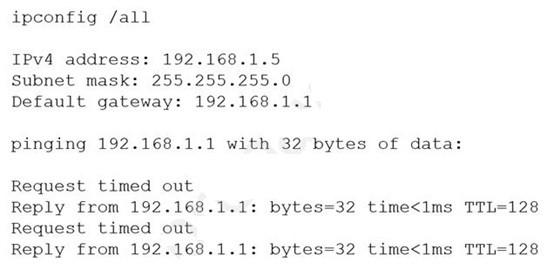
A server technician installs a new NIC on a server and configures the NIC for IP connectivity. The technician then tests the connection using thepingcommand. Given the following partial output of thepingandipconfigcommands:

Which of the following caused the issue?
Show answerHide answer

Correct answer: A Duplicate IP address

Explanation

Explanation:

The ping 10.20.10.15 command succeeds, and ipconfig shows the server’s IP is also 10.20.10.15. Pinging your own IP should only work via loopback — but getting real replies with TTL=128 and low latency means another device on the network is responding. This only happens with a duplicate IP address.

Why the other options are incorrect:

B. Incorrect default gateway
A wrong gateway prevents external network access, but local subnet pings (including self-ping via ARP) would still work. It does not cause successful replies from another device.

C. DHCP misconfiguration
The output shows a statically configured IP (ipconfig shows manual settings), not DHCP. Also, DHCP issues cause “no IP” or “APIPA (169.254.x.x)” — not duplicate responses.

D. Incorrect routing table
Routing affects inter-network traffic, not local subnet ARP or self-ping behavior. A bad route doesn’t cause duplicate IP responses.

Reference:
CompTIA Server+ SK0-005 Exam Objectives:
1.3 – Given a scenario, troubleshoot common network connectivity issues Includes identifying duplicate IP addresses via ping behavior and ARP conflicts.

Microsoft Windows Behavior:
When a duplicate IP exists, Windows may log: “The system detected an address conflict for IP address 10.20.10.15 with the system having network hardware address...” (Event ID 4199 in System log)

Final Answer: A. Duplicate IP address
The successful ping to the server’s own IP from itself — when testing connectivity — indicates another device is responding, confirming a duplicate IP conflict.
Question 69 Choose 1
Which of the following is a method that is used to prevent motor vehicles from getting too close to building entrances and exits?
Show answerHide answer

Correct answer: A Bollards

Explanation

Explanation:

A. Bollards are the correct answer. Bollards are short, sturdy vertical posts made of steel, concrete, or other durable materials. They are installed in strategic locations, such as in front of building entrances, exits, and other vulnerable points.

Primary Function:
Their explicit purpose is to provide physical security and perimeter control by creating a protective barrier. They prevent vehicles from intentionally or accidentally ramming into or getting too close to a building, a practice known as vehicle-ramming protection.

Method of Operation:
They work by physically blocking the path of a vehicle, absorbing the impact, and stopping it from proceeding further.

Why the other options are incorrect:

B. Reflective glassis primarily used for privacy, energy efficiency (by reflecting sunlight), or aesthetics. It does not provide any physical barrier to stop a vehicle.

C. Security guards are a deterrent and responsive measure. A guard can monitor vehicle traffic and report suspicious activity, but they cannot physically stop a determined vehicle from approaching a building. Their method is observational and procedural, not physical blocking.

D. Security cameras are a detective and deterrent control. They record activity and can provide evidence after an incident has occurred, but they offer zero physical prevention against a moving vehicle.

Reference:
This aligns with CompTIA Server+ SK0-005 Objective 4.1, "Given a scenario, apply physical security methods to protect physical assets." The objective includes implementing physical access controls and barriers, of which bollards are a prime example for mitigating threats from vehicles.
Question 70 Choose 1
Which of the following techniques can be configured on a server for network redundancy?
Show answerHide answer

Correct answer: D Teaming

Explanation

Explanation:

Network interface card (NIC) teaming — also known as link aggregation or bonding — is a network redundancy technique where multiple physical NICs on a server are combined into a single logical interface.
If one network link fails, traffic automatically fails over to another NIC, maintaining network connectivity and increasing both redundancy and throughput.

Why Others Are Incorrect:

A. Clustering:
Refers to multiple servers working together to provide application or service redundancy, not network interface redundancy. (Example: failover clustering for databases or web servers.)

B. Vitalizing (likely meant Virtualizing):
Virtualization allows multiple VMs to run on a single host but doesn’t inherently provide network redundancy.

C. Cloning:
Creates a copy of a system or VM, useful for deployment or testing — not a redundancy or failover mechanism.

Reference:
CompTIA Server+ (SK0-005) Exam Objectives, Domain 2.2: "Configure network services and redundancy."
Microsoft Docs: NIC Teaming Overview
Red Hat Documentation: Network Bonding Explained

In summary:
NIC Teaming provides network redundancy and load balancing, making D. Teaming the correct answer
Full mock exam

Sit the SK0-005 exam before exam day

Full-length mocks with the same number of questions and the same time limit as the real SK0-005 exam. Every attempt draws a new set of questions from the full bank, so you can keep going until you pass comfortably.

Get full SK0-005 mock exam
  • 90questions per mock
  • 90 mintime limit
  • 493questions in the bank
  • Newmock on every attempt