Microsoft certification · Exam SC-100

SC-100 Mock Exam

Microsoft Cybersecurity Architect

Free SC-100 questions on Topic 3: Mix Questions, each with the answer and an explanation.

20 questions · 33 minutes · free, no sign-up

Topic 3: Mix Questions questions

1–10 of 45 free
Question 1 Choose 2
Your company has an office in Seattle.
The company has two Azure virtual machine scale sets hosted on different virtual networks.
The company plans to contract developers in India.
You need to recommend a solution provide the developers with the ability to connect to the virtual machines over SSL from the Azure portal. The solution must meet the following requirements:
• Prevent exposing the public IP addresses of the virtual machines.
• Provide the ability to connect without using a VPN.
• Minimize costs.
Which two actions should you perform? Each correct answer presents part of the solution.
NOTE: Each correct selection is worth one point.
Show answerHide answer

Correct answer: A, D Deploy Azure Bastion to one virtual network. Create a hub and spoke network by using virtual network peering.

Explanation

Explanation:
The solution must enable secure developer access from India to VMs in two different Azure virtual networks without public IP exposure, VPN, or excessive cost.

A. Deploy Azure Bastion to one virtual network:
Azure Bastion provides secure RDP/SSH connectivity directly through the Azure portal over SSL (port 443), eliminating the need for public IPs on VMs. Deploying it to one network minimizes costs while providing the core service.
D. Create a hub and spoke network using VNet peering:
This enables the single Bastion host in the "hub" VNet to connect to VMs in both "spoke" VNets. VNet peering creates private connections between networks, allowing Bastion to route traffic to all VMs while maintaining a single, cost-effective deployment.

Why This Works:
No Public IPs: Bastion connects privately via the Azure backbone
No VPN: Uses native Azure networking
Portal Access: Direct SSL connection via Azure portal
Cost Optimization: Single Bastion deployment serves multiple networks
Security: All traffic remains within Azure's trusted network

Why Other Options Fail:
B. Deploy Azure Bastion to each virtual network:
While functional, this violates the "minimize costs" requirement by duplicating Bastion services unnecessarily.
C. Enable just-in-time VM access:
JIT still requires opening RDP/SSH ports and typically uses public IPs. It doesn't provide the Azure portal-based SSL connection that Bastion offers.
E. Create NAT and network rules in Azure Firewall:
This introduces unnecessary complexity and cost. It would require public IPs on the firewall and doesn't provide the seamless Azure portal integration that Bastion delivers natively.

References:
Microsoft Learn - What is Azure Bastion:
Explains how Bastion provides secure VM connectivity without public IPs
Microsoft Learn - Virtual Network Peering:
Details how VNet peering enables cross-network connectivity
Microsoft Learn - Just-in-time VM Access:
Clarifies that JIT manages port access but doesn't eliminate need for public endpoints
Question 2 Choose 1
You have a Microsoft 365 subscription that syncs with Active Directory Domain Services (AD DS). You need to define the recovery steps for a ransomware attack that encrypted data in the subscription The solution must follow Microsoft Security Best Practices.

What is the first step in the recovery plan?
Show answerHide answer

Correct answer: A Disable Microsoft OneDnve sync and Exchange ActiveSync.

Explanation

Explanation:
In a ransomware attack impacting a Microsoft 365 environment, the immediate priority is to contain the attack and prevent it from spreading to other devices or syncing encrypted files to the cloud. Following the incident response phases (Preparation, Detection, Containment, Eradication, Recovery, Lessons Learned), containment is a critical first action to limit damage.

Correct Option:

A. Disable Microsoft OneDrive sync and Exchange ActiveSync.
This is the correct first step for containment. It immediately prevents the ransomware from propagating encrypted or malicious files from the infected endpoint to your cloud storage (OneDrive) and email services (via Exchange ActiveSync). This action isolates the infection and stops the synchronization of potentially encrypted data, protecting your cloud-based backup and recovery points.

Incorrect Options:

B. Recover files to a cleaned computer or device.
This is a critical step, but it occurs later in the Recovery phase. You cannot begin safe recovery until you have first contained the threat and eradicated the malware from the environment to prevent re-infection.

C. Contact law enforcement.
While contacting relevant authorities may be part of an organization's incident response plan, it is not the first technical recovery step. The immediate technical priority is containment to minimize operational damage.

D. From Microsoft Defender for Endpoint, perform a security scan.
This action falls under the Detection and Analysis or Eradication phases. While crucial for identifying and removing the threat, the first step after detection is typically rapid Containment to stop ongoing damage before moving to deeper investigation and eradication.

Reference:
Microsoft's ransomware response best practices emphasize the "Contain" phase first. The official guidance in the Microsoft Security blog on ransomware recovery lists steps like "Disable end-user cloud sync clients" as an immediate containment action to prevent synchronization of infected files.
Question 3
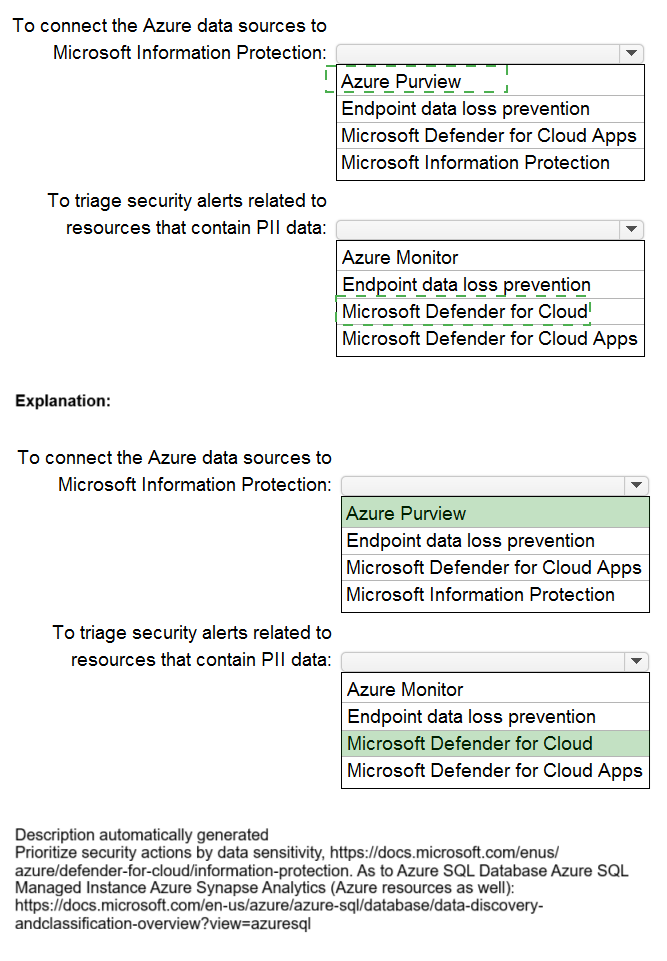
Your company is migrating data to Azure. The data contains Personally Identifiable Information (Pll). The company plans to use Microsoft Information Protection for the Pll data store in Azure. You need to recommend a solution to discover Pll data at risk in the Azure resources.
What should you include in the recommendation? To answer, select the appropriate options in the answer area.
NOTE: Each correct selection is worth one point.
Show answerHide answer

Explanation


Explanation:
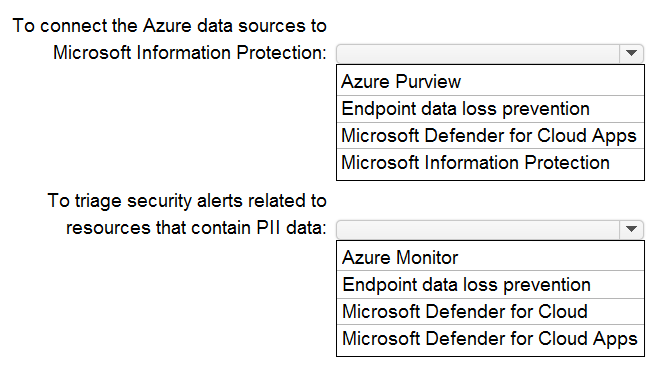
The question asks for a solution to discover PII data at risk in Azure resources. This requires two integrated capabilities: 1) A data governance service to scan, classify, and label data across Azure data sources, and 2) A security posture management tool to assess the security configuration of those resources and generate alerts.

Correct Options:

Azure Purview:
This is Microsoft's unified data governance service. It is specifically designed to connect to Azure data sources (like Azure SQL, Storage, Cosmos DB), scan them to automatically discover and classify sensitive information like PII, and apply sensitivity labels from Microsoft Information Protection. It creates a data map and provides the foundational discovery of where your PII resides.

Microsoft Defender for Cloud:
This is the central tool for cloud security posture management (CSPM) and threat protection. Once Purview identifies PII, Defender for Cloud assesses the security configuration of the underlying Azure resources (e.g., storage accounts, databases) containing that data. It provides security recommendations and generates security alerts for misconfigurations or threats that put that sensitive data at risk, allowing you to prioritize and triage alerts effectively.

Incorrect Options:

Endpoint data loss prevention:
This component is part of Microsoft Purview (formerly Microsoft 365) DLP and is focused on protecting data on Windows 10/11 devices and apps, not on discovering data within Azure resources like storage accounts or databases.

Microsoft Defender for Cloud Apps:
This is a Cloud Access Security Broker (CASB) used to discover, investigate, and govern SaaS applications (like Salesforce, Dropbox). While it can integrate with Azure Purview and has some Azure resource visibility, its primary strength is not in scanning native Azure PaaS/IaaS data sources for PII classification or managing their security posture, which is the core of this scenario.

Microsoft Information Protection:
This is the overarching framework and labeling service for classifying and protecting data. While Purview uses its labels, MIP itself does not "connect to Azure data sources" to scan and discover PII; that is the role of a data scanner like Azure Purview.

Azure Monitor:
This is a service for collecting, analyzing, and acting on telemetry and logs. It is not a dedicated tool for discovering PII data within data stores or for triaging security posture alerts related to specific sensitive data classifications.
Question 4 Choose 1
Your company uses Azure Pipelines and Azure Repos to implement continuous integration and continuous deployment (CI/CD) workflows for the deployment of applications to Azure.
You are updating the deployment process to align with DevSecOps controls guidance in the Microsoft Cloud Adoption Framework for Azure.
You need to recommend a solution to ensure that all code changes are submitted by using pull requests before being deployed by the CI/CD workflow.
What should you include in the recommendation?
Show answerHide answer

Correct answer: B branch policies in Azure Repos

Explanation

Explanation:
This question focuses on enforcing DevSecOps controls within the development process before code reaches the CI/CD pipeline. The requirement is to mandate that all code changes are reviewed via a pull request (PR) before they can be merged and subsequently deployed. This is a source control and collaboration policy that must be enforced at the repository level.

Correct Option:

B. Branch policies in Azure Repos
This is the direct and correct solution. Branch policies are a feature of Git repositories in Azure Repos. You can configure policies (like requiring a minimum number of reviewers, requiring linked work items, or build validation) on critical branches like main or release. By enabling the "Require a minimum number of reviewers" and "Check for linked work items" policies, you enforce that all changes must go through a pull request meeting those criteria before they can be merged, satisfying the requirement.

Incorrect Options:

A. Custom roles in Azure Pipelines & D. Custom Azure roles
These are authorization tools, not workflow enforcement tools. Custom roles in Azure Pipelines or Azure RBAC control who can perform certain actions (e.g., trigger a pipeline, manage resources). They cannot enforce how code changes are submitted (via PR) before reaching the pipeline. A user with the right permissions could still push directly to a branch, bypassing PR.

C. Azure policies
Azure Policy is a governance tool for enforcing rules and effects on Azure resources (like VMs, storage). It operates at the Azure subscription/resource group level to ensure compliance with security, cost, or configuration standards. It cannot govern the workflow within a source code repository like Azure Repos.

Reference:
The Microsoft Cloud Adoption Framework for Azure's DevSecOps guidance explicitly recommends using branch policies to enforce code quality and review gates. The article "Enforce policies with Azure Repos" details how branch policies are the primary mechanism for requiring pull requests and reviews to protect important branches.
Question 5
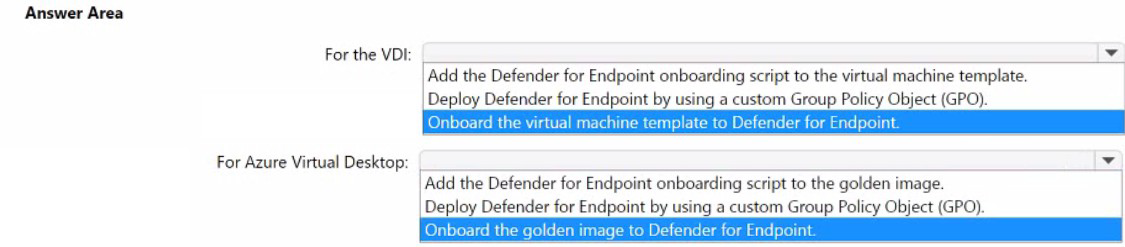
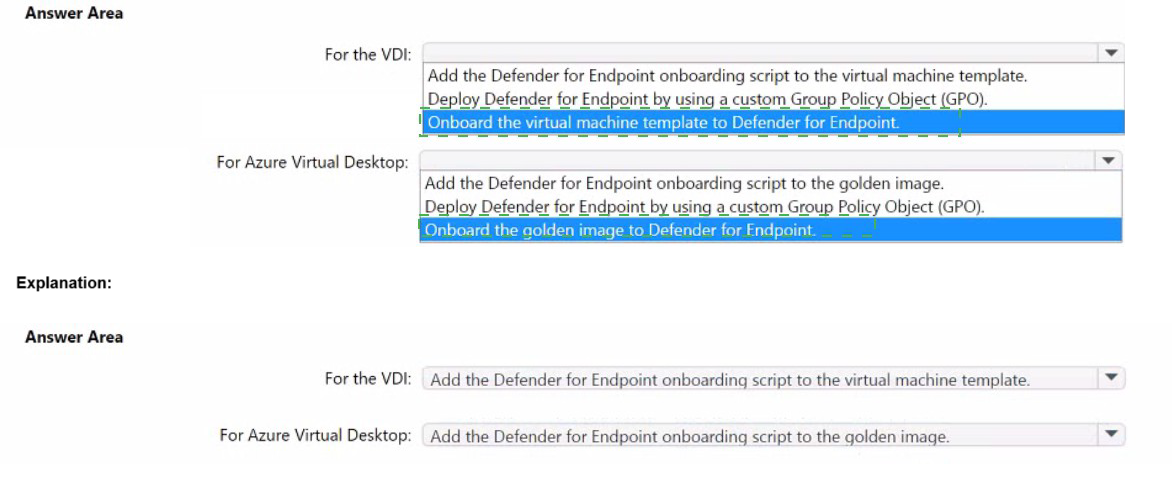
You have an Active Directory Domain Services (AD DS) domain that contains a virtual desktop infrastructure (VDI). The VDI uses non-persistent images and cloned virtual machine templates. VDI devices are members of the domain.
You have an Azure subscription that contains an Azure Virtual Desktop environment. The environment contains host pools that use a custom golden image. All the Azure Virtual Desktop deployments are members of a single Azure Active Directory Domain Services (Azure AD DS) domain.
You need to recommend a solution to deploy Microsoft Defender for Endpoint to the hosts. The solution must meet the following requirements:
• Ensure that the hosts are onboarded to Defender for Endpoint during the first startup sequence.
• Ensure that the Microsoft Defender 365 portal contains a single entry for each deployed VDI host.
• Minimize administrative effort.
What should you recommend? To answer, select the appropriate options in the answer area.
NOTE: Each correct selection is worth one point.
Show answerHide answer

Explanation


Explanation:
The goal is to onboard non-persistent hosts to Defender for Endpoint at first startup with a single portal entry per host while minimizing effort. The key is to embed the onboarding configuration directly into the master image or template before cloning, so every new virtual machine (VM) instance is automatically onboarded with a unique device identity when it first boots.

Correct Options:
For the VDI: Add the Defender for Endpoint onboarding script to the virtual machine template.

For on-premises, non-persistent VDI using cloned templates, the most efficient method is to inject the onboarding script/package into the VM template's startup sequence (e.g., via Unattend.xml or a startup script). This ensures onboarding occurs at first boot of each cloned VM, creating a unique device record. Using a GPO would be less reliable for first-boot onboarding on non-persistent, constantly recreated VMs.

For Azure Virtual Desktop: Add the Defender for Endpoint onboarding script to the golden image.
For Azure Virtual Desktop host pools using a shared golden image, the prescribed best practice is to install the Defender for Endpoint agent and embed the onboarding script directly into the golden image itself. When new session hosts are provisioned from this image, they automatically run the script on startup, ensuring immediate onboarding.

Incorrect Options:

Deploy Defender for Endpoint by using a custom Group Policy Object (GPO).
This method is less suitable for first startup sequence onboarding, especially for non-persistent VMs. GPOs apply during periodic policy refresh cycles, which may cause a delay or failure in onboarding a short-lived VM before it is deleted. It does not guarantee immediate onboarding at first boot, which is a core requirement.

Onboard the virtual machine template / golden image to Defender for Endpoint.
You should never onboard the template/image itself. Onboarding the master image creates a single, static device identity in the Defender portal. When you clone from it, all VMs will share that same identity, causing duplicate alerts and a single entry for all deployed hosts instead of one per host. This violates the requirement for a unique entry per host and is a documented anti-pattern.

Reference:
Microsoft's official guidance for deploying Microsoft Defender for Endpoint on non-persistent VDI environments explicitly states: "Onboarding must be done in the context of the VM instance, not the image." It recommends methods like adding the onboarding script to the template for on-premises VDI and integrating it into the golden image for Azure Virtual Desktop to ensure automatic, per-device onboarding. The documentation warns against onboarding the image itself, as it leads to device duplication in the portal.
Question 6
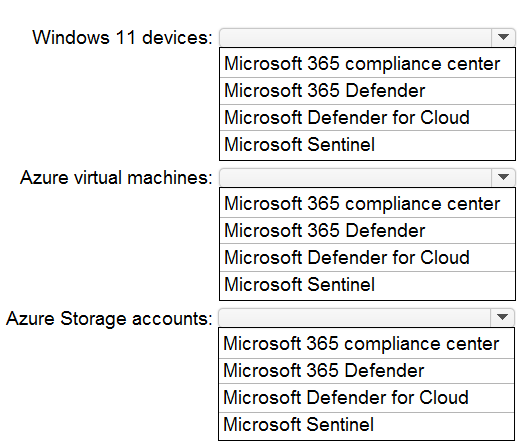
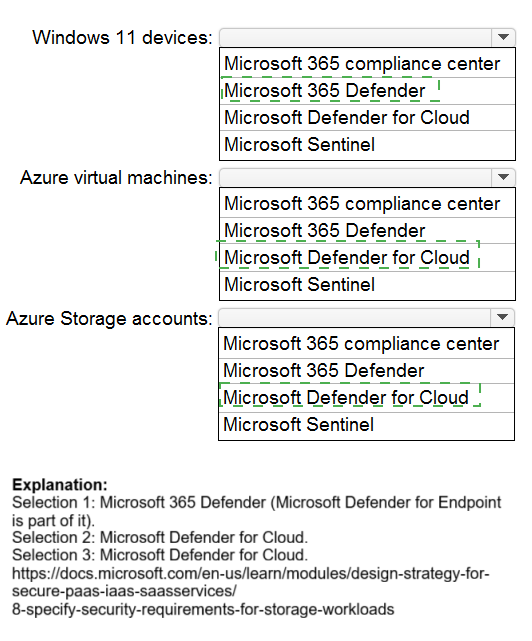
You have a Microsoft 365 E5 subscription and an Azure subscripts You need to evaluate the existing environment to increase the overall security posture for the following components:
• Windows 11 devices managed by Microsoft Intune
• Azure Storage accounts
• Azure virtual machines
What should you use to evaluate the components? To answer, select the appropriate options in the answer area.
Show answerHide answer

Explanation


Explanation:
The question asks for the tool to evaluate the existing environment to increase the overall security posture. This is a request for a security posture assessment and management tool that provides secure configuration recommendations, not just alerting or compliance.

Correct Options:

Microsoft 365 Defender:
This is the correct choice for Windows 11 devices managed by Intune. It provides the Microsoft Secure Score for Devices, which is a dedicated security posture assessment for endpoints. It analyzes device configurations, antivirus status, firewall rules, and other security controls against Microsoft's benchmarks, providing a measurable score and specific recommendations to harden the devices.

Microsoft Defender for Cloud:
This is the unified platform for cloud security posture management (CSPM) and threat protection in Azure. It is the definitive tool for evaluating and improving the security posture of Azure resources, including Azure virtual machines and Azure Storage accounts. It provides a secure score, continuously assesses configurations against security benchmarks (like Azure CIS, NIST), and delivers prioritized remediation steps.

Incorrect Options:

Microsoft 365 compliance center:
This center focuses on data governance, compliance, and risk management (e.g., Data Loss Prevention, eDiscovery, Information Protection). It is not the primary tool for evaluating and providing configuration hardening recommendations to improve the security posture of endpoints or Azure infrastructure.

Microsoft Sentinel:
This is a Security Information and Event Management (SIEM) and Security Orchestration, Automation, and Response (SOAR) solution. Its primary function is aggregating, correlating, and investigating security alerts and logs for threat detection and response. While it can ingest data from posture tools, Sentinel itself is not a posture assessment tool that provides a "secure score" or configuration evaluation.

Reference:
Microsoft's documentation clearly delineates the roles of these services. Microsoft Secure Score (accessed via Microsoft 365 Defender) measures an organization's endpoint security posture. Microsoft Defender for Cloud's secure score is the central feature for measuring and improving the security posture of Azure, AWS, and Google Cloud resources, including compute and storage services.
Question 7 Choose 1
Your company has a Microsoft 365 E5 subscription.
The Chief Compliance Officer plans to enhance privacy management in the working environment. You need to recommend a solution to enhance the privacy management. The solution must meet the following requirements:
• Identify unused personal data and empower users to make smart data handling decisions.
• Provide users with notifications and guidance when a user sends personal data in Microsoft Teams.
• Provide users with recommendations to mitigate privacy risks.
What should you include in the recommendation?
Show answerHide answer

Correct answer: C Privacy Risk Management in Microsoft Priva

Explanation

Explanation:
This question focuses on enhancing privacy management by identifying, monitoring, and guiding the handling of personal data. The requirements specifically ask for a solution that identifies unused data, provides in-app guidance (like in Teams), and offers recommendations to mitigate privacy risks. This points directly to a dedicated privacy management tool within Microsoft's compliance suite.

Correct Option:

C. Privacy Risk Management in Microsoft Priva
Microsoft Priva is the dedicated privacy risk management solution within the Microsoft Purview compliance suite. Its Privacy Risk Management component is explicitly designed to meet all three requirements:

It uses machine learning to identify and map personal data across the tenant, including unused or overexposed data.

It can deliver real-time policy tips and guidance in applications like Microsoft Teams and Outlook when users are about to send personal data.

It provides insights and actionable recommendations to help organizations and users understand and mitigate privacy risks.

Incorrect Options:

A. Microsoft Viva Insights
Viva Insights is a productivity and wellbeing tool that provides personal and organizational insights based on Microsoft 365 collaboration data. While it handles data responsibly, its primary goal is not to manage privacy risks, send policy tips about sending personal data, or identify unused personal data stores.

B. Advanced eDiscovery
Advanced eDiscovery is a tool for legal and investigative purposes. It is used to identify, hold, and export data relevant to a legal case or internal investigation. It is reactive and case-focused, not designed for proactive privacy management, user guidance, or ongoing risk mitigation.

D. Communication compliance in insider risk management
This is a policy-based solution within the Insider Risk Management suite designed to detect and remediate inappropriate or risky communications (e.g., harassment, sensitive information sharing). While it can scan for keywords, its purpose is regulatory and internal policy compliance monitoring, not empowering users with guidance or managing general privacy risks related to personal data handling.

Reference:
Microsoft's documentation for Priva Privacy Risk Management states it helps organizations "identify and remediate privacy risks" and "empower employees to make smarter data handling decisions with built-in user notifications and guidance in Microsoft 365 apps," directly aligning with the scenario's requirements.
Question 8
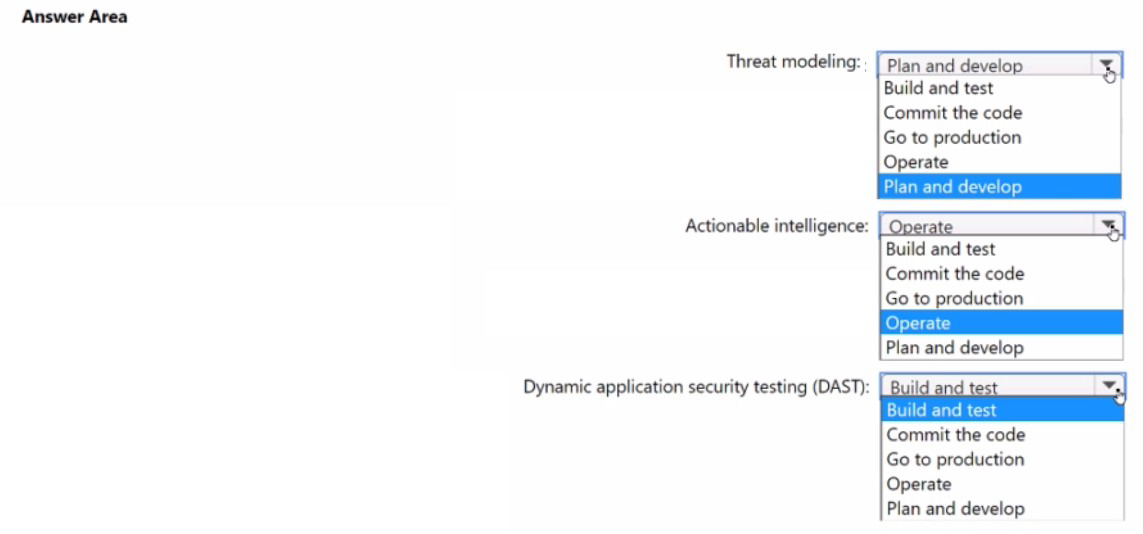
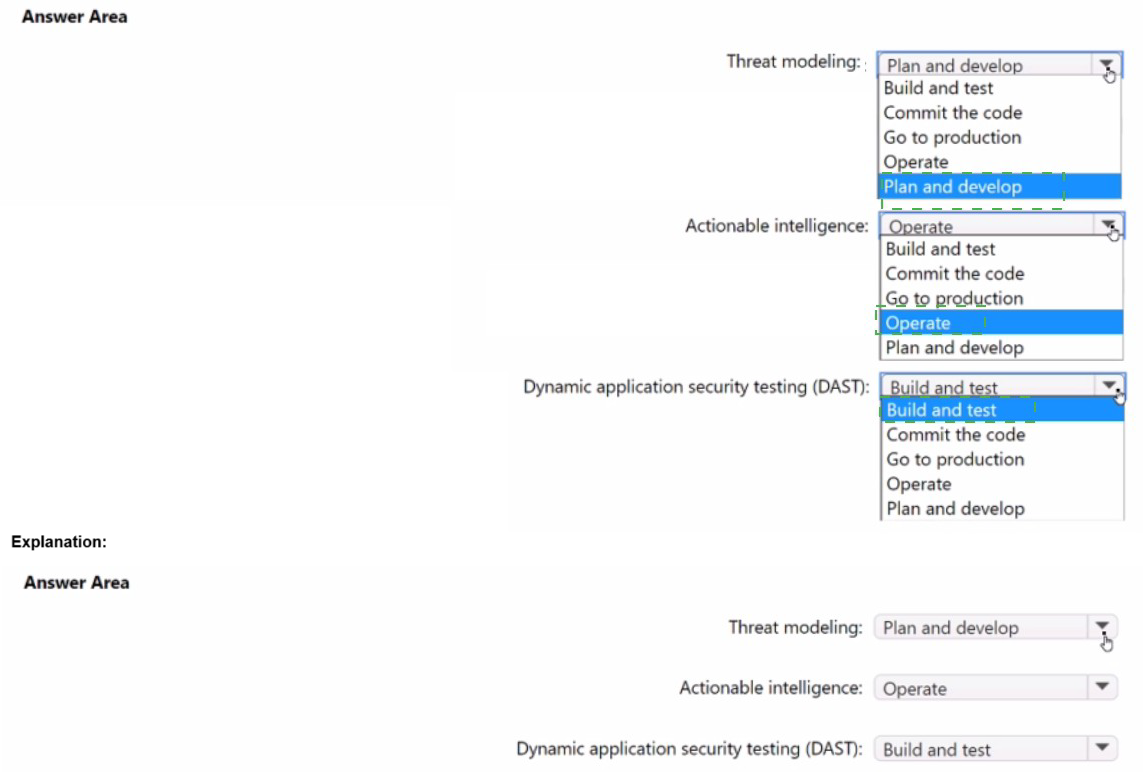
You need to recommend a security methodology for a DevOps development process based on the Microsoft Cloud Adoption Framework for Azure.
During which stage of a continuous integration and continuous deployment (CI/CD) DevOps process should each security-related task be performed? To answer, select the appropriate options in the answer area.
NOTE: Each correct selection is worth one point.
Show answerHide answer

Explanation


Explanation:
This question asks to align specific DevSecOps security tasks with the correct phase of a CI/CD pipeline. The goal is to integrate security "shifting left" (early in development) while also maintaining vigilance in operations.

Correct Options:

Threat modeling: Plan and develop
Threat modeling is a design-time activity. It involves analyzing the architecture and design of an application for potential security threats before any code is written. Therefore, it belongs in the Plan and Develop stage to identify and mitigate security flaws proactively at the earliest, most cost-effective phase.

Actionable intelligence: Operate
Actionable intelligence refers to using security insights from monitoring and incident response to inform improvements. This is an operational feedback activity. After an application is in production (Operate), data from attacks, vulnerabilities, and telemetry is analyzed to produce intelligence that feeds back into the planning phase for the next iteration.

Dynamic application security testing (DAST): Build and test
DAST is a testing methodology that analyzes a running application from the outside (like an attacker would) to find runtime vulnerabilities. Since it requires a functional, deployable application build to test, it is performed during the Build and Test stage of the CI/CD pipeline, typically in a staging environment before production deployment.

Incorrect Options for Context:

Commit the code: This is the stage where developers push code to the repository. Security tasks here are typically Static Application Security Testing (SAST) and code review, not DAST (which needs a built app) or threat modeling (which is earlier).

Go to production: This is the deployment/release stage. Security tasks here are final gates like security approval workflows or dependency scanning, not the primary execution phase for DAST or threat modeling.

Placing Threat modeling in any later phase defeats the "shift-left" purpose. Placing DAST in "Operate" is too late, as vulnerabilities should be caught before production. Placing Actionable intelligence in "Plan and develop" is incorrect, as the intelligence is generated from operational data.

Reference:
The Microsoft Cloud Adoption Framework for Azure's DevSecOps guidance emphasizes integrating security at every stage. It specifically recommends: Threat modeling during design/planning.

DAST as part of the automated testing in the CI/CD pipeline.

Using operational insights (Actionable intelligence) from security monitoring to continuously improve the development process.
Question 9 Choose 1
You are designing a security strategy for providing access to Azure App Service web apps through an Azure Front Door instance.
You need to recommend a solution to ensure that the web apps only allow access through the Front Door instance.
Solution: You recommend access restrictions to allow traffic from the backend IP address of the Front Door instance.
Does this meet the goal?
Show answerHide answer

Correct answer: B No

Explanation

Explanation:
The goal is to restrict access to the Azure App Service web apps only through Azure Front Door. The proposed solution uses access restrictions based on the backend IP address of Front Door. However, this method has a critical flaw because Front Door's backend IP address range is not static or exclusive; it is shared with other Azure services and can change.

Correct Answer: B. No

Correct Option Explanation:
The recommended solution does not fully meet the goal. While App Service Access Restrictions can limit traffic by source IP, Azure Front Door operates from a large, shared set of Azure infrastructure IP addresses that are not dedicated to your specific Front Door instance. These IPs are also used by other Azure services, meaning blocking all other IPs is not feasible, and using this range as an allowlist is not secure or exclusive. A truly effective solution requires a method to validate that incoming requests are specifically from your Front Door instance, not just from the Azure IP range.

The correct, more secure solution would involve:

Service Tags (More practical than IPs):
Configure App Service Access Restrictions to allow the AzureFrontDoor.Backend Service Tag. This tag represents the official IP range for Front Door backends and is managed by Microsoft, but it's still a shared range.

Front Door ID Header Validation (Most Secure):
The definitive method is to configure Front Door to send a unique, secret header (e.g., X-Azure-FDID) with a verified value to the origin (App Service). Then, configure the App Service to only accept requests that contain this specific header and value. This guarantees that traffic is explicitly from your Front Door instance, regardless of source IP.

Reference:
Microsoft documentation for securing an App Service behind Front Door explicitly states that IP-based filtering using Front Door's backend IPs is not recommended for production due to the shared, dynamic nature of the IP range. It recommends using the X-Azure-FDID header validation approach as the primary mechanism to "lock your App Service to Azure Front Door."
Question 10
You use Azure Pipelines with Azure Repos to implement continuous integration and continuous deployment (CI/CO) workflows.
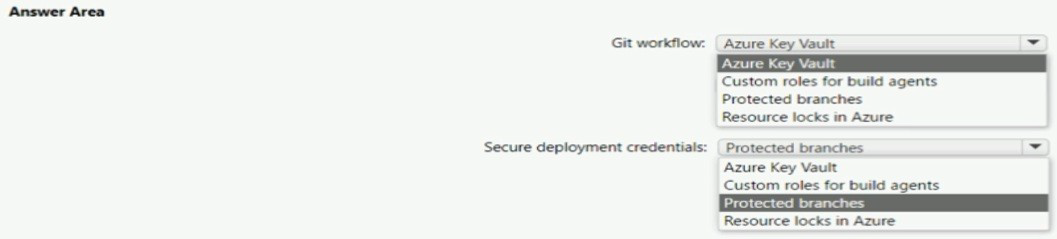
You need to recommend best practices to secure the stages of the CI/CD workflows based on the Microsoft Cloud Adoption Framework for Azure.
What should you include in the recommendation for each stage? To answer, select the appropriate options in the answer area.
NOTE: Each correct selection is worth one point.
Show answerHide answer

Explanation


Explanation:
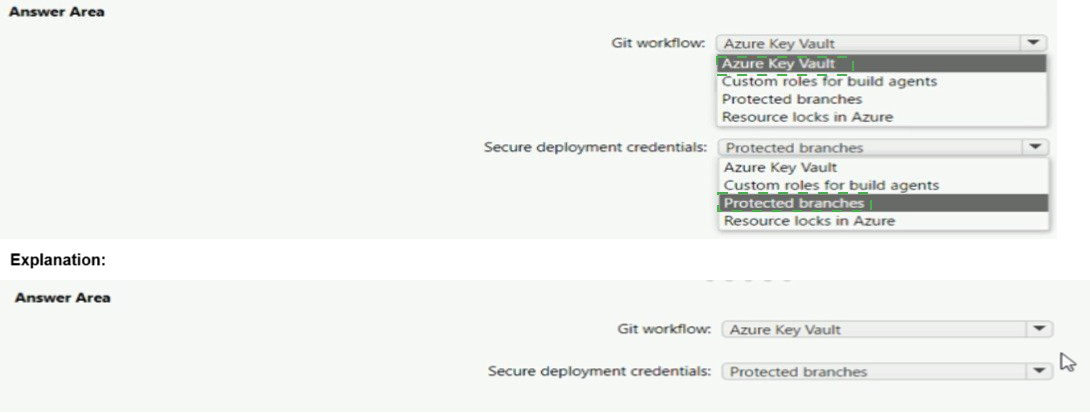
The question asks for best practices to secure two specific stages of a CI/CD workflow. The Git workflow stage concerns securing the source code and its change process, while Secure deployment credentials concerns managing the secrets used by the pipeline to deploy resources.

Correct Options:

Git workflow: Protected branches
Securing the Git workflow fundamentally involves controlling how code changes are merged into critical branches (like main). Protected branch policies in Azure Repos are the primary tool for this. They enforce security and quality gates by requiring pull requests, a minimum number of reviewers, and successful build validation before any merge can occur. This prevents direct, unreviewed pushes and ensures all changes are vetted.

Secure deployment credentials: Azure Key Vault
The best practice for managing secrets (like passwords, certificates, API keys) used by pipelines for deployment is to never store them in plaintext in code, variables, or build agents. Azure Key Vault is the dedicated Azure service for securely storing and managing secrets. Pipelines can securely retrieve secrets from Key Vault at runtime using managed identities or service principals, ensuring credentials are not exposed in logs or source code.

Incorrect Options:

Azure Key Vault for Git workflow:
Key Vault secures secrets, not the code change process itself. It does not enforce how code is reviewed or merged.

Custom roles for build agents:
This is a security practice for least-privilege access control for the pipeline's identity (service principal or managed identity) that deploys resources to Azure. While important for securing the deployment stage, it is not the direct tool for securing deployment credentials themselves; Key Vault is.

Resource locks in Azure:
This is a post-deployment governance control used in Azure to prevent accidental deletion or modification of critical resources (e.g., setting a CanNotDelete lock). It is not a CI/CD workflow security practice for the Git or credential management stages.

Reference:
The Microsoft Cloud Adoption Framework for Azure's DevSecOps guidance clearly recommends:

Using branch policies and protected branches to secure the development workflow and enforce code quality.

Integrating Azure Key Vault with Azure Pipelines to manage deployment secrets, as outlined in the "Secure your pipeline" and "Secret management" best practices.
Full mock exam

Sit the SC-100 exam before exam day

Full-length mocks with the same number of questions and the same time limit as the real SC-100 exam. Every attempt draws a new set of questions from the full bank, so you can keep going until you pass comfortably.

Get full SC-100 mock exam
  • 65questions per mock
  • 105 mintime limit
  • 171questions in the bank
  • Newmock on every attempt