You need to recommend an identity security solution for the Azure AD tenant of Litware.
The solution must meet the identity requirements and the regulatory compliance
requirements.
What should you recommend? To answer, select the appropriate options in the answer area.
NOTE: Each correct selection is worth one point.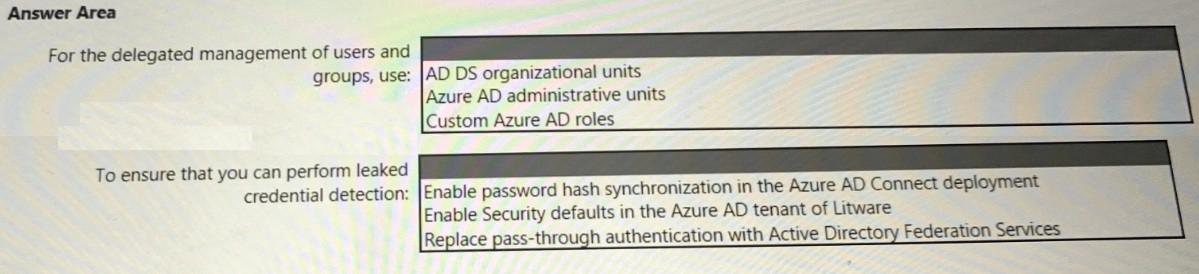
What should you recommend? To answer, select the appropriate options in the answer area.
NOTE: Each correct selection is worth one point.
Show answerHide answer
Explanation
Explanation:
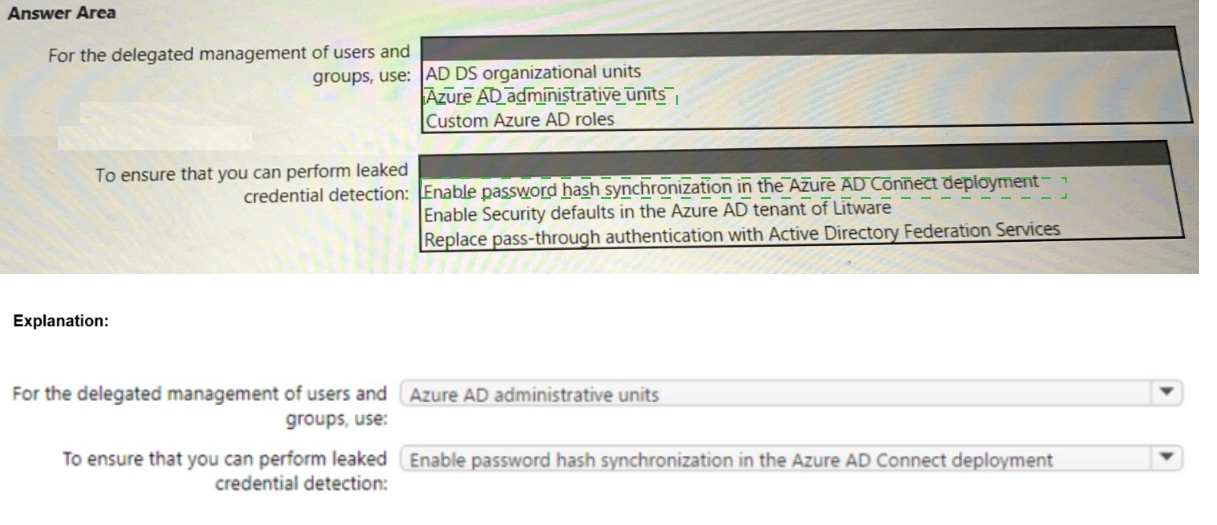
1. For the delegated management of users and groups, use: Azure AD administrative units
Reasoning:
This requirement is about delegating administrative permissions for a subset of users, which is a common need for large organizations or those with regulatory requirements for data locality/segregation.
Azure AD Administrative Units (AUs) are containers that allow you to segment your Azure AD users and groups. You can then assign a role (like User Administrator or Helpdesk Administrator) that is scoped only to a specific Administrative Unit. This allows, for example, a regional IT admin to manage users only in their region, without having global permissions.
The other options are incorrect:
AD DS organizational units:
This is for on-premises Active Directory and does not apply to delegating management within an Azure AD tenant.
Custom Azure AD roles:
While you can create custom roles, they are for defining custom permissions, not for scoping administration to a specific group of users. You would use a custom role in combination with an Administrative Unit to achieve granular delegation.
2. To ensure that you can perform leaked credential detection:
Enable password hash synchronization in the Azure AD Connect deployment
Reasoning:
Leaked credential detection is a critical feature of Azure AD Identity Protection. This service works by comparing user sign-in credentials (hashes of passwords) against a continuously updated database of known leaked credentials.
For this comparison to happen, Azure AD needs access to the password hash. Password Hash Synchronization in Azure AD Connect synchronizes a hash of the user's on-premises AD password hash to Azure AD. This is a prerequisite for leaked credential detection to function.
The other options are incorrect:
Enable Security defaults:
This enables basic security settings like requiring MFA for admins and blocking legacy authentication. It does not, by itself, enable the advanced machine learning-based leaked credential detection service.
Replace pass-through authentication with Active Directory Federation Services (AD FS): With AD FS, passwords remain on-premises and are not hashed in Azure AD. Therefore, Azure AD Identity Protection cannot perform leaked credential detection in this configuration. Enabling Password Hash Sync is actually recommended even with AD FS precisely to enable these features.
Reference:
Microsoft Learn - Administrative units in Azure Active Directory:
Microsoft Learn - What is password hash synchronization?: This document explains that PHS is required for leaked credential detection.